Scratch-gui: Blocks getting deleted when not over the flyout
Expected Behavior
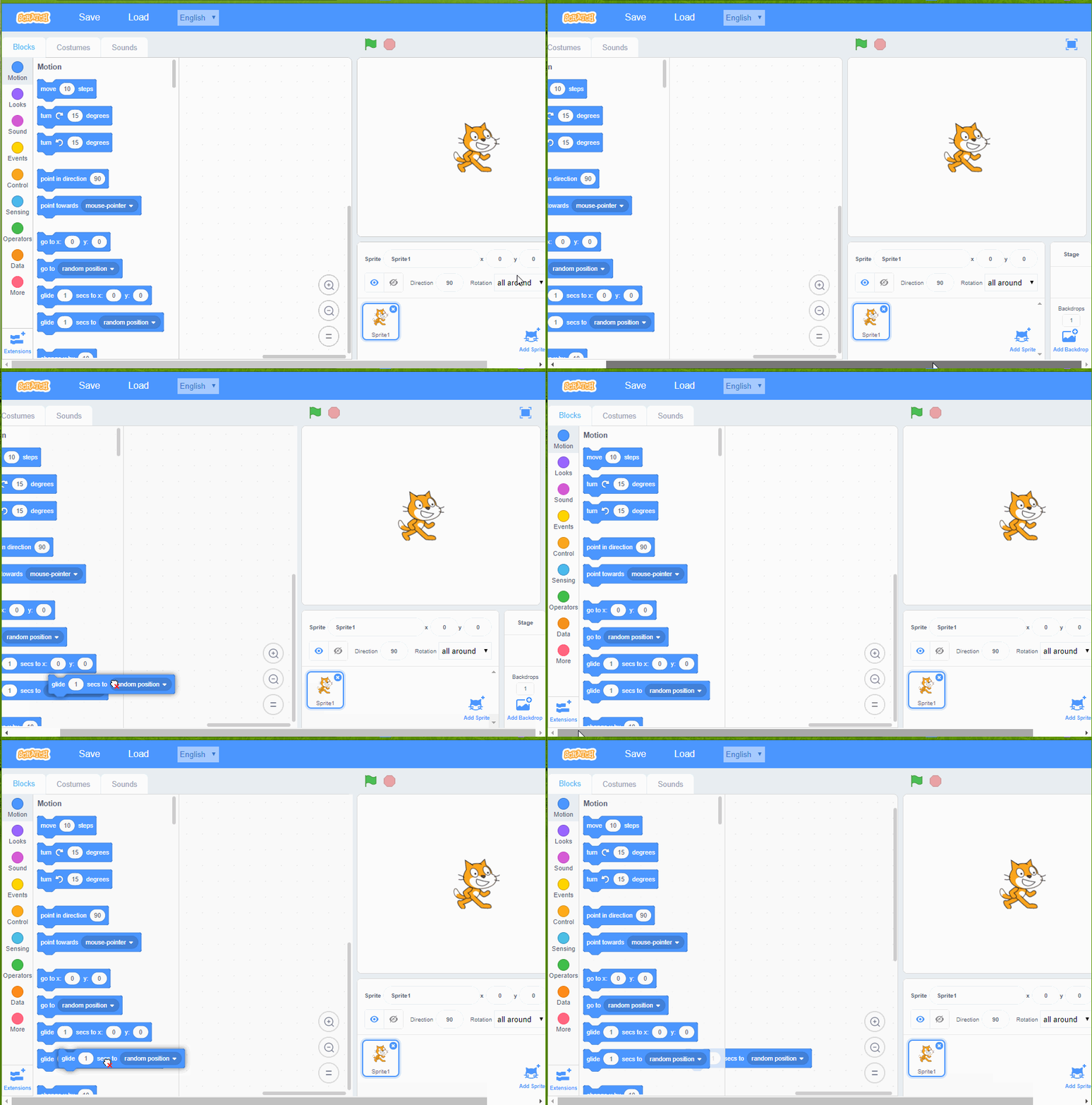
The stack should move, not get deleted
Actual Behavior
Notice I'm scrolled over to the right in Chrome.
I move the stack of blocks and it gets deleted.
Steps to Reproduce

Operating System and Browser
Windows 10 Chrome
 fsih
fsih
All 8 comments
@fsih can you repro this consistently?
 paulkaplan
on 18 Dec 2017
paulkaplan
on 18 Dec 2017
@paulkaplan Yes. I needed a couple more steps.
- Have the browser window be narrow enough that you have a horizontal scroll
- When the scroll is all the way to the left, drag a block to the workspace
- Scroll all the way to the right.
- Drag the block. The delete cursor shows up when you're over the left side of the workspace.
I found a related case:
- On a fresh workspace (without dragging any blocks anywhere), scroll right
- Drag any block anywhere
- Scroll back to the left. Now the threshold for where blocks get deleted is too far to the left.
fsih
on 18 Dec 2017
@paulkaplan Adding to "Bugapalooza"
 thisandagain
on 18 Dec 2017
thisandagain
on 18 Dec 2017
@thisandagain say what now??
 Kenny2github
on 19 Dec 2017
Kenny2github
on 19 Dec 2017
Note: this only happens when the GUI is being used in a window that is below our minimum resolution and is then scrolled or resized.
thisandagain
on 20 Dec 2017
Looks like a Scratch-Blocks problem with calculation of delete areas (not taking into account window offsets).
 rachel-fenichel
on 28 Dec 2017
rachel-fenichel
on 28 Dec 2017
Which probably means that somewhere there's a missing call to Blockly.WorkspaceSvg.prototype.updateScreenCalculationsIfScrolled()
Blockly caches the delete areas instead of calculating them every time it checks for a deletion. The delete area for the toolbox and flyout is calculated with getClientRect. That calls getBoundingClientRect on an SVG group, which does take into account the scroll position, so you just need to make sure it's called again when scrolls happen.
rachel-fenichel
on 28 Dec 2017
I see an expected call at the beginning of a gesture here: https://github.com/LLK/scratch-blocks/blob/develop/core/gesture.js#L427
That should mean that when a block drag is started, we check to see if the page has scrolled since the last time. If so, it should re-calculate. I don't have a clean enough debug branch to check whether we're getting inside this if statement to verify though
 picklesrus
on 28 Dec 2017
picklesrus
on 28 Dec 2017
Related issues
 kyleplo
·
3Comments
kyleplo
·
3Comments
 ntlrsk
·
3Comments
thisandagain
·
4Comments
ntlrsk
·
3Comments
thisandagain
·
4Comments
 rschamp
·
4Comments
rschamp
·
4Comments
 chrisgarrity
·
4Comments
chrisgarrity
·
4Comments
Most helpful comment
@paulkaplan Adding to "Bugapalooza"