Prusaslicer: [Feature Request] : Allow free Z placement of object
It would be a useful feature to allow an STL to be imported, and for there to be an option to allow free movement of the object also in the Z direction.
This would allow objects to be stacked. A typical usage case would be printing an electronics enclosure box, say with a base thickness of 5mm.
Secondary STL's (for instance mounts for bus-bars, Wago connectors etc) could then be imported into the same project, raised up to a Z-height of 5mm, and placed within the enclosure box, such that a one piece print is achieved.
Currently, the secondary STL's are locked to the bed-level height, and therefore 5mm of the STL is "lost" within the thickness of the first "main" STL.
 benkayuk
All 8 comments
You can stack objects if you load the other objects as volumes (parts) of
the first object.
On Tue, Mar 19, 2019 at 11:38 AM benkayuk notifications@github.com wrote:
It would be a useful feature to allow an STL to be imported, and for there
to be an option to allow free movement of the object also in the Z
direction.This would allow objects to be stacked. A typical usage case would be
printing an electronics enclosure box, say with a base thickness of 5mm.Secondary STL's (for instance mounts for bus-bars, Wago connectors etc)
could then be imported into the same project, raised up to a Z-height of
5mm, and placed within the enclosure box, such that a one piece print is
achieved.Currently, the secondary STL's are locked to the bed-level height, and
therefore 5mm of the STL is "lost" within the thickness of the first "main"
STL.—
You are receiving this because you are subscribed to this thread.
Reply to this email directly, view it on GitHub
https://github.com/prusa3d/Slic3r/issues/1987, or mute the thread
https://github.com/notifications/unsubscribe-auth/AFj5I4n3waw4c8PxCFfkgalTJGv4ASCaks5vYL4zgaJpZM4b7zBZ
.
 bubnikv
on 19 Mar 2019
bubnikv
on 19 Mar 2019
Thank you, I was not aware of this as a method...it works, as long as advanced or expert modes are selected.
benkayuk
on 19 Mar 2019
you can, either by entering the numbers in the transformation matrix table,
or by selecting the volume in the side panel, and then dragging the volume
in the scene.
On Tue, Mar 19, 2019 at 4:20 PM benkayuk notifications@github.com wrote:
This method, unless I am doing something wrong, still does not allow the
added "part" to be moved in relation to the main object?If I import main object, then right click - add part...I cannot then edit
the second parts location relative to the main object—
You are receiving this because you commented.
Reply to this email directly, view it on GitHub
https://github.com/prusa3d/Slic3r/issues/1987#issuecomment-474419933,
or mute the thread
https://github.com/notifications/unsubscribe-auth/AFj5I-lqYp1oRJ1eJ7Eh5n--3HmjJn7gks5vYQBTgaJpZM4b7zBZ
.
bubnikv
on 19 Mar 2019
Does it fulfill your needs?
bubnikv
on 24 Mar 2019
Yes, it works. It would be great if there was a way to "snap" objects together. For instance, I'm putting the flat base of a part, onto the upper flat surface of another part. At the moment I have to drag very carefully or manually input the z height....then slice to make sure it's not too low or too high by viewing the g-code layer by layer.
In a similar way to how you can snap an object surface to the bed-level, it would be a very cool feature to allow this between volumes of an object.
benkayuk
on 25 Mar 2019
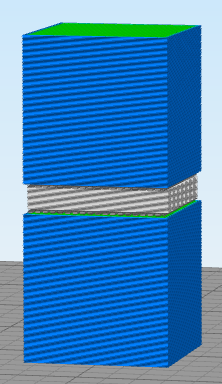
I have a different use case, but the ability to stack objects would be useful. In order to increase productivity, I need to stack layers of parts to be constructed. That is, a layer of parts, then a small layer of support material, and then another layer of parts, and so on. However, without the ability to move a part off the bed, this is not possible.
This is possible in Simplify3d (Image attached).
 mgg4
on 27 Mar 2019
mgg4
on 27 Mar 2019
@mgg4 Would you ever use such a feature to "increase your productivity"? I personally would never do that, I would rather restart the printer.
@benkayuk snapping objects together is a completely different animal from the original request.
bubnikv
on 1 Aug 2019
Duplicate of #1513. Closing this one.
bubnikv
on 1 Aug 2019
Related issues
 pricedev
·
4Comments
pricedev
·
4Comments
 alexiri
·
4Comments
alexiri
·
4Comments
 devilhunter84
·
4Comments
devilhunter84
·
4Comments
 Bubolz
·
3Comments
Bubolz
·
3Comments
 kakou-fr
·
4Comments
kakou-fr
·
4Comments
Most helpful comment
Yes, it works. It would be great if there was a way to "snap" objects together. For instance, I'm putting the flat base of a part, onto the upper flat surface of another part. At the moment I have to drag very carefully or manually input the z height....then slice to make sure it's not too low or too high by viewing the g-code layer by layer.
In a similar way to how you can snap an object surface to the bed-level, it would be a very cool feature to allow this between volumes of an object.