Prusaslicer: mmu2s filament color forgotten by prusaslicer
Version
2.0.0+win64
Operating system type + version
windows 10
3D printer brand / version + firmware version (if known)
not relevant
Behavior
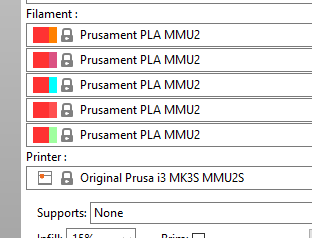
Prusaslicer forgets filament colors set in previous run
- set printer to mmu2s.
- left click on each filament to set a color.
- quit app
- restart
default color for all filaments.
Expected to remember filaments so I don't have set it up again every run.
Not a new feature request.
 i-make-robots
All 3 comments
i-make-robots
on 18 Jul 2019
Same problem on MacOS, it's very annoying!
 Patronics
on 23 Jul 2019
Patronics
on 23 Jul 2019
I know its not quite what you want but if you select the filaments you normally have set up then save the printer profile as a new profile then when you load that profile in the filament settings come in with it.
As Prusa Slicer remembers the last profile selected on a restart it means that the setting do sort of get loaded again automatically.
I think because the filaments are stored in the printer profile when you load the prusa machine default in it loads those too and as the prusa defaults are not editable through normal channels it doesnt 'remember' them so you have to use a custom profile to save your choices.
 neophyl
on 23 Jul 2019
neophyl
on 23 Jul 2019
Related issues
 jon-cpu
·
3Comments
jon-cpu
·
3Comments
 frakman1
·
4Comments
frakman1
·
4Comments
 Bubolz
·
3Comments
Bubolz
·
3Comments
 RossKor
·
3Comments
RossKor
·
3Comments
 alexiri
·
4Comments
alexiri
·
4Comments
Most helpful comment
I know its not quite what you want but if you select the filaments you normally have set up then save the printer profile as a new profile then when you load that profile in the filament settings come in with it.
As Prusa Slicer remembers the last profile selected on a restart it means that the setting do sort of get loaded again automatically.
I think because the filaments are stored in the printer profile when you load the prusa machine default in it loads those too and as the prusa defaults are not editable through normal channels it doesnt 'remember' them so you have to use a custom profile to save your choices.