Prusaslicer: Overlapping internal perimeters generated & "Detect thin walls" description misleading
Version
2.2.0
Operating system type + version
Windows 10
3D printer brand / version + firmware version (if known)
Prusa MK3S
Behavior
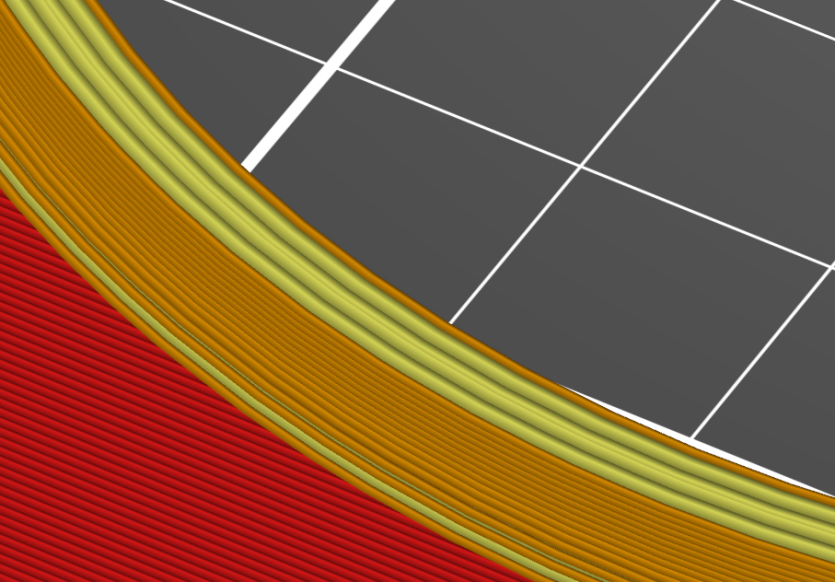
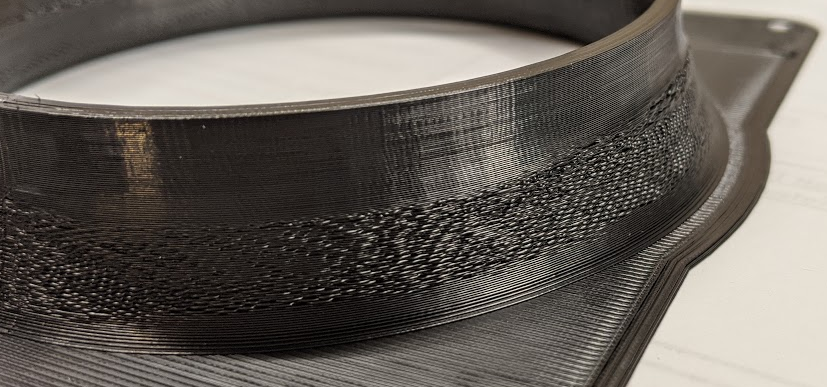
- When printing cylindrical objects with varying thicknesses, internal perimeters are generated in a way that they create massive overlap. This effectively results in extreme over-extrusion, leading to big printing artifacts.
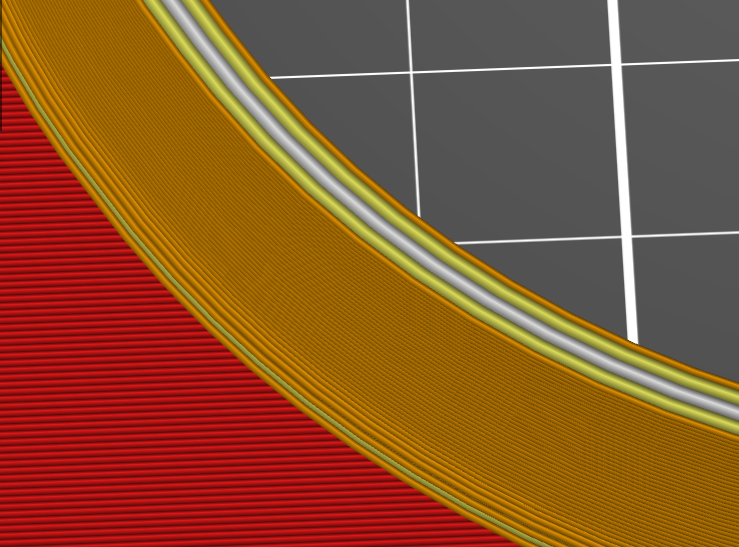
- "Detect thin walls" affects this behavior. With it turned OFF, the above problem state is the result. When turned ON, the object is properly sliced and gap fill is used instead.
"Detect thin walls" turned off. Note there are FOUR internal perimeters here (yellow color):
Correct use of gap fill with "Detect thin walls" turned on:
The practical result of massively overlapped internal perimeters pushes external perimeter extrusions outward:
Suggested action
- Either fix this in slicer code or amend the tooltip text for "Detect thin walls" to indicate it can effect internal perimeter overlap. Currently the descriptive text excludes this possibility:

_Is this a new feature request?_ No
Project File (.3MF) where problem occurs
 rackley096794
All 3 comments
What's the issue? Just leave thin walls on at all times.
 Photogad
on 17 Apr 2020
Photogad
on 17 Apr 2020
@Photogad Think bigger picture. This issue was not filed for my benefit. I know to turn it on for this object now. This was filed to save others time, frustration and filament. This setting controls something it does not indicate it controls. From a user perspective the only way to logically get from the above broken state to a fixed state is to have "magic insider knowledge voodoo" or just start randomly checking and unchecking boxes. This is not a user-friendly situation to say the least.
rackley096794
on 17 Apr 2020
If the overlap is smaller Detect thin walls does not solve the issue and some over extrusion happens anyway. In my opinion, the slicer should have an option to disallow overlapping perimeters completely, to avoid over extrusion and make it easier to tune perimeter widths. Slic3r++ has this behavior by default and Overlapping perimeters must be enabled to get the PrusaSlicer behavior.
 mathiasvr
on 6 May 2020
mathiasvr
on 6 May 2020
Related issues
 Foxtrek64
·
4Comments
Foxtrek64
·
4Comments
 yschroeder
·
3Comments
yschroeder
·
3Comments
 RossKor
·
3Comments
RossKor
·
3Comments
 Tirpitz93
·
3Comments
Tirpitz93
·
3Comments
 jon-cpu
·
3Comments
jon-cpu
·
3Comments
Most helpful comment
@Photogad Think bigger picture. This issue was not filed for my benefit. I know to turn it on for this object now. This was filed to save others time, frustration and filament. This setting controls something it does not indicate it controls. From a user perspective the only way to logically get from the above broken state to a fixed state is to have "magic insider knowledge voodoo" or just start randomly checking and unchecking boxes. This is not a user-friendly situation to say the least.