Prusaslicer: Custom Filament Configuration
Version
1.42.0-beta2+win64
Operating system type + version
N/A
3D printer brand / version + firmware version (if known)
Stock Prusa i3 MK3
_Is this a new feature request?_
Maybe? Depends on if I'm just blind or not.
It's entirely possible I'm missing it, but there doesn't seem to be a place to add custom filament types. I purchased a PETG spool from Microcenter (Inland) but the "Prusament PETG" filament type seems to be the only one available. If this were instead "Generic PETG", I'd have no issue modifying the defaults, but I'd like to avoid modifying the configurations for what I assume is a specific brand of PETG in case I ever need to print with it.
That said, I would feel a lot better if i were able to add a Microcenter PETG, etc., option where I can provide the correct values for their filament without worrying about modifying default values.
Do custom filament types need to be added through an issue/PR or can I do that from the UI? I went through the Slic3r user guide, and though it went through modifying built-in configurations, there was nothing I could find on adding your own.
 Foxtrek64
All 4 comments
Do custom filament types need to be added through an issue/PR or can I do that from the UI?
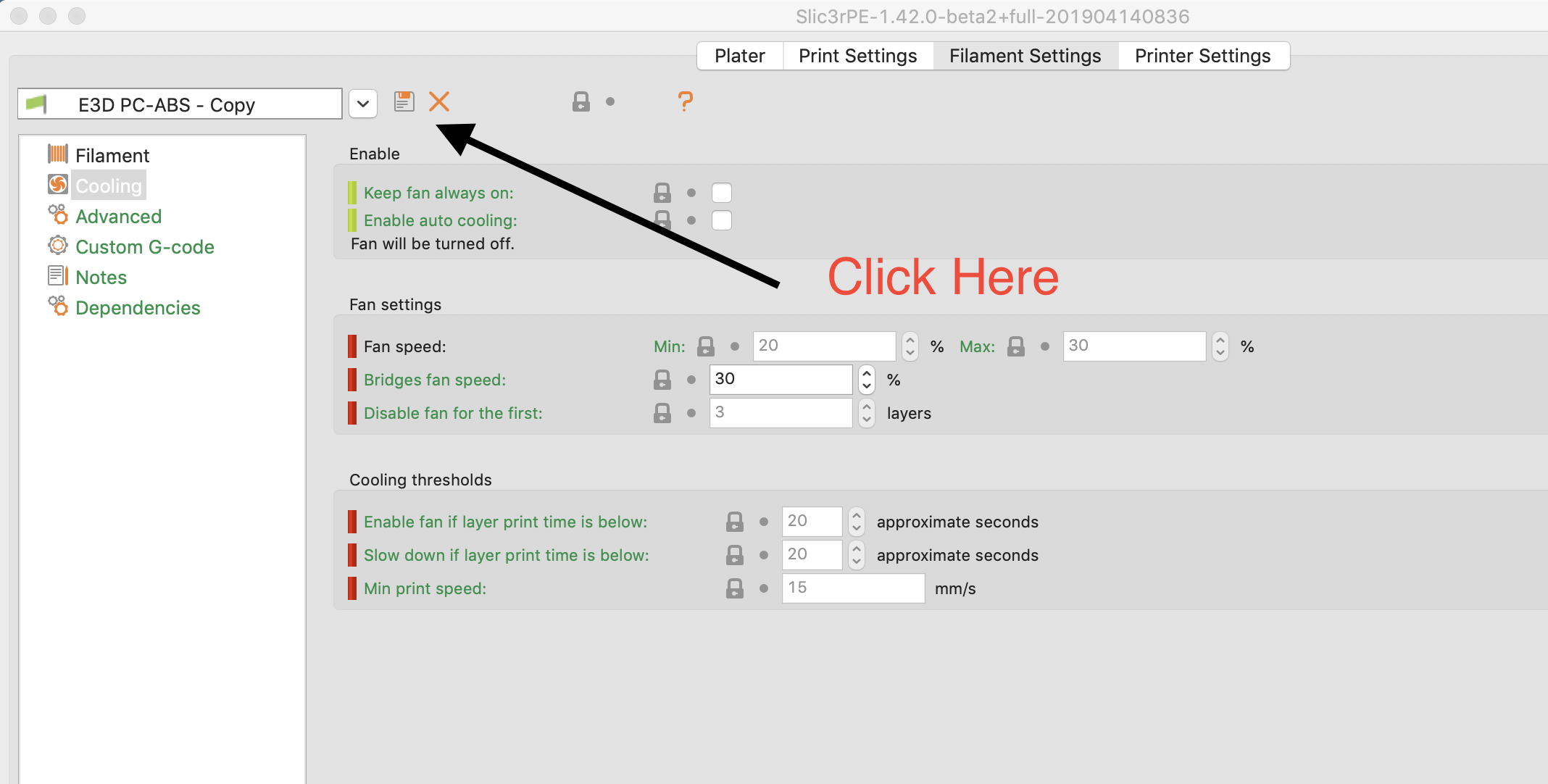
You can add your own. The process is as follows:
1) Select an existing item (can be filament, print settings, etc.)
2) Click on the icon just to the right of the name, (looks sort of like a 3.5" floppy disk icon). A dialog box will show up with the existing profile name with "-copy" appended. Type a new name in the box.
3) Click OK
4) Now edit the profile as much or as little as you need.
5) When complete, click the same icon as in step 2, and select "OK" once again in that dialog box.
See the attached screen shot.
 JohnOCFII
on 15 Apr 2019
JohnOCFII
on 15 Apr 2019
Thank you for the help! Probably should've tried that to begin with, but oh well.
Foxtrek64
on 15 Apr 2019
I also came here because I was looking for that option. I expected the save button to overwrite the current filament's settings, and thus didn't dare to use it. Maybe an "add filament" or "copy filament" button would be more intuitive?
 shred
on 19 Nov 2019
shred
on 19 Nov 2019
Yeah, this is super unintuitive. I also found in the dropdown selector for filaments an "add/remove filaments" option, which brings up the new printer wizard for some reason.
 BenBergman
on 30 Jul 2020
BenBergman
on 30 Jul 2020
Related issues
 chron0
·
31Comments
chron0
·
31Comments
 RosieTheRabbit
·
60Comments
RosieTheRabbit
·
60Comments
 nicksears
·
38Comments
nicksears
·
38Comments
 Itox001
·
35Comments
Itox001
·
35Comments
 Salamandar
·
33Comments
Salamandar
·
33Comments
Most helpful comment
I also came here because I was looking for that option. I expected the save button to overwrite the current filament's settings, and thus didn't dare to use it. Maybe an "add filament" or "copy filament" button would be more intuitive?