Prusaslicer: Strange offsets/artifacts in perimeters
Version
2.2.0
Operating system type + version
Gentoo
Resident memory: 567MB
Shared memory: 88MB
Private memory: 479MB
Peak memory usage: 642MB
RAM size reserved for the Undo / Redo stack: 1,074MB
RAM size occupied by the Undo / Redo stack: 16MB
OpenGL installation
GL version: 3.0 Mesa 20.0.8
Vendor: Intel Open Source Technology Center
Renderer: Mesa DRI Intel(R) HD Graphics 620 (KBL GT2)
GLSL version: 1.30
Installed extensions:
GL_3DFX_texture_compression_FXT1
GL_AMD_conservative_depth
GL_AMD_depth_clamp_separate
GL_AMD_draw_buffers_blend
GL_AMD_multi_draw_indirect
GL_AMD_query_buffer_object
GL_AMD_seamless_cubemap_per_texture
GL_AMD_shader_stencil_export
GL_AMD_shader_trinary_minmax
GL_AMD_texture_texture4
GL_ANGLE_texture_compression_dxt3
GL_ANGLE_texture_compression_dxt5
GL_APPLE_object_purgeable
GL_APPLE_packed_pixels
GL_ARB_ES2_compatibility
GL_ARB_ES3_1_compatibility
GL_ARB_ES3_compatibility
GL_ARB_arrays_of_arrays
GL_ARB_blend_func_extended
GL_ARB_buffer_storage
GL_ARB_clear_buffer_object
GL_ARB_clear_texture
GL_ARB_clip_control
GL_ARB_color_buffer_float
GL_ARB_compressed_texture_pixel_storage
GL_ARB_compute_shader
GL_ARB_conditional_render_inverted
GL_ARB_conservative_depth
GL_ARB_copy_buffer
GL_ARB_copy_image
GL_ARB_cull_distance
GL_ARB_debug_output
GL_ARB_depth_buffer_float
GL_ARB_depth_clamp
GL_ARB_depth_texture
GL_ARB_derivative_control
GL_ARB_draw_buffers
GL_ARB_draw_buffers_blend
GL_ARB_draw_elements_base_vertex
GL_ARB_draw_indirect
GL_ARB_draw_instanced
GL_ARB_explicit_attrib_location
GL_ARB_explicit_uniform_location
GL_ARB_fragment_coord_conventions
GL_ARB_fragment_layer_viewport
GL_ARB_fragment_program
GL_ARB_fragment_program_shadow
GL_ARB_fragment_shader
GL_ARB_fragment_shader_interlock
GL_ARB_framebuffer_no_attachments
GL_ARB_framebuffer_object
GL_ARB_framebuffer_sRGB
GL_ARB_get_program_binary
GL_ARB_get_texture_sub_image
GL_ARB_gl_spirv
GL_ARB_half_float_pixel
GL_ARB_half_float_vertex
GL_ARB_indirect_parameters
GL_ARB_instanced_arrays
GL_ARB_internalformat_query
GL_ARB_internalformat_query2
GL_ARB_invalidate_subdata
GL_ARB_map_buffer_alignment
GL_ARB_map_buffer_range
GL_ARB_multi_bind
GL_ARB_multi_draw_indirect
GL_ARB_multisample
GL_ARB_multitexture
GL_ARB_occlusion_query
GL_ARB_occlusion_query2
GL_ARB_parallel_shader_compile
GL_ARB_pipeline_statistics_query
GL_ARB_pixel_buffer_object
GL_ARB_point_parameters
GL_ARB_point_sprite
GL_ARB_polygon_offset_clamp
GL_ARB_post_depth_coverage
GL_ARB_program_interface_query
GL_ARB_provoking_vertex
GL_ARB_query_buffer_object
GL_ARB_robust_buffer_access_behavior
GL_ARB_robustness
GL_ARB_sample_shading
GL_ARB_sampler_objects
GL_ARB_seamless_cube_map
GL_ARB_seamless_cubemap_per_texture
GL_ARB_separate_shader_objects
GL_ARB_shader_atomic_counter_ops
GL_ARB_shader_atomic_counters
GL_ARB_shader_ballot
GL_ARB_shader_bit_encoding
GL_ARB_shader_clock
GL_ARB_shader_draw_parameters
GL_ARB_shader_group_vote
GL_ARB_shader_image_load_store
GL_ARB_shader_image_size
GL_ARB_shader_objects
GL_ARB_shader_precision
GL_ARB_shader_stencil_export
GL_ARB_shader_storage_buffer_object
GL_ARB_shader_texture_image_samples
GL_ARB_shader_texture_lod
GL_ARB_shading_language_100
GL_ARB_shading_language_420pack
GL_ARB_shading_language_include
GL_ARB_shading_language_packing
GL_ARB_shadow
GL_ARB_spirv_extensions
GL_ARB_stencil_texturing
GL_ARB_sync
GL_ARB_texture_barrier
GL_ARB_texture_border_clamp
GL_ARB_texture_compression
GL_ARB_texture_compression_bptc
GL_ARB_texture_compression_rgtc
GL_ARB_texture_cube_map
GL_ARB_texture_cube_map_array
GL_ARB_texture_env_add
GL_ARB_texture_env_combine
GL_ARB_texture_env_crossbar
GL_ARB_texture_env_dot3
GL_ARB_texture_filter_anisotropic
GL_ARB_texture_float
GL_ARB_texture_gather
GL_ARB_texture_mirror_clamp_to_edge
GL_ARB_texture_mirrored_repeat
GL_ARB_texture_multisample
GL_ARB_texture_non_power_of_two
GL_ARB_texture_query_levels
GL_ARB_texture_query_lod
GL_ARB_texture_rectangle
GL_ARB_texture_rg
GL_ARB_texture_rgb10_a2ui
GL_ARB_texture_stencil8
GL_ARB_texture_storage
GL_ARB_texture_storage_multisample
GL_ARB_texture_swizzle
GL_ARB_texture_view
GL_ARB_timer_query
GL_ARB_transform_feedback2
GL_ARB_transform_feedback3
GL_ARB_transform_feedback_instanced
GL_ARB_transform_feedback_overflow_query
GL_ARB_transpose_matrix
GL_ARB_uniform_buffer_object
GL_ARB_vertex_array_bgra
GL_ARB_vertex_array_object
GL_ARB_vertex_attrib_binding
GL_ARB_vertex_buffer_object
GL_ARB_vertex_program
GL_ARB_vertex_shader
GL_ARB_vertex_type_10f_11f_11f_rev
GL_ARB_vertex_type_2_10_10_10_rev
GL_ARB_window_pos
GL_ATI_blend_equation_separate
GL_ATI_draw_buffers
GL_ATI_separate_stencil
GL_ATI_texture_env_combine3
GL_ATI_texture_float
GL_EXT_EGL_image_storage
GL_EXT_EGL_sync
GL_EXT_abgr
GL_EXT_bgra
GL_EXT_blend_color
GL_EXT_blend_equation_separate
GL_EXT_blend_func_separate
GL_EXT_blend_minmax
GL_EXT_blend_subtract
GL_EXT_compiled_vertex_array
GL_EXT_copy_texture
GL_EXT_demote_to_helper_invocation
GL_EXT_direct_state_access
GL_EXT_draw_buffers2
GL_EXT_draw_instanced
GL_EXT_draw_range_elements
GL_EXT_fog_coord
GL_EXT_framebuffer_blit
GL_EXT_framebuffer_multisample
GL_EXT_framebuffer_multisample_blit_scaled
GL_EXT_framebuffer_object
GL_EXT_framebuffer_sRGB
GL_EXT_gpu_program_parameters
GL_EXT_gpu_shader4
GL_EXT_multi_draw_arrays
GL_EXT_packed_depth_stencil
GL_EXT_packed_float
GL_EXT_packed_pixels
GL_EXT_pixel_buffer_object
GL_EXT_point_parameters
GL_EXT_polygon_offset_clamp
GL_EXT_provoking_vertex
GL_EXT_rescale_normal
GL_EXT_secondary_color
GL_EXT_separate_specular_color
GL_EXT_shader_framebuffer_fetch
GL_EXT_shader_framebuffer_fetch_non_coherent
GL_EXT_shader_integer_mix
GL_EXT_shader_samples_identical
GL_EXT_shadow_funcs
GL_EXT_stencil_two_side
GL_EXT_stencil_wrap
GL_EXT_subtexture
GL_EXT_texture
GL_EXT_texture3D
GL_EXT_texture_array
GL_EXT_texture_compression_dxt1
GL_EXT_texture_compression_rgtc
GL_EXT_texture_compression_s3tc
GL_EXT_texture_cube_map
GL_EXT_texture_edge_clamp
GL_EXT_texture_env_add
GL_EXT_texture_env_combine
GL_EXT_texture_env_dot3
GL_EXT_texture_filter_anisotropic
GL_EXT_texture_integer
GL_EXT_texture_lod_bias
GL_EXT_texture_object
GL_EXT_texture_rectangle
GL_EXT_texture_sRGB
GL_EXT_texture_sRGB_R8
GL_EXT_texture_sRGB_decode
GL_EXT_texture_shadow_lod
GL_EXT_texture_shared_exponent
GL_EXT_texture_snorm
GL_EXT_texture_swizzle
GL_EXT_timer_query
GL_EXT_transform_feedback
GL_EXT_vertex_array
GL_EXT_vertex_array_bgra
GL_IBM_multimode_draw_arrays
GL_IBM_rasterpos_clip
GL_IBM_texture_mirrored_repeat
GL_INGR_blend_func_separate
GL_INTEL_performance_query
GL_INTEL_shader_atomic_float_minmax
GL_INTEL_shader_integer_functions2
GL_KHR_blend_equation_advanced
GL_KHR_blend_equation_advanced_coherent
GL_KHR_context_flush_control
GL_KHR_debug
GL_KHR_no_error
GL_KHR_parallel_shader_compile
GL_KHR_robust_buffer_access_behavior
GL_KHR_robustness
GL_KHR_texture_compression_astc_ldr
GL_KHR_texture_compression_astc_sliced_3d
GL_MESA_pack_invert
GL_MESA_shader_integer_functions
GL_MESA_texture_signed_rgba
GL_MESA_window_pos
GL_NV_blend_square
GL_NV_compute_shader_derivatives
GL_NV_conditional_render
GL_NV_depth_clamp
GL_NV_fog_distance
GL_NV_fragment_shader_interlock
GL_NV_light_max_exponent
GL_NV_packed_depth_stencil
GL_NV_primitive_restart
GL_NV_texgen_reflection
GL_NV_texture_barrier
GL_NV_texture_env_combine4
GL_NV_texture_rectangle
GL_OES_EGL_image
GL_OES_read_format
GL_S3_s3tc
GL_SGIS_generate_mipmap
GL_SGIS_texture_border_clamp
GL_SGIS_texture_edge_clamp
GL_SGIS_texture_lod
GL_SUN_multi_draw_arrays
3D printer brand / version + firmware version (if known)
Felix/Marlin
Behavior

The slicer produces slight offsets which are visible in the actual print but do not come from the model. I've tried to play with different wall widths in the model to see if it would affect layer width decisions but the problem persists. Is this a bug or am I doing something wrong here?
 chron0
All 31 comments
Does your model contain any mesh errors?
Have you tried fixing your model?
 BeatSlayer
on 20 Aug 2020
BeatSlayer
on 20 Aug 2020
Save your project (.3mf) and attach it. That way people can see all the settings used as well as the model.
 neophyl
on 20 Aug 2020
neophyl
on 20 Aug 2020
@BeatSlayer: ye, I've tried the repair object instead of the stl before as well - no change.
@neophyl : see attached
slicer-debug.zip
chron0
on 20 Aug 2020
Does it actually print wrongly? It could just be a graphical error in PrusaSlicer.
 3Delights
on 20 Aug 2020
3Delights
on 20 Aug 2020
No, as I've stated in OP, it actually prints like this. That's where I saw it and then went back into the slicer to find it there too.
chron0
on 20 Aug 2020
it must be connected to the holes. on the opposite side of the model is another inset which also goes down to 2 perimeters to thin out the wall. It doesnt happen there.
chron0
on 20 Aug 2020
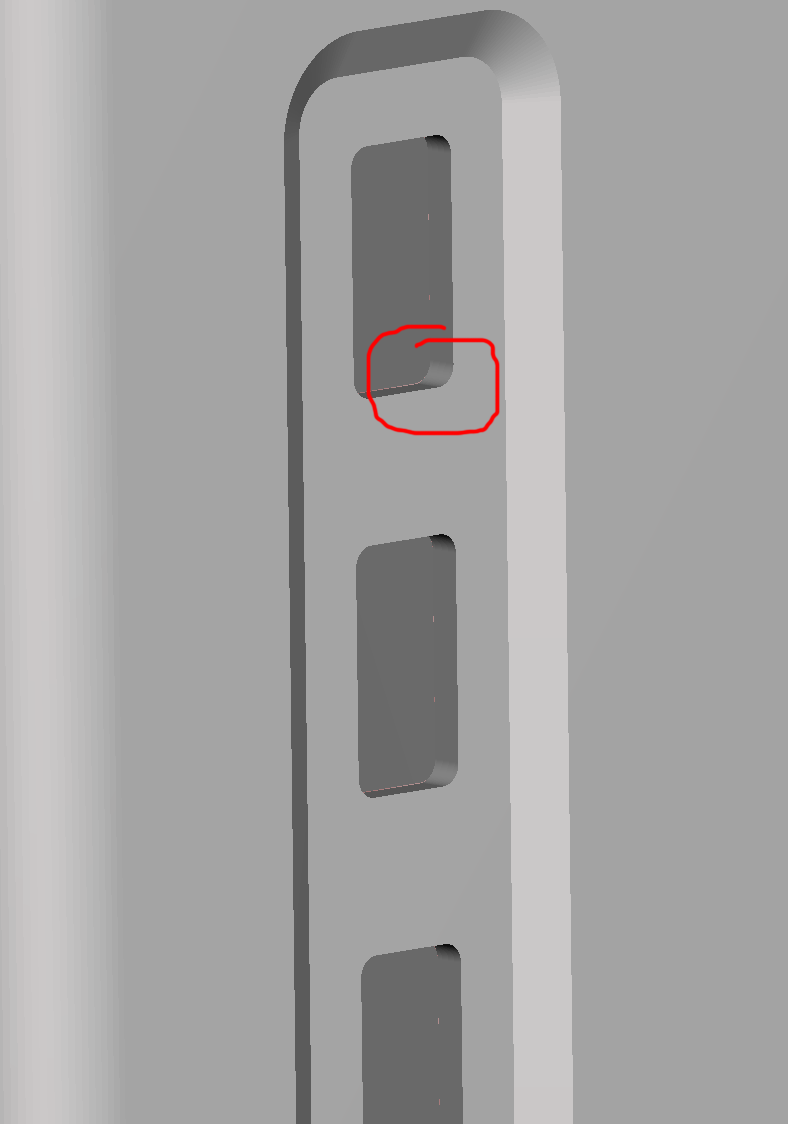
Your model indeed has features that would create slices like that:
 n8bot
on 20 Aug 2020
n8bot
on 20 Aug 2020
what am I seeing in the red circle? i dont see this hole, not hole change in wall thickness...
chron0
on 20 Aug 2020
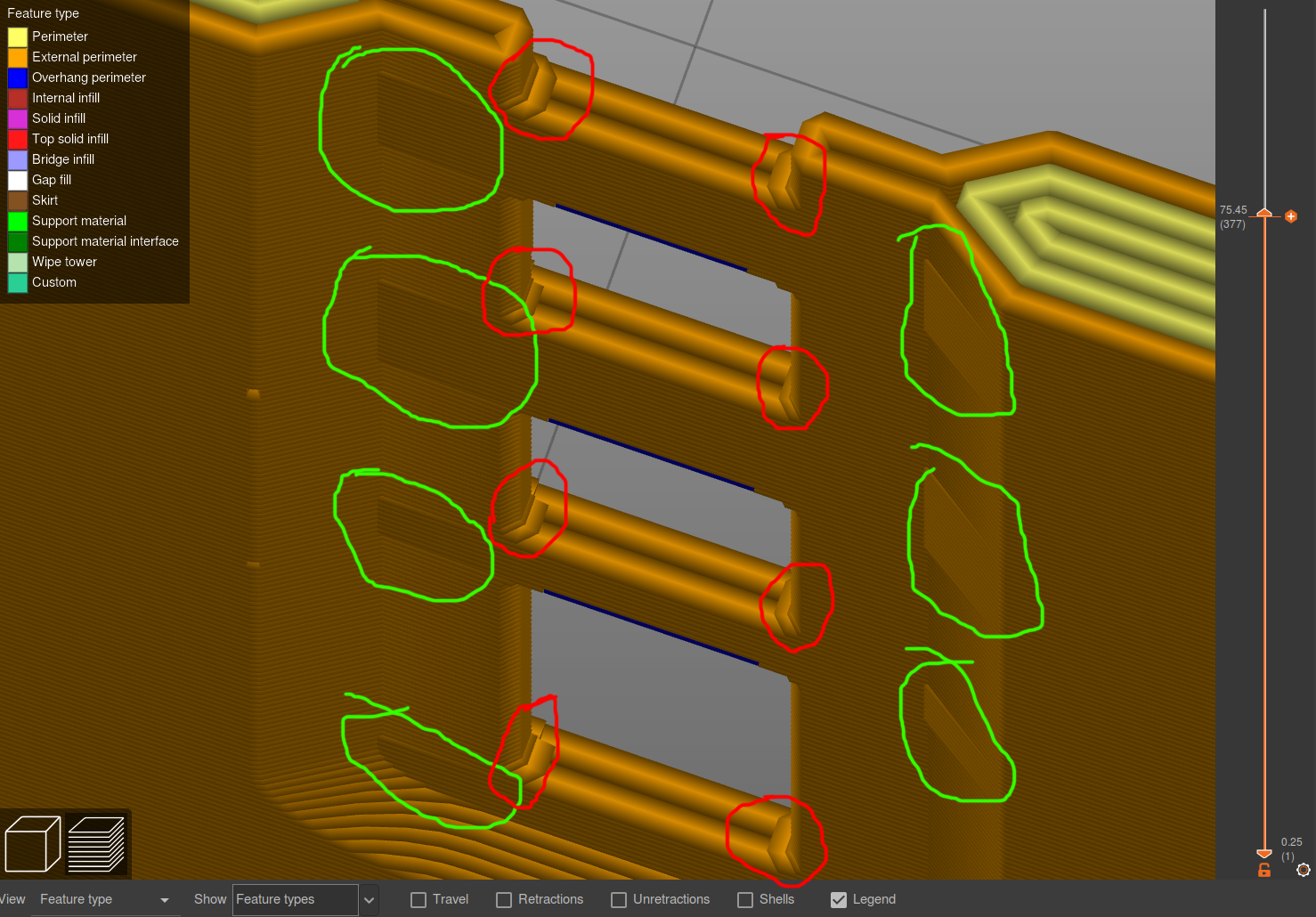
Which artifacts are you asking about, the ones circled in red or the ones circled in green in this photo?:
n8bot
on 20 Aug 2020
the red ones are obviously the rounded curve as I intended them and are part of the model. I'm talking about the green ones.
chron0
on 20 Aug 2020
Forgive my stupidity. Those other artifacts are due to the simplification of the layers' outlines to within 0.0125 mm as hardcoded in all slic3r variants. I made a fork that fixes this. Merely changing the value of RESOLUTION from 0.0125 to 0.001 in libslic3r.h is all that is needed. My builds perform a few other changes, too.
The release I have on my fork is out of date, but it should work fine for you with just one tiny bug in infill spacing.
n8bot
on 20 Aug 2020
ahhhh, splendid, I was thinking something like that so I tried to "fix" it in the model by changing wall thickness to smaller and odd/even values. I build it via ebuild, should be easy to make a little patch and throw it into portage. Thank you for this valuable input.
chron0
on 20 Aug 2020
Beware that you will have to ensure your firmware can handle the resulting small segments. You can ensure proerly-sized segments by sufficiently controlling the mesh resolution itself. But, also, when you change RESOLUTION to 0.001 from 0.0125, you are essentially extending the minimum value for the GUI setting "Resolution." If you find that you have TOO MUCH resolution after the change, you can increase the threshold to any amount, including the default 0.0125 in the GUI itself.
n8bot
on 20 Aug 2020
IC, will keep that in mind, so as long as I dont run into issues, I can go with lower resolution and can go to the new higher max if needed if I understand you here correctly...
chron0
on 20 Aug 2020
Yes. If you rebuild with:
-------------------------- src/libslic3r/libslic3r.h --------------------------
@@ -45,7 +45,7 @@ static constexpr double EPSILON = 1e-4;
 // with int64_t we don't have to worry anymore about the size of the int.
 static constexpr double SCALING_FACTOR = 0.000001;
 // RESOLUTION, SCALED_RESOLUTION: Used as an error threshold for a Douglas-Peucker polyline simplification algorithm.
-static constexpr double RESOLUTION = 0.0125;
+static constexpr double RESOLUTION = 0.001;
 #define                 SCALED_RESOLUTION (RESOLUTION / SCALING_FACTOR)
 static constexpr double PI = 3.141592653589793238;
 // When extruding a closed loop, the loop is interrupted and shortened a bit to reduce the seam.
Then the minimum is lowered, but you can always revert "up" to any value you want from the GUI.
n8bot
on 20 Aug 2020
ah nice, thanks for the diff, saves me the manual work :)
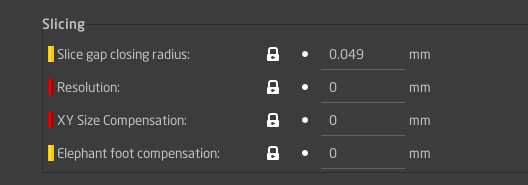
I assume you mean here then:
chron0
on 20 Aug 2020
Yes. You may want to put slice gap closing radius to 0, as well, because I think it simplifies things too. That's merely the GUI setting, nothing to change in source.
n8bot
on 20 Aug 2020
check!
chron0
on 20 Aug 2020
Let me know if it works out for you.
n8bot
on 20 Aug 2020
so far so good:
```chronos /etc/portage/patches/media-gfx/prusa-slicer # emerge -av prusa-slicer
These are the packages that would be merged, in order:
Calculating dependencies... done!
[ebuild R ~] media-gfx/prusa-slicer-2.2.0-r1::local-overlay USE="gui -test" 0 KiB
Total: 1 package (1 reinstall), Size of downloads: 0 KiB
Would you like to merge these packages? [Yes/No] y
Verifying ebuild manifests
Emerging (1 of 1) media-gfx/prusa-slicer-2.2.0-r1::local-overlay
- prusa-slicer-2.2.0.tar.gz BLAKE2B SHA512 size ;-) ... [ ok ]
Unpacking source...
Unpacking prusa-slicer-2.2.0.tar.gz to /var/tmp/portage/media-gfx/prusa-slicer-2.2.0-r1/work
Source unpacked in /var/tmp/portage/media-gfx/prusa-slicer-2.2.0-r1/work
Preparing source in /var/tmp/portage/media-gfx/prusa-slicer-2.2.0-r1/work/PrusaSlicer-version_2.2.0 ...- Applying prusa-slicer-2.2.0-r1-resolution.patch ... [ ok ]
- User patches applied.
- Hardcoded definition(s) removed in CMakeLists.txt:
- set(CMAKE_BUILD_TYPE "Release" CACHE STRING "Build type (default Release)"
Source prepared.
had to modify it slighty tho, in case someone else wants to grab it:
--- a/src/libslic3r/libslic3r.h 2020-08-20 19:53:27.345891814 +0000
+++ b/src/libslic3r/libslic3r.h 2020-08-20 19:54:13.091902209 +0000
@@ -35,7 +35,7 @@
// int32_t fits an interval of (-2147.48mm, +2147.48mm)
#define SCALING_FACTOR 0.000001
// RESOLUTION, SCALED_RESOLUTION: Used as an error threshold for a Douglas-Peucker polyline simplification algorithm.
-#define RESOLUTION 0.0125
+#define RESOLUTION 0.001
#define SCALED_RESOLUTION (RESOLUTION / SCALING_FACTOR)
#define PI 3.141592653589793238
// When extruding a closed loop, the loop is interrupted and shortened a bit to reduce the seam.
```
build is running...
chron0
on 20 Aug 2020
Cool! Yeah, I just grabbed the diff from GIT GUI super quickly to demonstrate, but that's great that you made it work to automatically patch! And also, yeah sorry I'm running the latest master (2.3.0-alpha0).
n8bot
on 20 Aug 2020
no worries, it's the intent/information that counted, if I'm too stupid to deal with the details it's on me ;)
chron0
on 20 Aug 2020
hmmm:
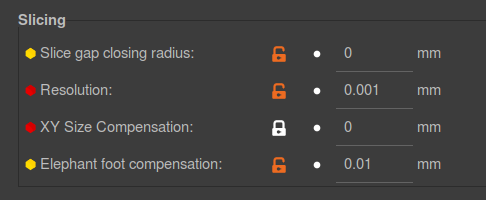
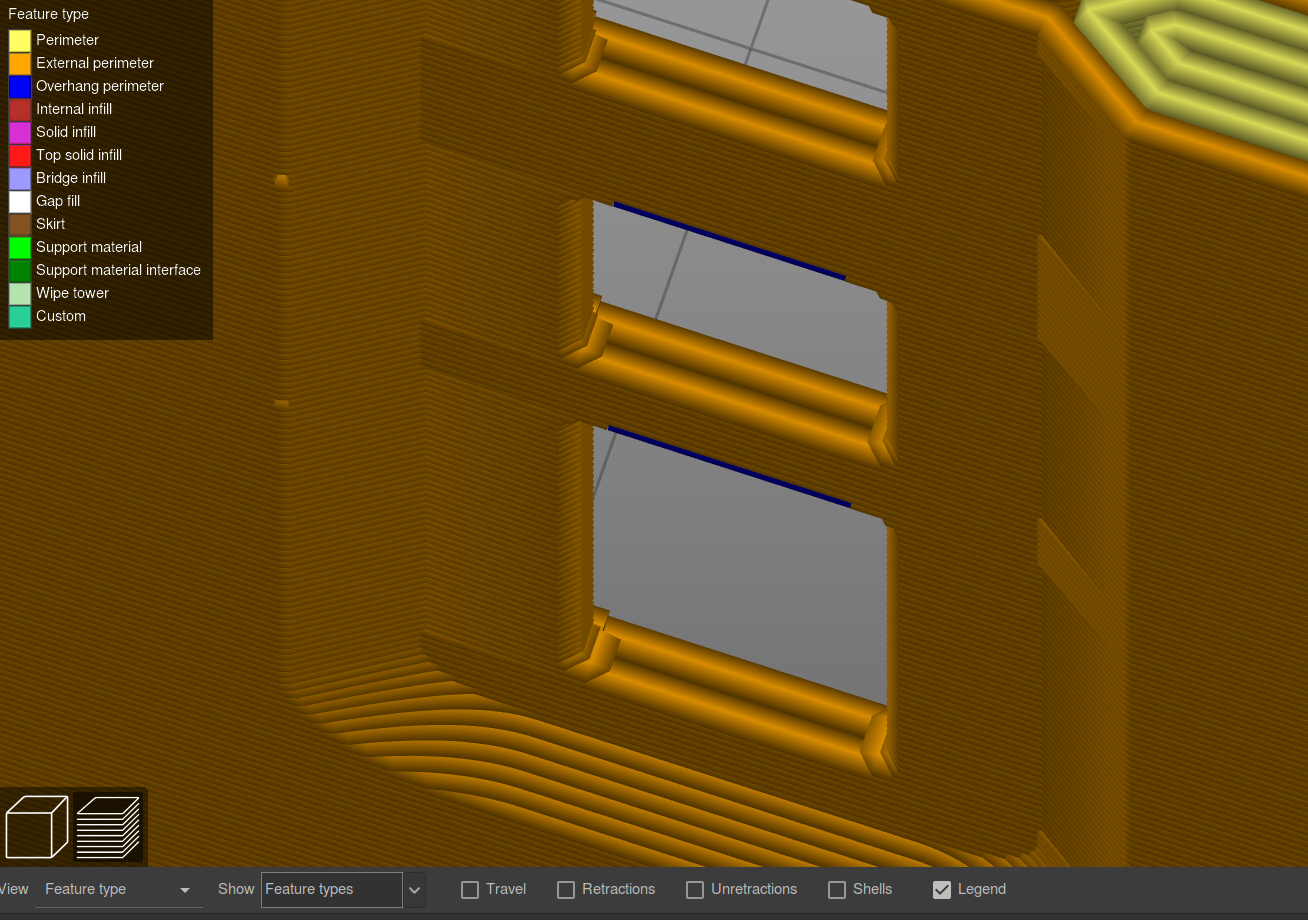
I've played with different resolution settings, still no cigar...
it seems to me as if the slicer is putting the corner point a tiny bit outward on layers where no "return run from the hole" is coming right when moving the pocket 45° to the thinner wall (2 perimeters). I still cant be 100% sure it's not in the model but I cant seem to see how that would come out of an openscad subtraction of the pocket and I dont see it (visually) there either.
chron0
on 20 Aug 2020
Leave the GUI Resolution setting at 0, with the change made. Are you positive that the diff was applied before compilation?
Actually, I just loaded it into my custom build and see the artifact in the visualization. It appears to me that the extrusion width is not being visualized correctly. Can you try printing the gcode with the modified RESOLUTION setting? See if you can still see the artifact.
n8bot
on 20 Aug 2020
ye, 0 made no change. Confidence level is high that the patch applied. Usually, if I fuck up patches, a build just breaks while trying to apply them. I was just about to ask if you could reproduce this on your end with the supplied debug files. It's getting late here, not enough awake time left for the print to complete. I'll try it tomorrow, wanted to get some more printed anyways, so I will try :) Thanks again for all your help so far!
chron0
on 20 Aug 2020
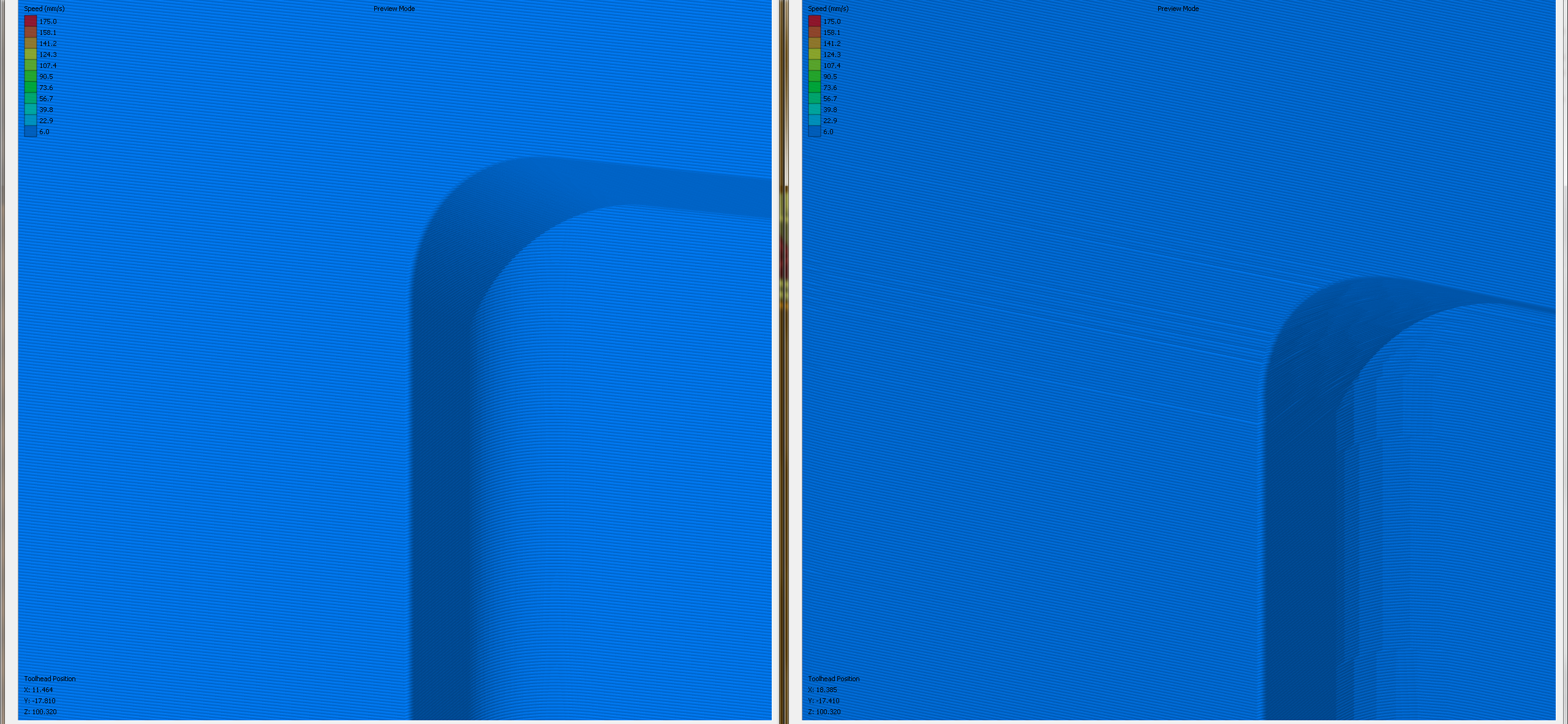
I just confirmed it's not the issue with RESOLUTION. Although, the other edges of the print become smoother, this is just an error in the visualization of the extrusion width, present in both stock PS and my modified build. Sorry for leading you down the wrong path!
Are you sure this prints exactly as shown? It shouldn't affect the print, it seems to be only an error in the visualization. See this visualization of the Gcode in Simplify3D:

n8bot
on 20 Aug 2020
yes, it is visible on the printed object, at first i thought it was ghosting/ringing but then I saw the same pattern in the slicer.
chron0
on 20 Aug 2020
There are other areas of the model that do end up with the slicing error that is fixed by the RESOLUTION setting. See this photo. Perhaps some of your errors are slicing, some are mechanically related?
n8bot
on 20 Aug 2020
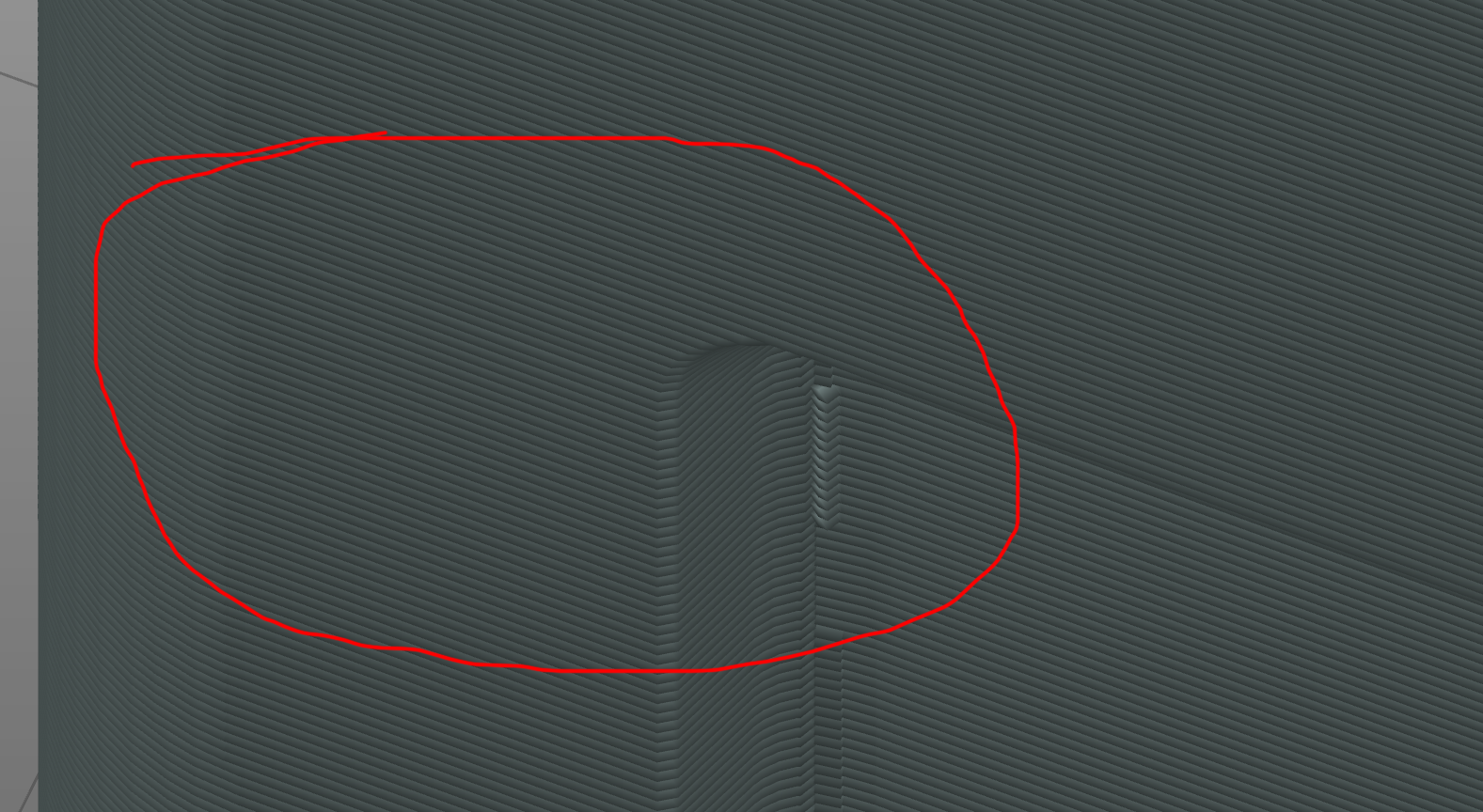
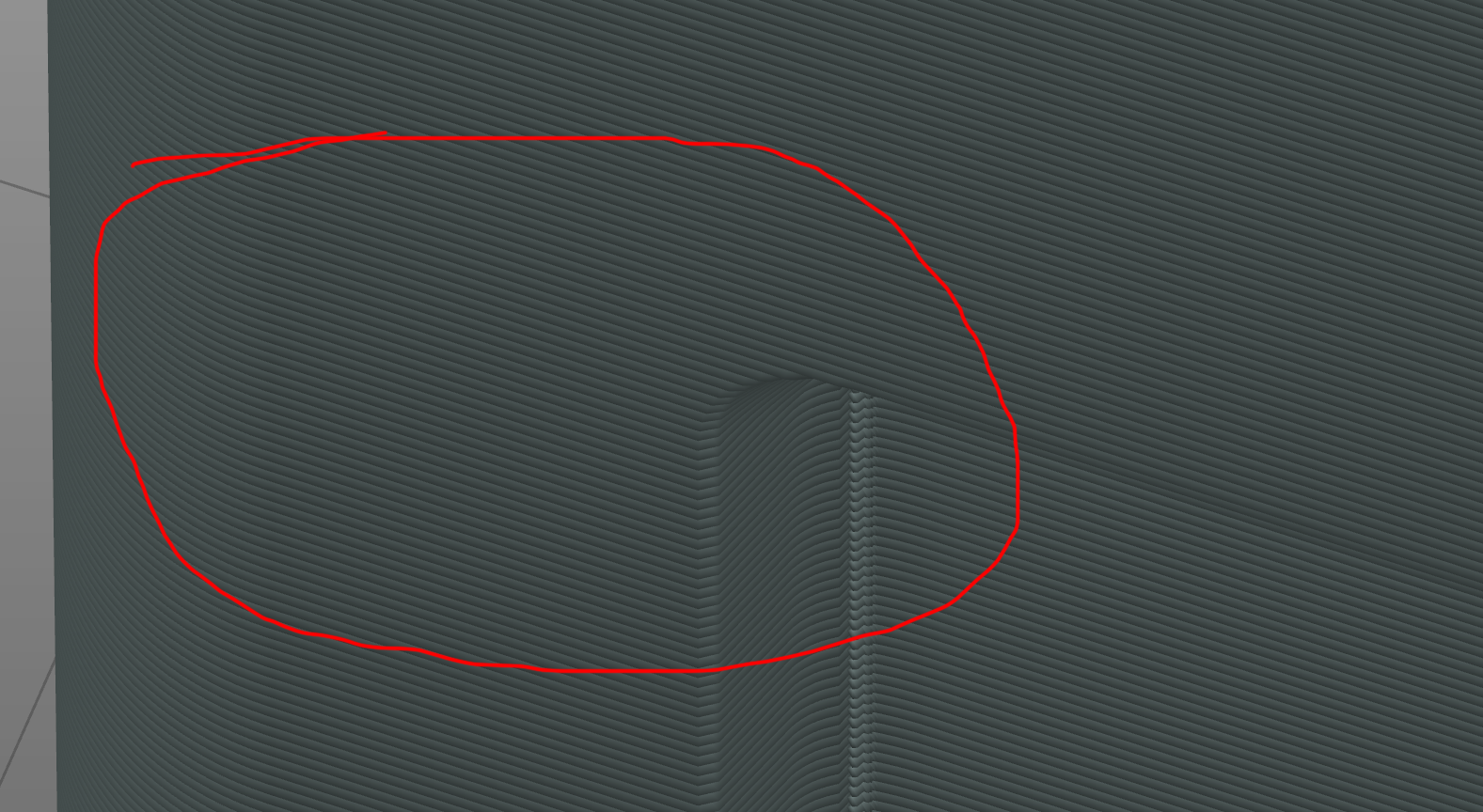
In PS visualization:
n8bot
on 20 Aug 2020
my X/Y precision is pretty decent and I've known this printer for about 7 years or so (https://apollo.open-resource.org/mission:resources:picoprint).
due to its high head mass (dual extruder) it is of course prone to ring/ghost and I'm fairly familiar with its characteristics and how to deal with them. More reason to continue my new CoreXY custom build!
When I look at the print i can make out what is X/Y jitter, what is ghosting/ringing (looking in very close details and the overall print quality is where I would expect it. Except for those patterns which are on the object AND in the slicer.
I'll just give it a print tomorrow and we'll see then :)
chron0
on 20 Aug 2020
The type of area you initially highlighted is quite difficult for any printer to print perfectly without misalignment, because there is a change in the 2d topology. With no hole, the perimeters might print in one direction, while layers with the hole may have perimeters printing the opposite direction, at least for portions of it.
n8bot
on 20 Aug 2020
Related issues
 m-Th
·
141Comments
m-Th
·
141Comments
 eowindel
·
34Comments
eowindel
·
34Comments
 ruedli
·
31Comments
ruedli
·
31Comments
 Seekerzero
·
71Comments
Seekerzero
·
71Comments
 GreatGrizzly
·
38Comments
GreatGrizzly
·
38Comments