Prusaslicer: Slight layer shift on every 5th layer when slicing some models via Slic3r
Version:
1.39.2 and 1.40-beta
Operating system type + version
Windows 10 fall update
Printers:
Original Prusa MK2, stock Extruder (161.30 E steps), also E3D Titan (813 E steps)
Original Prusa MK3, stock Extruder (280 E steps), also E3D Titan + Volcano (813 E steps)
Behavior:
On some models like a cube or something with a flat surface on the X axis Slic3r PE does a slight layer shift every 5 layers, resulting in a very broken surface finish.
Using stock Slic3r MK3 profiles and stock Cura MK3 profiles
Rotating the model sometimes fixes the problem.
I've uploaded pictures of the results here:
https://imgur.com/a/sQT0hXb
printed 3d Object is a simple teardrop, 1 shell, no top/bottom layers, no infill
Slic3rPE (all versions i have tried)
Cura 3.3.1 and S3D 4.0 are unaffected
Pictures are:
1st 3 pics: Cura with the flat side to the front
results: perfect x side, perfect bend, perfect pointy end
2nd 3 pics: Slic3rPE 1.39 and 1.40-beta with flat side to the front
results: layer shifting on every 5th layer slightly to the back, slightly broken bend, perfect pointy end
3rd 3 pics: Slic3rPE 1.39 and 1.40-beta with model rotated 90 degrees, so that the flat side is to the right
results: perfect x side, perfect bend, perfect pointy end
4rth 3 pics: Slic3rPE 1.39 and 1.40-beta with model rotated 90 degrees to the right and 'wipe while retracting' disabled
results: perfect x side, perfect bend, perfect pointy end
5th 3 pics: 3rPE 1.39 and 1.40-beta with the flat side to the front and 'wipe while retracting' disabled
result: layer shifting on every 5th layer slightly to the back, slightly broken bend, perfect pointy end
Included are:
gcodes, STL and pictures
teardrop.zip
gcodes.zip
Pictures https://imgur.com/a/sQT0hXb
 devilhunter84
All 4 comments
That looks to a noob like me like a contribution to #602
Interesting that Cura generates a even print quality while slic3r seems to have an issue.
What is Prusa Research‘s conclusion what is happening here?
 stahlfabrik
on 29 Jun 2018
stahlfabrik
on 29 Jun 2018
@stahlfabrik
nobody cares chris, ticket's been open a good while now.
I've been talking with kwaad about this a good while ago, but he lost interest.
here's the chatlog:
i like slic3r very much, but cura prints just cleaner
it's a btch to tweak though
Kwaad2 - 05/31/2018
Yeah.
I personally like Slic3r.
but sometimes it does REALLY stupid stuff.
sandman - 05/31/2018
slic3r does some things pretty weirdly, like the teardrop. flat side towards you, looks crap. flat side towards the right, looks great
Kwaad2 - 05/31/2018
see I just looked at 10 layers in a row.
that "front" X line.
1.65256 mm of filament.
every single time.
It's not "honestly" slic3r.
but that's REALLY interesting.
I'd LOVE to hook your printer up to a data-logger.
I wanna see what's going on, on the "output" side.
sandman - 05/31/2018
sorry i'm not following on "you say "gcode" but wtf man. " and "It's not "honestly" slic3r."
Kwaad2 - 05/31/2018
ok.
G1 X149.047 Y95.676 E1.65256
sandman - 05/31/2018
the weave basket pattern is not slic3r's doing, but the firmware. just was talking about the z banding upon layer change that slic3r does
Kwaad2 - 05/31/2018
^--- that line happens once per layer.
(exactly)
Search it. It occurs 50 times.
(I think)
sandman - 05/31/2018
this seems like the wipe move?
no wait, it's also in the gcode with wipe disabled
Kwaad2 - 05/31/2018
That's the single line of gcode to send from X100 to X150
(give or take)
The thing is.
This is NOT inconsistent.
It's NOT something wrong with Slic3r.
This is screaming to me, there's something TERRIBLY wrong with the gcode analyzer.
I think that's a "magic number" for some reason on your printer, that is royally, Fkin' the firmware up.
Why it only effects X, why it does the whole line... I have NO idea.
But that's a totally 'fine' gcode, from slic3r.
sandman - 05/31/2018
the gcode that you posted yesterday printed like crap for me on the x axis, had terrible banding there. the same gcode printed fine on two other's machines as we saw, no banding there, you mean that?
Kwaad2 - 05/31/2018
Yeah, basically that. And I don't think it's mechanical.
I think something you've done in your firmware, has a "magic number" that is conflicting with the "whatever the problem is"
question: Did you ever have the inconsistent extrusion issue, as bad as everyone else? And you tuned it, or it was always "good"?
sandman - 05/31/2018
what can i say, i just got the firmware, changed a few current numbers for holding, running and homing so that my motors work, then flashed to printer and did a factory reset
Kwaad2 - 05/31/2018
So only changed current?
(Like, I'm using your case, to try to isolate the actual problem. You are not the problem at all, nothing you've done, should cause that unless you messed with some REALLY deep stuff... which why would you)
I'm gonna call it an "artifact", but that "artifact" is being generated on the firmware. Something about the Slic3r gcode is REALLY upsetting the firmware. Why? How? And why only on yours. (That's important, because you are custom you've changed a few things, which likely means what you changed is key to finding the cause)... make sense?
sandman - 05/31/2018
i changed holding, running and homing currents to about double what prusa uses (my motors need that), changed height to 310mm build height, changed minimum extrusion temp to 180 degrees, changed firmware release to gold status so that the warning message at start would go away, changed steps per mm to 813 for the E3D Titan, and changed acceleration values on x/y this time to 4000 from 1000, and max feedrate to 500 on x/y to 500 from 200 this time. by this time i mean i always had these banding errors on X even just when i just changed motor currents on older builds. I built in a E3D Volcano last week, so i had to change the acceleration and feedrate higher to allow 250+mm speed. these speed values will get overwritten by Slic3r's starting gcode regardless.
Kwaad2 - 05/31/2018
Both your printers have it?
sandman - 05/31/2018
yes
this error is in the gcode.
pelase go to gcode.ws and uplaod the gcodes for slice3r_teardrop and cuva_teardrop there
Kwaad2 - 05/31/2018
I just read it. It's not. :(
That's what's crazy, that's why I'm scratching my head.
I think the error is in the way Firmware is READING the gcode.
sandman - 05/31/2018
you can see Slicer's gcode does the bonkers movement on the bottom left
cura's looks different
go up a few layers, then move the bottom slicer
*slider
Kwaad2 - 05/31/2018
You mean the "jiggle" effect of the "start/stop" layer?
sandman - 05/31/2018
yes, that messes everything up
even with wipe disabled
devilhunter84
on 29 Jun 2018
We have printed the teardrop model. The thing with the model is, the thin wall only fits a single line, therefore it is sliced using a gap fill algorithm, which produces an ugly seam in this particular case.
 bubnikv
on 12 Mar 2019
bubnikv
on 12 Mar 2019
Can you try again with current version of PrusaSlicer (2.2.0)?
I looked at the gcode and it seems to me, that those lines (shifts) are actually caused by slight overextrusion at the beginning of the layer. Seam position has some pattern there, which is repeating itself every 5 layers.
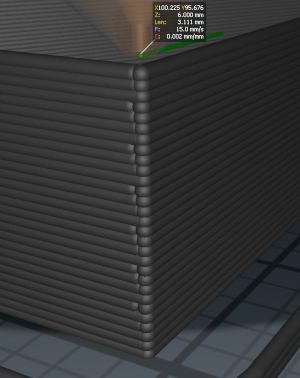
Anyway, I resliced it with current PS 2.2.0 using exactly same settings and the result is now different (and the "jiggle" extrusion effect at the start of the layer is gone). I even printed it on the MK3 and it looks fine.
I guess we can close this issue.
 rtyr
on 15 Apr 2020
rtyr
on 15 Apr 2020
Related issues
 sebastianha
·
4Comments
sebastianha
·
4Comments
 RossKor
·
3Comments
RossKor
·
3Comments
 jon-cpu
·
3Comments
jon-cpu
·
3Comments
 yschroeder
·
3Comments
yschroeder
·
3Comments
 i-make-robots
·
3Comments
i-make-robots
·
3Comments