Prusaslicer: Implement Cura's Ironing Feature for a more smoother surface finish
Version
Slic3r Prusa Edition
Version: 1.36.2-prusa3d-win64
Build: Slic3r-1.36.2-prusa3d-win64-full-201707281218
Operating System: MSWin32
System Architecture: MSWin32-x64-multi-thread
Windows Version: Microsoft Windows [Version 6.1.7601]
Behavior
Please implement a feature which is to be found in the latest Beta of Cura 2.7. In few words, the nozzle travels the top surfaces (pre)heated but without extruding.
This allows for a smoother finish.
See it here in action:
https://www.reddit.com/r/3Dprinting/comments/6rkzm7/top_surfaces_using_cura_27s_ironing_feature/
The subthread which speaks about this is here (it is called there neosanding):
https://www.reddit.com/r/3Dprinting/comments/6r35eq/cura_27_beta_is_here/dl28upo/
The general discussion about Cura 2.7 (from which the above subthread is took out):
https://www.reddit.com/r/3Dprinting/comments/6r35eq/cura_27_beta_is_here/
Cura's 2.7 release notes:
https://ultimaker.com/en/blog/50492-introducing-cura-27-beta
_Is this a new feature request?_
yes
 m-Th
m-Th
All 141 comments
We had that once back in time: #65
I think while it seems to work, it's more a nice to have feature than something realy important because it's only aplicable to horizontal top surfaces. As soon as it's tilted by 0.0001°, it's not useful any more. Real world things tend to have non-horizontal planes.
 Sebastianv650
on 5 Aug 2017
Sebastianv650
on 5 Aug 2017
- We had??? (past tense?)
- Hmmm... depends. Functional parts many times have horizontal surfaces.
m-Th
on 5 Aug 2017
Non-native speaker ;) Intended meaning: We already had that topic some time ago.
Sebastianv650
on 6 Aug 2017
@Sebastianv650 I print for my 3D Hubs customers just about every day, and I'd say that about 90% of the prints I do have a big horizontal surface. I think this would be really useful to implement :)
 Matts-Hub
on 9 Aug 2017
Matts-Hub
on 9 Aug 2017
Please see here https://www.facebook.com/groups/Prusai3users/permalink/795687387282411/ for expressions of interest
Matts-Hub
on 9 Aug 2017
With Linear Advance I get top surface quality as good as those "neosanded" pictures :)
[update: just saw pic on FB - that is insanely flat, but not very accurate, which is a reasonable trade-off if finish is what's important for a specific print]
I suspect this feature could be a blessing and a curse (I could imagine this completely ruining prints with PETG if not dialed in perfect, plus what about cooking the filament in the nozzle on huge top surface "irons" ? I will try myself before beleiving these "pictures on the Internet" ;)
 fiveangle
on 9 Aug 2017
fiveangle
on 9 Aug 2017
I haven't gotten around to doing the lin advance update yet, I think now's a good time to do it and compare the results :) I'm not sure what the results would be like with PETG, what makes you think it could ruin the print?
With regards to cooking filament - it does still extrude 10% by default. I'm not sure if that would be enough to stop it cooking though. Personally I've left filament hot in the nozzle for up to half an hour with no "cooking" effects.
Matts-Hub
on 9 Aug 2017
Some high resolution comparison pictures below. The bigger part is printed as usual, with no linear advance (haven't updated yet). The smaller disk was printed with ironing in cura. You can see the massive difference - it creates a uniform textured matte surface, which I don't think would be possible to get any other way


Matts-Hub
on 10 Aug 2017
@bubnikv What are your thoughts on this? To me, the surface finish from an ironed print looks very similar to the textured surface that you get from your new powder coated PEI that you use to print the MK2S parts. I think it would be awesome if you could have both the top and bottom surfaces with a similar texture!
Matts-Hub
on 10 Aug 2017
I get similar smooth top layer finishes just by decreasing the top layer speed down to 5-15 mm/s for the print.
 daktylus
on 13 Aug 2017
daktylus
on 13 Aug 2017
It's not a smooth surface though. It's a textured surface.. It leaves behind a matte finish which makes the individual extrusion lines impossible to see
Matts-Hub
on 14 Aug 2017
I would like to have this feature in Slic3r, but there are currently more
pressing issues, and there is also a lot of work to be done, like a
continuous refactoring to get rid of the unmaintained Perl programming
environment. So this feature is not at the top of my list.
On Mon, Aug 14, 2017 at 12:01 AM, Quintox303 notifications@github.com
wrote:
It's not a smooth surface though. It's a textured surface.. It leaves
behind a matte finish which makes the individual extrusion lines impossible
to see—
You are receiving this because you were mentioned.
Reply to this email directly, view it on GitHub
https://github.com/prusa3d/Slic3r/issues/458#issuecomment-322070252, or mute
the thread
https://github.com/notifications/unsubscribe-auth/AFj5I6bDXzimSIf-4vL9_hxG-tYj1rcTks5sX3I_gaJpZM4OugTD
.
 bubnikv
on 14 Aug 2017
bubnikv
on 14 Aug 2017
I print only functional parts across 2 Prusa MK2s and a MakerBot Rep 2. This feature would be awesome along with separate "designs" for top/bottom layers. Example, Hilbert Curve for top layers, Rectilinear for bottom.
 jslick007
on 14 Aug 2017
jslick007
on 14 Aug 2017
Example, Hilbert Curve for top layers, Rectilinear for bottom.
Definitely. I certainly can use this.
Ok, perhaps it can be done with the https://github.com/prusa3d/Slic3r/issues/378 but there is much more work and more confusing to achieve this.
m-Th
on 14 Aug 2017
m-Th
on 25 Sep 2017
Maybe you can implement the Neosanding 2.0 in Slic3r just by reducing the
top infill extrusion width 4x? We are going to test it.
On Mon, Sep 25, 2017 at 9:02 AM, m-Th notifications@github.com wrote:
Neosanding 2.0:
https://all3dp.com/neosanding-3d-printing-technique-smooths-
your-flat-surfaces/—
You are receiving this because you were mentioned.
Reply to this email directly, view it on GitHub
https://github.com/prusa3d/Slic3r/issues/458#issuecomment-331793787, or mute
the thread
https://github.com/notifications/unsubscribe-auth/AFj5IwCHO_XrawE6IEa1kexVgUv9fT5Hks5sl0_tgaJpZM4OugTD
.
bubnikv
on 25 Sep 2017
Make sure to publish this ratio for the user – surely it depends on filament used and situation („more” or „less” neosanding).
Also, the same stands for (perhaps) some temperature variation (few degrees above / below).
m-Th
on 25 Sep 2017
Maybe you can implement the Neosanding 2.0 in Slic3r just by reducing the top infill extrusion width 4x? We are going to test it.
Neat hack ! :)
fiveangle
on 26 Sep 2017
separate extrusion width for the top layer already exists and has been there for a long time, it's at print settings -> advanced -> top solid infill and it does give you that smooth look with certain filaments and speeds
I think the real hurdle to smooth top layers is the path planner now, to be honest; my setup got better since I posted the image in #65, so in Colorfabb's economy PLA it looks like this now (phone slightly misplaced focus and slight issues with linear advance notwithstanding, M3 nut for scale):

(and yes, it's of rather limited use, since most things don't have flat tops)
(also pinging https://github.com/prusa3d/Slic3r/issues/475#issuecomment-327390981 since it asks for configurable extrusion width)
 m0n5t3r
on 7 Dec 2017
m0n5t3r
on 7 Dec 2017
I’d like to put in another vote for this, neosanding is the only reason I still go back to Cura sometimes. It works great on PLA and PETG too.
 jettoblack
on 15 Dec 2017
jettoblack
on 15 Dec 2017
This would be great to have. If I have some time in the next few weeks I may take a look at implementing this functionality and creating a PR.
 kelchm
on 20 Dec 2017
kelchm
on 20 Dec 2017
I made a first draft.

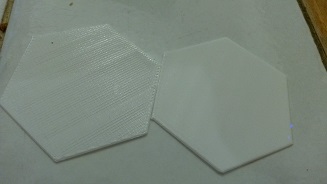
You need to decouple the top&bottom infill (#475) to set only the top one with the smooth feature.
internally, It's a rectilinear then an other rectilinear (flipped 90°) with two time more lines and almost no extrusion.
Should i have to do the second one also over the perimeters?
code : https://github.com/supermerill/Slic3r/tree/smooth_top_infill
 supermerill
on 25 Jan 2018
supermerill
on 25 Jan 2018
Have an error when exporting gcode from the joined file. The program quit.

03033-r06d - I3D-Conduit.zip
I dismissed the use of brim to the use of mickey mouse pads. It is not important to neosand that pads but the slic3r see that pads as flat surface. It seems the code don't like neosanding first layer.
You could try to solve the bug and the first layer can be neosanded. Or it could be discarded to neosand first layer but that create a new case to manage (new option to tick).
I already said on prusa forum a comment about it: https://shop.prusa3d.com/forum/improvements-f14/need-some-testers-for-slic3rpe-neosanding-t13953.html#p63836
 rongith
on 2 Feb 2018
rongith
on 2 Feb 2018
@rongith
try with this:
https://mega.nz/#!81J0lIyK!Vtg2QHjKF4EDRTkfsifQpugb8OCzkutMxn8XN2Dvyoo
i don't have any problem with this version, and no first layer is neosanded.
supermerill
on 3 Feb 2018
@supermerill , managed to export gcode. Thank you. gcode not yet printed .
rongith
on 5 Feb 2018
I've been eagerly awaiting this.
I just did a quick test print, though with no 1st layer areas. It worked great.
It would be nice to have control over the speed (and maybe extrusion rate?) of the smoothing pass.
Thanks for this! I hope to see it in the base code soon.
 KDPate
on 5 Feb 2018
KDPate
on 5 Feb 2018
One strange thing: it irons the whole layer if any part of it is the top layer. Or rather it probably irons all solid fill areas, which ends up causing causing some weird behavior depending on the shape of the solid fill (such as a raised ring around the edge of a top surface).
KDPate
on 5 Feb 2018
I compared it on PLA, top layer speed 40mm/s. It looks nearly identical. I can't even make a proper picture which shows the differene. The neosanded layer loosk slightly more shiny. Could also be the same. Maybe I misused your Slicer. Do I have to activate the neosanding somewhere?
daktylus
on 5 Feb 2018
Yes, it's not easy to find. Under Infill, you have to change the top fill pattern to "smooth".
KDPate
on 5 Feb 2018
It worked. Printed in PLA (dasFilament), with Linear Advance, top layer speed: 40 mm/s . Neosanded Surface is smooth and more glossy. Normally, that filaments gives a quite matt surface finish.
Left two pieces normal, right one with neosanding.
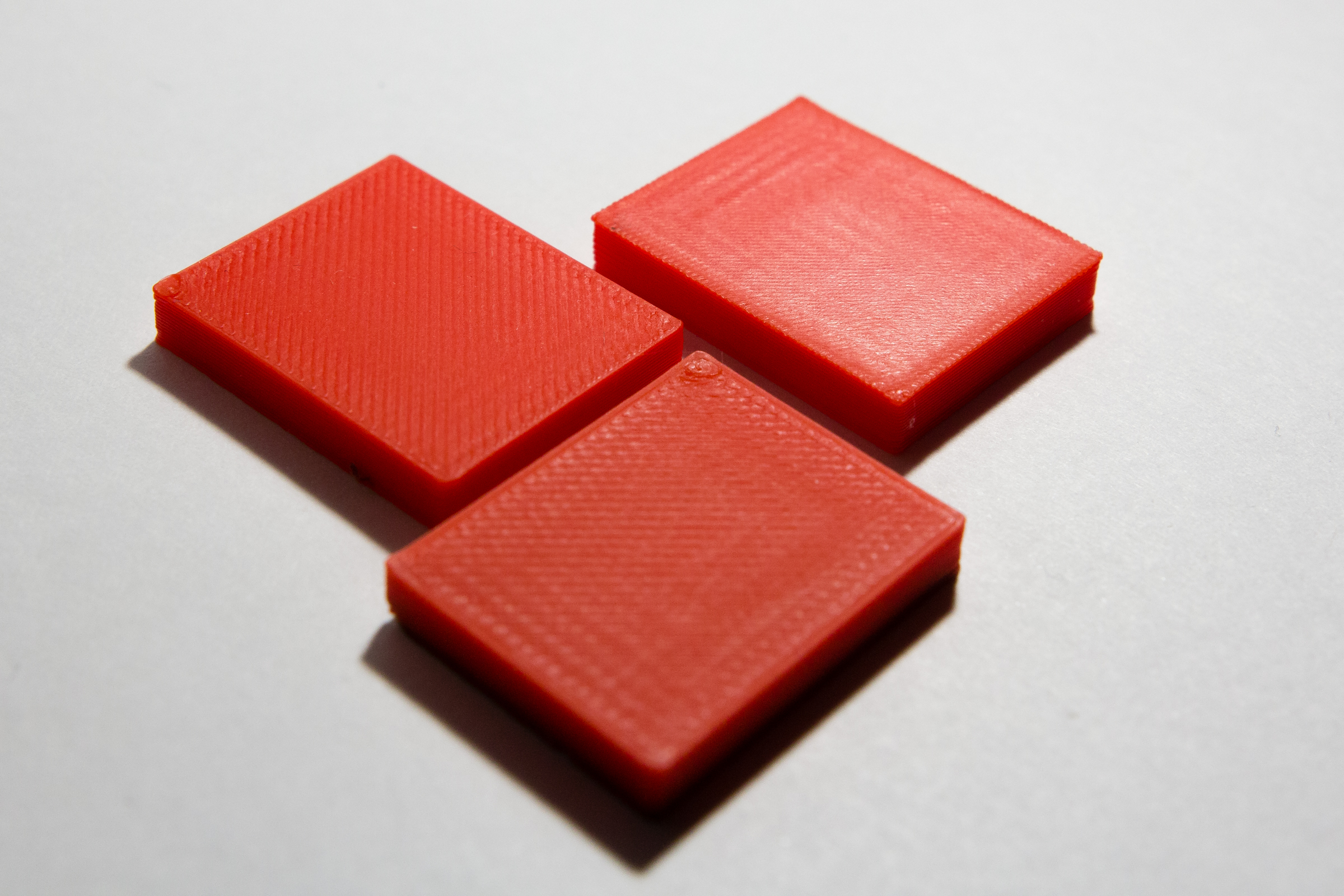
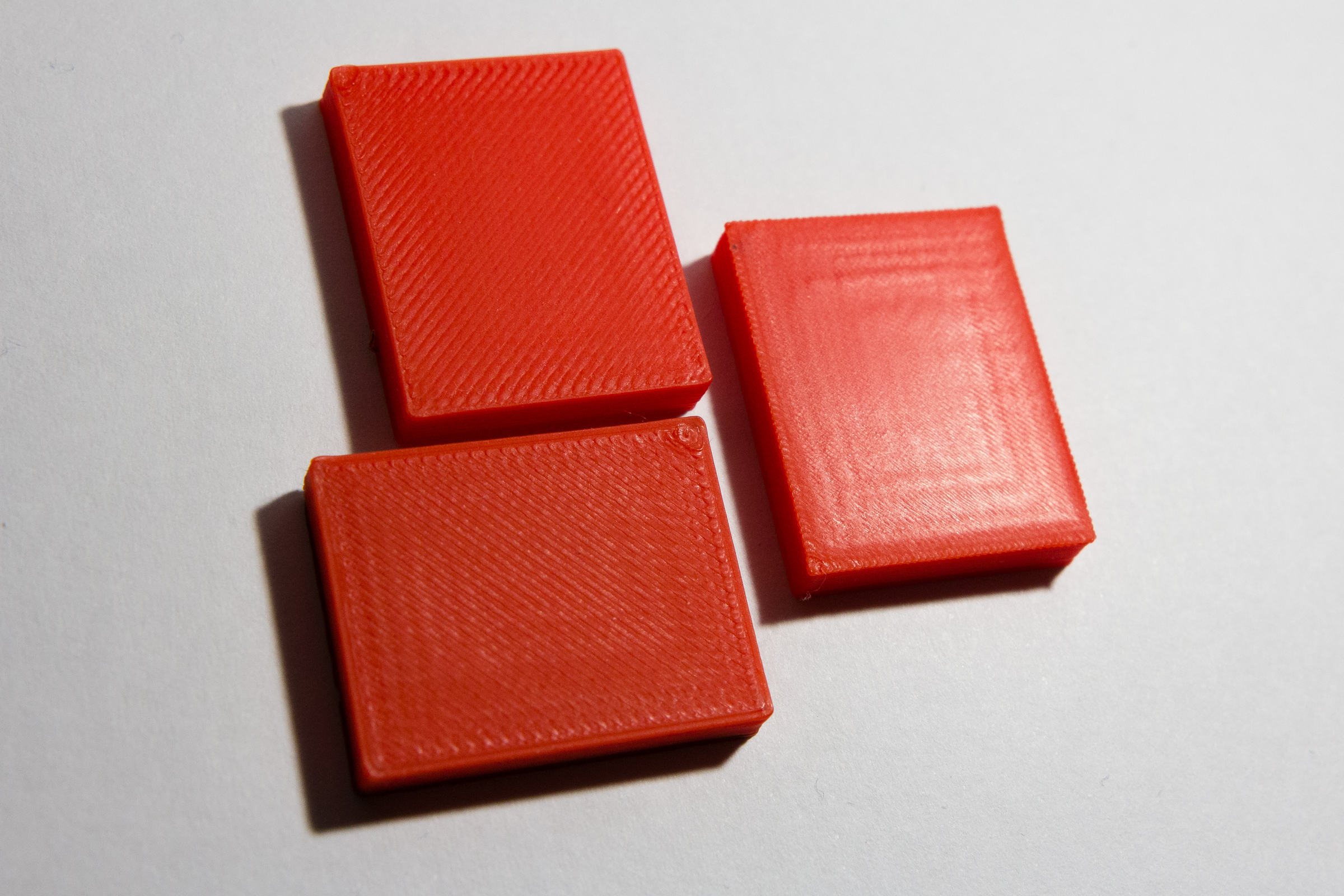
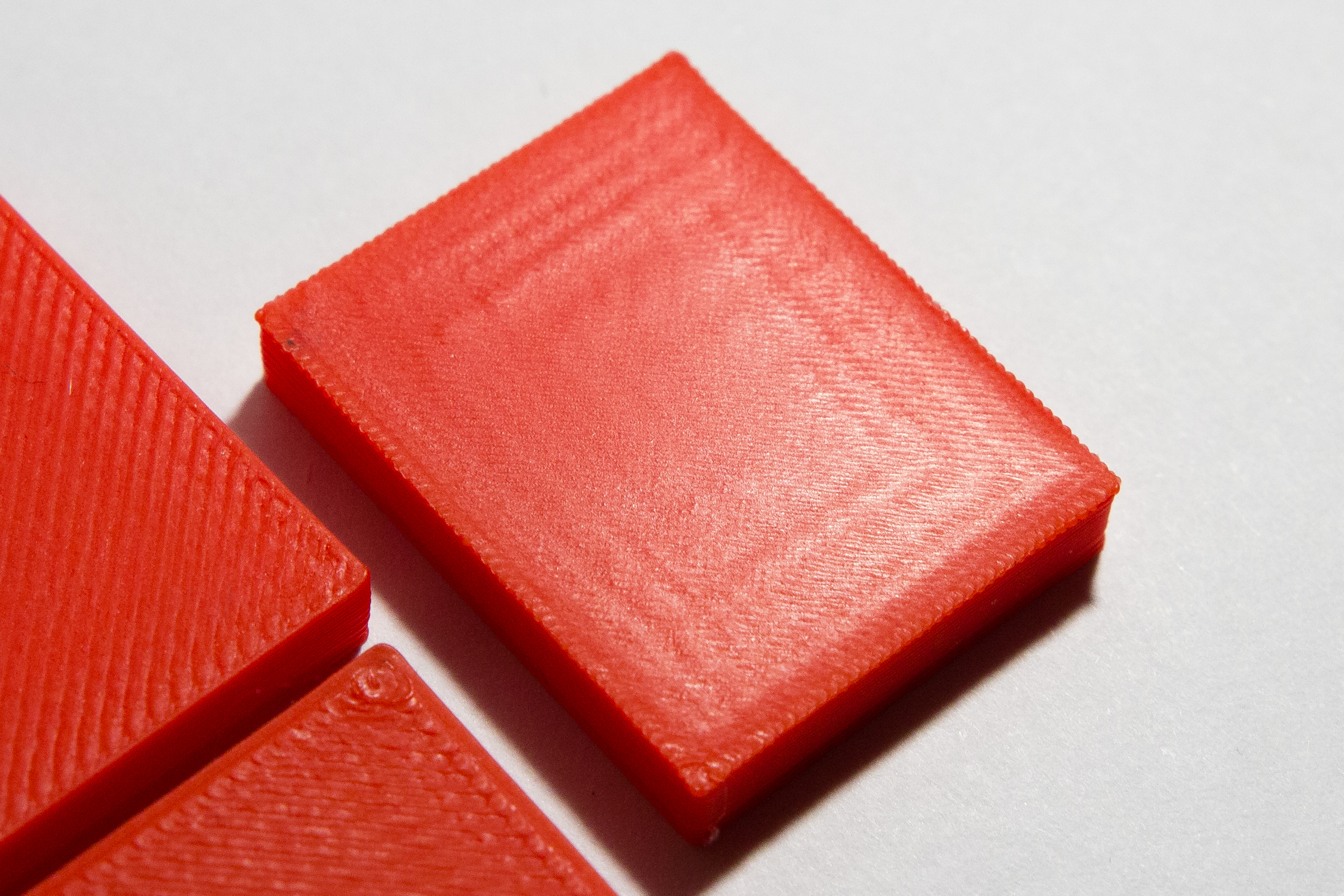
daktylus
on 6 Feb 2018
@supermerill Thanks for your great effort. Would you please create a pull request?
There is one thing I believe you did not do, and which makes sense to add: Slic3r extends the top surfaces inwards into an object by a fixed amount. By the way, the extension of the surfaces inwards aka anchoring of the full infill surfaces is the reason of https://github.com/prusa3d/Slic3r/issues/668. It really makes sense to complicate things and to do the neosanding over the visible surface only, not over the extended surface.
bubnikv
on 13 Feb 2018
@bubnikv
My changes are made vs a 18/1/4 commit.
Before making the pull request, I move my change to the current master or an other commit?
Do you prefer one pull request by modification or a pull request for the whole package?
(gyroid infill, ironing, only 1 perimeter top)
For the Visible thing, it's possible. All my modification use is_external() && surface_type == stTop.
I will do the pull request this evening.
supermerill
on 13 Feb 2018
@supermerill
Can I make some wishes for the implementation? I think the feature is quite hard to find and "smooth" doesn't describe the routine properly (also using 10 mm/s on top layer gives you a SMOOTH finish). I think a seperate checkbox with some label like: "Use neosanding on top layer" or "hypersmooth top layer" would be much clearer.
daktylus
on 13 Feb 2018
@ daktylus the other names are short. I can put "neosanding" or "ironing".
supermerill
on 13 Feb 2018
Yay, ironing!
Speed control for the ironing pass?
KDPate
on 13 Feb 2018
Maybe in v2, when the gui conversion will be over. Currently it's the infill speed.
supermerill
on 13 Feb 2018
Cannot find top fill pattern "smooth". Is iroing still a dev feature or just hidden somewhere I didn't look?
 apphead
on 21 Jul 2018
apphead
on 21 Jul 2018
it's not merged in the main branch, you have to get my fork (~I release a win32 build in the pull request thread~ edit: no more link here as it's not a prusa product, see my repository to get my fork) to use it.
supermerill
on 21 Jul 2018
It is partially covered by the "layer editing" option... it's not exactly the same but if you add one vertical layer + ensure the top ones are very thin you may achieve a comparable result.
 fdev31
on 25 Sep 2018
fdev31
on 25 Sep 2018
@fdev31. I disagree and your comment should probably be based on your specific usage. I wish Prusa add ironing in its version. @supermerill done a very good job.
Per example, you may have many top layers then you can't simply change layer height manually. Final result without ironing is sensible to material. I use a lot a 0.30 layer height where ironing is very effective.
rongith
on 26 Sep 2018
Actually this is a way I found to work around it, it's not "replacing" the feature, but still allows very nice top layers... I just change the height of those layers. I completely agree that it depends on the use case and it's some kind of tedious workaround for many models.
A one click option doing just the right thing is definitely something I would like to see in slic3r too... I just wanted to drop a tip in case it helped someone... with very thin top-most layers I get excellent results too, and it works on non-flat surfaces as well...
fdev31
on 26 Sep 2018
I wish Prusa add ironing in its version.
:+1:
 probonopd
on 27 Sep 2018
probonopd
on 27 Sep 2018
@fdev31, I was afraid you dismissed the usefulness of that feature. I will try to remember your tip if it simply solves a case and supermerill release doesn't work anymore.
rongith
on 2 Oct 2018
This is an example of a part that could benefit from the feature:

Source: https://www.reddit.com/r/prusa3d/comments/9x95kt/is_there_any_way_to_make_the_top_of_flat_prints/
probonopd
on 19 Nov 2018
Any news on this? I really loved this feature..
 Murloc992
on 10 Dec 2018
Murloc992
on 10 Dec 2018
I would love to see this feature implemented as well.
 KyleMaas
on 2 Feb 2019
KyleMaas
on 2 Feb 2019
I'm waiting for this feature, please add it!
I print a lot of models with flat tops, especially functional prints, logos, and phone cases. Ironing would really help a lot with this!!!
 3dprintingrookie
on 11 Feb 2019
3dprintingrookie
on 11 Feb 2019
When can we get this!? Why won’t the slic3r developers reply and are completely ignoring this topic?
 cyxlops
on 15 Feb 2019
cyxlops
on 15 Feb 2019
This is already a part of supermerril's branch, it just needs to be ported across
Matts-Hub
on 15 Feb 2019
When will they port it? Supermerril had this feature for a while and they didn’t bother porting it. It would be a nice gesture for them to acknowledge his hard work and implement his feature. It’s only fair.
cyxlops
on 15 Feb 2019
@cyxlops it's not a matter of bad intent or ingratitude or something, it's just that no one yet had the cycles to do it...
 vojtechkral
on 15 Feb 2019
vojtechkral
on 15 Feb 2019
When will they port it? Supermerril had this feature for a while and they
didn’t bother porting it. It would be a nice gesture for them to
acknowledge his hard work and implement his feature. It’s only fair.
It is more complex than that. First, we did not receive an implementation
by @supermerill, that was provably useful, at least by our measures.
Merging something that is not provably better than no ironing does not make
sense from maintenance point of view.
Second, we need to invest time of some of our engineer to review the code
changes. Imagine "merging" some changes that somebody claims to do only
good to your car, into your engine, without reviewing all the effects this
change will possibly have. I wish you a good luck. We cannot do that. We
are a business, and we are responsible to deliver a stable product to our
customers.
This is not a complaint to @supermerill 's great work. I wish we would have
more time to cooperate.
On Fri, Feb 15, 2019 at 4:04 PM Vojtech Kral notifications@github.com
wrote:
@cyxlops https://github.com/cyxlops it's not a matter of bad intent or
ingratitude or something, it's just that no one yet had the cycles to do
it...—
You are receiving this because you were mentioned.
Reply to this email directly, view it on GitHub
https://github.com/prusa3d/Slic3r/issues/458#issuecomment-464081838, or mute
the thread
https://github.com/notifications/unsubscribe-auth/AFj5I9e4KfA6gBGgEVUNZMQLFJg_SDe2ks5vNsyagaJpZM4OugTD
.
bubnikv
on 17 Feb 2019
@vojtechkral @bubnikv Yes you are a business and I understand how complex it is create a stable program and I really appreciate all the effort and work especially with the blog updates @josefprusa keeps emailing us. It's just that the ironing feature has been requested for a while and we would love to see it! Also, I'm certain that @supermerill would cooperate and explain his code and specifically the ironing feature to help you migrate it into your core.
If it's difficult to migrate a code from another user, why not design it from scratch? It's been requested since 2017, would you not think that some dedicated time might be given to slowly implement this feature since 2 years ago? I kinda agree with @cyxlops and the other people here (and reddit) who want this feature implemented, it really enhances how 3D objects turn out. When Cura released this feature, so many people went online to submit pictures of their prints with better surfaces, and in this way advertising Cura further. This is how I got to know about Cura in the first place tbh.
Again, I appreciate all the work you guys are putting into Slic3r, it's miles better than what it was since release.
3dprintingrookie
on 18 Feb 2019
I wanted to post this but I noticed it is already posted so I came here to comment that pls add ironing! I dont like cura and want to use slic3r only but ironing is very good feature
 3dfanantic
on 21 Feb 2019
3dfanantic
on 21 Feb 2019
Another vote here! This is something that makes an immediate and apparent difference on print quality, particularly for those of us creating functional prints (whomever said most models don't have flat top surfaces must be working with figurines I suspect).
 aderusha
on 25 Feb 2019
aderusha
on 25 Feb 2019
Another vote here, Supermerril's branch doesn't have a Linux Appimage, and doesn't compile for me using the standard Prusa SlicerPE Linux compile instructions. Really would LOVE to have this as a solution for parts that I print with a small nozzle, at 0.5 layers. It just feels so wrong to slic3r in a windows VM just for this feature :(
 mperino
on 26 Feb 2019
mperino
on 26 Feb 2019
And most importantly of all THANK YOU @vojtechkral @bubnikv and @supermerill Really appreciate all your hard work!
mperino
on 26 Feb 2019
Yep, I'm on this feature-request, too. This finishing-option should be in Slic3r PE. I'm short of changing to Cura because of this, since it creates a way more better finish for customers and also closes small gaps.
 Rycoviac
on 6 Mar 2019
Rycoviac
on 6 Mar 2019
Please add Ironing top and bottom layers to Slic3r.
This version has it.
https://github.com/supermerill/Slic3r/releases?fbclid=IwAR3tUem6pK3ifoNSK2hERF_zyiVC9znRaHB8Oj-SpfjBZd2f71i0CYyXQk0
 OopAck
on 7 Mar 2019
OopAck
on 7 Mar 2019
One vote more.
 mhavo
on 12 Mar 2019
mhavo
on 12 Mar 2019
Can people please stop with the useless voting comments. Everyone knows by now this is a wanted feature, your vote won't make people more aware. If you really want to vote just do a thumb up on the OP. But don't comment with a useless vote text. Because every time someone does that, everyone subscribed to this issue (eg: me) waiting eagerly for actual information about the progress just get a notification email informing them a useless comment has been placed. So please stop with the useless voting comments, thumb up the OP, click the subscribe button to get notified and wait for the development team to pick this up in their workflow.
 aequitas
on 12 Mar 2019
aequitas
on 12 Mar 2019
Can people please stop with the useless voting comments. Everyone knows by now this is a wanted feature
If everyone knows it's a wanted feature, then why is no-one assigned this issue??
 ggitmike
on 21 May 2019
ggitmike
on 21 May 2019
@ggitmike good question. Because there are 675 issues open and every issue is important to somebody. And there are just 6 in house developers in the team. And everybody cries for the Undo / Redo, perspective camera, button sizes, you name it.
bubnikv
on 21 May 2019
Please top layer ironing !!! Mandatory feature for carbon fiber PET-G !!!
 Serveurperso
on 3 Jun 2019
Serveurperso
on 3 Jun 2019
I produce keychains of my mascot for my university. All my keychains are flat. Ironing would make these prints SOO much better.
 gbanuru18
on 5 Aug 2019
gbanuru18
on 5 Aug 2019
I'm creating tabletop terrain and have done so almost exclusively with Cura until now. Out of interest I tried Pursaslicer and was really impressed with its accuracy and performance. Unfortunately, Ironing / Smoothing is a mandatory feature to me since the parts go on the gaming table with minimal post processing. Are there any plans for this software to have that feature in one of the upcoming releases?
 Alphaelectric
on 16 Aug 2019
Alphaelectric
on 16 Aug 2019
@vojtechkral @bubnikv, THANK YOU for all the hard work in 2.1.0 Alpha (f scale command is my new favorite)! Any chance that Ironing feature makes the cut for the release after that?
@supermerill 's fork is still on 1.4x code (I think)... Getting harder to go back to 1.4 with 2.x getting better with every release.
mperino
on 16 Aug 2019
So.... is this feature upgrade abandoned?
 esparacca
on 24 Sep 2019
esparacca
on 24 Sep 2019
Ironing is a nice to have kinda thing, almost never used it. What I'd kill for is a working combing system as CURA has it. I get lines across top surfaces no matter what I do and enabling 'avoid crossing perimeters' makes things even worse...
 drelich
on 30 Sep 2019
drelich
on 30 Sep 2019
I love so much ironing with supermerill's fork. I use it every week. Except when I forget to activate the feature.
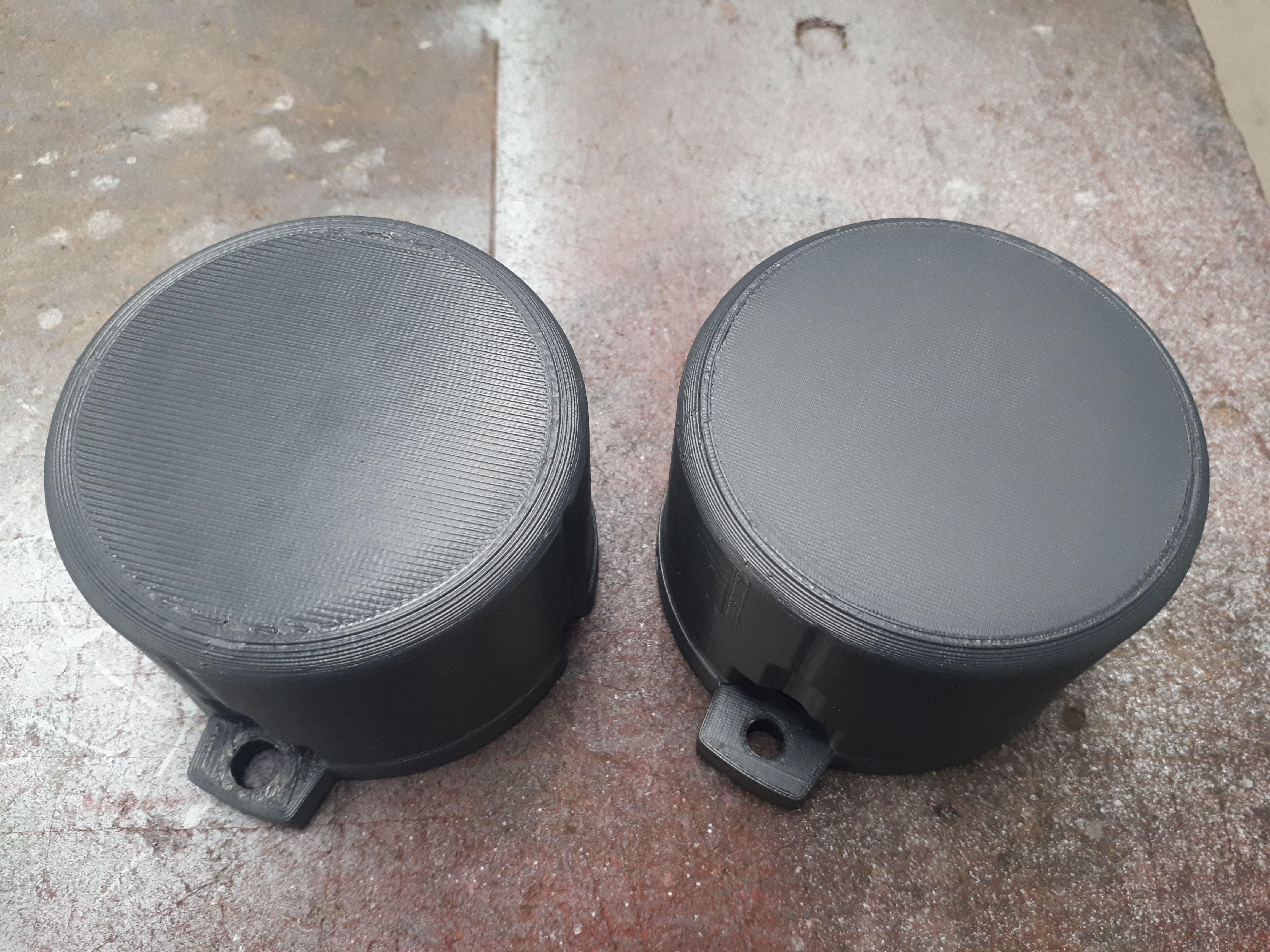
rongith
on 30 Sep 2019
@rongith This is amazing!
 Panayiotis-git
on 1 Oct 2019
Panayiotis-git
on 1 Oct 2019
Please include this in PrusaSlicer 2.1!! Apparently this has already been coded. Currently I content myself knowing that I will eventually paint the tabletop parts, but it is going to be a long time before I get around to do that....if at all. Until then, it would be so nice to have this surface quality.
Alphaelectric
on 1 Oct 2019
Please include this in PrusaSlicer 2.1!! Apparently this has already been coded. Currently I content myself knowing that I will eventually paint the tabletop parts, but it is going to be a long time before I get around to do that....if at all. Until then, it would be so nice to have this surface quality.
Seconded - please implement this.
 MrBill1234
on 1 Oct 2019
MrBill1234
on 1 Oct 2019
I would love for this to be implemented so I could use it more. I used it early on with supermerril's fork and it looked fantastic.
KDPate
on 1 Oct 2019
Some more eye candy / motivation. Left print is with ironing, right print is without. Otherwise they are identical.

Worth noting is I did have to adjust the flow parameters in the supermerill fork to get such nice results. Top solid infill layer flow should be 100%, then ironing flow needs to be adjusted between 0%-20% depending on the surface being ironed. Also I set the ironing extrusion width to 0.1mm instead of the default which was much larger. These two parameters should be user-adjustable in the print settings if ironing is implemented.
Matts-Hub
on 4 Oct 2019
Some more eye candy / motivation. Left print is with ironing, right print is without. Otherwise they are identical.
Something that have been around for quite some time now - and is very popular, but no reply from Prusa or assigned to have a look at.
Would be very nice since finish is something that a "non initiated" quite often comment when you show them a print with a larger flat surface.
I have sometimes (depending on print) cheated by setting the printerheads width to 0.38 (when using a 0.4 head) - and lowering the flow somewhat. But a proper setting would be so much better.
Let´s hope this is resolved sooner than later... parhaps this will be a a time-capsule to look back on in yet another two years... ;)
Cheers!
 Idus
on 4 Oct 2019
Idus
on 4 Oct 2019
Not your average +1... can we start a kickstarter or a bounty for this feature? I'd be down to kick in some money for this if it would help get this in.
 AndrewFarley
on 27 Oct 2019
AndrewFarley
on 27 Oct 2019
@AndrewFarley
Feature already implemented (in my fork and in an old pull request).
But this feature is too finicky to tune for the users (it's true that it require tuning depending of the filament and printer), so it won't be added inside prusaslicer (that's the reason i was told a year ago)
Can i have the bounty? ;-p
supermerill
on 28 Oct 2019
I don't think it's too finicky to use. There are a lot more options under "Expert" that can really screw up your print (and printer).
@supermerill: I have tried your fork and ironing worked really well. Just had to tune my extrusion a bit. The reason why I switched back to the main branch is that there was a problem with lower bridging layers. For some reason, the fork did something like a spiral pattern that didn't work with the parts I am printing. I had to switch back :(
Alphaelectric
on 30 Oct 2019
@Alphaelectric I'm interested in bug reports.
supermerill
on 30 Oct 2019
Please consider implementing this.
Polyalchemy elixir filaments look great when they've been ironed. It really brings out the shine.
 gitsh01
on 20 Nov 2019
gitsh01
on 20 Nov 2019
I would really like to see this in PrusaSlicer .. very good improvement to the normal top surface on my Ender 3 with Cura .. I'd like to switch to PrusaSlicer though :)
 g01d10x
on 7 Jan 2020
g01d10x
on 7 Jan 2020
This feature really needs to get implemented officially. Cura has always been ahead of the game in terms of experimental features but the fact there is already older forks with it implemented by @supermerill shows it can be done already.
I only recently decided to try out Prusa Slicer and I'm in love with the viewport and settings layout. It also solved a huge issue I was having with Cura on small curved surfaces having zits no matter which settings I messed with. Sadly I can't live without ironing, it works beyond incredibly with many filaments and gives surface finishes that simply can't be had in any other method. My dice trays would hardly be impressive without the beautifully smooth surface for rolling. The lack of an ironing feature is probably keeping may others like me from being able to fully embrace this slicer.
 EnderSyth
on 13 Jan 2020
EnderSyth
on 13 Jan 2020
Another vote for ironing. Cura is amazing for a free program, but the UI doesn't work for me, and Simplify3D gives me way better quality with less trial and error.
PrusaSlicer seems like a best of both worlds option -- or at least it would if it had ironing.
 warrenparsons
on 15 Jan 2020
warrenparsons
on 15 Jan 2020
@supermerill Does the prusa dev team accept PR's from the community? If yes, I hope you've created one?
 tuffrabit
on 23 Jan 2020
tuffrabit
on 23 Jan 2020
Another vote for ironing.
 manukieli
on 29 Jan 2020
manukieli
on 29 Jan 2020
I would love to see this feature implemented.
 willyckh
on 29 Jan 2020
willyckh
on 29 Jan 2020
I would also love to see this feature implemented, especially if it could be made to work with nonplanar printing.
 SniderThanYou
on 11 Feb 2020
SniderThanYou
on 11 Feb 2020
Seems there was a PR for it that got lost due to changes in the base code.
https://github.com/prusa3d/PrusaSlicer/pull/821
 Nandox7
on 22 Feb 2020
Nandox7
on 22 Feb 2020
Feature already implemented (in my fork and in an old pull request).
But this feature is too finicky to tune for the users (it's true that it require tuning depending of the filament and printer), so it won't be added inside prusaslicer (that's the reason i was told a year ago)
@supermerill I don't agree, I've used the ironing in your fork and it works perfectly fine with the default settings on any brand of PLA or HTPLA. It's 1000x better than the default top fills options.
Ironing does not work so good on PETG but that is because of the nature of the material.
 Photogad
on 24 Mar 2020
Photogad
on 24 Mar 2020
+1
 thierryzoller
on 11 Apr 2020
thierryzoller
on 11 Apr 2020
I am looking into ironing. I hope to finish the ironing for the next PrusaSlicer release.
I took my time and I spent about two days researching everything available on the Internet, printing some examples etc. I also reviewed @supermerill 's implementation of ironing.
I reviewed the Ironing feature as implemented in various slicers (Cura, Kisslicer, Ideamaker). The variant implemented by @supermerill irons over the areas that were filled with "top surfaces" pattern, while the better solution is to iron just surfaces visible from the top. This is what all the other slicers do and what our slicer will do as well. Therefore @supermerill 's implementation could not easily be reused in PrusaSlicer.
Also Cura has a parameter to not iron up to the edge of the surface, while Kisslicer has an interesting feature of ironing over concavities and holes inside the top region, which reduces surface scarring.
This is my work in progress implementing Ironing into PrusaSlicer: 10110ed3075b2b2c50096e842a45ea456c8106e2 While this ironing prototype works, I am not happy with the path planning.
I have also reviewed the pull request by @wavexx https://github.com/prusa3d/PrusaSlicer/pull/3803 implementing a "uniform" infill. The "uniform" infill partially reduces scarring of the top infills and the same technique could be used to improve my ironing prototype. The "uniform" infill partially implements the concept of "monotonous" infill, where one infill line is only allowed to be layed down at one side of an already extruded line. Such path planning is very difficult to do optimally though, more difficult than the normal infill planning. The key words here are "Precedence Constrained Tranveling Salesman Problem", "Pickup and Delivery TSP", "Asymmetric Constrained TSP" and similar. PrusaSlicer already implments the TSP algorithm for normal infill, I am looking into these variants for the Precedence Constained TSP.
I also googled the following issues and proposals of Ultimaker's Ironing implementation for reference:
Underextrusion after ironing #4108
https://github.com/Ultimaker/Cura/issues/4108
Ability to set ironing layer height #5342
https://github.com/Ultimaker/Cura/issues/5342
Please include an "Iron every layer" option, for clearer prints.
https://community.ultimaker.com/topic/26593-please-include-an-iron-every-layer-option-for-clearer-prints/
Scarring during ironing due to change of ironing direction, this is no different from normal infill and we have many issues in PrusaSlicer like that
https://community.ultimaker.com/topic/27383-feature-request-print-or-iron-top-skin-in-only-one-direction-in-zig-zag-or-line-mode/
@vintagepc
I've tried before with that slicer fork, the gotcha is that it has a severe tendency to cause heat creep jams with PLA and warmer ambient temperatures because your extrusion rate is so low - so I gave up on ironing, at least for now.
https://forum.prusaprinters.org/forum/prusaslicer/feature-request-top-layer-texturing/#post-157306
bubnikv
on 14 Apr 2020
Looking forward to see what comes of it!
 vintagepc
on 14 Apr 2020
vintagepc
on 14 Apr 2020
Thank you so much @bubnikv for looking into this! Can't wait to test it :D
Alphaelectric
on 14 Apr 2020
What release is this targeted for? 2.3? When can we (roughly) expect the first alpha of this - and possibly final release?
MrBill1234
on 14 Apr 2020
Thanks a lot for looking into this! I would really like to use ironing in PrusaSlicer!
 Dakkaron
on 15 Apr 2020
Dakkaron
on 15 Apr 2020
Thank you @bubnikv i cant wait until it's released!
Photogad
on 15 Apr 2020
Very GOOD NEW. Thank you so much 👍🏻👍🏻.
manukieli
on 15 Apr 2020
It's great that feature is getting picked up.
@bubnikv let me know if you need people testing this feature on various objects; I do not mind (alpha) testing if it helps development :)
 Cyberwizzard
on 15 Apr 2020
Cyberwizzard
on 15 Apr 2020
I have also reviewed the pull request by @wavexx #3803 implementing a "uniform" infill. The "uniform" infill partially reduces scarring of the top infills and the same technique could be used to improve my ironing prototype. The "uniform" infill partially implements the concept of "monotonous" infill, where one infill line is only allowed to be layed down at one side of an already extruded line. Such path planning is very difficult to do optimally though, more difficult than the normal infill planning. The key words here are "Precedence Constrained Tranveling Salesman Problem", "Pickup and Delivery TSP", "Asymmetric Constrained TSP" and similar. PrusaSlicer already implments the TSP algorithm for normal infill, I am looking into these variants for the Precedence Constained TSP.
I'm probably biased here, but I'm more excited about the prospect of monotonous than ironing (don't get me wrong, I excited about ironing too). Before writing the "uniform" PR I was essentially post-processing the gcode to do that. Once the vertical partitions are set up to have the same top/down direction, optimal merging reduces to sorting. We could then handle travels by using a simply dependence chain, so while they aren't strictly optimal, it would still be faster than ironing before we get to true constrained TSP. I don't think this is a good place to discuss this, but there are some architectural quirks to be resolved to get there (for example, how to structure dependencies in ExtrusionPath). Even if this is not a priority right now, I could perhaps give a hand there. Maybe we could continue in the "uniform" PR.
There's also another approach to remove ridges, which is perhaps less appealing from a purity perspective, but might work just as well (if not faster): "selective" ironing. Do traditional rectilinear infill, but extend the last move with a travel over the seam if we're on a boundary which has been filled with another direction already, essentially ironing _just_ the ridge. I never tried to do this one, but since we don't need to constrain directions, travels or even the ironing passes, it could be an interesting approach as well.
 wavexx
on 15 Apr 2020
wavexx
on 15 Apr 2020
I will +1 @wavexx uniform infill, above ironing. Even if it can´t be optimally planned, it is a small sacrifice to make to get uniform top layers without all of the other complexity and tuning that ironing brings. I have always noticed that it is always visible when the recitilinear pattern switches direction, changing the top surface glossyness and leaving a ridge where to infill sections made in opposite directions meet. Both would be best of course!
 Itox001
on 21 Apr 2020
Itox001
on 21 Apr 2020
Both Monotonous infill and Ironing are available in master for testing.
The Monotonous path planning (used for the Ironing as well) tries couple of semi-randomized round, this part of the algorithm may be improved.
bubnikv
on 30 Apr 2020
Thanks for the heads up.
Pulling the changes now to give it a try.
Issue Found:
First time slicing a part it shows the ironing,
If I make a change. I.e.: change infill from 10% > 15% and slice the ironing is no longer showing.
Need to either do the following to have it again applied:
- disable ironing > slice > enable ironing
- re-import the part
PS: IMHO the settings side menu buttons are really annoying, the tabs are way more practical.
Nandox7
on 30 Apr 2020
HTPLA3D870 print I just did with @supermerill ironing in his fork using default settings. Top surface came out flawless. I thought HTPLA would struggle but it's coming out just as good as regular PLA
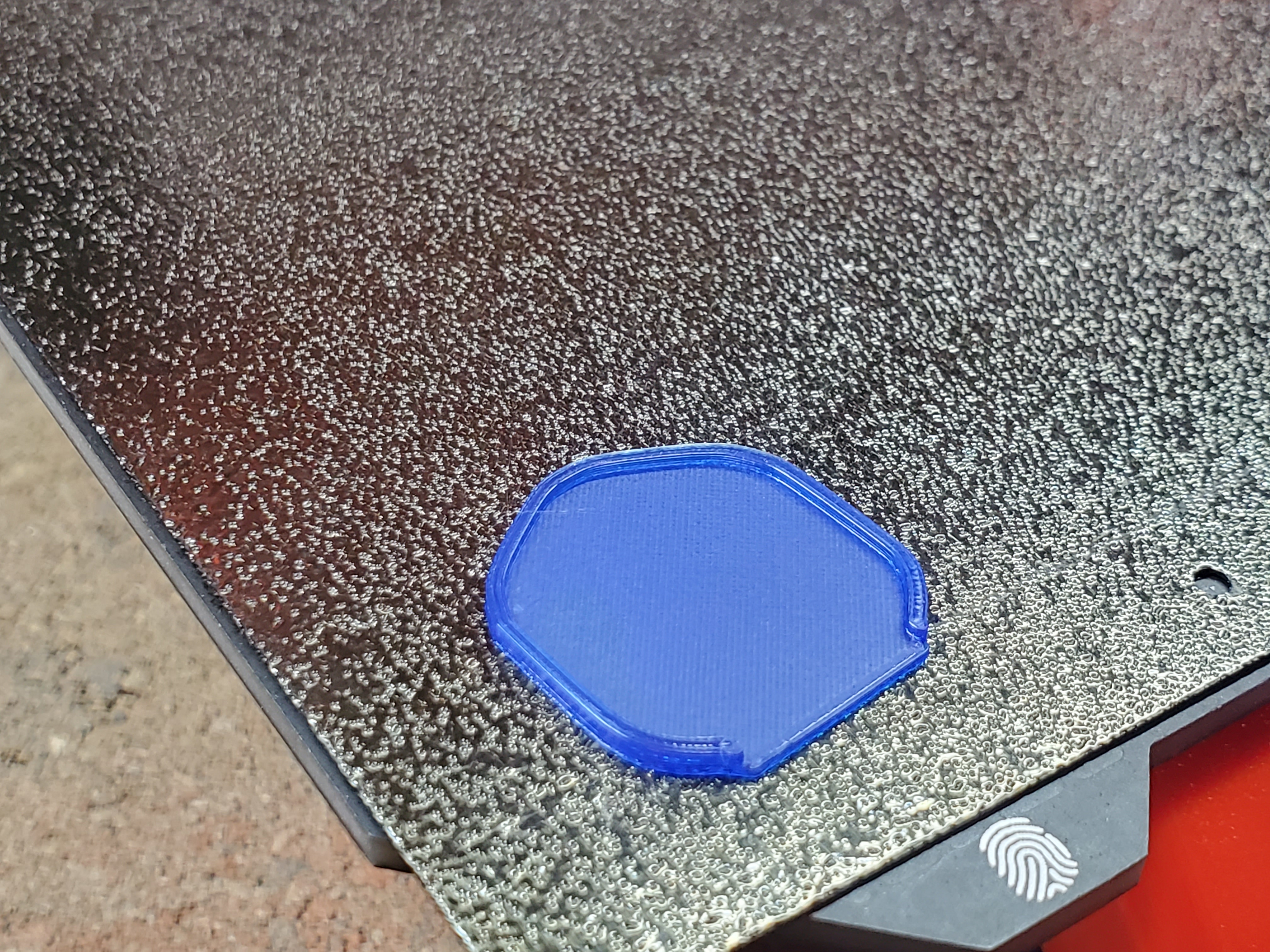
Photogad
on 30 Apr 2020
This is fantastic, I'm looking forward to the next release...
vintagepc
on 1 May 2020
This is so cool! Looking forward to it! Thanks a lot!
Dakkaron
on 1 May 2020
I am trying to test the new code in master, but although I am a long-time linux user I can not get the program to compile after nearly 6 hours of dependency and error solving (using WSL2 on Windows 10 with the Ubuntu base image).
So instead of me spending time on getting it to work on Ubuntu: when will the next unstable release be made?
Cyberwizzard
on 3 May 2020
I would like to point out that sometimes I fail with supermerril's implementation of ironing on very large flat parts and large bridged surfaces. Ironing is not always reliable. On small parts I don't have issues. I don't know why precisely at the moment. I can do very few tests, only when I have to produce those parts. It happens several months (and several supermerill versions) between different prints.
Here the good:
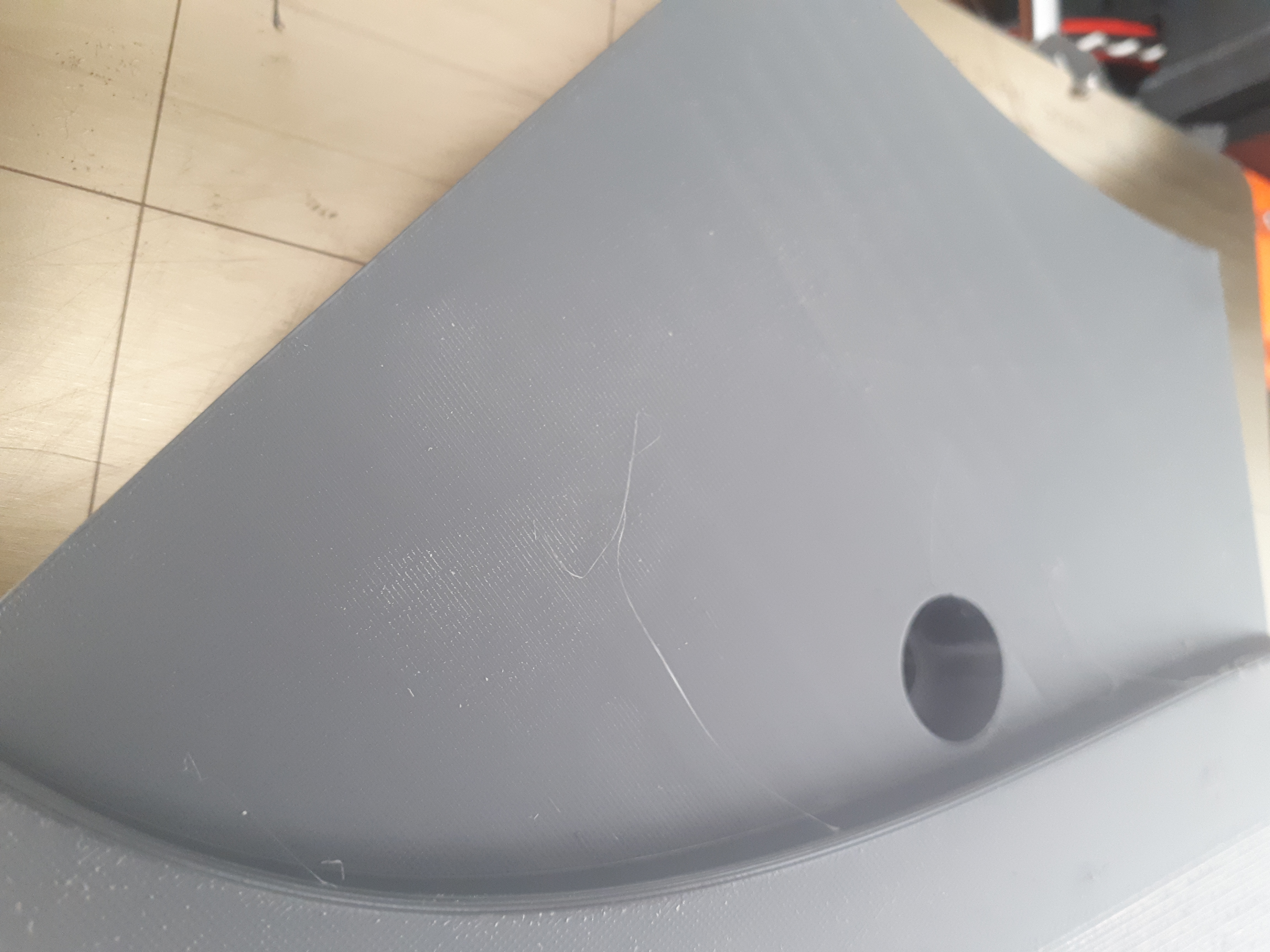
Here the bad:
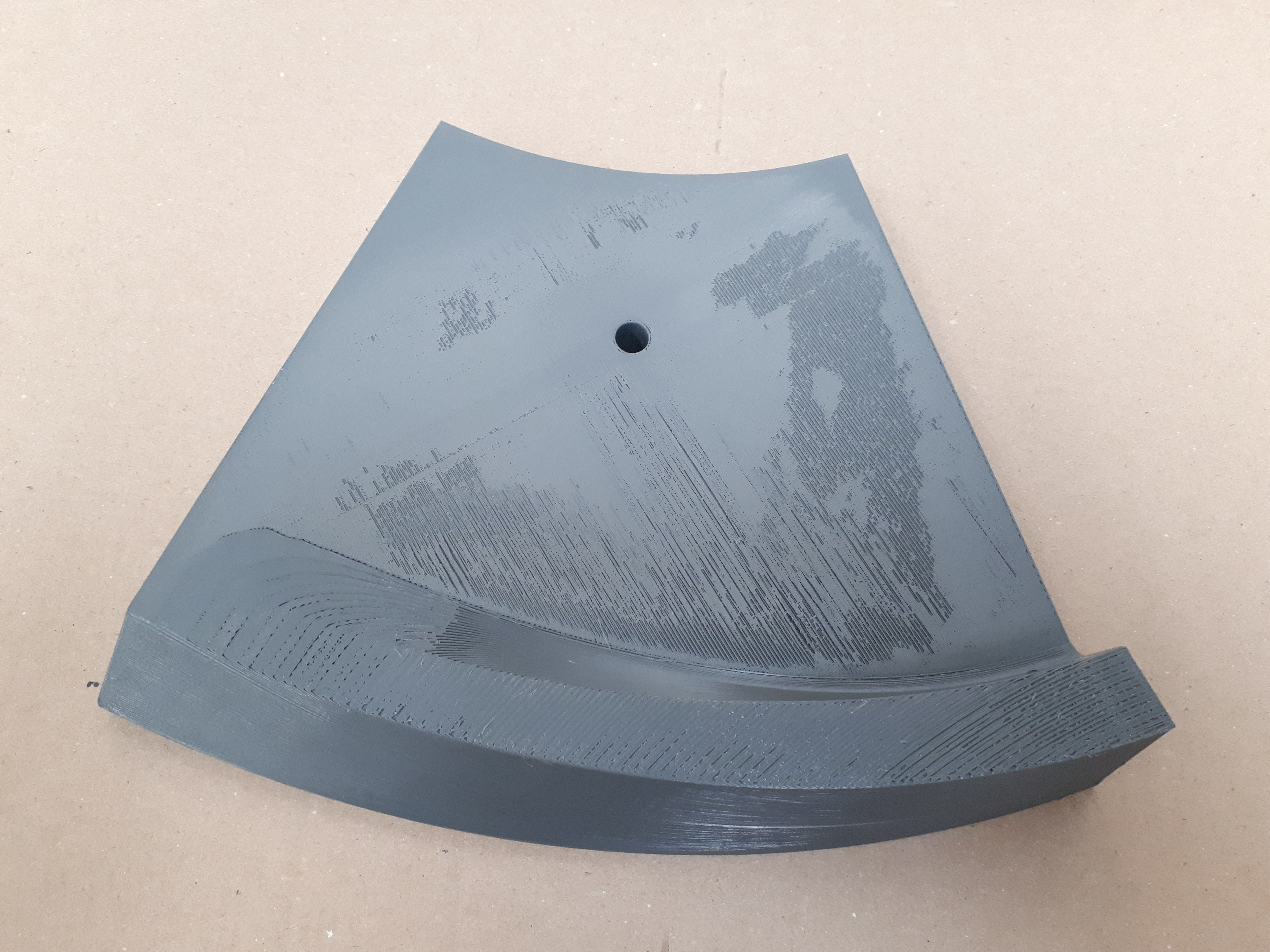
My suspected issues for the moment are:
- Large flat top surfaces are not always so flat for ironing?
- The extruder motor go too slowly for too long?
I still didn't compile with the Prusa's commits. I need to find a couple of days in a row to test that. I'm very happy that there is some activity on that.
rongith
on 4 May 2020
I would like to point out that sometimes I fail with supermerril's implementation of ironing on very large flat parts and large bridged surfaces. Ironing is not always reliable. On small parts I don't have issues. I don't know why precisely at the moment. I can do very few tests, only when I have to produce those parts. It happens several months (and several supermerill versions) between different prints.
Here the good:
Here the bad:
My suspected issues for the moment are:
- Large flat top surfaces are not always so flat for ironing?
- The extruder motor go too slowly for too long?
I still didn't compile with the Prusa's commits. I need to find a couple of days in a row to test that. I'm very happy that there is some activity on that.
@rongith
Pla or.petg?
Photogad
on 4 May 2020
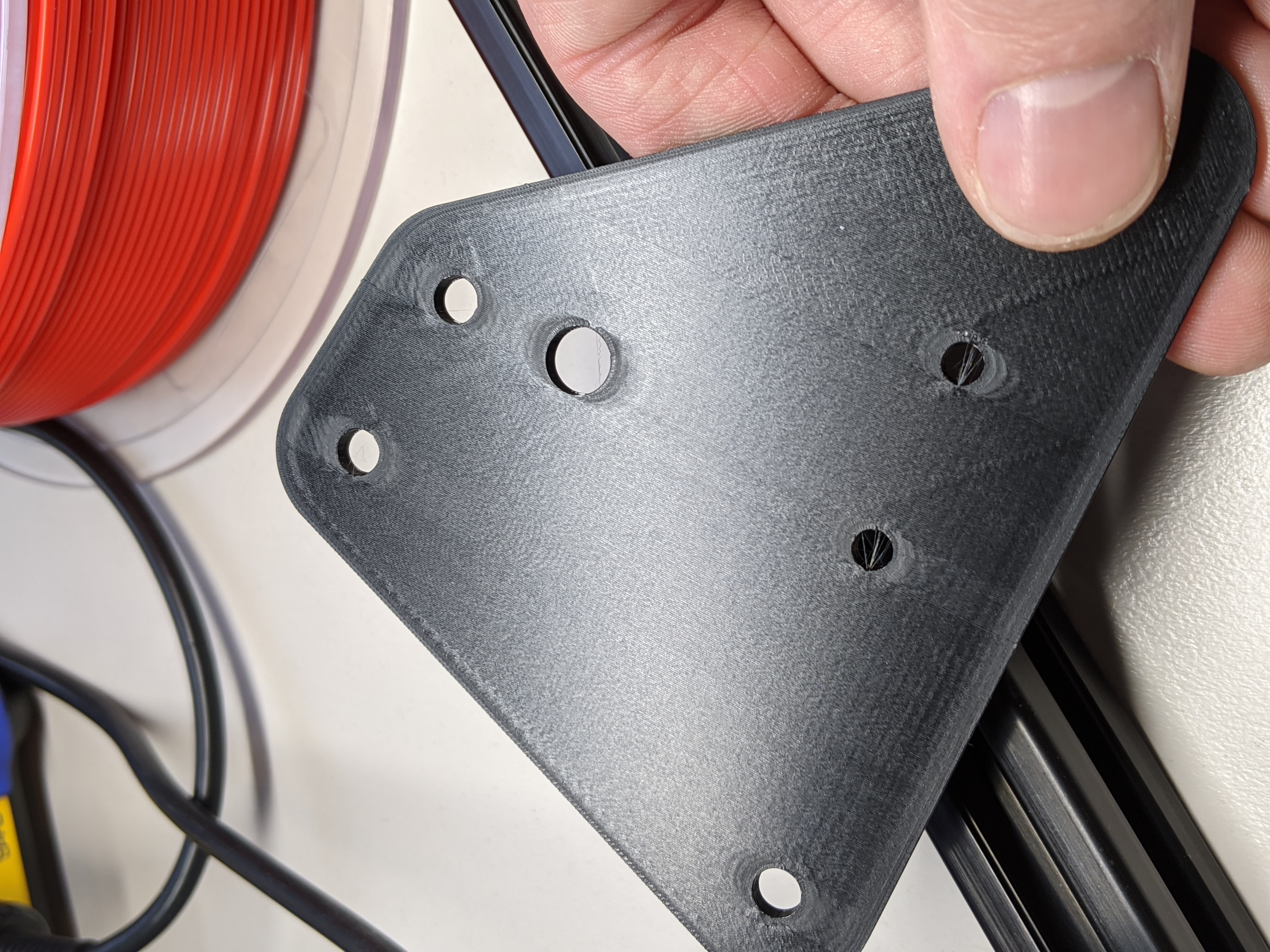
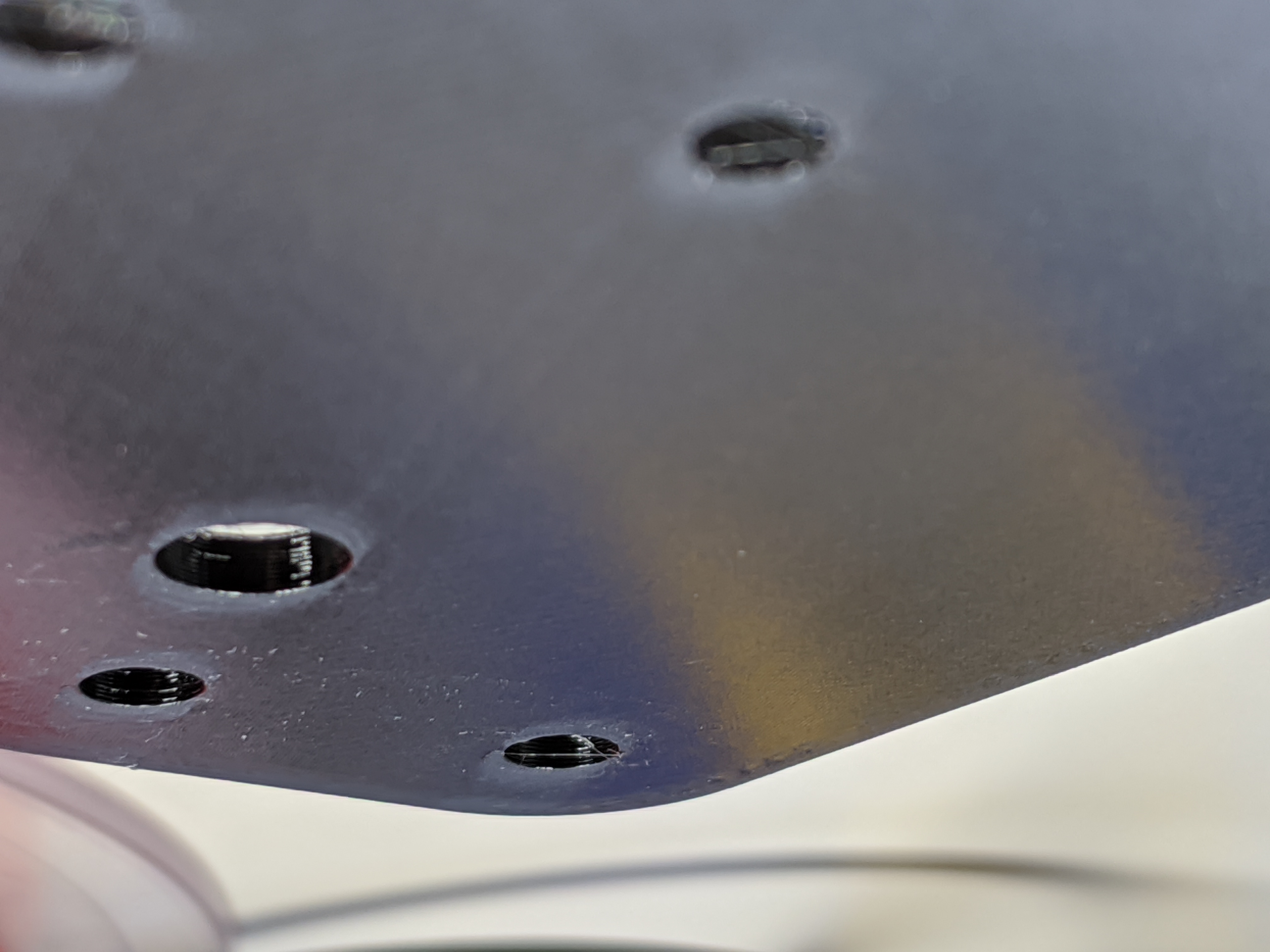
Absolutely incredible. Using Prusa Slicer built from master. This was printed in PLA, 0.1mm spacing, 17% flow (I could have done with an extra 1%), 90mm/s ironing speed and monotonous infill enabled.
Thank you so much for all your hard work @supermerill @wavexx and @bubnikv!
Matts-Hub
on 4 May 2020
Here the bad:
My suspected issues for the moment are:
I was seeing similar issues which I attributed to partial clogs with Slic3r++. In my case it would result in a jam and underextrusion after the ironing layer completed.
vintagepc
on 4 May 2020
These results look terrific! May I ask which release will carry this new function? Is this feature something for a 2.30 alpha?
Alphaelectric
on 4 May 2020
@Photograd
@rongith
Pla or.petg?
ColorFabb XT (Copolyester, PET like). Printing temp: 260°C. I clogged only once when printing 300 holes at a 0.2" pitch and by increasing retraction up to 1.6mm (I wanted to try the new possibility to override some parameters in filament settings). Printing many many holes at low pitch is a very good torture test for heat creep.
To have an idea of the size of the part, the fitting rectangle is 249.5x209.5 (no skirt).
@vintagepc
My suspected issues for the moment are:
I was seeing similar issues which I attributed to partial clogs with Slic3r++. In my case it would result in a jam and underextrusion after the ironing layer completed.
On that particular case I agree it seems it is a partial clog.
I couldn't find a photo of the top surface I think it is not so flat as only the centre is affected by the underextrusion.
I have different configurations of the following part from small to large:
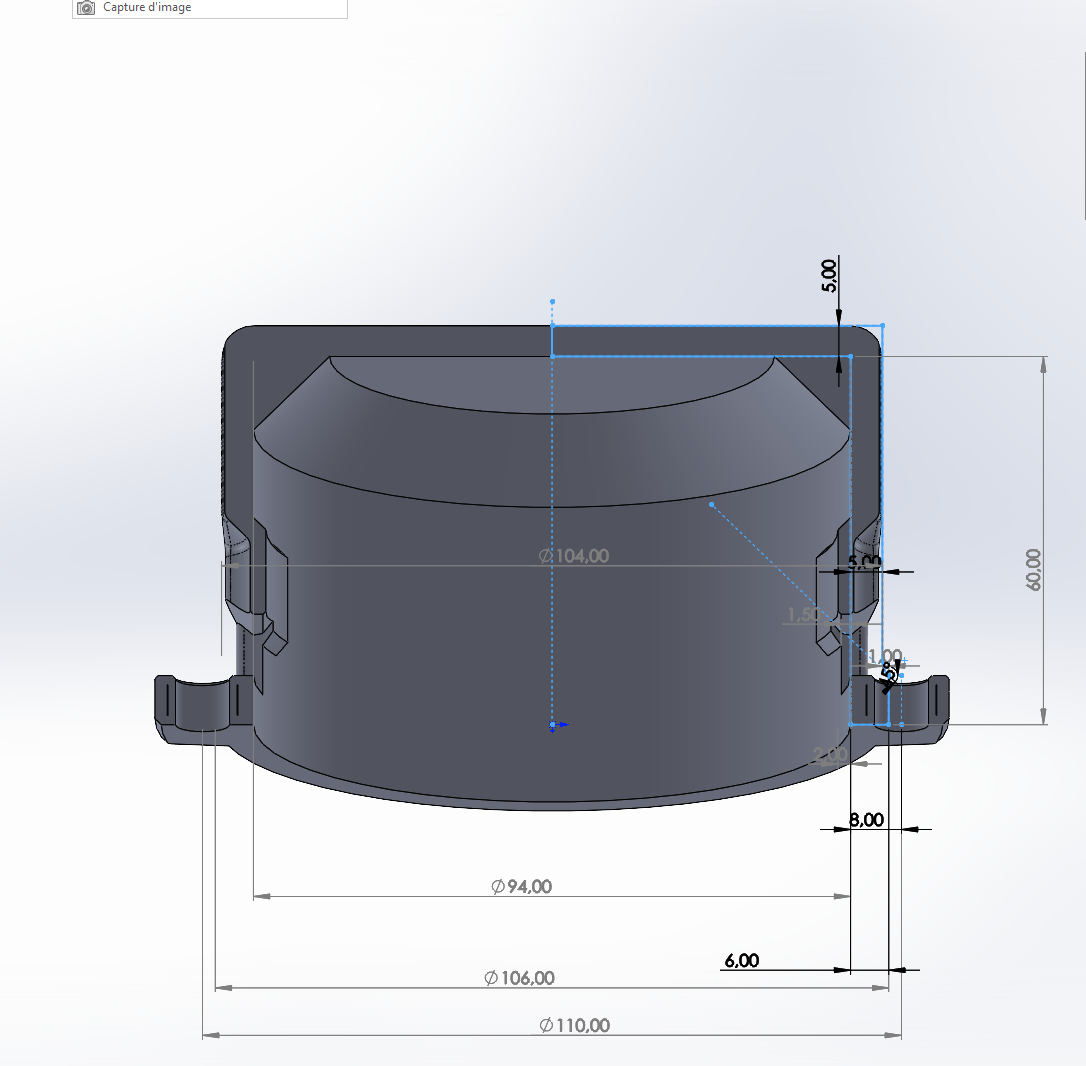
On small ones I have no issues, on large ones, I had to add a chamfer on the top inside to reduce to bridged distance, I have then good results for ironing.
There are now few parameters I can play with on supermerrill's version like distribution set to 20%.
rongith
on 4 May 2020
I haven't actually gotten around to building the tip to play with this feature, so please forgive me if this would be obvious...but will this feature also be available to attach to modifiers? I am thinking this would be incredible to use on modifier layers for stacking face shields to iron the "top" and "bottom" layers (via the modifier).
 adawalli
on 4 May 2020
adawalli
on 4 May 2020
@Photograd
@rongith
Pla or.petg?ColorFabb XT (Copolyester, PET like). Printing temp: 260°C.
I think this is the issue. @supermerill ironing works flawlessly for me with PLA, but has the issues like I see in your picture with PETG. I think PETG just does not like to be ironed. But IDK. I've never tried Cura Ironing with PETG to see if it works better.
Photogad
on 4 May 2020
I haven't actually gotten around to building the tip to play with this feature, so please forgive me if this would be obvious...but will this feature also be available to attach to modifiers? I am thinking this would be incredible to use on modifier layers for stacking face shields to iron the "top" and "bottom" layers (via the modifier).
You can iron only top flat surfaces.
rongith
on 4 May 2020
imo, if you have question with ironing from my fork, it's better to create an issue in my fork github.
Heat creep: increase the distribution from 10% to 15-20%, and/or enlarge the width a bit.
large surface fail: it's underextrusion. depends on the model and other options. If it's random, maybe heat creep, if it's reproductible, it's because there are a lack of plastic: filament diameter? over-bridge flow too low?
supermerill
on 4 May 2020
ColorFabb XT (Copolyester, PET like). Printing temp: 260°C.
I think this is the issue. @supermerill ironing works flawlessly for me with PLA, but has the issues like I see in your picture with PETG. I think PETG just does not like to be ironed. But IDK. I've never tried Cura Ironing with PETG to see if it works better.
Never tried with PLA. Then I didn't know. I'm happy to know that it is not only me that have issues.
Sometimes I have very nice results on large parts with XT but didn't found for now the parameters that gives that inconstancy.
imo, if you have question with ironing from my fork, it's better to create an issue in my fork github.
Heat creep: increase the distribution from 10% to 15-20%, and/or enlarge the width a bit.
large surface fail: it's underextrusion. depends on the model and other options. If it's random, maybe heat creep, if it's reproductible, it's because there are a lack of plastic: filament diameter? over-bridge flow too low?
I agree. I'm not here to solve that issue, just to expose some possible difficulties with ironing. I prefer to make some tests I have in mind before adding an issue on your fork.
rongith
on 4 May 2020

Layer height 0.3. Material: ABS. Left: Monotonous. Right: Monotonous + Ironing passes 0.2

Layer height 0.3. Material: PLA. Right: Monotonous. Left: Monotonous + Ironing passes 0.1 (Default)
Unfortunately as my filament sensor is down now, there were no material to finish the small part, where the sanding paper is attached. But you can see the two very nice flat surfaces on the top and middle of the part.
I like monotonous too.
I'm impressed by the default settings. But I think I won't use them. Before ironing, I was complaining that top surfaces was not nice compared to the perimeters. Now, with the defaults, it is too nice compared to the perimeters. It should make sense for low layer heights.
I tried to print a full bed part with ironing selected (46h print - 730g) but my filament was not good for bridging. The print was very early a fail. Then I can't expose my result now. I noticed that one layer is 370min long to print with 0.1mm between passes. It is a lot. That layer time drop down to 200min with 0.2mm and 96min without ironing.
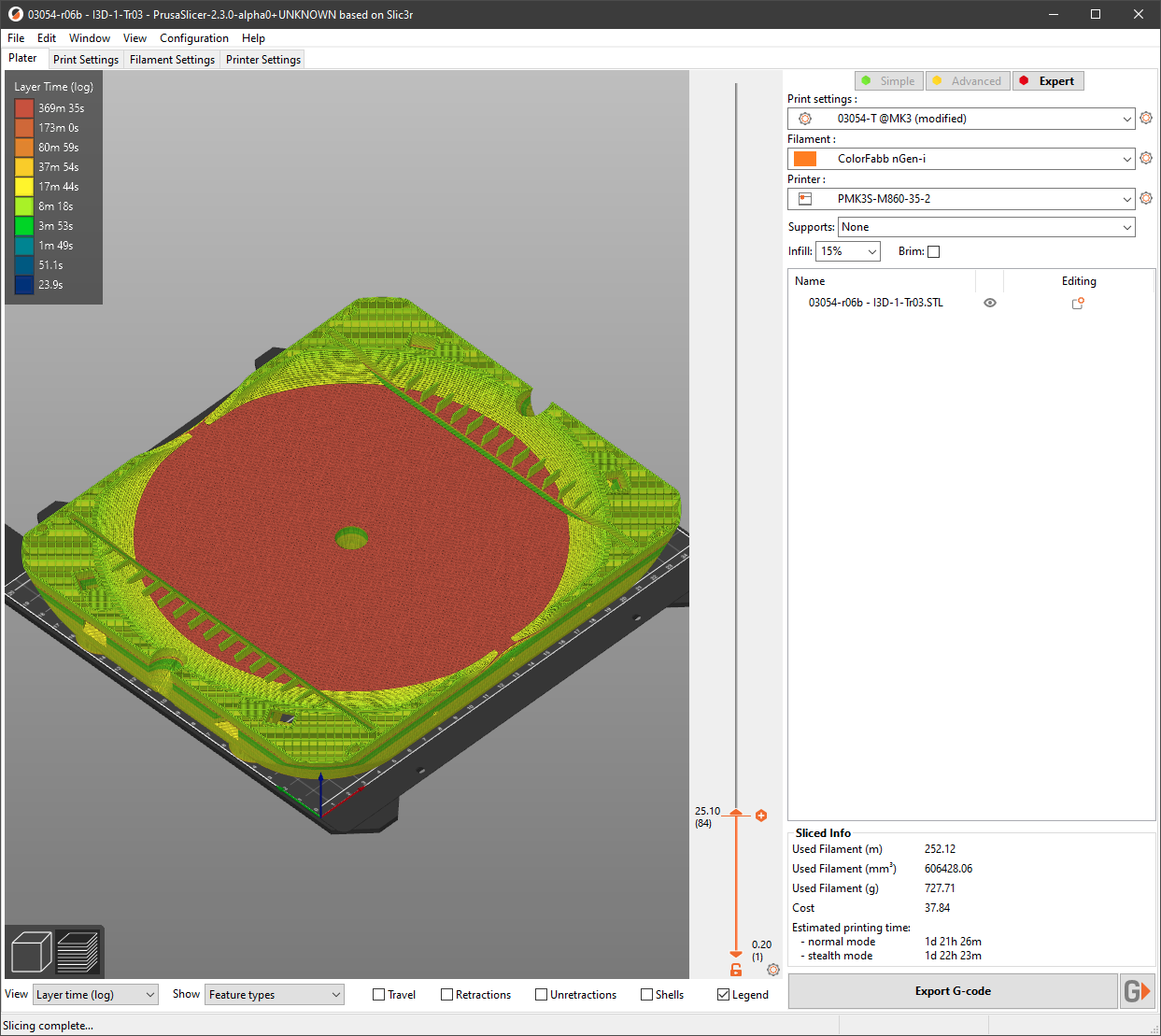
I think 0.2mm or 0.3mm would better fit my needs. I'm printing now 3 parts with different spacing between ironing passes. Result will be tomorrow.
rongith
on 13 May 2020
Damn I want to try this so badly. My products have mostly 3d printed mechanics, this will give me a lot more freedom when designing them!
 ddavidebor
on 13 May 2020
ddavidebor
on 13 May 2020
I made some prints to reduce the layer time. I went up to 90mm/s like @Matts-Hub . I don't look for the best result but a compromise between time and quality.

Material ABS. Layer height: 0.3
On the photo (when clicked):
| ________ | Left ____________________ | Right_____________________ |
| ________ | ------------------------ | --------------------------- |
| Top____ | Spacing: 0.3 - Speed: 15 | Spacing: 0.3 - Speed: 93.8 |
| ________ | Spacing: 0.2 - Speed: 15 | Spacing: 0.3 - Speed: 37.5 |
| Bottom | Spacing: 0.1 - Speed: 15 | Spacing: 0.3 - Speed: 15.0 |
@93.5, I can notice some small defects that can perhaps lead to some unreliability.
"Spacing: 0.3 - Speed: 37.5" is nice for me with that test. I will surely refine it. "Spacing: 0.1 - Speed: 15" don't worth the time for my need.
When touching the surface, I find that "Spacing: 0.3 - Speed: 37.5" is better than "Spacing: 0.3 - Speed: 15.0" and "Spacing: 0.2 - Speed: 15" is better than "Spacing: 0.1 - Speed: 15". The best are "Spacing: 0.2 - Speed: 15" and "Spacing: 0.3 - Speed: 37.5". At first it seems like if you increase spacing you have to increase speed too.
rongith
on 15 May 2020
Hello, so in order to test this feature we need to run Prusa Slicer 2.3 Alpha version? Is there a compiled version, prefered Linux but I'll also test Windows version if available. If anyone has compiled versions please share them. Thanks!
 valentt
on 31 May 2020
valentt
on 31 May 2020
@valentt ,
Here for windows: https://github.com/rongith/PrusaSlicer/releases
I just uploaded it for you and hopefully others in need.
rongith
on 1 Jun 2020
Feedback from rongiths build for Windows - it seems to work fine.
Still dialing in the settings but the results are encouraging.
One quirk: when selecting top-most surface only for ironing, only one surface from multiple surfaces at the same height are ironed. I was expecting all surfaces at that height to be ironed.
Cyberwizzard
on 5 Jun 2020
I don't like the ironing going to the edge of a surface, even upon all perimeters including the external perimeter.
Going so is nice for a flat surface but when there is a slope, ironing makes the slope rough. In the following case, the ironing is unnecessary on the external perimeter.
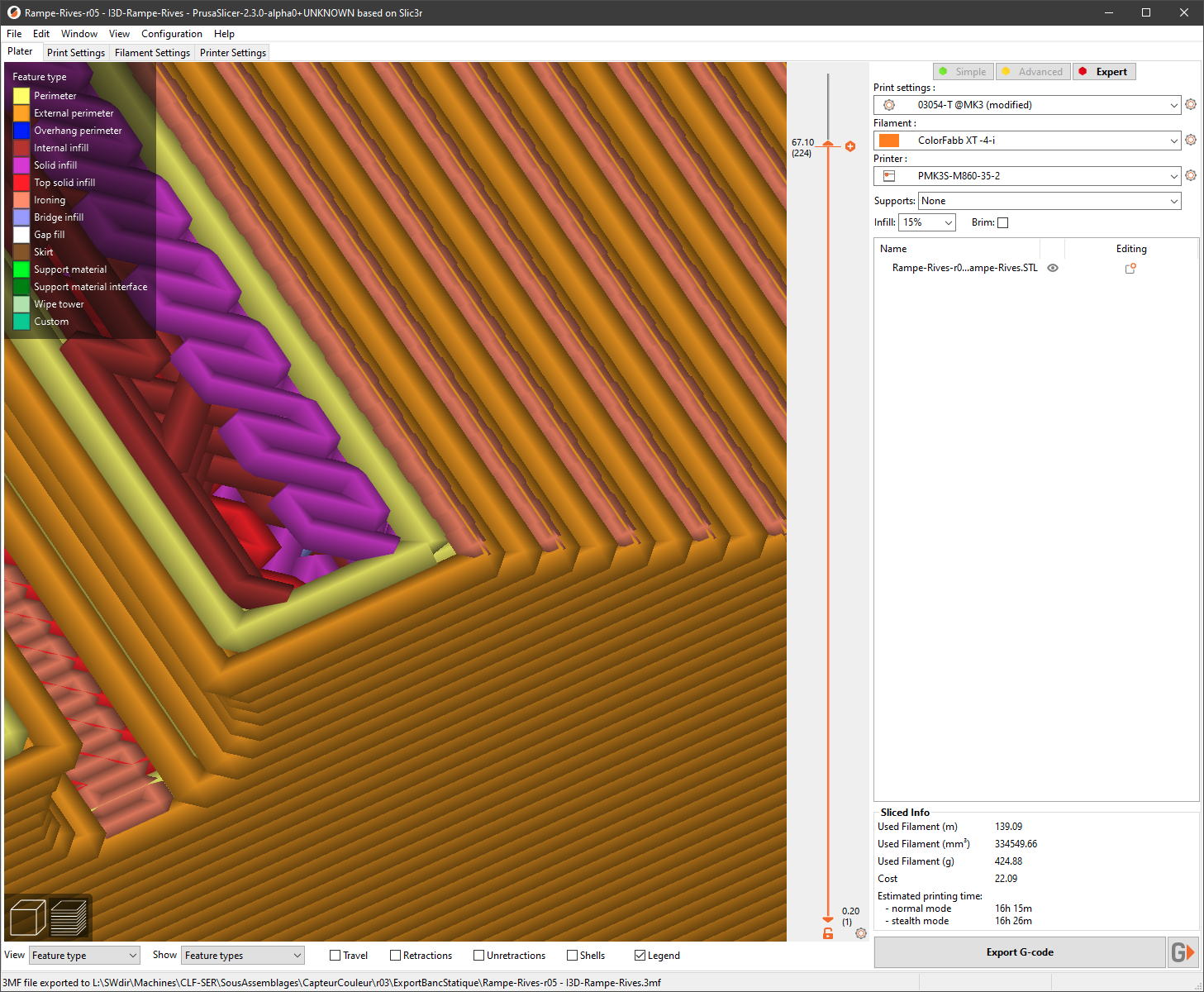
I prefer to have the perimeters without ironing. Then no https://github.com/supermerill/SuperSlicer/issues/228
Supermerill propose ironing on top infill only. He also propose to have only one perimeter on top surface. But I don't like it either on parts with fillet as then top infill is apparent on upper part of it making the fillet rough.
Ironing needs a clean nozzle. If it is partially clogged, the printing failed. I concluded that from the following sequence:
- Printing failed with ironing. Many layers missing:
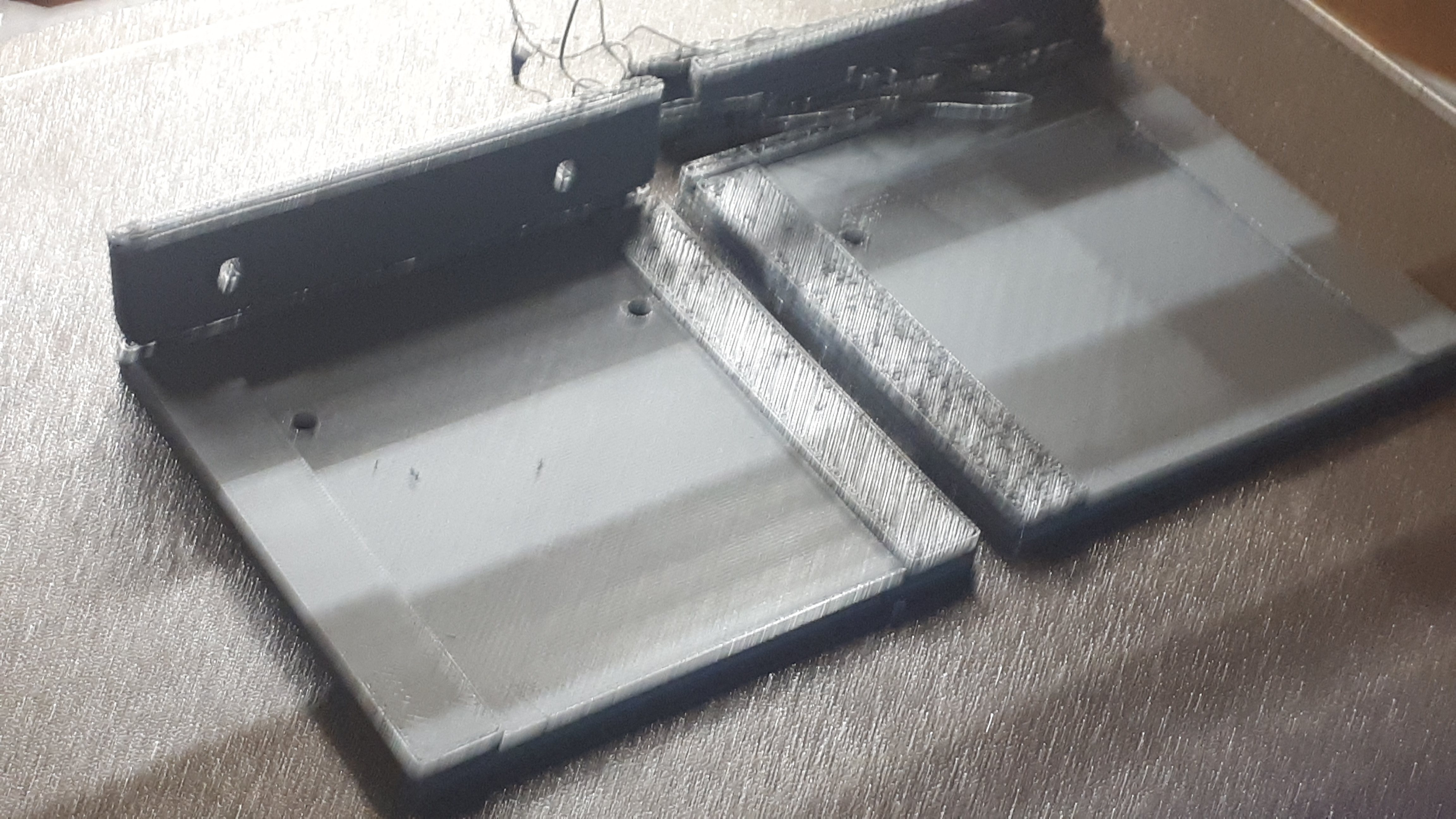
- Try again: fail.
- Printing succeeded without ironing.
- Multiple cold pulls of PA filament to clean le nozzle.
- Printing succeeded with ironing.
Edit: @Cyberwizzard, I'm unable to reproduce your issue with the following test:
IroningTest-MulipleSurfaces-r00 - Defaut.zip

My build for windows has modification but none concerning the g-code generator. My modifications are only about UI.
rongith
on 5 Jun 2020
I'm so happy that ironing is being added to PrusaSlicer! That is the only feature I really miss a lot from Cura. Btw, I can't believe how nice PrusaSlicer looks now and how well it works. It's really a pleasure to use. I've been using Cura or the last few years until recently bc I thought it would be like Slic3r's UI which I just straight up don't like.
How long until ironing will be included in a release version? I would like to try it out now so is building it from source for Win64 the only way? Thanks.
 Rob4226
on 9 Jun 2020
Rob4226
on 9 Jun 2020
@Rob4226 Thank you for the compliments. To answer your question, we generally try to do a minor version final release about every 6 months. Last release was mid-March, first alpha precedes the final by at least a month. This might give a rough idea about what might be about to happen. No promises though.
Compiling from source is the only option until then. If I see correctly, @foreachthing was kind enough to share a binary. Constructive criticism is welcome.
 lukasmatena
on 9 Jun 2020
lukasmatena
on 9 Jun 2020
@lukasmatena Thank you very much for your response! In that case, I'll compile from source or check out @foreachthing's binary in order to try out the ironing feature. I'll report back if I come across anything worth mentioning here. Keep up the really great work! :thumbsup:
Rob4226
on 9 Jun 2020
Compiling from source is the only option until then. If I see correctly, @foreachthing was kind enough to share a binary. Constructive criticism is welcome.
If I may hijack this topic, I have compiled PrusaSlicer from source today (87c9163a5e2e116ad4986ac80a35c7dde526c645) and gave the ironing a try as it is the no. 1 feature I was missing when I transitioned from Cura.
While I haven't dialed in my Fillamentum PLA perfectly yet, I noticed that the ironing feature gave some surface areas very visible scars with the default settings (I believe it was 15% flow rate, .1mm spacing). I was attempting to set the ironing flow rate to 0% to see what that would do, but PrusaSlicer didn't like that.
I am wondering if an ironing pass without any extrusion is possible, or what strategies you would recommend to avoid creating scars during the ironing process.
 MrManny
on 18 Jun 2020
MrManny
on 18 Jun 2020
After seeing the livestream I'm pretty excited to try this but I'll have to wait until there's a Linux image. I can't compile from source because my distro is a little older and put me in dependency hell if I try to meet the library requirements... I'd update but that would break a number of legacy software versions I depend on.
vintagepc
on 18 Jun 2020
@vintagepc Just use a virtual pc... like virtualbox.
 foreachthing
on 18 Jun 2020
foreachthing
on 18 Jun 2020
Eh, too much hassle. I have W7 install media here somewhere but I can't be bothered to go hunting. (Also, your link is expired)
Edit: Derp. Missed that the deps directory is an independent project and can wrangle them easily.
vintagepc
on 18 Jun 2020
Does anybody have any advice for compiling the alpha on a mac? I followed the guide, https://github.com/prusa3d/PrusaSlicer/blob/master/doc/How%20to%20build%20-%20Mac%20OS.md, but I don't know what to do after that.
 Colossalcow91
on 19 Jun 2020
Colossalcow91
on 19 Jun 2020
I got it working and had a play around. Unfortunately I see a gaping problem with the monotonous infill implementation that negates much of the benefit - middle fill layers are still standard rectilinear and the ridges will often show through a single layer. I've filed a new issue for this as an enhancement request:
https://github.com/prusa3d/PrusaSlicer/issues/4425
vintagepc
on 22 Jun 2020
Does anybody have any advice for compiling the alpha on a mac? I followed the guide, https://github.com/prusa3d/PrusaSlicer/blob/master/doc/How%20to%20build%20-%20Mac%20OS.md, but I don't know what to do after that.
What part are you stuck on? I just got this working on my Mac yesterday.
 brettvitaz
on 22 Jun 2020
brettvitaz
on 22 Jun 2020
I've been trying out the ironing feature. Unfortunately, when there's a color change, the ironing for that layer gets interrupted where there's going to be more material.
It would be nice to have a complete ironing on that face and then print the next color on top of it. Check this image for reference (The one on the left was printed merging two gcodes and two extra lines. Both with ironing on):

I used the two virtual extruder approach to print the one on the right (Ender-3)
 zalexzperez
on 22 Jun 2020
zalexzperez
on 22 Jun 2020
Regarding a non-cosmetic requirement for ironing with 0% flow:
My use case is not cosmetic, but is an technical engineering requirement. I have hundreds of very thin (3-5 layers), very similar rectangular parts which end up stacked like a deck of cards. I print on smooth sheets. Any consistently aligned z scaring (eg tiny tails from z lift) of even 1 micron, multiplied over 100's of stacked parts creates a stack which is higher on one side than the other (I get, for example, a side-to-side height difference of ~5mm with 300 stacked parts). I actually do not want the top surface to be "polished", as I seek to avoid any friction effects approaching those associated with, for example, the wringing of gauge blocks - so I don't want the valleys between adjacent lines of extrusion to be filled. But I do want to ensure that the part has consistent thickness and has no protrusions.
So in my use case, it would seem that I need 0% flow, and ironing over all perimeters. Attempting to slice with 0% flow gives an error Invalid flow height supplied to new_from_spacing(), so this does not seem possible at the moment. I mention "all perimeters" due to other requests regarding perimeters in this issue - please ensure that ironing all perimeters remains possible.
 tg73
on 26 Jul 2020
tg73
on 26 Jul 2020
Have you considered a Resin Printer?
thierryzoller
on 26 Jul 2020
@thierryzoller A resin printer would not be suitable: I use MMU2S with two contrasting colours of PLA (one for the main body of the part, one for part numbering on the 1st layer), and also TPU along certain edge regions to resist wear (but only on the middle layers, not top or bottom, so sandwiched by PLA). The PLA may well become ASA due to better thermal resistance and lower density, this is work in progress.
tg73
on 26 Jul 2020
So when will prusaslicer get ironing?
 rogery555
on 27 Sep 2020
rogery555
on 27 Sep 2020
@rogery555
Please consider reading at least some comments from the thread you are replying to: https://github.com/prusa3d/PrusaSlicer/issues/458#issuecomment-621709653, https://github.com/prusa3d/PrusaSlicer/issues/458#issuecomment-641126197.
I can now add that PrusaSlicer 2.3.0-alpha1 release can be expected in less than two weeks.
Actually, I'm closing the issue. It was a feature request and it has been fulfilled. Anything related to ironing should be discussed in a new issue to keep the discussion on topic. This one is already long enough.
lukasmatena
on 27 Sep 2020
Related issues
 hevilp
·
32Comments
hevilp
·
32Comments
 domesticatedviking
·
43Comments
domesticatedviking
·
43Comments
 chron0
·
31Comments
chron0
·
31Comments
 ruedli
·
31Comments
ruedli
·
31Comments
 Patrik-svobodik
·
52Comments
Patrik-svobodik
·
52Comments
Most helpful comment
I am looking into ironing. I hope to finish the ironing for the next PrusaSlicer release.
I took my time and I spent about two days researching everything available on the Internet, printing some examples etc. I also reviewed @supermerill 's implementation of ironing.
I reviewed the Ironing feature as implemented in various slicers (Cura, Kisslicer, Ideamaker). The variant implemented by @supermerill irons over the areas that were filled with "top surfaces" pattern, while the better solution is to iron just surfaces visible from the top. This is what all the other slicers do and what our slicer will do as well. Therefore @supermerill 's implementation could not easily be reused in PrusaSlicer.
Also Cura has a parameter to not iron up to the edge of the surface, while Kisslicer has an interesting feature of ironing over concavities and holes inside the top region, which reduces surface scarring.
This is my work in progress implementing Ironing into PrusaSlicer: 10110ed3075b2b2c50096e842a45ea456c8106e2 While this ironing prototype works, I am not happy with the path planning.
I have also reviewed the pull request by @wavexx https://github.com/prusa3d/PrusaSlicer/pull/3803 implementing a "uniform" infill. The "uniform" infill partially reduces scarring of the top infills and the same technique could be used to improve my ironing prototype. The "uniform" infill partially implements the concept of "monotonous" infill, where one infill line is only allowed to be layed down at one side of an already extruded line. Such path planning is very difficult to do optimally though, more difficult than the normal infill planning. The key words here are "Precedence Constrained Tranveling Salesman Problem", "Pickup and Delivery TSP", "Asymmetric Constrained TSP" and similar. PrusaSlicer already implments the TSP algorithm for normal infill, I am looking into these variants for the Precedence Constained TSP.
I also googled the following issues and proposals of Ultimaker's Ironing implementation for reference:
Underextrusion after ironing #4108
https://github.com/Ultimaker/Cura/issues/4108
Ability to set ironing layer height #5342
https://github.com/Ultimaker/Cura/issues/5342
Please include an "Iron every layer" option, for clearer prints.
https://community.ultimaker.com/topic/26593-please-include-an-iron-every-layer-option-for-clearer-prints/
Scarring during ironing due to change of ironing direction, this is no different from normal infill and we have many issues in PrusaSlicer like that
https://community.ultimaker.com/topic/27383-feature-request-print-or-iron-top-skin-in-only-one-direction-in-zig-zag-or-line-mode/
@vintagepc