Is there an easy way that you know of to convert the direction from the visualizations to source instead of destination (v5.5.1 Firewall Dashboard (082820).ndjson)?
Mostly concerned about incoming connections versus outgoing. It doesn't appear you can modify the Maps very easily after they're created from what I can see. Any tips would be appreciated!
 s7thamon
All 14 comments
You can edit the map, then save it as a new map with a new name (just to keep it separate)
Then look at each layer to see the source details - i.e for the Circles layer on the Firewall - Lines map its:
Data source Clusters and grids
Index pattern pfelk-*
Geospatial field destination.geo.location
then click close in the lower right - to back out
add a new layer - choose Clusters and Grids
Select the pfelk-* index pattern, and the source.geo.location field and add the layer.
From there you can open 2 tabs and compare the rest of the layer settings for fonts and colors, etc. and set it up how you want.
Then delete the Original Circles layer
Repeat that for the other layers, and then save the map again
Then add it as a visualization on the existing dashboard (there is a replace tool on each visualization - in the gear icon in the corner)
Hopefully that's clear - if not i can try to gram some screen-caps later
 revere521
on 15 Oct 2020
revere521
on 15 Oct 2020
@s7thamon - All dashboards were revised. However, be advised that the updated dashboards located here will require you to update the conf files, grok pattern, and templates. These updates were amended on 18 October 2020.
Please give them a try and provide any feedback for improvement.
 a3ilson
on 18 Oct 2020
a3ilson
on 18 Oct 2020
I will make some time over the next few days too update the configs and the snort dashboard to v6
revere521
on 19 Oct 2020
Attempting to follow the install for importing the kibana templates,
Pasting in Dev and hitting send but getting this message:
#! Deprecation: [types removal] Specifying include_type_name in put index template requests is deprecated. The parameter will be removed in the next major version.
{
  "acknowledged" : true
}
It doesn't appear to be creating any index patterns
s7thamon
on 19 Oct 2020
@s7thamon - Thanks/Corrected.
Please retry; the templates were updated.
Changed the first line from:
PUT _template/pfelk?include_type_name
to
PUT _template/pfelk?include_type_name=true
note: each tempalte was updated and each are unique (i.e. pfelk, pfelk-firewall, pfelk-geoip etc...)
a3ilson
on 19 Oct 2020

Still nothing being created in indexes. Found their article about it here: https://www.elastic.co/guide/en/elasticsearch/reference/7.x/removal-of-types.html but haven't had a chance to dig into it.
s7thamon
on 19 Oct 2020
@s7thamon - That's odd...The first time I tried, it worked fine without any error/message. I repeated and receive the same message but if navigate to Stack Management>>Index Management the specified template is present. The message is simply a notification and the template should be loaded/present.

The below is a screenshot of Stack Management>>Index Management depicting the template.
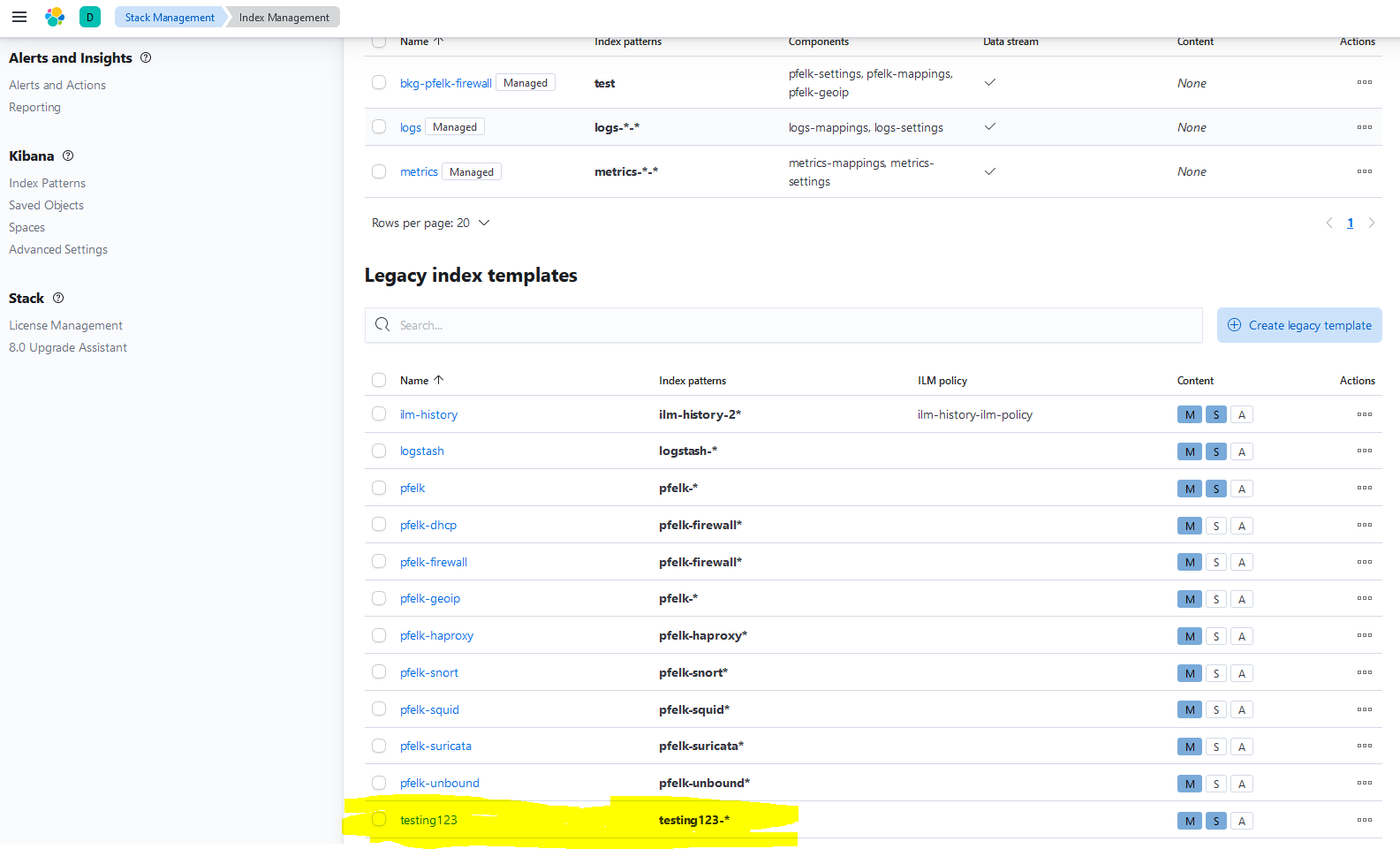
If you already have logs being sent, prior to the template, Elastic will create a template utilizing the logstash template. You may need to stop logstash systemctl stop logstash.service import the required templates and restart logstash. Prior to importing the templates make sure you have removed all templates depicting a preceding pfelk index pattern.
a3ilson
on 19 Oct 2020
Looks like that is okay, I didn't check under Legacy templates, apologies.
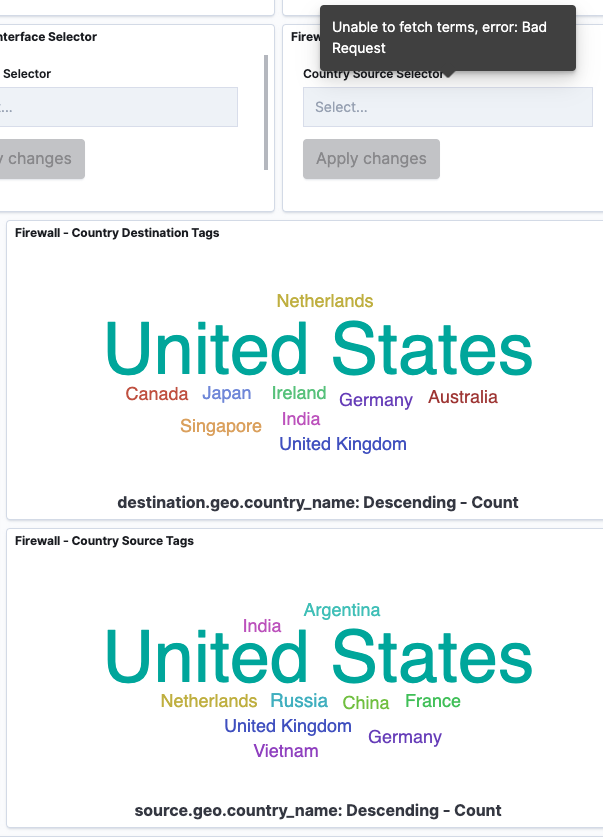
Dashboard looking good, looks like I'm having some issue with the filter drop downs. Will dive into that might be my conf though I feel like I updated everything correctly.
s7thamon
on 20 Oct 2020
That specific filter pivots off the source.go.country_name field and the country tags are working so I wouldn't believe it to be the conf. However, you can check discover and see if the field is present if so I would believe it to be an improper mapping. You may need to delete the indices.
a3ilson
on 20 Oct 2020
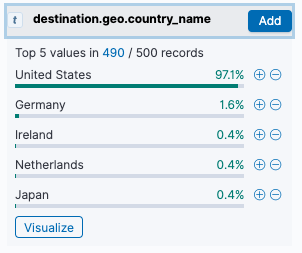
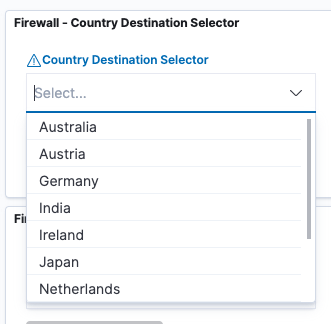
changing the multi-select from destination.geo.country_name.keyword to destination.geo.country_name seems to have worked.
s7thamon
on 20 Oct 2020
The Snort - Dashboard is uploaded now as well
revere521
on 20 Oct 2020
Great/thanks!!!
Are we able to close this one?
@revere521 - any issue with the new install?
a3ilson
on 20 Oct 2020
I used the installer script to do the install this time, and it was painless really. I just deleted all my old configs, grok, etc first.The only issue i had, wasnt really an issue...but i wasnt sure if i needed to create indices at first, and if the custom uuid was needed. Once i saw the templates creating the index templates, i figured thw custom uuid was not needed.Everything else was 100% out of the boxOn Oct 20, 2020 2:33 PM, Andrew notifications@github.com wrote:
Great/thanks!!!
Are we able to close this one?
@revere521 - any issue with the new install?
—You are receiving this because you were mentioned.Reply to this email directly, view it on GitHub, or unsubscribe.
revere521
on 20 Oct 2020
Issue resolved
a3ilson
on 21 Oct 2020
Related issues
 BeNeDeLuX
·
13Comments
s7thamon
·
22Comments
BeNeDeLuX
·
13Comments
s7thamon
·
22Comments
 myrsecurity
·
12Comments
myrsecurity
·
12Comments
 squirrelboot
·
12Comments
squirrelboot
·
12Comments
 bNg91
·
30Comments
bNg91
·
30Comments