Pfelk: Unable to import v6.1 - Snort.ndjson
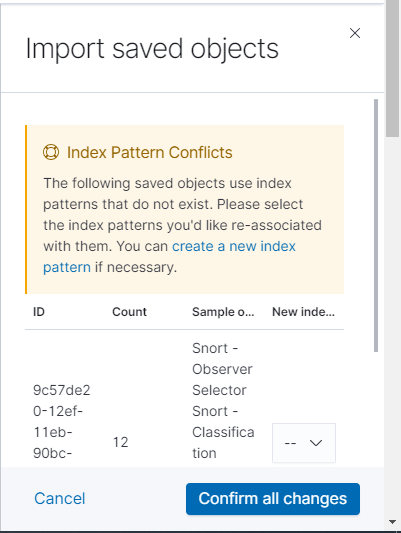
hello, I'm trying to import the snort dashboard into the kibana, but I'm getting the message "Index Pattern Conflicts" the other dashboards were imported without any problems.
note: my indexes are empty, I have not yet configured pfsense to generate the logs.
 bNg91
bNg91
All 30 comments
@bNg91 - Where you able to import the other dashboards?
 a3ilson
on 23 Dec 2020
a3ilson
on 23 Dec 2020
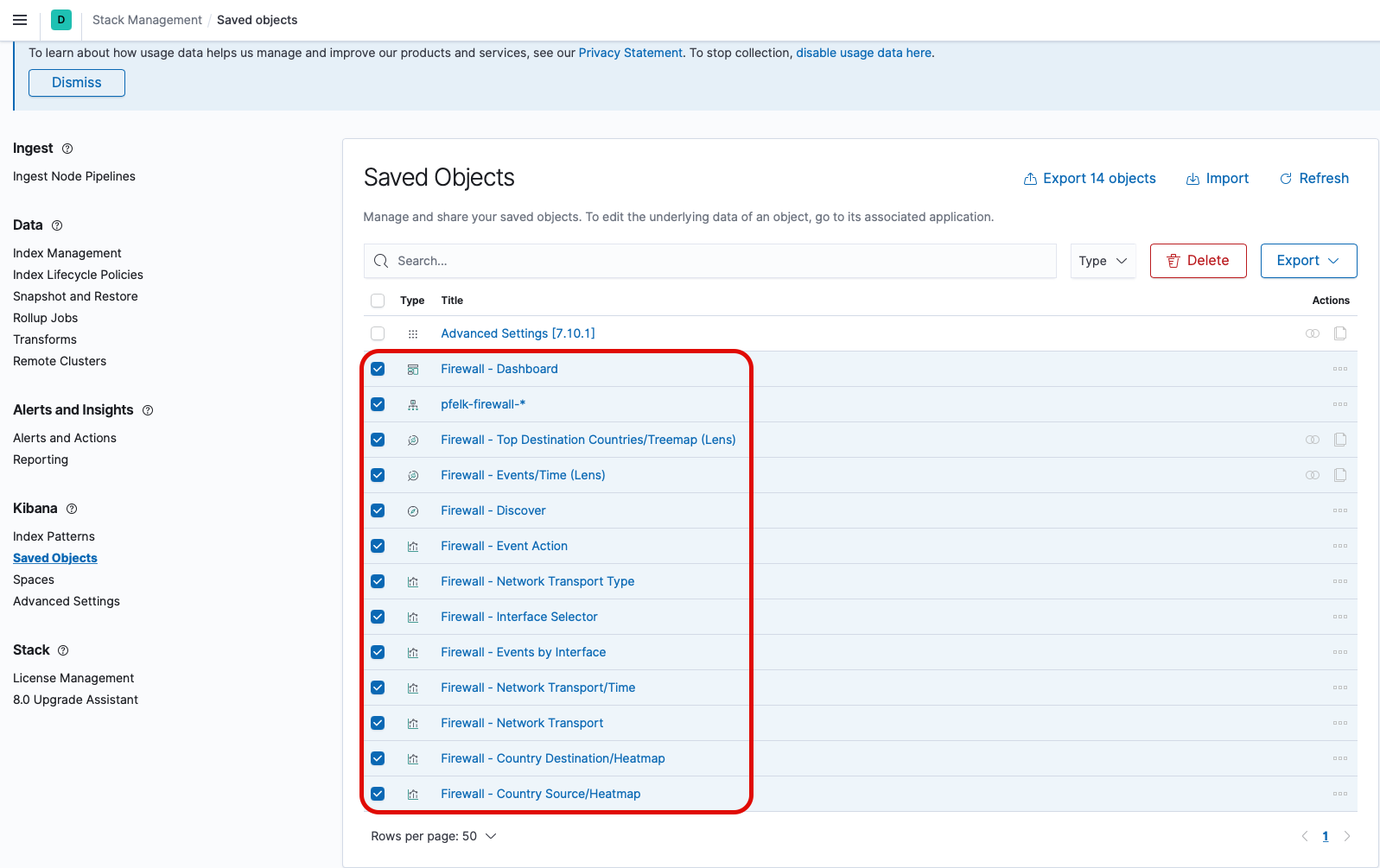
@revere521 - Confirmed... Can you update the snort dashboard to include the index pattern? I included a screenshot of the firewall dashboard below (all visualizations to include the index pattern):
a3ilson
on 23 Dec 2020
@bNg91 - Where you able to import the other dashboards?
yes, the other dashboards apparently already create the index pattern at the time of import.
bNg91
on 23 Dec 2020
@bNg91 - You could create the index pattern and try again. If you get it working, would you mind exporting the dashboard? There are some particulars but I can walk you through it if inclined.
Let me know and I'll reply with a quick guide.
a3ilson
on 23 Dec 2020
@bNg91 - You could create the index pattern and try again. If you get it working, would you mind exporting the dashboard? There are some particulars but I can walk you through it if inclined.
Let me know and I'll reply with a quick guide.
of course, which field setting should I choose? @timestamp?
bNg91
on 23 Dec 2020
Thanks!
Attached (trying the new video support) is a clip a quick guide on creating the index pattern. The second video depicts how to export. Please note on the second video that all objects were named specifically...the snort objects should follow the same guideline which you'll be able to view all snort objects to include the index pattern. Finally, you'll export but be sure to uncheck the Include related objects option.
a3ilson
on 23 Dec 2020
You can test/validate by deleting all your snort objects and uploading/importing your recently exported .ndjson file. If it all works out you can submit a PR or post here and I'll update.
Thanks!
a3ilson
on 23 Dec 2020
Sorry, just seeing this - do you still want me to re-upload the snort dashboard?
I did include the index the first time, but not the related objects (as per previous updates)
 revere521
on 24 Dec 2020
revere521
on 24 Dec 2020
@bNg91 - I utilize OPNsense + Suricata and unable to test this but. I took what @revere521 created and added the index pattern...amend the extension (i.e. remove .txt) and give this a try.
a3ilson
on 24 Dec 2020
the index pattern was there with the id "pfelk-snort" let me export it again right now, and see if there is still any issue
revere521
on 24 Dec 2020
Hi @revere521 - I attempted to install on a clean system and received the same error (likely due to the unique index id). So I amended and created a new index id with Custom index pattern ID set to 'id-snort'.
Try deleting all snort saved objects and importing.
a3ilson
on 24 Dec 2020
Ok, i understand - do you want me to try to fix it? or is it already fixed?
revere521
on 24 Dec 2020
If you don't mind checking my attempt to fix it listed above (be sure to remove the .txt extension). I was unable to test beyond importing as I do not have any snort traffic. If it works, feel free to amend/post and comment on here for @bNg91 to validate/close.
Thanks!
a3ilson
on 24 Dec 2020
I may need to clear everything out again and try to recreate it in the am, unfortunately now for both my old export and this new one I get errors that there is no index matching pfelk-snort-* (or that it can't be found)
I need to look at it with clearer eyes in the am
revere521
on 24 Dec 2020
No worries and thanks again!
a3ilson
on 24 Dec 2020
@bNg91 - Below is a quick video on how to circumvent your current issue. At a later time @revere521 will amend the current snort dashboard and alleviate this particular issue.
Thanks @bNg91 and @revere521!
a3ilson
on 24 Dec 2020
@a3ilson i'm troublesshooting an issue as my first step - that may be the cause of the index issue
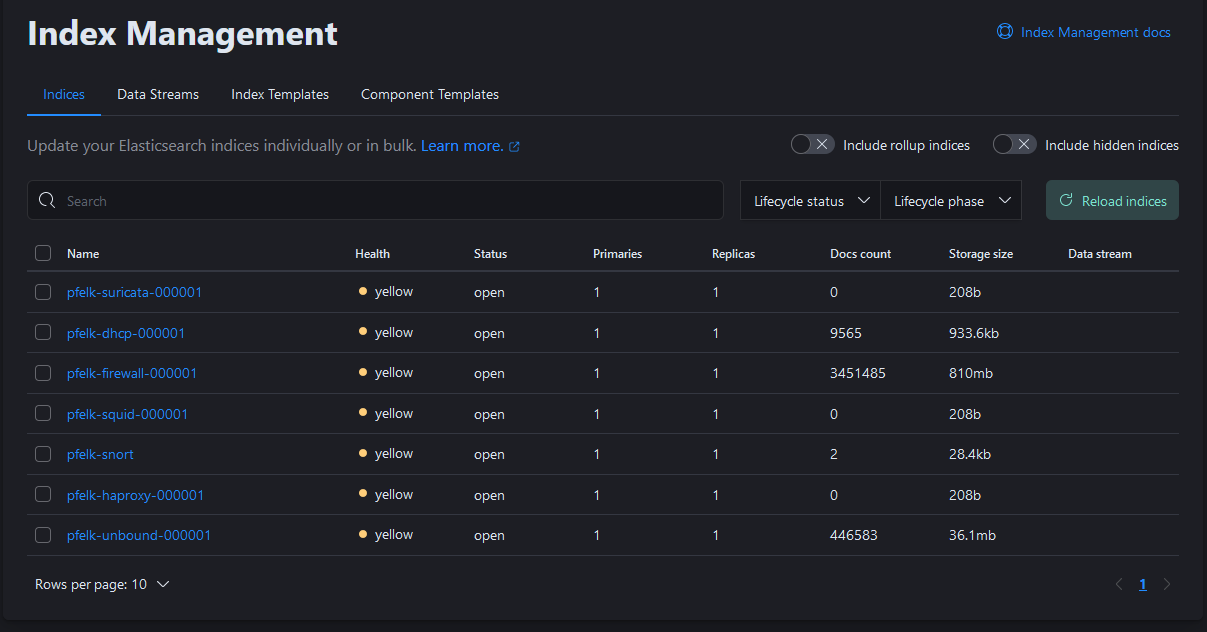
when the pfelk-index is created, in general before you define the index pattern - it looks like the ilm policy is not applying based on the pfelk template.
When the index is recreated after deleting them, this causes errors. I will take a look around to see if i can figure this out
revere521
on 24 Dec 2020
Ok, i had to delete all the Templates and indices, stop logstash, add all the templates then restart logstash and the indices were created with the ilm policy applied...
I updated/recreated the dashboard and exported it with the index pattern included. My custom ID had been "pfelk-snort" (instead of id-snort) all along, so I kept it that way to not have to recreate all of my visulizations.
@bNg91 please test the dashboard in the repo to see if this is resolved.
you can export yours to save it, then:
- delete all the snort saved objects
- import this one and see if it all works
If it does, all good - if not, just delete all the snort saved objects again and re-import your working ndjson.
revere521
on 24 Dec 2020
@revere521 - In your provided screenshoot, I see that the snort index does not contain the ilm pattern as defined in 50-outputs.conf. I'm not sure what is causing this and have not been able to replicate...Issue #227 reported a similar issue. We resolved it by:
- Stopping logstash
- Purging the indices
- Starting logstash
Out of curiosity...if you toggle the "include hidden indices" are there additional snort indices? Try stopping logstash, deleting the snort index and restart logstash to see if the ilm pattern appears.
a3ilson
on 24 Dec 2020
@bNg91 - Below is a quick video on how to circumvent your current issue. At a later time @revere521 will amend the current snort dashboard and alleviate this particular issue.
snort.mov
Thanks @bNg91 and @revere521!
following the guidelines in your video I managed to import the dashboard, but I believe that the fields in my elasticsearch are not in accordance with what is configured in the graphics. For example: the "Snort - Rules-Classifications" chart uses the fields "snort.rule.classification.keyword" and "snort.rule.description" but mine are named "rule.classification.keyword" and "rule.description" without the prefix "snort." ... reviewing the installation steps, I believe I have not forgotten anything :/
bNg91
on 24 Dec 2020
@bNg91 - Your fields are correct! The preceding snort object was removed to align these fields with ECS.
a3ilson
on 24 Dec 2020
I had trouble getting my brain aligned with ECS at first, i blame a lack of coffee and an aging brain.....
I think its all sorted out now :)
revere521
on 24 Dec 2020
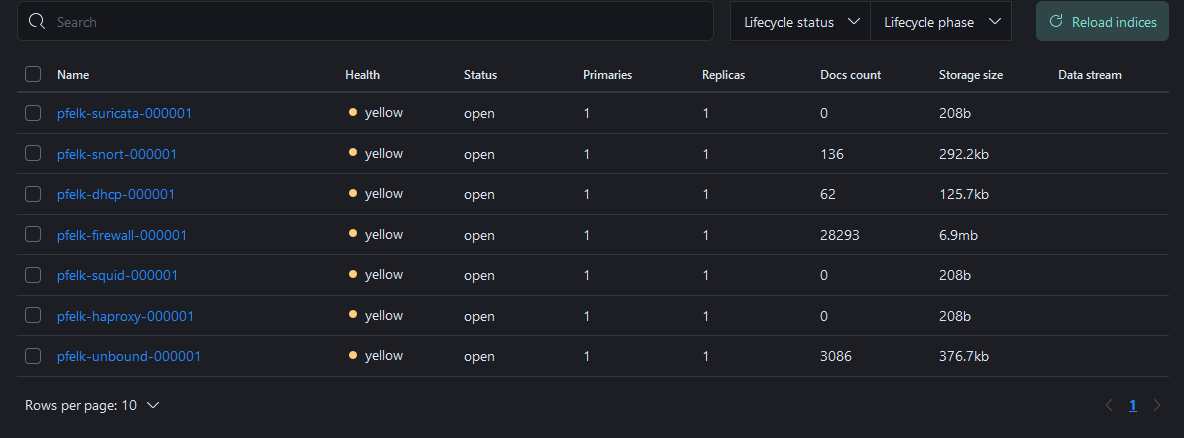
also, before i recreated the dashboard, etc. - i did make sure everything was setup. Having logstash stopped (so its not rushing to create the indices while you add the templates) is the key:
revere521
on 24 Dec 2020
@revere521 - I spoke too soon. If an index is deleted while logstash is running and a log/message is received that parses to that index pattern then the ilm pattern is omitted. Restarting logstash fixes the issue as upon starting logstash the referenced indices with ilm patterns are built...you'll note this in your previously provided screenshot where you have indices with zero docs count.
I opened a separate issue for this, #232
a3ilson
on 24 Dec 2020
also, for me - suricata, squid and haproxy always have no docs - i don't have those things in use..
but yes, if you are going to manage indices, you have to stop logstash first or it will create anything new without the ilm policy. It must be an ingest pipeline ordering or something
revere521
on 24 Dec 2020
@revere521 - correct...they are created when Logstash is started (i.e. 50-outputs.conf). You can delete them but when logstash is restarted, they'll be recreated. I'm testing without the defined ILM parameters in 50-outputs.conf as the ILM policy is defined in the index template settings.
@revere521 - did you see the snort field naming response from @bNg91:
following the guidelines in your video I managed to import the dashboard, but I believe that the fields in my elasticsearch are not in accordance with what is configured in the graphics. For example: the "Snort - Rules-Classifications" chart uses the fields "snort.rule.classification.keyword" and "snort.rule.description" but mine are named "rule.classification.keyword" and "rule.description" without the prefix "snort." ... reviewing the installation steps, I believe I have not forgotten anything :/
a3ilson
on 24 Dec 2020
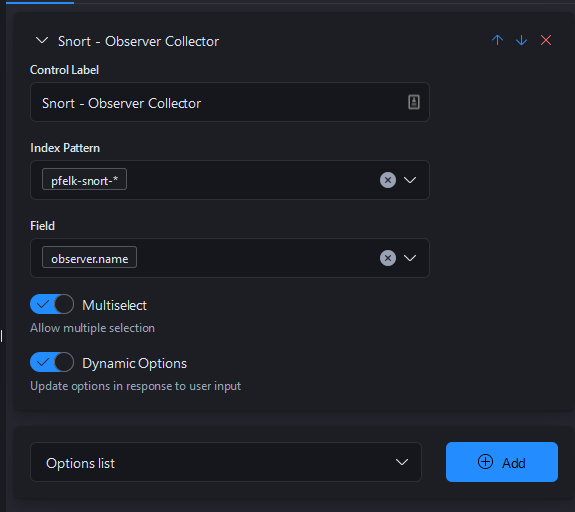
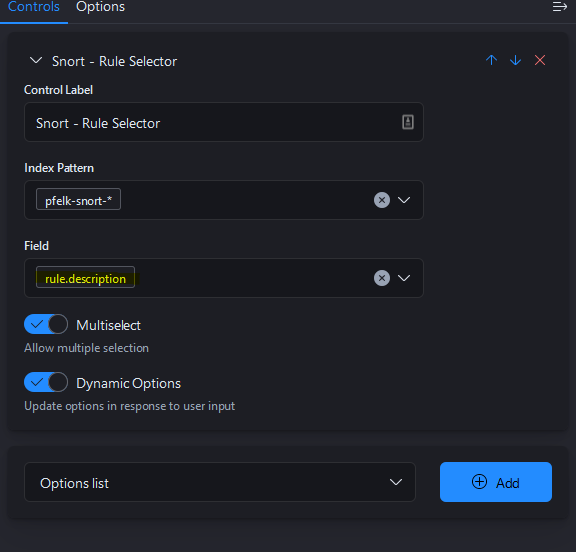
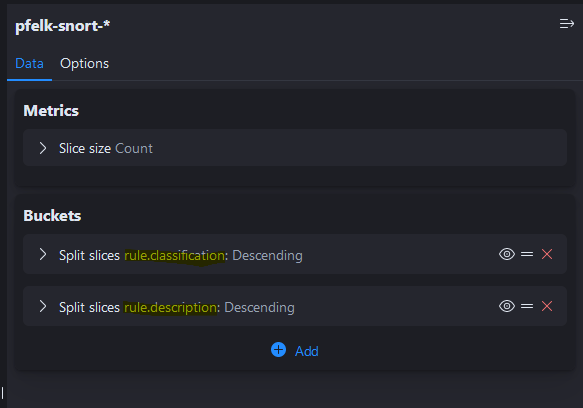
I don't really understand whats happining with @bNg91 ... I can confirm that all my visulizations are created with the ECS names removing "snort." from all of them:
for example:
Its possible they haven't deleted everything prior to re-testing?
revere521
on 24 Dec 2020
@bNg91 - Can you confirm that all Kibana saved objects and snort indices were deleted prior to reattempting to import the snort dashboard?
a3ilson
on 24 Dec 2020
@a3ilson @revere521 Guys, i followed the steps you asked for, and used the new version of v6.1 - Snort.ndjson from the repo , it worked like a charm! thank you very much for your help, now all the graphics are working perfectly. merry christmas for us (:
The steps I followed:
1 - Stop logstash process
2 - Delete the pfelk-snort-* index pattern
3 - Delete all the snort saved objects
4 - Import the new v6.1 - Snort.ndjson (this time there was no error message :D)
5 - Start logstash process
6 - It's done ! All graphics working !!
bNg91
on 24 Dec 2020
Thanks @revere521 & @bNg91 - Closing issue as it was resolved
a3ilson
on 24 Dec 2020
Related issues
 fastxl
·
5Comments
revere521
·
17Comments
fastxl
·
5Comments
revere521
·
17Comments
 myrsecurity
·
12Comments
myrsecurity
·
12Comments
 wylde780
·
12Comments
wylde780
·
12Comments
 fktkrt
·
5Comments
fktkrt
·
5Comments
Most helpful comment
@a3ilson @revere521 Guys, i followed the steps you asked for, and used the new version of v6.1 - Snort.ndjson from the repo , it worked like a charm! thank you very much for your help, now all the graphics are working perfectly. merry christmas for us (:
The steps I followed:
1 - Stop logstash process
2 - Delete the pfelk-snort-* index pattern
3 - Delete all the snort saved objects
4 - Import the new v6.1 - Snort.ndjson (this time there was no error message :D)
5 - Start logstash process
6 - It's done ! All graphics working !!