Notepad3: FR: Using "Dark Mode" without "Win10 Dark Mode".
Hi,
The NP3‘s ’"Dark Mode" is very comfortable to use, but I think the "Win10 Dark Mode" still needs a lot of improvement. Can I use the NP3‘s "Dark Mode" without "Win10 Dark Mode"? Thx :)
 hayreenlee
All 4 comments
Can I use the NP3‘s "Dark Mode" without "Win10 Dark Mode"? Thx :)
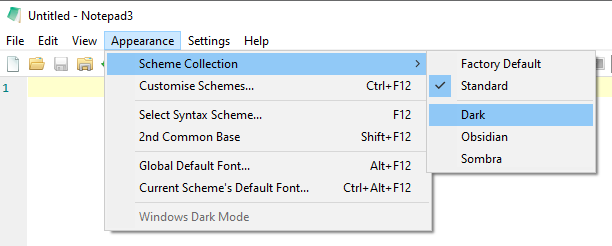
What about these 3 "Schemes" that doesn't rely on "Win10 Dark Mode" ? 🤔
 hpwamr
on 24 Mar 2021
hpwamr
on 24 Mar 2021
Unfortunately the "good old" Win32 GUI and Controls framework of Notepad2/3 is not capable of "dark mode" and the undocumented dark mode API introduced in Windows 10 1809 is not foreseen for these controls.
So the Notepad3 has to tell every dialog and control to use the "Dark-Mode" Explorer theme (e.g SetWindowTheme(GetDlgItem(hDlg, IDOK), L"Explorer", nullptr)).
See related development (https://github.com/ysc3839/win32-darkmode/tree/master/win32-darkmode).
So it needs the Explorer being set to the "Win10 Dark-Mode Color" settings to work properly.
And even this is not complete, until now we didn't find a way to switch the menu strip to "Dark-Mode" (except designing a complete custom made menu which would be a huge effort, introducing new bugs and problems).
The only independent "dark mode" thing is the editor pane using a "dark" styling scheme., as @hpwamr mentioned in his comment above.
 RaiKoHoff
on 24 Mar 2021
RaiKoHoff
on 24 Mar 2021
Can I use the NP3‘s "Dark Mode" without "Win10 Dark Mode"? Thx :)
What about these 3 "Schemes" that doesn't rely on "Win10 Dark Mode" ? 🤔
That looks great. Thank u!
hayreenlee
on 24 Mar 2021
Unfortunately the "good old" Win32 GUI and Controls framework of Notepad2/3 is not capable of "dark mode" and the undocumented dark mode API introduced in Windows 10 1809 is not foreseen for these controls.
So the Notepad3 has to tell every dialog and control to use the "Dark-Mode" Explorer theme (e.gSetWindowTheme(GetDlgItem(hDlg, IDOK), L"Explorer", nullptr)).
See related development (https://github.com/ysc3839/win32-darkmode/tree/master/win32-darkmode).
So it needs the Explorer being set to the "Win10 Dark-Mode Color" settings to work properly.
And even this is not complete, until now we didn't find a way to switch the menu strip to "Dark-Mode" (except designing a complete custom made menu which would be a huge effort, introducing new bugs and problems).The only independent "dark mode" thing is the editor pane using a "dark" styling scheme., as @hpwamr mentioned in his comment above.
Thank you very much for your detailed reply! Expect a better solution in the future.
hayreenlee
on 24 Mar 2021
Related issues
hpwamr
·
3Comments
 wmsrww
·
3Comments
wmsrww
·
3Comments
 craigo-
·
3Comments
craigo-
·
4Comments
craigo-
·
3Comments
craigo-
·
4Comments
 omega32
·
3Comments
omega32
·
3Comments