Notepad3: Add feature: Edit / Convert / File System Path to URL
Notepad3 can detect links in text and offers to open or jump to the target (e.g. https://www.rizonesoft.com/downloads/notepad3/), very nice!
But - Windows UNC path names have to be (externally) converted to be usable within Notepad3.
A Windows path like C:\Thomas\Collection\Haushalt\Technik\Geräte\Kopfhörer\Hören.txt needs to be changed into
file:///C:/Thomas/Collection/Haushalt/Technik/Ger%e4te/Kopfh%f6rer/H%f6ren.txt.
You may use a service like Online UNC to URI Path Converter. While this works (more or less, see below), it is time consuming and maybe a privacy threat. You may also use PowerShell like this
([system.uri](Get-Item "$UNCPATH").FullName).AbsoluteUri to provide the conversion, maybe also time consuming.
Both methods yield a result URI like this
file:///C:/Thomas/Collection/Haushalt/Technik/Ger%C3%A4te/Kopfh%C3%B6rer/H%C3%B6ren.txt, which is not usable in Notepad3. You need to change the encoding from the two bytes UTF-8 representation to the one byte Unicode encoding. Maybe there is more to it when it comes to Asian or other multi-byte character sets, I didn't try.
Now my proposal:
Add a feature: Edit / Covert/ URI Encode that takes a Windows UNC path from selection and converts it into a clickable link, replacing the selected text.
This would make it quick and convenient to paste UNC paths from Windows explorer into Notepad3 and convert it into a clickable link.
 ThomasHeinrichSchmidt
All 14 comments
Hello @ThomasHeinrichSchmidt,
there is already a feature Menu->Edit->Convert->[URL Encode|URL Decode] implemented.
Unfortunately, the Hyperlink Ctrl+Click resp. Alt+Click does no decoding (yet).
I will take care for this ...
 RaiKoHoff
on 26 Feb 2021
RaiKoHoff
on 26 Feb 2021
Thanks for your answer Rainer,
yes I've noticed the two commands, but I was not able to use them to convert a Windows path string into a clickable link.
I can URL Encode a string like C:\Thomas\Collection\Haushalt\Technik\Geräte\Kopfhörer\Hören.txt into C%3A%5CThomas%5CCollection%5CHaushalt%5CTechnik%5CGer%C3%A4te%5CKopfh%C3%B6rer%5CH%C3%B6ren.txt but this is not the format Notepad3 actually needs: file:///C:/Thomas/Collection/Haushalt/Technik/Ger%e4te/Kopfh%f6rer/H%f6ren.txt.
Is your proposal to make Notepad3 detect and use a string like C:\Thomas\Collection\Haushalt\Technik\Geräte\Kopfhörer\Hören.txt as a working Hyperlink? If yes, this is even better than my proposal to add a new Edit / Convert / URI Encode.
I would not expect a user to be irritated if a path specification is now suddenly a clickable link. I would expect everyone to be happy about it.
ThomasHeinrichSchmidt
on 26 Feb 2021
I am not going to add a file-system-path scanner beside the the Hyperlink-Scanner to highlight path and make them hotspot action aware - I think the file://... Hyperlink should be good enough.
The file://... Hyperlinks are URL decoded in upcoming beta/RC version, so makes
file://d:/temp/Geräte/Kopfhörer/Hören.txtfile://d%3A%5Ctemp%5CGer%C3%A4te%5CKopfh%C3%B6rer%5CH%C3%B6ren.txt
working fine with Notepad3 (Alt+Click open in Notepad3).
Open with the browser (Ctrl+Click) file://d:/temp/Geräte/Kopfhörer/Hören.txt is send (ShellExecuteEx()) as file:///d:/temp/Ger%e4te/Kopfh%f6rer/H%f6ren.txt which should be fine. Currently my security settings deny this action:

(Has someone an idea, to get this working 🤔)
Missing now is a converter (FS Path -> URL) which would turn
d:\temp\Geräte\Kopfhörer\Hören.txt -> file:///d:/temp/Geräte/Kopfhörer/Hören.txt ...
Since this is a new feature, it has to wait after RC/Release phase ...
RaiKoHoff
on 26 Feb 2021
Yes Rainer, I understand, file://... Hyperlinks are indeed good enough.
So for now I would be working like this with Notepad3: I'll take the file-system-path d:\temp\Geräte\Kopfhörer\Hören.txt, reverse the slashes, and add a file:/// prefix like this: file:///d:/temp/Geräte/Kopfhörer/Hören.txt. With your new fix "URL-Decoding of file Hyperlinks" (see above) Notepad3 would execute this link as desired. Fine.
_BTW. I tried to provoke the Windows error message above, but had no luck. All files I tried (having correct file URLs) would open, even .LNK's worked like a charm._
A converter (FS Path -> URL) which would turn a file-system-path into a file-URL would be great!
I'm looking forward to it!
ThomasHeinrichSchmidt
on 26 Feb 2021
Hello @ThomasHeinrichSchmidt ,
Feel free to test the "BETA/RC PortableApps" version "Notepad3Portable_5.21.226.2_rc.paf" or newer, see below or issue #1129.
"Notepad3Portable BETA/RC PortableApps" version can be used with or without ".7z" extension.
To update your "Notepad3 Setup" version with the latest features/fixes from the "BETA/RC" version, see issue #1105.
Also, feel free to test the "BETA/RC Setup" version "Notepad3_5.21.226.2_rc_Setup" or newer, see below or issue #1129.
- Notepad3_5.21.226.2_rc_Setup.7z -s
- Notepad3_5.21.226.2_rc_x86_Setup.7z -s
- Notepad3_5.21.226.2_rc.7z -s (portable)
Comments and suggestions are welcome... 😃
 hpwamr
on 26 Feb 2021
hpwamr
on 26 Feb 2021
I can confirm Notepad3_5.21.226.2_rc now correctly URL-decodes and opens a Hyperlink like file:///d:/temp/Geräte/Kopfhörer/Hören.txt. Also a path like file:///d:/temp/Geräte/Kopfhörer/Fliegen%20·%20King®%20(1).txt works fine, please note the spaces (%20), the middle dot (U+00B7), and the reserved sign (U+00AE).
I noted that it's (sometimes?) necessary to have three slashes file:/// instead of two file://. It seems that two slashes are enough for opening a file with Notepad3 (e.g. .txt files) or other app (e.g. .docx files). But to choose an external application
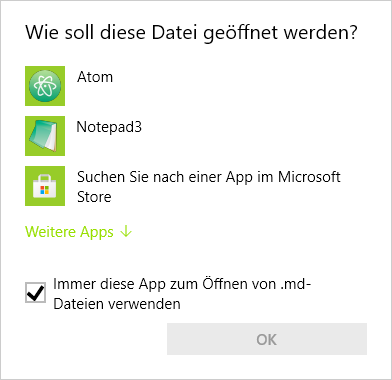
(e.g. for .md files on my system) three slashes seemed necessary, otherwise a "file not found message" is displayed. Maybe it has something to do with spaces. I noted that two slashes are enough for file names without spaces. As soon as I used %20 in file names three slashes seemed to be necessary.
I'm still having problems to get file-system-path names like file:///d:/temp/Geräte/Kopfhörer/Fliegen 🛩 · King® (1).txt right. Please note the small airplane (U+1F6E9). I have no idea how to encode 'real' Unicode chars. This may be more relevant for oriental locales, I do not have many file names with 'real' Unicode characters.
ThomasHeinrichSchmidt
on 27 Feb 2021
The current beta version (Notepad3Portable_5.21.228.1_beta.paf.exe.7z -s) ,
changes the ShellExecuteEx() lpVerb from "default (NULL)" to "open", which may change the "launch behavior" depending on system configuration.
If this causes problems, I am thinking to make it configurable 🤔.
The three slashes ("file:///") is correct URL specification (for German click here). Open the file with Notepad3 instance (Alt+Click), is fine, the missing "host" segment of the path is interpreted as "localhost".
This beta offers menu items (Menu->Edit->Convert->File System Path to URL and vice versa) which should help to get the right encoding. But these system api methods (UrlCreateFromPath()) are also limited regarding special Codepoints (Unicode chars).
RaiKoHoff
on 1 Mar 2021
Hello @ThomasHeinrichSchmidt ,
Feel free to test the "BETA/RC PortableApps" version "Notepad3Portable_5.21.301.1_beta.paf" or newer, see below or issue #1129.
"Notepad3Portable BETA/RC PortableApps" version can be used with or without ".7z" extension.
To update your "Notepad3 Setup" version with the latest features/fixes from the "BETA/RC" version, see issue #1105.
Also, feel free to test the "BETA/RC Setup" version "Notepad3_5.21.301.1_beta_Setup" or newer, see below or issue #1129.
- Notepad3_5.21.301.1_beta_Setup.7z -s
- Notepad3_5.21.301.1_beta_x86_Setup.7z -s
- Notepad3_5.21.301.1_beta.7z -s (portable)
Comments and suggestions are welcome... 😃
hpwamr
on 1 Mar 2021
I've tested Notepad3 (x64) v5.21.228.1 beta, here my findings:
- Menu item (
Menu->Edit->Convert->File System Path to URLand vice versa) does only exist for the English language (not e.g. for German, so far). Convert->File System Path to URLdoes not handle quotes well. The path"d:\temp\Geräte\Kopf Hörer\Hören.txt"is converted tofile:%22d:/temp/Ger%E4te/Kopf%20H%F6rer/H%F6ren.txt%22. The quotes (%22) should be trimmed and the required threes slashes added.- A path like
d:\temp\Geräte\Kopfhörer\Fliegen 🛩 · King® (1).txtis converted tofile:///d:/temp/Ger%E4te/Kopfh%F6rer/Fliegen%20🛩%20%B7%20King%AE%20(1).txtwhich looks fine but is not fully detected as Hyperlink in Notepad3

I do not know if and how Unicode chars like the small airplane can or should be part of file URLs. Convert->URL to File System Pathdoes not create quotes if the path contains spaces.
Otherwise the conversion works just fine, I also tested Notepad3 (x64) v5.21.301.1 beta and found everything just the same as in version 228.
ThomasHeinrichSchmidt
on 1 Mar 2021
- Menu items for other languages are scheduled for the build pipeline
- Trimming of quotes should be fixed (and "///" are added automatically in trimmed case)
- For conversion of file-system paths to URL, we completely rely on system conversion API (UrlCreateFromPath()).
So we accept the results from conversion, even, if they don't match the "Hyperlink RegEx search pattern".
Maybe a check if the converted string will match the pattern and revert if not (no conversion done) could be a good idea 🤔.
(_Note: UrlCreateFromPath() does not support extended paths._
_These are paths that include the extended-length path prefix "\\?\"_) - Add quotes, if file-system path contains spaces 👌
RaiKoHoff
on 1 Mar 2021
Hello @ThomasHeinrichSchmidt ,
Feel free to test the "BETA/RC PortableApps" version "Notepad3Portable_5.21.302.1_beta.paf" or newer, see below or issue #1129.
"Notepad3Portable BETA/RC PortableApps" version can be used with or without ".7z" extension.
To update your "Notepad3 Setup" version with the latest features/fixes from the "BETA/RC" version, see issue #1105.
Also, feel free to test the "BETA/RC Setup" version "Notepad3_5.21.302.1_beta_Setup" or newer, see below or issue #1129.
- Notepad3_5.21.302.1_beta_Setup.7z -s
- Notepad3_5.21.302.1_beta_x86_Setup.7z -s
- Notepad3_5.21.302.1_beta.7z -s (portable)
Comments and suggestions are welcome... 😃
hpwamr
on 2 Mar 2021
Brilliant!
                      @@@,
                     @@@@
                  #@@@@@
                @@@@@@@@@@@@@@
         @@@@ @@@@@@@@@@@@@@@@@@
         @@@@*@@@@@@@@@@@@@@@@@@
         @@@@*@@@@@@@@@@@@@@@@@
         @@@@*@@@@@@@@@@@@@@@@@
         @@@@*@@@@@@@@@@@@@@@@
I've tested _Notepad3_5.21.302.1_beta.7z -s (portable)_, everything works, even Unicode file-system paths do work, they are converted correctly, Notepad3 shows them as Hyperlinks, and they actually function when clicked, e.g.
d:\temp\Geräte\Kopfhörer\Fliegen 🛩 · King® (1).txt-->file:///d:/temp/Ger%E4te/Kopfh%F6rer/Fliegen%20🛩%20%B7%20King%AE%20(1).txt"d:\temp\Geräte\Keine Kunst\梁胜男.jpg"-->file:///d:/temp/Ger%E4te/Keine%20Kunst/梁胜男.jpg
Now this makes Notepad3 a really valuable tool for working with Hyperlinks to local files.
ThomasHeinrichSchmidt
on 2 Mar 2021
Hello @ThomasHeinrichSchmidt ,
As far as I'm concerned, I think you (requester) can close this issue...
hpwamr
on 11 Mar 2021
Yes, I'm already using Notepad3 (x64) v5.21.302.1 beta in production with no complaints.
Thanks again!
ThomasHeinrichSchmidt
on 11 Mar 2021
Related issues
 vvyoko
·
3Comments
vvyoko
·
3Comments
 wmsrww
·
3Comments
hpwamr
·
4Comments
hpwamr
·
3Comments
wmsrww
·
3Comments
hpwamr
·
4Comments
hpwamr
·
3Comments
 blackcrack
·
3Comments
blackcrack
·
3Comments