Notepad3: Left Margin has changed colour
In a pristine install of Notepad3 5.20.915.2 and 5.20.915.3, I have noticed that the line number and bookmark margin has lost its usual grey colour and is now plain white. The margin is its usual grey colour in release version 5.20.915.1.
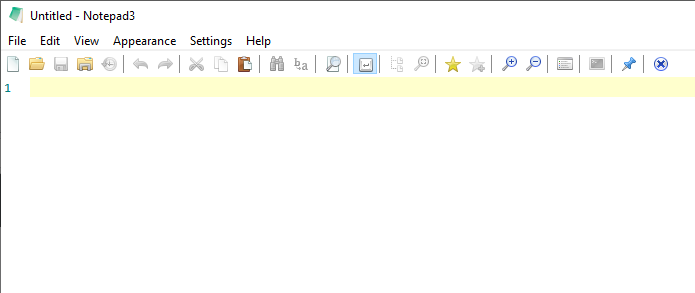
Is this an unintended consequence of e.g. the work on Dark Mode detection (issue #1811)?
x64 builds on Windows 10 Enterprise 1909 x64.
 craigo-
All 5 comments
I am using the Light theme from @maboroshin
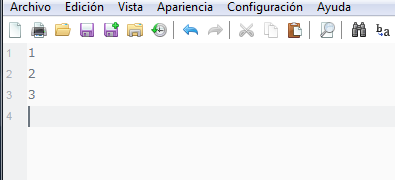
But i wish have back the original theme from notepad...
Ps: Notepad3 (x86) v5.20.915.3 beta (dkt1-amr) on Win 7 x64
 Mitezuss
on 16 Sep 2020
Mitezuss
on 16 Sep 2020
Hello @craigo-
Feel free to test the "BETA/RC" version "Notepad3Portable_5.20.916.1_beta.paf" or higher, see below or issue #1129.
"Notepad3Portable BETA/RC paf" version can be used with or without ".7z" extension.
To update "Notepad3 Setup" version with the latest features/fixes from the "BETA/RC" version, see issue #1105.
Comments and suggestions are welcome... 😃
 hpwamr
on 16 Sep 2020
hpwamr
on 16 Sep 2020
@hpwamr
Hi, now the toolbar will be "white", for ever?
For Windows 7:
befor:

after dark mode:

=/
Mitezuss
on 16 Sep 2020
Notepad3 5.20.916.1: I can confirm that the left margin is back to how it was. Thanks.
...But 916.1 has introduced another regression. Will start another issue for that.
Back to @Mitezuss' comment 😄
craigo-
on 16 Sep 2020
As per issue #2832, versions 5.20.918.1 and 5.20.918.2 continue to be fine. I _think_ @Mitezuss' toolbar problem on Windows 7 is now resolved, so will close this issue.
Thanks, all.
craigo-
on 18 Sep 2020
Related issues
 tzleon
·
3Comments
tzleon
·
3Comments
 bravo-hero
·
3Comments
bravo-hero
·
3Comments
 zb-z
·
3Comments
zb-z
·
3Comments
 vvyoko
·
3Comments
craigo-
·
4Comments
vvyoko
·
3Comments
craigo-
·
4Comments
Most helpful comment
As per issue #2832, versions 5.20.918.1 and 5.20.918.2 continue to be fine. I _think_ @Mitezuss' toolbar problem on Windows 7 is now resolved, so will close this issue.
Thanks, all.