Notepad3: how to change the color to CR and LF ?
how set a color ? for txt file
thanks
 Mitezuss
All 6 comments
You think of setting the color of the line-break characters, if they have been made visible?
This has not been made possible via configuration. If you see different colors, this is related to lexer dependent colorizing.
 RaiKoHoff
on 26 Aug 2020
RaiKoHoff
on 26 Aug 2020
so, are there not style for set the color to CR LF ?
so, the color of the CR/LF is the same with the text, right ?


i see. regards
Mitezuss
on 27 Aug 2020
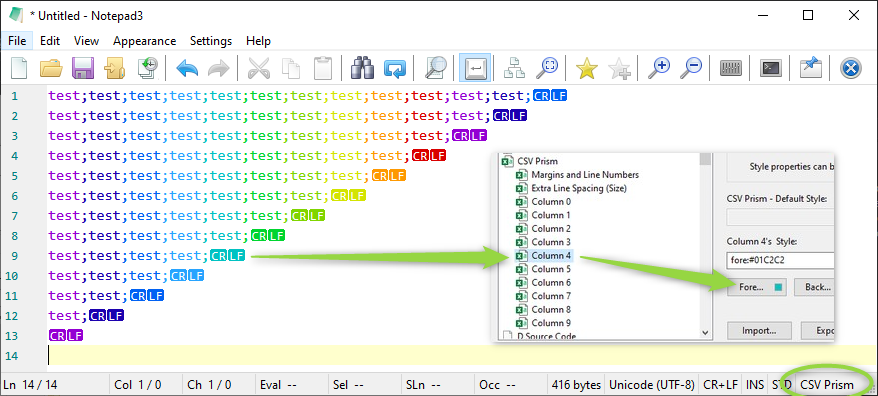
Remark: It depends on the used Lexer (which is responsible for coloring). Some Lexer stop coloring before line-break (depending on syntax, some colorize beyond the line breaks. But in principle it is the color of the text.
To change this to configurable line-breaks coloring, you have to check and change all used Lexers.
The result is by far not worth the effort - sorry.
RaiKoHoff
on 27 Aug 2020
Hi @RaiKoHoff
Can tell me how this work ? (i know, it is the lexer/syntax checking)
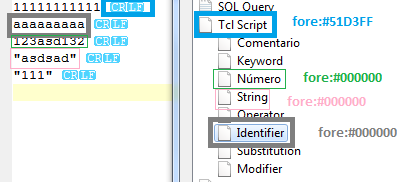
I wanna add thats three styles (Number, String, Identifier) to txt file (and set to fore:#51D3FF to global text on txt, so the color on CR/LF will be "cyan" (for example))
How and where i need to edit ? (can not edit directly on the scheme of txt, so i should edit directly the source of notepad3 ?)
Some like:
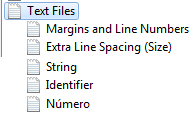
regards
Mitezuss
on 27 Aug 2020
RaiKoHoff
on 28 Aug 2020
Sorry not understand -.-, maybe you didnt to me xD (bad english really -.-)
Nevermind
Mitezuss
on 28 Aug 2020
Related issues
 craigo-
·
4Comments
craigo-
·
4Comments
 hpwamr
·
3Comments
hpwamr
·
3Comments
 wmsrww
·
3Comments
wmsrww
·
3Comments
 RaffaeleBianc0
·
3Comments
RaffaeleBianc0
·
3Comments
 bravo-hero
·
3Comments
bravo-hero
·
3Comments