Notepad3: How to "Clear Now" History and Search ?
Actually, for clear the history (archives and searchs) is uncheck and save settings and check again (if wanna keep saving later) or is there another acces key/option ?
Or can add?:

 Mitezuss
All 22 comments
How to "Clear Now" History and Search ?
Just "Uncheck" --> "Remember recent files" and EXIT Notepad3 !
or
Just "Uncheck" --> "Remember recent files" and press "F7" ! As easy as that ! 😃

 hpwamr
on 14 Aug 2020
hpwamr
on 14 Aug 2020
My opinion is that there is no need for more options, because "F7" does it perfectly and instantly ! 😬
Just "Uncheck" --> "Remember recent files" and press"F7" ! As easy as that ! 😃
hpwamr
on 15 Aug 2020
Hello @Mitezuss ,
As far as I'm concerned, I think you (requester) can close this issue...
hpwamr
on 15 Aug 2020
Upcoming beta will get controls to clear history in a more convenient workflow.
 RaiKoHoff
on 16 Aug 2020
RaiKoHoff
on 16 Aug 2020
- Clear All Remember History
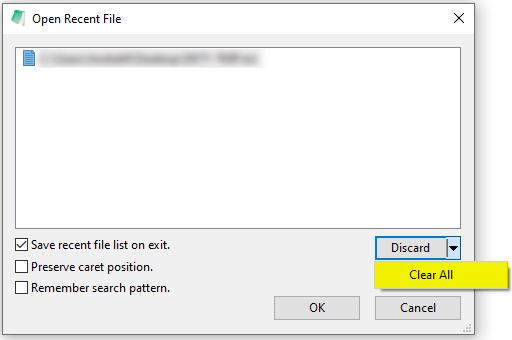
- Clear All Find - Replace History
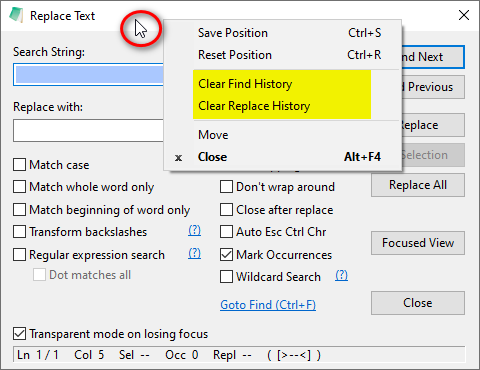
Feel free to test the "BETA/RC" version "Notepad3Portable_5.20.816.1_beta.paf" or higher, see below or issue #1129.
The "Notepad3Portable BETA/RC paf" version can be used with or without ".7z" extension.
To update the "Notepad3 Setup" version with the latest features/fixes from the "BETA/RC" version, see issue #1105.
Also, feel free to test the "BETA/RC" version "Notepad3_5.20.813.1_Setup_beta" or higher, see below or issue #1129.
Comments and suggestions are welcome... 😃
hpwamr
on 17 Aug 2020
Nice, thank you !
@hpwamr
XD esos mensajes borrados lol. No era mi intención a que se mal interprete, solo quería denotar lo tedioso que era realizar la limpieza del historial =7
Mitezuss
on 17 Aug 2020
@hpwamr
En el ultimo release, cuando le doy a borrar el historial de búsqueda y/o reemplazo, se borra en el momento, pero al cerrar e iniciar de nuevo el notepad, el historial sigue estando ahí. (no sabría desde que versión empezó este problema).
Mitezuss
on 29 Aug 2020
pero al cerrar e iniciar de nuevo el notepad, el historial sigue estando ahí.
OK thanks, we are going to investigate ? 🤔
Hello @RaiKoHoff ,
I confirm the bug, the Remember Search Pattern "F/R" is not permanently "deleted" !
hpwamr
on 30 Aug 2020
Hello @Mitezuss
Feel free to test the "BETA/RC" version "Notepad3Portable_5.20.830.1_rc.paf" or higher, see below or issue #1129.
"Notepad3Portable BETA/RC paf" version can be used with or without ".7z" extension.
To update "Notepad3 Setup" version with the latest features/fixes from the "BETA/RC" version, see issue #1105.
Also, feel free to test the "BETA/RC" version "Notepad3_5.20.822.1_Setup_beta" or higher, see below or issue #1129.
Comments and suggestions are welcome... 😃
hpwamr
on 30 Aug 2020
@hpwamr
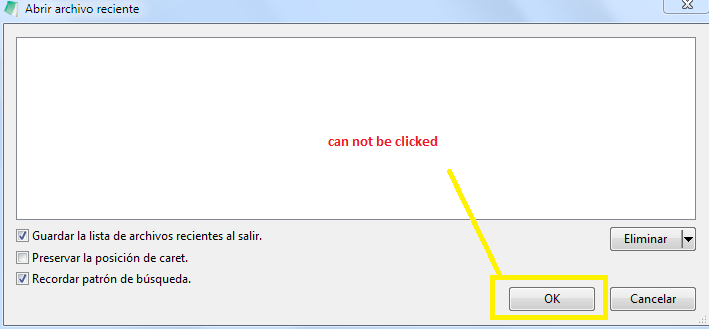
Another problem:
When delete all the "recent files" (Clear All), the OK button not work.
Mitezuss
on 31 Aug 2020
Recent File List (File History): Disable OK/Remove on empty list
Hello @RaiKoHoff ,
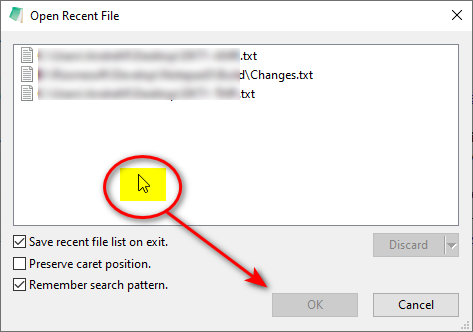
It's not only on "empty list" but also when you right click on the text window ? 🤔
hpwamr
on 31 Aug 2020
The last is correct behavior: See Window Title: You want to open a file from list with "OK" button, this should only be possible. if a file is selected !
RaiKoHoff
on 31 Aug 2020
The last is correct behavior: See Window Title: You want to open a file from list with "OK" button, this should only be possible. if a file is selected !
OK. 👍 😃
hpwamr
on 31 Aug 2020
Hello @Mitezuss ,
Feel free to test the "BETA/RC" version "Notepad3Portable_5.20.831.1_rc.paf" or higher, see below or issue #1129.
"Notepad3Portable BETA/RC paf" version can be used with or without ".7z" extension.
To update "Notepad3 Setup" version with the latest features/fixes from the "BETA/RC" version, see issue #1105.
Also, feel free to test the "BETA/RC" version "Notepad3_5.20.829.2_Setup_rc" or higher, see below or issue #1129.
Comments and suggestions are welcome... 😃
hpwamr
on 31 Aug 2020
@RaiKoHoff
But now can not be "delete all", because the button is also disabled (need select a file, is just a little observation)

@hpwamr
Por cierto, en esta ventana, el texto en ingles dice: Preserve caret position
Traducido esta: Preservar la posición de caret.
Debería ser igual al menú: (supongo que te falto actualizar)

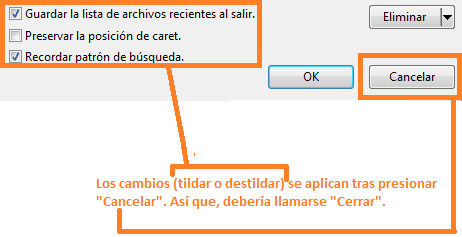
Otra observación es: se puede cambiar la traducción del botón "Cancelar"? (supongo que depende del ID del botón y windows le pone el texto) Ya que realmente su función es "Cerrar". Puesto que, si uno tilda las opciones que esa ventana ofrece, (si no esta seleccionado ningún archivo) no se puede apretar el botón OK (lógicamente porque uno no quiere abrir ningún archivo), pero como "Acepta" los cambios ? O sea, la única opción es cerrar esa ventana, tras tildar/destildar y por lo tanto el único botón disponible es el "Cancelar", no dando noción de lo que realmente sucede: Se aplican los cambios y se cierra la ventana. Por eso yo lo llamaría "Close" o "Cerrar". Supongo que es propio de windows eso (al colocar el botón), pero tal vez se pueda crear un ID de botón de Close ¿?
Mitezuss
on 31 Aug 2020
Traducido esta: Preservar la posición de caret.
It will be corrected with the next build.
Otra observación es: se puede cambiar la traducción del botón "Cancelar"?
It seems correct to me. 🤔
Cancelar is the correct translation of Cancel.
And also functional, it seems to work as expected,
If you press the button:
- OK, the file selected in the list above is opened.
- Cancel, you exit the window without any file selection in the list above.
hpwamr
on 31 Aug 2020
@hpwamr
El problema que le veo yo es que no cancela los cambios realizados (sino que los guarda; y por lo general un "Cancel" es descartar (no guardar) los cambios realizados)
Me refiero a las opciones (que están en la ventana):
Guardar la lista de archivos recientes al salir.
Preservar la posición de caret.
Recordar patrón de búsqueda.
Y sí, la traducción (de "Cancel") es "Cancelar", pero no debería ser _Cancel_ (en ingles) sino _Close_ (que traducido da Cerrar)
Mitezuss
on 1 Sep 2020
The "Recent File List" always tracks the opened files within one session (session = from NP3 instance Start until Exit).
Optional, you can "save recent file list on exit" - session file list and saved file list are merged (file list on disk may have changed by another instance of NP3).
So obviously, as long as a file is loaded in NP3 the "recent file list" can be cleared, except the currently loaded file.
Regarding the "Cancel" button: Maybe this is misleading, cause it implies that all changes to the list may be "canceled" which should revert the previous state. If this is wanted, we have to provide 3 Buttons: OK, Cancel and Close.
If not, we should rename this Button to Close.
RaiKoHoff
on 1 Sep 2020
If this is wanted, we have to provide 3 Buttons:
OK,CancelandClose.
If not, we should rename this Button toClose.
I suggest to rename the button "Cancel" in "Close" instead of 3 buttons. 🤔
hpwamr
on 1 Sep 2020
@hpwamr : Do you like to take over this task(s): dialogs_xx_yy.rc -> IDD_MUI_FILEMRU ?
RaiKoHoff
on 1 Sep 2020
Do you like to take over this task(s): dialogs_xx_yy.rc ->
IDD_MUI_FILEMRU?
Yes, I do. 👍
hpwamr
on 1 Sep 2020
Hello @Mitezuss
Feel free to test the "BETA/RC" version "Notepad3Portable_5.20.901.1_rc.paf" or higher, see below or issue #1129.
"Notepad3Portable BETA/RC paf" version can be used with or without ".7z" extension.
To update "Notepad3 Setup" version with the latest features/fixes from the "BETA/RC" version, see issue #1105.
Also, feel free to test the "BETA/RC" version "Notepad3_5.20.829.2_Setup_rc" or higher, see below or issue #1129.
hpwamr
on 1 Sep 2020
Related issues
 omega32
·
3Comments
omega32
·
3Comments
 vvyoko
·
3Comments
vvyoko
·
3Comments
 ggordon-vispero
·
3Comments
ggordon-vispero
·
3Comments
 craigo-
·
3Comments
craigo-
·
3Comments
 wmsrww
·
3Comments
wmsrww
·
3Comments
Most helpful comment
I suggest to rename the button "Cancel" in "Close" instead of 3 buttons. 🤔