Notepad3 have this feature ? (show the character decoded when mouse is over the code)
Hi, maybe yes, but i do not know how set... so, i will ask:
In some editor i can see the character decode (from encoded character). For fast explain check the image:
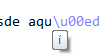
Have this feacture ? or can be implement ?
Regards
 Mitezuss
All 8 comments
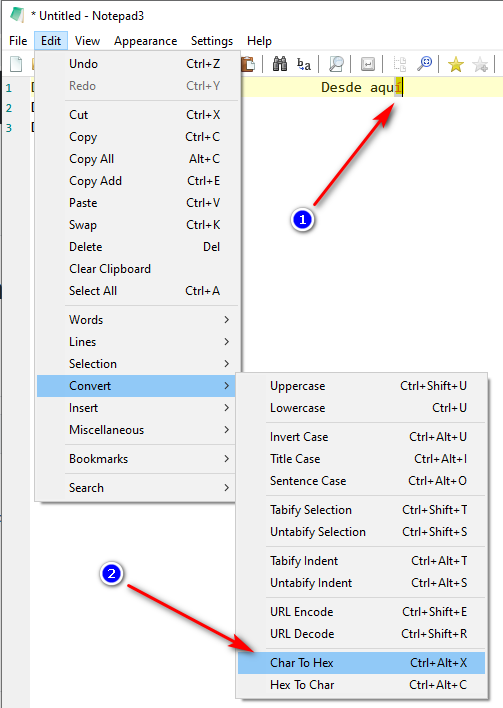
Hello @Mitezuss , is this the feature you are thinking of ? 🤔
Desde aquí
Desde aqu\xED
Desde \x61\x71\x75\xED
 hpwamr
on 3 Aug 2020
hpwamr
on 3 Aug 2020
No.
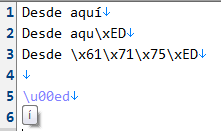
Java Escape:
\u00ed
check: https://charbase.com/00ed-unicode-latin-small-letter-i-with-acute
Note: the letter/character apear when you put the mouse over the code. (this feacture i want)
PD: be nice decode too the Javascript Escape =d (like your text)
Mitezuss
on 4 Aug 2020
Note: the letter/character appears when you put the mouse over the code. (this feature i want)
Hello @Mitezuss ,
Feel free to test the "Portable BETA/RC paf" version "Notepad3Portable_5.20.805.1_beta.paf" or higher.
See the issue "Notepad3 BETA/RC-channel access #1129" or hereunder:
_Note1:_ The "Notepad3Portable_paf" version can be used in "2 flavors", see with or without extension ".7z".
_Note2:_ If you follow the instructions of #1105 , you can update your "Notepad3 Setup" version with the latest features/fixes of the "Portable BETA/RC paf" version (see #1129).
Also, feel free to test the "Setup BETA/RC" version "Notepad3_5.20.805.1_Setup_beta" or higher.
See the issue "Notepad3 BETA/RC-channel access #1129" or hereunder:
Your comments and suggestions are welcome... 😃
hpwamr
on 5 Aug 2020
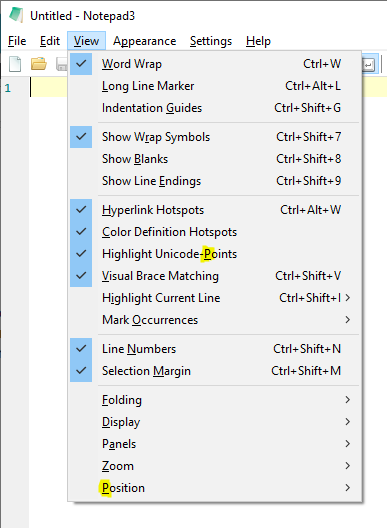
The keyboard shortcut for the new "Highlight Unicode-Points" menu entry is currently 'P', which conflicts with the "Position" menu. Could I please suggest that "Highlight Unicode-Points" use 'U' instead - currently unused in this level of the View menu?
 craigo-
on 6 Aug 2020
craigo-
on 6 Aug 2020
@craigo- : You are right.
@hpwamr : Do you think, you can take care of this topic ?
 RaiKoHoff
on 6 Aug 2020
RaiKoHoff
on 6 Aug 2020
Hello @RaiKoHoff ,
Already done 2834d0c . 😉
hpwamr
on 6 Aug 2020
Hello @craigo- ,
Feel free to test the "Portable BETA/RC paf" version "Notepad3Portable_5.20.808.1_beta.paf" or higher.
See the issue "Notepad3 BETA/RC-channel access #1129" or hereunder:
_Note1:_ The "Notepad3Portable_paf" version can be used in "2 flavors", see with or without extension ".7z".
_Note2:_ If you follow the instructions of #1105 , you can update your "Notepad3 Setup" version with the latest features/fixes of the "Portable BETA/RC paf" version (see #1129).
Also, feel free to test the "Setup BETA/RC" version "Notepad3_5.20.805.1_Setup_beta" or higher.
See the issue "Notepad3 BETA/RC-channel access #1129" or hereunder:
Your comments and suggestions are welcome... 😃
hpwamr
on 8 Aug 2020
@hpwamr, thanks for changing the keyboard shortcut. I can confirm it's working.
Will leave it to the OP to comment/close regarding the original issue.
craigo-
on 9 Aug 2020
Related issues
 blackcrack
·
3Comments
blackcrack
·
3Comments
 valhristov
·
3Comments
hpwamr
·
3Comments
valhristov
·
3Comments
hpwamr
·
3Comments
 omega32
·
3Comments
omega32
·
3Comments
 zb-z
·
3Comments
zb-z
·
3Comments
Most helpful comment
Hello @RaiKoHoff ,
Already done 2834d0c . 😉