Notepad3's displayed file encoding type
please delete ..
 blackcrack
All 3 comments
wrong idea..
blackcrack
on 18 Jul 2018
Ed.: Deleting an Issue or Comment
Due to the collaborative nature of GitHub, it’s not possible to delete issues. However, it is possible to delete a comment by clicking on the delete button as shown
So:
I captured this issue to clarify some details about Notepad3 encoding:
NP3 uses Scintilla's editor component in UTF-8 encoding mode only (like Notepad2 v.5 (no public source code, Notepad2(-mod) v.4 uses different encoding types internally).
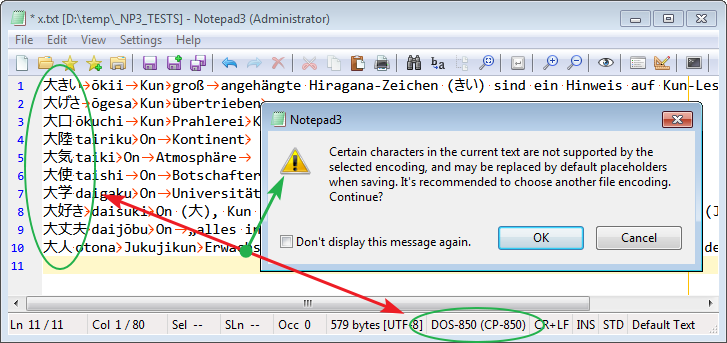
So Notepad3's text encoding (UTF-8) can display Unicode (non ANSI) text, even it is in DOS encoding mode. Any Unicode Text can be retrieved from Clipboard and displayed. So byte counting is displayed for this (internal) UTF-8 encoding.
The chosen encoding type only jumps into front in case of saving the text to a file:
 RaiKoHoff
on 19 Jul 2018
RaiKoHoff
on 19 Jul 2018
free will ? you ave raped my will
and this tread ! If i have see to i have made something wrong and cant / don't find this "delete Button"
have you not the right to misuse a start which i have want with my will to close ..
Or can your Chef do what he want ? Nope, you have fundamental rights with Articles ..
so, be glad i say it to you in friendship .. Maybe exist a Teamwork and a collaborative nature,
but this gives also not the right to misuse ... Look in the mirror and think about ..
best regards
Blacky
blackcrack
on 23 Jul 2018
Related issues
blackcrack
·
3Comments
 craigo-
·
3Comments
craigo-
·
3Comments
 zb-z
·
3Comments
zb-z
·
3Comments
 ggordon-vispero
·
3Comments
ggordon-vispero
·
3Comments
 tzleon
·
3Comments
tzleon
·
3Comments
Most helpful comment
Ed.: Deleting an Issue or Comment
Due to the collaborative nature of GitHub, it’s not possible to delete issues. However, it is possible to delete a comment by clicking on the delete button as shown
So:
I captured this issue to clarify some details about Notepad3 encoding:
NP3 uses Scintilla's editor component in UTF-8 encoding mode only (like Notepad2 v.5 (no public source code, Notepad2(-mod) v.4 uses different encoding types internally).
So Notepad3's text encoding (UTF-8) can display Unicode (non ANSI) text, even it is in DOS encoding mode. Any Unicode Text can be retrieved from Clipboard and displayed. So byte counting is displayed for this (internal) UTF-8 encoding.
The chosen encoding type only jumps into front in case of saving the text to a file:
