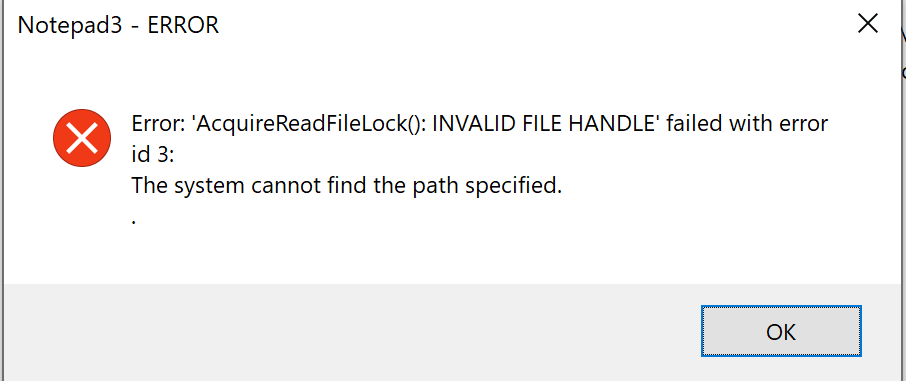
Have the following issues going from 5.19.815.2595 to 5.20.414.1
If I unstall the latest and reinstall 5.19 the error goes away. Any registry keys I can clean out to resolve?
 MeanEx2
All 6 comments
Notepad3 does not use any Registry read/write operations.
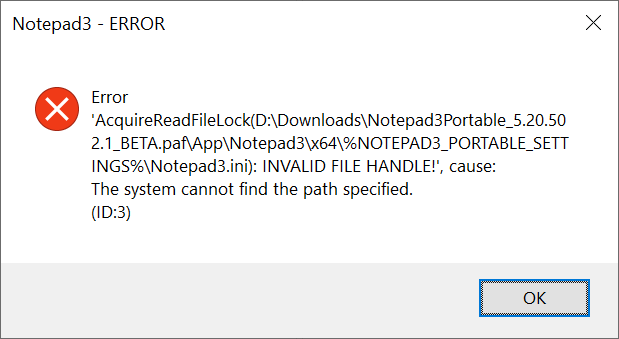
The error message means: Notepad3 tries to acquire a read-lock on its .ini-settings-file,
but the filename is empty, this leads to an "invalid file handle".
I have no idea yet, how this can happen - still under investigation ...
 RaiKoHoff
on 2 May 2020
RaiKoHoff
on 2 May 2020
@RaiKoHoff I saw similar message when unpacked portable .paf.exe and run Notepad3.exe
 alexantr
on 2 May 2020
alexantr
on 2 May 2020
Hello @RaiKoHoff ,
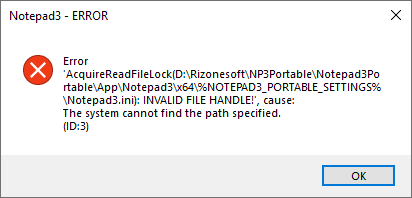
This message is displayed when, after unpacking the Notepad3Portable_.paf.exe, you run the Notepad3.exe in the x64/x86 directory instead of the Notepad3Portable.exe file in the Notepad3Portable directory.
 hpwamr
on 2 May 2020
hpwamr
on 2 May 2020
Hey @RaiKoHoff I have resolved this myself with that hint from you. What is happening is that Notepad3 is running under a standard user account. During install I provide it with elevated administrator account privileges to install. This means that the %AppData%\Roaming\Rizonesoft\Notepad3 folder and associated files IS NOT being created under the standard user but the admin user. It seems the older version of notepad3 does not care if they are missing and will run without error but the newer version does. In the meantime I manually copied the %AppData%\Roaming\Rizonesoft\Notepad3 folder from where it was created in the admin account over to the stander user %appdata% and this gets rid of the error.
MeanEx2
on 2 May 2020
@MeanEx2 : Yes, you found the problem. Nevertheless, there is a bug in the .ini-file handling.
(The .ini-file handling is a little bit more complicated: beside expanding environment variables, NP3 allows a two-stage ("adm -> user -> custom") redirection (.ini: [Notepad3] Notepad3.ini=... ).
This the path @alexantr and @hpwamr describe...
Long speech, short sense - I hope I fixed it (at least this issues).
Feel free to test the BETA version "Notepad3Portable_5.20.502.3_BETA.paf.exe.7z" or higher.
See "Notepad3 BETA-channel access #1129" or here Notepad3Portable_5.20.502.3_BETA.paf.exe.7z
_Note1:_ "Notepad3Portable PAF" can be used in "2 flavors", see with or without extension ".7z".
_Note2:_ If you follow the instructions #1105, you can also update your "Notepad3 Installer version" with the latest BETA version (see #1129).
Your comments and suggestions are welcome... 😃
RaiKoHoff
on 2 May 2020
Hello @MeanEx2 ,
As far as I'm concerned, I think you (requester) can close this issue...
hpwamr
on 19 Feb 2021
Related issues
 bravo-hero
·
51Comments
bravo-hero
·
51Comments
 rizonesoft
·
58Comments
rizonesoft
·
58Comments
 MelchiorGaspar
·
31Comments
rizonesoft
·
29Comments
MelchiorGaspar
·
31Comments
rizonesoft
·
29Comments
 craigo-
·
43Comments
craigo-
·
43Comments