Notepad3: Caret position and Find issue
Steps to Reproduce
- Open a reasonable large text file, so it does not fit into one screen. There shall be a word that exists in the file, but not in the first page.
- Press
Ctrl+Fto open the _Find Text_ dialog box. The _Search String_ input box now has focus. - Type in the word above. As we type, occurrences are highlighted all over the document.
- When the word in question is fully highlighted, press
Escto close the _Find Text_ dialog box.
Behavior Expected
The caret should stop at this occurrence.
Behavior Observed
In reality the caret merely stays at its very first position (i.e. it has not been moved at all), so as soon as the _Find Text_ dialog box is closed, the view port jumps back to where the caret sits before the dialog is opened.
The highlighting-on-the-fly feature is nice, but ... here it confuses me. :confused:
 lhmouse
All 19 comments
Hello @lhmouse ,
this works as designed (maybe the design can be discussed):
Only the view is moved (scrolled to) not the caret, cause:
- if the user decides not to go to the matching position, he can stop by pressing
ESCand he will find himself where he started from (caret position). - if the user wants to jump to the first match, he can simply press
F3(multipleF3to go to next matches).
Discussion opened...
 RaiKoHoff
on 6 May 2018
RaiKoHoff
on 6 May 2018
I know it is by design. Originally pressing Enter inside the find dialog will move the caret to the first occurrence, which is virtually unaltered. I haven't seen an editor have this feature, but my browser (Opera) does highlight matches upon input, and does not revert the view port on Esc. I am quite used to both behaviors above, but not the one currently Notepad3 has. A switch between these could be nice.
lhmouse
on 6 May 2018
Ok, I see your point. Just waiting for more opinions ...
RaiKoHoff
on 7 May 2018
For a change of the behavior, some points have to be clarified:
- typing into the search field should move the matching selection (ans so the caret automatically) to first occurrence after current caret position.
- behavior on
ESC: close search dialog (vies stays on current selection/caret position
(=> _change: don't switch back to origin caret position, when search dialog is opened_) - behavior on
ENTER: move selection/caret to next matching position, keep input focus on search dialog
(=> _keep former behavior_) - behavior on
(Shift+)F3: move selection/caret to next/prev matching position, and set/keep input focus on editor
(=> _keep former behavior_) - ... (_something forgotten_) ?
RaiKoHoff
on 7 May 2018
What is the behavior of other text editors? 🤔
 hpwamr
on 7 May 2018
hpwamr
on 7 May 2018
From Visual Studio : Incremental Search (Ctrl+I): it is like the new described behavior.
RaiKoHoff
on 7 May 2018
If 1) typing in the search field updates the selection then 2) behavior on Esc requires no special treatment since the caret has already been moved to where it should be, and 3) behavior on Enter will skip the current match as it has already been made.
lhmouse
on 7 May 2018
Please test development beta version "_develop_3.18.507.1022".
RaiKoHoff
on 7 May 2018
Nice work!
lhmouse
on 7 May 2018
Please, tell us what is changed in "_develop_3.18.507.1022"? 😏
hpwamr
on 7 May 2018
Compared to current RC:
- fixed a memory leak in "selection box undo/redo stack", before the data structures are freed only on new file loading - now orphaned memory chunks are reused (hope that nothing is broken).
- change the find/mark occurrences behavior as described in this issue (above).
RaiKoHoff
on 7 May 2018
Hmmm this version has another issue:
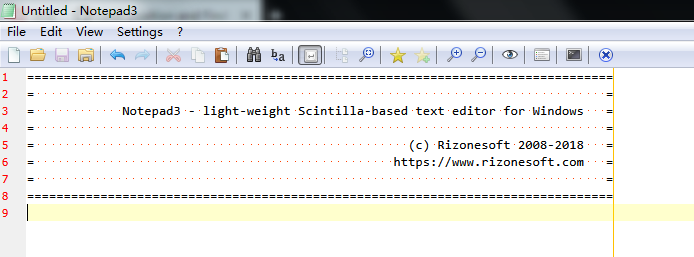
I have the 2nd default scheme turned on, which has the font size set to 10, while the 1st default scheme has the font size set to 18. However, when I create a new file, the margins between lines look as if I were using the 1st default scheme:
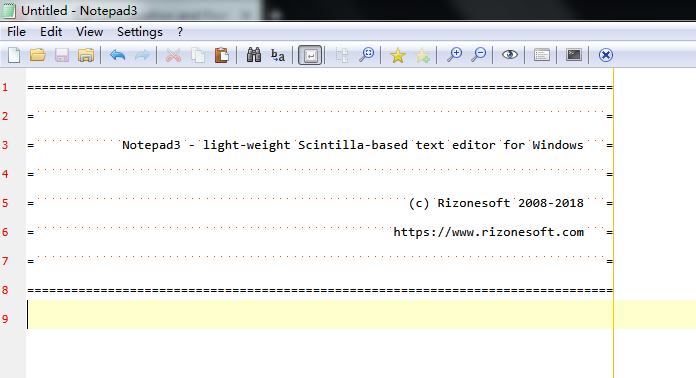
Manually turning off then back on the 2nd scheme makes it looks good again:
lhmouse
on 8 May 2018
@lhmouse : Confirmed.
RaiKoHoff
on 8 May 2018
Please test development beta "_develop_4.18.508.1026".
RaiKoHoff
on 8 May 2018
I can confirm it has been fixed now.
lhmouse
on 8 May 2018
This is fixed on master and I am closing this now.
lhmouse
on 9 May 2018
Hmm... now switching syntax schemes turns off 2nd default scheme if it was on. Is this by design or a bug?
lhmouse
on 9 May 2018
@lhmouse : It's a bug - nice finding.
Please try development beta "_develop_4.18.509.1028".
RaiKoHoff
on 9 May 2018
Yes this issue has been fixed, but there is again a new one. Further discussion is continued in #488.
lhmouse
on 10 May 2018
Related issues
 bravo-hero
·
3Comments
bravo-hero
·
3Comments
bravo-hero
·
3Comments
bravo-hero
·
3Comments
 craigo-
·
4Comments
hpwamr
·
4Comments
craigo-
·
4Comments
hpwamr
·
4Comments
 rizonesoft
·
4Comments
rizonesoft
·
4Comments