Nextcloud-vue: AppContent: no "fixed" element possible
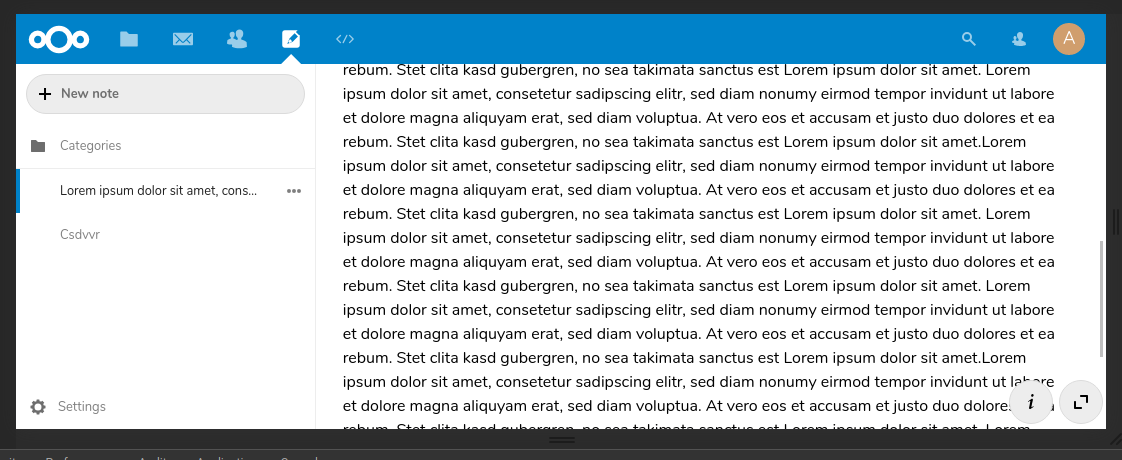
I want to add a button to the AppContent which should be at a fixed position. Therefore, I'm using the CSS style position: fixed on that button. However, the element isn't shown fixed in the app. Instead it scrolls with the content, i.e. it behaves like position: absolute.
I tried to debug this issue and found out that the following line causes this behavior:
If I remove this or deactivate this (e.g. with #app-content { will-change: auto !important; }), the behavior of my fixed element is as expected.
I've tested with Firefox 60.6.1esr and Chromium 73.0.3683.75 (Debian stable). Strange, hmm?
The easiest solution would be to remove that will-change, since it's just an optimization aspect. But maybe there is another solution to fix this?
 korelstar
All 7 comments
@korelstar did you set the top value of the fixed element?
This is a css requirement for it to work :)
 skjnldsv
on 27 Apr 2019
skjnldsv
on 27 Apr 2019
I'm using bottom instead, since it should be at the bottom of the window. Please see https://github.com/nextcloud/notes/blob/vue/src/Note.vue for details.
Here are the most relevant parts:
        <AppContent>
                <div>
                        [..]
                        <span class="action-buttons">
                                <button class="icon-details btn-sidebar" @click="onToggleSidebar" />
                                <button class="icon-fullscreen btn-fullscreen" @click="onToggleDistractionFree" />
                        </span>
                </div>
        </AppContent>
and the style:
.action-buttons {
        position: fixed;
        bottom: 4px;
        right: 20px;
        z-index: 2000;
}
@korelstar works here on webkit with this css :) :
.action-buttons[data-v-c28c672a] {
    position: sticky;
    bottom: 5px;
    left: 100%;
    z-index: 2000;
    display: flex;
    justify-content: space-around;
    width: 100px;
}
.action-buttons button[data-v-c28c672a] {
    padding: 14px;
    width: 44px;
    height: 44px;
    margin: 0;
}
skjnldsv
on 29 Apr 2019
Thanks for your research, @skjnldsv ! :-) :heart:
This seems to work, but I'm still wondering why the simple solution doesn't work like in non-Nextcloud environments. But I'm interpreting your answer as you have no idea, too.
korelstar
on 29 Apr 2019
Your solution leads to a strange behavior in fullscreen-mode. :-(
I still think, that removing will-change is the best solution.
korelstar
on 29 Apr 2019
Let's remove it then! :)
skjnldsv
on 30 Apr 2019
Great, thanks!
korelstar
on 30 Apr 2019
Related issues
 ma12-co
·
5Comments
ma12-co
·
5Comments
 roadrunnerjb
·
5Comments
roadrunnerjb
·
5Comments
 jancborchardt
·
9Comments
jancborchardt
·
9Comments
 ChristophWurst
·
7Comments
ma12-co
·
7Comments
ChristophWurst
·
7Comments
ma12-co
·
7Comments
Most helpful comment
Thanks for your research, @skjnldsv ! :-) :heart:
This seems to work, but I'm still wondering why the simple solution doesn't work like in non-Nextcloud environments. But I'm interpreting your answer as you have no idea, too.