Nextcloud-vue: App content list item layout detail
This is the current message list component, or at least how it appears in Mail – and in Talk it is similar (or at least 1 similar issue occurs, as explained below):
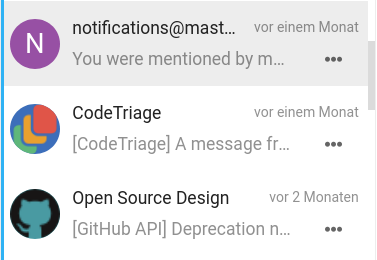
One issue is that ellipsizing of the text in the subline starts too early. The subline has a margin-right from the icon, which is not needed for the subline if there is an action menu, as the menu icon has enough padding to provide space from the text:
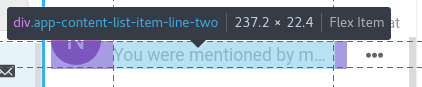
Issue two is that the menu button is actually not all the way on the right side of the list item but rather has a 7px distance. Which results in some more space wasted for the subline, as well as the unintended effect that if you click too far right of the icon, actually the item opens, and not the menu (this also happens in Talk):

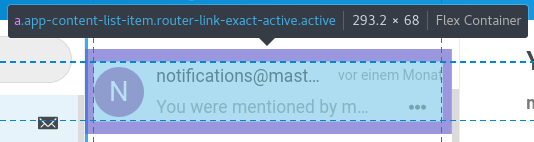
This is of course because there is a padding around the whole entry:
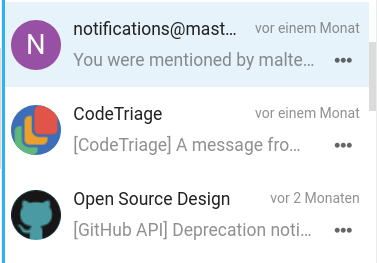
Proposal
- Remove padding-right from the whole entry
- Add padding-right: 7px; to the date in the top right
- Remove padding-right from the subline
You can already see that even though it’s a tiny change only, the action icon looks much nicer aligned, there’s some more space for the text, and the menu click issue is fixed:
cc @skjnldsv @ma12-co @ChristophWurst @juliushaertl – I guessed this belongs in the components repo. Feel free to move or open issues in other repos as appropriate.
 jancborchardt
All 9 comments
cc @skjnldsv @ma12-co @ChristophWurst @juliushaertl – I guessed this belongs in the components repo. Feel free to move or open issues in other repos as appropriate.
nah, there is no component for that yet :p
Everyone stole the component from contacts ^^
We are waiting for the newly update one from talk by @ma12-co :wink:
 skjnldsv
on 31 Mar 2020
skjnldsv
on 31 Mar 2020
We are waiting for the newly update one from talk by @ma12-co wink
this component is used in so many different ways, we need a clear Idea about what this component should be able to do
Up till now the features are:
- Slot for icon/avatar
- 1st text line
- 2nd text line
- 3rd text line (optional)
- Text on the right (Can be up or down)
- Actions (up or down)
- Counter
Is that all?
the outer element is always a router link for all use cases right??
 ma12-co
on 31 Mar 2020
ma12-co
on 31 Mar 2020
- Text on the right (Can be up or down)
We could specify this as "timestamp", right? We never want other text there on the right, and the timestamp should be kept short (e.g. 5m, 1h, Mon, Jan 20, etc.)
Also "1st text line" is always the main highlighted element, and the 2nd is an already optional subline – see Contacts when you have a contact without mail or phone number, which would be shown in the subline.
Essentially everything is optional except the icon/picture and the main text line.
jancborchardt
on 31 Mar 2020
But the fact that this is a 2 line element is the only thing that differentiate it from AppNavigationItem from a layout perspective, isn't it?? Do we use this with 1 line somewhere?
ma12-co
on 31 Mar 2020
But the fact that this is a 2 line element is the only thing that differentiate it from
AppNavigationItemfrom a layout perspective, isn't it?? Do we use this with 1 line somewhere?
Yes, as said:
see Contacts when you have a contact without mail or phone number, which would be shown in the subline.
jancborchardt
on 31 Mar 2020
:man_facepalming: sorry, going a bit too fast here :)
ma12-co
on 31 Mar 2020
the outer element is always a router link for all use cases right??
^ @skjnldsv @ChristophWurst
ma12-co
on 31 Mar 2020
the outer element is always a router link for all use cases right??
Nope, all apps doesn't have to use vue-router
skjnldsv
on 31 Mar 2020
Yeah I would not assume that to be always the case.
 ChristophWurst
on 13 May 2020
ChristophWurst
on 13 May 2020
Related issues
 korelstar
·
8Comments
ma12-co
·
7Comments
korelstar
·
8Comments
ma12-co
·
7Comments
 juliushaertl
·
10Comments
skjnldsv
·
9Comments
juliushaertl
·
10Comments
skjnldsv
·
9Comments
 raimund-schluessler
·
3Comments
raimund-schluessler
·
3Comments
Most helpful comment
this component is used in so many different ways, we need a clear Idea about what this component should be able to do
Up till now the features are:
Is that all?
the outer element is always a router link for all use cases right??