Material-theme-jetbrains: Plugin Error: Material Theme UI threw an uncaught NoSuchMethodError when loading folder
Summary
The java folder does not load in the project view
Expected behavior
All files and folders will be loaded in the project
Actual behavior
The error Plugin Error: Material Theme UI threw an uncaught NoSuchMethodError is thrown and the java folder in the Android project view does not load. A loading spinner is displayed at the top right of the project view and does not go away.
An IDE error also occurs with the following message
com.intellij.ide.projectView.impl.ProjectRootsUtil.findUnloadedModuleByContentRoot(Lcom/intellij/openapi/vfs/VirtualFile;Lcom/intellij/openapi/project/Project;)Ljava/lang/String;
java.lang.NoSuchMethodError: com.intellij.ide.projectView.impl.ProjectRootsUtil.findUnloadedModuleByContentRoot(Lcom/intellij/openapi/vfs/VirtualFile;Lcom/intellij/openapi/project/Project;)Ljava/lang/String;
    at com.chrisrm.idea.icons.MTFileIconProvider.getDirectoryIcon(MTFileIconProvider.java:121)
    at com.chrisrm.idea.icons.MTFileIconProvider.getIcon(MTFileIconProvider.java:98)
    at com.intellij.ide.projectView.impl.nodes.PsiDirectoryNode.setupIcon(PsiDirectoryNode.java:171)
    at com.intellij.ide.projectView.impl.nodes.PsiDirectoryNode.updateImpl(PsiDirectoryNode.java:136)
    at com.android.tools.idea.navigator.nodes.android.AndroidPsiDirectoryNode.updateImpl(AndroidPsiDirectoryNode.java:45)
    at com.intellij.ide.projectView.impl.nodes.AbstractPsiBasedNode.lambda$update$0(AbstractPsiBasedNode.java:163)
    at com.intellij.openapi.application.impl.ApplicationImpl.runReadAction(ApplicationImpl.java:926)
    at com.intellij.ide.projectView.impl.nodes.AbstractPsiBasedNode.update(AbstractPsiBasedNode.java:138)
    at com.intellij.ide.util.treeView.PresentableNodeDescriptor.getUpdatedPresentation(PresentableNodeDescriptor.java:88)
    at com.intellij.ide.util.treeView.PresentableNodeDescriptor.update(PresentableNodeDescriptor.java:41)
    at com.intellij.ide.util.treeView.AbstractTreeBuilder.updateNodeDescriptor(AbstractTreeBuilder.java:577)
    at com.intellij.ide.util.treeView.AbstractTreeUi$22.perform(AbstractTreeUi.java:924)
    at com.intellij.ide.util.treeView.TreeRunnable.run(TreeRunnable.java:36)
    at com.intellij.ide.util.treeView.AbstractTreeUi.execute(AbstractTreeUi.java:1826)
    at com.intellij.ide.util.treeView.AbstractTreeUi.update(AbstractTreeUi.java:920)
    at com.intellij.ide.util.treeView.AbstractTreeUi.update(AbstractTreeUi.java:877)
    at com.intellij.ide.util.treeView.AbstractTreeUi.collectNodesToInsert(AbstractTreeUi.java:2225)
    at com.intellij.ide.util.treeView.AbstractTreeUi.access$4300(AbstractTreeUi.java:64)
    at com.intellij.ide.util.treeView.AbstractTreeUi$29.perform(AbstractTreeUi.java:1381)
    at com.intellij.ide.util.treeView.TreeRunnable.run(TreeRunnable.java:36)
    at com.intellij.ide.util.treeView.TreeRunnable$TreeConsumer.consume(TreeRunnable.java:50)
    at org.jetbrains.concurrency.AsyncPromise.setResult(AsyncPromise.kt:148)
    at org.jetbrains.concurrency.DonePromise.notify(DonePromise.java:101)
    at com.intellij.ide.util.treeView.AbstractTreeUi$33.perform(AbstractTreeUi.java:1771)
    at com.intellij.ide.util.treeView.TreeRunnable.run(TreeRunnable.java:36)
    at com.intellij.ide.util.treeView.AbstractTreeUi.executeYieldingRequest(AbstractTreeUi.java:2060)
    at com.intellij.ide.util.treeView.AbstractTreeUi.access$5800(AbstractTreeUi.java:64)
    at com.intellij.ide.util.treeView.AbstractTreeUi$36$1.perform(AbstractTreeUi.java:1972)
    at com.intellij.ide.util.treeView.TreeRunnable.run(TreeRunnable.java:36)
    at com.intellij.ide.util.treeView.AbstractTreeBuilder.runOnYeildingDone(AbstractTreeBuilder.java:433)
    at com.intellij.ide.util.treeView.AbstractTreeUi.runOnYieldingDone(AbstractTreeUi.java:2155)
    at com.intellij.ide.util.treeView.AbstractTreeUi$36.perform(AbstractTreeUi.java:1967)
    at com.intellij.ide.util.treeView.TreeRunnable.run(TreeRunnable.java:36)
    at com.intellij.ide.util.treeView.AbstractTreeBuilder.lambda$new$0(AbstractTreeBuilder.java:51)
    at com.intellij.util.containers.TransferToEDTQueue.processNext(TransferToEDTQueue.java:99)
    at com.intellij.util.containers.TransferToEDTQueue.access$300(TransferToEDTQueue.java:37)
    at com.intellij.util.containers.TransferToEDTQueue$1.run(TransferToEDTQueue.java:58)
    at java.awt.event.InvocationEvent.dispatch(InvocationEvent.java:311)
    at java.awt.EventQueue.dispatchEventImpl(EventQueue.java:762)
    at java.awt.EventQueue.access$500(EventQueue.java:98)
    at java.awt.EventQueue$3.run(EventQueue.java:715)
    at java.awt.EventQueue$3.run(EventQueue.java:709)
    at java.security.AccessController.doPrivileged(Native Method)
    at java.security.ProtectionDomain$JavaSecurityAccessImpl.doIntersectionPrivilege(ProtectionDomain.java:80)
    at java.awt.EventQueue.dispatchEvent(EventQueue.java:732)
    at com.intellij.ide.IdeEventQueue.defaultDispatchEvent(IdeEventQueue.java:827)
    at com.intellij.ide.IdeEventQueue._dispatchEvent(IdeEventQueue.java:655)
    at com.intellij.ide.IdeEventQueue.dispatchEvent(IdeEventQueue.java:365)
    at java.awt.EventDispatchThread.pumpOneEventForFilters(EventDispatchThread.java:201)
    at java.awt.EventDispatchThread.pumpEventsForFilter(EventDispatchThread.java:116)
    at java.awt.EventDispatchThread.pumpEventsForHierarchy(EventDispatchThread.java:105)
    at java.awt.EventDispatchThread.pumpEvents(EventDispatchThread.java:101)
    at java.awt.EventDispatchThread.pumpEvents(EventDispatchThread.java:93)
    at java.awt.EventDispatchThread.run(EventDispatchThread.java:82)
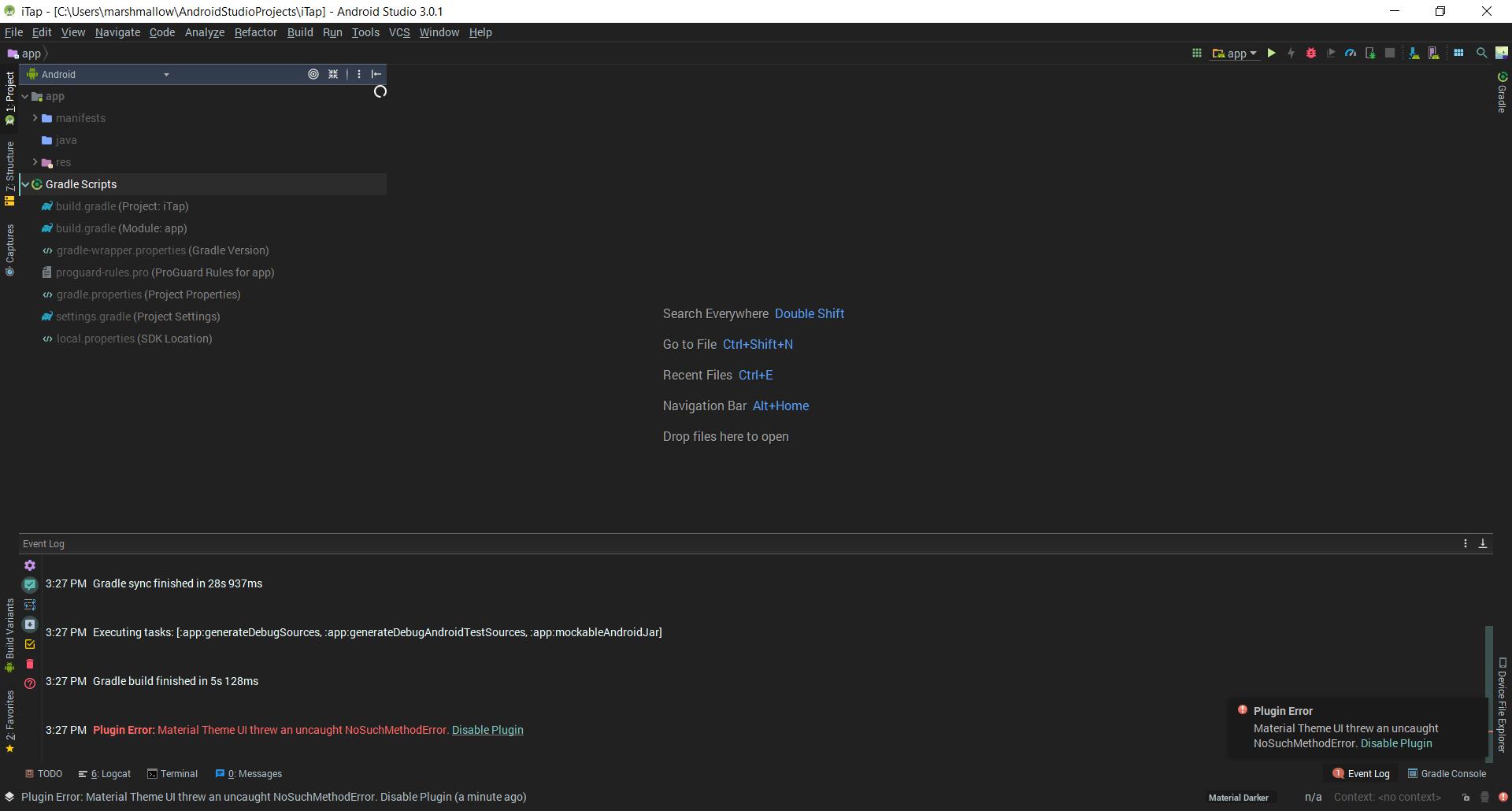
Steps to reproduce (if needed)
- Download latest plugin version
1.5.3 - Open
appfolder inAndroidproject view - The
javafolder fails to load and the errorPlugin Error: Material Theme UI threw an uncaught NoSuchMethodErroris thrown
Environment
Android Studio 3.0.1
Build #AI-171.4443003, built on November 10, 2017
JRE: 1.8.0_152-release-915-b01 amd64
JVM: OpenJDK 64-Bit Server VM by JetBrains s.r.o
Windows 10 10.0
 ghost
ghost
All 6 comments
Exact same thing here, uninstalling for now. Boy oh boy does AS look ugly without this plugin...
Edit: Also on Windows 10, AS 3.0.1
 therealccarter
on 7 Jan 2018
therealccarter
on 7 Jan 2018
@therealccarter Alternatively you can right-click on app > Show in Explorer > Navigate to app/src/main/java/<package-name> > Drag all the files to Android Studio. That way AS won't look ugly and you'll stay up to date with the latest version of this plugin when there's one.
ghost
on 7 Jan 2018
Thanks, will do!
therealccarter
on 7 Jan 2018
Jeez this Android Studio... When are they going to sync it with the latest IDE release?!
 mallowigi
on 7 Jan 2018
mallowigi
on 7 Jan 2018
fixed
mallowigi
on 7 Jan 2018
Awesome, thanks
therealccarter
on 7 Jan 2018
Related issues
 wolf99
·
3Comments
wolf99
·
3Comments
 ddnexus
·
3Comments
ddnexus
·
3Comments
 uar-zlatko-alomerovic
·
3Comments
uar-zlatko-alomerovic
·
3Comments
 dg00GT00
·
3Comments
dg00GT00
·
3Comments
 un000
·
4Comments
un000
·
4Comments
Most helpful comment
fixed