Material-theme-jetbrains: Settings cut off
Summary
When opening Intellij settings. if the window is not large enough there are scroll bars to scroll the settings explorer and the settings page itself.
With the theme plugin enabled, it is not possible to scroll as far as needed.
In some cases this means I cannot click the buttons at bottom right on the pages (e.g. Apply) and that some settings pages cannot be accessed at all.
The settings window can be resized, but his is un-intuitive as the maximize and minimize buttons are not present on the title bar (double clicking title bar to maximize as is normal on windows, also does not work for this window).
In the image I have scrolled down as far as is possible in both panes
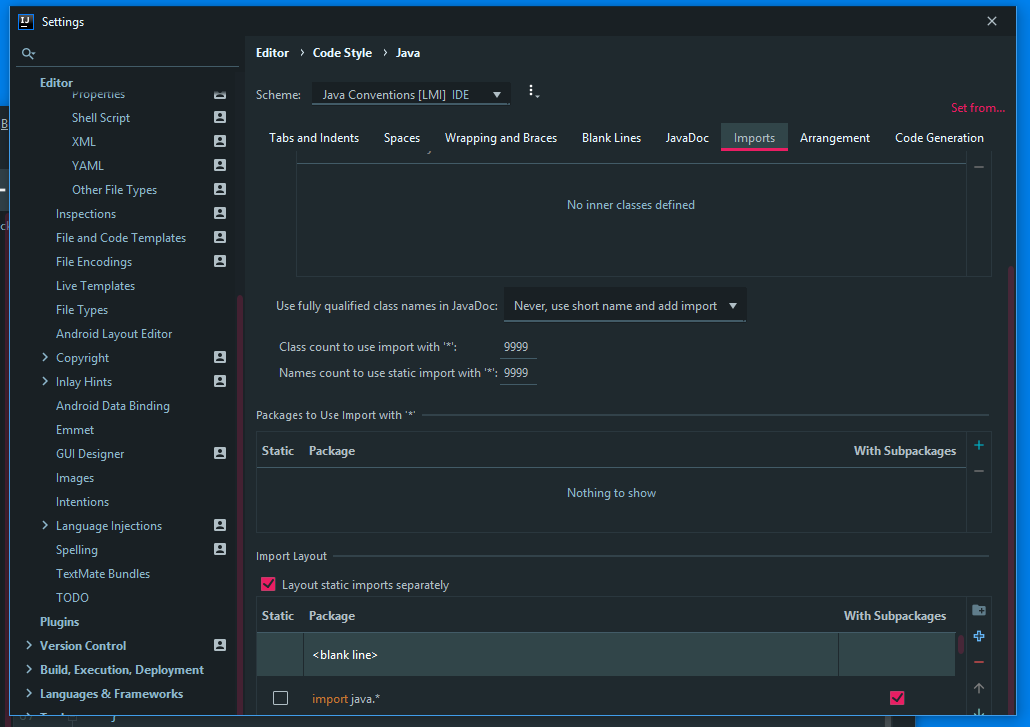
...
Steps to reproduce (if needed)
- apply theme
- Open IntelliJ settings
- Attempt to scroll down on longer settings page
Environment
Intellij IDEA 2019.2
Plugin 4.5.1
Windows 10 1803
colors.scheme.xml
<application>
  <component name="EditorColorsManagerImpl">
    <global_color_scheme name="_@user_Material Oceanic" />
  </component>
</application>
material_theme.xml
<application>
  <component name="MaterialThemeConfig">
    <option name="darkTitleBar" value="true" />
    <option name="isContrastMode" value="true" />
    <option name="isHighContrast" value="true" />
    <option name="isWizardShown" value="true" />
    <option name="pristineConfig" value="false" />
    <option name="settingsSelectedTab" value="5" />
    <option name="userId" value="91dfec5:166a06e6d57:-8000" />
    <option name="version" value="4.5.1" />
  </component>
</application>
material_custom_theme.xml
<application>
  <component name="MaterialCustomThemeConfig">
    <option name="treeSelectionColor" value="546e7a" />
    <option name="highlightColor" value="425b67" />
    <option name="secondBorderColor" value="2a373e" />
    <option name="contrastColor" value="1e272c" />
    <option name="secondaryBackgroundColor" value="32424a" />
    <option name="buttonColor" value="2e3c43" />
    <option name="selectionForegroundColor" value="ffffff" />
    <option name="selectionBackgroundColor" value="546e7a" />
    <option name="textColor" value="607d8b" />
    <option name="foregroundColor" value="b0bec5" />
  </component>
</application>
Side note: every time I do anything with the themes in this plugin (like switching to one of the predefined themes) it immediately decides I have a custom one and tells me so. Whats up with that?
 wolf99
All 3 comments
I can see this only happens on Windows, but unfortunately I can't debug at the moment, my Windows machine is awfully slow and I can't work under those conditions.
I'll try to see what I can do.
 mallowigi
on 10 Oct 2019
mallowigi
on 10 Oct 2019
Ok so apparently the sluggishness was caused by something else. I've issued a hotfix to take care of that sluggishness so eventually I'll be able to debug in Windows.
mallowigi
on 12 Oct 2019
Found the reason, and I could not find a fix. This is because the "Sidebar height" setting as it affects all trees, not only the project view. Now I don't understand why it doesn't reproduce on Mac, but it is an odd one.
As you said, it is easily fixed by resizing the window. In any case it happens only on the Code Style settings because of the trees in there. You can also reduce the Sidebar height to 20 and it will work as well, but it will affect all trees.
I'll try to give it more chance but I'd rather not waste too much time on such an isolated condition.
mallowigi
on 15 Oct 2019
Related issues
 sanderboom
·
4Comments
sanderboom
·
4Comments
 uar-zlatko-alomerovic
·
3Comments
uar-zlatko-alomerovic
·
3Comments
 Izopi4a
·
4Comments
Izopi4a
·
4Comments
 dg00GT00
·
3Comments
dg00GT00
·
3Comments
 un000
·
4Comments
un000
·
4Comments