Material-theme-jetbrains: Check boxes size issues
Summary
Check boxes icons remain stretched after changing the setting at Use custom font, within Appearance & Behavior tab.
I had already observed that behavior before, but a simple Invalidate and/or Retart trigger on the IDE options set up back all the check boxes to their default size. This approach has no more effect after the 2020.1 IDE 's updates.
Even though I'm showing a PyCharm screenshot, all the JetBrains IDE s that I have installed on my machine suffer from the same issue.
Expected behavior
...
Actual behavior
...
Steps to reproduce (if needed)

Environment
PyCharm 2020.1 (Professional Edition)
Build #PY-201.6668.115, built on April 7, 2020
Licensed to dg00GT00
Runtime version: 11.0.6+8-b765.25 amd64
VM: OpenJDK 64-Bit Server VM by JetBrains s.r.o
Windows 10 10.0
GC: ParNew, ConcurrentMarkSweep
Memory: 989M
Cores: 8
Registry: editor.distraction.free.mode=true, ide.balloon.shadow.size=0
Non-Bundled Plugins: com.chrisrm.idea.MaterialThemeUI, com.intellij.ideolog, com.mallowigi, mobi.hsz.idea.gitignore, izhangzhihao.rainbow.brackets, com.intellij.plugin.adernov.powershell
<application>
  <component name="MaterialThemeConfig">
    <option name="compactMenus" value="true" />
    <option name="compactStatusBar" value="true" />
    <option name="compactTables" value="true" />
    <option name="contrastMode" value="true" />
    <option name="customTreeIndentEnabled" value="true" />
    <option name="highContrast" value="true" />
    <option name="compactDropdowns" value="true" />
    <option name="compactSidebar" value="true" />
    <option name="darkTitleBar" value="true" />
    <option name="isCompactMenus" value="true" />
    <option name="isCompactStatusBar" value="true" />
    <option name="isCompactTables" value="true" />
    <option name="isContrastMode" value="true" />
    <option name="isCustomTreeIndentEnabled" value="true" />
    <option name="isHighContrast" value="true" />
    <option name="isWizardShown" value="true" />
    <option name="overrideAccentColor" value="false" />
    <option name="pristineConfig" value="false" />
    <option name="upperCaseButtons" value="false" />
    <option name="useMaterialFont2" value="true" />
    <option name="treeFontSize" value="15" />
    <option name="tabFontSize" value="15" />
    <option name="highlightThickness" value="1" />
    <option name="indicatorThickness" value="1" />
    <option name="leftTreeIndent" value="4" />
    <option name="rightTreeIndent" value="6" />
    <option name="tabsHeight" value="18" />
    <option name="accentColor" value="1de9b6" />
    <option name="selectedTheme" value="DEEPOCEAN" />
    <option name="userId" value="-1db8b91a:16ce24680c6:-8000" />
    <option name="version" value="5.1.0" />
  </component>
</application>
 dg00GT00
All 3 comments
Yes, I remember this issue. I many times tried to fix it but couldn't manage to do it.
One option would be to replace the checkboxes with icons, so that it grows consistently. I'll check into it but it won't be for now.
 mallowigi
on 16 Apr 2020
mallowigi
on 16 Apr 2020
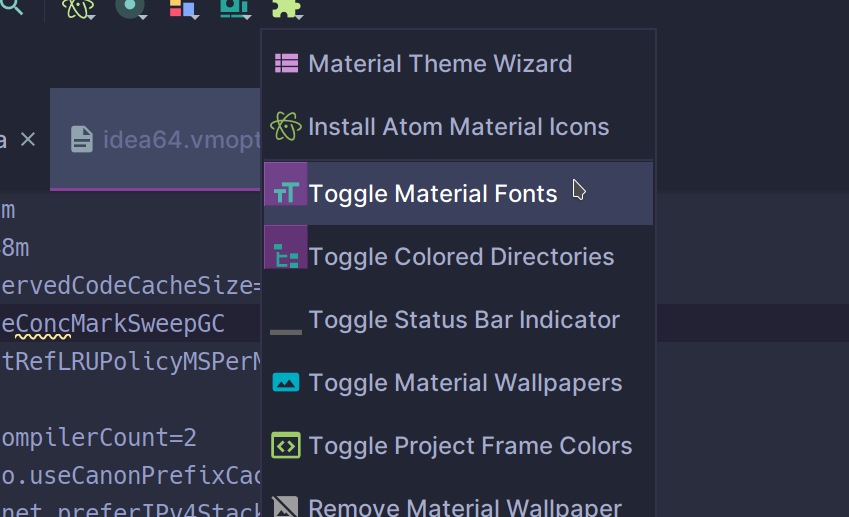
@mallowigi I believe this will not solve the problem entirely, as toggle icons in menus (their background fill more specific) suffer a similar fate. Also an observation: UI gets skewed as soon as -Dide.ui.scale is set to anything other than 1, so any scale (even floating like 1.25) will mess it up.
_Screenshot is taken in latest Idea 2020.2 with --Dide.ui.scale=2, KDE plasma 5 on 4k display with 200% scaling factor_
 Apxdono
on 13 Aug 2020
Apxdono
on 13 Aug 2020
Finally fixed
mallowigi
on 4 Nov 2020
Related issues
 un000
·
4Comments
un000
·
4Comments
 NikoGrano
·
4Comments
NikoGrano
·
4Comments
 wolf99
·
3Comments
wolf99
·
3Comments
 sheinfeld
·
4Comments
sheinfeld
·
4Comments
 MiracleWisp
·
3Comments
MiracleWisp
·
3Comments