Material-theme-jetbrains: Folder icon doesn't work with non-empty directory
1.When i create a controllers/routes folder it has special icon.

2.But when i add any js file it become default folder

WebStorm 2018.2.3
Build #WS-182.4323.44, built on September 3, 2018
JRE: 1.8.0_152-release-1248-b8 amd64
JVM: OpenJDK 64-Bit Server VM by JetBrains s.r.o
Linux 4.15.0-34-generic
Plugin version 2.9.0-pre1
Material Theme Plugin Darker
 MiracleWisp
All 3 comments
Hi everyone,
I have the same problem with the JS folder.
When the folder is empty or contains minified JS files, it works.

But when there is a JS file in it, the icon disappear

PhpStorm 2018.2.4
Build #PS-182.4505.42, built on September 27, 2018
JRE: 1.8.0_152-release-1248-b8 amd64
JVM: OpenJDK 64-Bit Server VM by JetBrains s.r.o
Windows 10 10.0
Version 2.9.0 of Material Theme UI
Thanks for your work !
[EDIT] There is an impact of the assets folder icon

And maybe the rest of the parent folders that contain the JS folder.
 TomCorvus
on 4 Oct 2018
TomCorvus
on 4 Oct 2018
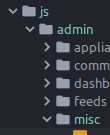
Just to chime in on this one, the breadcrumb _does_ display the custom folder icon, while the directory tree does not:

 nazrhyn
on 5 Oct 2018
nazrhyn
on 5 Oct 2018
The bug here is that it should display OPEN directories when there is a file opened in the editor when the "Project View Decorators" option is on, independently of the folder name. Since there are no "open states" for custom folders, the default "open folder" should be shown, however the bug here is that it shows the close folder.
Next version will fix this.
 mallowigi
on 5 Oct 2018
mallowigi
on 5 Oct 2018
Related issues
 sheinfeld
·
4Comments
sheinfeld
·
4Comments
 CeramicTitan
·
3Comments
CeramicTitan
·
3Comments
 dg00GT00
·
3Comments
dg00GT00
·
3Comments
 wolf99
·
3Comments
wolf99
·
3Comments
 pahan35
·
4Comments
pahan35
·
4Comments
Most helpful comment
The bug here is that it should display OPEN directories when there is a file opened in the editor when the "Project View Decorators" option is on, independently of the folder name. Since there are no "open states" for custom folders, the default "open folder" should be shown, however the bug here is that it shows the close folder.
Next version will fix this.