Material-theme-jetbrains: RubyMine shows an empty window when clicked on `Show Diff` from annotations
Summary
RubyMine shows an empty window when clicked on Show Diff from annotations. The same issue happens when starting the RubyMine for the first time.
Expected behavior
When clicked on Show Diff the new window should show the git diff between two revisions
Actual behavior
When clicked on Show Diff the new window is empty and the whole UI appears empty, except for the window icons (close, minimize, maximize)
Steps to reproduce (if needed)
(on startup)
- Open RubyMine
Observe the window:
Expected: The RubyMine loads UI
Actual: The RubyMine is only showing an empty window with window icons (close, minimize, maximize)
To show the window contents, I use the following trick:
- Click on the
Viewmenu ->Appearance->Enter Presentation Mode - Click on the
Viewmenu ->Appearance->Exit Presentation Mode
(when using Show Diff)
- Open any file tracked with GIT
- Click on
VCSmenu, and fromGitsubmenu selectAnnotate - Right-click any revision from the left pane (list of git revisions) and click
Show Diff
Observe the window that appears
Expected: The newly opened window is empty and the window only contains icons(close, minimize, maximize)
Actual: The newly opened window should show the diff for the selected revision
To get back to the open files, I just use the ESC button.
The image of the issue->

The issue was gone when I removed the Material Theme plugin.
Environment
RubyMine 2019.2.4
Build #RM-192.7142.37, built on October 29, 2019
Licensed to #
You have a perpetual fallback license for this version
Subscription is active until September 11, 2020
Runtime version: 11.0.4+10-b304.77 x86_64
VM: OpenJDK 64-Bit Server VM by JetBrains s.r.o
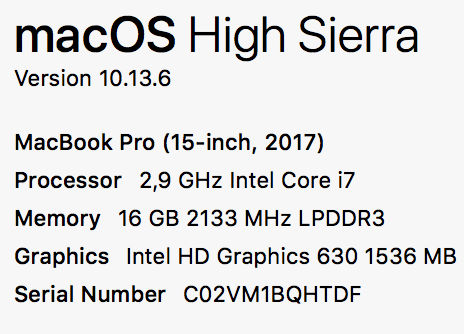
macOS 10.13.6
GC: ParNew, ConcurrentMarkSweep
Memory: 1981M
Cores: 8
Registry: ide.mac.allowDarkWindowDecorations=true, ide.tree.ui.experimental=false, ide.balloon.shadow.size=0
Non-Bundled Plugins: com.alayouni.ansiHighlight, com.chrisrm.idea.MaterialThemeUI, com.intellij.ideolog, net.seesharpsoft.intellij.plugins.csv, org.elm.klazuka, BashSupport, com.jetbrains.lang.ejs, org.jetbrains.plugins.vue, ru.adelf.idea.dotenv
material_theme.xml
<application>
  <component name="MaterialThemeConfig">
    <option name="isContrastMode" value="true" />
    <option name="isHighContrast" value="true" />
    <option name="isWizardShown" value="true" />
    <option name="pristineConfig" value="false" />
    <option name="selectedTheme" value="DARKER" />
    <option name="userId" value="15fd17df:166686ce982:-8000" />
    <option name="version" value="4.5.2" />
  </component>
</application>
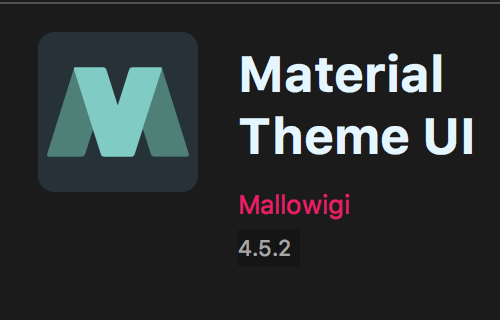
Material Theme Version
OS and computer Info
More references:
IntelliJ Community Posts
 uar-zlatko-alomerovic
All 3 comments
I also have this issue. As a temporary workaround, I've found that moving the blank Show Diff window (i.e. just dragging the window a few pixels any direction) restores the visibility of the contents.
 gfosteroutlier
on 4 Nov 2019
gfosteroutlier
on 4 Nov 2019
This is an issue with JRE 11 and is fixed for 2019.3. In the meantime if it bothers you, you can also disable the "Themed Title bar" option and restart.
 mallowigi
on 4 Nov 2019
mallowigi
on 4 Nov 2019
@mallowigi, thanks for the workaround! Saved my life. BTW, the theme is beautiful, you guys are doing a great job :+1:
 DimaDK02
on 10 Jul 2020
DimaDK02
on 10 Jul 2020
Related issues
 MiracleWisp
·
3Comments
MiracleWisp
·
3Comments
 wolf99
·
3Comments
wolf99
·
3Comments
 anstarovoyt
·
3Comments
anstarovoyt
·
3Comments
 timrspratt
·
3Comments
timrspratt
·
3Comments
 sanderboom
·
4Comments
sanderboom
·
4Comments
Most helpful comment
This is an issue with JRE 11 and is fixed for 2019.3. In the meantime if it bothers you, you can also disable the "Themed Title bar" option and restart.