Material-components-ios: Can I change the height size of TextFields for IOS use?
Overview
For usage questions: ask on Stack Overflow.
- Context, problem or idea, solution or next step
- Screenshots/Video (if possible)
- Stack trace (if possible)
Reproduction steps
- Detailed steps to reproduce
Version number
- Found in CHANGELOG.md
Operating system and device
Related issues
- Type
#and the issue number or#and select the from the inline drop down.
Internal data
- Associated internal bug: b/146433298
 Fernandez-Aldo
All 15 comments
The title doesn't have a [Component] prefix.
![material-automation[bot] picture](https://avatars.githubusercontent.com/u/19556314?v=4&s=40) material-automation[bot]
on 14 Dec 2019
material-automation[bot]
on 14 Dec 2019
TextField
Fernandez-Aldo
on 14 Dec 2019
@Fernandez-Aldo can you share a mock of what you are trying to do?
@andrewoverton we have an open question about TextField height. Perhaps this is a good candidate for the newer text controls component.
 randallli
on 17 Dec 2019
randallli
on 17 Dec 2019

I'm just trying to modify the height of the TexField. I increased the height of my button to look consistently but I want both of them to decrease the height. I can do it with the button but when I set a fixed height for the TexField it remains the same. Can you post a link for the open question about TexField height, I cannot find it.
Fernandez-Aldo
on 18 Dec 2019
In Material Design parlance we refer to what you're talking about as "density." There is no way to accomplish dense textfields with MDCTextFields. There _is_ a way to do it with our newest textfield offerings, which live under the TextControls component, but that mechanism is not currently exposed to users. Would you be interested in having that mechanism be exposed and trying it out?
Here is an example of MDCTextControl textfields that are not dense:

And here is an example of dense MDCTextControl textfields:
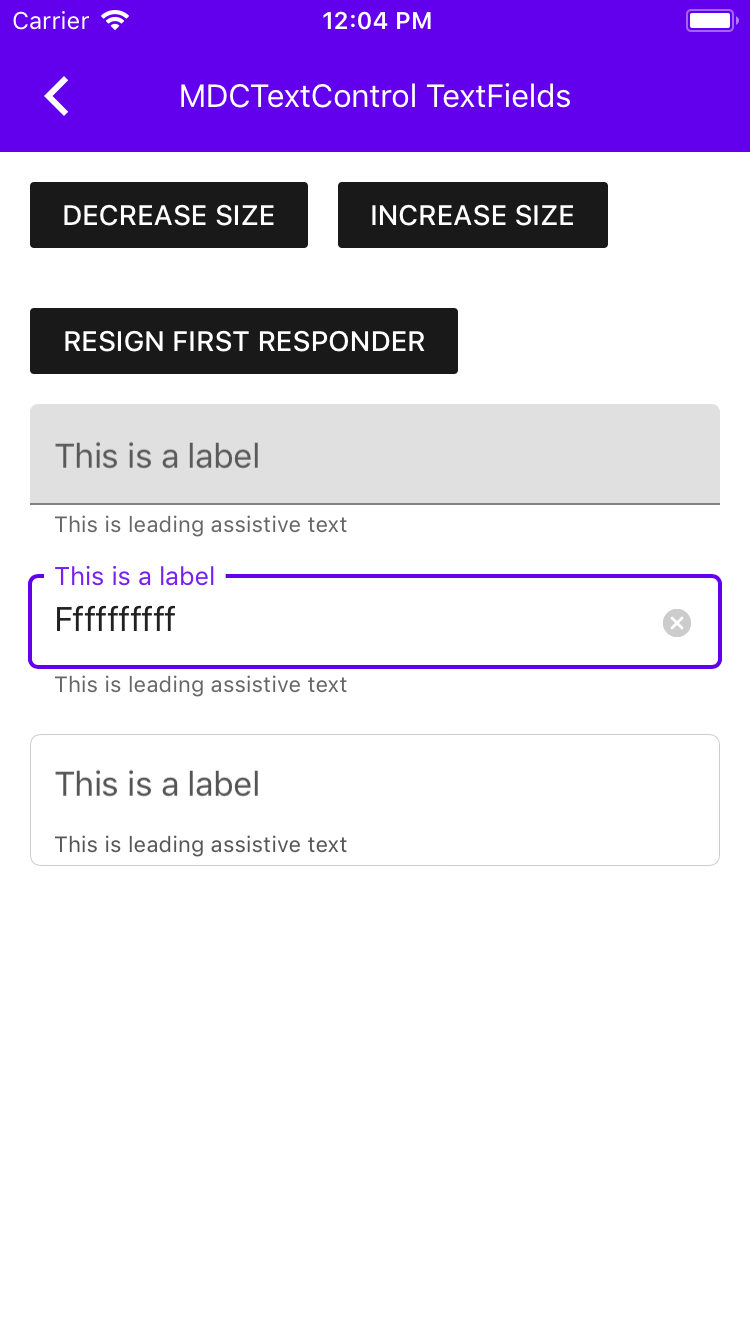
 andrewoverton
on 19 Dec 2019
andrewoverton
on 19 Dec 2019
Well, yes..that is exactly what I'm looking for. What do I need to do to
test it?
El jue., 19 dic. 2019 a las 9:08, Andrew Overton (notifications@github.com)
escribió:
In Material Design parlance we refer to what you're talking about as
"density." There is no way to accomplish dense textfields with
MDCTextFields. There is a way to do it with our newest textfield
offerings, which live under the TextControls component
https://github.com/material-components/material-components-ios/tree/develop/components/TextControls/src,
but that mechanism is not currently exposed to users. Would you be
interested in having that mechanism be exposed and trying it out?Here is an example of MDCTextControl textfields that are not dense:
[image: Simulator Screen Shot - iPhone 7 - 2019-12-19 at 12 03 13]
https://user-images.githubusercontent.com/8020010/71193436-29161180-2258-11ea-85b2-1db9351737cc.pngAnd here is an example of dense MDCTextControl textfields:
[image: Simulator Screen Shot - iPhone 7 - 2019-12-19 at 12 04 48]
https://user-images.githubusercontent.com/8020010/71193435-29161180-2258-11ea-9d99-48fce0e69cd9.png—
You are receiving this because you were mentioned.
Reply to this email directly, view it on GitHub
https://github.com/material-components/material-components-ios/issues/9291?email_source=notifications&email_token=AC337UWIVVKVYDEJLJMMBBLQZOTBVA5CNFSM4J2YIY6KYY3PNVWWK3TUL52HS4DFVREXG43VMVBW63LNMVXHJKTDN5WW2ZLOORPWSZGOEHKI2PA#issuecomment-567577916,
or unsubscribe
https://github.com/notifications/unsubscribe-auth/AC337UU6NHMVQBDGLUQ2XMLQZOTBVANCNFSM4J2YIY6A
.
--
Saludos,
Aldo Fernández
Fernandez-Aldo
on 19 Dec 2019
I am also trying to modify the height of the MDCTextFields in iOS, so I would also be interested in having that mechanism exposed to try it out.
Is there a tentative date for the release of this newer component? It would be really helpful to know. Thank you!
 Thonyvb
on 20 Dec 2019
Thonyvb
on 20 Dec 2019
The component is ready to use, I just haven't exposed a mechanism for density yet. I just created a bug to track that work though: #9324
andrewoverton
on 20 Dec 2019
Any updates about this?
Fernandez-Aldo
on 2 Jan 2020
Have you guys been able to expose hat mechanism?
Fernandez-Aldo
on 18 Jan 2020
No updates yet on exposing the mechanism for density on the TextControl text fields. Sorry! I'm doing a lot of work with these textfields in general right now and will get to this soon hopefully.
andrewoverton
on 21 Jan 2020
Hi @NirajCapermint, there are no updates on this yet. We have not yet gotten a chance to get together as a team to weigh the pros and cons of exposing the property.
If you wanted, you could create a category on the class with @property(nonatomic, assign) CGFloat density;, and set it through that, but it technically wouldn't be supported and might be a little \~dangerous\~.
andrewoverton
on 25 Feb 2020
Density was brought up again in https://github.com/material-components/material-components-ios/issues/9860. I really think we should expose it soon! If any of you want to vote for how it should work, please do so on this comment. Since I just put the poll there I'm going to use that issue for the density stuff from now on and close this one, just so there aren't duplicates. Sorry for the wait on density :/
andrewoverton
on 9 Mar 2020
We have used MDCTextfield in my application but we don't have a privilege to change the height of the text field. Can you please expose it to users ASAP, we need it very urgently.
Please consider my request and release it ASAP.
 YamunaChebolu
on 27 Apr 2020
YamunaChebolu
on 27 Apr 2020
Hi @YamunaChebolu, to clarify, there is no way (that I know of) to change the height of MDCTextField. The newer text fields, MDCFilledTextField and MDCOutlinedTextField, do have a mechanism to change the height, but it is not yet exposed, and unfortunately nobody else on my team views exposing that mechanism as a priority, so I can't promise if or when it'll happen :(
This issue is now being tracked at #9860.
andrewoverton
on 27 Apr 2020
Related issues
 croccio
·
3Comments
croccio
·
3Comments
 gmann1
·
5Comments
gmann1
·
5Comments
 zishanj
·
4Comments
zishanj
·
4Comments
 temkich
·
8Comments
temkich
·
8Comments
 Morpheu5
·
7Comments
Morpheu5
·
7Comments