Material-components-ios: [TextFields] MDCTextField less responsive with MDCTextInputControllerUnderline
The textfield becomes a lot less responsive to touch events.I have to click the upper portion of the text field to get it to register.
e.g. when I type text in and click the X on the right I have to click the top of the X and clicking the dead center of it does nothing.
Basically any touch event below the top 30% of the view doesn't do anything.
v46.1.0
OS 11.3 and 11.2.6
 gmann1
All 5 comments
Can you open an inspector like Reveal or the view inspector in Xcode and verify nothing is in the way and that the frame encompasses the entire MDCTextField? I'm not able to reproduce.
 willlarche
on 13 Mar 2018
willlarche
on 13 Mar 2018
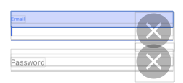
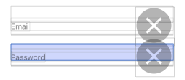
The top image has the controller the other does not. The blue area in each image is the MDCTextInputBorderView. It seems anything outside of that area doesn't register touch events. There are no other views blocking.
Also, not sure why, but in this mode it enlarged the X 🤷♂️
gmann1
on 13 Mar 2018
Can you post any of the layout code?
willlarche
on 14 Mar 2018
@willlarche I figured it out... I had height constraints set on both textfields!
Thanks again for taking time out of your day- apologies
gmann1
on 14 Mar 2018
Oh! You don't need those! It has an intrinsicContentSize
On Wed, Mar 14, 2018 at 1:14 PM gmann1 notifications@github.com wrote:
@willlarche https://github.com/willlarche I figured it out... I had
height constraints set on both textfields!—
You are receiving this because you were mentioned.
Reply to this email directly, view it on GitHub
https://github.com/material-components/material-components-ios/issues/3088#issuecomment-373102492,
or mute the thread
https://github.com/notifications/unsubscribe-auth/ABNm5fMEFhBlNSabPbIT2Bi3103oQQaPks5teU_dgaJpZM4SpSLz
.
willlarche
on 14 Mar 2018
Related issues
 versoworks
·
4Comments
versoworks
·
4Comments
 jimmy-robert
·
8Comments
willlarche
·
6Comments
jimmy-robert
·
8Comments
willlarche
·
6Comments
 steviemo
·
7Comments
steviemo
·
7Comments
 material-mirror
·
10Comments
material-mirror
·
10Comments
Most helpful comment
Oh! You don't need those! It has an intrinsicContentSize
On Wed, Mar 14, 2018 at 1:14 PM gmann1 notifications@github.com wrote: