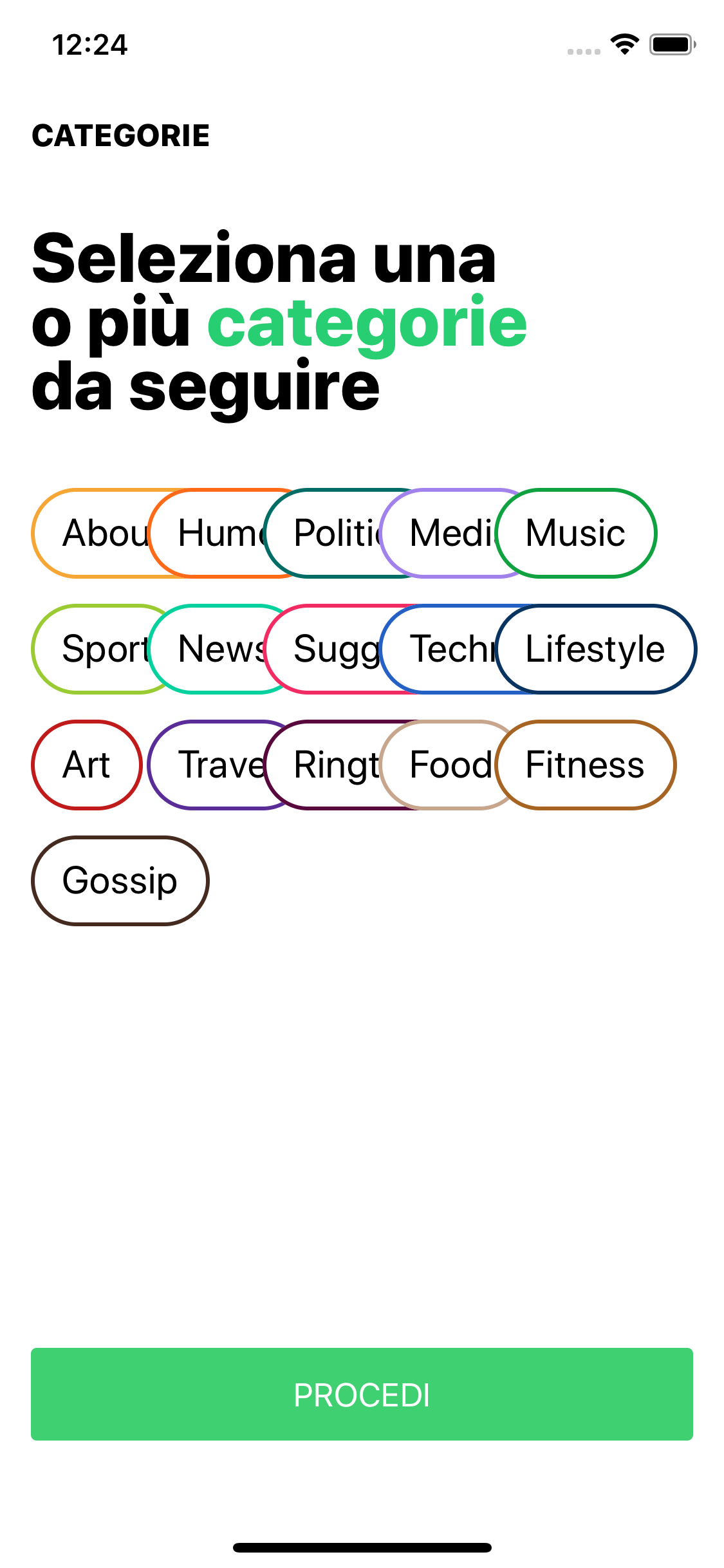
Material-components-ios: [CHIPS] are overlapping
For usage questions: ask on Stack Overflow.
A clear and concise description of what the bug is.
Reproduction steps
Steps to reproduce the behavior:
in viewDidLoad
    chipsCollectionView.collectionViewLayout = MDCChipCollectionViewFlowLayout()

    chipsCollectionView.register(MDCChipCollectionViewCell.self, forCellWithReuseIdentifier: "identifier")

    chipsCollectionView.delegate = self
    chipsCollectionView.dataSource = self
    chipsCollectionView.allowsMultipleSelection = true


    func collectionView(_ collectionView: UICollectionView, cellForItemAt indexPath: IndexPath) -> UICollectionViewCell {
    let cell: MDCChipCollectionViewCell = collectionView.dequeueReusableCell(withReuseIdentifier: "identifier", for: indexPath) as! MDCChipCollectionViewCell

    let chipView = cell.chipView

    chipView.titleFont = UIFont.systemFont(ofSize: 20)
    chipView.titleLabel.text = viewModel.categories.value[indexPath.row].name
    chipView.contentPadding = UIEdgeInsetsMake(8, 8, 8, 8)
    chipView.setBackgroundColor(UIColor.init(hexString: viewModel.categories.value[indexPath.row].colour!), for: UIControlState.selected)
    chipView.setBackgroundColor(AppColor.ChipSelectCategory.backgroundNormal, for: UIControlState.normal)
    chipView.setTitleColor(AppColor.ChipSelectCategory.titleColor, for: UIControlState.normal)
    chipView.setBorderWidth(2, for: UIControlState.normal)
    chipView.setBorderColor(UIColor.init(hexString: viewModel.categories.value[indexPath.row].colour!), for: UIControlState.normal)

    chipView.sizeToFit()
    cell.layoutIfNeeded()
    return cell

}
this is how it show:
Expected behavior
Chips should not overlapping
Actual behavior
Chips are overlapping
Platform (please complete the following information)
- Device: Simulator iPhone XS
- OS: 12
Additional context
Add any other context about the problem here.
Internal data
- Associated internal bug: b/121147133
 croccio
All 3 comments
The title doesn't have a [Component] prefix.
![material-automation[bot] picture](https://avatars.githubusercontent.com/u/19556314?v=4&s=40) material-automation[bot]
on 8 Nov 2018
material-automation[bot]
on 8 Nov 2018
+1. This is still happening and the collectionView cannot be scrolled on horizontal scroll direction, any solution?
 damai007
on 17 Jan 2019
damai007
on 17 Jan 2019
👍1
Have you tried to set estimatedItemSize to UICollectionViewFlowLayout.automaticSize
for example above try to replace first line with:
let layout = MDCChipCollectionViewFlowLayout()
layout.estimatedItemSize = UICollectionViewFlowLayout.automaticSize
chipsCollectionView.collectionViewLayout = layout
Because MDCChipCollectionViewFlowLayout extends UICollectionViewFlowLayout it might work.
And then you don't need to call
chipView.sizeToFit()
cell.layoutIfNeeded()
 Rokanank
on 19 Feb 2019
Rokanank
on 19 Feb 2019
👍6
Was this page helpful?
0 / 5 - 0 ratings
Related issues
 brianjmoore
·
5Comments
brianjmoore
·
5Comments
 jimmy-robert
·
8Comments
jimmy-robert
·
8Comments
 shadowsheep1
·
3Comments
shadowsheep1
·
3Comments
 vance
·
5Comments
vance
·
5Comments
 Morpheu5
·
7Comments
Morpheu5
·
7Comments
Most helpful comment
Have you tried to set estimatedItemSize to UICollectionViewFlowLayout.automaticSize
for example above try to replace first line with:
Because MDCChipCollectionViewFlowLayout extends UICollectionViewFlowLayout it might work.
And then you don't need to call