Material-components-ios: [Cards] MDCCardCollectionCell elevation shadow not shown only with setShadowElevtion
I've used MDCCardCollectionCell like you explain in docs.
I set
- (UICollectionViewCell *)collectionView:(UICollectionView *)cv
                  cellForItemAtIndexPath:(NSIndexPath *)indexPath;
{
    MDCCardCollectionCell *cell = (MDCCardCollectionCell *) [cv dequeueReusableCellWithReuseIdentifier:@"cellID"
                                                                                          forIndexPath:indexPath];

    [cell setShadowElevation:3.f forState:MDCCardCellStateNormal];
    return cell;
}
But I get not shadow.
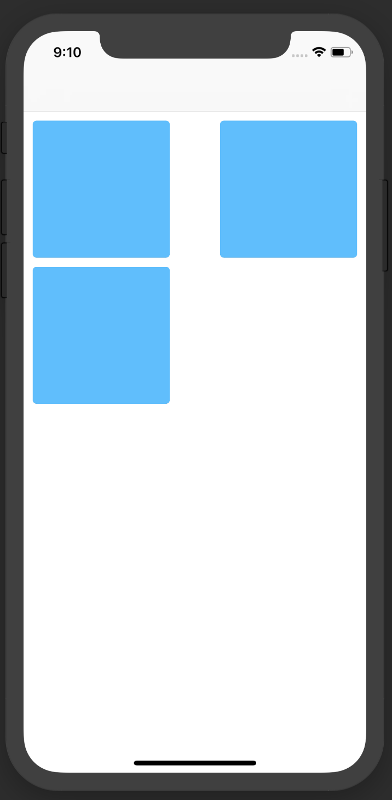
After a bit of debugging I found that I need to set this:
cell.layer.masksToBounds = NO;
In order to see the shadows.
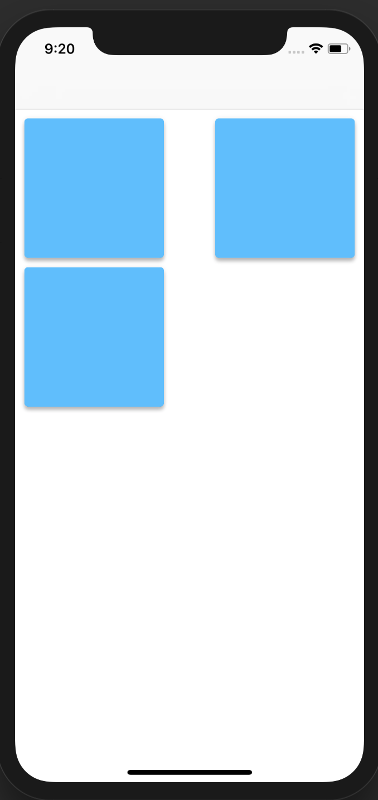
In the shadow layer is having masksToBounds set to YES by default a wanted behaviour?
If this is a usage related question I will post this question on SO, but I'd prefer to ask you guys before.
Reproduction steps
This is my controller:
//
//  ViewController.m
//  test0010
//
//  Created by shadowsheep on 13/03/2018.
//  Copyright © 2018 shadowsheep. All rights reserved.
//

#import "ViewController.h"
#import "MaterialCards.h"

@interface ViewController ()

@end

NSArray *titles;

@implementation ViewController

- (void)viewDidLoad {
    [super viewDidLoad];
    // Do any additional setup after loading the view, typically from a nib.
    titles = [[NSArray alloc] initWithObjects:@"1"
              , @"2"
              , @"3"
              , nil];
}


- (void)didReceiveMemoryWarning {
    [super didReceiveMemoryWarning];
    // Dispose of any resources that can be recreated.
}

#pragma mark UICollectionView delegate
- (NSInteger)collectionView:(UICollectionView *)view numberOfItemsInSection:(NSInteger)section;
{
    return [titles count];
}

- (UICollectionViewCell *)collectionView:(UICollectionView *)cv
                  cellForItemAtIndexPath:(NSIndexPath *)indexPath;
{
    MDCCardCollectionCell *cell = (MDCCardCollectionCell *) [cv dequeueReusableCellWithReuseIdentifier:@"cellID"
                                                                                          forIndexPath:indexPath];

    [cell setShadowElevation:3.f forState:MDCCardCellStateNormal];
    //cell.layer.shadowOffset = CGSizeMake(2.f, 2.f);
    //cell.layer.masksToBounds = NO;
    return cell;
}

@end
Version number
- Found in material components pods 44.6.0
Operating system and device
tested on iOS 10.3 and iOS 11.x
Internal data
- Associated internal bug: b/117179222
 shadowsheep1
All 3 comments
Having the same problem, is there any way to keep both shadow and masking?
 yigitserin
on 13 Nov 2018
yigitserin
on 13 Nov 2018
I fixed this problem by setting this on the cell.
cell.contentView.layer.cornerRadius = 8
cell.contentView.layer.masksToBounds = true
cell.layer.masksToBounds = false
cell.setShadowElevation(ShadowElevation(rawValue: 2), for: .normal)
 polishninja
on 30 Nov 2018
polishninja
on 30 Nov 2018
The internal issue b/117179222 is now closed. This issue is being closed as a result.
 material-mirror
on 30 Jul 2019
material-mirror
on 30 Jul 2019
Related issues
 LinneHuang
·
6Comments
LinneHuang
·
6Comments
 willlarche
·
6Comments
willlarche
·
6Comments
 jverkoey
·
7Comments
jverkoey
·
7Comments
 versoworks
·
4Comments
versoworks
·
4Comments
 Morpheu5
·
7Comments
Morpheu5
·
7Comments
Most helpful comment
I fixed this problem by setting this on the cell.
cell.contentView.layer.cornerRadius = 8
cell.contentView.layer.masksToBounds = true
cell.layer.masksToBounds = false
cell.setShadowElevation(ShadowElevation(rawValue: 2), for: .normal)