Material-components-ios: [MDCTextInputControllerOutlined] default border color
Any idea what is the default border color for MDCTextInputControllerOutlined and where it is defined?

I want to use this similar color for custom UITextField.
 zishanj
All 4 comments
The title doesn't have a [Component] prefix.
![material-automation[bot] picture](https://avatars.githubusercontent.com/u/19556314?v=4&s=40) material-automation[bot]
on 6 Jul 2019
material-automation[bot]
on 6 Jul 2019
The outlined controller's border color is controlled with normalColor. And normalColor defaults to UIColor.lightGrayColor. Hope that helps you!
 romoore
on 7 Jul 2019
romoore
on 7 Jul 2019
Thanks @romoore for your reply. Can you please tell me how to change the default black text color in above image when the field is not in focus?
zishanj
on 8 Jul 2019
You can configure the placeholder color for Outlined text fields using 3 properties. Each property controls the placeholder text color in a different state:
|State|Property|Example|
|---|---|---|
|textField.text == niltextField.isFirstResponder == NO |inlinePlaceholderColor|controller.inlinePlaceholderColor = UIColor.purpleColor;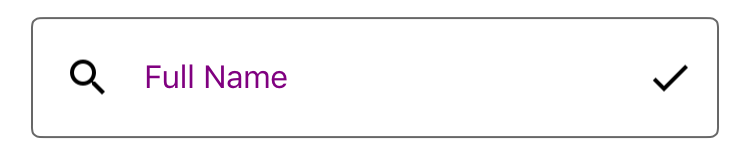 |
|
|textField.text != niltextField.isFirstResponder == NO|floatingPlaceholderNormalColor|controller.floatingPlaceholderNormalColor = UIColor.redColor;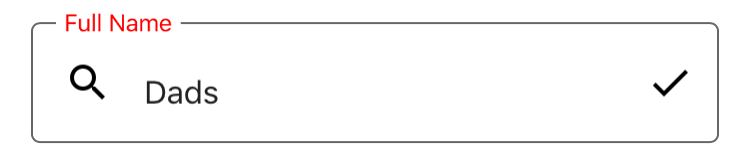 |
|
|textField.isFirstResponder = YES|floatingPlaceholderActiveColor|controller.floatingPlaceholderActiveColor = UIColor.brownColor;`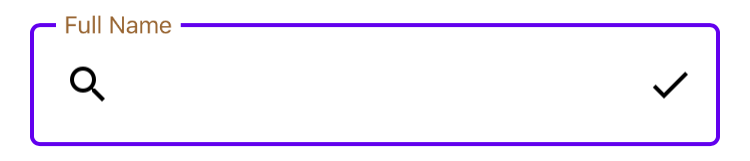 |
|
romoore
on 8 Jul 2019
Related issues
romoore
·
5Comments
 croccio
·
3Comments
croccio
·
3Comments
 appsforartists
·
5Comments
appsforartists
·
5Comments
 Morpheu5
·
7Comments
Morpheu5
·
7Comments
 guillermolechuga
·
3Comments
guillermolechuga
·
3Comments
Most helpful comment
You can configure the placeholder color for Outlined text fields using 3 properties. Each property controls the placeholder text color in a different state:
|State|Property|Example|
 |
|
 |
|
 |
|
|---|---|---|
|
textField.text == niltextField.isFirstResponder == NO|inlinePlaceholderColor|controller.inlinePlaceholderColor = UIColor.purpleColor;|
textField.text != niltextField.isFirstResponder == NO|floatingPlaceholderNormalColor|controller.floatingPlaceholderNormalColor = UIColor.redColor;|
textField.isFirstResponder = YES|floatingPlaceholderActiveColor|controller.floatingPlaceholderActiveColor = UIColor.brownColor;`