Live-share: Users may be unable to connect to Live Share services via a proxy
Users who are on a network that requires use of a proxy server to connect to external websites may experience problems using Live Share. Specifically, attempting to share using a connection mode of Auto (the default mode) or Relay may fail to connect to the relay service.
A partial workaround may be to use Direct connection mode, however then guests must be on the same network as you in order to join the session. (Direct connections _may_ also work through a VPN, depending on the VPN client and server configuration.)
Please upvote and/or comment on this issue if you're experiencing proxy-related issues.
 jasongin
All 86 comments
Just for anyone else working on this issue. The problem that I experiences with this issue went all the way down to only working on the same LAN connection. VPN over a WAN connection or anything like that would not work for me through our company proxy.
 JoshuaGarrison27
on 7 Feb 2018
JoshuaGarrison27
on 7 Feb 2018
Note we added a section on troubleshooting connections based on our experiences here to the docs to try to help people out. https://github.com/MicrosoftDocs/live-share/blob/master/docs/getting-started.md#troubleshooting-connections
 Chuxel
on 8 Feb 2018
Chuxel
on 8 Feb 2018
@Chuxel that looks great! The "getting started" page is getting really long though. Do you think it would make sense to move the sections about connection mode, connection troubleshooting, and firewall settings to a separate page, linked from the getting started page?
jasongin
on 8 Feb 2018
@jasongin Yeah I was thinking about that as well. There's also the quick start articles that cut to the chase so this is the more detailed article with things like manual join in it so we'll have to figure out the right balance for this one.
Chuxel
on 8 Feb 2018
@jasongin We also had a user on Slack mention that we are not respecting the VS Code proxy settings. My assumption is we'll track this problem with this same GitHub issue.
Chuxel
on 14 Feb 2018
Our proxy essentially serves as a MITM and I'm seeing this issue when trying to sign-in:
fetch('https://insiders.liveshare.vsengsaas.visualstudio.com/').then(res => res.json()).then(console.log);
The promise is rejected and my fetch fails:
GET https://insiders.liveshare.vsengsaas.visualstudio.com/ net::ERR_INSECURE_RESPONSE
 kdruff-c1
on 14 Feb 2018
kdruff-c1
on 14 Feb 2018
@kdruff-c1 It looks like this is indeed a specific issue with proxies that we've now identified. We've got an internal thread going to see what we can do about it in the service. Thank you so much for reporting it!
Chuxel
on 15 Feb 2018
The intermediate SSL cert issue (#111) that was at least partially responsible for causing this issue should be resolved at this point. @kdruff-c1 - Can you retry to see if it resolves your problem? @JoshuaGarrison27 - I'd be curious if your issue is resolved as well. We're still working on full proxy support.
Chuxel
on 27 Feb 2018
@jasongin FYI - Joshua and I connected and he's still seeing the problem so we'll leave this issue open for the larger proxy problem.
Chuxel
on 27 Feb 2018
Just for logging purposes, I worked with Chuck (@Chuxel ) to see if this was resolved for me. It looks like I will have to wait for full proxy support. Thanks for keeping me in the loop!
Edit: Should have refreshed my browser before posting this. haha. Thanks everyone.
JoshuaGarrison27
on 27 Feb 2018
I am unable to install dependencies ...
Visual Studio Live Share was unable to download needed dependencies to finish installation. Ensure you have network connectivity and restart VS Code to retry.
Sorry for the account change from @kdruff-c1 ... one of my colleagues had success creating a new github account w/ his corporate email and I tried that to no avail...
 kedruff
on 27 Feb 2018
kedruff
on 27 Feb 2018
@kendruff The good news is we're past the SSL issue, the bad news is it sounds like you may have some needed locations blocked by your local or corporate firewalls - least when not going through the proxy. Try running these commands from a terminal (you can also grab curl for windows here):
curl https://download.visualstudio.microsoft.com
curl https://download.microsoft.com
...and then...
curl --noproxy "*" https://download.visualstudio.microsoft.com
curl --noproxy "*" https://download.microsoft.com
If the first two give you a "document moved" HTML snippet while the last two cannot reach the destination, you're now hitting the proxy problem we have not resolved yet. Am I correct in assuming that is the case?
As an aside, there was a circumstance where GitHub accounts were unable to start sharing (see #99) but this should be resolved. This error is prior to that point so it likely is not related.
Chuxel
on 27 Feb 2018
Is there additional troubleshooting that I could add as a user to help with getting proxy connectivity working?
Forgot to add: Windows 7, VScode 1.20.1, authenticated corporate proxy that I unfortunately do not control
 ericc4
on 1 Mar 2018
ericc4
on 1 Mar 2018
@ericc4 Depending on your situation and the exact error you are seeing, we may need to implement better proxy support before you are unblocked. That is entirely dependent on the error you are getting, however.
That said, what error are you seeing and at what point?
Chuxel
on 1 Mar 2018
@Chuxel When I sign in I get "Error Login Failed" from VScode, but in the browser it says "Ready to collaborate". I've tried entering a user code but I get the same error from VScode. Everything else in VScode that would require the proxy works fine, such as updates and installing extensions
ericc4
on 1 Mar 2018
@ericc4 This may be due to the bug this issue is tracking. However, to verify, can you send us your logs after reproing? You can run the "Live Share: Export Logs" command to get a zip. From there you can either attach it here or shoot it to us at [email protected]. @jasongin and I can verify its the same problem.
Chuxel
on 1 Mar 2018
120 is a variation to this except it seems like it is stopping the sign in instead of stopping a sharing session. I closed #120 so we can focus on this first, and I will reopen it if this is fixed and #120 is not.
 AjkayAlan
on 2 Mar 2018
AjkayAlan
on 2 Mar 2018
For other's info - Both ericc4 and AjkayAlan had the following telltale sign in their logs that are another indicator of this problem:
[2018-03-01 16:35:16.603 Agent.Http E] > POST https://insiders.liveshare.vsengsaas.visualstudio.com/auth/token (c150ms sms) => 407 Proxy Authentication Required
Chuxel
on 2 Mar 2018
I suspect there is also proxy issue when installing. I get stuck with this for about a minute:

Followed by:

curl https://download.visualstudio.microsoft.com
curl https://download.microsoft.com
outputs HTML
curl --noproxy "*" https://download.visualstudio.microsoft.com
curl --noproxy "*" https://download.microsoft.com
outputs
curl: (7) Failed to connect to download.visualstudio.microsoft.com port 443: Timed out
At this point I don't see Live Share: Export Logs in the command palate. I'm able to install other extensions with no issue.
 zachberger
on 7 Mar 2018
zachberger
on 7 Mar 2018
@zachberger Thanks for the awesome data. You are indeed correct. We cover this in connectivity troubleshooting, but here's the breakdown:
- Finishing the installation (as you see above) for VS Code requires access to download.visualstudio.microsoft.com and download.microsoft.com
- Signing in requires access to *.liveshare.vsengsaas.visualstudio.com (specifically insiders.liveshare.vsengsaas.visualstudio.com right now)
- Running in "relay" mode requires access to *.servicebus.windows.net
Each of these may be impacted by this proxy issue depending on the exact rules your company has setup.
Chuxel
on 7 Mar 2018
@zachberger, do you have HTTP_PROXY / HTTPS_PROXY environment variables set on your system? It's likely the Live Share extension isn't using them, but should.
Unfortunately VS Code doesn't do anything to help extensions use the correct proxy settings. For some discussion on that topic see https://github.com/Microsoft/vscode/issues/12588
We know there are a few things we need to do to fix proxy issues for Live Share; it's just taking some time to investigate, develop, and test the fixes.
jasongin
on 7 Mar 2018
Thanks, setting the proxy environment variables fixed. Normally I depend on my .bash_profile to do this, but when clicking a join link it didn't open VS Code via bash. I've now set them the variables system wide and the installation and sign in completed.
zachberger
on 7 Mar 2018
@ericc4 @AjkayAlan @kedruff @JoshuaGarrison27 I had another person confirm that setting the environment variables Jason mentions above resolved the issue for them.
Do any of you have HTTP_PROXY and HTTPS_PROXY environment variables set globally? If not, can you set these and retry?
Chuxel
on 8 Mar 2018
@chuxel, those variables apply to Mac OS (and Linux, when we support it later). I don’t think they will help with any proxy issues on Windows.
However the latest Live Share update, released yesterday for VS Code and soon for VS, includes a fix specifically for authenticating proxies on Windows.
jasongin
on 8 Mar 2018
@jasongin those variables helped me on Windows
zachberger
on 8 Mar 2018
OK, I stand corrected. I wasn't aware the electron (node) HTTP library used those variables on Windows.
jasongin
on 8 Mar 2018
@Chuxel I have HTTP_PROXY, HTTPS_PROXY, and NO_PROXY set on my environment variables. I tested having it set both under my user variables and my system variables, and am still encountering not being able to sign in.
AjkayAlan
on 8 Mar 2018
@AjkayAlan Thanks for checking! Jason's still got more fixes in the queue so hopefully we'll get you covered with the next update.
Chuxel
on 8 Mar 2018
I also tried setting the proxy settings directly in my user settings with the following:
"http.proxy": "MyCompaniesProxyServerHere",
"http.proxyStrictSSL": true
This also didn't work.
Thanks for working on it!
AjkayAlan
on 8 Mar 2018
when using the diagnostic logging, I get this:
[Agent.Http E] > POST https://insiders.liveshare.vsengsaas.visualstudio.com/api/v0.2/workspace (c13ms sms) => 407 Proxy Authentication Required
and this:
[Agent E] Microsoft.Azure.Relay.RelayException: The handshake failed due to an unexpected packet format. ---> System.Net.WebSockets.WebSocketException: Unable to connect to the remote server ---> System.IO.IOException: The handshake failed due to an unexpected packet format.
   at System.Net.Security.SslState.StartReadFrame(Byte[] buffer, Int32 readBytes, AsyncProtocolRequest asyncRequest)
   at System.Net.Security.SslState.StartReceiveBlob(Byte[] buffer, AsyncProtocolRequest asyncRequest)
   at System.Net.Security.SslState.CheckCompletionBeforeNextReceive(ProtocolToken message, AsyncProtocolRequest asyncRequest)
   at System.Net.Security.SslState.StartSendBlob(Byte[] incoming, Int32 count, AsyncProtocolRequest asyncRequest)
   at System.Net.Security.SslState.ForceAuthentication(Boolean receiveFirst, Byte[] buffer, AsyncProtocolRequest asyncRequest)
   at System.Net.Security.SslState.ProcessAuthentication(LazyAsyncResult lazyResult)
   at System.Net.Security.SslStream.BeginAuthenticateAsClient(String targetHost,...
 tommck
on 9 Mar 2018
tommck
on 9 Mar 2018
I needed the HTTP_PROXY environment variable to finish installation and sign in, but I get the above errors when trying to share with someone in the office :(
tommck
on 9 Mar 2018
@tommck What version of the Live Share extension do you have? And are you on Windows or Mac?
jasongin
on 9 Mar 2018
@jasongin I'jm on Windows 7. I'm running VS Code extension 0.2.206
tommck
on 9 Mar 2018
Merging in #129 from @killnine. His scenario is as follows:
Error:
Sign-in failed.
Steps to Reproduce:
- Connect to NetMotion (VPN)
- Open Visual Studio or Visual Studio Code.
- Attempt to start a new sharing session (Visual Studio) or sign into Live Share (VS Code)
- Visual Studio will immediately fail with the error:
[2018-03-09 22:02:37.396 VSIX I] Acquired an access token for the VSO account '<14:eb047f03>'
[2018-03-09 22:02:37.420 VSIX E] Failed to create a collaboration session. An internal error occurred. Please contact Microsoft Product Support Services.
VS Code will get to 'Ready to Collaborate' page on browser, but will display 'Sign-in Failed' on actual instance of VS Code.
Note: If I disable VPNing, which probably also disables use of my corporate proxy, everything works as expected.
Note: My system currently works (on the VPN + Proxy) with Spotify, MS Teams, NuGet in Visual Studio, and Docker, which either natively support IE proxy settings or have their own setup for proxy details.
Note: When I use bash shell on windows and CURL https://download.microsoft.com, it fails with (56) Proxy CONNECT aborted.
Note: I have the HTTP_PROXY and HTTPS_PROXY environment variables set up with my corporate proxy url (url only, no credentials).
||Version Data|
|-:|:-|
|extensionName|VSLS|
|extensionVersion|0.2.206|
|protocolVersion|2.1|
|applicationName|VSCode|
|applicationVersion|1.21.0|
|platformName|Windows|
|platformVersion|10.0.14393|
Chuxel
on 14 Mar 2018
Merging in #142 from @rssfrncs as another example of this problem
Product and Version: 1.21
OS Version: Windows 10
Live Share Extension Version: 0.2.206
Steps to Reproduce / Scenario:
- Install extension
- Wait for extension to install its dependencies
Extension output window:
[2018-03-16 08:22:55.039 Client I] Passed version check for Windows: found 10.0.15063
[2018-03-16 08:22:55.044 Client I] Installing dependencies for Live Share...
[2018-03-16 08:22:55.046 Client I] Downloading package '.NET Core Runtime 2.0.5 for win7-x86'
[2018-03-16 08:22:55.126 Client E] Failed at stage: downloadPackages - Dependency download failed. RequestError: unable to get local issuer certificate
I am behind a corporate proxy, zScaler, which has caused issues with NPM/Yarn/Git in the past. However, we resolved these issues by setting the cafile NPM config property.
I've also set Git http.sslVerify to false.
Any ideas?
Chuxel
on 19 Mar 2018
same here #151 .
I am able to to connect to the servers without proxy. And i have HTTP_PROXY and HTTPS_PROXY are set in my environment. I also tried to set it in VS Code settings.
 alioguzhan
on 21 Mar 2018
alioguzhan
on 21 Mar 2018
Merging #151 from @alioguzhan
Error:
Could not connect to the server. Check that you are using a valid service endpoint
Steps to Reproduce:
I can't log in to my account behind the corporate proxy. If i switch to no-proxy connection everything [logging in to account / starting live share etc. ] work perfectly.
Traceback:
Agent.Rpc.Auth V] > #1 [14] auth.login(<0:>)
[Agent.Http V] < POST https://insiders.liveshare.vsengsaas.visualstudio.com/auth/token
[Agent.Http E] > POST https://insiders.liveshare.vsengsaas.visualstudio.com/auth/token => An error occurred while sending the request.
[Agent V] < #1 telemetry.httpRequestComplete: <65:35e51a44>
[Agent.Rpc.Auth V] < #1 [14] Error: Could not connect to the server. Check that you are using a valid service endpoint
[Client.Rpc.Auth E] > auth.login() error:    at System.Runtime.ExceptionServices.ExceptionDispatchInfo.Throw()
   at System.Runtime.CompilerServices.TaskAwaiter.HandleNonSuccessAndDebuggerNotification(Task task)
   at Microsoft.Cascade.Tracing.TracingHttpMessageHandler.<SendAsync>d__14.MoveNext() in E:\A\_work\12\s\src\Common\Tracing\TracingHttpMessageHandler.cs:line 79
--- End of stack trace from previous location where exception was thrown ---
   at System.Runtime.ExceptionServices.ExceptionDispatchInfo.Throw()
   at System.Runtime.CompilerServices.TaskAwaiter.HandleNonSuccessAndDebuggerNotification(Task task)
   at Microsoft.Cascade.Agent.ForwardResponseMessageHandler.<SendAsync>d__7.MoveNext() in E:\A\_work\12\s\src\Agent\ForwardResponseMessageHandler.cs:line 55
--- End of stack trace from previous location where exception was thrown ---
   at System.Runtime.ExceptionServices.ExceptionDispatchInfo.Throw()
   at System.Runtime.CompilerServices.TaskAwaiter.HandleNonSuccessAndDebuggerNotification(Task task)
   at System.Runtime...
||Version Data|
|-:|:-|
|extensionName|VSLS|
|extensionVersion|0.2.206|
|protocolVersion|2.1|
|applicationName|VSCode|
|applicationVersion|1.21.1|
|platformName|MacOS|
|platformVersion|16.7.0|
Chuxel
on 21 Mar 2018
So do the newer versions now detect a problem faster? I now can't even start a sharing session where I could start one and not actually make it work before
tommck
on 13 Apr 2018
@tommck We're continuing to try to better bubble up errors as they happen, so possibly. That said, can you share what you are seeing? Is an error message appearing? Anything in the output window for Live Share?
Chuxel
on 13 Apr 2018
I'm seeing the exact same thing as #191 now
tommck
on 13 Apr 2018
We continue to chip away at proxy issues. We just released v0.2.399 for VS Code and v0.2.400 for VS.
This release includes support for using the HTTP_PROXY and HTTPS_PROXY environment variables for authenticated proxies (e.g. via https://username:password@proxy-ip-or-name:port) along with Windows integrated credentials while in direct mode only. However, there are still issues for traffic that needs to route through the cloud relay. Specifically, proxy settings are not respected if "auto" mode falls back on the cloud relay or you are in "relay" mode. One of our down stream dependencies is giving us issues with relay mode and we continue to work through it with that team.
Chuxel
on 18 Apr 2018
I'm working on getting the relay mode proxy connection working, and looking for common scenarios.. What are the most common auth protocols supported by your proxy servers, does having Basic and Digest auth support enough?
 Priya91
on 18 Apr 2018
Priya91
on 18 Apr 2018
Our proxy uses ADFS integration. I don't authenticate at all.
tommck
on 19 Apr 2018
I am not exactly sure if our proxy uses integrated credentials or not. My http_proxy and https_proxy environment variables point directly to a server without any credentials in the url.
Here are some logs from VS Code 1.22.2 commit 3aeede733d9a3098f7b4bdc1f66b63b0f48c1ef9 when attempting to share.
Error: "Unable to get user information"
VSCode Log
[2018-04-20 13:54:19.829 Client I] Extension, IDE, OS : VSLS/0.2.399 VSCode/1.22.2 Windows/10.0.14393
[2018-04-20 13:54:19.841 Client I] Did not find user settings at C:\Users\K587812\.vs-liveshare-settings.json
[2018-04-20 13:54:19.847 Client I] Passed version check for Windows: found 10.0.14393
[2018-04-20 13:54:20.176 Client I] No workspaceId found in workspace settings.
[2018-04-20 13:54:20.183 Client I] No workspace url found in cascade.json file.
[2018-04-20 13:54:21.946 Client.Rpc I] Agent connection success - net.pipe://localhost/2c3db7beaa3b417bae778c5b8c6490cf
[2018-04-20 13:54:21.947 Client.Rpc V] < version.exchangeVersions()
[2018-04-20 13:54:21.948 Client.Rpc.Auth V] < auth.loginWithCachedToken()
[2018-04-20 13:54:22.446 Client.Rpc V] > version.exchangeVersions() succeeded
[2018-04-20 13:54:22.446 Client I] Client version: 0.2.399 (VSLS/2.1), agent version: 0.2.399.22819 (VSLS/2.1)
[2018-04-20 13:54:22.468 Client.Rpc.Auth V] > auth.loginWithCachedToken() succeeded
[2018-04-20 13:54:24.190 Client.Rpc V] < firewall.getFirewallStatus()
[2018-04-20 13:54:24.295 Client.Rpc V] > firewall.getFirewallStatus() succeeded
[2018-04-20 13:54:31.674 Client.Rpc.Workspace V] < workspace.shareWorkspace()
[2018-04-20 13:54:31.815 Client.Rpc.Workspace E] > workspace.shareWorkspace() error: System.InvalidOperationException: Unable to get user information
   at Microsoft.Cascade.Agent.WorkspaceService.<ShareWorkspaceAsync>d__22.MoveNext() in E:\A\_work\13\s\src\Agent\WorkspaceService.cs:line 176
--- End of stack trace from previous location where exception was thrown ---
   at System.Runtime.ExceptionServices.ExceptionDispatchInfo.Throw()
   at System.Runtime.CompilerServices.TaskAwaiter.ThrowForNonSuccess(Task task)
   at System.Runtime.CompilerServices.TaskAwaiter.HandleNonSuccessAndDebuggerNotification(Task task)
   at Microsoft.Cascade.Rpc.RpcDispatcher`1.<>c__DisplayClass23_2.<<BuildMethodMap>b__2>d.MoveNext() in E:\A\_work\13\s\src\Rpc\RpcDispatcher.cs:line 214
--- End of stack trace from previous location where exception was thrown ---
   at System.Runtime.ExceptionServices.ExceptionDispatchInfo.Throw()
   at System.Runtime.CompilerServices.TaskAwaiter.ThrowForNonSuccess(Task task)
   at System.Runtime.CompilerServices.TaskAwaiter.HandleNonSucc...
Agent Log
[2018-04-20 13:54:21.643 Agent I] vsls-agent v0.2.399.22819 (pid: 16960)
[2018-04-20 13:54:21.649 Agent I] Start time: 2018-04-20 13:54:21.498
[2018-04-20 13:54:21.649 Agent I] Using VSLS service: https://insiders.liveshare.vsengsaas.visualstudio.com/
[2018-04-20 13:54:21.796 Agent I] VSLSAgent/0.2.399.22819 VSLS/2.1
[2018-04-20 13:54:21.796 Agent I]
[2018-04-20 13:54:21.826 Agent I] Proxy settings from env variable: http_proxy was not null and https_proxy was not null
[2018-04-20 13:54:21.931 Agent I] (1001) Listening on pipe "2c3db7beaa3b417bae778c5b8c6490cf"
[2018-04-20 13:54:21.969 Agent I] Accepted incoming pipe connection.
[2018-04-20 13:54:22.005 Agent I] RPC session #1 established.
[2018-04-20 13:54:22.331 Agent V] > #1 [0] version.exchangeVersions(<0:>)
[2018-04-20 13:54:22.387 Agent V] < #1 [0] Result: <32:b38f2b15>
[2018-04-20 13:54:22.388 Agent.Rpc.Auth V] > #1 [1] auth.loginWithCachedToken(<0:>)
[2018-04-20 13:54:22.406 Agent.Auth V] CredRead(<9:b3ffbbff>, <9:b3ffbbff>) => 0
[2018-04-20 13:54:22.407 Agent.Auth V] CredRead(<9:b3ffbbff>, <9:9fbf261b>) => 0
[2018-04-20 13:54:22.408 Agent.Auth V] CredRead(<9:9fbf261b>, <22:e6e97681>) => 0
[2018-04-20 13:54:22.409 Agent.Auth V] CredRead(<8:c930ce7d>, <32:30e036b1>) => 0
[2018-04-20 13:54:22.448 Agent.Auth I] Profile cache hit (expires 04/24/2018 1:06:57 PM)
[2018-04-20 13:54:22.452 Agent.Rpc.Auth V] < #1 [1] Result: <84:f768c1e7>
[2018-04-20 13:54:22.457 Agent.Auth I] Profile background cache update triggered.
[2018-04-20 13:54:22.489 Agent.Http V] < GET https://insiders.liveshare.vsengsaas.visualstudio.com/api/v0.2/profile
[2018-04-20 13:54:23.258 Agent.Http V] > GET https://insiders.liveshare.vsengsaas.visualstudio.com/api/v0.2/profile (c768ms sms) => 200 OK
[2018-04-20 13:54:23.280 Agent V] < #1 telemetry.genericOperation: <53:191cc461>
[2018-04-20 13:54:23.668 Agent.Auth V] CredWrite(UserInfo, microsoft|[email protected]) => 0
[2018-04-20 13:54:23.669 Agent.Auth I] Profile background cache update complete.
[2018-04-20 13:54:24.191 Agent.Rpc.Firewall V] > #1 [2] firewall.getFirewallStatus(<0:>)
[2018-04-20 13:54:24.289 Agent.Firewall I] AgentApplicationName: C:\Users\K587812\.vscode\extensions\ms-vsliveshare.vsliveshare-0.2.399\dotnet_modules\vsls-agent.exe
[2018-04-20 13:54:24.293 Agent.Rpc.Firewall V] < #1 [2] Result: <4:dc937b59>
[2018-04-20 13:54:31.675 Agent.Rpc.Workspace V] > #1 [3] workspace.shareWorkspace(<0:>)
[2018-04-20 13:54:31.806 Agent E] Exception in workspace.shareWorkspace request handler: System.InvalidOperationException: Unable to get user information
   at Microsoft.Cascade.Agent.WorkspaceService.<ShareWorkspaceAsync>d__22.MoveNext() in E:\A\_work\13\s\src\Agent\WorkspaceService.cs:line 176
--- End of stack trace from previous location where exception was thrown ---
   at System.Runtime.ExceptionServices.ExceptionDispatchInfo.Throw()
   at System.Runtime.CompilerServices.TaskAwaiter.ThrowForNonSuccess(Task task)
   at System.Runtime.CompilerServices.TaskAwaiter.HandleNonSuccessAndDebuggerNotification(Task task)
   at Microsoft.Cascade.Rpc.RpcDispatcher`1.<>c__DisplayClass23_2.<<BuildMethodMap>b__2>d.MoveNext() in E:\A\_work\13\s\src\Rpc\RpcDispatcher.cs:line 214
--- End of stack trace from previous location where exception was thrown ---
   at System.Runtime.ExceptionServices.ExceptionDispatchInfo.Throw()
   at System.Runtime.CompilerServices.TaskAwaiter.ThrowForNonSuccess(Task task)
   at System.Runtime.CompilerServices.TaskAw...
[2018-04-20 13:54:31.812 Agent.Rpc.Workspace V] < #1 [3] Error: Unable to get user information
I also encountered "unable to download needed dependencies to finish installation".
In VS Live Share log, it said:
[Client I] Passed version check for Windows: found 10.0.14393
[Client I] Installing dependencies for Live Share...
[Client I] Downloading package '.NET Core Runtime 2.0.5 for win7-x86'
[Client I] Download complete.
[Client I] Downloading package 'OmniSharp for Windows (.NET 4.6)'
[Client E] Failed at stage: downloadPackages - Dependency download failed. RequestError: read ECONNRESET
It seems like it works for '.NET Core Runtimebut notOmniSharp for Windows`.
Could this also be proxy issue or something else?
 unional
on 22 Apr 2018
unional
on 22 Apr 2018
@unional There are two different download URLs for each of those dependencies and it is possible one of the two are blocked. To test this assertion, run...
curl https://download.visualstudio.microsoft.com
curl https://download.microsoft.com
...and then...
curl --noproxy "*" https://download.visualstudio.microsoft.com
curl --noproxy "*" https://download.microsoft.com
Most likely one of the two with "--noproxy" is blocked. Assuming so, you can try the steps described here: https://docs.microsoft.com/en-us/visualstudio/liveshare/reference/connectivity#proxies
We unfortunately have an issue with a down stream dependency and relay mode yet and there may be others given the sheer volume and variation in proxy setups.
Chuxel
on 23 Apr 2018
Thanks.
I actually having problem with the first one already:
curl https://download.visualstudio.microsoft.com
curl: (35) gnutls_handshake() failed: Error in the pull function.
The second one is ok:
curl https://download.microsoft.com
<head><title>Document Moved</title></head>
<body><h1>Object Moved</h1>This document may be found <a HREF="http://www.microsoft.com/download">here</a></body>
The --noproxy version yield the same result.
On another system, I got:
curl https://download.visualstudio.microsoft.com
curl: (35) OpenSSL SSL_connect: SSL_ERROR_SYSCALL in connection to download.visualstudio.microsoft.com:443
curl https://download.microsoft.com
<head><title>Document Moved</title></head>
<body><h1>Object Moved</h1>This document may be found <a HREF="http://www.microsoft.com/download">here</a></body>
@unional Try following the steps in https://docs.microsoft.com/en-us/visualstudio/liveshare/reference/connectivity#proxies
However, it may not be a proxy issue. It's possible your corporate or local firewall is simply blocking download.visualstudio.microsoft.com completely.
Chuxel
on 23 Apr 2018
@tommck Currently I have an implementation for relay that works for non-authenticating, authenticating (only basic and digest) proxies. If the proxy is sending some content body along with the 407 response, then the current implementation will support Content-Length type, and doesn't support chunked response body. This should be available most likely in the next release.
Priya91
on 25 Apr 2018
@AjkayAlan That doesn't seem like a proxy issue.
Priya91
on 25 Apr 2018
@AjkayAlan It seems like you authentication failed, if it's not the case of using wrong credentials, can you please create a new issue with the relevant details. We'll take a look. Also provide information on your environment.
Priya91
on 25 Apr 2018
I signed out and signed back in, and it appears everything is working for me now! I believe the original issue was with proxy stuff which was fixed with a recent VS Code update, but I was also potentially signed into the wrong account (I have 2 accounts with the same email, one personal and one through work).
Consider my scenario resolved.
AjkayAlan
on 25 Apr 2018
@AjkayAlan Great!
We also just released v0.2.487 that includes the fixes Priya mentioned above.
Chuxel
on 25 Apr 2018
@Chuxel that got rid of my #191 issue.. now to find someone who's still at work to test sharing...
tommck
on 25 Apr 2018
Looks like it's working, though it crashed nearly right away when I went through the proxy with a friend, but it seems to be partially working.. he got this error twice though:
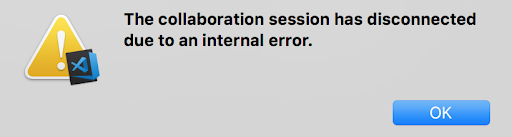
tommck
on 26 Apr 2018
After failing to create a collaboration session (VS2017) last week I followed the troubleshooting steps, checking the environment variables and trying Direct connection mode. Proxy credentials were not supplied, we use AD. I was able to create a session link and assumed the issue was resolved, but still never got a chance to fully test.
I'm now getting a completely different error:
[VSIX I] Acquired an access token for the VSO account '<>'
[VSIX I] Proxy settings from env variable: http_proxy was not null and https_proxy was not null
[VSIX E] > POST https://insiders.liveshare.vsengsaas.visualstudio.com/auth/exchange => The ServicePointManager does not support proxies with the https scheme.
[VSIX E] Failed to sign-in with the user '<>' credentials: The ServicePointManager does not support proxies with the https scheme.
[VSIX E] Failed to create a collaboration session. The ServicePointManager does not support proxies with the https scheme.
Is this just a more descriptive error that's being provided now? Figured I'd report it anyway.
 Camble
on 30 Apr 2018
Camble
on 30 Apr 2018
I'm trying to sign in for the first time and am getting errors. I'm not sure whether it's our corporate MITM SSL proxy or something else. I've ran the curl commands (with the -k to ignore cert issues for now) and get the redirect page for the https://download.microsoft.com but I am receiving a 500 response on https://download.visualstudio.microsoft.com
 davidkassa
on 4 May 2018
davidkassa
on 4 May 2018
@davidkassa curl without the --noproxy setting typically does go through your local proxy settings. Can you post the exact response you're getting from the command?
Howver, given what you describe, it is very likely could be that your corporate proxy is blocking (or has not allowed) access to download.vsiualstudio.com. You'll likely need to contact your corp IT.
This article can give them the information they need to understand connectivity requirements: http://aka.ms/vsls-docs/connection-mode
Chuxel
on 4 May 2018
I just checked and I get the same response from my cell phone so is there a server issue right now? Or is that an expected response?
Here are my logs
λ curl https://download.microsoft.com -k --noproxy '*'
<head><title>Document Moved</title></head>
<body><h1>Object Moved</h1>This document may be found <a HREF="http://www.microsoft.com/download">here</a></bod
y>

λ curl https://download.visualstudio.microsoft.com -k --noproxy '*'
<?xml version="1.0" encoding="iso-8859-1"?>
<!DOCTYPE html PUBLIC "-//W3C//DTD XHTML 1.0 Transitional//EN"
         "http://www.w3.org/TR/xhtml1/DTD/xhtml1-transitional.dtd">
<html xmlns="http://www.w3.org/1999/xhtml" xml:lang="en" lang="en">
        <head>
                <title>500 - Internal Server Error</title>
        </head>
        <body>
                <h1>500 - Internal Server Error</h1>
        </body>
</html>
Without the "-k" I get a self-signed error. Is there a way to import my root cert? Does Live Share use a standalone cert store like curl/Firefox or the OS store as Chrome/IE/Windows?
curl: (60) SSL certificate problem: self signed certificate in certificate chain
More details here: http://curl.haxx.se/docs/sslcerts.html
The Live Share error I get is
[VSIX I] Acquired an access token for the VSO account '<18:xxxxxx>'
[VSIX E] Failed to sign-in with the user '<18:xxxxxxx>' credentials: Value cannot be null.
Parameter name: loginTokenOrCode
[VSIX E] Failed to create a collaboration session. Value cannot be null.
I'll be working with our network team on this too but they typically prefer to inject our corporate cert over opening up direct access.
davidkassa
on 4 May 2018
Same here. I set the proxy and still a link for a live sharing session is not created.
[VS Code] Failed to create a collaboration session. An error occurred while sending the request.
 bhaidar
on 11 May 2018
bhaidar
on 11 May 2018
@Camble .NET doesn't yet provide support for proxy servers with https scheme, we only connect to proxies with http. Although note that you can access any http/https site through a proxy, the connection between the proxy and the site will be a tls channel in case of https, just that there's no tls connection between you and the proxy. This is the case with many browsers as well, supporting https proxies is not widely adopted yet. It may be the case that you put https_proxy=https://something, just change it to https_proxy=http://something.. should work most likely..
Priya91
on 14 May 2018
UPDATE: below is the vs share log output. looks like its having trouble with company proxy cert. any idea how to get pass this ?
[Client I] Trace log: /var/folders/yl/sjs151x17pbcy5r2hlq4mlpr0000gp/T/VSFeedbackVSRTCLogs/20180516_112557_15264699575650_VSCode.log
[Client I] Extension, IDE, OS : VSLS/0.3.114 VSCode/1.23.1 MacOS/16.7.0
[Client I] Did not find user settings at /Users/xxx/.vs-liveshare-settings.json
[Client I] Passed version check for MacOS: found 16.7.0
[Client I] Installing dependencies for Live Share...
[Client I] Downloading package '.NET Core Runtime 2.0.5 for osx-x64'
[Client I] Download complete.
[Client I] Downloading package 'OmniSharp for OSX'
[Client E] Failed at stage: downloadPackages - Dependency download failed. RequestError: unable to get local issuer certificate
it seems like i am experiencing similar issue what @kedruff seeing. both commands seem to give same output...
output for curl commands is below.
curl https://download.visualstudio.microsoft.com
```
"http://www.w3.org/TR/xhtml1/DTD/xhtml1-transitional.dtd">
500 - Internal Server Error
curl https://download.microsoft.com
```<head><title>Document Moved</title></head>
<body><h1>Object Moved</h1>This document may be found <a HREF="http://www.microsoft.com/download">here</a></body>
curl --noproxy "*" https://download.visualstudio.microsoft.com
```
"http://www.w3.org/TR/xhtml1/DTD/xhtml1-transitional.dtd">
500 - Internal Server Error
curl --noproxy "*" https://download.microsoft.com
```<head><title>Document Moved</title></head>
<body><h1>Object Moved</h1>This document may be found <a HREF="http://www.microsoft.com/download">here</a></body>
 mlakmal
on 16 May 2018
mlakmal
on 16 May 2018
@mlakmal Did you set the http_proxy and https_proxy env vars?
Priya91
on 17 May 2018
@priya91 i am not using proxy url as we don't have any proxy url. (im under company proxy (Blue Coat SSLV) and its setup through pac file. all requests need to approve company root certificate which is self signed). I opened similar issue for vscode sometime back which was fixed later by vscode team https://github.com/Microsoft/vscode/issues/17187
mlakmal
on 18 May 2018
Could make it work after setting the SYSTEM env variables (HTTP_PROXY and HTTPS_PROXY).
Here's what I found in the log, hope it helps:
[2018-05-23 07:36:55.732 Client.Rpc.Auth E] > auth.login() error: Error: An error occurred while sending the request.
at new ResponseError (C:\Users\G34542.vscode-insiders\extensions\ms-vsliveshare.vsliveshare-0.3.198\node_modules\vscode-jsonrpc\lib\messages.js:46:28)
at handleResponse (C:\Users\G34542.vscode-insiders\extensions\ms-vsliveshare.vsliveshare-0.3.198\node_modules\vscode-jsonrpc\lib\main.js:430:48)
at processMessageQueue (C:\Users\G34542.vscode-insiders\extensions\ms-vsliveshare.vsliveshare-0.3.198\node_modules\vscode-jsonrpc\lib\main.js:258:17)
at Immediate.
at runCallback (timers.js:672:20)
at tryOnImmediate (timers.js:645:5)
at processImmediate [as _immediateCallback] (timers.js:617:5)
 modul8com
on 23 May 2018
modul8com
on 23 May 2018
@Priya91 I set both HTTP_PROXY and HTTPS_PROXY variables to the same http:// address, which has not helped.
Camble
on 30 May 2018
I too am having issues with installing liveshare inside of VSCode, I was able to get it running inside of VS2017 by setting the HTTP_PROXY and HTTPS_PROXY variables. Seems to be an issue with not accepting my enterprise cert used for MITM.
[Client I] Trace log: C:\Users\dbhavsar\AppData\Local\Temp\VSFeedbackVSRTCLogs\20180605_122059_15282012592590_VSCode.log
[Client I] Extension, IDE, OS : VSLS/0.3.262 VSCode/1.23.1 Windows/10.0.15063
[Client I] Did not find user settings at <?:\<redacted>\<redacted>.json>
[Client I] Passed version check for Windows: found 10.0.15063
[Client I] Installing dependencies for Live Share...
[Client I] Downloading package '.NET Core Runtime 2.0.5 for win7-x86'
[Client I] Download complete.
[Client I] Downloading package 'OmniSharp for Windows (.NET 4.6)'
[Client E] Failed at stage: downloadPackages - Dependency download failed. RequestError: unable to verify the first certificate
 dhruvb14
on 5 Jun 2018
dhruvb14
on 5 Jun 2018
A coworker is getting the same problem as @dhruvb14 with Dependency download failed. RequestError: unable to verify the first certificate
Where do we need to inject our trusted CA? It's already in the machine store as well as in the following environment variables:
- CURL_CA_BUNDLE
- SSL_CERT_DIR
- SSL_CERT_FILE
 jakauppila
on 7 Jun 2018
jakauppila
on 7 Jun 2018
It somehow works now for some reason after the latest update ! Thank you !
modul8com
on 8 Jun 2018
Still not working for me, version: 0.3.264.59210.
Proxy settings are in the environment variables, same strings as I use in .npmrc for node to work with my user/pass included, but live share still doesn't work
[VSIX I] Acquired an access token for the VSO account '<30:c068add4>'
[Client.Rpc.Auth V] < #1 [9] auth.loginWithExternalToken(<47:6db21cec>)
[Agent.Rpc.Auth V] > #1 [9] auth.loginWithExternalToken(<0:>)
[Agent.Auth V] CredRead(<4:59d6e80e>, <30:52163006>) => 1168
[Agent.Auth I] External token cache miss.
[Agent.Http V] < POST https://insiders.liveshare.vsengsaas.visualstudio.com/auth/exchange
[Agent.Http E] > POST https://insiders.liveshare.vsengsaas.visualstudio.com/auth/exchange (c688ms sms) => 407 Proxy Authentication Required
[Agent V] < #1 telemetry.genericOperation: <53:4d27d5d9>
[Client.Rpc V] > #1 telemetry.genericOperation: <0:>
[Agent E] Remote exception in auth.loginWithExternalToken request handler: Microsoft.Cascade.Agent.HttpResponseStatusException: Visual Studio Live Share has detected you are behind an authenticated proxy and that you need to take steps for Live Share to use it. To find out more about proxy setup, see http://aka.ms/vsls-docs/proxy.
   at Microsoft.Cascade.Agent.HttpResponseMessageExtensions.ThrowHttpStatusException(HttpResponseMessage response) in E:\A\_work\24\s\src\Agent\HttpResponseMessageExtensions.cs:line 90
   at Microsoft.Cascade.Agent.HttpResponseMessageExtensions.<ThrowIfFailedAsync>d__2.MoveNext() in E:\A\_work\24\s\src\Agent\HttpResponseMessageExtensions.cs:line 46
--- End of stack trace from previous location where exception was thrown ---
   at System.Runtime.ExceptionServices.ExceptionDispatchInfo.Throw()
   at System.Runtime.CompilerServices.TaskAwaiter.ThrowForNonSuccess(Task task)
   at System.Runtime.CompilerServices.TaskAwaiter.HandleNonSuccessAndDebuggerNotification(Task task)
   at Microsoft.Cascade.Agent.AuthenticationService.<ExchangeTokenAsync>d__34.MoveNext() in E:\A\_work\24\s\src\Agent\AuthenticationService.cs:line 424
--- End of stack trace from previous location where exception was thrown ---
   at System.Runtime.ExceptionServices.ExceptionDispatchInfo.Throw()
   at System.Runtime.CompilerServices.TaskAwaiter.ThrowForNonSuccess(Task task)
   at System.Runtime.CompilerServices.TaskAwaiter.HandleNonSuccessAndDebuggerNotification(Task task)
   at Microsoft.Cascade.Agent.AuthenticationService.<LoginWithExternalTokenInternalAsync>d__29.MoveNext() in E:\A\_work\24\s\src\Agent\AuthenticationService.cs:line 254
--- End of stack trace from previous location where exception was thrown ---
   at System.Runtime.ExceptionServices.ExceptionDispatchInfo.Throw()
   at System.Runtime.CompilerServices.TaskAwaiter.ThrowForNonSuccess(Task task)
   at System.Runtime.CompilerServices.TaskAwaiter.HandleNonSuccessAndDebuggerNotification(Task task)
   at Microsoft.Cascade.Agent.AuthenticationService.<LoginWithExternalTokenAsync>d__28.MoveNext() in E:\A\_work\24\s\src\Agent\AuthenticationService.cs:line 226
--- End of stack trace from previous location where exception was thrown ---
   at System.Runtime.ExceptionServices.ExceptionDispatchInfo.Throw()
   at System.Runtime.CompilerServices.TaskAwaiter.ThrowForNonSuccess(Task task)
   at System.Runtime.CompilerServices.TaskAwaiter.HandleNonSuccessAndDebuggerNotification(Task task)
   at Microsoft.Cascade.Rpc.RpcDispatcher`1.<>c__DisplayClass23_2.<<BuildMethodMap>b__2>d.MoveNext() in E:\A\_work\24\s\src\Rpc\RpcDispatcher.cs:line 217
--- End of stack trace from previous location where exception was thrown ---
   at System.Runtime.ExceptionServices.ExceptionDispatchInfo.Throw()
   at System.Runtime.CompilerServices.TaskAwaiter.ThrowForNonSuccess(Task task)
   at System.Runtime.CompilerServices.TaskAwaiter.HandleNonSuccessAndDebuggerNotification(Task task)
   at Microsoft.Cascade.Rpc.RpcDispatcher`1.<HandleRequestAsync>d__16.MoveNext() in E:\A\_work\24\s\src\Rpc\RpcDispatcher.cs:line 99
--- End of stack trace from previous location where exception was thrown ---
   at System.Runtime.ExceptionServices.ExceptionDispatchInfo.Throw()
   at System.Runtime.CompilerServices.TaskAwaiter.ThrowForNonSuccess(Task task)
   at System.Runtime.CompilerServices.TaskAwaiter.HandleNonSuccessAndDebuggerNotification(Task task)
   at Microsoft.Cascade.Rpc.RpcServiceUtil.<RequestAsync>d__3.MoveNext() in E:\A\_work\24\s\src\Rpc\RpcServiceUtil.cs:line 56
[Agent.Rpc.Auth V] < #1 [9] Error: Visual Studio Live Share has detected you are behind an authenticated proxy and that you need to take steps for Live Share to use it. To find out more about proxy setup, see http://aka.ms/vsls-docs/proxy.
[Client.Rpc.Auth V] > #1 [9] Error: Visual Studio Live Share has detected you are behind an authenticated proxy and that you need to take steps for Live Share to use it. To find out more about proxy setup, see http://aka.ms/vsls-docs/proxy.
[VSIX E] Failed to sign-in with the user '<30:c068add4>' credentials: Visual Studio Live Share has detected you are behind an authenticated proxy and that you need to take steps for Live Share to use it. To find out more about proxy setup, see http://aka.ms/vsls-docs/proxy.
[VSIX E] Failed to create a collaboration session. Visual Studio Live Share has detected you are behind an authenticated proxy and that you need to take steps for Live Share to use it. To find out more about proxy setup, see http://aka.ms/vsls-docs/proxy.
 c0bra99
on 8 Jun 2018
c0bra99
on 8 Jun 2018
@k7shanmugam @jasongin @srivatsn People are hitting downloader issues on vscode due to cert issues, and as mentioned here, these are already solved by vscode, we should push to get the downloader apis exposed, so we don't have to duplicate these solutions in our extension as well.
Priya91
on 13 Jun 2018
I was able to get past Dependency download failed. RequestError: unable to verify the first certificate by specify the environment variable NODE_TLS_REJECT_UNAUTHORIZED to 0.
Far from ideal, but it does pinpoint that the issue is that node is not looking at the appropriate trust stores.
jakauppila
on 13 Jun 2018
We've made a significant amount of improvements to our proxy support (thanks @Priya91!), so we're going to close this general-purpose issue, and track any remaining proxy work via specific issues. Please let us know if you run into connectivity problems. Otherwise, we'll track progress via the issues we've already got logged. Thanks!
 lostintangent
on 8 Aug 2018
lostintangent
on 8 Aug 2018
Is there a solution for proxies with a 'pac'-File?
"Unable to connect to the remote server. TrackingId:40b15f09-60d4-4c48-a8ee-76eb4d25e532, Address:sb://vsls-prod-ins-euw-private-relay.servicebus.windows.net/c0b214cbd3852b83c1535c97274f182be2b4--70c9e139-ed6f-485c-bf1b-5f0ef2ff7eb1, Timestamp:15.08.2018 07:48:27"
 lornz
on 15 Aug 2018
lornz
on 15 Aug 2018
@Priya91, do you have any insight into PAC files?
 grork
on 15 Aug 2018
grork
on 15 Aug 2018
@lornz For pac file, have you tried to set the proxy setting to one of the server + port specified in your PAC file?
 yangwen2
on 8 Mar 2019
yangwen2
on 8 Mar 2019
Our internet access requires a proxy server with user authentication.
The method of setting http_proxy and https_proxy for Visual Studio Live Share is a very poor design since it exposes a user name and password into a system wide environment variable.
Is there any plan for a more secure method of dealing with a proxy server?
 Jeff5519
on 16 Apr 2019
Jeff5519
on 16 Apr 2019
@Jeff5519 If you use your AAD logon credentials for proxy authentication, and you have the proxy setting configured in OS Settings, then we will read the proxy information from OS and use your logon credentials to authenticate. If you need separate credentials, we don't support that today, since that requires having a separate UI to get the credentials from user, and then securing it.. We haven't had many user reports for this scenario, so we don't have plans to support that yet.
Priya91
on 17 Apr 2019
Tried several ways to connect in Visual Studio 2019, but i don't manage to connect by Relay or Direct.
Behind Firewall (with Proxy Pac configuration)
I can download and read the proxy pac file and i also tried to use some of the ip addresses there for stearing via HTTP_PROXY and HTTPS_PROXY, but to no avail.
The Output from Live Share Window stays empty, the Message on Top says can't connect.
Our proxy does use Active Directory logon credentials and the Proxy settings are configured in the Windows 10 Proxy "script" section.
 farangkao
on 19 Jun 2019
farangkao
on 19 Jun 2019
@farangkao Use the connectivity troubleshooting tips here: https://docs.microsoft.com/en-us/visualstudio/liveshare/troubleshooting#connectivity
Priya91
on 19 Jun 2019
I was able to get live share working by setting the HTTP_Proxy and HTTPS_Proxy environment variables without including my logon credentials.
HTTPS_PROXY=http://
HTTP_PROXY=http://
Some things that may have helped: Make sure you create these as system environment variables and reboot after you set them. Both definitions use "http".
Jeff5519
on 20 Jun 2019
It doesn't seem to respect http proxy variables in JSON config file, but will respect them in environment variables (Windows, 1.37.1). Unfortunately, those env variables will interfere with other apps trying to access local network so I'll see if I can get it to respect it somehow from JSON config.
 yilun11
on 19 Nov 2019
yilun11
on 19 Nov 2019
Works perfectly with system env variables but we don't want to deploy them globally. Any other way to make it work with proxy? Why is Live Share not able to read proxy settings from OS?
 bucmic
on 29 Jan 2020
bucmic
on 29 Jan 2020
curl https://download.visualstudio.microsoft.com currently gives back an error
"http://www.w3.org/TR/xhtml1/DTD/xhtml1-transitional.dtd">
500 - Internal Server Error
 kpatrick
on 29 Feb 2020
kpatrick
on 29 Feb 2020
curl https://download.visualstudio.microsoft.com currently gives back an error
500 - Internal Server Error 500 - Internal Server Error
bucmic
on 2 Mar 2020
In our environment it still doesn't work in sudden cases. For extensions it work. But for LiveShare it doesn't. The only way to get this to work is to set both environment variables AND set the property "http.proxy" in the settings.json to the address of the proxy server including the user name and password. That is certainly a security issue and very inconvenient.
 hjrb
on 1 Dec 2020
hjrb
on 1 Dec 2020
Related issues
 squillace
·
3Comments
squillace
·
3Comments
 YardGnomeNinja
·
3Comments
YardGnomeNinja
·
3Comments
 dec0dOS
·
4Comments
dec0dOS
·
4Comments
 lockoncode
·
3Comments
lockoncode
·
3Comments
 PranavGPR
·
3Comments
PranavGPR
·
3Comments
Most helpful comment
I am unable to install dependencies ...
Visual Studio Live Share was unable to download needed dependencies to finish installation. Ensure you have network connectivity and restart VS Code to retry.Sorry for the account change from @kdruff-c1 ... one of my colleagues had success creating a new github account w/ his corporate email and I tried that to no avail...