Jupyterlab: Getting OSError: [Errno 24] Too many open files
Describe the bug
When opening new consoles, I am often (though not always) getting the following error:

Copy-pasted thats:
Traceback (most recent call last):
  File "/Users/Nick/anaconda3/lib/python3.7/site-packages/tornado/web.py", line 1592, in _execute
  File "/Users/Nick/anaconda3/lib/python3.7/site-packages/tornado/gen.py", line 1133, in run
  File "/Users/Nick/anaconda3/lib/python3.7/site-packages/tornado/gen.py", line 1141, in run
  File "/Users/Nick/anaconda3/lib/python3.7/site-packages/notebook/services/sessions/handlers.py", line 73, in post
  File "/Users/Nick/anaconda3/lib/python3.7/site-packages/tornado/gen.py", line 1133, in run
  File "/Users/Nick/anaconda3/lib/python3.7/site-packages/tornado/gen.py", line 1141, in run
  File "/Users/Nick/anaconda3/lib/python3.7/site-packages/notebook/services/sessions/sessionmanager.py", line 79, in create_session
  File "/Users/Nick/anaconda3/lib/python3.7/site-packages/tornado/gen.py", line 1133, in run
  File "/Users/Nick/anaconda3/lib/python3.7/site-packages/tornado/gen.py", line 1141, in run
  File "/Users/Nick/anaconda3/lib/python3.7/site-packages/notebook/services/sessions/sessionmanager.py", line 92, in start_kernel_for_session
  File "/Users/Nick/anaconda3/lib/python3.7/site-packages/tornado/gen.py", line 1133, in run
  File "/Users/Nick/anaconda3/lib/python3.7/site-packages/tornado/gen.py", line 326, in wrapper
  File "/Users/Nick/anaconda3/lib/python3.7/site-packages/notebook/services/kernels/kernelmanager.py", line 160, in start_kernel
  File "/Users/Nick/anaconda3/lib/python3.7/site-packages/jupyter_client/multikernelmanager.py", line 110, in start_kernel
    km.start_kernel(**kwargs)
  File "/Users/Nick/anaconda3/lib/python3.7/site-packages/jupyter_client/manager.py", line 240, in start_kernel
    self.write_connection_file()
  File "/Users/Nick/anaconda3/lib/python3.7/site-packages/jupyter_client/connect.py", line 472, in write_connection_file
    kernel_name=self.kernel_name
  File "/Users/Nick/anaconda3/lib/python3.7/site-packages/jupyter_client/connect.py", line 98, in write_connection_file
    sock = socket.socket()
  File "/Users/Nick/anaconda3/lib/python3.7/socket.py", line 151, in __init__
OSError: [Errno 24] Too many open files
[I 14:57:20.667 LabApp] Adapting to protocol v5.0 for kernel 80f5b454-304b-4f77-ae2f-72b1f60bb9b6
[E 14:57:20.669 LabApp] Uncaught exception GET /api/kernels/80f5b454-304b-4f77-ae2f-72b1f60bb9b6/channels?session_id=c9436bb4-8747-41d3-911c-4c4a24da7575&token=efea1c3040a707f1504d45fe9c9e3ba0c1767cbee36f2bd1 (::1)
    HTTPServerRequest(protocol='http', host='localhost:8888', method='GET', uri='/api/kernels/80f5b454-304b-4f77-ae2f-72b1f60bb9b6/channels?session_id=c9436bb4-8747-41d3-911c-4c4a24da7575&token=efea1c3040a707f1504d45fe9c9e3ba0c1767cbee36f2bd1', version='HTTP/1.1', remote_ip='::1')
    Traceback (most recent call last):
      File "/Users/Nick/anaconda3/lib/python3.7/site-packages/tornado/websocket.py", line 546, in _run_callback
        result = callback(*args, **kwargs)
      File "/Users/Nick/anaconda3/lib/python3.7/site-packages/notebook/services/kernels/handlers.py", line 276, in open
        self.create_stream()
      File "/Users/Nick/anaconda3/lib/python3.7/site-packages/notebook/services/kernels/handlers.py", line 130, in create_stream
        self.channels[channel] = stream = meth(self.kernel_id, identity=identity)
      File "/Users/Nick/anaconda3/lib/python3.7/site-packages/jupyter_client/multikernelmanager.py", line 33, in wrapped
        r = method(*args, **kwargs)
      File "/Users/Nick/anaconda3/lib/python3.7/site-packages/jupyter_client/ioloop/manager.py", line 22, in wrapped
        socket = f(self, *args, **kwargs)
      File "/Users/Nick/anaconda3/lib/python3.7/site-packages/jupyter_client/connect.py", line 553, in connect_iopub
        sock = self._create_connected_socket('iopub', identity=identity)
      File "/Users/Nick/anaconda3/lib/python3.7/site-packages/jupyter_client/connect.py", line 543, in _create_connected_socket
        sock = self.context.socket(socket_type)
      File "/Users/Nick/anaconda3/lib/python3.7/site-packages/zmq/sugar/context.py", line 146, in socket
        s = self._socket_class(self, socket_type, **kwargs)
      File "/Users/Nick/anaconda3/lib/python3.7/site-packages/zmq/sugar/socket.py", line 59, in __init__
        super(Socket, self).__init__(*a, **kw)
      File "zmq/backend/cython/socket.pyx", line 328, in zmq.backend.cython.socket.Socket.__init__
    zmq.error.ZMQError: Too many open files
Troubleshoot Output
(base) ➜ ~ jupyter troubleshoot
$PATH:
/Users/Nick/anaconda3/bin
/Users/Nick/anaconda3/bin
/Users/Nick/anaconda3/condabin
/usr/local/bin
/usr/bin
/bin
/usr/sbin
/sbin
/users/nick/github/barrio_networks/code/modules
/Library/TeX/texbin
/opt/X11/bin
/usr/local/git/bin
sys.path:
/Users/Nick/anaconda3/bin
/users/nick/github/barrio_networks/code/modules
/Users/Nick/anaconda3/lib/python37.zip
/Users/Nick/anaconda3/lib/python3.7
/Users/Nick/anaconda3/lib/python3.7/lib-dynload
/Users/Nick/.local/lib/python3.7/site-packages
/Users/Nick/anaconda3/lib/python3.7/site-packages
/Users/Nick/anaconda3/lib/python3.7/site-packages/aeosa
sys.executable:
/Users/Nick/anaconda3/bin/python
sys.version:
3.7.3 (default, Mar 27 2019, 16:54:48)
[Clang 4.0.1 (tags/RELEASE_401/final)]
platform.platform():
Darwin-18.6.0-x86_64-i386-64bit
which -a jupyter:
/Users/Nick/anaconda3/bin/jupyter
/Users/Nick/anaconda3/bin/jupyter
pip list:
Package Version
---------------------------------- -----------
alabaster 0.7.12
anaconda-client 1.7.2
anaconda-navigator 1.9.7
anaconda-project 0.8.2
appdirs 1.4.3
appnope 0.1.0
appscript 1.0.1
argh 0.26.2
asn1crypto 0.24.0
astroid 2.2.5
astropy 3.1.2
atomicwrites 1.3.0
attrs 19.1.0
Babel 2.6.0
backcall 0.1.0
backports.os 0.1.1
backports.shutil-get-terminal-size 1.0.0
bash-kernel 0.7.1
beautifulsoup4 4.7.1
bitarray 0.8.3
bkcharts 0.2
black 19.3b0
bleach 3.1.0
bokeh 1.0.4
boto 2.49.0
Bottleneck 1.2.1
certifi 2019.3.9
cffi 1.12.2
chardet 3.0.4
Click 7.0
click-plugins 1.1.1
cligj 0.5.0
cloudpickle 0.8.0
clyent 1.2.2
colorama 0.4.1
conda 4.7.5
conda-build 3.17.8
conda-package-handling 1.3.10
conda-verify 3.1.1
contextlib2 0.5.5
cryptography 2.6.1
cycler 0.10.0
Cython 0.29.6
cytoolz 0.9.0.1
dask 1.1.4
decorator 4.4.0
defusedxml 0.5.0
Deprecated 1.2.5
descartes 1.1.0
distributed 1.26.0
docutils 0.14
entrypoints 0.3
et-xmlfile 1.0.1
fastcache 1.0.2
filelock 3.0.10
Fiona 1.8.4
Flask 1.0.2
future 0.17.1
GDAL 2.3.3
geopandas 0.4.1
gevent 1.4.0
glob2 0.6
gmpy2 2.0.8
greenlet 0.4.15
h5py 2.9.0
heapdict 1.0.0
html5lib 1.0.1
idna 2.8
imageio 2.5.0
imagesize 1.1.0
importlib-metadata 0.0.0
ipykernel 5.1.0
ipython 7.4.0
ipython-genutils 0.2.0
ipywidgets 7.4.2
isort 4.3.16
itsdangerous 1.1.0
jdcal 1.4
jedi 0.13.3
Jinja2 2.10
jsonschema 3.0.1
jupyter 1.0.0
jupyter-client 5.2.4
jupyter-console 6.0.0
jupyter-core 4.4.0
jupyterlab 1.0.0
jupyterlab-code-formatter 0.2.1
jupyterlab-latex 0.4.1
jupyterlab-server 1.0.0rc0
keyring 18.0.0
kiwisolver 1.0.1
lazy-object-proxy 1.3.1
libarchive-c 2.8
lief 0.9.0
livereload 2.6.0
llvmlite 0.28.0
locket 0.2.0
lxml 4.3.2
mapclassify 2.1.0
MarkupSafe 1.1.1
matplotlib 3.0.3
mccabe 0.6.1
mistune 0.8.4
mkl-fft 1.0.10
mkl-random 1.0.2
more-itertools 6.0.0
mpmath 1.1.0
msgpack 0.6.1
multipledispatch 0.6.0
munch 2.3.2
navigator-updater 0.2.1
nbconvert 5.4.1
nbformat 4.4.0
nbsphinx 0.4.2
networkx 2.2
nltk 3.4
nose 1.3.7
notebook 5.7.8
numba 0.43.1
numexpr 2.6.9
numpy 1.16.2
numpydoc 0.8.0
olefile 0.46
openpyxl 2.6.1
packaging 19.0
pandas 0.24.2
pandocfilters 1.4.2
parso 0.3.4
partd 0.3.10
path.py 11.5.0
pathlib2 2.3.3
pathtools 0.1.2
patsy 0.5.1
pep8 1.7.1
pexpect 4.6.0
pickleshare 0.7.5
Pillow 5.4.1
pip 19.0.3
pkginfo 1.5.0.1
pluggy 0.9.0
ply 3.11
port-for 0.3.1
prometheus-client 0.6.0
prompt-toolkit 2.0.9
psutil 5.6.1
ptyprocess 0.6.0
py 1.8.0
pycodestyle 2.5.0
pycosat 0.6.3
pycparser 2.19
pycrypto 2.6.1
pycurl 7.43.0.2
pyflakes 2.1.1
Pygments 2.3.1
pylint 2.3.1
pyodbc 4.0.26
pyOpenSSL 19.0.0
pyparsing 2.3.1
pyproj 1.9.6
pyrsistent 0.14.11
PySocks 1.6.8
pytest 4.3.1
pytest-arraydiff 0.3
pytest-astropy 0.5.0
pytest-doctestplus 0.3.0
pytest-openfiles 0.3.2
pytest-remotedata 0.3.1
python-dateutil 2.8.0
pytz 2018.9
PyWavelets 1.0.2
PyYAML 5.1
pyzmq 18.0.0
QtAwesome 0.5.7
qtconsole 4.4.3
QtPy 1.7.0
requests 2.21.0
rope 0.12.0
Rtree 0.8.3
ruamel-yaml 0.15.46
scikit-image 0.14.2
scikit-learn 0.20.3
scipy 1.2.1
seaborn 0.9.0
Send2Trash 1.5.0
setuptools 40.8.0
Shapely 1.6.4.post2
simplegeneric 0.8.1
singledispatch 3.4.0.3
six 1.12.0
snowballstemmer 1.2.1
sortedcollections 1.1.2
sortedcontainers 2.1.0
soupsieve 1.8
Sphinx 1.8.5
sphinx-autobuild 0.7.1
sphinxcontrib-websupport 1.1.0
spyder 3.3.3
spyder-kernels 0.4.2
SQLAlchemy 1.3.1
stata-kernel 1.10.5
statsmodels 0.9.0
sympy 1.3
tables 3.5.1
tblib 1.3.2
terminado 0.8.1
testpath 0.4.2
toml 0.10.0
toolz 0.9.0
tornado 5.1.1
tqdm 4.31.1
traitlets 4.3.2
unicodecsv 0.14.1
urllib3 1.24.1
watchdog 0.9.0
wcwidth 0.1.7
webencodings 0.5.1
Werkzeug 0.14.1
wheel 0.33.1
widgetsnbextension 3.4.2
wrapt 1.11.1
wurlitzer 1.0.2
xlrd 1.2.0
XlsxWriter 1.1.5
xlwings 0.15.4
xlwt 1.3.0
zict 0.1.4
zipp 0.3.3
conda list:
# packages in environment at /Users/Nick/anaconda3:
#
# Name Version Build Channel
_ipyw_jlab_nb_ext_conf 0.1.0 py37_0
alabaster 0.7.12 py37_0
anaconda 2019.03 py37_0
anaconda-client 1.7.2 py37_0
anaconda-navigator 1.9.7 py37_0
anaconda-project 0.8.2 py37_0
appdirs 1.4.3 pypi_0 pypi
appnope 0.1.0 py37_0 conda-forge
appscript 1.1.0 py37h1de35cc_0
asn1crypto 0.24.0 py37_0
astroid 2.2.5 py37_0 conda-forge
astropy 3.1.2 py37h1de35cc_0 conda-forge
atomicwrites 1.3.0 py37_1
attrs 19.1.0 py37_1
babel 2.6.0 py37_0
backcall 0.1.0 py37_0
backports 1.0 py37_1
backports.os 0.1.1 py37_0
backports.shutil_get_terminal_size 1.0.0 py37_2
bash-kernel 0.7.1 pypi_0 pypi
beautifulsoup4 4.7.1 py37_1
bitarray 0.8.3 py37h1de35cc_0
bkcharts 0.2 py37_0
black 19.3b0 pypi_0 pypi
blas 1.0 mkl
bleach 3.1.0 py37_0
blosc 1.15.0 hd9629dc_0
bokeh 1.0.4 py37_0
boost-cpp 1.70.0 hd59e818_0 conda-forge
boto 2.49.0 py37_0
bottleneck 1.2.1 py37h1d22016_1
bzip2 1.0.6 h1de35cc_5
ca-certificates 2019.1.23 0
cairo 1.14.12 h9d4d9ac_1005 conda-forge
certifi 2019.3.9 py37_0 conda-forge
cffi 1.12.2 py37hb5b8e2f_1
chardet 3.0.4 py37_1
click 7.0 py37_0
click-plugins 1.1.1 py_0 conda-forge
cligj 0.5.0 py_0 conda-forge
cloudpickle 0.8.0 py37_0
clyent 1.2.2 py37_1
colorama 0.4.1 py37_0
conda 4.7.5 py37_0 conda-forge
conda-build 3.17.8 py37_0
conda-env 2.6.0 1
conda-package-handling 1.3.10 py37_0 conda-forge
conda-verify 3.1.1 py37_0
contextlib2 0.5.5 py37_0
cryptography 2.6.1 py37ha12b0ac_0
curl 7.64.0 ha441bb4_2
cycler 0.10.0 py37_0
cython 0.29.6 py37h0a44026_0 conda-forge
cytoolz 0.9.0.1 py37h1de35cc_1
dask 1.1.4 py37_1
dask-core 1.1.4 py37_1
dbus 1.13.6 h90a0687_0
decorator 4.4.0 py37_1
defusedxml 0.5.0 py37_1
deprecated 1.2.5 py_0 conda-forge
descartes 1.1.0 py_3 conda-forge
distributed 1.26.0 py37_1 conda-forge
docutils 0.14 py37_0
entrypoints 0.3 py37_0
et_xmlfile 1.0.1 py37_0
expat 2.2.6 h0a44026_0
fastcache 1.0.2 py37h1de35cc_2
filelock 3.0.10 py37_0
fiona 1.8.4 py37h8e9a8e4_1001 conda-forge
flask 1.0.2 py37_1
fontconfig 2.13.1 h1027ab8_1000 conda-forge
freetype 2.9.1 hb4e5f40_0
freexl 1.0.5 h1de35cc_1002 conda-forge
future 0.17.1 py37_1000 conda-forge
gdal 2.3.3 py37hbe65578_0
geopandas 0.4.1 py_1 conda-forge
geos 3.7.1 h0a44026_1000 conda-forge
get_terminal_size 1.0.0 h7520d66_0
gettext 0.19.8.1 h15daf44_3
gevent 1.4.0 py37h1de35cc_0 conda-forge
giflib 5.1.7 h01d97ff_1 conda-forge
glib 2.56.2 hd9629dc_0
glob2 0.6 py37_1
gmp 6.1.2 hb37e062_1
gmpy2 2.0.8 py37h6ef4df4_2
greenlet 0.4.15 py37h1de35cc_0
h5py 2.9.0 py37h3134771_0
hdf4 4.2.13 0 conda-forge
hdf5 1.10.4 hfa1e0ec_0
heapdict 1.0.0 py37_2
html5lib 1.0.1 py37_0
icu 58.2 h4b95b61_1
idna 2.8 py37_0
imageio 2.5.0 py37_0 conda-forge
imagesize 1.1.0 py37_0
importlib_metadata 0.8 py37_0 conda-forge
intel-openmp 2019.3 199
ipykernel 5.1.0 py37h39e3cac_0
ipython 7.4.0 py37h39e3cac_0
ipython_genutils 0.2.0 py37_0
ipywidgets 7.4.2 py37_0
isort 4.3.16 py37_0 conda-forge
itsdangerous 1.1.0 py37_0
jbig 2.1 h4d881f8_0
jdcal 1.4 py37_0
jedi 0.13.3 py37_0 conda-forge
jinja2 2.10 py37_0
jpeg 9b he5867d9_2
json-c 0.13.1 h1de35cc_1001 conda-forge
jsonschema 3.0.1 py37_0 conda-forge
jupyter 1.0.0 py37_7
jupyter_client 5.2.4 py37_0
jupyter_console 6.0.0 py37_0
jupyter_core 4.4.0 py37_0
jupyterlab 1.0.0 pypi_0 pypi
jupyterlab-code-formatter 0.2.1 pypi_0 pypi
jupyterlab-latex 0.4.1 pypi_0 pypi
jupyterlab-server 1.0.0rc0 pypi_0 pypi
kealib 1.4.10 hecf890f_1003 conda-forge
keyring 18.0.0 py37_0 conda-forge
kiwisolver 1.0.1 py37h0a44026_0
krb5 1.16.1 hddcf347_7
lazy-object-proxy 1.3.1 py37h1de35cc_2
libarchive 3.3.3 h786848e_5
libcurl 7.64.0 h051b688_2
libcxx 4.0.1 hcfea43d_1
libcxxabi 4.0.1 hcfea43d_1
libdap4 3.19.1 hae55d67_1000 conda-forge
libedit 3.1.20181209 hb402a30_0
libffi 3.2.1 h475c297_4
libgdal 2.3.3 h0950a36_0
libgfortran 3.0.1 h93005f0_2
libiconv 1.15 hdd342a3_7
libkml 1.3.0 hed7d534_1010 conda-forge
liblief 0.9.0 h2a1bed3_2
libnetcdf 4.6.1 hd5207e6_2
libpng 1.6.36 ha441bb4_0
libpq 11.2 h051b688_0
libsodium 1.0.16 h3efe00b_0
libspatialindex 1.9.0 h6de7cb9_1 conda-forge
libspatialite 4.3.0a h0cd9627_1026 conda-forge
libssh2 1.8.0 ha12b0ac_4
libtiff 4.0.10 hcb84e12_2
libxml2 2.9.9 hab757c2_0
libxslt 1.1.33 h33a18ac_0
llvmlite 0.28.0 py37h8c7ce04_0
locket 0.2.0 py37_1
lxml 4.3.2 py37hef8c89e_0
lz4-c 1.8.1.2 h1de35cc_0
lzo 2.10 h362108e_2
mapclassify 2.1.0 py_0 conda-forge
markupsafe 1.1.1 py37h1de35cc_0 conda-forge
matplotlib 3.0.3 py37h54f8f79_0
mccabe 0.6.1 py37_1
mistune 0.8.4 py37h1de35cc_0
mkl 2019.3 199
mkl-service 1.1.2 py37hfbe908c_5
mkl_fft 1.0.10 py37h5e564d8_0
mkl_random 1.0.2 py37h27c97d8_0
more-itertools 6.0.0 py37_0
mpc 1.1.0 h6ef4df4_1
mpfr 4.0.1 h3018a27_3
mpmath 1.1.0 py37_0
msgpack-python 0.6.1 py37h04f5b5a_1
multipledispatch 0.6.0 py37_0
munch 2.3.2 py_0 conda-forge
navigator-updater 0.2.1 py37_0
nbconvert 5.4.1 py37_3
nbformat 4.4.0 py37_0
nbsphinx 0.4.2 py_0 conda-forge
ncurses 6.1 h0a44026_1
networkx 2.2 py37_1
nltk 3.4 py37_1
nodejs 11.14.0 h6de7cb9_1 conda-forge
nose 1.3.7 py37_2 conda-forge
notebook 5.7.8 py37_0 conda-forge
numba 0.43.1 py37h6440ff4_0
numexpr 2.6.9 py37h7413580_0
numpy 1.16.2 py37hacdab7b_0
numpy-base 1.16.2 py37h6575580_0
numpydoc 0.8.0 py37_0
olefile 0.46 py37_0
openjpeg 2.3.1 hc1feee7_0 conda-forge
openpyxl 2.6.1 py37_1
openssl 1.1.1b h1de35cc_1 conda-forge
packaging 19.0 py37_0
pandas 0.24.2 py37h0a44026_0 conda-forge
pandoc 2.2.3.2 0
pandocfilters 1.4.2 py37_1
parso 0.3.4 py37_0
partd 0.3.10 py37_1
path.py 11.5.0 py37_0
pathlib2 2.3.3 py37_0
patsy 0.5.1 py37_0
pcre 8.43 h0a44026_0
pep8 1.7.1 py37_0
pexpect 4.6.0 py37_0 conda-forge
pickleshare 0.7.5 py37_0
pillow 5.4.1 py37hb68e598_0
pip 19.0.3 py37_0 conda-forge
pixman 0.34.0 h1de35cc_1003 conda-forge
pkginfo 1.5.0.1 py37_0
pluggy 0.9.0 py37_0
ply 3.11 py37_0
poppler 0.65.0 ha097c24_1
poppler-data 0.4.9 1 conda-forge
proj4 5.2.0 h6de7cb9_1003 conda-forge
prometheus_client 0.6.0 py37_0
prompt_toolkit 2.0.9 py37_0
psutil 5.6.1 py37h1de35cc_0 conda-forge
ptyprocess 0.6.0 py37_0 conda-forge
py 1.8.0 py37_0
py-lief 0.9.0 py37h1413db1_2
pycodestyle 2.5.0 py37_0
pycosat 0.6.3 py37h1de35cc_0
pycparser 2.19 py37_0
pycrypto 2.6.1 py37h1de35cc_9
pycurl 7.43.0.2 py37ha12b0ac_0
pyflakes 2.1.1 py37_0
pygments 2.3.1 py37_0
pylint 2.3.1 py37_0 conda-forge
pyodbc 4.0.26 py37h0a44026_0 conda-forge
pyopenssl 19.0.0 py37_0 conda-forge
pyparsing 2.3.1 py37_0
pyproj 1.9.6 py37h01d97ff_1002 conda-forge
pyqt 5.9.2 py37h655552a_2
pyrsistent 0.14.11 py37h1de35cc_0 conda-forge
pysocks 1.6.8 py37_0
pytables 3.5.1 py37h5bccee9_0
pytest 4.3.1 py37_0 conda-forge
pytest-arraydiff 0.3 py37h39e3cac_0
pytest-astropy 0.5.0 py37_0
pytest-doctestplus 0.3.0 py37_0
pytest-openfiles 0.3.2 py37_0
pytest-remotedata 0.3.1 py37_0
python 3.7.3 h359304d_0
python-dateutil 2.8.0 py37_0
python-libarchive-c 2.8 py37_6
python.app 2 py37_9
pytz 2018.9 py37_0
pywavelets 1.0.2 py37h1d22016_0
pyyaml 5.1 py37h1de35cc_0 conda-forge
pyzmq 18.0.0 py37h0a44026_0
qt 5.9.7 h468cd18_1
qtawesome 0.5.7 py37_1
qtconsole 4.4.3 py37_0
qtpy 1.7.0 py37_1
readline 7.0 h1de35cc_5
requests 2.21.0 py37_0
rope 0.12.0 py37_0
rtree 0.8.3 py37h666c49c_1002 conda-forge
ruamel_yaml 0.15.46 py37h1de35cc_0
scikit-image 0.14.2 py37h0a44026_0 conda-forge
scikit-learn 0.20.3 py37h27c97d8_0
scipy 1.2.1 py37h1410ff5_0
seaborn 0.9.0 py37_0
send2trash 1.5.0 py37_0
setuptools 40.8.0 py37_0 conda-forge
shapely 1.6.4 py37h79c6f3e_1005 conda-forge
simplegeneric 0.8.1 py37_2
singledispatch 3.4.0.3 py37_0
sip 4.19.8 py37h0a44026_0
six 1.12.0 py37_0
snappy 1.1.7 he62c110_3
snowballstemmer 1.2.1 py37_0
sortedcollections 1.1.2 py37_0
sortedcontainers 2.1.0 py37_0
soupsieve 1.8 py37_0 conda-forge
sphinx 1.8.5 py37_0 conda-forge
sphinxcontrib 1.0 py37_1
sphinxcontrib-websupport 1.1.0 py37_1
spyder 3.3.3 py37_0
spyder-kernels 0.4.2 py37_0 conda-forge
sqlalchemy 1.3.1 py37h1de35cc_0 conda-forge
sqlite 3.27.2 ha441bb4_0
stata-kernel 1.10.5 pypi_0 pypi
statsmodels 0.9.0 py37h1d22016_0
sympy 1.3 py37_0 conda-forge
tblib 1.3.2 py37_0
terminado 0.8.1 py37_1 conda-forge
testpath 0.4.2 py37_0
tk 8.6.8 ha441bb4_0 conda-forge
toml 0.10.0 pypi_0 pypi
toolz 0.9.0 py37_0
tornado 5.1.1 pypi_0 pypi
tqdm 4.31.1 py37_1
traitlets 4.3.2 py37_0 conda-forge
unicodecsv 0.14.1 py37_0
unixodbc 2.3.7 h1de35cc_0
urllib3 1.24.1 py37_0
wcwidth 0.1.7 py37_0
webencodings 0.5.1 py37_1
werkzeug 0.14.1 py37_0
wheel 0.33.1 py37_0 conda-forge
widgetsnbextension 3.4.2 py37_0
wrapt 1.11.1 py37h1de35cc_0 conda-forge
wurlitzer 1.0.2 py37_0
xerces-c 3.2.2 h44e365a_1001 conda-forge
xlrd 1.2.0 py37_0
xlsxwriter 1.1.5 py37_0
xlwings 0.15.4 py37_0 conda-forge
xlwt 1.3.0 py37_0
xz 5.2.4 h1de35cc_4
yaml 0.1.7 hc338f04_2
zeromq 4.3.1 h0a44026_3
zict 0.1.4 py37_0
zipp 0.3.3 py37_1
zlib 1.2.11 h1de35cc_3
zstd 1.3.7 h5bba6e5_0
Command Line Output
Paste the output from your command line running `jupyter lab` here, use `--debug` if possible.
Browser Output
Paste the output from your browser console here.
 nickeubank
All 160 comments
I have also seen these errors. Are you on a Mac? What is your output of ulimit -n? If the output is a small number (e.g. 256), will the problem persist after you run ulimit -n 4096? Note that the effect of ulimit -n is session-based so you will have to either change the limit permanently (OS and version dependent) or run this command in your shell starting script.
 BoPeng
on 29 Jun 2019
BoPeng
on 29 Jun 2019
I am getting this same error with just one notebook open on Ubuntu 18.04LTS. Using the R kernel.
My ulimit -n output was 1024 and I increased it to 2048. Still happened after only about 20 minutes.
Though, I guess it could be different? Mine has no connection to opening a console, it happens when the notebook/lab interface it just sitting idle.
Only happening since upgrading the jupyterlab-server package today.
 groverj3
on 29 Jun 2019
groverj3
on 29 Jun 2019
Do you see something suspicious with any of the processes using command ps -aef (or other usages listed here)?
BoPeng
on 30 Jun 2019
@BoPeng, I updated my ulimit to 4096 and haven't had this issue again, but:
$ ps -aef | grep jupyter-lab -m 1 | cut -d ' ' -f 2 | xargs lsof -p | wc -l
2432
That seems like a lot of open files for 1 notebook and one jupyter instance on a machine.
groverj3
on 1 Jul 2019
I'm having the same problem (running under Arch Linux), started after the update to version 1 and was not solved by yesterday's update. Also, when I get the error message, one CPU gets to 100% and stays there till I close JupyterLab.
 IgorDouven
on 1 Jul 2019
IgorDouven
on 1 Jul 2019
Also having the same issue. Single user server running within JupyterHub. Accessing Juypter Lab on macOS 10.14.5 with Safari. The issue only appeared after updating to v1 yesterday.
 darsnack
on 2 Jul 2019
darsnack
on 2 Jul 2019
Same issue, but with only one notebook open (it's rather large, 16.1 mb), when I tried to save it. High load across all 4 CPUs, averaging around 30%-50% usage.
Ubuntu 18.04, Firefox. I tried setting ulimit -n 4096 and it seems to be behaving better. Originally it was set at 1024.
 emcangi
on 2 Jul 2019
emcangi
on 2 Jul 2019
Does ulimit set a limit to number of files over life of shell session or limit to number of files at a given moment? I probably have the same terminal session open for a long time, ending jupyter sessions but leaving the shell window in the corner and using it to restart jupyter lab later...
nickeubank
on 3 Jul 2019
@nickeubank , I'm pretty sure it's for the lifetime of the shell session. There are also ways to change this permanently. However, I think this many open files at once must be a bug.
groverj3
on 3 Jul 2019
I think I'm still having this issue. If I open one of my large notebooks (~16 mb) and a smaller notebook (~10 kb), even with ulimit -n 4096, and work on the large notebook for a while (continually running a cell that generates a plot and shows it without closing it), the issue appears.
I also should have mentioned in the first place that these notebooks are in Julia 0.7. I haven't needed to use Python in a while so I'm not sure if the error is related to the language used or not.
emcangi
on 7 Jul 2019
I was working with a combination of bash and python kernels, so safe to say
this is not kernel dependent then....
On Sun, Jul 7, 2019 at 4:38 PM emc2 notifications@github.com wrote:
I think I'm still having this issue. If I open one of my large notebooks
(~16 mb) and a smaller notebook (~10 kb), even with ulimit -n 4096, and
work on the large notebook for a while (continually running a cell that
generates a plot and shows it without closing it), the issue appears.I also should have mentioned in the first place that these notebooks are
in Julia 0.7. I haven't needed to use Python in a while so I'm not sure if
the error is related to the language used or not.—
You are receiving this because you were mentioned.
Reply to this email directly, view it on GitHub
https://github.com/jupyterlab/jupyterlab/issues/6727?email_source=notifications&email_token=ACJ4F3OTYDW6O5I7NHKOCWTP6JO55A5CNFSM4H4IESRKYY3PNVWWK3TUL52HS4DFVREXG43VMVBW63LNMVXHJKTDN5WW2ZLOORPWSZGODZLTSYA#issuecomment-509032800,
or mute the thread
https://github.com/notifications/unsubscribe-auth/ACJ4F3KBFE63QXTUOTF4IZ3P6JO55ANCNFSM4H4IESRA
.
nickeubank
on 7 Jul 2019
Might be related to #4017 and/or jupyter/notebook#3748
 flying-sheep
on 8 Jul 2019
flying-sheep
on 8 Jul 2019
I’m experiencing this with my IRkernel. Previously to the last jupyterlab/pyzmq/… update everything was fine. Now:
$ lsof 2>/dev/null | grep philipp.angerer | cut -f 1 -d ' ' | sort | uniq -c
     21 cut
     23 grep
   2172 jupyter-l
     31 lsof
    807 R
      4 (sd-pam
     25 sort
      4 ssh-agent
      4 sshd
     52 systemd
     25 tmux
     21 uniq
     48 zsh
400 900 of these are open ports, 5001000 are unix sockets, ~1200 are libraries
update: 3180 ports, 3553 sockets. the numbers keep exploding until the error occurs.
flying-sheep
on 8 Jul 2019
I can confirm this issue only happens for notebooks with cells that generate a lot of plot output over a long period of time.
darsnack
on 8 Jul 2019
Does it also happen in the classic notebook? If so, it's likely not a JupyterLab issue, but an issue with the kernel and/or the code the kernel is running.
 jasongrout
on 8 Jul 2019
jasongrout
on 8 Jul 2019
For me, the problem started after the upgrade to JupyterLab v1 in a
notebook with Julia code that was unchanged and had been executed without
problems in v0.35. There was no Julia update in the meantime. In view of
all the other reports, there is pretty strong evidence the problem is
related to the JupyterLab upgrade.
Op ma 8 jul. 2019 om 17:21 schreef Jason Grout notifications@github.com:
Does it also happen in the classic notebook? If so, it's likely not a
JupyterLab issue, but an issue with the kernel and/or the code the kernel
is running.—
You are receiving this because you commented.
Reply to this email directly, view it on GitHub
https://github.com/jupyterlab/jupyterlab/issues/6727?email_source=notifications&email_token=AIFACLDFIS4SJFTLBH2TLMTP6NLQZA5CNFSM4H4IESRKYY3PNVWWK3TUL52HS4DFVREXG43VMVBW63LNMVXHJKTDN5WW2ZLOORPWSZGODZNNVNA#issuecomment-509270708,
or mute the thread
https://github.com/notifications/unsubscribe-auth/AIFACLALX2JQ7KD7Q535473P6NLQZANCNFSM4H4IESRA
.
IgorDouven
on 8 Jul 2019
Are you sure that JupyterLab was the only thing upgraded? Often the notebook server is also upgraded, as well as tornado, etc., and those upgrades might be the source of the issues.
That's why I suggest you check on that exact same system, with the now current packages, if the problem appears using the classic notebook (please use the JLab help menu to use the exact same classic notebook server that jlab is using).
jasongrout
on 8 Jul 2019
You're probably right. I think I remember the server was updated at the
same time when JupyterLab was updated.
Op ma 8 jul. 2019 om 17:32 schreef Jason Grout notifications@github.com:
Are you sure that JupyterLab was the only thing upgraded? Often the
notebook server is also upgraded, as well as tornado, etc., and those
upgrades might be the source of the issues.That's why I suggest you check on that exact same system, with the now
current packages, if the problem appears using the classic notebook (please
use the JLab help menu to use the exact same classic notebook server that
jlab is using).—
You are receiving this because you commented.
Reply to this email directly, view it on GitHub
https://github.com/jupyterlab/jupyterlab/issues/6727?email_source=notifications&email_token=AIFACLFWYQ256VFPFJXQ2BTP6NMZBA5CNFSM4H4IESRKYY3PNVWWK3TUL52HS4DFVREXG43VMVBW63LNMVXHJKTDN5WW2ZLOORPWSZGODZNOXUQ#issuecomment-509275090,
or mute the thread
https://github.com/notifications/unsubscribe-auth/AIFACLFTPBB6LAVHKH7IQR3P6NMZBANCNFSM4H4IESRA
.
IgorDouven
on 8 Jul 2019
Since this is hard to replicate, can anyone (preemptively) suggest what data / output people can collect when it's happening to aid in diagnosing and troubleshooting this?
nickeubank
on 8 Jul 2019
If it's helpful, I can send you the notebook in which it happens, of
course. Just let me know.
Op ma 8 jul. 2019 om 17:42 schreef Nick Eubank notifications@github.com:
Since this is hard to replicate, can anyone (preemptively) suggest what
data / output people can collect when it's happening to aid in diagnosing
and troubleshooting this?—
You are receiving this because you commented.
Reply to this email directly, view it on GitHub
https://github.com/jupyterlab/jupyterlab/issues/6727?email_source=notifications&email_token=AIFACLDKN6NQTIOD7PGX3A3P6NN6LA5CNFSM4H4IESRKYY3PNVWWK3TUL52HS4DFVREXG43VMVBW63LNMVXHJKTDN5WW2ZLOORPWSZGODZNPWWQ#issuecomment-509279066,
or mute the thread
https://github.com/notifications/unsubscribe-auth/AIFACLBGJXKTSHV57SLI3OLP6NN6LANCNFSM4H4IESRA
.
IgorDouven
on 8 Jul 2019
It’s a general problem. I assume the more kernels are running the faster it happens, but it should be possible to cause this with most notebooks (Maybe it won’t happen if you don’t plot or something)
flying-sheep
on 8 Jul 2019
I've tried using the same notebook for a while morning, continually regenerating plots, and haven't gotten the same "too many files" error yet. I did open the notebook using the JupyterLab menu as requested.
emcangi
on 8 Jul 2019
I have Linux x86, libzmq 3.0.0, the newest python packages for everything, except for matplotlib 3.0.3 (due to an incompatibility in 3.1)
flying-sheep
on 9 Jul 2019
Back to having problems. No figures created in my current session. Anyone have advice for how to get more meaningful information the possible source of the problem while I have the error running?
nickeubank
on 14 Jul 2019
Also only 1 running kernel:

nickeubank
on 14 Jul 2019
Also getting different error reports:
OSError: [Errno 24] Too many open files Exception in callback BaseAsyncIOLoop._handle_events(7, 1) handle:Traceback (most recent call last): File "/Users/Nick/anaconda3/lib/python3.7/asyncio/events.py", line 88, in _run File "/Users/Nick/anaconda3/lib/python3.7/site-packages/tornado/platform/asyncio.py", line 138, in _handle_events File "/Users/Nick/anaconda3/lib/python3.7/site-packages/tornado/netutil.py", line 260, in accept_handler File "/Users/Nick/anaconda3/lib/python3.7/socket.py", line 212, in accept OSError: [Errno 24] Too many open files Exception in callback BaseAsyncIOLoop._handle_events(7, 1) handle: Traceback (most recent call last): File "/Users/Nick/anaconda3/lib/python3.7/asyncio/events.py", line 88, in _run File "/Users/Nick/anaconda3/lib/python3.7/site-packages/tornado/platform/asyncio.py", line 138, in _handle_events File "/Users/Nick/anaconda3/lib/python3.7/site-packages/tornado/netutil.py", line 260, in accept_handler File "/Users/Nick/anaconda3/lib/python3.7/socket.py", line 212, in accept OSError: [Errno 24] Too many open files Exception in callback BaseAsyncIOLoop._handle_events(7, 1) handle: Traceback (most recent call last): File "/Users/Nick/anaconda3/lib/python3.7/asyncio/events.py", line 88, in _run File "/Users/Nick/anaconda3/lib/python3.7/site-packages/tornado/platform/asyncio.py", line 138, in _handle_events File "/Users/Nick/anaconda3/lib/python3.7/site-packages/tornado/netutil.py", line 260, in accept_handler File "/Users/Nick/anaconda3/lib/python3.7/socket.py", line 212, in accept OSError: [Errno 24] Too many open files Exception in callback BaseAsyncIOLoop._handle_events(7, 1) handle: Traceback (most recent call last): File "/Users/Nick/anaconda3/lib/python3.7/asyncio/events.py", line 88, in _run File "/Users/Nick/anaconda3/lib/python3.7/site-packages/tornado/platform/asyncio.py", line 138, in _handle_events File "/Users/Nick/anaconda3/lib/python3.7/site-packages/tornado/netutil.py", line 260, in accept_handler File "/Users/Nick/anaconda3/lib/python3.7/socket.py", line 212, in accept OSError: [Errno 24] Too many open files Exception in callback BaseAsyncIOLoop._handle_events(7, 1) handle: Traceback (most recent call last): File "/Users/Nick/anaconda3/lib/python3.7/asyncio/events.py", line 88, in _run File "/Users/Nick/anaconda3/lib/python3.7/site-packages/tornado/platform/asyncio.py", line 138, in _handle_events File "/Users/Nick/anaconda3/lib/python3.7/site-packages/tornado/netutil.py", line 260, in accept_handler File "/Users/Nick/anaconda3/lib/python3.7/socket.py", line 212, in accept OSError: [Errno 24] Too many open files Exception in callback BaseAsyncIOLoop._handle_events(7, 1) handle: Traceback (most recent call last): File "/Users/Nick/anaconda3/lib/python3.7/asyncio/events.py", line 88, in _run File "/Users/Nick/anaconda3/lib/python3.7/site-packages/tornado/platform/asyncio.py", line 138, in _handle_events File "/Users/Nick/anaconda3/lib/python3.7/site-packages/tornado/netutil.py", line 260, in accept_handler File "/Users/Nick/anaconda3/lib/python3.7/socket.py", line 212, in accept OSError: [Errno 24] Too many open files [E 10:20:08.440 LabApp] Uncaught exception GET /api/contents/github/practicaldatascience/source?content=1&1563117608435 (::1) HTTPServerRequest(protocol='http', host='localhost:8888', method='GET', uri='/api/contents/github/practicaldatascience/source?content=1&1563117608435', version='HTTP/1.1', remote_ip='::1') Traceback (most recent call last): File "/Users/Nick/anaconda3/lib/python3.7/site-packages/tornado/web.py", line 1699, in _execute File "/Users/Nick/anaconda3/lib/python3.7/site-packages/tornado/gen.py", line 209, in wrapper File "/Users/Nick/anaconda3/lib/python3.7/site-packages/notebook/services/contents/handlers.py", line 112, in get File "/Users/Nick/anaconda3/lib/python3.7/site-packages/notebook/services/contents/filemanager.py", line 431, in get File "/Users/Nick/anaconda3/lib/python3.7/site-packages/notebook/services/contents/filemanager.py", line 313, in _dir_model OSError: [Errno 24] Too many open files: '/Users/Nick/github/practicaldatascience/source' [W 10:20:08.441 LabApp] Unhandled error [E 10:20:08.441 LabApp] { "Host": "localhost:8888", "Connection": "keep-alive", "Authorization": "token 3115048e2c1b948d2e153280145c2fce7803050589d4c888", "Dnt": "1", "X-Xsrftoken": "2|0ca294cf|2763a99108e0f6abff0c53c025e82121|1562689740", "User-Agent": "Mozilla/5.0 (Macintosh; Intel Mac OS X 10_14_5) AppleWebKit/537.36 (KHTML, like Gecko) Chrome/75.0.3770.100 Safari/537.36", "Content-Type": "application/json", "Accept": "*/*", "Referer": "http://localhost:8888/lab", "Accept-Encoding": "gzip, deflate, br", "Accept-Language": "en-US,en;q=0.9", "Cookie": "username-localhost-8889=\"2|1:0|10:1562267991|23:username-localhost-8889|44:NGQ3YjU3OTlhMzFhNDViOGJhZjBhNzdhMzYyZDZmYjY=|191c351e768221b47963cf5ec150635ff3788788aba3851e0491ebe4c6dc99d4\"; _xsrf=2|0ca294cf|2763a99108e0f6abff0c53c025e82121|1562689740; username-localhost-8888=\"2|1:0|10:1563117608|23:username-localhost-8888|44:ZDRhZWZmYjUzNWZmNDkxMmFjMmI2ZjY2NGZlZWI5NTY=|372342209030764dbd3b76e009d48657de870afa3ed69e3b29e1aa5d5cceb4b7\"" } [E 10:20:08.441 LabApp] 500 GET /api/contents/github/practicaldatascience/source?content=1&1563117608435 (::1) 2.32ms referer=http://localhost:8888/lab Exception in callback BaseAsyncIOLoop._handle_events(7, 1) handle: Traceback (most recent call last): File "/Users/Nick/anaconda3/lib/python3.7/asyncio/events.py", line 88, in _run File "/Users/Nick/anaconda3/lib/python3.7/site-packages/tornado/platform/asyncio.py", line 138, in _handle_events File "/Users/Nick/anaconda3/lib/python3.7/site-packages/tornado/netutil.py", line 260, in accept_handler File "/Users/Nick/anaconda3/lib/python3.7/socket.py", line 212, in accept OSError: [Errno 24] Too many open files Exception in callback BaseAsyncIOLoop._handle_events(7, 1) handle: Traceback (most recent call last): File "/Users/Nick/anaconda3/lib/python3.7/asyncio/events.py", line 88, in _run File "/Users/Nick/anaconda3/lib/python3.7/site-packages/tornado/platform/asyncio.py", line 138, in _handle_events File "/Users/Nick/anaconda3/lib/python3.7/site-packages/tornado/netutil.py", line 260, in accept_handler File "/Users/Nick/anaconda3/lib/python3.7/socket.py", line 212, in accept OSError: [Errno 24] Too many open files Exception in callback BaseAsyncIOLoop._handle_events(7, 1) handle: Traceback (most recent call last): File "/Users/Nick/anaconda3/lib/python3.7/asyncio/events.py", line 88, in _run File "/Users/Nick/anaconda3/lib/python3.7/site-packages/tornado/platform/asyncio.py", line 138, in _handle_events File "/Users/Nick/anaconda3/lib/python3.7/site-packages/tornado/netutil.py", line 260, in accept_handler File "/Users/Nick/anaconda3/lib/python3.7/socket.py", line 212, in accept OSError: [Errno 24] Too many open files Exception in callback BaseAsyncIOLoop._handle_events(7, 1) handle: Traceback (most recent call last): File "/Users/Nick/anaconda3/lib/python3.7/asyncio/events.py", line 88, in _run File "/Users/Nick/anaconda3/lib/python3.7/site-packages/tornado/platform/asyncio.py", line 138, in _handle_events File "/Users/Nick/anaconda3/lib/python3.7/site-packages/tornado/netutil.py", line 260, in accept_handler File "/Users/Nick/anaconda3/lib/python3.7/socket.py", line 212, in accept OSError: [Errno 24] Too many open files Exception in callback BaseAsyncIOLoop._handle_events(7, 1) handle: Traceback (most recent call last): File "/Users/Nick/anaconda3/lib/python3.7/asyncio/events.py", line 88, in _run File "/Users/Nick/anaconda3/lib/python3.7/site-packages/tornado/platform/asyncio.py", line 138, in _handle_events File "/Users/Nick/anaconda3/lib/python3.7/site-packages/tornado/netutil.py", line 260, in accept_handler File "/Users/Nick/anaconda3/lib/python3.7/socket.py", line 212, in accept OSError: [Errno 24] Too many open files Exception in callback BaseAsyncIOLoop._handle_events(7, 1) handle: Traceback (most recent call last): File "/Users/Nick/anaconda3/lib/python3.7/asyncio/events.py", line 88, in _run File "/Users/Nick/anaconda3/lib/python3.7/site-packages/tornado/platform/asyncio.py", line 138, in _handle_events File "/Users/Nick/anaconda3/lib/python3.7/site-packages/tornado/netutil.py", line 260, in accept_handler File "/Users/Nick/anaconda3/lib/python3.7/socket.py", line 212, in accept OSError: [Errno 24] Too many open files Exception in callback BaseAsyncIOLoop._handle_events(7, 1) handle: Traceback (most recent call last): File "/Users/Nick/anaconda3/lib/python3.7/asyncio/events.py", line 88, in _run File "/Users/Nick/anaconda3/lib/python3.7/site-packages/tornado/platform/asyncio.py", line 138, in _handle_events File "/Users/Nick/anaconda3/lib/python3.7/site-packages/tornado/netutil.py", line 260, in accept_handler File "/Users/Nick/anaconda3/lib/python3.7/socket.py", line 212, in accept OSError: [Errno 24] Too many open files [E 10:20:18.449 LabApp] Uncaught exception GET /api/contents/github/practicaldatascience/source?content=1&1563117618445 (::1) HTTPServerRequest(protocol='http', host='localhost:8888', method='GET', uri='/api/contents/github/practicaldatascience/source?content=1&1563117618445', version='HTTP/1.1', remote_ip='::1') Traceback (most recent call last): File "/Users/Nick/anaconda3/lib/python3.7/site-packages/tornado/web.py", line 1699, in _execute File "/Users/Nick/anaconda3/lib/python3.7/site-packages/tornado/gen.py", line 209, in wrapper File "/Users/Nick/anaconda3/lib/python3.7/site-packages/notebook/services/contents/handlers.py", line 112, in get File "/Users/Nick/anaconda3/lib/python3.7/site-packages/notebook/services/contents/filemanager.py", line 431, in get File "/Users/Nick/anaconda3/lib/python3.7/site-packages/notebook/services/contents/filemanager.py", line 313, in _dir_model OSError: [Errno 24] Too many open files: '/Users/Nick/github/practicaldatascience/source' [W 10:20:18.450 LabApp] Unhandled error [E 10:20:18.451 LabApp] { "Host": "localhost:8888", "Connection": "keep-alive", "Authorization": "token 3115048e2c1b948d2e153280145c2fce7803050589d4c888", "Dnt": "1", "X-Xsrftoken": "2|0ca294cf|2763a99108e0f6abff0c53c025e82121|1562689740", "User-Agent": "Mozilla/5.0 (Macintosh; Intel Mac OS X 10_14_5) AppleWebKit/537.36 (KHTML, like Gecko) Chrome/75.0.3770.100 Safari/537.36", "Content-Type": "application/json", "Accept": "*/*", "Referer": "http://localhost:8888/lab", "Accept-Encoding": "gzip, deflate, br", "Accept-Language": "en-US,en;q=0.9", "Cookie": "username-localhost-8889=\"2|1:0|10:1562267991|23:username-localhost-8889|44:NGQ3YjU3OTlhMzFhNDViOGJhZjBhNzdhMzYyZDZmYjY=|191c351e768221b47963cf5ec150635ff3788788aba3851e0491ebe4c6dc99d4\"; _xsrf=2|0ca294cf|2763a99108e0f6abff0c53c025e82121|1562689740; username-localhost-8888=\"2|1:0|10:1563117618|23:username-localhost-8888|44:YTFjYjI2NDJkNDViNGFiMGI1Yzc3NTdjZGE2N2IzOWQ=|749086c2491525684bf6d8951dc5468fa5e3573e00c00ebcf07e07b1311602df\""
nickeubank
on 14 Jul 2019
Anyone have advice for how to get more meaningful information the possible source of the problem while I have the error running?
Perhaps the following?
- Create a new conda env and have JLab installed. Do not install any extension for other kernel.
- Reduce your system
ulimitto a smaller number such as128. - Try to see if you can reproduce the problem. If not, add extension and/or kernel and repeat.
BoPeng
on 14 Jul 2019
Ok — is there anyway to see what these thousands of open files are right
now causing the problem? Seems like that might give some pretty clear
diagnostic information if there’s a way to see them . Sorry I’m not an
operating system wizard I’m afraid. :)
On Sun, Jul 14, 2019 at 10:26 AM Bo notifications@github.com wrote:
Anyone have advice for how to get more meaningful information the possible
source of the problem while I have the error running?Perhaps?
- Create a new conda env and have JLab installed. Do not install any
extension for other kernel.- Reduce your system ulimit to a smaller number such as 128.
- Try to see if you can reproduce the problem. If not, add extension
and/or kernel and repeat.—
You are receiving this because you were mentioned.
Reply to this email directly, view it on GitHub
https://github.com/jupyterlab/jupyterlab/issues/6727?email_source=notifications&email_token=ACJ4F3OG3RLQ5G6QSLQ5LSLP7NAT7A5CNFSM4H4IESRKYY3PNVWWK3TUL52HS4DFVREXG43VMVBW63LNMVXHJKTDN5WW2ZLOORPWSZGODZ4HS2Q#issuecomment-511211882,
or mute the thread
https://github.com/notifications/unsubscribe-auth/ACJ4F3ML5VVOCDFJH3EAPFTP7NAT7ANCNFSM4H4IESRA
.
nickeubank
on 14 Jul 2019
These are most likely not 'files', but sockets created by zmq. Command lsof can be used to list open files/sockets and you can filter by the Jupyter process.
BoPeng
on 14 Jul 2019
thanks @BoPeng .
Here's my full lsof:
Here's emulating @flying-sheep 's trick:
(base) ➜  ~ lsof | grep Nick | cut -f 1 -d ' ' | sort | uniq -c
  10 AGMServic
   7 APFSUserA
  69 Activity
   8 AdobeCRDa
 118 AdobeRead
  14 AirPlayUI
   6 AlertNoti
  45 Antivirus
 185 AppleSpel
  12 AssetCach
 188 Atom
 205 Atom\x20H
  16 AudioComp
  10 CMFSyncAg
  36 CalNCServ
  84 CalendarA
  77 CallHisto
  95 Cardhop
  55 Citations
  11 CloudKeyc
  35 CommCente
   7 ContactsA
  12 Container
   8 ContextSe
  18 CoreLocat
  16 CoreServi
 251 Dock
  64 DocumentP
 656 Dropbox
  14 DropboxAc
  12 DropboxFo
   7 EscrowSec
 155 Evernote
  24 EvernoteH
  42 ExternalQ
   8 FMIPClien
  92 Finder
  55 Freedom
   9 FreedomPr
 290 GitHub
 516 Google
  11 IMAutomat
  52 IMDPersis
  37 IMRemoteU
   8 IMTransco
  14 Keychain
 145 Kindle
  15 LaterAgen
  27 LocationM
   7 LoginUser
  75 MTLCompil
 203 Messages
 667 Microsoft
  80 Notificat
  22 Notify
  25 OSDUIHelp
  15 PAH_Exten
  66 Preview
  10 PrintUITo
  17 Protected
  53 QuickLook
 124 R
 106 RdrCEF
  12 ReportCra
   9 SafariBoo
   8 SafariClo
  15 SafeEject
  11 ScopedBoo
  61 Screens
   8 SidecarRe
  19 Siri
  14 SiriNCSer
  68 Skim
 117 Slack
 152 Slack\x20
   8 SocialPus
 115 Spotlight
  72 SystemUIS
  68 Terminal
 208 Things3
  16 Trackball
   6 USBAgent
  16 UsageTrac
 179 UserEvent
  79 VTDecoder
   9 ViewBridg
  17 WiFiAgent
  12 WiFiProxy
  98 accountsd
  16 adprivacy
  19 akd
  15 appstorea
  92 assistant
  10 atsd
  31 avconfere
  15 backgroun
  96 bird
  27 bzbmenu
  44 callservi
   7 cdpd
   7 cfprefsd
  11 chrome_cr
 396 cloudd
  10 cloudpair
  53 cloudphot
   7 colorsync
 788 com.apple
   7 com.flexi
  24 commerce
   8 coreauthd
   8 corespeec
  57 corespotl
   9 crashpad_
   8 ctkahp
   7 ctkd
   6 cut
   6 dbfsevent
  10 deleted
  14 diagnosti
   6 distnoted
   8 dmd
   9 familycir
   8 fileprovi
   8 findmydev
 569 firefox
  17 fmfd
   8 followupd
  12 fontd
   8 fontworke
  80 garcon
   6 grep
  18 icdd
 343 iconservi
  48 identitys
  18 imagent
  12 imklaunch
  22 keyboards
  22 knowledge
   7 loginitem
  52 loginwind
  13 lsd
   8 lsof
   9 mapspushd
   9 mdworker
 169 mdworker_
  10 mdwrite
  11 media-ind
   7 mediaremo
  23 nbagent
  12 networkse
  16 nsurlsess
 169 nsurlstor
   6 org.spark
  12 parsecd
   7 pboard
   9 pbs
  64 photoanal
  24 photolibr
   9 pkd
3341 plugin-co
  13 printtool
 325 python3.7
  54 quicklook
  23 rapportd
  16 recentsd
  11 reversete
  56 routined
  25 secd
  13 secinitd
  11 sharedfil
  60 sharingd
   7 silhouett
  10 siriknowl
  49 soagent
   7 softwareu
   7 spindump_
   7 storeacco
  16 storeasse
   9 storedown
   8 storelega
  16 storeuid
 120 suggestd
   9 swcd
  19 talagent
  14 tccd
  36 trustd
  15 universal
  12 useractiv
  19 usernoted
  12 videosubs
Unlike his, I don't have a "jupyter-lab" process. Looks like it's hiding in plugin-container?
Here is the lsof of plugin-container files (lsof | grep plugin-co > lsof_plugins.txt):
(base) ➜  ~ lsof | grep plugin-co | grep Fonts | wc -l
    2636
Seems like the problem may be that every font on my system seems to be open?
nickeubank
on 14 Jul 2019
I'm working under Jupyterhub, and I noticed the same problem since I upgraded to JLab 1.0.0.
I have an intuition about what is generating such behavior. It seems that the new status bar is sending update queries at a fixed rate to check the status of the environment. Each of these queries opens a socket that REMAINS open until the session ends. When the number of open sockets reaches the ulimit... boom! Errno 24.
Does anybody know if there is a way to deactivate the status bar update queries?
 jtmatamalas
on 23 Jul 2019
jtmatamalas
on 23 Jul 2019
~updating to 1.0.2 fixed this issue for me (at least for now)...~ Problem is back, never mind. 1.0.2 also has the same problem
 firasm
on 24 Jul 2019
firasm
on 24 Jul 2019
@jtmatamalas would that explain the fact the files being open are all fonts? https://github.com/jupyterlab/jupyterlab/issues/6727#issuecomment-511214271
nickeubank
on 24 Jul 2019
Anyone else have any ideas of workarounds?
We are considering moving from jupyter notebooks to jupyterlab in a class of a 100 students this fall - this issue will affect more than half of the students.
firasm
on 27 Jul 2019
@firasm Same! Well, 50 students. But agreed: this is a big usability issue that doesn't seem to be getting much attention, though it seems like we're getting some diagnostic traction. I'll post on Jupyter discourse.
nickeubank
on 27 Jul 2019
I did try setting this in the terminal: ulimit -n 1024 ;
will report back to see if it doesn't work.
firasm
on 27 Jul 2019
nickeubank
on 27 Jul 2019
I can't see why 'plugin-container' would be JupyterLab. That's an assumption above that I think merits checking.
jasongrout
on 27 Jul 2019
@jasongrout Well, didn't seem that I had any jupyterlab processes, though jupyterlab was clearly open (though you can see my full dump in my posts above). Also, the only place I was getting the error was jupyterlab.
But I know nothing about web development tools, so don't really know. Just trying to moving the diagnosis forward... As I posted a while ago, happy to collect any additional data a dev suggests would be useful next time it happens.
nickeubank
on 27 Jul 2019
Here's what I tried to narrow things down more:
# Create a new conda environment:
conda create -n del-lsof jupyterlab
conda activate del-lsof
ulimit -n
ulimit -n gave 4096 for my system. That's the max number of open files.
Then I ran the following summary command before starting up JupyterLab to get a baseline for my system.
lsof 2>/dev/null | grep <USERNAME> | cut -f 1 -d ' ' | sort | uniq -c | sort -n
Note that plugin-co is already there with many open files.
Then I started JupyterLab, and in another terminal ran my lsof count again. I noticed there was a new python3 process with about 85 open handles. That matches with the more specific summary command for the jlab process
ps | grep jupyter-lab -m 1 | cut -d ' ' -f 1 | xargs lsof -p | wc -l
Opening a notebook only bumped the jlab opened file handles up to 115 or so.
jasongrout
on 27 Jul 2019
Furthermore, looking up the PID of plugin-co, then grepping the output of ps for that process id shows that plugin-co is /Applications/Firefox.app/Contents/MacOS/plugin-container.app/Contents/MacOS/plugin-container - that makes sense that firefox would open the files on a system.
jasongrout
on 27 Jul 2019
Indeed, shutting down firefox makes that plugin-co go away in the lsof summary, and opening back up and opening tabs makes it come back.
jasongrout
on 27 Jul 2019
Thanks @jasongrout for helping! Let me know if you'd like me to run anything while I see the errors
firasm
on 27 Jul 2019
So is jupyter lab inducing the browser in which it has been opened to do something weird?
BTW, re: replication: I think the consensus is that this doesn't happen immediately. In my case, I usually find I hit this after I've left jupyterlab open overnight...
nickeubank
on 27 Jul 2019
Agreed, it takes a couple of hours for the errors to start. Default ulimit on my system (macOS 10.14.6 was 256
firasm
on 27 Jul 2019
Doing the same debugging steps would help. Get a baseline for your system before starting jlab, then monitor that lsof summary over time to see what is increasing. I would do it both with jlab open, and without jlab open to see what the difference that jlab makes.
That ulimit of 256 is asking for trouble. I would say that needs to be raised no matter what.
jasongrout
on 27 Jul 2019
k will set that up and run it tonight overnight.
nickeubank
on 27 Jul 2019
(to be clear, I don't have to be doing anything during those hours (there's no code running), it just seems to require it to be open).
nickeubank
on 27 Jul 2019
I would also do it from a clean environment, with no other kernel activity running. In other words, let's try to just have jlab doing things, and not any extra activity from kernels, etc.
jasongrout
on 27 Jul 2019
o be clear, I don't have to be _doing_ anything during those hours (there's no code running), it just seems to require it to be open).
Not even a notebook open? Just the single Launcher tab?
And this is a clean jlab with no extensions installed, right? 1.0.4?
jasongrout
on 27 Jul 2019
Anyway, the point here is to try to eliminate any other sources for file handles to be exhausted, and just have stock JLab with nothing else.
jasongrout
on 27 Jul 2019
There may be a notebook / kernel open, but no running code.
Will try with all the cleanliness you suggest tonight!
On Sat, Jul 27, 2019 at 2:16 PM Jason Grout notifications@github.com
wrote:
Anyway, the point here is to try to eliminate any other sources for file
handles to be exhausted, and just have stock JLab with nothing else.—
You are receiving this because you were mentioned.
Reply to this email directly, view it on GitHub
https://github.com/jupyterlab/jupyterlab/issues/6727?email_source=notifications&email_token=ACJ4F3N3TB2TM5UT45KGAJ3QBSNKTA5CNFSM4H4IESRKYY3PNVWWK3TUL52HS4DFVREXG43VMVBW63LNMVXHJKTDN5WW2ZLOORPWSZGOD26RCAQ#issuecomment-515707138,
or mute the thread
https://github.com/notifications/unsubscribe-auth/ACJ4F3N3W2KDTR737W3IHZLQBSNKTANCNFSM4H4IESRA
.
nickeubank
on 27 Jul 2019
@Zsailer is there a chance this is related to the tornado issue you helped to debug a few months back?
 ellisonbg
on 28 Jul 2019
ellisonbg
on 28 Jul 2019
@jasongrout OK, experiment running.
FWIW my ulimit is apparently 256. I'm working on a mac and have never played with that setting, so I assume that's the default (unless my terminal (oh-my-zsh) changed it?). If that's the problem, maybe we need a way to bump that number when jupyter lab runs?
But there are a few people in comments above who have hit when they were set at 1024 and 2048...
nickeubank
on 28 Jul 2019
256 is the default on macOS (10.14.6), and if you just use ulimit -n 1024, it'll reset at next launch instance of Terminal. There are other ways of setting it system wide persistently, but I haven't gone through the trouble of doing it because the same errors came back when I bumped it up to 1024.
That being said, I haven't had a chance to run the tests as clean as you suggest above yet...
firasm
on 28 Jul 2019
my lsof before jupyterlab launch. Note I had to tweak the linux command you gave to be:
lsof | grep <USERNAME> | cut -f 1 -d ' ' | sort | uniq -c | sort -n
   6 dbfsevent
   6 distnoted
   6 grep
   7 APFSUserA
   7 ContactsA
   7 EscrowSec
   7 LoginUser
   7 cdpd
   7 cfprefsd
   7 colorsync
   7 ctkd
   7 loginitem
   7 mediaremo
   7 pboard
   7 silhouett
   7 softwareu
   7 storeacco
   8 DiskArbit
   8 FMIPClien
   8 SafariClo
   8 SidecarRe
   8 SocialPus
   8 assertion
   8 corespeec
   8 ctkahp
   8 diskutil
   8 dmd
   8 findmydev
   8 followupd
   8 lsof
   8 spindump_
   8 storelega
   9 FreedomPr
   9 SafariBoo
   9 ViewBridg
   9 crashpad_
   9 familycir
   9 fileprovi
   9 mapspushd
   9 pbs
   9 rcd
  10 AGMServic
  10 CMFSyncAg
  10 DiskUnmou
  10 IMTransco
  10 PrintUITo
  10 atsd
  10 cloudpair
  10 coreauthd
  10 deleted
  10 mdwrite
  10 siriknowl
  10 swcd
  11 AirPort
  11 CloudKeyc
  11 IMAutomat
  11 ScopedBoo
  11 media-ind
  11 parsecd
  11 pkd
  11 reversete
  11 sharedfil
  12 AssetCach
  12 DropboxFo
  12 WiFiProxy
  12 fontd
  12 imklaunch
  12 networkse
  12 useractiv
  12 videosubs
  13 Container
  13 ReportCra
  13 lsd
  13 printtool
  13 secinitd
  14 AirPlayUI
  14 DropboxAc
  14 Keychain
  14 SiriNCSer
  14 diagnosti
  14 tccd
  15 LaterAgen
  15 PAH_Exten
  15 SafeEject
  15 backgroun
  15 universal
  16 AppleMobi
  16 AudioComp
  16 CoreServi
  16 QuickLook
  16 Trackball
  16 UsageTrac
  16 nsurlsess
  16 storeuid
  17 Protected
  17 Visualize
  17 adprivacy
  17 adservice
  17 fmfd
  17 recentsd
  17 storeasse
  17 talagent
  18 CoreLocat
  18 WiFiAgent
  18 icdd
  19 ContextSe
  19 Siri
  19 avconfere
  19 imagent
  19 storedown
  19 usernoted
  21 akd
  21 appstorea
  22 Notify
  22 keyboards
  22 knowledge
  22 rapportd
  23 nbagent
  25 EvernoteH
  25 photolibr
  25 secd
  26 LocationM
  27 OSDUIHelp
  27 bzbmenu
  27 commerce
  29 mdworker
  36 CalNCServ
  36 CommCente
  36 trustd
  36 zsh
  42 callservi
  43 UIKitSyst
  45 Antivirus
  45 MTLCompil
  47 Disk\x20U
  47 VTDecoder
  47 soagent
  47 studentd
  48 garcon
  53 IMDPersis
  53 loginwind
  55 Citations
  55 identitys
  55 routined
  61 Activity
  62 sharingd
  63 corespotl
  65 photoanal
  67 IMRemoteU
  69 Freedom
  70 Skim
  73 SystemUIS
  75 Terminal
  76 Photos
  78 Stata
  81 CalendarA
  82 CallHisto
  82 cloudphot
  94 Notificat
  97 bird
 100 Spotlight
 103 accountsd
 104 assistant
 107 Dock
 125 suggestd
 129 iTunes
 135 Finder
 137 USBAgent
 153 Evernote
 164 nsurlstor
 167 Messages
 169 mdworker_
 179 UserEvent
 191 Atom
 203 AppleSpel
 221 Atom\x20H
 247 iconservi
 250 Things3
 261 GitHub
 396 cloudd
 490 Papers
 507 firefox
 539 com.apple
 655 Microsoft
 687 Dropbox
1536 plugin-co
2463 ath
nickeubank
on 28 Jul 2019
This is quite odd, I've been running jupyterlab version 1.x pretty much since it was release. This problem just started this weekend! Only change I can think of is Ubuntu pushed out a kernel update?
 david-waterworth
on 28 Jul 2019
david-waterworth
on 28 Jul 2019
@david-waterworth do you mean you just started seeing it on Ubuntu?
The reported issues here by myself and @nickeubank are on macOS - so is this problem now cross-platform?
firasm
on 28 Jul 2019
@firasm yes, I've been seeing it all weekend on Ubuntu 18.04 + jupyterlab 1.0.1, it's driving me nuts as once it starts I can no longer save my work. I didn't actually realise the original reports were maxOS so yeah this is cross platform. I originally thought maybe the issue was firefox related so I switched to chrome but same issue (plus after a while in chrome jupyterlab crashed - although that's probably not browser related)
And after a while:
OSError: [Errno 12] Cannot allocate memory
david-waterworth
on 28 Jul 2019
There are several Linux reports above (both Arch and Ubuntu). As well as
reports from people using different kernels (Python, R, and Julia).
On Sun, Jul 28, 2019 at 2:18 AM David Waterworth notifications@github.com
wrote:
@firasm https://github.com/firasm yes, I've been seeing it all weekend
on Ubuntu 18.04 + jupyterlab 1.0.1, it's driving me nuts as once it starts
I can no longer save my work. I didn't actually realise the original
reports were maxOS so yeah this is cross platform. I originally thought
maybe the issue was firefox related so I switched to chrome but same issue
(plus after a while in chrome jupyterlab crashed - although that's probably
not browser related)—
You are receiving this because you were mentioned.
Reply to this email directly, view it on GitHub
https://github.com/jupyterlab/jupyterlab/issues/6727?email_source=notifications&email_token=ACJ4F3I4GSYKKH55ZQTTK53QBVB6DA5CNFSM4H4IESRKYY3PNVWWK3TUL52HS4DFVREXG43VMVBW63LNMVXHJKTDN5WW2ZLOORPWSZGOD26Y55Y#issuecomment-515739383,
or mute the thread
https://github.com/notifications/unsubscribe-auth/ACJ4F3PAYS22WCYF4SERWJDQBVB6DANCNFSM4H4IESRA
.
nickeubank
on 28 Jul 2019
Here's output after leaving open my new clean install all night but with NOTHING open in jupyter lab (except the default launcher tab).
(base) ➜  ~ lsof | grep Nick | cut -f 1 -d ' ' | sort | uniq -c | sort -n
   6 AlertNoti
   6 cut
   6 dbfsevent
   6 distnoted
   6 grep
   7 APFSUserA
   7 ContactsA
   7 EscrowSec
   7 LoginUser
   7 cdpd
   7 cfprefsd
   7 colorsync
   7 ctkd
   7 loginitem
   7 mediaremo
   7 pboard
   7 silhouett
   7 softwareu
   7 storeacco
   8 DiskArbit
   8 FMIPClien
   8 SafariClo
   8 SidecarRe
   8 SocialPus
   8 assertion
   8 corespeec
   8 ctkahp
   8 diskutil
   8 dmd
   8 findmydev
   8 followupd
   8 lsof
   8 spindump_
   8 storelega
   9 FreedomPr
   9 SafariBoo
   9 ViewBridg
   9 chrome_cr
   9 crashpad_
   9 familycir
   9 fileprovi
   9 mapspushd
   9 mdworker
   9 pbs
   9 rcd
  10 AGMServic
  10 CMFSyncAg
  10 DiskUnmou
  10 IMTransco
  10 PrintUITo
  10 atsd
  10 cloudpair
  10 coreauthd
  10 deleted
  10 mdwrite
  10 siriknowl
  10 swcd
  11 AirPort
  11 CloudKeyc
  11 IMAutomat
  11 ScopedBoo
  11 media-ind
  11 parsecd
  11 pkd
  11 reversete
  11 sharedfil
  12 AssetCach
  12 DropboxFo
  12 WiFiProxy
  12 fontd
  12 imklaunch
  12 networkse
  12 useractiv
  12 videosubs
  13 Container
  13 ReportCra
  13 lsd
  13 printtool
  13 secinitd
  14 AirPlayUI
  14 DropboxAc
  14 Keychain
  14 SiriNCSer
  14 tccd
  15 LaterAgen
  15 PAH_Exten
  15 SafeEject
  15 backgroun
  15 diagnosti
  15 universal
  16 AppleMobi
  16 AudioComp
  16 CoreServi
  16 QuickLook
  16 Trackball
  16 UsageTrac
  16 nsurlsess
  16 storeuid
  17 Protected
  17 Visualize
  17 adprivacy
  17 adservice
  17 fmfd
  17 recentsd
  17 storeasse
  17 talagent
  18 CoreLocat
  18 WiFiAgent
  18 icdd
  19 ContextSe
  19 Siri
  19 avconfere
  19 imagent
  19 storedown
  19 usernoted
  21 akd
  21 appstorea
  21 rapportd
  22 Notify
  22 keyboards
  22 knowledge
  23 nbagent
  25 EvernoteH
  25 photolibr
  25 secd
  26 LocationM
  27 OSDUIHelp
  27 bzbmenu
  27 commerce
  36 CalNCServ
  36 CommCente
  36 trustd
  42 callservi
  43 UIKitSyst
  45 Antivirus
  45 MTLCompil
  47 Disk\x20U
  47 soagent
  47 studentd
  48 garcon
  53 IMDPersis
  53 loginwind
  55 Citations
  55 identitys
  55 routined
  55 zsh
  56 VTDecoder
  61 Activity
  62 sharingd
  63 corespotl
  65 photoanal
  66 mdworker_
  67 IMRemoteU
  69 Freedom
  70 Skim
  73 SystemUIS
  76 Photos
  78 Stata
  78 Terminal
  81 CalendarA
  81 python3.7
  82 CallHisto
  82 cloudphot
  94 Notificat
  97 bird
  99 accountsd
 100 Spotlight
 104 assistant
 107 Dock
 110 iTunes
 125 suggestd
 135 Finder
 137 USBAgent
 153 Evernote
 164 nsurlstor
 167 Messages
 179 UserEvent
 200 Atom
 207 AppleSpel
 222 Atom\x20H
 247 iconservi
 250 Things3
 261 GitHub
 396 cloudd
 468 Google
 491 Papers
 504 firefox
 550 com.apple
 655 Microsoft
 687 Dropbox
1136 plugin-co
3129 ath
But when I open a notebook, edit, and try and save, I'm not having a problem. Could be clean environment, could be not having a notebook open.
So I'm gonna leave this clean install of jupyter lab sitting around with the notebook open now and report back later.
nickeubank
on 28 Jul 2019
Nothing yet. :/ So like this kind of problem to not crop up when you actually want it to. It's always seemed intermittent, though, so I don't know that that that's dispositive yet.
With that said, here's my extension list (in the version I usually use -- testing now in a clean environment), in case anyone else with this problem wants to cross reference:
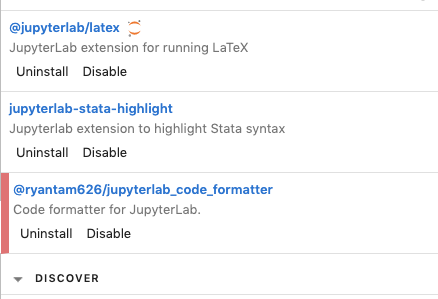
nickeubank
on 28 Jul 2019
@ellisonbg
@Zsailer is there a chance this is related to the tornado issue you helped to debug a few months back?
I've never seen this error, specifically, but @nickeubank it might be worth upgrading to tornado>=6.0.3 and seeing if that fixes your issue (I see your original post says your running tornado 5.1.1).
 Zsailer
on 29 Jul 2019
Zsailer
on 29 Jul 2019
Upgraded to tornado 6.0.3 (I was on 5.1.1 as well). It did not help.
This time, I managed to catch this error just as it was happening:
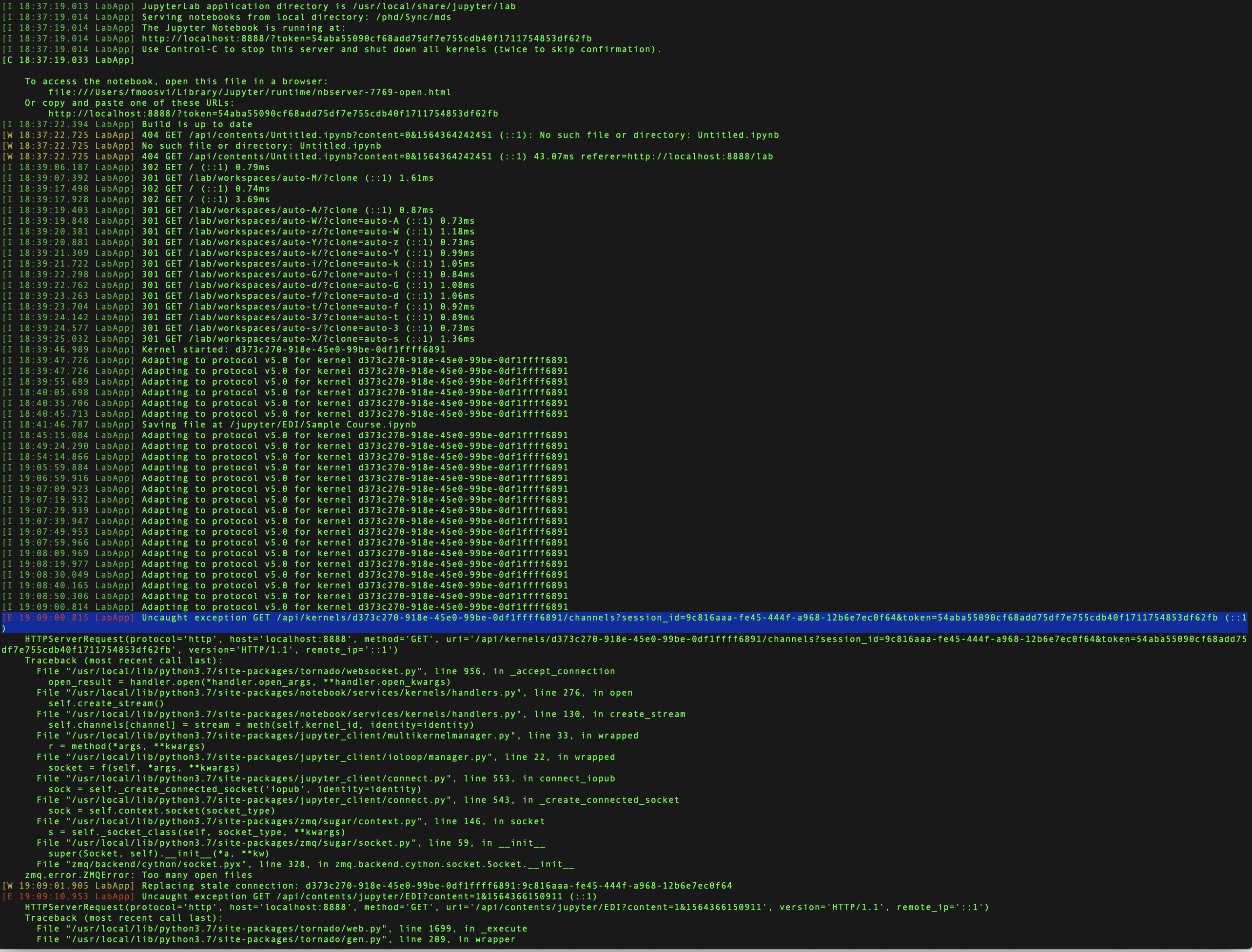
Terminal output
Firass-15-rMBP:~ fmoosvi$ pip3 install tornado
Requirement already satisfied: tornado in /usr/local/lib/python3.7/site-packages (5.1.1)
Firass-15-rMBP:~ fmoosvi$ pip3 install --upgrade tornado
Collecting tornado
Installing collected packages: tornado
Found existing installation: tornado 5.1.1
Uninstalling tornado-5.1.1:
Successfully uninstalled tornado-5.1.1
Successfully installed tornado-6.0.3
Firass-15-rMBP:~ fmoosvi$ mdsj
[I 18:37:18.993 LabApp] [jupyter_nbextensions_configurator] enabled 0.4.1
[I 18:37:19.005 LabApp] JupyterLab extension loaded from /usr/local/lib/python3.7/site-packages/jupyterlab
[I 18:37:19.006 LabApp] JupyterLab application directory is /usr/local/share/jupyter/lab
[W 18:37:19.008 LabApp] JupyterLab server extension not enabled, manually loading...
[I 18:37:19.013 LabApp] JupyterLab extension loaded from /usr/local/lib/python3.7/site-packages/jupyterlab
[I 18:37:19.013 LabApp] JupyterLab application directory is /usr/local/share/jupyter/lab
[I 18:37:19.014 LabApp] Serving notebooks from local directory: /path/is/redacted
[I 18:37:19.014 LabApp] The Jupyter Notebook is running at:
[I 18:37:19.014 LabApp] http://localhost:8888/?token=
[I 18:37:19.014 LabApp] Use Control-C to stop this server and shut down all kernels (twice to skip confirmation).
[C 18:37:19.033 LabApp]
To access the notebook, open this file in a browser:
    file:///Users/fmoosvi/Library/Jupyter/runtime/nbserver-7769-open.html
Or copy and paste one of these URLs:
    http://localhost:8888/?token=<REDACTED>
[I 18:37:22.394 LabApp] Build is up to date
[W 18:37:22.725 LabApp] 404 GET /api/contents/Untitled.ipynb?content=0&1564364242451 (::1): No such file or directory: Untitled.ipynb
[W 18:37:22.725 LabApp] No such file or directory: Untitled.ipynb
[W 18:37:22.725 LabApp] 404 GET /api/contents/Untitled.ipynb?content=0&1564364242451 (::1) 43.07ms referer=http://localhost:8888/lab
[I 18:39:06.187 LabApp] 302 GET / (::1) 0.79ms
[I 18:39:07.392 LabApp] 301 GET /lab/workspaces/auto-M/?clone (::1) 1.61ms
[I 18:39:17.498 LabApp] 302 GET / (::1) 0.74ms
[I 18:39:17.928 LabApp] 302 GET / (::1) 3.69ms
[I 18:39:19.403 LabApp] 301 GET /lab/workspaces/auto-A/?clone (::1) 0.87ms
[I 18:39:19.848 LabApp] 301 GET /lab/workspaces/auto-W/?clone=auto-A (::1) 0.73ms
[I 18:39:20.381 LabApp] 301 GET /lab/workspaces/auto-z/?clone=auto-W (::1) 1.18ms
[I 18:39:20.881 LabApp] 301 GET /lab/workspaces/auto-Y/?clone=auto-z (::1) 0.73ms
[I 18:39:21.309 LabApp] 301 GET /lab/workspaces/auto-k/?clone=auto-Y (::1) 0.99ms
[I 18:39:21.722 LabApp] 301 GET /lab/workspaces/auto-i/?clone=auto-k (::1) 1.05ms
[I 18:39:22.298 LabApp] 301 GET /lab/workspaces/auto-G/?clone=auto-i (::1) 0.84ms
[I 18:39:22.762 LabApp] 301 GET /lab/workspaces/auto-d/?clone=auto-G (::1) 1.08ms
[I 18:39:23.263 LabApp] 301 GET /lab/workspaces/auto-f/?clone=auto-d (::1) 1.06ms
[I 18:39:23.704 LabApp] 301 GET /lab/workspaces/auto-t/?clone=auto-f (::1) 0.92ms
[I 18:39:24.142 LabApp] 301 GET /lab/workspaces/auto-3/?clone=auto-t (::1) 0.89ms
[I 18:39:24.577 LabApp] 301 GET /lab/workspaces/auto-s/?clone=auto-3 (::1) 0.73ms
[I 18:39:25.032 LabApp] 301 GET /lab/workspaces/auto-X/?clone=auto-s (::1) 1.36ms
[I 18:39:46.989 LabApp] Kernel started: d373c270-918e-45e0-99be-0df1ffff6891
[I 18:39:47.726 LabApp] Adapting to protocol v5.0 for kernel d373c270-918e-45e0-99be-0df1ffff6891
[I 18:39:47.726 LabApp] Adapting to protocol v5.0 for kernel d373c270-918e-45e0-99be-0df1ffff6891
[I 18:39:55.689 LabApp] Adapting to protocol v5.0 for kernel d373c270-918e-45e0-99be-0df1ffff6891
[I 18:40:05.698 LabApp] Adapting to protocol v5.0 for kernel d373c270-918e-45e0-99be-0df1ffff6891
[I 18:40:35.706 LabApp] Adapting to protocol v5.0 for kernel d373c270-918e-45e0-99be-0df1ffff6891
[I 18:40:45.713 LabApp] Adapting to protocol v5.0 for kernel d373c270-918e-45e0-99be-0df1ffff6891
[I 18:41:46.787 LabApp] Saving file at /jupyter/EDI/Sample Course.ipynb
[I 18:45:15.084 LabApp] Adapting to protocol v5.0 for kernel d373c270-918e-45e0-99be-0df1ffff6891
[I 18:49:24.290 LabApp] Adapting to protocol v5.0 for kernel d373c270-918e-45e0-99be-0df1ffff6891
[I 18:54:14.866 LabApp] Adapting to protocol v5.0 for kernel d373c270-918e-45e0-99be-0df1ffff6891
[I 19:05:59.884 LabApp] Adapting to protocol v5.0 for kernel d373c270-918e-45e0-99be-0df1ffff6891
[I 19:06:59.916 LabApp] Adapting to protocol v5.0 for kernel d373c270-918e-45e0-99be-0df1ffff6891
[I 19:07:09.923 LabApp] Adapting to protocol v5.0 for kernel d373c270-918e-45e0-99be-0df1ffff6891
[I 19:07:19.932 LabApp] Adapting to protocol v5.0 for kernel d373c270-918e-45e0-99be-0df1ffff6891
[I 19:07:29.939 LabApp] Adapting to protocol v5.0 for kernel d373c270-918e-45e0-99be-0df1ffff6891
[I 19:07:39.947 LabApp] Adapting to protocol v5.0 for kernel d373c270-918e-45e0-99be-0df1ffff6891
[I 19:07:49.953 LabApp] Adapting to protocol v5.0 for kernel d373c270-918e-45e0-99be-0df1ffff6891
[I 19:07:59.966 LabApp] Adapting to protocol v5.0 for kernel d373c270-918e-45e0-99be-0df1ffff6891
[I 19:08:09.969 LabApp] Adapting to protocol v5.0 for kernel d373c270-918e-45e0-99be-0df1ffff6891
[I 19:08:19.977 LabApp] Adapting to protocol v5.0 for kernel d373c270-918e-45e0-99be-0df1ffff6891
[I 19:08:30.049 LabApp] Adapting to protocol v5.0 for kernel d373c270-918e-45e0-99be-0df1ffff6891
[I 19:08:40.165 LabApp] Adapting to protocol v5.0 for kernel d373c270-918e-45e0-99be-0df1ffff6891
[I 19:08:50.306 LabApp] Adapting to protocol v5.0 for kernel d373c270-918e-45e0-99be-0df1ffff6891
[I 19:09:00.814 LabApp] Adapting to protocol v5.0 for kernel d373c270-918e-45e0-99be-0df1ffff6891
[E 19:09:00.815 LabApp] Uncaught exception GET /api/kernels/d373c270-918e-45e0-99be-0df1ffff6891/channels?session_id=9c816aaa-fe45-444f-a968-12b6e7ec0f64&token=
HTTPServerRequest(protocol='http', host='localhost:8888', method='GET', uri='/api/kernels/d373c270-918e-45e0-99be-0df1ffff6891/channels?session_id=9c816aaa-fe45-444f-a968-12b6e7ec0f64&token=
Traceback (most recent call last):
File "/usr/local/lib/python3.7/site-packages/tornado/websocket.py", line 956, in _accept_connection
open_result = handler.open(handler.open_args, *handler.open_kwargs)
File "/usr/local/lib/python3.7/site-packages/notebook/services/kernels/handlers.py", line 276, in open
self.create_stream()
File "/usr/local/lib/python3.7/site-packages/notebook/services/kernels/handlers.py", line 130, in create_stream
self.channels[channel] = stream = meth(self.kernel_id, identity=identity)
File "/usr/local/lib/python3.7/site-packages/jupyter_client/multikernelmanager.py", line 33, in wrapped
r = method(args, *kwargs)
File "/usr/local/lib/python3.7/site-packages/jupyter_client/ioloop/manager.py", line 22, in wrapped
socket = f(self, args, *kwargs)
File "/usr/local/lib/python3.7/site-packages/jupyter_client/connect.py", line 553, in connect_iopub
sock = self._create_connected_socket('iopub', identity=identity)
File "/usr/local/lib/python3.7/site-packages/jupyter_client/connect.py", line 543, in _create_connected_socket
sock = self.context.socket(socket_type)
File "/usr/local/lib/python3.7/site-packages/zmq/sugar/context.py", line 146, in socket
s = self._socket_class(self, socket_type, *kwargs)
File "/usr/local/lib/python3.7/site-packages/zmq/sugar/socket.py", line 59, in __init__
super(Socket, self).__init__(a, *kw)
File "zmq/backend/cython/socket.pyx", line 328, in zmq.backend.cython.socket.Socket.__init__
zmq.error.ZMQError: Too many open files
[W 19:09:01.905 LabApp] Replacing stale connection: d373c270-918e-45e0-99be-0df1ffff6891:9c816aaa-fe45-444f-a968-12b6e7ec0f64
[E 19:09:10.953 LabApp] Uncaught exception GET /api/contents/jupyter/EDI?content=1&1564366150911 (::1)
HTTPServerRequest(protocol='http', host='localhost:8888', method='GET', uri='/api/contents/jupyter/EDI?content=1&1564366150911', version='HTTP/1.1', remote_ip='::1')
Traceback (most recent call last):
File "/usr/local/lib/python3.7/site-packages/tornado/web.py", line 1699, in _execute
File "/usr/local/lib/python3.7/site-packages/tornado/gen.py", line 209, in wrapper
File "/usr/local/lib/python3.7/site-packages/notebook/services/contents/handlers.py", line 112, in get
File "/usr/local/lib/python3.7/site-packages/notebook/services/contents/filemanager.py", line 431, in get
File "/usr/local/lib/python3.7/site-packages/notebook/services/contents/filemanager.py", line 313, in _dir_model
OSError: [Errno 24] Too many open files: '/path/is/redacted/jupyter/EDI'
[W 19:09:10.954 LabApp] Unhandled error
[E 19:09:10.955 LabApp] {
"Host": "localhost:8888",
"Pragma": "no-cache",
"Accept": "/*",
"Authorization": "token 54aba55090cf68add75df7e755cdb40f1711754853df62fb",
"X-Xsrftoken": "2|334e1f38|3944eb4731e3366f845f9afcfb0d8789|1564188958",
"Accept-Language": "en-ca",
"Accept-Encoding": "gzip, deflate",
"Cache-Control": "no-cache",
"Content-Type": "application/json",
"User-Agent": "Mozilla/5.0 (Macintosh; Intel Mac OS X 10_14_6) AppleWebKit/605.1.15 (KHTML, like Gecko) Version/12.1.2 Safari/605.1.15",
"Referer": "http://localhost:8888/lab",
"Connection": "keep-alive",
"Cookie": "username-localhost-8888=\"2|1:0|10:1564366140|23:username-localhost-8888|44:MWFhYmViNWE4NTU4NGNhN2IwMDVhZDhmOTlkNWQ3YmQ=|2834597008995426258d56d33bc4a3e5be1d213eaa3026b020504645c33c6306\"; username-localhost-8889=\"2|1:0|10:1564268254|23:username-localhost-8889|44:NzUzZjcxMWNlNmEzNDUzMmI4ZTYyMjllYTZhNTEwYTI=|d391fdd9ef091b843c6d0591879ec18d8b8edb85d04353b6f2a679c97525854b\"; _xsrf=2|334e1f38|3944eb4731e3366f845f9afcfb0d8789|1564188958"
}
[E 19:09:10.955 LabApp] 500 GET /api/contents/jupyter/EDI?content=1&1564366150911 (::1) 2.69ms referer=http://localhost:8888/lab
Exception in callback BaseAsyncIOLoop._handle_events(7, 1)
handle:
File "/usr/local/Cellar/python/3.7.3/Frameworks/Python.framework/Versions/3.7/lib/python3.7/asyncio/events.py", line 88, in _run
File "/usr/local/lib/python3.7/site-packages/tornado/platform/asyncio.py", line 138, in _handle_events
File "/usr/local/lib/python3.7/site-packages/tornado/netutil.py", line 260, in accept_handler
File "/usr/local/Cellar/python/3.7.3/Frameworks/Python.framework/Versions/3.7/lib/python3.7/socket.py", line 212, in accept
OSError: [Errno 24] Too many open files
Exception in callback BaseAsyncIOLoop._handle_events(7, 1)
handle:
File "/usr/local/Cellar/python/3.7.3/Frameworks/Python.framework/Versions/3.7/lib/python3.7/asyncio/events.py", line 88, in _run
File "/usr/local/lib/python3.7/site-packages/tornado/platform/asyncio.py", line 138, in _handle_events
File "/usr/local/lib/python3.7/site-packages/tornado/netutil.py", line 260, in accept_handler
File "/usr/local/Cellar/python/3.7.3/Frameworks/Python.framework/Versions/3.7/lib/python3.7/socket.py", line 212, in accept
OSError: [Errno 24] Too many open files
Exception in callback BaseAsyncIOLoop._handle_events(7, 1)
handle:
File "/usr/local/Cellar/python/3.7.3/Frameworks/Python.framework/Versions/3.7/lib/python3.7/asyncio/events.py", line 88, in _run
File "/usr/local/lib/python3.7/site-packages/tornado/platform/asyncio.py", line 138, in _handle_events
File "/usr/local/lib/python3.7/site-packages/tornado/netutil.py", line 260, in accept_handler
File "/usr/local/Cellar/python/3.7.3/Frameworks/Python.framework/Versions/3.7/lib/python3.7/socket.py", line 212, in accept
OSError: [Errno 24] Too many open files
Exception in callback BaseAsyncIOLoop._handle_events(7, 1)
handle:
File "/usr/local/Cellar/python/3.7.3/Frameworks/Python.framework/Versions/3.7/lib/python3.7/asyncio/events.py", line 88, in _run
File "/usr/local/lib/python3.7/site-packages/tornado/platform/asyncio.py", line 138, in _handle_events
File "/usr/local/lib/python3.7/site-packages/tornado/netutil.py", line 260, in accept_handler
File "/usr/local/Cellar/python/3.7.3/Frameworks/Python.framework/Versions/3.7/lib/python3.7/socket.py", line 212, in accept
firasm
on 29 Jul 2019
FYI: I just updated from jupyterlab 1.0.2 to 1.0.4 and the errors seem to have stopped... for now. Jupyterlab has been running for about 4 hours now with no issue. Will report back if they come back.
@david-waterworth - I noticed you're on 1.0.1, try going to .4 and see if you still have the issue?
firasm
on 29 Jul 2019
@firasm do you have any extensions installed?
nickeubank
on 29 Jul 2019
@jasongrout My attempt to replicate on clean install failed. :/ Seems like that suggests it was (a) fixed by 1.0.4, or (b) it's extension related, right? I'll upgrade to 1.0.4 now in my regular environment and see what happens...
nickeubank
on 29 Jul 2019
My guess is it is extension related if it's coming from JLab, but either could be true. Let us know what you find!
jasongrout
on 29 Jul 2019
Will do, thanks!
nickeubank
on 29 Jul 2019
I've disabled all by @jupyter-widgets/jupyterlab-manager and updated to 1.0.4, also updated tornado from 5.1.1 to 6.0.3
I note though, it still say 1.0.2 on the Help > About Jupyter Lab screen? pip list says 1.0.4
david-waterworth
on 29 Jul 2019
I have not had this issue since the upgrade to 1.0.4 either.
groverj3
on 30 Jul 2019
Same. Updated to 1.0.4 yesterday, did lots of work yesterday, left open overnight, and am doing lots of work this morning. No problems. I'd suggest leaving this open a few more days to be sure, but this may have been accidentally fixed!
EDIT: sorry, "accidentally fixed" suggests no one put work into fixing this, and obviously all bug fixes take work. I just mean someone appears to have fixed this particular problem while patching something out, as opposed to fixing it by trying to directly address this error.
nickeubank
on 30 Jul 2019
Just curious - when people saw this problem, were they working with the Jupyter python kernel, or some other kernel?
jasongrout
on 1 Aug 2019
There are a range of kernels reported. I usually see working with a Python kernel, but have seen it working with R kernels. There are also reports above of seeing it with Julia kernel.
nickeubank
on 1 Aug 2019
In 1.0.3, we relaxed validation of kernel messages, since strict validation was causing errors with kernels that weren't quite compliant with the kernel spec (which apparently included R and Julia kernels). In looking at the 1.0.3 PRs, that was the one that jumped out to me as possibly fixing something like what was noted on this thread. If we were seeing these issues with the python kernel, though, that wasn't the fix, since the python kernel was compliant.
jasongrout
on 1 Aug 2019
Are there any reports of these issues with jlab 1.0.4, or should we close the issue as resolved?
jasongrout
on 1 Aug 2019
Seems like everyone is doing well so far -- seems reasonable to close to me.
nickeubank
on 1 Aug 2019
No issues yet on 1.0.4 ! Thanks all
My errors were on the R kernel.
firasm
on 1 Aug 2019
Closing as fixed in 1.0.4, then (and probably 1.0.3, since 1.0.4 was a one-PR fix for 1.0.3). Perhaps related to #6860
We can reopen this if someone is still noticing an issue.
jasongrout
on 1 Aug 2019
Just encountered this in 1.0.4, my ulimit was 256 and I was running 6 notebooks but only 1 or 2 notebooks had cells executed, and weren't using significant resources.
 sballin
on 5 Aug 2019
sballin
on 5 Aug 2019
Just encountered this in 1.0.4, my ulimit was 256 and I was running 6 notebooks but only 1 or 2 notebooks had cells executed, and weren't using significant resources.
Same issue on our side as well, no more than 3-4 notebooks running, only a few actually executing jobs, error keeps coming back after some time :( on Ubuntu 18.04, JLAB 1.0.4 and tried both Jhub 1.0.0 and 0.9.6.
ulimit was set to fs.file-max = 500000
Issue still happens
 fchiriac
on 6 Aug 2019
fchiriac
on 6 Aug 2019
Reopening since there are still people apparently seeing this.
jasongrout
on 6 Aug 2019
If you are still seeing this in 1.0.4, can you please use lsof to try to narrow down where the issue is coming from? For example, see jupyterlab/jupyterlab#6727 (comment). Also, can you try in a fresh clean environment with no extensions and only minimal dependencies (e.g., conda create -n jlab3748 -c conda-forge jupyterlab=1.0.4)
jasongrout
on 6 Aug 2019
hello, lsof output :
root@*:/home/*# lsof 2>/dev/null | grep jupyter | cut -f 1 -d ' ' | sort | uniq -c
1652 jupyterhu
102769 jupyter-l
fchiriac
on 6 Aug 2019
root@*:/home/**# jupyter serverextension list
config dir: /root/.jupyter
sparkmagic enabled
- Validating...
sparkmagic 0.12.9 OK
@jupyter-widgets/jupyterlab-manager enabled
- Validating...
Error loading server extension @jupyter-widgets/jupyterlab-manager
X is @jupyter-widgets/jupyterlab-manager importable?
jupyterlab enabled
- Validating...
jupyterlab 1.0.4 OK
config dir: /usr/etc/jupyter
jupyterlab enabled
- Validating...
jupyterlab 1.0.4 OK
config dir: /usr/local/etc/jupyter
jupyterlab enabled
- Validating...
jupyterlab 1.0.4 OK
I also dissabled the extension with issues :
@jupyter-widgets/jupyterlab-manager disabled
- Validating...
Error loading server extension @jupyter-widgets/jupyterlab-manager
X is @jupyter-widgets/jupyterlab-manager importable?
fchiriac
on 6 Aug 2019
Hello everyone,
After further investigation on my end, i seem to have found a working combination of the components in JLab.
After trying multiple versions of JH,JLAB and Tornado server, the following versions seems to have solved the too many open files issue on my ubuntu 18.04 instance :
Tornado 5.1.1
JLab 1.0.4
JHub 0.9.6
After trying to use Tornado 4.0.3, 5.0.1 and latest 6.0.3, and JLab 1.0.2 all seemed to give me this issue over and over again after some time using them on Ubuntu 18.04. after my last Tornado deployment of 5.1.1 and JLab 1.04, the problem seems to have disappeared, i have some notebooks running for more than 24 hours and no other issues occurred till now.
fchiriac
on 9 Aug 2019
@fchiriac - very interesting!
Can you test with no jlab extensions installed (jupyter labextension list) and no server extensions installed (jupyter serverextension list)? We're trying to figure out here if there is an issue with JupyterLab itself, so running a pristine JupyterLab is important to try. In particular, can you see if running the latest tornado and a clean pristine JupyterLab works well?
In particular, I'm wondering about the sparkmagic server extension - that seems like it could open file handles. Also, it seems that you may have a misconfiguration of your server config files, in that the jupyter-widgets/jupyterlab-manager package should not have an entry there - it's a JupyterLab package, not a server extension. Also, it seems that you have multiple config files referencing the jupyterlab server extension, which likely is also a misconfiguration issue?
jasongrout
on 9 Aug 2019
no server extensions installed (
jupyter serverextension list)
(except JupyterLab, in one config file, of course :)
jasongrout
on 9 Aug 2019
@fchiriac - very interesting!
Can you test with no jlab extensions installed (
jupyter labextension list) and no server extensions installed (jupyter serverextension list)? We're trying to figure out here if there is an issue with JupyterLab itself, so running a pristine JupyterLab is important to try. In particular, can you see if running the latest tornado and a clean pristine JupyterLab works well?In particular, I'm wondering about the sparkmagic server extension - that seems like it could open file handles. Also, it seems that you may have a misconfiguration of your server config files, in that the jupyter-widgets/jupyterlab-manager package should not have an entry there - it's a JupyterLab package, not a server extension. Also, it seems that you have multiple config files referencing the jupyterlab server extension, which likely is also a misconfiguration issue?
Its a really hard for me to do too many modifications on our current environment as this is a production server and i`m really limited in operation time over it.
When i can get some more time to investigate further i will update you.
fchiriac
on 9 Aug 2019
Okay, understood. Thanks for investigating, and I'm glad you found a configuration that seems to work and reported back here.
It really does look like you have a misconfiguration, at least with the ipywidgets being in the server extension config, though as the error in jupyter serverextension list indicates, it is ignoring that, so operationally you won't notice.
jasongrout
on 9 Aug 2019
I also seem to find that i had a user running way to many notebooks at once (currently 41), and once he logged in, the session would have been shut down instantly as too many open files are running :
: [Errno 24] Too many open files',))
    OSError: [Errno 24] Too many open files
      File "/usr/local/lib/python3.6/dist-packages/urllib3/connectionpool.py", line 603, in urlopen
    urllib3.exceptions.NewConnectionError: <urllib3.connection.HTTPConnection object at 0x7fc1d41c8ac8>: Failed to establish a new connection: [Errno 24] Too many open files
      File "/usr/local/lib/python3.6/dist-packages/urllib3/connectionpool.py", line 641, in urlopen
    urllib3.exceptions.MaxRetryError: HTTPConnectionPool(host='127.0.0.1', port=8081): Max retries exceeded with url: /hub/api/oauth2/token (Caused by NewConnectionError('<urllib3.connection.HTTPConnection object at 0x7fc1d41c8ac8>: Failed to establish a new connection: [Errno 24] Too many open files',))
    requests.exceptions.ConnectionError: HTTPConnectionPool(host='127.0.0.1', port=8081): Max retries exceeded with url: /hub/api/oauth2/token (Caused by NewConnectionError('<urllib3.connection.HTTPConnection object at 0x7fc1d41c8ac8>: Failed to establish a new connection: [Errno 24] Too many open files',))
      File "/usr/local/lib/python3.6/dist-packages/jinja2/utils.py", line 154, in open_if_exists
    OSError: [Errno 24] Too many open files: '/usr/local/lib/python3.6/dist-packages/notebook/500.html'
But i saw this happening when only ONE single user logged in  :

[I 2019-08-09 11:53:28.572 JupyterHub base:499] User logged in: mmmm9161
[I 2019-08-09 11:53:28.573 JupyterHub log:158] 302 POST /hub/login?next= -> /user/mmmm9161/ (mmmm9161@::ffff:10.114.52.148) 128.72ms
[I 2019-08-09 11:53:28.583 SingleUserLabApp log:158] 302 GET /user/mmmm9161/ -> /user/mmmm9161/lab? (@::ffff:10.114.52.148) 0.93ms
[I 2019-08-09 11:53:28.591 SingleUserLabApp log:158] 302 GET /user/mmmm9161/lab? -> /hub/api/oauth2/authorize?client_id=jupyterhub-user-mmmm9161&redirect_uri=%2Fuser%2 mmmm9161%2Foauth_callback&response_type=code&state=[secret] (@::ffff:10.114.52.148) 1.24ms
[I 2019-08-09 11:53:28.609 JupyterHub log:158] 302 GET /hub/api/oauth2/authorize?client_id=jupyterhub-user-mmmm9161&redirect_uri=%2Fuser%2Fmmmm9161%2Foauth_callback&response_type=code&state=[secret] -> /user/mmmm9161/oauth_callback?code=[secret]&state=[secret] (mmmm9161@::ffff:10.114.52.148) 10.31ms
[W 2019-08-09 11:53:28.622 SingleUserLabApp web:1667] 500 GET /user/mmmm9161/oauth_callback?code=4b02addc-3bf9-4626-89fe-1fc4f02dd4ef&state=eyJ1dWlkIjogIjY5ZjQ2NGIxZjUxYTQ2MzY4ZGQ1MDdjZDRhNjkzYjU0IiwgIm5leHRfdXJsIjogIi91c2VyL21tbW05MTYxL2xhYj8ifQ (::ffff:10.114.52.148): Failed to connect to Hub API at 'http://127.0.0.1:8081/hub/api'.  Is the Hub accessible at this URL (from host: opbigled01)?  Make sure to set c.JupyterHub.hub_ip to an IP accessible to single-user servers if the servers are not on the same host as the Hub.
      "Cookie": "jupyterhub-user-mmmm9161-oauth-state=\"2|1:0|10:1565344408|36:jupyterhub-user-mmmm9161-oauth-state|144:ZXlKMWRXbGtJam9nSWpZNVpqUTJOR0l4WmpVeFlUUTJNelk0WkdRMU1EZGpaRFJoTmprellqVTBJaXdnSW01bGVIUmZkWEpzSWpvZ0lpOTFjMlZ5TDIxdGJXMDVNVFl4TDJ4aFlqOGlmUQ==|c9dd160dda907fd745d920e8e078fb4dcd54f3f10f685bc280f621907b156331\"; jupyterhub-session-id=4d1f8e439ea0416993a48438abd64665",
[E 2019-08-09 11:53:28.625 SingleUserLabApp log:158] 500 GET /user/mmmm9161/oauth_callback?code=[secret]&state=[secret] (@::ffff:10.114.52.148) 6.31ms
[I 2019-08-09 11:53:28.732 SingleUserLabApp log:158] 302 GET /user/mmmm9161/tree -> /hub/api/oauth2/authorize?client_id=jupyterhub-user-mmmm9161&redirect_uri=%2Fuser%2 mmmm9161%2Foauth_callback&response_type=code&state=[secret] (@::ffff:10.114.52.148) 1.44ms
[I 2019-08-09 11:53:28.750 JupyterHub log:158] 302 GET /hub/api/oauth2/authorize?client_id=jupyterhub-user-mmmm9161&redirect_uri=%2Fuser%2Fmmmm9161%2Foauth_callback&response_type=code&state=[secret] -> /user/mmmm9161/oauth_callback?code=[secret]&state=[secret] (mmmm9161@::ffff:10.114.52.148) 10.92ms
[W 2019-08-09 11:53:28.760 SingleUserLabApp web:1667] 500 GET /user/mmmm9161/oauth_callback?code=b3911a30-d231-4d32-be1d-e12573139289&state=eyJ1dWlkIjogIjAzMjQ1ZmIxNDE2NzRjOWI5ZmQ1MmIwZGQ1NzVmNjkzIiwgIm5leHRfdXJsIjogIi91c2VyL21tbW05MTYxL3RyZWUifQ (::ffff:10.114.52.148): Failed to connect to Hub API at 'http://127.0.0.1:8081/hub/api'.  Is the Hub accessible at this URL (from host: opbigled01)?  Make sure to set c.JupyterHub.hub_ip to an IP accessible to single-user servers if the servers are not on the same host as the Hub.
      "Cookie": "jupyterhub-user-mmmm9161-oauth-state=\"2|1:0|10:1565344408|36:jupyterhub-user-mmmm9161-oauth-state|144:ZXlKMWRXbGtJam9nSWpBek1qUTFabUl4TkRFMk56UmpPV0k1Wm1RMU1tSXdaR1ExTnpWbU5qa3pJaXdnSW01bGVIUmZkWEpzSWpvZ0lpOTFjMlZ5TDIxdGJXMDVNVFl4TDNSeVpXVWlmUQ==|9d4ef849131e0ead58ffa3f2282739b5a0f06257f94cb2565e5bd090b45f45bc\"; jupyterhub-session-id=4d1f8e439ea0416993a48438abd64665; _xsrf=2|2defcdb1|ec9fb0693a9f57b6df202f7c80cbf198|1565344408",
[E 2019-08-09 11:53:28.762 SingleUserLabApp log:158] 500 GET /user/mmmm9161/oauth_callback?code=[secret]&state=[secret] (@::ffff:10.114.52.148) 5.62ms
[I 2019-08-09 11:58:28.212 JupyterHub base:499] User logged in: mmmm9161’
After investigating his home dir, found he had ~700 or so Untitled.ipyb notebooks in there, and who knows how many he didn`t close in his last session.
_So i m assuming that now, the error is very likely to appear, but at least it won t form this log loop I saw in other version combinations i`ve tried. Which i really find interesting_
fchiriac
on 9 Aug 2019
Okay, understood. Thanks for investigating, and I'm glad you found a configuration that seems to work and reported back here.
It really does look like you have a misconfiguration, at least with the ipywidgets being in the server extension config, though as the error in
jupyter serverextension listindicates, it is ignoring that, so operationally you won't notice.
I will have access to my staging platform where i try to keep all my tests running all the time.
On that specific platform, i use a slightly older version of jlab. 0.36.x and jhub 0.96. I also remember having the same extensions running as the production one, but didn`t see this issue there.
I can try different combinations on the staging and will report back my findings @next week
fchiriac
on 9 Aug 2019
I also remember having the same extensions running as the production one, but didn`t see this issue there.
Good point. Your post above also indicates it may also be related to users that have excessive notebooks open or are doing other things, which wouldn't show up on a staging platform.
jasongrout
on 9 Aug 2019
I also remember having the same extensions running as the production one, but didn`t see this issue there.
Good point. Your post above also indicates it may also be related to users that have excessive notebooks open or are doing other things, which wouldn't show up on a staging platform.
Exactly my point. I was thinking that this might be the issue in the first place, but i couldn`t explain the continuous log loop with Too many open files, because, when it happened once, it will remain stuck in a log loop until eventually my whole /log partition got full. At least now, with the current version combination, it does kill the session if the user is exceeding the given ulimits systemwide/user limits which for now are set to :
core file size (blocks, -c) 0
data seg size (kbytes, -d) unlimited
scheduling priority (-e) 0
file size (blocks, -f) unlimited
pending signals (-i) 63980
max locked memory (kbytes, -l) 16384
max memory size (kbytes, -m) unlimited
open files (-n) 500000
pipe size (512 bytes, -p) 8
POSIX message queues (bytes, -q) 819200
real-time priority (-r) 0
stack size (kbytes, -s) 8192
cpu time (seconds, -t) unlimited
max user processes (-u) 63980
virtual memory (kbytes, -v) unlimited
file locks (-x) unlimited
fchiriac
on 9 Aug 2019
This is similar to my experiance - somewhere in this thread it was recomended I upgrade to 1.0.4 which I did, and it didn't work at all (I forget the exact error, sorry I should have taken notes) so I downgraded tornado from 6.0.3 to 5.1.1 and since then it seems to be ok with jupyterlab 1.0.4.
After trying to use Tornado 4.0.3, 5.0.1 and latest 6.0.3, and JLab 1.0.2 all seemed to give me this issue over and over again after some time using them on Ubuntu 18.04. after my last Tornado deployment of 5.1.1 and JLab 1.04, the problem seems to have disappeared, i have some notebooks running for more than 24 hours and no other issues occurred till now.
david-waterworth
on 10 Aug 2019
This is similar to my experiance - somewhere in this thread it was recomended I upgrade to 1.0.4 which I did, and it didn't work at all (I forget the exact error, sorry I should have taken notes) so I downgraded tornado from 6.0.3 to 5.1.1 and since then it seems to be ok with jupyterlab 1.0.4.
After trying to use Tornado 4.0.3, 5.0.1 and latest 6.0.3, and JLab 1.0.2 all seemed to give me this issue over and over again after some time using them on Ubuntu 18.04. after my last Tornado deployment of 5.1.1 and JLab 1.04, the problem seems to have disappeared, i have some notebooks running for more than 24 hours and no other issues occurred till now.
This is interesting, thanks for the reply, glad it helped !
fchiriac
on 12 Aug 2019
Facing this. Error while starting first python console (no notebooks opened)
jupyterlab==1.1.0
tornado==6.0.3
 arogozhnikov
on 3 Sep 2019
arogozhnikov
on 3 Sep 2019
@arogozhnikov Can you try to downgrade tornado to 5.x as done by @fchiriac above:
firasm
on 3 Sep 2019
@firasm for now increased ulimit -n to 4096. So far works, but if stops, I'll experiment with tornado
arogozhnikov
on 3 Sep 2019
After downgrading with
pip install tornado==5.1.1
I'm still having the same issue. Mac, JL==1.1.0
arogozhnikov
on 4 Sep 2019
Same issue as well. Mac, JL 1.1.0, and I user papermill to generate around 115 notebooks, plus I have my jupyter lab instance opened. ulimit -n 1024 worked.
 gsimenel
on 11 Sep 2019
gsimenel
on 11 Sep 2019
Sigh. Getting again. In window I now see:
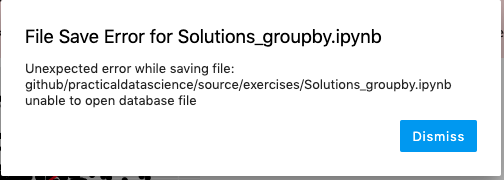
But the terminal output has our old friend:
[E 08:25:49.285 LabApp] 500 PUT /api/contents/github/practicaldatascience/source/exercises/Solutions_groupby.ipynb?1568291149277 (::1) 4.18ms referer=http://localhost:8888/lab
[E 08:25:56.228 LabApp] Uncaught exception GET /api/contents/github/practicaldatascience/source?content=1&1568291156224 (::1)
    HTTPServerRequest(protocol='http', host='localhost:8888', method='GET', uri='/api/contents/github/practicaldatascience/source?content=1&1568291156224', version='HTTP/1.1', remote_ip='::1')
    Traceback (most recent call last):
      File "/Users/Nick/miniconda3/lib/python3.7/site-packages/tornado/web.py", line 1699, in _execute
      File "/Users/Nick/miniconda3/lib/python3.7/site-packages/tornado/gen.py", line 209, in wrapper
      File "/Users/Nick/miniconda3/lib/python3.7/site-packages/notebook/services/contents/handlers.py", line 112, in get
      File "/Users/Nick/miniconda3/lib/python3.7/site-packages/notebook/services/contents/filemanager.py", line 431, in get
      File "/Users/Nick/miniconda3/lib/python3.7/site-packages/notebook/services/contents/filemanager.py", line 313, in _dir_model
    OSError: [Errno 24] Too many open files: '/Users/Nick/github/practicaldatascience/source'
(base) ➜ ~ jupyter troubleshoot
$PATH:
/Users/Nick/miniconda3/bin
/Users/Nick/miniconda3/bin
/Users/Nick/miniconda3/condabin
/usr/local/bin
/usr/bin
/bin
/usr/sbin
/sbin
/Library/TeX/texbin
sys.path:
/Users/Nick/miniconda3/bin
/Users/Nick/miniconda3/lib/python37.zip
/Users/Nick/miniconda3/lib/python3.7
/Users/Nick/miniconda3/lib/python3.7/lib-dynload
/Users/Nick/.local/lib/python3.7/site-packages
/Users/Nick/miniconda3/lib/python3.7/site-packages
sys.executable:
/Users/Nick/miniconda3/bin/python3.7
sys.version:
3.7.3 | packaged by conda-forge | (default, Jul 1 2019, 14:38:56)
[Clang 4.0.1 (tags/RELEASE_401/final)]
platform.platform():
Darwin-18.7.0-x86_64-i386-64bit
which -a jupyter:
/Users/Nick/miniconda3/bin/jupyter
/Users/Nick/miniconda3/bin/jupyter
pip list:
Package Version
----------------------------- -----------
alabaster 0.7.12
appnope 0.1.0
argh 0.26.2
asn1crypto 0.24.0
attrs 19.1.0
Babel 2.7.0
backcall 0.1.0
bash-kernel 0.7.2
bleach 3.1.0
certifi 2019.6.16
cffi 1.12.3
chardet 3.0.4
Click 7.0
click-plugins 1.1.1
cligj 0.5.0
commonmark 0.9.0
conda 4.7.11
conda-package-handling 1.4.1
cryptography 2.7
cycler 0.10.0
decorator 4.4.0
defusedxml 0.5.0
descartes 1.1.0
docutils 0.15.2
entrypoints 0.3
Fiona 1.8.6
future 0.17.1
GDAL 2.4.2
geopandas 0.5.1
idna 2.8
imagesize 1.1.0
ipykernel 5.1.2
ipython 7.8.0
ipython-genutils 0.2.0
jedi 0.15.1
Jinja2 2.10.1
json5 0.8.5
jsonschema 3.0.2
jupyter-client 5.3.1
jupyter-core 4.4.0
jupyterlab 1.1.1
jupyterlab-server 1.0.6
kiwisolver 1.1.0
libarchive-c 2.8
livereload 2.6.1
Markdown 2.6.11
MarkupSafe 1.1.1
matplotlib 3.1.1
mistune 0.8.4
mizani 0.6.0
munch 2.3.2
nbconvert 5.6.0
nbformat 4.4.0
nbsphinx 0.4.2
notebook 6.0.1
numpy 1.17.1
packaging 19.1
palettable 3.2.0
pandas 0.25.0
pandocfilters 1.4.2
parso 0.5.1
pathtools 0.1.2
patsy 0.5.1
pexpect 4.7.0
pickleshare 0.7.5
pip 19.2.3
plotnine 0.6.0
port-for 0.3.1
prometheus-client 0.7.1
prompt-toolkit 2.0.9
ptyprocess 0.6.0
pycosat 0.6.3
pycparser 2.19
Pygments 2.4.2
pyOpenSSL 19.0.0
pyparsing 2.4.2
pyproj 2.3.1
pyrsistent 0.15.4
PySocks 1.7.0
python-dateutil 2.8.0
pytz 2019.2
PyYAML 5.1.2
pyzmq 18.0.2
recommonmark 0.6.0
requests 2.22.0
Rtree 0.8.3
ruamel-yaml 0.15.71
scipy 1.3.1
Send2Trash 1.5.0
setuptools 41.2.0
Shapely 1.6.4.post2
six 1.12.0
snowballstemmer 1.9.0
Sphinx 2.2.0
sphinx-autobuild 0.7.1
sphinx-markdown-tables 0.0.9
sphinxcontrib-applehelp 1.0.1
sphinxcontrib-devhelp 1.0.1
sphinxcontrib-htmlhelp 1.0.2
sphinxcontrib-jsmath 1.0.1
sphinxcontrib-qthelp 1.0.2
sphinxcontrib-serializinghtml 1.1.3
statsmodels 0.10.1
terminado 0.8.2
testpath 0.4.2
tornado 6.0.3
tqdm 4.35.0
traitlets 4.3.2
urllib3 1.25.3
watchdog 0.9.0
wcwidth 0.1.7
webencodings 0.5.1
wheel 0.33.6
xlrd 1.2.0
conda list:
# packages in environment at /Users/Nick/miniconda3:
#
# Name Version Build Channel
alabaster 0.7.12 py_0 conda-forge
appnope 0.1.0 py37_1000 conda-forge
asn1crypto 0.24.0 py37_1003 conda-forge
attrs 19.1.0 py_0 conda-forge
babel 2.7.0 py_0 conda-forge
backcall 0.1.0 py_0 conda-forge
bash-kernel 0.7.2 pypi_0 pypi
bleach 3.1.0 py_0 conda-forge
boost-cpp 1.70.0 hd59e818_1 conda-forge
bzip2 1.0.8 h01d97ff_0 conda-forge
ca-certificates 2019.6.16 hecc5488_0 conda-forge
cairo 1.16.0 h0ab9d94_1001 conda-forge
certifi 2019.6.16 py37_1 conda-forge
cffi 1.12.3 py37hccf1714_0 conda-forge
cfitsio 3.470 h389770f_2 conda-forge
chardet 3.0.4 py37_1003 conda-forge
click 7.0 py_0 conda-forge
click-plugins 1.1.1 py_0 conda-forge
cligj 0.5.0 py_0 conda-forge
commonmark 0.9.0 pypi_0 pypi
conda 4.7.11 py37_0 conda-forge
conda-package-handling 1.4.1 py37_0 conda-forge
cryptography 2.7 py37h212c5bf_0 conda-forge
curl 7.65.3 h22ea746_0 conda-forge
cycler 0.10.0 py_1 conda-forge
decorator 4.4.0 py_0 conda-forge
defusedxml 0.5.0 py_1 conda-forge
descartes 1.1.0 py_3 conda-forge
docutils 0.15.2 py37_0 conda-forge
entrypoints 0.3 py37_1000 conda-forge
expat 2.2.5 h6de7cb9_1003 conda-forge
fiona 1.8.6 py37h39889d8_4 conda-forge
fontconfig 2.13.1 h1027ab8_1000 conda-forge
freetype 2.10.0 h24853df_1 conda-forge
freexl 1.0.5 h1de35cc_1002 conda-forge
future 0.17.1 pypi_0 pypi
gdal 2.4.2 py37h735812d_7 conda-forge
geopandas 0.5.1 py_0 conda-forge
geos 3.7.2 h6de7cb9_1 conda-forge
geotiff 1.5.1 h2bcb450_3 conda-forge
gettext 0.19.8.1 h46ab8bc_1002 conda-forge
giflib 5.1.7 h01d97ff_1 conda-forge
glib 2.58.3 h9d45998_1002 conda-forge
hdf4 4.2.13 hf3c6af0_1002 conda-forge
hdf5 1.10.4 nompi_h0cbb7df_1106 conda-forge
icu 58.2 h0a44026_1000 conda-forge
idna 2.8 py37_1000 conda-forge
imagesize 1.1.0 pypi_0 pypi
ipykernel 5.1.2 py37h5ca1d4c_0 conda-forge
ipython 7.8.0 py37h5ca1d4c_0 conda-forge
ipython_genutils 0.2.0 py_1 conda-forge
jedi 0.15.1 py37_0 conda-forge
jinja2 2.10.1 py_0 conda-forge
jpeg 9c h1de35cc_1001 conda-forge
json-c 0.13.1 h1de35cc_1001 conda-forge
json5 0.8.5 py_0 conda-forge
jsonschema 3.0.2 py37_0 conda-forge
jupyter_client 5.3.1 py_0 conda-forge
jupyter_core 4.4.0 py_0 conda-forge
jupyterlab 1.1.1 py_0 conda-forge
jupyterlab_server 1.0.6 py_0 conda-forge
kealib 1.4.10 hecf890f_1003 conda-forge
kiwisolver 1.1.0 py37h770b8ee_0 conda-forge
krb5 1.16.3 hcfa6398_1001 conda-forge
libarchive 3.3.3 h5c473cc_1006 conda-forge
libblas 3.8.0 12_openblas conda-forge
libcblas 3.8.0 12_openblas conda-forge
libcurl 7.65.3 h16faf7d_0 conda-forge
libcxx 8.0.1 0 conda-forge
libcxxabi 8.0.1 0 conda-forge
libdap4 3.20.2 hae55d67_1000 conda-forge
libedit 3.1.20170329 hcfe32e1_1001 conda-forge
libffi 3.2.1 h6de7cb9_1006 conda-forge
libgdal 2.4.2 hd1d3004_7 conda-forge
libgfortran 3.0.1 0 conda-forge
libiconv 1.15 h01d97ff_1005 conda-forge
libkml 1.3.0 hed7d534_1010 conda-forge
liblapack 3.8.0 12_openblas conda-forge
libnetcdf 4.6.2 h6b88ef6_1001 conda-forge
libopenblas 0.3.7 hd44dcd8_1 conda-forge
libpng 1.6.37 h2573ce8_0 conda-forge
libpq 11.5 h756f0eb_1 conda-forge
libsodium 1.0.17 h01d97ff_0 conda-forge
libspatialindex 1.9.0 h6de7cb9_1 conda-forge
libspatialite 4.3.0a hd0a3780_1030 conda-forge
libssh2 1.8.2 hcdc9a53_2 conda-forge
libtiff 4.0.10 hd08fb8f_1003 conda-forge
libxml2 2.9.9 hd80cff7_2 conda-forge
lz4-c 1.8.3 h6de7cb9_1001 conda-forge
lzo 2.10 h1de35cc_1000 conda-forge
markdown 2.6.11 pypi_0 pypi
markupsafe 1.1.1 py37h1de35cc_0 conda-forge
matplotlib 3.1.1 py37_1 conda-forge
matplotlib-base 3.1.1 py37h3a684a6_1 conda-forge
mistune 0.8.4 py37h1de35cc_1000 conda-forge
mizani 0.6.0 py_0 conda-forge
munch 2.3.2 py_0 conda-forge
nbconvert 5.6.0 py37_1 conda-forge
nbformat 4.4.0 py_1 conda-forge
nbsphinx 0.4.2 py_0 conda-forge
ncurses 6.1 h0a44026_1002 conda-forge
notebook 6.0.1 py37_0 conda-forge
numpy 1.17.1 py37h6b0580a_0 conda-forge
openjpeg 2.3.1 hc1feee7_0 conda-forge
openssl 1.1.1c h01d97ff_0 conda-forge
packaging 19.1 pypi_0 pypi
palettable 3.2.0 py_0 conda-forge
pandas 0.25.0 py37h86efe34_0 conda-forge
pandoc 2.7.3 0 conda-forge
pandocfilters 1.4.2 py_1 conda-forge
parso 0.5.1 py_0 conda-forge
patsy 0.5.1 py_0 conda-forge
pcre 8.41 h0a44026_1003 conda-forge
pexpect 4.7.0 py37_0 conda-forge
pickleshare 0.7.5 py37_1000 conda-forge
pip 19.2.3 py37_0 conda-forge
pixman 0.38.0 h01d97ff_1003 conda-forge
plotnine 0.6.0 py_0 conda-forge
poppler 0.67.0 hd5eb092_7 conda-forge
poppler-data 0.4.9 1 conda-forge
postgresql 11.5 h25afefd_1 conda-forge
proj4 6.1.1 hca663eb_1 conda-forge
prometheus_client 0.7.1 py_0 conda-forge
prompt_toolkit 2.0.9 py_0 conda-forge
ptyprocess 0.6.0 py_1001 conda-forge
pycosat 0.6.3 py37h1de35cc_1001 conda-forge
pycparser 2.19 py37_1 conda-forge
pygments 2.4.2 py_0 conda-forge
pyopenssl 19.0.0 py37_0 conda-forge
pyparsing 2.4.2 py_0 conda-forge
pyproj 2.3.1 py37h9bb365a_0 conda-forge
pyrsistent 0.15.4 py37h01d97ff_0 conda-forge
pysocks 1.7.0 py37_0 conda-forge
python 3.7.3 h93065d6_1 conda-forge
python-dateutil 2.8.0 py_0 conda-forge
python-libarchive-c 2.8 py37_1004 conda-forge
python.app 1.2 py37h1de35cc_1200 conda-forge
pytz 2019.2 py_0 conda-forge
pyzmq 18.0.2 py37hee98d25_2 conda-forge
readline 8.0 hcfe32e1_0 conda-forge
recommonmark 0.6.0 pypi_0 pypi
requests 2.22.0 py37_1 conda-forge
rtree 0.8.3 py37h666c49c_1002 conda-forge
ruamel_yaml 0.15.71 py37h1de35cc_1000 conda-forge
scipy 1.3.1 py37hab3da7d_2 conda-forge
send2trash 1.5.0 py_0 conda-forge
setuptools 41.2.0 py37_0 conda-forge
shapely 1.6.4 py37h0567c5e_1006 conda-forge
six 1.12.0 py37_1000 conda-forge
snowballstemmer 1.9.0 py_0 conda-forge
sphinx 2.2.0 py_0 conda-forge
sphinx-markdown-tables 0.0.9 pypi_0 pypi
sphinxcontrib-applehelp 1.0.1 py_0 conda-forge
sphinxcontrib-devhelp 1.0.1 py_0 conda-forge
sphinxcontrib-htmlhelp 1.0.2 py_0 conda-forge
sphinxcontrib-jsmath 1.0.1 py_0 conda-forge
sphinxcontrib-qthelp 1.0.2 py_0 conda-forge
sphinxcontrib-serializinghtml 1.1.3 pypi_0 pypi
sqlite 3.29.0 hb7d70f7_1 conda-forge
statsmodels 0.10.1 py37heacc8b8_0 conda-forge
terminado 0.8.2 py37_0 conda-forge
testpath 0.4.2 py_1001 conda-forge
tk 8.6.9 h2573ce8_1002 conda-forge
tornado 6.0.3 py37h01d97ff_0 conda-forge
tqdm 4.35.0 py_0 conda-forge
traitlets 4.3.2 py37_1000 conda-forge
tzcode 2019a h01d97ff_1002 conda-forge
urllib3 1.25.3 py37_0 conda-forge
wcwidth 0.1.7 py_1 conda-forge
webencodings 0.5.1 py_1 conda-forge
wheel 0.33.6 py37_0 conda-forge
xerces-c 3.2.2 h4db8090_1003 conda-forge
xlrd 1.2.0 py_0 conda-forge
xz 5.2.4 h1de35cc_1001 conda-forge
yaml 0.1.7 h1de35cc_1001 conda-forge
zeromq 4.3.2 h6de7cb9_2 conda-forge
zlib 1.2.11 h01d97ff_1005 conda-forge
zstd 1.4.0 ha9f0a20_0 conda-forge
(base) ➜ ~
@jasongrout Anyone in development have any insights on this? I know it seemed like it mostly went away with 1.0.4, but still seems to be croping up for people.
nickeubank
on 12 Sep 2019
All I can suggest at this point is to try to narrow down what is using lots of files (c.f. https://github.com/jupyterlab/jupyterlab/issues/6727#issuecomment-518635880)
jasongrout
on 12 Sep 2019
I’m also having this issue. It’s only started happening since the 1.0 release for me. I used to be able to keep open dozens of tabs, now I’m limited to 4-6.
Sent with GitHawk
 wiseyoungbuck
on 12 Sep 2019
wiseyoungbuck
on 12 Sep 2019
Again, for anyone experiencing this, please try to follow the pattern above to figure out what might taking up all of the file handles, or be really descriptive about a way you can reproduce the problem so we can reproduce it in a clean environment. I haven't been able to reproduce this yet.
jasongrout
on 12 Sep 2019
@jasongrout OK, here's my lsof:
And my unique counts from lsof | grep Nick | cut -f 1 -d ' ' | sort | uniq -c:
(base) ➜ ~ lsof | grep Nick | cut -f 1 -d ' ' | sort | uniq -c
   7 APFSUserA
  79 Activity
  17 AirPlayUI
   6 AlertNoti
 278 AppleSpel
  12 AssetCach
 149 Atom
 190 Atom\x20H
  16 AudioComp
  30 BESClient
   9 CMFSyncAg
  44 CalNCServ
  84 CalendarA
  84 CallHisto
  11 CloudKeyc
  19 CommCente
  80 ConnectWi
  14 ContactsA
  15 Container
  19 ContextSe
  38 ControlSt
  19 CoreLocat
  18 CoreServi
  10 DiskArbit
   8 DiskSpace
  10 DiskUnmou
 281 Dock
 731 Dropbox
  16 DropboxAc
  12 DropboxFo
   8 DropboxNo
  37 EmojiFunc
   7 EscrowSec
 145 Evernote
  36 EvernoteH
  14 FMIPClien
 211 Finder
 121 Freedom
  15 FreedomPr
2409 Google
  11 IMAutomat
  49 IMDPersis
  67 IMRemoteU
  16 IMTransco
  16 Keychain
  17 LaterAgen
  26 LocationM
   7 LoginUser
 184 MTLCompil
 184 Messages
 428 Microsoft
  31 MirrorDis
 118 Notificat
  20 Notify
  28 OSDUIHelp
  25 PowerChim
  56 Preview
  11 PrintUITo
  17 Protected
  42 QuickLook
   6 ReportCra
   9 SafariBoo
   8 SafariClo
  15 SafeEject
  11 ScopedBoo
   8 SidecarRe
  21 Siri
  15 SiriNCSer
 138 Slack
 104 Slack\x20
   8 SocialPus
  17 SoftwareU
 327 Spotlight
  73 SystemUIS
  92 Terminal
  51 TextEdit
 226 Things3
  19 Trackball
  43 UIKitSyst
   6 USBAgent
  16 UsageTrac
 184 UserEvent
  91 VTDecoder
   9 VTEncoder
  10 ViewBridg
  20 WiFiAgent
  14 WiFiProxy
   9 XprotectS
 103 accountsd
  16 adprivacy
  18 adservice
  21 akd
  23 appstorea
   8 assertion
  97 assistant
  10 atsd
  16 avconfere
  15 backgroun
  96 bird
  43 callservi
   7 cdpd
   7 cfprefsd
   9 chrome_cr
 431 cloudd
  10 cloudpair
  54 cloudphot
   9 colorsync
 487 com.apple
  29 commerce
  27 coreautha
  14 coreauthd
  12 corespeec
  65 corespotl
  18 crashpad_
   8 ctkahp
   7 ctkd
   6 cut
   6 dbfsevent
  10 deleted
  14 diagnosti
   9 diskimage
   7 distnoted
   8 dmd
  12 eapolclie
   9 familycir
   9 fileprovi
   8 findmydev
 585 firefox
  28 fmfd
   8 followupd
  12 fontd
 110 garcon
   6 grep
  19 homed
  24 icdd
 766 iconservi
  55 identitys
  18 imagent
  12 imklaunch
  11 jamfAgent
  17 keyboards
  22 knowledge
   9 languagea
  65 loginwind
  13 lsd
  21 lsof
   9 mapspushd
   9 mdworker
 163 mdworker_
  10 mdwrite
  11 media-ind
   7 mediaremo
  24 nbagent
  10 networkse
  15 nsurlsess
 179 nsurlstor
  12 parsecd
  18 passd
   7 pboard
   8 pbs
  81 photoanal
  24 photolibr
  11 pkd
3140 plugin-co
  14 printtool
   9 progressd
1829 python3.7
  19 rapportd
   9 rcd
  17 recentsd
  10 reversete
  57 routined
  26 secd
  13 secinitd
  12 sharedfil
  66 sharingd
   8 silhouett
  12 siriknowl
  54 soagent
   7 softwareu
   7 spindump_
   7 storeacco
  16 storeasse
  19 storedown
   8 storelega
  18 storeuid
  47 studentd
 134 suggestd
   9 swcd
  19 talagent
  14 tccd
  38 trustd
  17 universal
  12 useractiv
  18 usernoted
  12 videosubs
  64 zsh
My jupyter troubleshoot:
(base) ➜ ~ jupyter troubleshoot
$PATH:
/Users/Nick/miniconda3/bin
/Users/Nick/miniconda3/bin
/Users/Nick/miniconda3/condabin
/usr/local/bin
/usr/bin
/bin
/usr/sbin
/sbin
/Library/TeX/texbin
sys.path:
/Users/Nick/miniconda3/bin
/Users/Nick/miniconda3/lib/python37.zip
/Users/Nick/miniconda3/lib/python3.7
/Users/Nick/miniconda3/lib/python3.7/lib-dynload
/Users/Nick/.local/lib/python3.7/site-packages
/Users/Nick/miniconda3/lib/python3.7/site-packages
sys.executable:
/Users/Nick/miniconda3/bin/python3.7
sys.version:
3.7.3 | packaged by conda-forge | (default, Jul 1 2019, 14:38:56)
[Clang 4.0.1 (tags/RELEASE_401/final)]
platform.platform():
Darwin-18.7.0-x86_64-i386-64bit
which -a jupyter:
/Users/Nick/miniconda3/bin/jupyter
/Users/Nick/miniconda3/bin/jupyter
pip list:
Package Version
----------------------------- -----------
alabaster 0.7.12
appnope 0.1.0
argh 0.26.2
asn1crypto 0.24.0
attrs 19.1.0
Babel 2.7.0
backcall 0.1.0
bash-kernel 0.7.2
bleach 3.1.0
certifi 2019.6.16
cffi 1.12.3
chardet 3.0.4
Click 7.0
click-plugins 1.1.1
cligj 0.5.0
commonmark 0.9.0
conda 4.7.11
conda-package-handling 1.4.1
cryptography 2.7
cycler 0.10.0
decorator 4.4.0
defusedxml 0.5.0
descartes 1.1.0
docutils 0.15.2
entrypoints 0.3
Fiona 1.8.6
future 0.17.1
GDAL 2.4.2
geopandas 0.5.1
idna 2.8
imagesize 1.1.0
ipykernel 5.1.2
ipython 7.8.0
ipython-genutils 0.2.0
jedi 0.15.1
Jinja2 2.10.1
json5 0.8.5
jsonschema 3.0.2
jupyter-client 5.3.1
jupyter-core 4.4.0
jupyterlab 1.1.1
jupyterlab-server 1.0.6
kiwisolver 1.1.0
libarchive-c 2.8
livereload 2.6.1
Markdown 2.6.11
MarkupSafe 1.1.1
matplotlib 3.1.1
mistune 0.8.4
mizani 0.6.0
munch 2.3.2
nbconvert 5.6.0
nbformat 4.4.0
nbsphinx 0.4.2
notebook 6.0.1
numpy 1.17.1
packaging 19.1
palettable 3.2.0
pandas 0.25.0
pandocfilters 1.4.2
parso 0.5.1
pathtools 0.1.2
patsy 0.5.1
pexpect 4.7.0
pickleshare 0.7.5
pip 19.2.3
plotnine 0.6.0
port-for 0.3.1
prometheus-client 0.7.1
prompt-toolkit 2.0.9
ptyprocess 0.6.0
pycosat 0.6.3
pycparser 2.19
Pygments 2.4.2
pyOpenSSL 19.0.0
pyparsing 2.4.2
pyproj 2.3.1
pyrsistent 0.15.4
PySocks 1.7.0
python-dateutil 2.8.0
pytz 2019.2
PyYAML 5.1.2
pyzmq 18.0.2
recommonmark 0.6.0
requests 2.22.0
Rtree 0.8.3
ruamel-yaml 0.15.71
scipy 1.3.1
Send2Trash 1.5.0
setuptools 41.2.0
Shapely 1.6.4.post2
six 1.12.0
snowballstemmer 1.9.0
Sphinx 2.2.0
sphinx-autobuild 0.7.1
sphinx-markdown-tables 0.0.9
sphinxcontrib-applehelp 1.0.1
sphinxcontrib-devhelp 1.0.1
sphinxcontrib-htmlhelp 1.0.2
sphinxcontrib-jsmath 1.0.1
sphinxcontrib-qthelp 1.0.2
sphinxcontrib-serializinghtml 1.1.3
statsmodels 0.10.1
terminado 0.8.2
testpath 0.4.2
tornado 6.0.3
tqdm 4.35.0
traitlets 4.3.2
urllib3 1.25.3
watchdog 0.9.0
wcwidth 0.1.7
webencodings 0.5.1
wheel 0.33.6
xlrd 1.2.0
conda list:
# packages in environment at /Users/Nick/miniconda3:
#
# Name Version Build Channel
alabaster 0.7.12 py_0 conda-forge
appnope 0.1.0 py37_1000 conda-forge
asn1crypto 0.24.0 py37_1003 conda-forge
attrs 19.1.0 py_0 conda-forge
babel 2.7.0 py_0 conda-forge
backcall 0.1.0 py_0 conda-forge
bash-kernel 0.7.2 pypi_0 pypi
bleach 3.1.0 py_0 conda-forge
boost-cpp 1.70.0 hd59e818_1 conda-forge
bzip2 1.0.8 h01d97ff_0 conda-forge
ca-certificates 2019.6.16 hecc5488_0 conda-forge
cairo 1.16.0 h0ab9d94_1001 conda-forge
certifi 2019.6.16 py37_1 conda-forge
cffi 1.12.3 py37hccf1714_0 conda-forge
cfitsio 3.470 h389770f_2 conda-forge
chardet 3.0.4 py37_1003 conda-forge
click 7.0 py_0 conda-forge
click-plugins 1.1.1 py_0 conda-forge
cligj 0.5.0 py_0 conda-forge
commonmark 0.9.0 pypi_0 pypi
conda 4.7.11 py37_0 conda-forge
conda-package-handling 1.4.1 py37_0 conda-forge
cryptography 2.7 py37h212c5bf_0 conda-forge
curl 7.65.3 h22ea746_0 conda-forge
cycler 0.10.0 py_1 conda-forge
decorator 4.4.0 py_0 conda-forge
defusedxml 0.5.0 py_1 conda-forge
descartes 1.1.0 py_3 conda-forge
docutils 0.15.2 py37_0 conda-forge
entrypoints 0.3 py37_1000 conda-forge
expat 2.2.5 h6de7cb9_1003 conda-forge
fiona 1.8.6 py37h39889d8_4 conda-forge
fontconfig 2.13.1 h1027ab8_1000 conda-forge
freetype 2.10.0 h24853df_1 conda-forge
freexl 1.0.5 h1de35cc_1002 conda-forge
future 0.17.1 pypi_0 pypi
gdal 2.4.2 py37h735812d_7 conda-forge
geopandas 0.5.1 py_0 conda-forge
geos 3.7.2 h6de7cb9_1 conda-forge
geotiff 1.5.1 h2bcb450_3 conda-forge
gettext 0.19.8.1 h46ab8bc_1002 conda-forge
giflib 5.1.7 h01d97ff_1 conda-forge
glib 2.58.3 h9d45998_1002 conda-forge
hdf4 4.2.13 hf3c6af0_1002 conda-forge
hdf5 1.10.4 nompi_h0cbb7df_1106 conda-forge
icu 58.2 h0a44026_1000 conda-forge
idna 2.8 py37_1000 conda-forge
imagesize 1.1.0 pypi_0 pypi
ipykernel 5.1.2 py37h5ca1d4c_0 conda-forge
ipython 7.8.0 py37h5ca1d4c_0 conda-forge
ipython_genutils 0.2.0 py_1 conda-forge
jedi 0.15.1 py37_0 conda-forge
jinja2 2.10.1 py_0 conda-forge
jpeg 9c h1de35cc_1001 conda-forge
json-c 0.13.1 h1de35cc_1001 conda-forge
json5 0.8.5 py_0 conda-forge
jsonschema 3.0.2 py37_0 conda-forge
jupyter_client 5.3.1 py_0 conda-forge
jupyter_core 4.4.0 py_0 conda-forge
jupyterlab 1.1.1 py_0 conda-forge
jupyterlab_server 1.0.6 py_0 conda-forge
kealib 1.4.10 hecf890f_1003 conda-forge
kiwisolver 1.1.0 py37h770b8ee_0 conda-forge
krb5 1.16.3 hcfa6398_1001 conda-forge
libarchive 3.3.3 h5c473cc_1006 conda-forge
libblas 3.8.0 12_openblas conda-forge
libcblas 3.8.0 12_openblas conda-forge
libcurl 7.65.3 h16faf7d_0 conda-forge
libcxx 8.0.1 0 conda-forge
libcxxabi 8.0.1 0 conda-forge
libdap4 3.20.2 hae55d67_1000 conda-forge
libedit 3.1.20170329 hcfe32e1_1001 conda-forge
libffi 3.2.1 h6de7cb9_1006 conda-forge
libgdal 2.4.2 hd1d3004_7 conda-forge
libgfortran 3.0.1 0 conda-forge
libiconv 1.15 h01d97ff_1005 conda-forge
libkml 1.3.0 hed7d534_1010 conda-forge
liblapack 3.8.0 12_openblas conda-forge
libnetcdf 4.6.2 h6b88ef6_1001 conda-forge
libopenblas 0.3.7 hd44dcd8_1 conda-forge
libpng 1.6.37 h2573ce8_0 conda-forge
libpq 11.5 h756f0eb_1 conda-forge
libsodium 1.0.17 h01d97ff_0 conda-forge
libspatialindex 1.9.0 h6de7cb9_1 conda-forge
libspatialite 4.3.0a hd0a3780_1030 conda-forge
libssh2 1.8.2 hcdc9a53_2 conda-forge
libtiff 4.0.10 hd08fb8f_1003 conda-forge
libxml2 2.9.9 hd80cff7_2 conda-forge
lz4-c 1.8.3 h6de7cb9_1001 conda-forge
lzo 2.10 h1de35cc_1000 conda-forge
markdown 2.6.11 pypi_0 pypi
markupsafe 1.1.1 py37h1de35cc_0 conda-forge
matplotlib 3.1.1 py37_1 conda-forge
matplotlib-base 3.1.1 py37h3a684a6_1 conda-forge
mistune 0.8.4 py37h1de35cc_1000 conda-forge
mizani 0.6.0 py_0 conda-forge
munch 2.3.2 py_0 conda-forge
nbconvert 5.6.0 py37_1 conda-forge
nbformat 4.4.0 py_1 conda-forge
nbsphinx 0.4.2 py_0 conda-forge
ncurses 6.1 h0a44026_1002 conda-forge
notebook 6.0.1 py37_0 conda-forge
numpy 1.17.1 py37h6b0580a_0 conda-forge
openjpeg 2.3.1 hc1feee7_0 conda-forge
openssl 1.1.1c h01d97ff_0 conda-forge
packaging 19.1 pypi_0 pypi
palettable 3.2.0 py_0 conda-forge
pandas 0.25.0 py37h86efe34_0 conda-forge
pandoc 2.7.3 0 conda-forge
pandocfilters 1.4.2 py_1 conda-forge
parso 0.5.1 py_0 conda-forge
patsy 0.5.1 py_0 conda-forge
pcre 8.41 h0a44026_1003 conda-forge
pexpect 4.7.0 py37_0 conda-forge
pickleshare 0.7.5 py37_1000 conda-forge
pip 19.2.3 py37_0 conda-forge
pixman 0.38.0 h01d97ff_1003 conda-forge
plotnine 0.6.0 py_0 conda-forge
poppler 0.67.0 hd5eb092_7 conda-forge
poppler-data 0.4.9 1 conda-forge
postgresql 11.5 h25afefd_1 conda-forge
proj4 6.1.1 hca663eb_1 conda-forge
prometheus_client 0.7.1 py_0 conda-forge
prompt_toolkit 2.0.9 py_0 conda-forge
ptyprocess 0.6.0 py_1001 conda-forge
pycosat 0.6.3 py37h1de35cc_1001 conda-forge
pycparser 2.19 py37_1 conda-forge
pygments 2.4.2 py_0 conda-forge
pyopenssl 19.0.0 py37_0 conda-forge
pyparsing 2.4.2 py_0 conda-forge
pyproj 2.3.1 py37h9bb365a_0 conda-forge
pyrsistent 0.15.4 py37h01d97ff_0 conda-forge
pysocks 1.7.0 py37_0 conda-forge
python 3.7.3 h93065d6_1 conda-forge
python-dateutil 2.8.0 py_0 conda-forge
python-libarchive-c 2.8 py37_1004 conda-forge
python.app 1.2 py37h1de35cc_1200 conda-forge
pytz 2019.2 py_0 conda-forge
pyzmq 18.0.2 py37hee98d25_2 conda-forge
readline 8.0 hcfe32e1_0 conda-forge
recommonmark 0.6.0 pypi_0 pypi
requests 2.22.0 py37_1 conda-forge
rtree 0.8.3 py37h666c49c_1002 conda-forge
ruamel_yaml 0.15.71 py37h1de35cc_1000 conda-forge
scipy 1.3.1 py37hab3da7d_2 conda-forge
send2trash 1.5.0 py_0 conda-forge
setuptools 41.2.0 py37_0 conda-forge
shapely 1.6.4 py37h0567c5e_1006 conda-forge
six 1.12.0 py37_1000 conda-forge
snowballstemmer 1.9.0 py_0 conda-forge
sphinx 2.2.0 py_0 conda-forge
sphinx-markdown-tables 0.0.9 pypi_0 pypi
sphinxcontrib-applehelp 1.0.1 py_0 conda-forge
sphinxcontrib-devhelp 1.0.1 py_0 conda-forge
sphinxcontrib-htmlhelp 1.0.2 py_0 conda-forge
sphinxcontrib-jsmath 1.0.1 py_0 conda-forge
sphinxcontrib-qthelp 1.0.2 py_0 conda-forge
sphinxcontrib-serializinghtml 1.1.3 pypi_0 pypi
sqlite 3.29.0 hb7d70f7_1 conda-forge
statsmodels 0.10.1 py37heacc8b8_0 conda-forge
terminado 0.8.2 py37_0 conda-forge
testpath 0.4.2 py_1001 conda-forge
tk 8.6.9 h2573ce8_1002 conda-forge
tornado 6.0.3 py37h01d97ff_0 conda-forge
tqdm 4.35.0 py_0 conda-forge
traitlets 4.3.2 py37_1000 conda-forge
tzcode 2019a h01d97ff_1002 conda-forge
urllib3 1.25.3 py37_0 conda-forge
wcwidth 0.1.7 py_1 conda-forge
webencodings 0.5.1 py_1 conda-forge
wheel 0.33.6 py37_0 conda-forge
xerces-c 3.2.2 h4db8090_1003 conda-forge
xlrd 1.2.0 py_0 conda-forge
xz 5.2.4 h1de35cc_1001 conda-forge
yaml 0.1.7 h1de35cc_1001 conda-forge
zeromq 4.3.2 h6de7cb9_2 conda-forge
zlib 1.2.11 h01d97ff_1005 conda-forge
zstd 1.4.0 ha9f0a20_0 conda-forge
nickeubank
on 13 Sep 2019
Adding | sort -n | tail shows the biggest users:
 327 Spotlight
 428 Microsoft
 431 cloudd
 487 com.apple
 573 firefox
 731 Dropbox
 766 iconservi
1829 python3.7
2363 Google
3140 plugin-co
We saw above that plugin-co seems to be firefox, not sure what Google is, and python3.7 is probably a kernel.
jasongrout
on 13 Sep 2019
What is your ulimit -n?
jasongrout
on 13 Sep 2019
Still 256, the mac default.
nickeubank
on 13 Sep 2019
Still 256, the mac default.
Thanks for diving deeper into investigating this.
- There are things I don't understand about how the open file descriptors limit works. For example, you have a
ulimit -nset to 256, but our code above seems to indicate that actually many more files are open. Perhaps the lsof command line above is not actually showing us the open files per process, but aggregating across multiple processes. - I personally think 256 is far too low for many people doing development work, i.e., people using notebooks. I routinely set my open file limit to 4096 in my shell startup.
- It's not clear to me that there is anything wrong with what you are seeing, or that it is related to JupyterLab, the frontend, per se. It does seem like your usage patterns may require a higher limit?
- It would be very interesting if you could find a reproducible way to trigger this, where the only thing that changes is the JupyterLab version (kernels stay the same, other processes on the system stay the same, etc.)
jasongrout
on 13 Sep 2019
On two: I think that if 256 is too low for use-cases like mine (which I think is pretty standard... I don't do anything crazy like loop over hundreds of files -- I'm literally just writing up instructional materials in jupyter notebooks for a class and doing little exercises with small tabular datasets), then I think that is a JupyterLab problem. Jupyter is big in data science education (I'm training up 50 students in it now), and so I think it's inevitable that there will be lots of beginner students using it. Having to install anaconda and launch it from the command line already makes it less user-friendly than, say, spyder or RStudio, or Hydrogen; also requiring users to know how to reconfigure their OS seems like an unnecessary friction. Could JupyterLab adjust the ulimit setting on startup if it's critical to "normal" use of the program?
One three: again, if this many users are hitting a point while using JupyterLab where (a) they can't save their files, and (b) they don't know the cause unless they dig up this issue, then I think that's a JupyterLab usability issue.
One four: I agree the fact it's not reproducible is frustrating and makes this hard. Will keep looking for a more consistent cause to get reproducibility.
nickeubank
on 13 Sep 2019
On two: I think that if 256 is too low for use-cases like mine (which I think is pretty standard... I don't do anything crazy like loop over hundreds of files -- I'm literally just writing up instructional materials in jupyter notebooks for a class and doing little exercises with small tabular datasets), then I think that is a JupyterLab problem. Jupyter is big in data science education (I'm training up 50 students in it now), and so I think it's inevitable that there will be lots of beginner students using it. Having to install anaconda and launch it from the command line already makes it less user-friendly than, say, spyder or RStudio, or Hydrogen; also requiring users to know how to reconfigure their OS seems like an unnecessary friction. Could JupyterLab adjust the ulimit setting on startup if it's critical to "normal" use of the program?
We're still trying to understand what is exactly is running into the limit and triggering this, if this is a JupyterLab (i.e., frontend) issue, a Jupyter notebook server (i.e., web server) issue, or a ipython kernel (i.e., kernel backend) issue. Each of those is a separate project with different developers in the Jupyter ecosystem, so figuring that out (or if it some other complex coincidence of conditions) is important here.
It may be that the webserver (Jupyter notebook server) should adjust the limit if it is too low. That would be great if we can narrow it down to that.
One four: I agree the fact it's not reproducible is frustrating and makes this hard. Will keep looking for a more consistent cause to get reproducibility.
Thanks. We're all trying to get to the bottom of this. I've been running some statistics on your file you posted, and will post momentarily.
jasongrout
on 13 Sep 2019
Right -- on board with figuring out the exact source; just wanted to express the view that we shouldn't fall back on the argument "users should just be using a higher ulimit."
With that said, another fix (if we can't figure out the exact source, of if it turns out that, say, checkpoint files keep piling up or something) is just a more informative error message to direct people to up the ulimit. At the very least it'd reduce the puzzlement among users.
Sorry I don't know enough to point at causes, but I'll keep pulling lsof whenever I hit a problem. Also, it now occurs to me I should have closed everything else before pulling that to reduce noise, so I'll do that in the future.
nickeubank
on 13 Sep 2019
we shouldn't fall back on the argument "users should just be using a higher ulimit."
Yep, I hope too that we can do something about this.
With that said, another fix (if we can't figure out the exact source, of if it turns out that, say, checkpoint files keep piling up or something) is just a more informative error message to direct people to up the
ulimit. At the very least it'd reduce the puzzlement among users.
I agree - that's the right fallback if we can't bump this limit ourselves, or find/fix a leak somewhere if there is one.
jasongrout
on 13 Sep 2019
Okay, using this script to consolidate open files by process number:
import pandas as pd
df = pd.read_fwf('lsof_nick.txt', infer_nrows=10000)
print(df.groupby(['PID', 'COMMAND']).count().iloc[:,0].sort_values().tail(25).to_string())
gives
PID    COMMAND
852    UserEvent    184
6678   Messages     184
32402  python3.7    188
28792  python3.7    188
2086   Finder       209
9041   Things3      226
27422  Google       269
3243   AppleSpel    279
2084   Dock         281
27410  python3.7    326
68899  Spotlight    327
36497  plugin-co    354
39242  python3.7    364
99635  plugin-co    377
19592  plugin-co    392
15873  plugin-co    396
27098  plugin-co    396
31970  plugin-co    399
15440  plugin-co    402
99634  plugin-co    424
5126   Microsoft    428
877    cloudd       431
4551   Dropbox      541
99625  firefox      573
1050   iconservi    766
It shows a number of processes that have over 256 open files. Presumably those processes have set their open file limit higher. So my current hypothesis is that there is some process that we care about here that has under 256 open files, and is bumping into that limit. Of course, it may be that there is some process here that actually does set its limit higher, but not high enough.
jasongrout
on 13 Sep 2019
Also, if you can get the error message. From the error message it seems that the process having problems is the notebook server process, since it's the one complaining. Is that notebook server process one of the python 3.7 processes above that has 188 file handles open? Another help would be doing the lsof with lsof -u Nick +c 0 (the +c tries to give a bit more context) and ps aux | grep python3.7 since perhaps the problem here is the python3.7 process running the notebook server.
jasongrout
on 13 Sep 2019
OK, here's a blcok of error code from kernel:
[E 20:47:47.843 LabApp] 500 PATCH /api/sessions/ecc18cd2-1779-4df3-83a4-541a921c6724?1568422067815 (::1) 26.09ms referer=http://localhost:8888/lab
[I 20:47:54.330 LabApp] Saving file at /github/practicaldatascience/source/exercises/Untitled1.ipynb
[E 20:47:56.952 LabApp] Uncaught exception GET /api/kernels/0527c0bd-2ca3-40d2-8554-093c08f43d31/channels?session_id=7471b8c3-73fd-40df-96b5-18cc16a50230&token=3395b49df5a642d281fb31e844282bc1b03979556e3bb3ae (::1)
    HTTPServerRequest(protocol='http', host='localhost:8888', method='GET', uri='/api/kernels/0527c0bd-2ca3-40d2-8554-093c08f43d31/channels?session_id=7471b8c3-73fd-40df-96b5-18cc16a50230&token=3395b49df5a642d281fb31e844282bc1b03979556e3bb3ae', version='HTTP/1.1', remote_ip='::1')
    Traceback (most recent call last):
      File "/Users/Nick/miniconda3/lib/python3.7/site-packages/tornado/websocket.py", line 956, in _accept_connection
        open_result = handler.open(*handler.open_args, **handler.open_kwargs)
      File "/Users/Nick/miniconda3/lib/python3.7/site-packages/notebook/services/kernels/handlers.py", line 274, in open
        self.create_stream()
      File "/Users/Nick/miniconda3/lib/python3.7/site-packages/notebook/services/kernels/handlers.py", line 128, in create_stream
        self.channels[channel] = stream = meth(self.kernel_id, identity=identity)
      File "/Users/Nick/miniconda3/lib/python3.7/site-packages/jupyter_client/multikernelmanager.py", line 33, in wrapped
        r = method(*args, **kwargs)
      File "/Users/Nick/miniconda3/lib/python3.7/site-packages/jupyter_client/ioloop/manager.py", line 22, in wrapped
        socket = f(self, *args, **kwargs)
      File "/Users/Nick/miniconda3/lib/python3.7/site-packages/jupyter_client/connect.py", line 553, in connect_iopub
        sock = self._create_connected_socket('iopub', identity=identity)
      File "/Users/Nick/miniconda3/lib/python3.7/site-packages/jupyter_client/connect.py", line 543, in _create_connected_socket
        sock = self.context.socket(socket_type)
      File "/Users/Nick/miniconda3/lib/python3.7/site-packages/zmq/sugar/context.py", line 146, in socket
        s = self._socket_class(self, socket_type, **kwargs)
      File "/Users/Nick/miniconda3/lib/python3.7/site-packages/zmq/sugar/socket.py", line 59, in __init__
        super(Socket, self).__init__(*a, **kw)
      File "zmq/backend/cython/socket.pyx", line 328, in zmq.backend.cython.socket.Socket.__init__
    zmq.error.ZMQError: Too many open files
[W 20:47:58.500 LabApp] Replacing stale connection: 0527c0bd-2ca3-40d2-8554-093c08f43d31:7471b8c3-73fd-40df-96b5-18cc16a50230
[I 20:49:04.189 LabApp] Saving file at /github/practicaldatascience/source/exercises/Untitled.ipynb
[E 20:49:28.939 LabApp] Uncaught exception POST /api/sessions?1568422168924 (::1)
    HTTPServerRequest(protocol='http', host='localhost:8888', method='POST', uri='/api/sessions?1568422168924', version='HTTP/1.1', remote_ip='::1')
    Traceback (most recent call last):
      File "/Users/Nick/miniconda3/lib/python3.7/site-packages/tornado/web.py", line 1699, in _execute
        result = await result
      File "/Users/Nick/miniconda3/lib/python3.7/site-packages/tornado/gen.py", line 742, in run
        yielded = self.gen.throw(*exc_info)  # type: ignore
      File "/Users/Nick/miniconda3/lib/python3.7/site-packages/notebook/services/sessions/handlers.py", line 72, in post
        type=mtype))
      File "/Users/Nick/miniconda3/lib/python3.7/site-packages/tornado/gen.py", line 735, in run
        value = future.result()
      File "/Users/Nick/miniconda3/lib/python3.7/site-packages/tornado/gen.py", line 742, in run
        yielded = self.gen.throw(*exc_info)  # type: ignore
      File "/Users/Nick/miniconda3/lib/python3.7/site-packages/notebook/services/sessions/sessionmanager.py", line 88, in create_session
        kernel_id = yield self.start_kernel_for_session(session_id, path, name, type, kernel_name)
      File "/Users/Nick/miniconda3/lib/python3.7/site-packages/tornado/gen.py", line 735, in run
        value = future.result()
      File "/Users/Nick/miniconda3/lib/python3.7/site-packages/tornado/gen.py", line 742, in run
        yielded = self.gen.throw(*exc_info)  # type: ignore
      File "/Users/Nick/miniconda3/lib/python3.7/site-packages/notebook/services/sessions/sessionmanager.py", line 101, in start_kernel_for_session
        self.kernel_manager.start_kernel(path=kernel_path, kernel_name=kernel_name)
      File "/Users/Nick/miniconda3/lib/python3.7/site-packages/tornado/gen.py", line 735, in run
        value = future.result()
      File "/Users/Nick/miniconda3/lib/python3.7/site-packages/tornado/gen.py", line 209, in wrapper
        yielded = next(result)
      File "/Users/Nick/miniconda3/lib/python3.7/site-packages/notebook/services/kernels/kernelmanager.py", line 168, in start_kernel
        super(MappingKernelManager, self).start_kernel(**kwargs)
      File "/Users/Nick/miniconda3/lib/python3.7/site-packages/jupyter_client/multikernelmanager.py", line 110, in start_kernel
        km.start_kernel(**kwargs)
      File "/Users/Nick/miniconda3/lib/python3.7/site-packages/jupyter_client/manager.py", line 261, in start_kernel
        self._connect_control_socket()
      File "/Users/Nick/miniconda3/lib/python3.7/site-packages/jupyter_client/manager.py", line 210, in _connect_control_socket
        self._control_socket = self._create_connected_socket('control')
      File "/Users/Nick/miniconda3/lib/python3.7/site-packages/jupyter_client/connect.py", line 543, in _create_connected_socket
        sock = self.context.socket(socket_type)
      File "/Users/Nick/miniconda3/lib/python3.7/site-packages/zmq/sugar/context.py", line 146, in socket
        s = self._socket_class(self, socket_type, **kwargs)
      File "/Users/Nick/miniconda3/lib/python3.7/site-packages/zmq/sugar/socket.py", line 59, in __init__
        super(Socket, self).__init__(*a, **kw)
      File "zmq/backend/cython/socket.pyx", line 328, in zmq.backend.cython.socket.Socket.__init__
    zmq.error.ZMQError: Too many open files
[W 20:49:28.941 LabApp] Unhandled error
[E 20:49:28.941 LabApp] {
      "Host": "localhost:8888",
      "Connection": "keep-alive",
      "Content-Length": "166",
      "Sec-Fetch-Mode": "cors",
      "Origin": "http://localhost:8888",
      "Authorization": "token 3395b49df5a642d281fb31e844282bc1b03979556e3bb3ae",
      "X-Xsrftoken": "2|f51e3a70|6477f4cb7dd3af82a09295dc5c153ec2|1566391492",
      "User-Agent": "Mozilla/5.0 (Macintosh; Intel Mac OS X 10_14_6) AppleWebKit/537.36 (KHTML, like Gecko) Chrome/76.0.3809.100 Safari/537.36",
      "Content-Type": "application/json",
      "Accept": "*/*",
      "Sec-Fetch-Site": "same-origin",
      "Referer": "http://localhost:8888/lab",
      "Accept-Encoding": "gzip, deflate, br",
      "Accept-Language": "en-US,en;q=0.9",
      "Cookie": "_xsrf=2|f51e3a70|6477f4cb7dd3af82a09295dc5c153ec2|1566391492; username-localhost-8890=\"2|1:0|10:1567525018|23:username-localhost-8890|44:MTZjM2FmOTU1YzQ1NDIyMGEwMDdhZmY2YzFhMmY1MzQ=|99ebf0a3b61ed118c45530ce803309c22477030b1c44d3bcc50f27393d805ef3\"; username-localhost-8889=\"2|1:0|10:1568203070|23:username-localhost-8889|44:ZTBjZTZhMWY4YzM4NDk4MmFiNGYwZTIxYTU4NmJlNzU=|6ea756133144895ae59df0f7adff618bb241ae68475908fb4692b9d1611ee197\"; username-localhost-8888=\"2|1:0|10:1568422167|23:username-localhost-8888|44:NjRjN2VlYjczNTkyNGRjNDlmNGNmNzI3YjI5YWVkNzA=|6c829da2f71baefd7e387daeff0625f09b98e8b46fee4a7b1d9b21f010a24c3e\""
    }
[E 20:49:28.942 LabApp] 500 POST /api/sessions?1568422168924 (::1) 14.71ms referer=http://localhost:8888/lab
[E 20:49:29.905 LabApp] Uncaught exception POST /api/sessions?1568422169899 (::1)
    HTTPServerRequest(protocol='http', host='localhost:8888', method='POST', uri='/api/sessions?1568422169899', version='HTTP/1.1', remote_ip='::1')
    Traceback (most recent call last):
      File "/Users/Nick/miniconda3/lib/python3.7/site-packages/tornado/web.py", line 1699, in _execute
        result = await result
      File "/Users/Nick/miniconda3/lib/python3.7/site-packages/tornado/gen.py", line 742, in run
        yielded = self.gen.throw(*exc_info)  # type: ignore
      File "/Users/Nick/miniconda3/lib/python3.7/site-packages/notebook/services/sessions/handlers.py", line 72, in post
        type=mtype))
      File "/Users/Nick/miniconda3/lib/python3.7/site-packages/tornado/gen.py", line 735, in run
        value = future.result()
      File "/Users/Nick/miniconda3/lib/python3.7/site-packages/tornado/gen.py", line 742, in run
        yielded = self.gen.throw(*exc_info)  # type: ignore
      File "/Users/Nick/miniconda3/lib/python3.7/site-packages/notebook/services/sessions/sessionmanager.py", line 88, in create_session
        kernel_id = yield self.start_kernel_for_session(session_id, path, name, type, kernel_name)
      File "/Users/Nick/miniconda3/lib/python3.7/site-packages/tornado/gen.py", line 735, in run
        value = future.result()
      File "/Users/Nick/miniconda3/lib/python3.7/site-packages/tornado/gen.py", line 742, in run
        yielded = self.gen.throw(*exc_info)  # type: ignore
      File "/Users/Nick/miniconda3/lib/python3.7/site-packages/notebook/services/sessions/sessionmanager.py", line 101, in start_kernel_for_session
        self.kernel_manager.start_kernel(path=kernel_path, kernel_name=kernel_name)
      File "/Users/Nick/miniconda3/lib/python3.7/site-packages/tornado/gen.py", line 735, in run
        value = future.result()
      File "/Users/Nick/miniconda3/lib/python3.7/site-packages/tornado/gen.py", line 209, in wrapper
        yielded = next(result)
      File "/Users/Nick/miniconda3/lib/python3.7/site-packages/notebook/services/kernels/kernelmanager.py", line 168, in start_kernel
        super(MappingKernelManager, self).start_kernel(**kwargs)
      File "/Users/Nick/miniconda3/lib/python3.7/site-packages/jupyter_client/multikernelmanager.py", line 110, in start_kernel
        km.start_kernel(**kwargs)
      File "/Users/Nick/miniconda3/lib/python3.7/site-packages/jupyter_client/manager.py", line 240, in start_kernel
        self.write_connection_file()
      File "/Users/Nick/miniconda3/lib/python3.7/site-packages/jupyter_client/connect.py", line 472, in write_connection_file
        kernel_name=self.kernel_name
      File "/Users/Nick/miniconda3/lib/python3.7/site-packages/jupyter_client/connect.py", line 98, in write_connection_file
        sock = socket.socket()
      File "/Users/Nick/miniconda3/lib/python3.7/socket.py", line 151, in __init__
    OSError: [Errno 24] Too many open files
[W 20:49:29.906 LabApp] Unhandled error
[E 20:49:29.906 LabApp] {
      "Host": "localhost:8888",
      "Connection": "keep-alive",
      "Content-Length": "166",
      "Sec-Fetch-Mode": "cors",
      "Origin": "http://localhost:8888",
      "Authorization": "token 3395b49df5a642d281fb31e844282bc1b03979556e3bb3ae",
      "X-Xsrftoken": "2|f51e3a70|6477f4cb7dd3af82a09295dc5c153ec2|1566391492",
      "User-Agent": "Mozilla/5.0 (Macintosh; Intel Mac OS X 10_14_6) AppleWebKit/537.36 (KHTML, like Gecko) Chrome/76.0.3809.100 Safari/537.36",
      "Content-Type": "application/json",
      "Accept": "*/*",
      "Sec-Fetch-Site": "same-origin",
      "Referer": "http://localhost:8888/lab",
      "Accept-Encoding": "gzip, deflate, br",
      "Accept-Language": "en-US,en;q=0.9",
      "Cookie": "_xsrf=2|f51e3a70|6477f4cb7dd3af82a09295dc5c153ec2|1566391492; username-localhost-8890=\"2|1:0|10:1567525018|23:username-localhost-8890|44:MTZjM2FmOTU1YzQ1NDIyMGEwMDdhZmY2YzFhMmY1MzQ=|99ebf0a3b61ed118c45530ce803309c22477030b1c44d3bcc50f27393d805ef3\"; username-localhost-8889=\"2|1:0|10:1568203070|23:username-localhost-8889|44:ZTBjZTZhMWY4YzM4NDk4MmFiNGYwZTIxYTU4NmJlNzU=|6ea756133144895ae59df0f7adff618bb241ae68475908fb4692b9d1611ee197\"; username-localhost-8888=\"2|1:0|10:1568422169|23:username-localhost-8888|44:NThiYTEzYmNkYWZkNGI2MThmOWNlNzMwZTE0ODQ2MGI=|d6e5a09d3e26ba1deaf816ec2ffdf775e86824e9d201e01e839f5ae1c4087016\""
    }
[E 20:49:29.906 LabApp] 500 POST /api/sessions?1568422169899 (::1) 4.41ms referer=http://localhost:8888/lab
[I 20:49:41.239 LabApp] Creating new notebook in /github/practicaldatascience/source/exercises
[E 20:49:41.243 LabApp] Error while saving file: github/practicaldatascience/source/exercises/Untitled2.ipynb [Errno 24] Too many open files: '/Users/Nick/github/practicaldatascience/source/exercises/.ipynb_checkpoints/Untitled2-checkpoint.ipynb'
    Traceback (most recent call last):
      File "/Users/Nick/miniconda3/lib/python3.7/site-packages/notebook/services/contents/filemanager.py", line 474, in save
        self.create_checkpoint(path)
      File "/Users/Nick/miniconda3/lib/python3.7/site-packages/notebook/services/contents/manager.py", line 520, in create_checkpoint
        return self.checkpoints.create_checkpoint(self, path)
      File "/Users/Nick/miniconda3/lib/python3.7/site-packages/notebook/services/contents/filecheckpoints.py", line 56, in create_checkpoint
        self._copy(src_path, dest_path)
      File "/Users/Nick/miniconda3/lib/python3.7/site-packages/notebook/services/contents/fileio.py", line 241, in _copy
        copy2_safe(src, dest, log=self.log)
      File "/Users/Nick/miniconda3/lib/python3.7/site-packages/notebook/services/contents/fileio.py", line 51, in copy2_safe
        shutil.copyfile(src, dst)
      File "/Users/Nick/miniconda3/lib/python3.7/shutil.py", line 121, in copyfile
        with open(dst, 'wb') as fdst:
    OSError: [Errno 24] Too many open files: '/Users/Nick/github/practicaldatascience/source/exercises/.ipynb_checkpoints/Untitled2-checkpoint.ipynb'
[W 20:49:41.245 LabApp] 500 POST /api/contents/github/practicaldatascience/source/exercises?1568422181236 (::1): Unexpected error while saving file: github/practicaldatascience/source/exercises/Untitled2.ipynb [Errno 24] Too many open files: '/Users/Nick/github/practicaldatascience/source/exercises/.ipynb_checkpoints/Untitled2-checkpoint.ipynb'
[W 20:49:41.245 LabApp] Unexpected error while saving file: github/practicaldatascience/source/exercises/Untitled2.ipynb [Errno 24] Too many open files: '/Users/Nick/github/practicaldatascience/source/exercises/.ipynb_checkpoints/Untitled2-checkpoint.ipynb'
[E 20:49:41.245 LabApp] {
      "Host": "localhost:8888",
      "Connection": "keep-alive",
      "Content-Length": "73",
      "Sec-Fetch-Mode": "cors",
      "Origin": "http://localhost:8888",
      "Authorization": "token 3395b49df5a642d281fb31e844282bc1b03979556e3bb3ae",
      "X-Xsrftoken": "2|f51e3a70|6477f4cb7dd3af82a09295dc5c153ec2|1566391492",
      "User-Agent": "Mozilla/5.0 (Macintosh; Intel Mac OS X 10_14_6) AppleWebKit/537.36 (KHTML, like Gecko) Chrome/76.0.3809.100 Safari/537.36",
      "Content-Type": "application/json",
      "Accept": "*/*",
      "Sec-Fetch-Site": "same-origin",
      "Referer": "http://localhost:8888/lab",
      "Accept-Encoding": "gzip, deflate, br",
      "Accept-Language": "en-US,en;q=0.9",
      "Cookie": "_xsrf=2|f51e3a70|6477f4cb7dd3af82a09295dc5c153ec2|1566391492; username-localhost-8890=\"2|1:0|10:1567525018|23:username-localhost-8890|44:MTZjM2FmOTU1YzQ1NDIyMGEwMDdhZmY2YzFhMmY1MzQ=|99ebf0a3b61ed118c45530ce803309c22477030b1c44d3bcc50f27393d805ef3\"; username-localhost-8889=\"2|1:0|10:1568203070|23:username-localhost-8889|44:ZTBjZTZhMWY4YzM4NDk4MmFiNGYwZTIxYTU4NmJlNzU=|6ea756133144895ae59df0f7adff618bb241ae68475908fb4692b9d1611ee197\"; username-localhost-8888=\"2|1:0|10:1568422179|23:username-localhost-8888|44:NGFjZGJkYTc3OTkwNDRlNmFjZTIxNzUyMzNlMDM4MTY=|2775bd0ee3c473af9c66b9411aebf2c7831bdfb28e3003ef4172ea775b4a131a\""
    }
[E 20:49:41.245 LabApp] 500 POST /api/contents/github/practicaldatascience/source/exercises?1568422181236 (::1) 6.71ms referer=http://localhost:8888/lab
[I 20:49:45.043 LabApp] Creating new notebook in /github/practicaldatascience/source/exercises
[E 20:49:45.047 LabApp] Error while saving file: github/practicaldatascience/source/exercises/Untitled3.ipynb [Errno 24] Too many open files: '/Users/Nick/github/practicaldatascience/source/exercises/.ipynb_checkpoints/Untitled3-checkpoint.ipynb'
    Traceback (most recent call last):
      File "/Users/Nick/miniconda3/lib/python3.7/site-packages/notebook/services/contents/filemanager.py", line 474, in save
        self.create_checkpoint(path)
      File "/Users/Nick/miniconda3/lib/python3.7/site-packages/notebook/services/contents/manager.py", line 520, in create_checkpoint
        return self.checkpoints.create_checkpoint(self, path)
      File "/Users/Nick/miniconda3/lib/python3.7/site-packages/notebook/services/contents/filecheckpoints.py", line 56, in create_checkpoint
        self._copy(src_path, dest_path)
      File "/Users/Nick/miniconda3/lib/python3.7/site-packages/notebook/services/contents/fileio.py", line 241, in _copy
        copy2_safe(src, dest, log=self.log)
      File "/Users/Nick/miniconda3/lib/python3.7/site-packages/notebook/services/contents/fileio.py", line 51, in copy2_safe
        shutil.copyfile(src, dst)
      File "/Users/Nick/miniconda3/lib/python3.7/shutil.py", line 121, in copyfile
        with open(dst, 'wb') as fdst:
    OSError: [Errno 24] Too many open files: '/Users/Nick/github/practicaldatascience/source/exercises/.ipynb_checkpoints/Untitled3-checkpoint.ipynb'
[W 20:49:45.047 LabApp] 500 POST /api/contents/github/practicaldatascience/source/exercises?1568422185040 (::1): Unexpected error while saving file: github/practicaldatascience/source/exercises/Untitled3.ipynb [Errno 24] Too many open files: '/Users/Nick/github/practicaldatascience/source/exercises/.ipynb_checkpoints/Untitled3-checkpoint.ipynb'
[W 20:49:45.047 LabApp] Unexpected error while saving file: github/practicaldatascience/source/exercises/Untitled3.ipynb [Errno 24] Too many open files: '/Users/Nick/github/practicaldatascience/source/exercises/.ipynb_checkpoints/Untitled3-checkpoint.ipynb'
[E 20:49:45.048 LabApp] {
      "Host": "localhost:8888",
      "Connection": "keep-alive",
      "Content-Length": "73",
      "Sec-Fetch-Mode": "cors",
      "Origin": "http://localhost:8888",
      "Authorization": "token 3395b49df5a642d281fb31e844282bc1b03979556e3bb3ae",
      "X-Xsrftoken": "2|f51e3a70|6477f4cb7dd3af82a09295dc5c153ec2|1566391492",
      "User-Agent": "Mozilla/5.0 (Macintosh; Intel Mac OS X 10_14_6) AppleWebKit/537.36 (KHTML, like Gecko) Chrome/76.0.3809.100 Safari/537.36",
      "Content-Type": "application/json",
      "Accept": "*/*",
      "Sec-Fetch-Site": "same-origin",
      "Referer": "http://localhost:8888/lab",
      "Accept-Encoding": "gzip, deflate, br",
      "Accept-Language": "en-US,en;q=0.9",
      "Cookie": "_xsrf=2|f51e3a70|6477f4cb7dd3af82a09295dc5c153ec2|1566391492; username-localhost-8890=\"2|1:0|10:1567525018|23:username-localhost-8890|44:MTZjM2FmOTU1YzQ1NDIyMGEwMDdhZmY2YzFhMmY1MzQ=|99ebf0a3b61ed118c45530ce803309c22477030b1c44d3bcc50f27393d805ef3\"; username-localhost-8889=\"2|1:0|10:1568203070|23:username-localhost-8889|44:ZTBjZTZhMWY4YzM4NDk4MmFiNGYwZTIxYTU4NmJlNzU=|6ea756133144895ae59df0f7adff618bb241ae68475908fb4692b9d1611ee197\"; username-localhost-8888=\"2|1:0|10:1568422183|23:username-localhost-8888|44:MTJiMDc5YjEzZWEwNDFlM2JiNzZkODBmMDZmZDkyNDA=|9f8996ebf99b8ca7b9c362f901757e00d76b17b8d552d8f790c8a139761b3cc2\""
    }
[E 20:49:45.048 LabApp] 500 POST /api/contents/github/practicaldatascience/source/exercises?1568422185040 (::1) 4.83ms referer=http://localhost:8888/lab
(base) ➜ ~ ps aux | grep python3.7
Nick             27410   0.1  0.3  6561296  85264 s002  S+   Thu11AM   1:13.90 /Users/Nick/miniconda3/bin/python3.7 /Users/Nick/miniconda3/bin/jupyter-lab
Nick             61363   0.0  0.0  4399112    908 s003  S+    8:51PM   0:00.00 grep --color=auto --exclude-dir=.bzr --exclude-dir=CVS --exclude-dir=.git --exclude-dir=.hg --exclude-dir=.svn python3.7
Traceback (most recent call last):
  File "/Users/Nick/miniconda3/lib/python3.7/site-packages/tornado/web.py", line 1699, in _execute
    result = await result
  File "/Users/Nick/miniconda3/lib/python3.7/site-packages/tornado/gen.py", line 742, in run
    yielded = self.gen.throw(*exc_info)  # type: ignore
  File "/Users/Nick/miniconda3/lib/python3.7/site-packages/notebook/services/sessions/handlers.py", line 72, in post
    type=mtype))
  File "/Users/Nick/miniconda3/lib/python3.7/site-packages/tornado/gen.py", line 735, in run
    value = future.result()
  File "/Users/Nick/miniconda3/lib/python3.7/site-packages/tornado/gen.py", line 742, in run
    yielded = self.gen.throw(*exc_info)  # type: ignore
  File "/Users/Nick/miniconda3/lib/python3.7/site-packages/notebook/services/sessions/sessionmanager.py", line 88, in create_session
    kernel_id = yield self.start_kernel_for_session(session_id, path, name, type, kernel_name)
  File "/Users/Nick/miniconda3/lib/python3.7/site-packages/tornado/gen.py", line 735, in run
    value = future.result()
  File "/Users/Nick/miniconda3/lib/python3.7/site-packages/tornado/gen.py", line 742, in run
    yielded = self.gen.throw(*exc_info)  # type: ignore
  File "/Users/Nick/miniconda3/lib/python3.7/site-packages/notebook/services/sessions/sessionmanager.py", line 101, in start_kernel_for_session
    self.kernel_manager.start_kernel(path=kernel_path, kernel_name=kernel_name)
  File "/Users/Nick/miniconda3/lib/python3.7/site-packages/tornado/gen.py", line 735, in run
    value = future.result()
  File "/Users/Nick/miniconda3/lib/python3.7/site-packages/tornado/gen.py", line 209, in wrapper
    yielded = next(result)
  File "/Users/Nick/miniconda3/lib/python3.7/site-packages/notebook/services/kernels/kernelmanager.py", line 168, in start_kernel
    super(MappingKernelManager, self).start_kernel(**kwargs)
  File "/Users/Nick/miniconda3/lib/python3.7/site-packages/jupyter_client/multikernelmanager.py", line 110, in start_kernel
    km.start_kernel(**kwargs)
  File "/Users/Nick/miniconda3/lib/python3.7/site-packages/jupyter_client/manager.py", line 240, in start_kernel
    self.write_connection_file()
  File "/Users/Nick/miniconda3/lib/python3.7/site-packages/jupyter_client/connect.py", line 472, in write_connection_file
    kernel_name=self.kernel_name
  File "/Users/Nick/miniconda3/lib/python3.7/site-packages/jupyter_client/connect.py", line 98, in write_connection_file
    sock = socket.socket()
  File "/Users/Nick/miniconda3/lib/python3.7/socket.py", line 151, in __init__
OSError: [Errno 24] Too many open files
If I try and open a python notebook I get:
Then:

Here's my lsof -u Nick +c 0 output:
lsof_w_plusc.txt
nickeubank
on 14 Sep 2019
@jasongrout A fresh replication! Just from working for a couple hours. Again, nothing special: mostly editing notebooks, nothing exceptional in terms of IO (in fact, I don't think saving anything to disk, and only opening a handful of datasets).
After closing everything besides my jupyterlab session and chrome (where I'm working):
In console error messages:
[I 15:11:06.502 LabApp] Saving file at /github/practicaldatascience/source/exercises/Solutions_cleaning.ipynb
[W 15:11:06.502 LabApp] Notebook github/practicaldatascience/source/exercises/Solutions_cleaning.ipynb is not trusted
[E 15:11:06.503 LabApp] Error while saving file: github/practicaldatascience/source/exercises/Solutions_cleaning.ipynb [Errno 24] Too many open files: '/Users/Nick/github/practicaldatascience/source/exercises/.~Solutions_cleaning.ipynb'
    Traceback (most recent call last):
      File "/Users/Nick/miniconda3/lib/python3.7/site-packages/notebook/services/contents/filemanager.py", line 471, in save
        self._save_notebook(os_path, nb)
      File "/Users/Nick/miniconda3/lib/python3.7/site-packages/notebook/services/contents/fileio.py", line 293, in _save_notebook
        with self.atomic_writing(os_path, encoding='utf-8') as f:
      File "/Users/Nick/miniconda3/lib/python3.7/contextlib.py", line 112, in __enter__
        return next(self.gen)
      File "/Users/Nick/miniconda3/lib/python3.7/site-packages/notebook/services/contents/fileio.py", line 213, in atomic_writing
        with atomic_writing(os_path, *args, log=self.log, **kwargs) as f:
      File "/Users/Nick/miniconda3/lib/python3.7/contextlib.py", line 112, in __enter__
        return next(self.gen)
      File "/Users/Nick/miniconda3/lib/python3.7/site-packages/notebook/services/contents/fileio.py", line 103, in atomic_writing
        copy2_safe(path, tmp_path, log=log)
      File "/Users/Nick/miniconda3/lib/python3.7/site-packages/notebook/services/contents/fileio.py", line 51, in copy2_safe
        shutil.copyfile(src, dst)
      File "/Users/Nick/miniconda3/lib/python3.7/shutil.py", line 121, in copyfile
        with open(dst, 'wb') as fdst:
    OSError: [Errno 24] Too many open files: '/Users/Nick/github/practicaldatascience/source/exercises/.~Solutions_cleaning.ipynb'
[W 15:11:06.509 LabApp] 500 PUT /api/contents/github/practicaldatascience/source/exercises/Solutions_cleaning.ipynb?1568661066499 (::1): Unexpected error while saving file: github/practicaldatascience/source/exercises/Solutions_cleaning.ipynb [Errno 24] Too many open files: '/Users/Nick/github/practicaldatascience/source/exercises/.~Solutions_cleaning.ipynb'
[W 15:11:06.509 LabApp] Unexpected error while saving file: github/practicaldatascience/source/exercises/Solutions_cleaning.ipynb [Errno 24] Too many open files: '/Users/Nick/github/practicaldatascience/source/exercises/.~Solutions_cleaning.ipynb'
[E 15:11:06.510 LabApp] {
      "Host": "localhost:8888",
      "Connection": "keep-alive",
      "Content-Length": "16433",
      "Sec-Fetch-Mode": "cors",
      "Origin": "http://localhost:8888",
      "Authorization": "token 09be590a7371ba50100728087368695d9d5e4679babb1fae",
      "X-Xsrftoken": "2|f51e3a70|6477f4cb7dd3af82a09295dc5c153ec2|1566391492",
      "User-Agent": "Mozilla/5.0 (Macintosh; Intel Mac OS X 10_14_6) AppleWebKit/537.36 (KHTML, like Gecko) Chrome/76.0.3809.100 Safari/537.36",
      "Content-Type": "application/json",
      "Accept": "*/*",
      "Sec-Fetch-Site": "same-origin",
      "Referer": "http://localhost:8888/lab",
      "Accept-Encoding": "gzip, deflate, br",
      "Accept-Language": "en-US,en;q=0.9",
      "Cookie": "_xsrf=2|f51e3a70|6477f4cb7dd3af82a09295dc5c153ec2|1566391492; username-localhost-8890=\"2|1:0|10:1567525018|23:username-localhost-8890|44:MTZjM2FmOTU1YzQ1NDIyMGEwMDdhZmY2YzFhMmY1MzQ=|99ebf0a3b61ed118c45530ce803309c22477030b1c44d3bcc50f27393d805ef3\"; username-localhost-8889=\"2|1:0|10:1568203070|23:username-localhost-8889|44:ZTBjZTZhMWY4YzM4NDk4MmFiNGYwZTIxYTU4NmJlNzU=|6ea756133144895ae59df0f7adff618bb241ae68475908fb4692b9d1611ee197\"; username-localhost-8888=\"2|1:0|10:1568661066|23:username-localhost-8888|44:NmFmNGI1YTc4OGU5NGNjMzhhYTVmYzJkYTA1NDI2N2Q=|753241ab095bdde12d304282202b9dba470f7422b616db59b3b97effa5a6253d\""
    }
[E 15:11:06.510 LabApp] 500 PUT /api/contents/github/practicaldatascience/source/exercises/Solutions_cleaning.ipynb?1568661066499 (::1) 8.49ms referer=http://localhost:8888/lab
[I 15:13:06.509 LabApp] Saving file at /github/practicaldatascience/source/exercises/Solutions_cleaning.ipynb
[W 15:13:06.510 LabApp] Notebook github/practicaldatascience/source/exercises/Solutions_cleaning.ipynb is not trusted
[E 15:13:06.510 LabApp] Error while saving file: github/practicaldatascience/source/exercises/Solutions_cleaning.ipynb [Errno 24] Too many open files: '/Users/Nick/github/practicaldatascience/source/exercises/.~Solutions_cleaning.ipynb'
    Traceback (most recent call last):
      File "/Users/Nick/miniconda3/lib/python3.7/site-packages/notebook/services/contents/filemanager.py", line 471, in save
        self._save_notebook(os_path, nb)
      File "/Users/Nick/miniconda3/lib/python3.7/site-packages/notebook/services/contents/fileio.py", line 293, in _save_notebook
        with self.atomic_writing(os_path, encoding='utf-8') as f:
      File "/Users/Nick/miniconda3/lib/python3.7/contextlib.py", line 112, in __enter__
        return next(self.gen)
      File "/Users/Nick/miniconda3/lib/python3.7/site-packages/notebook/services/contents/fileio.py", line 213, in atomic_writing
        with atomic_writing(os_path, *args, log=self.log, **kwargs) as f:
      File "/Users/Nick/miniconda3/lib/python3.7/contextlib.py", line 112, in __enter__
        return next(self.gen)
      File "/Users/Nick/miniconda3/lib/python3.7/site-packages/notebook/services/contents/fileio.py", line 103, in atomic_writing
        copy2_safe(path, tmp_path, log=log)
      File "/Users/Nick/miniconda3/lib/python3.7/site-packages/notebook/services/contents/fileio.py", line 51, in copy2_safe
        shutil.copyfile(src, dst)
      File "/Users/Nick/miniconda3/lib/python3.7/shutil.py", line 121, in copyfile
        with open(dst, 'wb') as fdst:
    OSError: [Errno 24] Too many open files: '/Users/Nick/github/practicaldatascience/source/exercises/.~Solutions_cleaning.ipynb'
[W 15:13:06.511 LabApp] 500 PUT /api/contents/github/practicaldatascience/source/exercises/Solutions_cleaning.ipynb?1568661186506 (::1): Unexpected error while saving file: github/practicaldatascience/source/exercises/Solutions_cleaning.ipynb [Errno 24] Too many open files: '/Users/Nick/github/practicaldatascience/source/exercises/.~Solutions_cleaning.ipynb'
[W 15:13:06.511 LabApp] Unexpected error while saving file: github/practicaldatascience/source/exercises/Solutions_cleaning.ipynb [Errno 24] Too many open files: '/Users/Nick/github/practicaldatascience/source/exercises/.~Solutions_cleaning.ipynb'
[E 15:13:06.511 LabApp] {
      "Host": "localhost:8888",
      "Connection": "keep-alive",
      "Content-Length": "16433",
      "Sec-Fetch-Mode": "cors",
      "Origin": "http://localhost:8888",
      "Authorization": "token 09be590a7371ba50100728087368695d9d5e4679babb1fae",
      "X-Xsrftoken": "2|f51e3a70|6477f4cb7dd3af82a09295dc5c153ec2|1566391492",
      "User-Agent": "Mozilla/5.0 (Macintosh; Intel Mac OS X 10_14_6) AppleWebKit/537.36 (KHTML, like Gecko) Chrome/76.0.3809.100 Safari/537.36",
      "Content-Type": "application/json",
      "Accept": "*/*",
      "Sec-Fetch-Site": "same-origin",
      "Referer": "http://localhost:8888/lab",
      "Accept-Encoding": "gzip, deflate, br",
      "Accept-Language": "en-US,en;q=0.9",
      "Cookie": "_xsrf=2|f51e3a70|6477f4cb7dd3af82a09295dc5c153ec2|1566391492; username-localhost-8890=\"2|1:0|10:1567525018|23:username-localhost-8890|44:MTZjM2FmOTU1YzQ1NDIyMGEwMDdhZmY2YzFhMmY1MzQ=|99ebf0a3b61ed118c45530ce803309c22477030b1c44d3bcc50f27393d805ef3\"; username-localhost-8889=\"2|1:0|10:1568203070|23:username-localhost-8889|44:ZTBjZTZhMWY4YzM4NDk4MmFiNGYwZTIxYTU4NmJlNzU=|6ea756133144895ae59df0f7adff618bb241ae68475908fb4692b9d1611ee197\"; username-localhost-8888=\"2|1:0|10:1568661186|23:username-localhost-8888|44:MmIyMWNlMGJmNmIzNGE2OWI3NDk1NDYzZmYxNDYyZjM=|22c2c7b6d8a5a80c671d88a33c5fe7452624364116af022d38419ce24b599338\""
    }
[E 15:13:06.511 LabApp] 500 PUT /api/contents/github/practicaldatascience/source/exercises/Solutions_cleaning.ipynb?1568661186506 (::1) 2.47ms referer=http://localhost:8888/lab
(base) ➜ ~ ps aux | grep python3.7

Nick             71523   0.0  0.2  6564372  83884 s000  S+   11:33AM   0:24.16 /Users/Nick/miniconda3/bin/python3.7 /Users/Nick/miniconda3/bin/jupyter-lab
Nick             95936   0.0  0.0  4268040    560 s004  R+    3:14PM   0:00.00 grep --color=auto --exclude-dir=.bzr --exclude-dir=CVS --exclude-dir=.git --exclude-dir=.hg --exclude-dir=.svn python3.7
lsof and lsof with the +c flag:
lsof_repeat_sept16.txt
lsof_sept16_w_plusc.txt
CORRECTION: I think I did save a handful of images during this workflow... like 15?
nickeubank
on 16 Sep 2019
A great coincidence! I was working on understanding this more this morning, and perhaps have a fix that will automatically adjust the open file limit for the right process. Can you see if https://github.com/jupyter/notebook/pull/4893 fixes the issue for you?
For example, you can manually apply the changes there to the corresponding file in your site-packages folder (/Users/Nick/miniconda3/lib/python3.7/site-packages/notebook/notebook/notebookapp.py, probably). Then launch the server with --debug, and it should say it is increasing the open file limit for the process in the console messages.
jasongrout
on 16 Sep 2019
Great! Will implement when next working. Tomorrow is a teaching day but should be on it Wednesday!
nickeubank
on 16 Sep 2019
OK, Just hard-patched it into my file. Debug output looks good:
(base) ➜ ~ jupyter lab --debug
[D 19:36:37.961 LabApp] Searching ['/Users/Nick', '/Users/Nick/.jupyter', '/Users/Nick/miniconda3/etc/jupyter', '/usr/local/etc/jupyter', '/etc/jupyter'] for config files
[D 19:36:37.961 LabApp] Looking for jupyter_config in /etc/jupyter
[D 19:36:37.961 LabApp] Looking for jupyter_config in /usr/local/etc/jupyter
[D 19:36:37.961 LabApp] Looking for jupyter_config in /Users/Nick/miniconda3/etc/jupyter
[D 19:36:37.961 LabApp] Looking for jupyter_config in /Users/Nick/.jupyter
[D 19:36:37.961 LabApp] Looking for jupyter_config in /Users/Nick
[D 19:36:37.962 LabApp] Looking for jupyter_notebook_config in /etc/jupyter
[D 19:36:37.962 LabApp] Looking for jupyter_notebook_config in /usr/local/etc/jupyter
[D 19:36:37.962 LabApp] Looking for jupyter_notebook_config in /Users/Nick/miniconda3/etc/jupyter
[D 19:36:37.962 LabApp] Loaded config file: /Users/Nick/miniconda3/etc/jupyter/jupyter_notebook_config.json
[D 19:36:37.962 LabApp] Looking for jupyter_notebook_config in /Users/Nick/.jupyter
[D 19:36:37.964 LabApp] Loaded config file: /Users/Nick/.jupyter/jupyter_notebook_config.py
[D 19:36:37.964 LabApp] Looking for jupyter_notebook_config in /Users/Nick
[D 19:36:37.965 LabApp] Raised open file limit: soft 256->4096; hard 9223372036854775807->9223372036854775807
Will let you know how things proceed!
nickeubank
on 18 Sep 2019
@jasongrout No issues despite lots of work since patching! I think we're in business!
nickeubank
on 30 Sep 2019
Great! Thanks for testing and following up here.
jasongrout
on 30 Sep 2019
I am wondering if it makes sense to have so many open files ?
Jupyter used to be very stable to me. However, it is crashing now every couple of days with the too many open files message.
Also, it is now impossible to stop a kernel from the main interface.
 tonio73
on 1 Oct 2019
tonio73
on 1 Oct 2019
I am wondering if it makes sense to have so many open files ?
It's still not clear exactly what is causing the number of open files. What is clear is that it is the notebook server process that is running into the limit, which is the https://github.com/jupyter/notebook/ project. Here are three possibilities:
- It may be that JupyterLab makes it easier to open multiple kernels on the notebook server, so it is natural to run into an open files limit. The solution to this is https://github.com/jupyter/notebook/pull/4893, which is raising the limit for the server process to support a natural workflow. My guess is that this is probably what is happening.
- It may be that JupyterLab is somehow causing the notebook server to open unnecessary file handles.
- It may be that the notebook server these days naturally runs into this limit, regardless of using JupyterLab or the classic notebook.
jasongrout
on 1 Oct 2019
I also have been facing a similar error with a voila-dashboard application which uses the same jupyter server if I am not mistaken.
I am sharing this case in hope it sheds some light on the root cause.
Before raising the ulimit, this error starts to loop after less than a dozen notebooks have been open.
OSError: [Errno 24] Too many open files
ERROR:asyncio:Exception in callback BaseAsyncIOLoop._handle_events(4, 1)
handle: <Handle BaseAsyncIOLoop._handle_events(4, 1)>
Traceback (most recent call last):
File "/usr/local/lib/python3.7/asyncio/events.py", line 88, in _run
File "/usr/local/lib/python3.7/site-packages/tornado/platform/asyncio.py", line 138, in _handle_events
File "/usr/local/lib/python3.7/site-packages/tornado/netutil.py", line 260, in accept_handler
File "/usr/local/lib/python3.7/socket.py", line 212, in accept
OSError: [Errno 24] Too many open files
After raising the ulimit to 64000, the error disappears, I instead start to get this looping error:
[Voila] Kernel started: cad4beb9-c6fb-4257-b6ab-18957f54df69
[IPKernelApp] ERROR | Error in message handler
Traceback (most recent call last):
File "/usr/local/lib/python3.7/site-packages/ipykernel/kernelbase.py", line 378, in dispatch_queue
yield self.process_one()
File "/usr/local/lib/python3.7/site-packages/tornado/gen.py", line 735, in run
value = future.result()
File "/usr/local/lib/python3.7/site-packages/tornado/gen.py", line 742, in run
yielded = self.gen.throw(*exc_info) # type: ignore
File "/usr/local/lib/python3.7/site-packages/ipykernel/kernelbase.py", line 365, in process_one
yield gen.maybe_future(dispatch(*args))
File "/usr/local/lib/python3.7/site-packages/tornado/gen.py", line 735, in run
value = future.result()
File "/usr/local/lib/python3.7/site-packages/tornado/gen.py", line 209, in wrapper
yielded = next(result)
File "/usr/local/lib/python3.7/site-packages/ipykernel/kernelbase.py", line 176, in dispatch_control
idents, msg = self.session.feed_identities(msg, copy=False)
File "/usr/local/lib/python3.7/site-packages/jupyter_client/session.py", line 853, in feed_identities
raise ValueError("DELIM not in msg_list")
ValueError: DELIM not in msg_list
[IPKernelApp] ERROR | Error in message handler
This points to some jupyter_client code dealing with ZMQ
My application is running with docker on ECS, and causes the container to fail the healthcheck and restart a few times a day.
versions: ipywidgets==7.5.1, jupyter==1.0.0, voila==0.1.10
 fabid
on 3 Oct 2019
fabid
on 3 Oct 2019
Hi @fabid, I'm wondering if maybe this PR will fix the open files issue: https://github.com/ipython/ipykernel/pull/431. Are you able to make that change locally, change your ulimit back down to 256, and try again? If that works I'll cut a release of ipykernel today.
 blink1073
on 3 Oct 2019
blink1073
on 3 Oct 2019
Hi @blink1073 , thank you for the suggestion. I did as you mentioned and got the following error (redacted) after opening 4 notebook instances.
ERROR:tornado.application:Uncaught exception GET / (127.0.0.1)
HTTPServerRequest(protocol='http', host='@@@@@', method='GET', uri='/', version='HTTP/1.1', remote_ip='127.0.0.1')
Traceback (most recent call last):
File "/usr/local/lib/python3.7/site-packages/traitlets/traitlets.py", line 528, in get
value = obj._trait_values[self.name]
KeyError: 'context'
During handling of the above exception, another exception occurred:
Traceback (most recent call last):
File "/usr/local/lib/python3.7/site-packages/tornado/web.py", line 1699, in _execute
result = await result
File "/usr/local/lib/python3.7/site-packages/tornado/gen.py", line 748, in run
yielded = self.gen.send(value)
File "/usr/local/lib/python3.7/site-packages/voila/handler.py", line 61, in get
result = executenb(notebook, km=km, cwd=cwd, config=self.traitlet_config)
File "/usr/local/lib/python3.7/site-packages/voila/execute.py", line 160, in executenb
return ep.preprocess(nb, resources, km=km)[0]
File "/usr/local/lib/python3.7/site-packages/voila/execute.py", line 100, in preprocess
result = super(VoilaExecutePreprocessor, self).preprocess(nb, resources=resources, km=km)
File "/usr/local/lib/python3.7/site-packages/nbconvert/preprocessors/execute.py", line 379, in preprocess
with self.setup_preprocessor(nb, resources, km=km):
File "/usr/local/lib/python3.7/contextlib.py", line 112, in __enter__
return next(self.gen)
File "/usr/local/lib/python3.7/site-packages/nbconvert/preprocessors/execute.py", line 340, in setup_preprocessor
self.kc.start_channels()
File "/usr/local/lib/python3.7/site-packages/jupyter_client/client.py", line 101, in start_channels
self.shell_channel.start()
File "/usr/local/lib/python3.7/site-packages/jupyter_client/client.py", line 141, in shell_channel
socket = self.connect_shell(identity=self.session.bsession)
File "/usr/local/lib/python3.7/site-packages/jupyter_client/connect.py", line 559, in connect_shell
return self._create_connected_socket('shell', identity=identity)
File "/usr/local/lib/python3.7/site-packages/jupyter_client/connect.py", line 543, in _create_connected_socket
sock = self.context.socket(socket_type)
File "/usr/local/lib/python3.7/site-packages/traitlets/traitlets.py", line 556, in __get__
return self.get(obj, cls)
File "/usr/local/lib/python3.7/site-packages/traitlets/traitlets.py", line 535, in get
value = self._validate(obj, dynamic_default())
File "/usr/local/lib/python3.7/site-packages/jupyter_client/client.py", line 54, in _context_default
return zmq.Context()
File "zmq/backend/cython/context.pyx", line 48, in zmq.backend.cython.context.Context.__cinit__
zmq.error.ZMQError: Too many open files
ERROR:tornado.application:Uncaught exception in write_error
Traceback (most recent call last):
File "/usr/local/lib/python3.7/site-packages/traitlets/traitlets.py", line 528, in get
value = obj._trait_values[self.name]
KeyError: 'context'
During handling of the above exception, another exception occurred:
Traceback (most recent call last):
File "/usr/local/lib/python3.7/site-packages/tornado/web.py", line 1699, in _execute
result = await result
File "/usr/local/lib/python3.7/site-packages/tornado/gen.py", line 748, in run
yielded = self.gen.send(value)
File "/usr/local/lib/python3.7/site-packages/voila/handler.py", line 61, in get
result = executenb(notebook, km=km, cwd=cwd, config=self.traitlet_config)
File "/usr/local/lib/python3.7/site-packages/voila/execute.py", line 160, in executenb
return ep.preprocess(nb, resources, km=km)[0]
File "/usr/local/lib/python3.7/site-packages/voila/execute.py", line 100, in preprocess
result = super(VoilaExecutePreprocessor, self).preprocess(nb, resources=resources, km=km)
File "/usr/local/lib/python3.7/site-packages/nbconvert/preprocessors/execute.py", line 379, in preprocess
with self.setup_preprocessor(nb, resources, km=km):
File "/usr/local/lib/python3.7/contextlib.py", line 112, in __enter__
return next(self.gen)
File "/usr/local/lib/python3.7/site-packages/nbconvert/preprocessors/execute.py", line 340, in setup_preprocessor
self.kc.start_channels()
File "/usr/local/lib/python3.7/site-packages/jupyter_client/client.py", line 101, in start_channels
self.shell_channel.start()
File "/usr/local/lib/python3.7/site-packages/jupyter_client/client.py", line 141, in shell_channel
socket = self.connect_shell(identity=self.session.bsession)
File "/usr/local/lib/python3.7/site-packages/jupyter_client/connect.py", line 559, in connect_shell
return self._create_connected_socket('shell', identity=identity)
File "/usr/local/lib/python3.7/site-packages/jupyter_client/connect.py", line 543, in _create_connected_socket
sock = self.context.socket(socket_type)
File "/usr/local/lib/python3.7/site-packages/traitlets/traitlets.py", line 556, in __get__
return self.get(obj, cls)
File "/usr/local/lib/python3.7/site-packages/traitlets/traitlets.py", line 535, in get
value = self._validate(obj, dynamic_default())
File "/usr/local/lib/python3.7/site-packages/jupyter_client/client.py", line 54, in _context_default
return zmq.Context()
File "zmq/backend/cython/context.pyx", line 48, in zmq.backend.cython.context.Context.__cinit__
zmq.error.ZMQError: Too many open files
During handling of the above exception, another exception occurred:
Traceback (most recent call last):
File "/usr/local/lib/python3.7/site-packages/tornado/web.py", line 1214, in send_error
self.write_error(status_code, **kwargs)
File "/usr/local/lib/python3.7/site-packages/jupyter_server/base/handlers.py", line 523, in write_error
File "/usr/local/lib/python3.7/site-packages/jupyter_server/base/handlers.py", line 454, in render_template
File "/usr/local/lib/python3.7/site-packages/jupyter_server/base/handlers.py", line 450, in get_template
File "/usr/local/lib/python3.7/site-packages/jinja2/environment.py", line 830, in get_template
File "/usr/local/lib/python3.7/site-packages/jinja2/environment.py", line 804, in _load_template
File "/usr/local/lib/python3.7/site-packages/jinja2/loaders.py", line 113, in load
File "/usr/local/lib/python3.7/site-packages/jinja2/loaders.py", line 171, in get_source
File "/usr/local/lib/python3.7/site-packages/jinja2/utils.py", line 154, in open_if_exists
OSError: [Errno 24] Too many open files: '/usr/share/jupyter/voila/templates/sunroof/templates/500.html'
ERROR:tornado.access:500 GET / (127.0.0.1) 34.26ms
ERROR:asyncio:Exception in callback BaseAsyncIOLoop._handle_events(4, 1)
handle: <Handle BaseAsyncIOLoop._handle_events(4, 1)>
Traceback (most recent call last):
File "/usr/local/lib/python3.7/asyncio/events.py", line 88, in _run
File "/usr/local/lib/python3.7/site-packages/tornado/platform/asyncio.py", line 138, in _handle_events
File "/usr/local/lib/python3.7/site-packages/tornado/netutil.py", line 260, in accept_handler
File "/usr/local/lib/python3.7/socket.py", line 212, in accept
OSError: [Errno 24] Too many open files
Exception in thread Thread-2:
Traceback (most recent call last):
File "/usr/local/lib/python3.7/threading.py", line 917, in _bootstrap_inner
self.run()
File "/usr/local/lib/python3.7/site-packages/jupyter_client/channels.py", line 167, in run
self._create_socket()
File "/usr/local/lib/python3.7/site-packages/jupyter_client/channels.py", line 94, in _create_socket
self.socket = self.context.socket(zmq.REQ)
File "/usr/local/lib/python3.7/site-packages/zmq/sugar/context.py", line 204, in socket
s = self._socket_class(self, socket_type, **kwargs)
File "/usr/local/lib/python3.7/site-packages/zmq/sugar/socket.py", line 59, in __init__
super(Socket, self).__init__(*a, **kw)
File "zmq/backend/cython/socket.pyx", line 328, in zmq.backend.cython.socket.Socket.__init__
zmq.error.ZMQError: Too many open files
[Voila] WARNING | Culling 'starting' kernel 'python3' (70bd5d99-4498-454f-8305-e9f11cc4f999) with 0 connections due to 56 seconds of inactivity.
[Voila] Kernel shutdown: 70bd5d99-4498-454f-8305-e9f11cc4f999
[Voila] WARNING | Notebook @@@@@@.ipynb is not trusted
[Voila] Kernel started: 069a492d-a9d7-4cfa-9eb1-0e4967a71070
Too many open files (src/epoll.cpp:65)
Aborted (core dumped)
There is more discussion about this over at https://github.com/jupyterlab/jupyterlab/issues/4017
jasongrout
on 16 Oct 2019
Been facing the same error for the past 2 weeks now...I'm hoping that this log would be helpful to someone.
[I 16:08:48.220 LabApp] JupyterLab extension loaded from /home/b060149ee/miniconda/envs/minimal_ds/lib/python3.7/site-packages/jupyterlab
[I 16:08:48.220 LabApp] JupyterLab application directory is /home/b060149ee/miniconda/envs/minimal_ds/share/jupyter/lab
[I 16:08:48.252 LabApp] Serving notebooks from local directory: /var/www/xxxx/notebooks
[I 16:08:48.252 LabApp] The Jupyter Notebook is running at:
[I 16:08:48.252 LabApp] http://localhost:8888/
[I 16:08:48.252 LabApp] Use Control-C to stop this server and shut down all kernels (twice to skip confirmation).
[W 16:08:52.601 LabApp] Notebook zzzz/20190927 1323 xxxx xxxx xxxx.ipynb is not trusted
[W 16:08:52.678 LabApp] Notebook zzzz/20190903 1232 yyyy yyyyy yyyyy.ipynb is not trusted
[I 16:08:52.993 LabApp] Build is up to date
[I 16:08:53.651 LabApp] Kernel started: 0fb8d1a0-50d4-4308-b8fa-4601784f80c5
[I 16:08:53.714 LabApp] Kernel started: 53b32507-0f11-4b09-aa4e-09fbf95f961f
[I 16:08:53.736 LabApp] Kernel started: 64e13cdc-9523-4c9a-b10a-746d04b5fa5d
(clicked "Render with Voila")
[I 16:14:59.274 LabApp] Saving file at /zzzz/20190927 1323 xxxx xxxx xxxx.ipynb
[W 16:14:59.276 LabApp] Notebook zzzz/20190927 1323 xxxx xxxx xxxx.ipynb is not trusted
[W 16:14:59.417 LabApp] Notebook zzzz/20190927 1323 xxxx xxxx xxxx.ipynb is not trusted
[I 16:14:59.760 LabApp] Kernel started: 27e2c3d9-3bc0-4d88-8868-0c5f0c4d1148
[I 16:15:00.506 LabApp] Executing notebook with kernel:
_....75 more times...._
[I 16:15:50.922 LabApp] Executing notebook with kernel:
[W 16:15:51.705 LabApp] 404 GET /voila/plotlywidget.js (127.0.0.1) 23.55ms referer=http://localhost:8888/voila/render/zzzz/20190927%201323%20xxxx%20xxxx%20xxxx%20xxxx%20xxxx%20xxxx.ipynb
[I 16:16:33.026 LabApp] Starting buffering for 27e2c3d9-3bc0-4d88-8868-0c5f0c4d1148:40d1f7d1-5a88-41d1-b545-441f69ed1686
[I 17:05:11.523 LabApp] Starting buffering for 0fb8d1a0-50d4-4308-b8fa-4601784f80c5:bc8a99f2-632d-4322-a481-2fd63c7bb7e1
[I 17:05:17.091 LabApp] Kernel shutdown: 0fb8d1a0-50d4-4308-b8fa-4601784f80c5
[I 17:05:17.405 LabApp] Kernel shutdown: 64e13cdc-9523-4c9a-b10a-746d04b5fa5d
[I 17:05:17.712 LabApp] Kernel shutdown: 53b32507-0f11-4b09-aa4e-09fbf95f961f
[W 17:05:17.753 LabApp] Got events for closed stream None
(clicked "Render with Voila")
[I 17:05:30.727 LabApp] Saving file at /zzzz/20190903 1232 yyyy yyyyy yyyyy.ipynb
[W 17:05:30.729 LabApp] Notebook zzzz/20190903 1232 yyyy yyyyy yyyyy.ipynb is not trusted
[W 17:05:30.802 LabApp] Notebook zzzz/20190903 1232 yyyy yyyyy yyyyy.ipynb is not trusted
[I 17:05:31.012 LabApp] Kernel started: 4d94906f-4098-4b14-840a-08dd6e67c107
[I 17:05:31.860 LabApp] Executing notebook with kernel:
_....25 more times...._
[I 17:06:12.272 LabApp] Executing notebook with kernel:
[I 17:07:01.392 LabApp] Kernel shutdown: 4d94906f-4098-4b14-840a-08dd6e67c107
(refreshed voila)
[W 17:07:01.437 LabApp] Notebook zzzz/20190903 1232 yyyy yyyyy yyyyy.ipynb is not trusted
[I 17:07:01.649 LabApp] Kernel started: ce43dae3-6762-4d88-b2f1-37b435397cb7
[I 17:07:02.460 LabApp] Executing notebook with kernel:
_....25 more times...._
[I 17:07:46.793 LabApp] Executing notebook with kernel:
[I 17:19:58.623 LabApp] 302 GET / (127.0.0.1) 2.71ms
[I 17:20:00.453 LabApp] 301 GET /lab/workspaces/auto-m/?clone (127.0.0.1) 1.58ms
[W 17:20:02.381 LabApp] Notebook zzzz/20190903 1232 yyyy yyyyy yyyyy.ipynb is not trusted
[I 17:20:02.983 LabApp] Build is up to date
[I 17:20:03.824 LabApp] Kernel started: e10c78f0-3740-44a8-bcc6-4689b4181d39
Exception in thread Thread-102:
Traceback (most recent call last):
File "/home/b060149ee/miniconda/envs/minimal_ds/lib/python3.7/threading.py", line 917, in _bootstrap_inner
self.run()
File "/home/b060149ee/miniconda/envs/minimal_ds/lib/python3.7/site-packages/jupyter_client/channels.py", line 167, in run
self._create_socket()
File "/home/b060149ee/miniconda/envs/minimal_ds/lib/python3.7/site-packages/jupyter_client/channels.py", line 94, in _create_socket
self.socket = self.context.socket(zmq.REQ)
File "/home/b060149ee/miniconda/envs/minimal_ds/lib/python3.7/site-packages/zmq/sugar/context.py", line 204, in socket
s = self._socket_class(self, socket_type, *kwargs)
File "/home/b060149ee/miniconda/envs/minimal_ds/lib/python3.7/site-packages/zmq/sugar/socket.py", line 59, in __init__
super(Socket, self).__init__(a, **kw)
File "zmq/backend/cython/socket.pyx", line 328, in zmq.backend.cython.socket.Socket.__init__
zmq.error.ZMQError: Too many open files
 b060149ee
on 16 Oct 2019
b060149ee
on 16 Oct 2019
@b060149ee - what is your open file limit? (ulimit -n?)
I think the solution is over at https://github.com/jupyter/notebook/pull/4893/, which is currently under review.
jasongrout
on 16 Oct 2019
You can raise your system open file limit until the notebook server has a new release with that fix.
jasongrout
on 16 Oct 2019
@jasongrout A colleague of mine has applied the changes discussed in jupyter/notebook#4893 but still faces the problem. So I'm not sure if that is a complete fix for the problem
b060149ee
on 17 Oct 2019
What is their ulimit, and how many kernels are they trying to launch? Perhaps the default there of 4096 is not enough?
jasongrout
on 17 Oct 2019
the limit after applying the changes obviously is 4096. The number of kernels is limited <10-15
b060149ee
on 17 Oct 2019
seeing this on macOS today for the first time.
But mine isn't thrown by zmq but it's a pure OSError:
OSError: [Errno 24] Too many open files
jlab 1.2.1
macOS 10.14.6
I tried a lab?reset to no avail, which is when I realized that lab?reset actually doesn't close notebooks (I thought it should)?
So, closing (i.e. shutting down all notebooks manually), then restarting the jupyter lab server removed the error.
Note, it was only 8 open notebooks.
 michaelaye
on 7 Nov 2019
michaelaye
on 7 Nov 2019
Whoa, @blink1073 - did you mean to close this issue from a commit on your branch?
jasongrout
on 11 Nov 2019
Wow, I did not that is bizarre.
blink1073
on 11 Nov 2019
I'd like to comment on this issue since I just spent several hours trying to debug this on my MacOS Mojave machine. It was pretty frustrating not knowing what file limit I had to set to get this to work. I ended up having to jump into the notebookapp.py to see what it was trying to set the limit to. May I suggest some better logging on this for people who haven't set their ulimit to 4096 or above? Not to mention it's not in the documentation. I'd be happy to do this if it is of interest.
 mmaybeno
on 12 Nov 2019
mmaybeno
on 12 Nov 2019
is there an explanation though why this would suddenly be an issue while i never had it in recent years with jupyter notebook/lab before? who changed something? Is JLab opening hundreds of temporary files? More than in recent years? My 8 open notebooks cannot be the reason for this error, right?
michaelaye
on 12 Nov 2019
I noticed a few commits related to port management on the jupyter_client repository, like this one, which were integreated in the recent releases.
https://github.com/jupyter/jupyter_client/commit/32795970830064572c891b5c11bf7660b37d23be
After upgrading to jupyter-client==5.3.4, this issue seems to be gone so far, without even raising the ulimit.
fabid
on 28 Nov 2019
I noticed a few commits related to port management on the jupyter_client repository, like this one, which were integreated in the recent releases.
jupyter/jupyter_client@3279597After upgrading to jupyter-client==5.3.4, this issue seems to be gone so far, without even raising the ulimit.
I also started seeing this issue again after i fixed it once some time ago, now i upgraded jupyter client from 5.3.1 to 5.3.4 and tornado from 5.1.1 to 6.0.2 which seems to have done the trick for the moment.
Will keep on investigating
fchiriac
on 3 Dec 2019
I noticed a few commits related to port management on the jupyter_client repository, like this one, which were integreated in the recent releases.
jupyter/jupyter_client@3279597
After upgrading to jupyter-client==5.3.4, this issue seems to be gone so far, without even raising the ulimit.I also started seeing this issue again after i fixed it once some time ago, now i upgraded jupyter client from 5.3.1 to 5.3.4 and tornado from 5.1.1 to 6.0.2 which seems to have done the trick for the moment.
Will keep on investigating
Issue started again after ~ 1 hour, will investigate further ..
fchiriac
on 4 Dec 2019
(To help reduce selection bias in our data, wanted to quickly weigh in that I still haven't hit a problem since I implemented @jasongrout 's patch Sept 30).
nickeubank
on 4 Dec 2019
This is now majorly hampering my work, need to go back to Jupyter notebooks, to see if it happens there as well, here's my current version set:
$ conda list jupyter
# packages in environment at /Users/klay6683/miniconda3/envs/py37:
#
# Name                    Version                   Build  Channel
jupyter                   1.0.0                      py_2    conda-forge
jupyter-server-proxy      1.2.0                      py_0    conda-forge
jupyter_client            5.3.3                    py37_1    conda-forge
jupyter_console           6.0.0                      py_0    conda-forge
jupyter_contrib_core      0.3.3                      py_2    conda-forge
jupyter_core              4.6.1                    py37_0    conda-forge
jupyter_nbextensions_configurator 0.4.1                    py37_0    conda-forge
jupyterlab                1.2.3                      py_0    conda-forge
jupyterlab-git            0.8.1                    pypi_0    pypi
jupyterlab-github         1.0.0                    pypi_0    pypi
jupyterlab-hdf            0.1.0                    pypi_0    pypi
jupyterlab_server         1.0.6                      py_0    conda-forge

$ conda list zmq
# packages in environment at /Users/klay6683/miniconda3/envs/py37:
#
# Name                    Version                   Build  Channel
pyzmq                     18.1.1           py37h4bf09a9_0    conda-forge
Currently, JLab has 7 notebooks open.
My symptoms are that after a restart of JLab with these 7 open files, and wanting to start working in one of these notebooks it simply doesn't execute any cells, I'm waiting and waiting and only get the "too many open files" errors in the log.
michaelaye
on 6 Dec 2019
I have updated notebook on my system and it stop working completely. After quick research it turned out that you are trying to set hard limit for file descriptor count... in this commit https://github.com/jupyter/notebook/commit/5acbc155b930a79240c8584cd2e9d65e35041730 Hard limit can only be set by privileged user (with CAP_SYS_RESOURCE), so yeah it completely fails on system where hard limit is < 4096. Luckily we can set value lower than our hard limit in min_open_files_limit to be able to run notebook.
IMO setting soft limit behind user back is also not very good, but it is fine as long as you leave hard limit intact.
//CC @jasongrout @lresende
 kasper93
on 21 Dec 2019
kasper93
on 21 Dec 2019
Hard limit can only be set by privileged user (with CAP_SYS_RESOURCE), so yeah it completely fails on system where hard limit is < 4096.
This was fixed in https://github.com/jupyter/notebook/pull/5075, but hasn't been released yet.
IMO setting soft limit behind user back is also not very good,
Isn't that a pretty standard thing to do? I think lots of programs up their soft limits.
jasongrout
on 21 Dec 2019
This was fixed in jupyter/notebook#5075, but hasn't been released yet.
Nice, this will do the job.
I mostly focused on logic in init_resources (and missed the default value change added later), but I guess it is fine to adjust also hard limit if user manually dials the value. Maybe some nicer error message when it fails would be nice, because now it is not obvious that one don't have permissions to adjust the limit.
Isn't that a pretty standard thing to do? I think lots of programs up their soft limits.
Fair enough. I don't mind doing that if it is necessary.
kasper93
on 21 Dec 2019
Is there any chance that this issue is related to updating Mac OS to Catalina?
I've had my mac act weird on a number of places since that OS upgrade (or perhaps I'm imagining or drawing false correlation, hence my question).
 brando90
on 10 Jan 2020
brando90
on 10 Jan 2020
@brando90 I had this issue pre upgrade to Catalina.
mmaybeno
on 10 Jan 2020
@mmaybeno Thanks for the info.
Is there no solution besides ulimit -n 4096? It feels weird that I'd have to change the file descriptor that my machine allows for using jupyter. I've never had an issue like this before and it seems hacky (rather than solving the issue at its core).
brando90
on 10 Jan 2020
I agree it's not ideal. I had bumped mine up already for other reasons but needed to increase it (to 4096) to accommodate jupyter.
mmaybeno
on 10 Jan 2020
I had this issue on Ubuntu 19.10 as well.
 edurenye
on 12 Jan 2020
edurenye
on 12 Jan 2020
I think this issue isn't specific to jupyter lab per se. I use a standalone version of voila and still face the same issue.
b060149ee
on 21 Jan 2020
I'm having this issue as well on MacOS Catalina. However, the worse thing is that if I shutdown JupyterLab while having few notebooks opened, after the error is generated, I cannot start jupyter lab again at all(!?), because it tries to load those files (stuck completely at startup). That's totally killing the workflow. Can anyone point out where does JupyterLab store the temp files responsible for remembering which files were opened on shutdown?
 mikolajolszewski
on 22 Jan 2020
mikolajolszewski
on 22 Jan 2020
This issue is very disruptive to my workflow. I can work around it, but I still wonder why it's only an issue for jupyter and not any other program. There has to be a better way to write the code to not require so many open files
 azraq27
on 22 Apr 2020
azraq27
on 22 Apr 2020
Have you upgraded to the most recent notebook package, version 6.0.3? I think it is fixed there.
jasongrout
on 22 Apr 2020
Closing as fixed by upgrading notebook to 6.0.3. If someone is still experiencing this with notebook 6.0.3, please comment below or open a new issue referencing this one.
jasongrout
on 22 Apr 2020
Nope - still happening in 6.0.3
 Dom103
on 23 May 2020
Dom103
on 23 May 2020
@Dom103, hi, welcome to this thread. Can you post the details of your setup? In particular, what versions of software, what OS, what is the output of jupyter lab --debug (which should tell us what it is setting the file handle limit to), and the pattern of actions that leads to the error?
jasongrout
on 23 May 2020
Related issues
 dclong
·
61Comments
dclong
·
61Comments
 anshbansal
·
68Comments
blink1073
·
76Comments
anshbansal
·
68Comments
blink1073
·
76Comments
 saulshanabrook
·
91Comments
saulshanabrook
·
91Comments
 mgeier
·
48Comments
mgeier
·
48Comments
Most helpful comment
I have also seen these errors. Are you on a Mac? What is your output of
ulimit -n? If the output is a small number (e.g.256), will the problem persist after you runulimit -n 4096? Note that the effect ofulimit -nis session-based so you will have to either change the limit permanently (OS and version dependent) or run this command in your shell starting script.