Jupyterlab: Please disable "autoClosingBrackets" by default
The "intelligent" auto-closing behavior of the Notebook has annoyed me since day one. Now it haunts me in JupyterLab, too.
I thought I'm just too old and stubborn and I'll get used to it eventually, but after more than 5 years of regular usage, I didn't.
So I thought I'm just an idiot and I'll have to live with it.
But then I discovered this issue: https://github.com/jupyter/notebook/issues/2040, and I knew that I'm not alone!
There are many, many up-votes for disabling this abomination of a feature by default. And not a single down-vote!
That issue is closed, but there is another one: https://github.com/jupyter/notebook/issues/2650.
This is more about creating a menu-option for disabling this behavior, but I'm quite sure the people who are discussing there wouldn't mind to have it disabled by default.
There is also an issue here at JupyterLab: #4663, which shows how to disable this feature manually, which is great. But I still think we shouldn't annoy every single new user with this ...
So I'm wondering: Who actually likes this feature?
What about disabling it by default in JupyterLab and making the world a better place?
 mgeier
All 48 comments
Who actually likes this feature?
I generally like this feature, though I agree sometimes it gets in the way.
What about disabling it by default in JupyterLab and making the world a better place?
I wouldn't be opposed to making it default to off with an option to switch it on.
 jasongrout
on 11 Dec 2018
jasongrout
on 11 Dec 2018
Please don't disable this, It's super useful and i very much like this feature. I'm guessing that many people also like this and it has probably never occurred to them to manifest their support. Changing a behaviour that's been default for years is just going to create aggro. Just document how to turn it off.
 mangecoeur
on 14 Dec 2018
mangecoeur
on 14 Dec 2018
@mgeier - perhaps making the setting easier to see, like a menu item in the settings menu, would be helpful? We already have text editor keymap and text editor theme in the menu options. We have several text editor on/off settings, including: autoClosingBrackets, lineNumbers, matchBrackets, readOnly, insertSpaces. Maybe we could have a text editor settings submenu with some of those options as checkable menu items?
jasongrout
on 14 Dec 2018
@mgeier - would having the setting be a menu item in the settings menu make a difference to you?
jasongrout
on 14 Dec 2018
@jasongrout
For me personally, a menu item or some kind of setting in the GUI would be definitely an improvement. But it would be much better to have the sane default.
@mangecoeur
I'm guessing that many people also like this
It would be really interesting if that is true.
Changing a behaviour that's been default for years is just going to create aggro.
It was the default in the Classic Notebook for years.
But JupyterLab is a new product, it can decide to provide a different default behavior.
I would very much recommend that, that's why I opened this issue.
mgeier
on 18 Dec 2018
+1
 pestrela
on 30 Jan 2019
pestrela
on 30 Jan 2019
+1
We have two different opinions now in the comments above. @pestrela, which are you expressing preference for?
jasongrout
on 30 Jan 2019
preference to default to off with an option to switch it on.
please note that I wasn't able to disable it manually at all on https://jupyter.org/try
cheers
pestrela
on 31 Jan 2019
I wonder about the type of person who benefits from these auto-quotes and auto-parentheses
 AlexFiliakov
on 1 Feb 2019
AlexFiliakov
on 1 Feb 2019
Wander what about them? Auto-paren is extremely useful.
Worth pointing out that it's also the behaviour of classic jupyter and I suspect many people would consider any change as a regression.
On 1 Feb 2019, at 22:20, Alex Filiakov notifications@github.com wrote:
I wonder about the type of person who benefits from these auto-quotes and auto-parentheses
—
You are receiving this because you were mentioned.
Reply to this email directly, view it on GitHub, or mute the thread.
mangecoeur
on 2 Feb 2019
+1. Actually, my preferred option is to add a menu option for it. Most IDEs have a set of options somewhere for this.
Is there an issue open for that, or should I start one?
I also agree with the person farther up who notes that Jupyter's script is more annoying and invasive than most other autocompletes I've had to deal with.
 kieran-lemayai
on 5 Feb 2019
kieran-lemayai
on 5 Feb 2019
The auto-quote and auto-parens feature is very annoying for me when I'm writing code, and I'd be very interesting in a menu option for disabling them.
 LeggoMahEggo
on 25 Mar 2019
LeggoMahEggo
on 25 Mar 2019
I just figured out how to make this (thank god) finally stop manually:
In JupyterLab, under "Setting" -> "Advanced Settings Editor" -> Notebook -> "User Overrides" add the following:
{
    "codeCellConfig": {
        "autoClosingBrackets": false
    }
}
and then hit the tiny "save" button in the upper right.
 philippeller
on 10 Jun 2019
philippeller
on 10 Jun 2019
Thanks for posting here for others to see a solution!
jasongrout
on 10 Jun 2019
Default or no, please make this an officially supported flag that will not change. You can see here the history of ways to disable this in the notebook https://stackoverflow.com/questions/22843891/turn-off-auto-closing-parentheses-in-ipython/. The auto brackets are annoying, but even more annoying is having to go find that stackoverflow question again every year because Jupyter broke the method of disabling them.
 asmeurer
on 12 Jun 2019
asmeurer
on 12 Jun 2019
please make this an officially supported flag
It is an officially supported option in JupyterLab
that will not change
Of course there may be breaking changes in major version updates of software, but the good news is that there is a plan to migrate user config settings between versions in JupyterLab.
jasongrout
on 13 Jun 2019
I agree with disabling autoclosing brackets by default. Text editors for half a century have had this as the default. The feature is a very new thing and is extremely annoying, especially when it is so difficult to figure out how to disable.
 moorepants
on 23 Nov 2019
moorepants
on 23 Nov 2019
from @philippeller
I just figured out how to make this (thank god) finally stop manually:
In JupyterLab, under "Setting" -> "Advanced Settings Editor" -> Notebook -> "User Overrides" add the following:
^^ I've been doing this manually for a while, but would like to run this programatically as on Sagemaker the settings are reset every time the instance is started. Is there a location where the advanced user settings are saved?
 DrNickBailey
on 14 Jan 2020
DrNickBailey
on 14 Jan 2020
Absolutely, permanently, thoroughly kill auto-bracket, and then burn its code, and widely distribute the ashes so no one ever _even thinks_ of reconstructing it.
Full disclosure - I was the OP on the the same complaint for Jupyter Notebook entitled: "can't disable autoclose brackets - I swear those extra closing brackets are stalking me!"
https://github.com/jupyter/notebook/issues/2040#issuecomment-579525768
Someone on that thread suggested I may want to also post my opinion here.
Cheers! :)
P.S. The human interface reason for killing this should be self-evident, but let me spell it out anyway. For many users, it simply does not work. It breaks the "flow state" of writing code by introducing errors into the code. Moreover, the unpredictable changes it introduces require concentrated thought to correct, so it is maximally disruptive. It does this (at least for me) far more often than it auto-closes correctly - it is wrong over 90% of the time. Quite simply, it is exceptionally buggy and for that reason not a convenience at all - it is a totally out of control source of disruptive chaos. It is precisely the antithesis of good human interface. It should never have been released as production code.
P.P.S. How does auto-close pass production-release testing? I suspect that it either is not tested at all, or the test has been rigged to let it pass. Put in some rigorous testing across a wide range of corner cases and I bet it will fail spectacularly. -- Mission accomplished! Its dead!
 codeisnotcode
on 29 Jan 2020
codeisnotcode
on 29 Jan 2020
I just figured out how to make this (thank god) finally stop manually:
In JupyterLab, under "Setting" -> "Advanced Settings Editor" -> Notebook -> "User Overrides" add the following:{ "codeCellConfig": { "autoClosingBrackets": false } }and then hit the tiny "save" button in the upper right.
Thanks to everyone for sharing the black magic on how to achieve this!
Has anyone found a way to turn off the autoclosing parentheses in a console (e.g. when you attach a console to a notebook in Jupyter Lab)? I've tried everything I can think of: I've got
  "codeCellConfig": {
    "autoClosingBrackets": false,
  }
in the _Notebook_ settings,
    "editorConfig": {
        "autoClosingBrackets": false,
  }
in the _Text editor_ settings, and I've unticked "Auto Close Brackets for Text Editor" in the settings menu. The maddening autoclose behavior is duly gone in the notebook, but the console seems to ignore all these settings and keeps autoclosing...
 prosaic-toast
on 30 Apr 2020
prosaic-toast
on 30 Apr 2020
Cell fails, need an extra quote. Add the extra quote. Jupyter inserts two. Delete one. Jupyter deletes the other.
Every time.
As for config, how many times do I need to repeat this config across every browser and account?
If for some reason you feel you do need to mess with user input and not provide the consistency of one-to-one input, why not present that option in your UI?
I am cutting and pasting to insert a single character that is present on my keyboard. Why is this your default User Experience?
If you're not doing sufficient analysis on the program to determine if a parenthesis or quote is already matched in the programming language I am using, then why do you think you know enough to always add one?
Also, the Auto Close Brackets for Text Editor doesn't affect the issue at all, because it changes the config in the wrong area.
 vwood
on 31 May 2020
vwood
on 31 May 2020
There's a lot of calls to turn this off by default, or to make it easier to turn off, etc. but I'm not seeing anyone (in this issue or when I did a search) calling for the feature to be, well, fixed.
Would that not be a viable solution instead for those who want this gone?
If the cases where this feature is causing more problems than it is solving were actually detailed would it not be possible to fix the bugs in the feature?
For example it fails at even the very simple case where you have, say, foo(x) and you need to wrap the input inside bar() as well, autoclose will almost certainly eat a closing bracket and leave you with this:
foo(bar(x)
Failing in such a simple situation suggests that the feature isn't making any effort at all to work out if it is nested,. Would you not classify this as a bug? Surely fixing the behaviour is better than disabling the feature?
 Omnikron13
on 26 Nov 2020
Omnikron13
on 26 Nov 2020
It’s buggy alright, and it should be fixed for those who like this sort of feature. Personally, though, I feel very strongly that nothing should mess with my typing. That means no completions of any kind unless I hit a shortcut to explicitly invoke it. So kill the whole feature with fire, or please just allow me to easily get rid of it. I still think it should be off by default, but at the very least, there should be a menu option that’s available in any stock Jupyter installation. On something like Binder, I can’t disable the broken auto-complete myself, but have to rely on the repo maintainer to set it up correctly (and, it’s not easy for them either: they’ll have to write a postBuild script).
 goerz
on 27 Nov 2020
goerz
on 27 Nov 2020
I hate this feature as much as everyone else here, but to play devil's advocate, I think the reason why it "eats" the closing parenthesis is precisely because it is trying not to mess with your typing. If you type f(x) without looking at the screen, it just works, even though when you typed the ( it inserted the ), because when you type ) it just overtypes the one that is already there. The problem is that it doesn't keep track of whether the overtyped ) corresponds to the most recently typed ( (IMO, this is the correct way to fix this, not to attempt to lex the input and detect matching parentheses, which is highly dependent on the input language in order to be correct).
asmeurer
on 27 Nov 2020
Oh that is certainly why it's doing it, but it's very stupid and is literally creating syntax errors where they wouldn't otherwise be. =P
Omnikron13
on 27 Nov 2020
asmeurer - Don't defend the feature, even as devil's advocate - just let it burn in Hell.
codeisnotcode
on 28 Nov 2020
The upcoming JupyterLab 3.0 release would be a great opportunity to get rid of this horrible default behavior, right?
mgeier
on 2 Dec 2020
We talked about this briefly in the JupyterLab team meeting today. Some thoughts that came up:
- At a minimum, this setting should be easier to change (probably a menu item in the Settings menu, possibly a command).
- We noted that many applications like JupyterLab do have auto-closing brackets enabled by default (see https://stackoverflow.com/questions/46470363/disable-automatic-curly-brace-or-bracket-insertion-in-vscode)
 ellisonbg
on 2 Dec 2020
jasongrout
on 2 Dec 2020
ellisonbg
on 2 Dec 2020
jasongrout
on 2 Dec 2020
Isn't it already a setting in the menu?
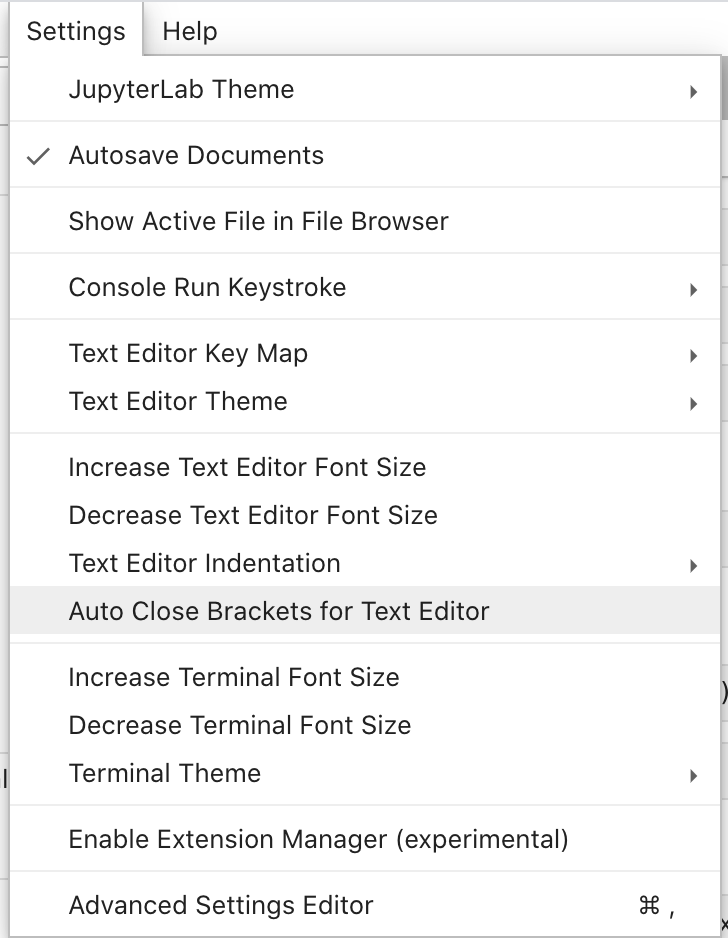
Note that this issue is on the Jupyterlab repo, not the classic notebook repo.
(and I'm assuming you meant to write "many applications like VSCode", not "many applications like Jupyterlab")
asmeurer
on 2 Dec 2020
Oh I didn't see the issue Jason linked to. So clearly that setting should apply in all editor buffers where autoclosing brackets are used.
asmeurer
on 2 Dec 2020
Just to expand on https://github.com/jupyterlab/jupyterlab/issues/5741#issuecomment-734728212, the way I would fix this is (in pseudocode)
# In the "editor loop"
overwrite_closing_paren = False
if '(' is typed:
    insert '('
    insert ')' after cursor
    overwrite_closing_paren = True
if ')' is typed and character after cursor is ')':
    if overwrite_closing_paren == True:
        move cursor forward
    else:
        insert ')'
if cursor position is moved or editor is deselected or ...:
    # If anything other than typing text after the ( is done, end the "overwrite )" state
    overwrite_closing_paren = False
The idea is that typing ) before a ) only automatically moves the cursor forward instead of inserting a ) if the editor is in a state where it it believes the user is simply trying to type a closing ) from a previously typed ( that was already automatically inserted. Currently, typing ) before a ) unconditionally moves the cursor forward instead of inserting a new ), leading to situations where the user really did intend to insert another ), and the result is invalid syntax if the user isn't paying attention and annoying if they are (like described in this comment). Any action other than typing text (including moving the cursor forward or deselecting the input buffer) should clear this variable.
I don't know how codemirror works, so I don't know how feasible this is. But I think it would alleviate a lot of the pain of this feature (personally I would still find it annoying anyway and would still disable it, but I still think it would be helpful for those who do have it on). It may also be worth looking at other editors to see if there is prior art here.
asmeurer
on 2 Dec 2020
Oh I didn't see the issue Jason linked to. So clearly that setting should apply in all editor buffers where autoclosing brackets are used.
I'm not sure if it's the same underlying cause, but as noted earlier in the thread it's also impossible (as far as I've been able to discover) to disable the autoclosing brackets in a console attached to a notebook in JupyterLab.
prosaic-toast
on 3 Dec 2020
It sounds like the more important thing here is for us to improve the auto-closing bracket behavior, rather than simply disabling it. I am not sure, but I am guessing this behavior comes from Code Mirror, so we may have to dive into how it is handling these things.
ellisonbg
on 3 Dec 2020
It sounds like the more important thing here is for us to improve the auto-closing bracket behavior, rather than simply disabling it.
What about disabling it right now by default as long as it is obviously broken and later (probably with JupyterLab 4.0 or 5.0 or ...) check again if it has been fixed and then consider enabling it again (ideally after some usability testing)?
mgeier
on 4 Dec 2020
To be really specific, here is a problematic case I encountered:
Type f"A {True} in a cell. Then put your cursor at the end of the text and try to type the closing quote. JLab 2.2.9 (older codemirror) and 3.0rc12 (codemirror 5.57.0, almost the most current) will both insert two quotes, so you end up with text like f"A {True}"". It should recognize that the quote you type at the end is a closing quote (not an opening quote), and so should not automatically insert a matching quote. Note that things work if you don't have the {True} in there, i.e., if the starting text is just f"A, so apparently codemirror is somehow not recognizing {} syntax inside of a python f-string.
For reference, here is the bracket autoclose code from codemirror: https://codemirror.net/addon/edit/closebrackets.js.
jasongrout
on 4 Dec 2020
Are there other specific problems people are encountering where the autoclose behavior is wrong, i.e., where it is inserting an extra closing delimiter erroneously?
jasongrout
on 4 Dec 2020
Can we compare this logic to that of other open source implementations that
are more usable? If the issue is with the quality of our auto-closing, and
it really is broken to the point of seldom being useful, I am supportive of
disabling this until we fix it. Whether or not it is default on/off in the
long term should depend on how good a new implementation is.
On Fri, Dec 4, 2020 at 9:57 AM Jason Grout notifications@github.com wrote:
Are there other specific problems people are encountering where the
autoclose behavior is wrong, i.e., where it is inserting an extra closing
delimiter erroneously?—
You are receiving this because you commented.
Reply to this email directly, view it on GitHub
https://github.com/jupyterlab/jupyterlab/issues/5741#issuecomment-738928877,
or unsubscribe
https://github.com/notifications/unsubscribe-auth/AAAGXUEJY5D22VGLPLZ5OIDSTEPKNANCNFSM4GJE7LFA
.
--
Brian E. Granger
Principal Technical Program Manager, AWS AI Platform ([email protected])
On Leave - Professor of Physics and Data Science, Cal Poly
@ellisonbg on GitHub
ellisonbg
on 4 Dec 2020
To be really specific, here is a problematic case I encountered:
To be clear, in most cases I've seen, the autoclosing correctly determines when to put in a closing delimiter. This is one case I recently observed that had issues.
jasongrout
on 4 Dec 2020
To be really specific, here is a problematic case I encountered:
Turns out I already dove into why this happens: https://github.com/codemirror/CodeMirror/issues/2344
More generally, there are issues with prefixed strings in python.
jasongrout
on 4 Dec 2020
Does codemirror have different closing bracket behavior based on what language it is editing? I noticed that typing three quotes inserts three quotes. Would it also do that for languages where there aren't triple-quoted strings?
asmeurer
on 4 Dec 2020
Each language mode has configuration about what delimiters should be autoclosed. Python mode specifies the triple-quote delimiters here: https://github.com/codemirror/CodeMirror/blob/master/mode/python/python.js#L381
jasongrout
on 4 Dec 2020
@jasongrout said: Are there other specific problems people are encountering where the autoclose behavior is wrong
Yes, already described as other comments:
- https://github.com/jupyterlab/jupyterlab/issues/5741#issuecomment-734496669
- https://github.com/jupyterlab/jupyterlab/issues/5741#issuecomment-737525581
- https://github.com/jupyterlab/jupyterlab/issues/5741#issuecomment-636479198
- ...
Personally, whenever I end up using Jupyter, I have an extra mental effort to double check if what I typed is exactly what is written, and very very often it's not. Programming is already very difficult and taxing, we don't need the tool to make it more difficult.
Half the time it "helpfully" adds a closing bracket/parenthesis/quote, I already have muscle memory to type it myself anyway; and the other half it just adds it wrongly and I have to delete it (breaking my typing flow). When it "eats" a typed character, it either does it wrongly (leading to syntax errors) or if it does it right, it's essentially undoing the auto-added character (in other words, it types over the auto-added character, meaning the helpful auto-adding feature was useless).
Get rid of this misfeature, please.
 denilsonsa
on 5 Dec 2020
denilsonsa
on 5 Dec 2020
To make sure we are understanding these cases:
create a cell with foo(x). We want to change it to foo(bar(x)). So we put the cursor just before the x, and type bar(, move the cursor one to the right to skip over the x, then type ) to add the second ), however autoclose skips the ) we are now on when we type ), so we end up having to type two parens )). VS Code handles this case correctly in Typescript mode, but has the same problem in Python, interestingly.
I found another related corner case: we start with foo(bar(x)), and we want to delete bar(x). So we put the cursor after bar(x), and press backspace twice to get foo(bar(|), then pressing backspace one more time deletes both parens (i.e., it wrongly deletes )) to give us foo(bar|. VS Code also messes up this case in the same way.
This is a proposal for fixing the wrong behavior above (and generally try to be not as magic), not a new specific different problem, if I understand it correctly.
This sounds like the same problem I documented above, where codemirror doesn't understand prefix strings so it gets messed up about where strings are starting and stopping. VS Code does correctly recognize prefix strings, so does not have this problem.
jasongrout
on 5 Dec 2020
Does codemirror know when an inserted character is inside of a string? Obviously the highlighter does, but I don't know if that is accessible from the editor code.
asmeurer
on 5 Dec 2020
Given the issues here, I would be in favor of disabling this until we fix the underlying issues. Adding to the 3.0 milestone for discussion.
ellisonbg
on 15 Dec 2020
I too loathe "autoClosingBrackets", and autobrackets in all forms. My very first contribution to jupyterlab was a setting to turn them off. Still, I generally supported keeping "autoClosingBrackets": true as the default, as my impression has been that this is a feature that is popular with newer users, who might not be savvy enough (at least not right away) to dig around the advanced settings to find it.
But yeah, if we're in agreement that "autoClosingBrackets" is currently broken, by all means let us switch this to default off. We can soften the blow by changing the "Settings -> Auto Close Brackets for Text Editor" menu item to just "Settings -> Auto Close Brackets", and have said item toggle the autobracket behavior for jlab globally. That'll make the relevant options both easier to find and easier to use (since this way you don't have to find and set 4+ separate options).
 telamonian
on 15 Dec 2020
telamonian
on 15 Dec 2020
Another thing occurs when you use vim commands. You can repeat the previous command by pressing .
Now suppose you want to insert " in a bunch of places, by giving the insert command in the first case and repeat a search to go to the new place, then press . again, and so on for 10 times in a (very) quick row. Or you put the sequence in a macro and tell vim to run it 10 times.
I do that quite often in regular Vim. In a Jupyter notebook, to my surprise, weird things were happening, until I discovered that there were extra quotes or brackets inserted.
The autocomplete is at odds with a kind of functional, compositional thinking that comes with efficient editing.
So, if you are a somewhat inefficient user of a text-editor, than auto-close will increase your efficiency. But if you are a highly efficient text-mangler, then auto-close will decrease your efficiency.
A few weeks ago I discovered by chance that it could be turned off in the jupyter lab, and I greatly enjoy the smoothness in editing now.
I do not mind what the default is, if there is an accessible, clickable button somewhere to turn it off.
 dirkroorda
on 15 Dec 2020
dirkroorda
on 15 Dec 2020
Related issues
 bollwyvl
·
3Comments
bollwyvl
·
3Comments
 blink1073
·
3Comments
blink1073
·
3Comments
 dhirschfeld
·
3Comments
dhirschfeld
·
3Comments
 psinger
·
3Comments
psinger
·
3Comments
 idoDavid
·
3Comments
idoDavid
·
3Comments
Most helpful comment
I just figured out how to make this (thank god) finally stop manually:
In JupyterLab, under "Setting" -> "Advanced Settings Editor" -> Notebook -> "User Overrides" add the following:
and then hit the tiny "save" button in the upper right.