Jitsi-meet: Jitsi meet black screen and crash in release build
I am integration jitsi meet in my react native project, Jitsi meet SDK not working properly, it's crashing in a release build and in debug build it's giving black screen in first time and then works on second time,
I got below error in release build
TypeError: Cannot read property 'Direction' of null, js engine: Hermes, stack:
I tried everything, I tried npm package of jitsi meet, when using npm package I got black empty screen in debug build and crash on release build,
then I try to manually implement the SDK, In this case it's working fine in debug build but crashing on a release build.
Nothing works for React Native android release build. I am using react native version 0.62
Steps to reproduce:
- Create empty react native project with react-navigation and gesture handler.
- Install jitsi meet npm package and you can also try with a manual install.
- Make a release build.
Expected behavior:
it should not be given a black screen and works on release build but nothing working.
Actual behavior:
It's crashing on release build with multiple errors
TypeError: Cannot read property 'Direction' of null, js engine: Hermes, stack:
 Mayank8290
All 28 comments
I also tried with jitsi sdk version 2.5.1 , in debug build everything working fine but in release build getting the error ==
JitsiMeetUncaughtExceptionHandler FATAL ERROR
com.facebook.react.common.JavascriptException: TypeError: null is not an object (evaluating 't(r(d[1])).default.Direction'), stack:
Mayank8290
on 29 May 2020
Duplicate of #6860 ?
 l3d00m
on 30 May 2020
l3d00m
on 30 May 2020
Yep, a duplicate indeed.
 saghul
on 30 May 2020
saghul
on 30 May 2020
@Mayank8290 thanks for the report anyway!
 luixxiul
on 30 May 2020
luixxiul
on 30 May 2020
this should be duplicate of the other issue but I have provide more error, like this crash, happen in every version of jitsi meet SDK with react native.
Mayank8290
on 30 May 2020
Nothing is working, tried everything.
Mayank8290
on 31 May 2020
Well, then leave your comments there if you haven't already. Opening a new issue will definitely not accelerate the process, providing better info (what you did) does though.
l3d00m
on 31 May 2020
@Mayank8290 Check this comment for issue "black screen at the first time". Solution number 2 works for me.
For issue number 2, I got the same issue, I figured out that it was because of I enabled proguard. Here is the error I catch in release mode using appcenter. Did anyone encounter it before ? Or if you know what to put into proguard, please share with me. Many thanks.
com.facebook.react.common.JavascriptException: Invariant Violation: Element type is invalid: expected a string (for built-in components) or a class/function (for composite components) but got: undefined. This error is located at: in R in l in R in Unknown in A in S in Unknown in RCTView in l in Styled(l) in b in c in _ in Unknown in b in RCTView in RCTView in b
 baotoan1905
on 2 Jun 2020
baotoan1905
on 2 Jun 2020
@baotoan1905 please try to disable proguard then install release apk , and also share your react native version i am using 0.62 and it's crashes even after disable the proguard.
Mayank8290
on 2 Jun 2020
@Mayank8290 I have found it here, it fixed my issue.
Just need to add these proguard rules
# WebRTC

-keep class org.webrtc.** { *; }
-dontwarn org.chromium.build.BuildHooksAndroid

# Jisti Meet SDK

-keep class org.jitsi.meet.** { *; }
-keep class org.jitsi.meet.sdk.** { *; }

# We added the following when we switched minifyEnabled on. Probably because we
# ran the app and hit problems...

-keep class com.facebook.react.bridge.CatalystInstanceImpl { *; }
-keep class com.facebook.react.bridge.ExecutorToken { *; }
-keep class com.facebook.react.bridge.JavaScriptExecutor { *; }
-keep class com.facebook.react.bridge.ModuleRegistryHolder { *; }
-keep class com.facebook.react.bridge.ReadableType { *; }
-keep class com.facebook.react.bridge.queue.NativeRunnable { *; }
-keep class com.facebook.react.devsupport.** { *; }

-dontwarn com.facebook.react.devsupport.**
-dontwarn com.google.appengine.**
-dontwarn com.squareup.okhttp.**
-dontwarn javax.servlet.**

# ^^^ We added the above when we switched minifyEnabled on.

# Rule to avoid build errors related to SVGs.
-keep public class com.horcrux.svg.** {*;}
For your issue, are you using hermes ? if yes please try to disable it and try again.
One more thing I have encountered before was that inside android/app/build.gradle I have to put these code since I'm using other packages in my project too. You might check if the error come from some of your third party libraries and add them there too
implementation(project(':react-native-jitsi-meet')) {
      exclude group: 'com.facebook.react',module:'react-native-locale-detector'
      exclude group: 'com.facebook.react',module:'react-native-vector-icons'
      exclude group: 'com.facebook.react',module:'react-native-community-async-storage'
      exclude group: 'com.facebook.react',module:'react-native-webview'
      exclude group: 'com.facebook.react',module:'react-native-community_netinfo'
      exclude group: 'com.facebook.react',module:'react-native-svg'
      exclude group: 'com.facebook.react',module:'react-native-fetch-blob'
      exclude group: 'com.facebook.react',module:'react-native-push-notification'
    }
I tried your solutions, this is the error I got when opening the jitsi video conference page.
com.facebook.react.common.JavascriptException: TypeError: null is not an object (evaluating 't(r(d[1])).default.Direction'), stack:
Mayank8290
on 2 Jun 2020
@Mayank8290
Please send an example or a minimal version of your project if possible. I can help to look into it.
My project configuration ( for your reference)
React-native 0.61.5
react-native-jitsi-meet 2.1.1
Proguard enabled
Hermes disabled (jitsi SDK 2.4.0 doesn't support hermes, some guys from jitsi mentioned that we need to upgrade to at least 2.6.0)
My build.gradle (com.android.tools.build:gradle:3.5.2)
project.ext {
    excludeAppGlideModule = true
}

configurations.all {
    resolutionStrategy {
     force "com.facebook.soloader:soloader:0.9.0+"
    }
}

buildscript {
    ext {
        buildToolsVersion = "28.0.3"
        minSdkVersion = 24
        compileSdkVersion = 28
        targetSdkVersion = 28
        supportLibVersion = "27.1.1"
        googlePlayServicesVersion = "16.0.0"
        firebaseVersion = "17.5.0"
        // glideVersion = "4.11.0"
    }
    repositories {
        google()
        jcenter()
    }
    dependencies {
        classpath 'com.android.tools.build:gradle:3.5.2'
        // NOTE: Do not place your application dependencies here; they belong
        // in the individual module build.gradle files
    }
}

allprojects {
    repositories {
      mavenLocal()
      maven {
          // All of React Native (JS, Obj-C sources, Android binaries) is installed from npm
          url("$rootDir/../node_modules/react-native/android")
      }
      maven {
          // Android JSC is installed from npm
          url("$rootDir/../node_modules/jsc-android/dist")
      }
      maven { // <---- Add this block
          url "https://github.com/jitsi/jitsi-maven-repository/raw/master/releases"
      }
      google()
      jcenter()
      maven { url 'https://www.jitpack.io' }
    }
}
Thanks for sharing your configuration, here is my project configuration :
"@react-native-community/masked-view": "^0.1.10",
"@react-navigation/material-bottom-tabs": "^5.2.9",
"@react-navigation/native": "^5.4.2",
"@react-navigation/stack": "^5.3.9",
"jsc-android": "^241213.1.0",
"lottie-ios": "^3.0.3",
"lottie-react-native": "^3.4.0",
"react": "16.11.0",
"react-native": "0.62.2",
"react-native-gesture-handler": "^1.6.1",
"react-native-jitsi-meet": "^2.1.1",
"react-native-safe-area-context": "^2.0.0",
"react-native-screens": "^2.8.0",
"react-native-vector-icons": "^6.6.0"
React Native Version 0.62.2
Hermes is disabled and same 2.4.0 sdk of jitsi meet .
Proguard is disabled
and other configuration is the same as yours.
I also tried jitsi sdk 2.9.0 with Hermes enabled I got the same direction kind of error in release build.
TypeError: Cannot read property 'Direction' of null, js engine: Hermes, stack:
Mayank8290
on 3 Jun 2020
@Mayank8290 What is your build tool version, did you try to upgrade it ? Mine is com.android.tools.build:gradle:3.5.2
baotoan1905
on 3 Jun 2020
previous was 3.4.2 , changes to 3.5.2 the error is the same.
E/JitsiMeetSDK: JitsiMeetUncaughtExceptionHandler FATAL ERROR
com.facebook.react.common.JavascriptException: TypeError: null is not an object (evaluating 't(r(d[1])).default.Direction'), stack:
Mayank8290
on 3 Jun 2020
I'm also facing this issue with com.android.tools.build:gradle:4.0.0
It looks like an issue with react-native-gesture-handler
 adamthewan
on 11 Jun 2020
adamthewan
on 11 Jun 2020
https://github.com/skrafft/react-native-jitsi-meet/issues/117#issuecomment-636263779
@Mayank8290 this solved it for me. Solution 2
adamthewan
on 11 Jun 2020
Can you send your minimal project configuration , and did u tested in release build .
Mayank8290
on 11 Jun 2020
I'm also facing this issue, did you solve it? @Mayank8290
 tanhx2008
on 30 Jun 2020
tanhx2008
on 30 Jun 2020
Why is this closed? This hasn't been fixed
 thomas-cruz
on 2 Sep 2020
thomas-cruz
on 2 Sep 2020
yes
 dharmendrashah
on 14 Sep 2020
dharmendrashah
on 14 Sep 2020
Same problem here, with same error "TypeError: null is not an object (evaluating 't(r(d[1])).default.Direction')"
 Evanfeenstra
on 5 Oct 2020
Evanfeenstra
on 5 Oct 2020
Same problem here with implementation ('org.jitsi.react:jitsi-meet-sdk:2.10.0') ! :'(
 Marinaarimany
on 7 Oct 2020
Marinaarimany
on 7 Oct 2020
Même problème ici avec l'implémentation ('org.jitsi.react: jitsi-meet-sdk: 2.10.0')! : '(
@saghul will you have a solution to this problem please ? Thank you
Marinaarimany
on 8 Oct 2020
We don't maintain react-native-jitsi-meet, hence can't support it. If you can reproduce the issue with the SDK samples then I can look into it.
saghul
on 8 Oct 2020
@saghul I run android application in release variant
And I found this error, hope it can help fixing this error
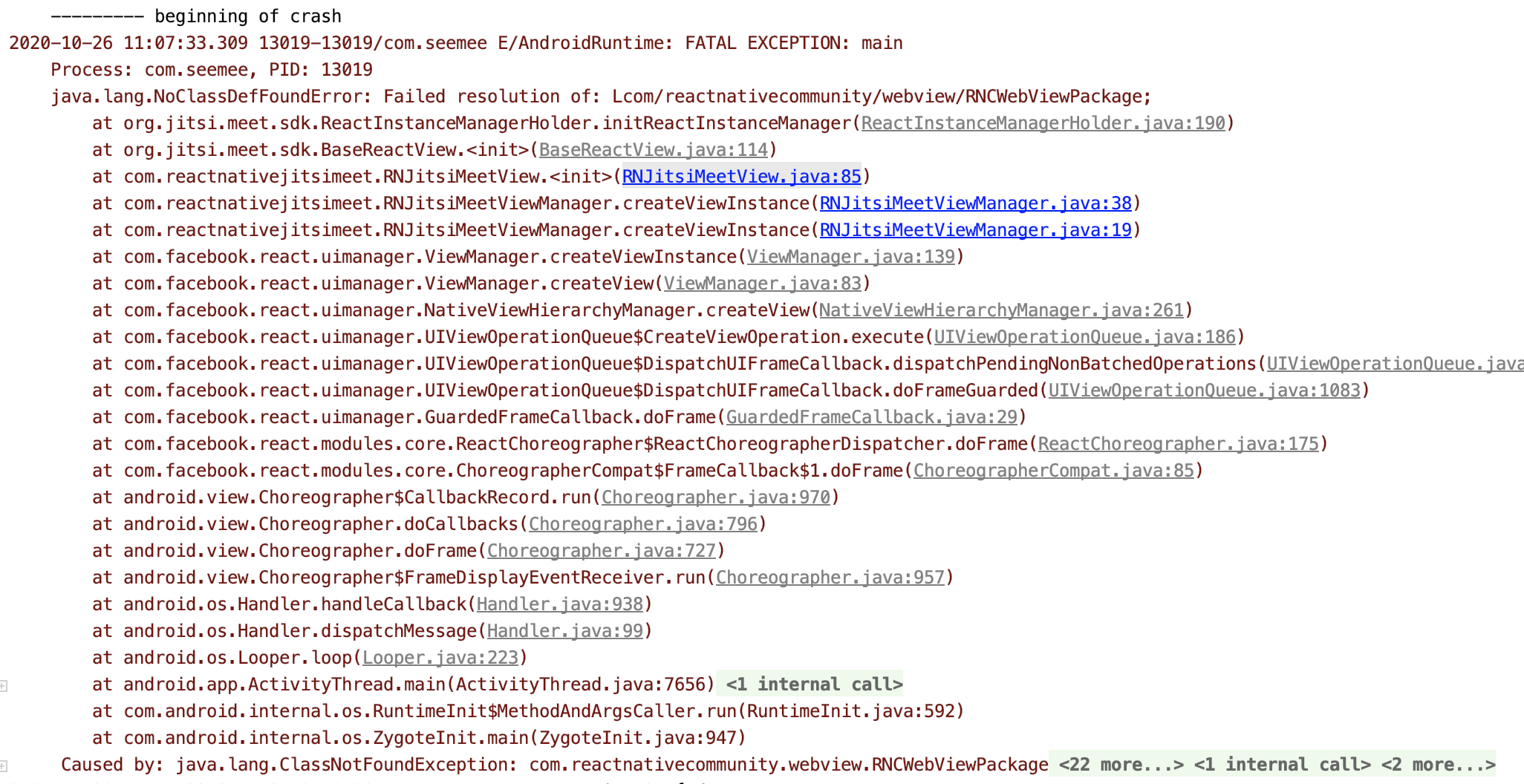
 ZeroCool00
on 26 Oct 2020
ZeroCool00
on 26 Oct 2020
I have installed react-native-webview package and this error is gone, but I am getting another error
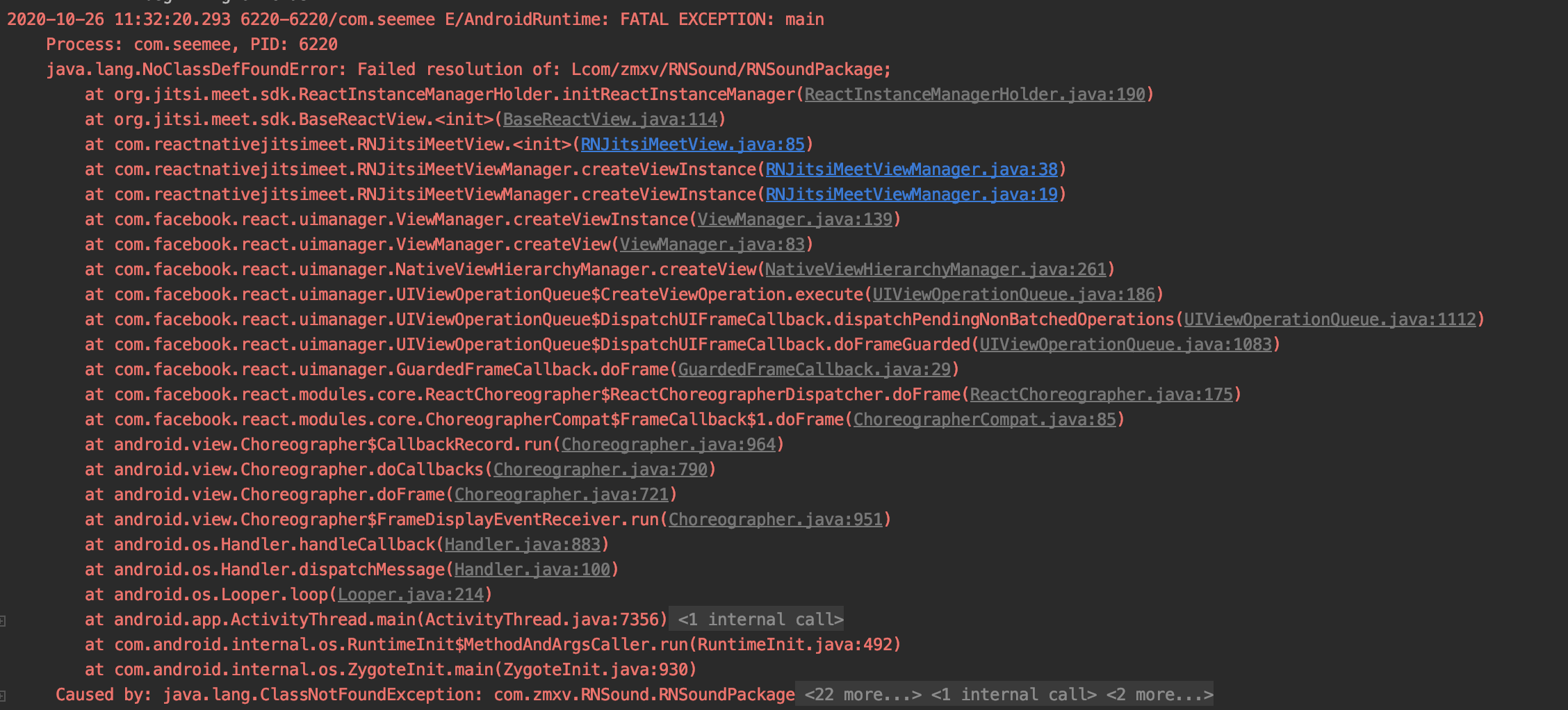
ZeroCool00
on 26 Oct 2020
Now I install rn-sound lib, and no class define error gone, but have another one
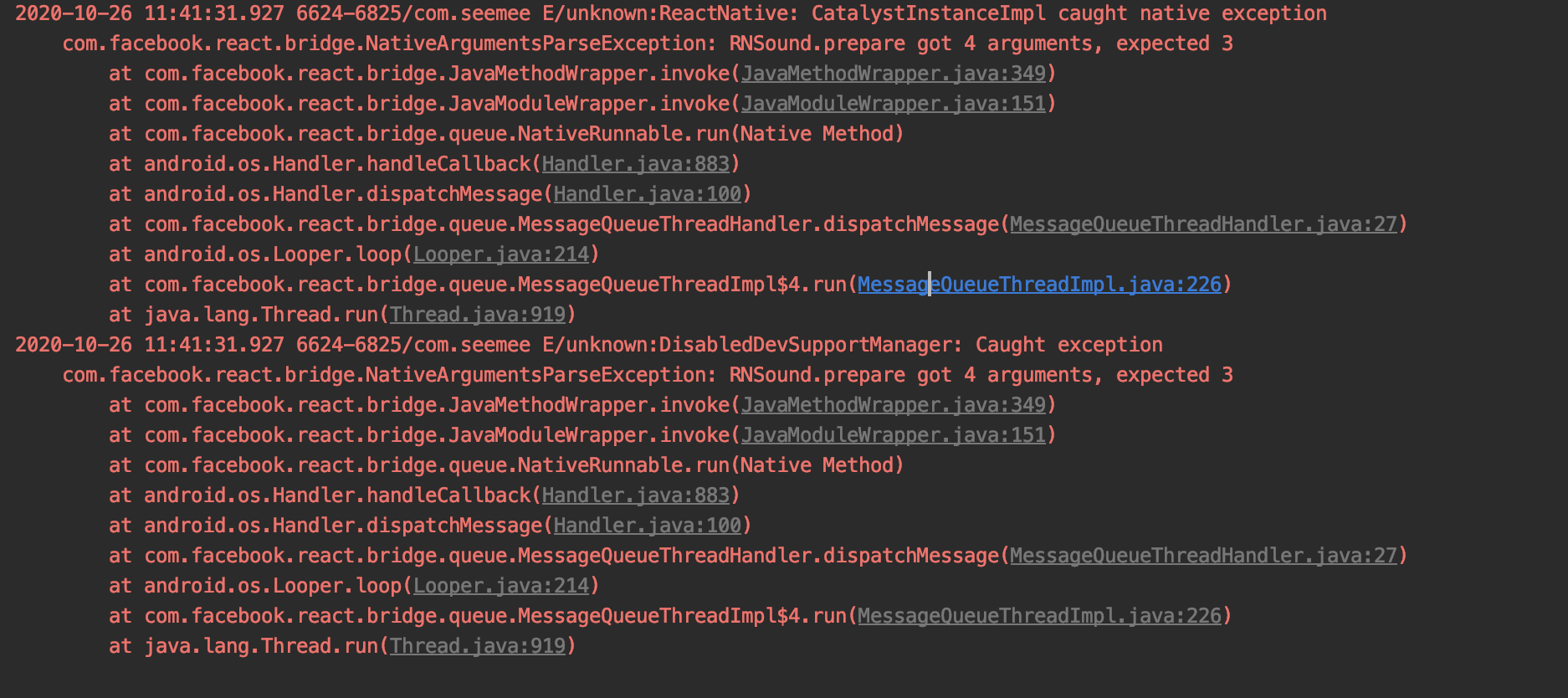
ZeroCool00
on 26 Oct 2020
Related issues
 rscastil
·
44Comments
rscastil
·
44Comments
 shellshocker
·
47Comments
shellshocker
·
47Comments
 edmundlaugasson
·
36Comments
saghul
·
106Comments
edmundlaugasson
·
36Comments
saghul
·
106Comments
 carotkut94
·
45Comments
carotkut94
·
45Comments
Most helpful comment
@Mayank8290 I have found it here, it fixed my issue.
Just need to add these proguard rules
For your issue, are you using hermes ? if yes please try to disable it and try again.
One more thing I have encountered before was that inside android/app/build.gradle I have to put these code since I'm using other packages in my project too. You might check if the error come from some of your third party libraries and add them there too