Description
jitsi has a very high client CPU load.
Depending on the machine it takes 50-100 % CPU.
Tested with 3-5 participants.
Also tested another product BigBlueButton that only takes ~20 % CPU.
Current behavior
High CPU load
Expected Behavior
Lower CPU load
Possible Solution
Don't know. If I can provide any information about codecs / connection / code in use please let me know.
Environment details
3-5 Participants.
Instances:
- Hosted jitsi on https://jitsi.org/
- Self hosted docker instance
Tested on
- Firefox 74 on Linux
- Chromium 80 on Linux
- Several browsers on MacOS
It is more or less the same on all machines.
 weeman1337
All 56 comments
I am also facing the same problem.
 phil-flex
on 30 Mar 2020
phil-flex
on 30 Mar 2020
Same here, especially in tile view.
It it possible to force clients to stream with a lower resolution? I think this might help.
We had a test call yesterday with 10 streams. Server load was ok. Client load went up to 5 in tile view. A bit more or less on all devices.
Traffic was about 24gb/hour on the server.
EDIT: I just found https://twitter.com/unixtippse/status/1241795464678248448
 c0dev0id
on 30 Mar 2020
c0dev0id
on 30 Mar 2020
Can you share your server specs? The JVB performs a CPU intensive task, high CPU is ok as long as it's able to cope with the load and not drop packets.
 saghul
on 30 Mar 2020
saghul
on 30 Mar 2020
Can you share your server specs? The JVB performs a CPU intensive task, high CPU is ok as long as it's able to cope with the load and not drop packets.
The server load is okay. I've checked that.
I opened this issue because of the client load.
weeman1337
on 30 Mar 2020
Oh, sorry, going tthough many issue and i misread.
Jitsi Meet and BBB operate in 2 funddamentally different modes, so comparing the load iss not very meaningful.
If you want to geta. lower CPU usage you can lower your received quality with the "Manage call quality" slider (it's on the 3 dots menu in the toolbar). We are working on applying the setting to the local video too.
If you have a self-hosted instance you can modify the default settings as that tweet showed.
saghul
on 30 Mar 2020
Jitsi Meet and BBB operate in 2 funddamentally different modes, so comparing the load iss not very meaningful.
Okay - that was just my test to see if it is possible to have a lower load on the client (in the browser).
If you want to geta. lower CPU usage you can lower your received quality with the "Manage call quality" slider (it's on the 3 dots menu in the toolbar). We are working on applying the setting to the local video too.
Will do that. Anyway I'm wondering if there is anything else that may be improved like using different codecs or something like that.
The high client CPU is an issue :/
weeman1337
on 30 Mar 2020
Lowering the quality and eventually going to low bandwidth mode (which removes all video) is about the only thing you can do...
There is one thting you can try: set the channelLasN cconfig variable like so: https://meet.jit.si/MyAwesomeMeeting#config.channelLastN=3 and that will overrride our bridge logic and send you at most 3 videos, taking into account the last active participants.
saghul
on 30 Mar 2020
that will overrride our bridge logic and send you at most 3 videos,
I will try that later.
It's a shame. I like jitsi but it is out of the game once you have >= 4-5 pariticpants :(
Do you know what BBB does different?
weeman1337
on 30 Mar 2020
It's a shame. I like jitsi but it is out of the game once you have >= 4-5 pariticpants :(
I have a daily standdup with 15. YMMV, of course.
Do you know what BBB does different?
I believe the use an MCU, so they mix the video on the server and you only get 1 video stream. We use an SFU which forwars the traffic intead. Each model has a different set of advantages / disadvantages.
saghul
on 30 Mar 2020
One cause could be also that the Video is not GPU encoded/decoded.
At least it is not al all on Linux, I don't know for MacOS, could be if you force H264 instead of VP8 maybe.
 freechelmi
on 30 Mar 2020
freechelmi
on 30 Mar 2020
I have a daily standdup with 15. YMMV, of course.
"Works on my machine"? ;)
Found out three friends running into the 4-5 "limit" and see comments from others above.
Maybe that feature to only show last N speaking persons should be a regular option in the frontend?
weeman1337
on 30 Mar 2020
Maybe that feature to only show last N speaking persons should be a regular option in the frontend?
That's what the thing I told you to try does, have you had the chance to test it?
We adjust for optimal bandwidth utilisation, but alas, browsers don't seem to react very well to CPU overuse, even if they do have detecting measures.
We might need to have a setting, the problem with settings is having to explain them to users, so me might do a combination of things. We are starting with the reduction of local video resolution to match the requested remote one on the quality slider.
saghul
on 30 Mar 2020
"Works on my machine"? ;)
No, I was just trying to tell you that it's not "out of the game", not for everyone.
saghul
on 30 Mar 2020
At least it is not al all on Linux, I don't know for MacOS, could be if you force H264 instead of VP8 maybe.
Forcicng H.264 is a bad idea. We cannot do ssimulcast on H264, which means you'd reeive every participant in HD, instead of having a lower resoluttion for the thumbnails.
Whiuch makes me wonder: @weeman1337 what browssers are you using for your meetings?
saghul
on 30 Mar 2020
That's what the thing I told you to try does, have you had the chance to test it?
Will try this evening and report here.
Whiuch makes me wonder: @weeman1337 what browssers are you using for your meetings?
See ticket description:
Tested on

Firefox 74 on Linux
Chromium 80 on Linux
Several browsers on MacOS
We might need to have a setting, the problem with settings is having to explain them to users
Jep - I know that is tricky. I just wanted to say that the current situation observed by me is (sadly): "it blows up the client. skype/zoom/$other doesn't - good bye jitsi".
To be clear: I like jitsi and want to find a way using it :+1:
weeman1337
on 30 Mar 2020
Thanks for sticking with us!
Tested on
Firefox 74 on Linux
Chromium 80 on Linux
Several browsers on MacOS
I had missed this, sorry. At the moment your best bet is tu use Chromium. We don't support simulcast on Firefox yet (it's coming really soon) which means that you are receiving HD from every Firefox participant, no matter whether they are on stage (large view) or not. On Chromium you'll only receive the large view participant in HD, the rest come a t a lower resolution. This has significant impact on the CPU usage on the client.
saghul
on 30 Mar 2020
Just to add an additional case to this, I also have this issue with Chrome 80/Firefox 74 on MacOS. My colleagues (5-6 including myself) use Chrome 80 on Windows 10
I had missed this, sorry. At the moment your best bet is tu use Chromium. We don't support simulcast on Firefox yet (it's coming really soon) which means that you are receiving HD from _every_ Firefox participant, no matter whether they are on stage (large view) or not. On Chromium you'll only receive the large view participant in HD, the rest come a t a lower resolution. This has significant impact on the CPU usage on the client.
Just want to check if I have this right in my head, does this mean that if any Firefox client is connected this will significantly increase the CPU usage on every connected client?
As an additional related question does using the tile view put an additional strain on the client?
 jameswmcnab
on 30 Mar 2020
jameswmcnab
on 30 Mar 2020
Forcicng H.264 is a bad idea. We cannot do ssimulcast on H264, which means you'd reeive every participant in HD, instead of having a lower resoluttion for the thumbnails.
Thanks that is an important point.
Then maybe should invest in the electron app which could maybe have built in VP8 hardware decoding enabled ( VP8 decoding is available on GPU since 6 years at least)
freechelmi
on 30 Mar 2020
Just want to check if I have this right in my head, does this mean that if any Firefox client is this will significantly increase the CPU usage on every connected client?
Correct.
As an additional related question does using the tile view put an additional strain on the client?
Depends on the number of tiles. Each tile takes more bandwidth than a thumbnail.
saghul
on 30 Mar 2020
could maybe have built in VP8 hardware decoding enabled ( VP8 decoding is available on GPU since 6 years at least)
Even on devices with HW VP8 like mobile phones, it's not possible to do simulcast unless you use the SW encoder...
saghul
on 30 Mar 2020
Lowering the quality and eventually going to low bandwidth mode (which removes all video) is about the only thing you can do...
We did lower the quality. Unless you lower it to no video, the client-CPU-Load does not go down very much. It still takes at least 35% of the client-CPU.
 gitte20
on 30 Mar 2020
gitte20
on 30 Mar 2020
It still takes at least 35% of the client-CPU.
That is quite low TBH. How many participants were sending video?
saghul
on 30 Mar 2020
It still takes at least 35% of the client-CPU.
That is quite low TBH. How many participants were sending video?
two + me = three
Don't know about the load on the other clients.
gitte20
on 30 Mar 2020
Lowering the quality and eventually going to low bandwidth mode (which removes all video) is about the only thing you can do...
We did lower the quality. Unless you lower it to no video, the client-CPU-Load does not go down very much. It still takes at least 35% of the client-C
Lowering the quality and eventually going to low bandwidth mode (which removes all video) is about the only thing you can do...
We did lower the quality. Unless you lower it to no video, the client-CPU-Load does not go down very much. It still takes at least 35% of the client-CPU.
let me double-check the load during the next session.
gitte20
on 30 Mar 2020
I can confirm that Chromium/Linux ( No GPU decoding) would consume easily 50% of a Corei5 skylake in a 3 people conference with jitsi meet
So 35% seems quite OK.
It's just the way Browsers works nowadays.
freechelmi
on 30 Mar 2020
Just checking again. Simple setup. Both firefox/linux, both I5, both both LD resolution, only 2 clients
1) Desktop from 35% to 50%
2) laptop from 72% to 75%
gitte20
on 30 Mar 2020
Please don't test these things with Firefox until we have rolled out some fixes. As I mentioned here: https://github.com/jitsi/jitsi-meet/issues/5464#issuecomment-605968816 your experience won't be good.
saghul
on 31 Mar 2020
Today we tried a Chromium only session. It is way much better. < 20 %
So waiting for the Firefox improvements ;)
weeman1337
on 31 Mar 2020
Thanks for giving it a try!
saghul
on 31 Mar 2020
May this be a duplicate of #4758 ?
weeman1337
on 2 Apr 2020
May this be a duplicate of #4758 ?
I think it's not because that bug is talking about Firefox and this one is not (CPU is high in Chromium as well).
A data point from me:
- using Chromium with the latest (as of this moment) stable jitsi meet Debian packages on the server
- Linux / Debian stable
- nobody but me in the channel
- micro is switched off in meet jitsi in my browser
- video is off as well
- thus one could describe this as "the session is completely idle, there's no work to do whatsoever"
- Chromium is using ~ 30% CPU
- Pulseaudio, caused by Chromium is using another 12% CPU (what need PA and Chrome communicating here about since there's no audio input and or output? ("I've nothing to tell you". "Me neither". One microsecond later: "Still nothing to tell you". "Same here". 1müs later... what's the matter here?))
- about 80 packets/minute get exchanged with the server, total 15KB traffic
 tpo
on 7 Apr 2020
tpo
on 7 Apr 2020
Related: #5381 [Ubuntu 18.04.4] High CPU usage after some time
 Echolon
on 10 Apr 2020
Echolon
on 10 Apr 2020
Hi, similar issue here. Chrome on Mac. I burned a full battery in a 1 hour video call. Anything I can do to help investigate?
 D4nte
on 11 Apr 2020
D4nte
on 11 Apr 2020
Hi, similar issue here. Chrome on Mac. I burned a full battery in a 1 hour video call. Anything I can do to help investigate?
You could try profiling the client side application. Google "javascript profiling". That should get you started.
tpo
on 12 Apr 2020
xranby from community did a good profiling. It may help
https://community.jitsi.org/t/host-a-meeting-with-500-people-ideas/34672/4
He suggests to make disableAudioLevels=true
 Fahad-Alsaidi
on 15 Apr 2020
Fahad-Alsaidi
on 15 Apr 2020
This also happens for me.
I'm using meet.jit.si on a Fedora linux and I tested on Firefox, Chrome, Chromium - same cpu huge intensive use.
 adrianovieira
on 8 May 2020
adrianovieira
on 8 May 2020
@saghul is the client currently auto-adjusting video quality when the CPU is maxed out? That would of course be the best solution. Explaining people where to find the quality slider is not good user experience.
 sellth
on 25 May 2020
sellth
on 25 May 2020
@saghul is the client currently auto-adjusting video quality when the CPU is maxed out? That would of course be the best solution. Explaining people where to find the quality slider is not good user experience.
@sellth : let me respectfully disagree: when meetjitsi would be adjusting video quality on CPU max out only, then my laptop would still be running hot screeching and emiting large volumes of hot air, which I personally deem inacceptable except for very special circumstances (such as compiling large amounts of code).
tpo
on 25 May 2020
is the client currently auto-adjusting video quality when the CPU is maxed out?
Yes and no. The browser adjusts the local resolution when CPU overuse is detected. But that's not the entire story, since you are going to continue receiving remote video and depending on your machine and the amount of video, no adjustment would save you.
We are currently not using the CPU overuse information to try to do something smart. A straw man proposal here would be to start lowering last N up to a point, in steps, hoping the overuse flag clears, signaling that we succeeded.
But before that there is probably more low hanging fruit to be collected. Audio levels, for example, seem to contribute a fair amount to the overall CPU load.
saghul
on 25 May 2020
Ok, just to state where I'm coming from: One of my colleagues has a maxed out CPU in every call (even 1on1) with an Intel 5Y10. Her framerate is usually at 1–5 fps and various other issues occur (Audio desync, unresponsive interface). Reducing the quality slider manually greatly improved the experience on both sides of the call. If possible, this should be an automatic adjustment imo. Audio level indicators are already deactivated on that server and the Electron app is used.
sellth
on 25 May 2020
For those interested, as I didn't see a proposal for addressing specifically the audio levels CPU usage, I created issue #6920.
 nekohayo
on 30 May 2020
nekohayo
on 30 May 2020
I am also getting high CPU usage on Chrome (10.14.6 MacOS). It is simply unusable, both meet.jit.si and my own implementation of it on AWS.
 sirvan3tr
on 26 Jun 2020
sirvan3tr
on 26 Jun 2020
Same thing here with Firefox 79.0 (64Bits)
CPU 79% (i5-1035G1) | Memory 93% (8Gb)
 tech62
on 21 Aug 2020
tech62
on 21 Aug 2020
I noticed that my CPU usage went down substantially when I turned off my own video display on Firefox 80 on Linux. When the others turn off theirs it doesn't have as much of an effect.
Has someone experienced a similar situation?
 leonardehrenfried
on 18 Sep 2020
leonardehrenfried
on 18 Sep 2020
Ok, this slowly is becoming my biggest gripe when debating the usefulness of Jitsi vs other video chat tools. In almost every call we have at least one user with CPU-related performance trouble. Slightly older Macbook Pros (2013) are also struggling heavily, and there are still a lot of those around apparently.
Is there any silver lining for this right now? How could the client better auto-adapt to CPU overuse situations?
sellth
on 25 Sep 2020
Unfortunately agree with Sellth, but know (hope) the team is working hard on improvements, right?
 rickgoud
on 25 Sep 2020
rickgoud
on 25 Sep 2020
There is nothing we are able to do now to improve the performance on FF because of a missing implementation in the browser - https://bugzilla.mozilla.org/show_bug.cgi?id=1401592. We don't have the ability to adjust the send resolution/bandwidth based on how the user is being viewed by others.
All the other browsers should not have this issue. If you are still seeing this, please make sure you have enabled layer suspension on your deployments. - https://github.com/jitsi/jitsi-meet/blob/master/config.js#L156
If you are still seeing issues on meet.jit.si with non-FF browsers, please let us know about the specific scenario where you are seeing a cpu performance issue on the client.
 jallamsetty1
on 25 Sep 2020
jallamsetty1
on 25 Sep 2020
There are other new settings available in the latest stable all targeted to bring down the cpu utilization. You will find them under the videoQuality section - https://github.com/jitsi/jitsi-meet/blob/master/config.js#L242
The lastN limits settings also help in limiting the number of videos received as the number of participants in a call go up.
https://github.com/jitsi/jitsi-meet/blob/master/config.js#L233
jallamsetty1
on 25 Sep 2020
Thanks, I'll play around with these settings and see if I can improve performance for my edge case users, but maybe another suggestion: If possible, the client should always prioritize audio quality over video quality as audio lags are way more disruptive to the meeting experience than a choppy video stream.
sellth
on 28 Sep 2020
Thanks, I'll play around with these settings and see if I can improve performance for my edge case users, but maybe another suggestion: If possible, the client should always prioritize audio quality over video quality as audio lags are way more disruptive to the meeting experience than a choppy video stream.
Yes, the webrtc architecture always prioritizes audio over video. If you are experiencing choppy audio and have ruled out faulty hardware/send side issues, you can check if the bridges are overloaded.
jallamsetty1
on 28 Sep 2020
Ok, activating layer suspension improved our user experience by a lot. Thanks for pointing it out to me. Maybe this option should default to true?
sellth
on 22 Oct 2020
Ok, activating layer suspension improved our user experience by a lot. Thanks for pointing it out to me. Maybe this option should default to true?
Awesome! For now we don't want to make it the default behavior since it can be confusing in the beginning why the resolution being sent up to the bridge keeps changing. Maybe eventually we will. I am closing this issue since it seems to be resolved.
jallamsetty1
on 22 Oct 2020
Just one follow-up question if I may. How would a user even notice that the resolution sent up is changing?
sellth
on 23 Oct 2020
A speculation: is the resolution indicated by the HD/SD icon next to the thumbnail?
leonardehrenfried
on 23 Oct 2020
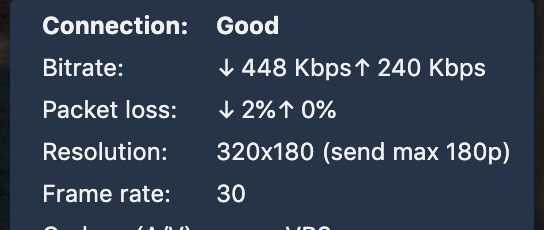
You can see it in local and remote stats; send max 180p, so this participant is sending up to 180p.
 damencho
on 23 Oct 2020
damencho
on 23 Oct 2020
The resolution indicated by the HD/SD/LD/AUDIO icon next to the thumbnail is the resolution of the video displayed on the stage. You can check the resolution sent up by looking at the connectivity details on your local thumbnail. The resolution stats, the resolution requested by bridge(send max) and the resolution sent up by the client are displayed.
jallamsetty1
on 23 Oct 2020
Related issues
 rcidt
·
4Comments
rcidt
·
4Comments
 jidanni
·
3Comments
jidanni
·
3Comments
 mlelyakan
·
4Comments
mlelyakan
·
4Comments
 xiefangzhenz
·
3Comments
xiefangzhenz
·
3Comments
 TopheC
·
3Comments
TopheC
·
3Comments
Most helpful comment
xranby from community did a good profiling. It may help
https://community.jitsi.org/t/host-a-meeting-with-500-people-ideas/34672/4
He suggests to make disableAudioLevels=true