Jitsi-meet: How to edit and rebuild jitsi-meet codes?
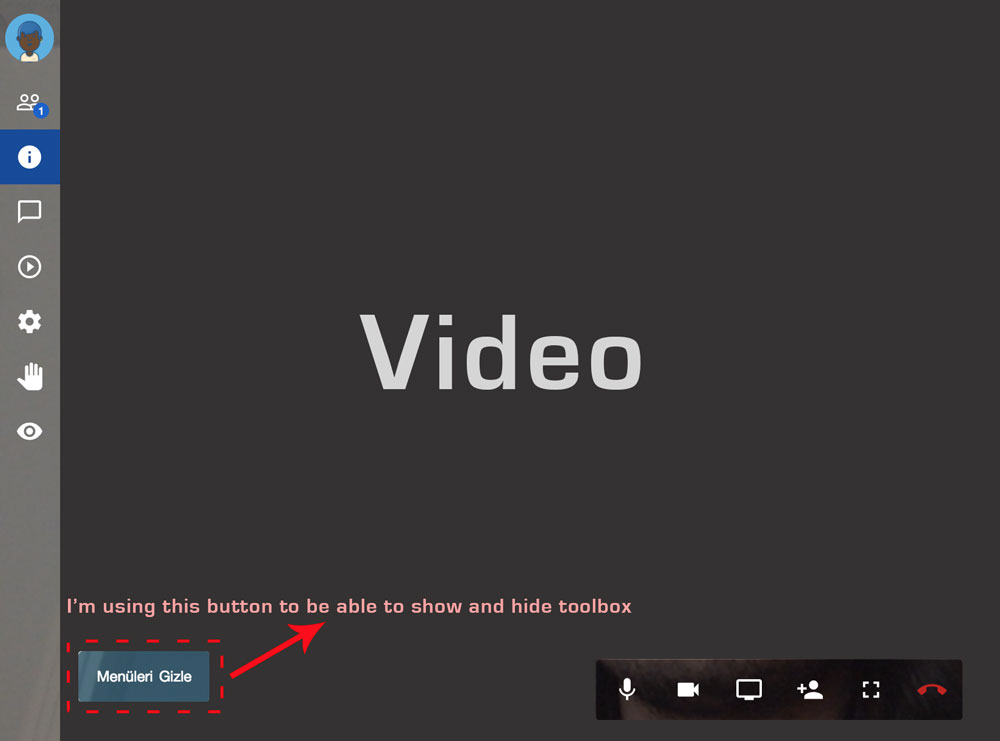
I would like to manage Primary and Secondary Toolbar's show and hide actions (hideToolbox and showToolbox methods). I'm applying "make" command after I've edited codes. But when I check out browser's developer tools. It doesn't show the codes that I changed. Here is the image that shows the latest view. My main purpose is to disable timeout method to be used for the toolbox' hide. What should I do to be able to edit and rebuild the codes ? When I apply the make command, build time takes a long time (approxiamately 15min.) Is that possible to make build process more rapidly ?
 mlelyakan
All 4 comments
I'm applying "make" command after I've edited codes. But when I check out browser's developer tools. It doesn't show the codes that I changed.
Where are you doing this? You will need to upload the built result to the webserver so that it's updated.
What should I do to be able to edit and rebuild the codes ?
You are already doing the right thing: modify the sources, then make, then deploy to your server.
When I apply the make command, build time takes a long time (approxiamately 15min.) Is that possible to make build process more rapidly ?
Alas no, AFAIK.
 saghul
on 10 Feb 2018
saghul
on 10 Feb 2018
do I have to make it to test locally in my development environment?
Is it not possible to make instant development with the command "npm run"?
 enlicayomer
on 10 Feb 2018
enlicayomer
on 10 Feb 2018
@enlicayomer You should use the ./node_modules/.bin/webpack-dev-server command to do development. You do not need to run the make command to do every code changes. To do this, add the following to the script value in the package.json file:
"start:dev": "webpack-dev-server"
Then you need to do npm run start:dev
 abdurrahmanekr
on 10 Feb 2018
abdurrahmanekr
on 10 Feb 2018
@abdurrahmanekr I tried the solution provided by you. But it is not working. Unless the make command is executed, npm run start:dev is not updating the changes.
It would be great if you can help me out.
 JatinRanka
on 2 Nov 2020
JatinRanka
on 2 Nov 2020
Related issues
 mfts
·
3Comments
mfts
·
3Comments
 galvaniccoffee
·
3Comments
galvaniccoffee
·
3Comments
 VogtAI
·
3Comments
VogtAI
·
3Comments
 rcidt
·
4Comments
rcidt
·
4Comments
 wilddylan
·
4Comments
wilddylan
·
4Comments
Most helpful comment
@enlicayomer You should use the
./node_modules/.bin/webpack-dev-servercommand to do development. You do not need to run the make command to do every code changes. To do this, add the following to the script value in the package.json file:Then you need to do
npm run start:dev