There is no need for plugins in latest Safari on desktop and mobile but it still shows a notification that Safari requires a plugin.
 Janhouse
All 99 comments
It seems like it would be far simpler to check whether or not the relevant browser APIs are available, rather than relying on (what I'm guessing are) hardcoded User Agent strings.
There's plenty of libraries out there that simplify this process. I've had success with webrtcsupport in the past. Might be worth looking in to.
 joshfarrant
on 22 Sep 2017
joshfarrant
on 22 Sep 2017
Hmm, I just tested opening https://meet.jit.si with my Safari on my iPhone 7 on iOS 11.0.2 and I still get the "Your browser does not support WebRTC" message.....
Is webRTC support only available in desktop safari and not iOS 11?
 petervnv
on 2 Oct 2017
petervnv
on 2 Oct 2017
@petervnv the only support for safari currently is via the temasys plugin, so i don't think mobile will work. we're taking a look at native webrtc support for the safari versions that support it soon (though i doubt we'll be spending time on mobile safari, as we have the native app there, but @saghul or @lyubomir can confirm)
 bbaldino
on 2 Oct 2017
bbaldino
on 2 Oct 2017
Thanks for the update @bbaldino
I wouldn't spend much time on mobile Safari either. The app is more than enough
petervnv
on 2 Oct 2017
@bbaldino Would it be possible to strip out the Temasys plugin entirely, seeing as it's not required for mobile Safari any more?
Is there any reason that you can't just treat mobile Safari in the same way you do any desktop browser, or even Chrome on Android, and use the built-in WebRTC APIs?
joshfarrant
on 3 Oct 2017
@joshfarrant not sure if we'll be able to get rid of temasys entirely, lots of enterprises lag quite a bit on updates and are probably on old versions of ie/safari which would require the plugin. maybe someday though, it would be nice to be able to simplify things.
as for treating mobile safari the same, that might be possible, but i haven't looked into what mobile safari even supports...it may or may not have the same webrtc apis implemented as in the desktop one and, even if so, unfortunately 'treating mobile browser XXX the same as desktop browser XXX' never seems to work all that well and practice and usually requires special-casing. but agree it's worth a look once we get desktop safari working.
bbaldino
on 3 Oct 2017
@bbaldino That's fair. Appreciate that enterprise users won't be particularly up-to-date and you definitely don't want to start breaking things!
I've actually had a lot of success with WebRTC on mobile Safari in the past. I worked on quite a large WebRTC application (which was built for desktop browsers, as well as for Chrome on Android) which didn't require any modification at all to get it working on iOS 11. This might not be the case for every application, but it gives me hope at least!
I'd be interested in testing Jitsi Meet on iOS 11 as-is (minus Temasys) to see what breaks, and how badly. Is there any chance you could point me in the right direction of where to start removing/bypassing Temasys? I've had a poke around but can't seem to find where it's referenced.
joshfarrant
on 3 Oct 2017
@joshfarrant @virtuacoplenny and i are in the middle of some work right now that should make all this a lot easier...we're moving away from our own shimming and over to using adapterjs which will make supporting other browsers like safari a lot more straightforward. if you do want to poke around, there is a method in RTCBrowserUtils which tests whether or not the temasys plugin should be used. but when you turn that off for safari, you'll need to add a bunch of shimming logic to make the types/functions (getUserMedia, RTCPeerConnection) etc. set up in the way that lib-jitsi-meet expects them. i'd suggest waiting a week or two, hopefully this should be in much better shape by then.
bbaldino
on 3 Oct 2017
@bbaldino That's great to know, thanks. I'll have a bit of a poke around but won't go too deep down this rabbit hole until those changes have dropped 👍
joshfarrant
on 3 Oct 2017
Hello! I wonder if there has been any advancement on this, please? I'd love to have Safari 11 working without the plugin, just to avoid having a plug-in!
 neilzone
on 9 Nov 2017
neilzone
on 9 Nov 2017
@virtuacoplenny just did a bunch of PRs on this, though we are just doing audio-only on safari for now. but that should be available soon.
bbaldino
on 9 Nov 2017
In my case, I need to make Safari working, even by changing from VP8 to H264 and disabling simulcast. I forked the lib-jitsi-meet to enable video support for Safari, and it works fine between Chrome / Safari. But I can't get it working between Firefox and Safari, I suspect due to Firefox.
Currently, I try to completely remove VP8/VP9 from SDP but it causes even more problems. Anyone has ideas how can I work around it? Thanks
 Kukunin
on 20 Nov 2017
Kukunin
on 20 Nov 2017
@Kukunin i'd send an email on the list ([email protected]) and we can try and figure out your issues there.
bbaldino
on 20 Nov 2017
any update on this?
 shreeve
on 19 Jul 2018
shreeve
on 19 Jul 2018
By the way, if you are unsure of how to approach it or if it is working at all, here is a working demo that runs on iPhone Safari https://wcs5-eu.flashphoner.com/client2/examples/demo/streaming/two_way_streaming/two_way_streaming.html
Janhouse
on 19 Jul 2018
Is there any plan to make it work for Safari? Any plans?
 tomkos
on 24 Aug 2018
tomkos
on 24 Aug 2018
This issue has been automatically marked as stale because it has not had recent activity. It will be closed if no further activity occurs. Thank you for your contributions.
![stale[bot] picture](https://avatars3.githubusercontent.com/in/1724?v=4&s=40) stale[bot]
on 3 Dec 2018
stale[bot]
on 3 Dec 2018
Nice try bot, this still hasn't been fixed. 😃
Janhouse
on 3 Dec 2018
We've got to keep an eye on these bots - This is how it starts...
joshfarrant
on 3 Dec 2018
so what is the status? I see for other webrtc services like appearin, safari works except for screensharing.
 jtoy
on 27 Dec 2018
jtoy
on 27 Dec 2018
FWIW the technology preview of Safari appears to support VP8 video since preview 68.
 danchr
on 15 Jan 2019
danchr
on 15 Jan 2019
Just tried https://meet.jit.si on Safari Technology Preview Release 74 and video is still not supported..
This Technology Preview supports the following experimental features and they are enabled:
- VP8
- H264 simulcast
- Unified plan
- mDNS ICE
that's said..
What we, real users, can expect here?
 soulfly
on 2 Feb 2019
soulfly
on 2 Feb 2019
You can expect full support. But it will take a bit for us to get there, we are a tad busy these days. Don’t despair!
 saghul
on 3 Feb 2019
saghul
on 3 Feb 2019
We really need this to work. Thank you and appreciate all the work.
 abdullahnkhan
on 4 Feb 2019
abdullahnkhan
on 4 Feb 2019
Hello, we also need this to work on iphone safari. I was successful in editing the app_bundle_min.js to work for Android both video and audio! I was hoping to get it to work for iphone since Safari now supports webRTC.
 V3SalC
on 18 Feb 2019
V3SalC
on 18 Feb 2019
Seems all is shipped on Safari
https://webkit.org/blog/8672/on-the-road-to-webrtc-1-0-including-vp8/
So we are good to go here, no blockers should be faced, all the WebRTC features are supported now
do we have any updates here? ;)
soulfly
on 29 Mar 2019
I am interested in the update as well. But also, out of curiosity, how does the Demo react native app overcome this issue on ios ? https://github.com/jitsi/jitsi-meet/tree/master/react
 nathando
on 5 Apr 2019
nathando
on 5 Apr 2019
Everyone: This is close to getting fixed here https://github.com/jitsi/lib-jitsi-meet/pull/835
@nathando I don't understand your question.
saghul
on 5 Apr 2019
@saghul I wonder how the react native app overcome the issue on safari ? Or it did not just use the safari mobile but other native element ?
nathando
on 6 Apr 2019
The Jitsi Meet app is built using React Native, it does not use a webview and thus is not affected by this problem.
saghul
on 6 Apr 2019
@saghul thanks for the info. We are working on a solution and want to have it work on Unity3d. Wonder how could we replicate the result achieved in React Native, or anyone tried before ?
nathando
on 10 Apr 2019
I see https://github.com/jitsi/lib-jitsi-meet/pull/835 has been merged into master.
Would love to test this on http://meet.jit.si or even on https://github.com/jitsi/docker-jitsi-meet. Any ideas how or just a matter of waiting? Thanks.
 mibstar
on 10 Apr 2019
mibstar
on 10 Apr 2019
It's a matter of waiting for a stable deployment. You can test on our beta setup: https://beta.meet.jit.si
I'm going to keep this open until we deploy a release to meet.jit.si at least.
Cheers!
saghul
on 10 Apr 2019
@nathando Please start a topic on our forum (https://community.jitsi.org), your question is off-topic in this issue. Thanks!
saghul
on 10 Apr 2019
It's a matter of waiting for a stable deployment. You can test on our beta setup: https://beta.meet.jit.si
@saghul No safari support yet on the beta site yet. But happy to test once it's there.
mibstar
on 10 Apr 2019
@mibstar I double-checked, it's there. What Safari version are you using? Note that video will only work (as a starter) on Safari >= 12.1 with plan B (the default). If you change the experimental flag to Unified Plan you'll get audio only.
saghul
on 10 Apr 2019
@saghul I'm on 12.1 and I'm not aware that I've changed any defaults.

mibstar
on 10 Apr 2019
Hello All,
I would like to report that we tested on the iPhone using Safari 12.1 mobile at https://beta.meet.jit.si (requested desktop version), and firefox on linux. We were both able to see each other and hear each other. The camera is working! Any ETA on this beta on being production release?
Thanks
V3SalC
on 10 Apr 2019
@mibstar It might be a case of cache flushing / hard refreshing.
saghul
on 11 Apr 2019
I would like to report that we tested on the iPhone using Safari 12.1 mobile at https://beta.meet.jit.si (requested desktop version), and firefox on linux. We were both able to see each other and hear each other. The camera is working! Any ETA on this beta on being production release?
Thanks for testing! The only ETA I can give you is "soon", sorry.
saghul
on 11 Apr 2019
Still not working after emptying cache. Also I've only just come across the beta site so I can't see how it would be a cache issue as it didn't not work in incognito mode.
On an iPad Air I deleted the meet app and tried but I'm getting:
Safari cannot open the page because the address is invalid
When I click on 'Continue to the app' instead of 'Download the app'. So still unable to test!
mibstar
on 11 Apr 2019
@mibstar How weird! What do you see in the JS console logs at the start?
saghul
on 11 Apr 2019
@saghul this:

mibstar
on 11 Apr 2019
Can you start on a private tab so no usettings are reused? Also, is your camera working fine with other applications?
saghul
on 11 Apr 2019
Ah... strange the camera was in fact not working not even on facetime but after a reboot still nothing.
Tried from Safari first and no prompt for access to camera. Joined Chrome and all was well.

I'm also including a fresh console log from incognito:

mibstar
on 11 Apr 2019
That's very weird. "Invalid constraint" is the error, but I have no idea why you are getting that. What mac are you using?
saghul
on 11 Apr 2019
I'm using Safari 12.1 on macOS 10.14.4 (18E226).
When I load the beta site, I am prompted to permit camera and mic access. If I do so, it works, but the display shows only a static video image.

neilzone
on 11 Apr 2019
When I load the beta site, I am prompted to permit camera and mic access. If I do so, it works, but the display shows only a static video image.
You mean the user avatar? Where, in the thumbnails or the large video?
saghul
on 11 Apr 2019
Sorry, I was unclear.
The large video, showing me (as the only participant to the conference at the time), not the gravatar.
neilzone
on 11 Apr 2019
Not showing video on the thumbnails is a known issue due to how Safari handles the autoplay policy, we'll be working on that. Thanks for testing!
saghul
on 11 Apr 2019
I might be misunderstanding, but I've just tried joining a beta conference from:
a.) Safari 12.1 on macOS; and
b.) the jitsi iOS client.
On the iOS client, things are working as expected: I can see the image from my MacBook in the main screen, and a video thumbnail of me looking into my phone.
On the macOS Safari client, I have a big static image of the video stream from my phone, and a static thumbnail of me looking into my MacBook camera.
neilzone
on 11 Apr 2019
That's very weird. "Invalid constraint" is the error, but I have no idea why you are getting that. What mac are you using?
@saghul 13 MacBookPro9,2 from mid 2012 running 10.14.1 Mojave
mibstar
on 11 Apr 2019
@mibstar What Safari TP version are you running?
saghul
on 11 Apr 2019
I'd also like to mention that on iPhone Safari browser, I could not tell how to have it use the front facing camera. It was using the rear camera.
V3SalC
on 11 Apr 2019
@mibstar What Safari TP version are you running?
@saghul I'm not!
But I've just tried on Release 79 12.2 and I only get a prompt for access to Mic nor camera. Same experimental settings as per https://github.com/jitsi/jitsi-meet/issues/2000#issuecomment-481726150
mibstar
on 11 Apr 2019
Hum. I just tried TP 79 and it works fine. We support Safari >= 12.1 for video, so You'll need macOS 10.14.4 (or use Safari TP).
Now, as for the actual problem, it just ocurred to me... are you using http or https to acess beta.meet.jit.si? It does not redirect from HTTP to HTTPS.
saghul
on 11 Apr 2019
using http or https to acess beta.meet.jit.si? It does not redirect from HTTP to HTTPS.
For me, it was https, and it appears that macOS/Safari is sending traffic (as the video stream from my MacBook's camera is visible in the iOS app), but not receiving is (as all I see is a static image from the video from my iOS device).
neilzone
on 11 Apr 2019
This is why we have beta, thanks a lot for testing folks! We'll look into these.
saghul
on 11 Apr 2019
If you're able to give instructions for what kind of testing would be useful, and what kind of information you want as a response (i.e. what's actually useful to you), then do just say!
neilzone
on 11 Apr 2019
Hum. I just tried TP 79 and it works fine. We support Safari >= 12.1 for video, so You'll need macOS 10.14.4 (or use Safari TP).
A little confused as to why Safari TP is needed when the latest Safari is 12.1.
Now, as for the actual problem, it just ocurred to me... are you using http or https to acess beta.meet.jit.si? It does not redirect from HTTP to HTTPS.
Still not getting any video in 12.1 nor TP.
Also unable to test on iPad where I uninstall the meet app (see comment on https://github.com/jitsi/jitsi-meet/issues/2000#issuecomment-482023750)
mibstar
on 11 Apr 2019
Hum. I just tried TP 79 and it works fine. We support Safari >= 12.1 for video, so You'll need macOS 10.14.4 (or use Safari TP).
A little confused as to why Safari TP is needed when the latest Safari is 12.1.
I think it is "Safari TP" or "macOS 10.14.4 (which has Safari 12.1)".
(Although I've not had much success with the latter, personally.)
neilzone
on 11 Apr 2019
I think it is "Safari TP" or "macOS 10.14.4 (which has Safari 12.1)".
Correct. We know of some issues already, will be looking into these too.
saghul
on 12 Apr 2019
@saghul would it help if I raised 2 separate issues?
mibstar
on 12 Apr 2019
would it help if I raised 2 separate issues?
Sure, please go ahead.
saghul
on 12 Apr 2019
Hello, Has there been any progress in fully supporting Safari browser on iPhone? We tried the beta once and it had shown video(rear camera) and audio, however the release version does not.
Thanks
V3SalC
on 25 Jun 2019
Making this feature graduate from beta would certainly seem ideal. http://beta.meet.jit.si works flawlessly with Safari, but http://meet.jit.si does not.
 davidwyly
on 8 Aug 2019
davidwyly
on 8 Aug 2019
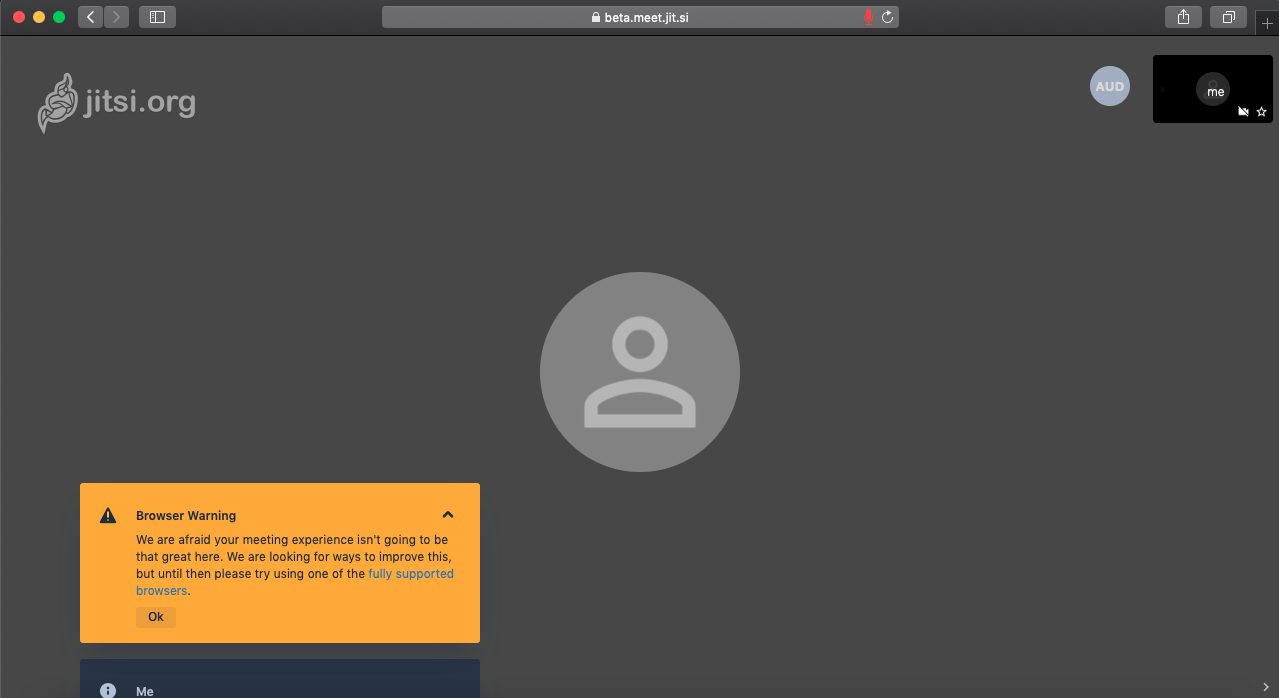
Showing browser warning in safari 12.0
 imakshath
on 14 Aug 2019
imakshath
on 14 Aug 2019
Showing browser warning in safari 12.0
Is there any way to solve it now?
 RifatBinReza
on 11 Sep 2019
RifatBinReza
on 11 Sep 2019
Would installing Mozilla Firefox for Mac be a suitable solution?
At least until this feature graduates from the beta http://beta.meet.jit.si which works flawlessly with Safari, to http://meet.jit.si which currently does not.
What do you think?
Thank you
 ovari
on 12 Sep 2019
ovari
on 12 Sep 2019
Would installing Mozilla Firefox for Mac be a suitable solution?
It's the approach which I take, so definitely a viable workaround.
But I suspect many, like me, who run their own instance of jitsi, would love it to work on all major common browsers, without needing to suggest to a macOS user "oh, by the way, you'll need to install Firefox or Chrome if you want to use video".
That being said, I don't have the skills to contribute towards making it work in Safari, and I presume the feature will be available just as soon as it can be, so I'm not bumping this thread asking if it's available yet.
neilzone
on 12 Sep 2019
until this feature graduates from the beta http://beta.meet.jit.si which works flawlessly with Safari
This is curious, as the beta version doesn't work fully for me in Safari — it does audio, but not video. (macOS 10.14.6, Safari 12.1.2)
neilzone
on 12 Sep 2019
Making this feature graduate from beta would certainly seem ideal. http://beta.meet.jit.si works flawlessly with Safari, but http://meet.jit.si does not.
Hi @davidwyly , can you please tell me which version of safari and macOS are you using. The beta.meet.jit.si does not work for me. I am using safari(13.0.2) and macOS(10.13.6). Also can you please add some screenshots of the video call?
 mayur-bhandari
on 10 Oct 2019
mayur-bhandari
on 10 Oct 2019
We disabled video on Safari. They flipped the Unified Plan flag and it currently doesn't work properly.
We have plans to improve this, but I don't know where it is in the (long) TODO list.
saghul
on 10 Oct 2019
Okay, thank you @saghul for your reply. Can you please keep me posted on this.
mayur-bhandari
on 14 Oct 2019
This issue has been automatically marked as stale because it has not had recent activity. It will be closed if no further activity occurs. Thank you for your contributions.
stale[bot]
on 12 Jan 2020
@saghul can you advise a ling to the TODO list? Can the wontfix label please be removed? Thank you
ovari
on 12 Jan 2020
Sorry about that, it should never go stale now.
This is now actively being worked on, so stay tuned! @jallamsetty1 please update this issue when we have progress on the Safari support front, thanks!
saghul
on 14 Jan 2020
Sure, will do @saghul , thanks !
 jallamsetty1
on 14 Jan 2020
jallamsetty1
on 14 Jan 2020
Any progress on this?
 msolters
on 17 Mar 2020
msolters
on 17 Mar 2020
Hi there ! The majority of the work needed for supporting Safari in Unified plan has been completed and we are planning to merge it to the master in the next 1-2 weeks. I will update this issue when it makes it to a Jitsi Meet release.
jallamsetty1
on 17 Mar 2020
The majority of the work needed for supporting Safari in Unified plan has been completed and we are planning to merge it to the master in the next 1-2 weeks
Amazing — congratulations. I look forward to testing it.
neilzone
on 17 Mar 2020
Hi there ! The majority of the work needed for supporting Safari in Unified plan has been completed and we are planning to merge it to the master in the next 1-2 weeks. I will update this issue when it makes it to a Jitsi Meet release.
@jallamsetty1
I am also really looking forward to see (currently, a show stopper) Safari support.
 Wikinaut
on 19 Mar 2020
Wikinaut
on 19 Mar 2020
@jallamsetty1 is there a branch available that it can be tested from?
 mdbraber
on 19 Mar 2020
mdbraber
on 19 Mar 2020
By the way, the problem of my users is present in Safari 13.0.4.
Wikinaut
on 19 Mar 2020
@jallamsetty1 is there a branch available that it can be tested from?
Its WIP so there is no public branch available. Are there any specific features that you are planning to test ? I can test them myself before I merge the changes if you can let me know.
jallamsetty1
on 19 Mar 2020
By the way, the problem of my users is present in Safari 13.0.4.
Safari defaulted to Unified plan in release 12.1.2, so through this change, we would be adding support for 12.1.2 and higher.
jallamsetty1
on 19 Mar 2020
We're also really looking forward to this feature. In light of COVID-19 we're trying to hold our conferences remotely. And we want to use Jitsi Meet but couldn't so far since half the team is using Safari. Full Safari support couldn't come at a better time. 🙂
 A1bi
on 20 Mar 2020
A1bi
on 20 Mar 2020
@jallamsetty1 is there a branch available that it can be tested from?
Its WIP so there is no public branch available. Are there any specific features that you are planning to test ? I can test them myself before I merge the changes if you can let me know.
No - it's mainly for full Safari support (>12.1.2) as we're in the same situation as @A1bi is
mdbraber
on 20 Mar 2020
Folks, putting more preasure on a team which is already under a lot of stress these days is not really a recipe for success.
I get it, you want to use Safari. We want to support it, we are working on it, but claiming you can't use Jitsi because we don't support Safari it's a stretch. You can use a different browser on the interim, can't you?
saghul
on 20 Mar 2020
You can use a different browser on the interim, can't you?
Yes, and it is superb. A couple of friends have both run up Jitsi instances for their businesses, and they've over the moon with it.
Thank you for all your continued hard work on it. It's an amazing piece of open source software.
neilzone
on 20 Mar 2020
I'm sorry my words came across a little harsh. I don't want to put pressure on anyone. Thank you for your hard work. 🙂
Just to explain my situation: Most people in my team are not very tech-savvy unfortunately. I can't just tell them to install and use another browser. But you are right, we will find a way. 🙂
A1bi
on 20 Mar 2020
@saghul - did in no way try to put more pressure but rather try and see where we could help out testing some of the upcoming features. Truly appreciate all the work you're putting in to this!
mdbraber
on 20 Mar 2020
Any update on this?
My camera is not working on safari.
 phips28
on 24 Mar 2020
phips28
on 24 Mar 2020
4 days ago, the estimate was 1-2 weeks, so I suspect it’ll be a bit longer! I’m sure they’ll post here when it’s ready for testing :)
neilzone
on 24 Mar 2020
Stop it, please.
saghul
on 24 Mar 2020
It is worth locking this issue (if Github supports that?) until you have an update? It's clearly on people's minds, but the pressure cannot be helping.
neilzone
on 24 Mar 2020
any news on this ? extremely important, can you create a branch so we can help ?
 pilosof
on 27 Mar 2020
pilosof
on 27 Mar 2020
I'm locking this because people don't seem to comprehend that asking more times won't solve it quicker. It will be ready when it's ready.
saghul
on 27 Mar 2020
This issue has been fixed.
jallamsetty1
on 14 May 2020
Related issues
 mdosch
·
3Comments
mdosch
·
3Comments
 mlelyakan
·
4Comments
mlelyakan
·
4Comments
 ranjithrajv
·
3Comments
ranjithrajv
·
3Comments
 TechnologyClassroom
·
3Comments
TechnologyClassroom
·
3Comments
 wilddylan
·
4Comments
wilddylan
·
4Comments
Most helpful comment
Hi there ! The majority of the work needed for supporting Safari in Unified plan has been completed and we are planning to merge it to the master in the next 1-2 weeks. I will update this issue when it makes it to a Jitsi Meet release.