If your camera is not working, please test it on https://test.webrtc.org and report your results here.
https://github.com/jitsi/jitsi-meet/issues/5236
https://github.com/jitsi/jitsi-meet/issues/5335
https://github.com/jitsi/jitsi-meet/issues/3532
https://github.com/jitsi/jitsi-meet/issues/5390
https://github.com/jitsi/jitsi-meet/issues/5195
https://github.com/jitsi/jitsi-meet/issues/5372
https://github.com/jitsi/jitsi-meet/issues/5186
https://github.com/jitsi/jitsi-meet/issues/1964
https://github.com/jitsi/jitsi-meet/issues/5358
https://github.com/jitsi/jitsi-meet/issues/5479
https://github.com/jitsi/jitsi-meet/issues/5466
https://github.com/jitsi/jitsi-meet/issues/5463
https://github.com/jitsi/jitsi-meet/issues/2495
https://github.com/jitsi/jitsi-meet/issues/5492
https://github.com/jitsi/jitsi-meet/issues/5155
https://github.com/jitsi/jitsi-meet/issues/5448
https://github.com/jitsi/jitsi-meet/issues/5430
https://github.com/jitsi/jitsi-meet/issues/5490
https://github.com/jitsi/jitsi-meet/issues/4163
https://github.com/jitsi/jitsi-meet/issues/5425
Update: macOS users, please try this:
- Open Activity Monitor
- Search for "VDCAssistant"
- Right click, force quit
- Does it work now?
Update 2:
We have deployed a new Jitsi Meet version (on meet.jit.si) which we think solves this problem. Please give it a try! In order to know you are running the new version note that new mute buttons have a new appearance:

Update 3:
I found an old webcam and could reproduce the problem! Any chance you can test the following? (SomeRandomRoomNameToTestTheCamera is a room name i just made up)
https://meet.jit.si/SomeRandomRoomNameToTestTheCamera#config.constraints.video.aspectRatio=1.33
Then try to select your camera.
Update 4:
The fix mentioned on update 3 is now deployed on meet.jit.si.
 saghul
All 106 comments
Hi. I also have the same problem. WebRTC Camera tests were all fine. but then problems with:
Network:
Ipv6 enabled
[ WARN ] Failed to gather IPv6 candidates, it might not be setup/supported on the network.
Connectivity:
Reflexive connectivity
[ INFO ] Gathered candidate of Type: srflx Protocol: UDP Address: 178.83.110.77
[ WARN ] Could not connect using reflexive candidates, likely due to the network environment/configuration.
Throughput
Video bandwidth
[ FAILED ] Frame rate mean is 0, cannot test bandwidth without a working camera.
[ INFO ] Send bitrate mean: NaN kbps
[ INFO ] Send bitrate standard deviation: NaN kbps
[ INFO ] RTT average: 0 ms
[ INFO ] RTT max: 0 ms
[ INFO ] Packets lost: -1
I work on Windows 10 Pro and use Antivirus.
Thanx!
 keolan
on 28 Mar 2020
keolan
on 28 Mar 2020
my provider says the above mentioned errors network and connectivity are no real errors and the system should work anyway. nevertheless I cannot access the camera. Can you please help?
In my profile windows it says I have stopped the camera, which I did not, at least not in jitsi.


keolan
on 30 Mar 2020
Did this and it's working again:
OSX: In Terminal do this: sudo killall VDCAssistant
From this page: https://setapp.com/how-to/fix-camera-on-mac-not-working
 boerup
on 30 Mar 2020
boerup
on 30 Mar 2020
I forgot to mention I work on windows 10, so the above fix for OSX doesn't help me.
keolan
on 30 Mar 2020
Thank you for pinning :+1:
 alexanderadam
on 31 Mar 2020
alexanderadam
on 31 Mar 2020
Can confirm does not work either.
My setting:
Linux Mint 4.10.0-38-generic #42-16.04.1-Ubuntu SMP
None of the browsers work (chrome 80, firefox 74.0, opera)
Permissions are granted in each browser
Error Msg Java Console:
2020-04-02T11:38:32.944Z [features/base/tracks] Failed to create local tracks (2) ["audio", "video"] a {gum: {…}, name: "gum.general", message: "Could not start video source", stack:

 mitchsIM
on 2 Apr 2020
mitchsIM
on 2 Apr 2020
@mitchsIM Please the "update 2" on the initial post: https://github.com/jitsi/jitsi-meet/issues/5425#issue-589235823
saghul
on 2 Apr 2020
i have a hint:
it worked after a reboot i got the webcam running then i used "zoom" in the same desktop session.
then even after i quit "zoom" it was not possible for jitsi to access the resource and i got the previous error messages.
mitchsIM
on 2 Apr 2020
Everyone, please see "update 3" on the original post. I managed to reproduce this.
saghul
on 4 Apr 2020
@saghul I can reproduce the issue mentioned in update 3 on one of my customer's 5-year-old laptop. What information would you require to address the issue?
 a3c
on 5 Apr 2020
a3c
on 5 Apr 2020
You mean it gets fixed with the URL parameter?
saghul
on 5 Apr 2020
I've been unable to get laptop webcam working with Jitsi. I get stuck at the Jitsi needs to access your microphone and camera screen after allowing permissions. I can only get into the call screen if i manually block the camera permission (mic works by itself)
Acer Aspire s7 392
Integrated HD camera
Windows 8.1
Opera 67.0
Chrome 80.03
-Camera Passes first two resolution tests from link above but seems to hang on 1280 X 720. Report here
https://test.webrtc.org/report/AMIfv95zmL7W4EOpD3bPc-7cYMskSLeN-HqkqFdWP7HvGp8F5Sm0i-fuAPYP8dJKoZVnrW-uoXTa5PkYcaX8PHvy4adoE6JtddKfj3wEuHgq3taxbP71EUotXc8TTap0d21GUesiuicM_lKCyhn1SFvNnTgeJ7vxPg
-I am running updated version of Jitsi meet identified by mute buttons
-I am unable to enter somerandomroomnametotestcamera with my camera permission allowed, still get stuck at allow access screen. With mic permission only i can enter but am unable to turn on camera,
-I have tried updating camera drivers, updated windows, restarted PC, tried reducing in call video quality and then re allowing camera still no luck.
Thank you in advance.
Ryan
 rtwise
on 5 Apr 2020
rtwise
on 5 Apr 2020
Hi, i'm having a problem using Jitsi in iOS Safari and iOS Chrome, it's not asking for camera or microphone permission, is there a special config for that case? i tested it in Windows and Android and it works perfectly.
thank you in advance for your help!
 reyisw
on 7 Apr 2020
reyisw
on 7 Apr 2020
@reyisw That has nothing to do with this, and we don't yet support Jitsi on mobile or desktop Safari, please remain on topic.
saghul
on 7 Apr 2020
@rtwise Can you pastte the output of your browser console?
saghul
on 7 Apr 2020
testrtc-2020-04-07T07_58_32.833Z.log
Still having problems, iMac and MacBook Pro with Mac OS 10.15.4 with Safari 13.1 microphone works, integrated camera doesn't even if given manual permission.
 prismopensource
on 7 Apr 2020
prismopensource
on 7 Apr 2020
I'm running the docker-jitsi-meetup containers and whatever you added to https://meet.jit.si is working for me, how can I get that running on my personal instance?
 dkanada
on 7 Apr 2020
dkanada
on 7 Apr 2020
Happy Tuesday. I have been having a fair amount of Camera issues with a self-hosted instance of Jitsi Meet. This manifested on one user, the primary of course. So far it seems that the issue was related to the "HP Sure Click Secure Browsing Extension".
His issues were:
- No permissions on Camera/Audio, intermittent
- Resume from sleep required a reboot
Removing that extension has resolved both issues.
I am running these versions
jitsi-meet-prosody/stable,now 1.0.3969-1 all [installed,automatic]
jitsi-meet-turnserver/stable,now 1.0.3969-1 all [installed,automatic]
jitsi-meet-web-config/stable,now 1.0.3969-1 all [installed,automatic]
jitsi-meet-web/stable,now 1.0.3969-1 all [installed,automatic]
jitsi-meet/stable,now 2.0.4384-1 all [installed]
jitsi-videobridge2/stable,now 2.1-164-gfdce823f-1 all [installed,automatic]
Hope this helps
 alsobrsp
on 7 Apr 2020
alsobrsp
on 7 Apr 2020
You mean it gets fixed with the URL parameter?
No, it didn't fix. We are still facing same issue.
a3c
on 8 Apr 2020
this issue sucks, wtf
 chupalo11
on 8 Apr 2020
chupalo11
on 8 Apr 2020
fix this please
chupalo11
on 8 Apr 2020
@a3c Damn. Does your ccamera work in the device preview window?
saghul
on 8 Apr 2020
@saghul if you know what branch or tag is currently running on the test link you posted on the initial comment I would love to run that on my local instance. I can build it from source if there's no binaries at the moment.
For context, the error on my local instance was that navigator.mediaDevices is null, which was getting spammed in the browser logs repeatedly.
dkanada
on 9 Apr 2020
When I append "#config.constraints.video.aspectRatio=1.33" to my meeting URL (as used in Update 3), I can now switch my cameras. How do I set up a meeting with that by default?
 GitMeTheHub
on 11 Apr 2020
GitMeTheHub
on 11 Apr 2020
Ref #5952
Update 2 & Update 3 not working for me.
 hklaufus
on 14 Apr 2020
hklaufus
on 14 Apr 2020
Try deleting the webcam off windows 10 in devices then unplug and replugging it should reinstall drivers. I used this method for zoom when my mic wasn’t working (when I used to use zoom now jitsi is my daily driver 👍)
 ghost
on 15 Apr 2020
ghost
on 15 Apr 2020
I first used Jitsi in Firefox, where my camera worked perfectly fine. Unfortunately Jitsi does not work well in Firefox (it's true) and it advised me to switch to Chrome. Well, I did. Installed Chrome and everything and started it up. But there it's suddenly 'Unable to access my camera'. This happens after a few seconds where there's actually a connection and I'm visible.
Since there's apparently no problem with my camera as it worked fine in Firefox, the problem lies somewhere else.
Any suggestions?
 SolitaryShell
on 15 Apr 2020
SolitaryShell
on 15 Apr 2020
@SolitaryShell yea same happened to me took like 10 seconds to connect to a meeting usually it’s instant my guess is their upgrading servers and some are down rn for upgrade as they said in their community stream yesterday.
ghost
on 15 Apr 2020
@SolitaryShell yea same happened to me took like 10 seconds to connect to a meeting usually it’s instant my guess is their upgrading servers and some are down rn for upgrade as they said in their community stream yesterday.
That's not my problem. I'm connected fine. Then after up to 20 seconds the camera stops working and Jitsi says it's not accessable.
SolitaryShell
on 15 Apr 2020
@saghul mind sharing which information you would need to troubleshoot? I'm happy to help.
 luixxiul
on 15 Apr 2020
luixxiul
on 15 Apr 2020
The issue looks to be fixed on https://meet.jit.si.
luixxiul
on 15 Apr 2020
Not for me, still says:
Your camera does not support required video resolution.
prismopensource
on 15 Apr 2020
sry, I mean the issue related with mic and video @prismopensource
luixxiul
on 15 Apr 2020
Not for me, still says:
Your camera does not support required video resolution.
seems to be working fine https://a.cockfile.com/sOTZG4_brave_2020-04-15_17-20-44.png
ghost
on 16 Apr 2020
@saghul I notice config.js at https://meet.jit.si/ contains a resolutionand constraints section:
    resolution: 720,
    constraints: {
        video: {
            height: {
                ideal: 720,
                max: 720,
                min: 180
            },
            width: {
                ideal: 1280,
                max: 1280,
                min: 320
            }
        }
    },
Is this the deployed workaround? I added a similar section to my own config.js but have not had the opportunity yet to do extensive tests, it seems to work though with an older VGA-resolution camera (_Philips PCVC740K_).
Also, yesterday it contained aspectRatio: 16 / 9, as the first member of the video object, this has been taken out now. Still experimenting I guess?
 Yetangitu
on 16 Apr 2020
Yetangitu
on 16 Apr 2020
Also, yesterday it contained
aspectRatio: 16 / 9,as the first member of thevideoobject, this has been taken out now. Still experimenting I guess?
We deployed the fix, that constraintt is now gone for good.
saghul
on 16 Apr 2020
UPDATE: We updated meet.jit.ssi yesterday and applied the fix mentioned on "update 3". Please tet again normally and report back if you are still having problems.
saghul
on 16 Apr 2020
Still not working with update 3 and update 4.
Still unable to access camera ref #5952
hklaufus
on 16 Apr 2020
UPDATE: We updated meet.jit.ssi yesterday and applied the fix mentioned on "update 3". Please tet again normally and report back if you are still having problems.
...and the mentioned _fix_ consists of the constraints section I mentioned minus the aspectRatio item? Inquiring minds running their own _meet_ instances want to know... In other words, is the _fix_ simply an edit to config.js and as such easily deployable by anyone or does it require an update to _lib-jitsi-meet_? I suspect the former as I have not found any relevant commits to _lib-jitsi-meet_.
Yetangitu
on 16 Apr 2020
@Yetangitu Correct.
saghul
on 16 Apr 2020
@saghul OK, thanks, an easy fix.
Yetangitu
on 16 Apr 2020
As of today Jitsi cannot see my camera or mike on HP laptop, with Mint/Firefox....I get a red flashing camera sign, as soon as I allow access.....any ideas.
tks
 Iwish767
on 16 Apr 2020
Iwish767
on 16 Apr 2020
Still the same error after I check now with latest Safari on latest Mac OS X.
prismopensource
on 16 Apr 2020
Failed to access camera
2020-04-17T08:29:09.794Z [features/base/tracks] Failed to create local tracks ["video"] s {gum: {…}, name: "gum.general", message: "Could not start video source", stack: "Error↵    at new s (https://web-cdn.jitsi.net/meet…677/libs/lib-jitsi-meet.min.js?v=4020.672:1:91969"}gum: {error: DOMException: Could not start video source, constraints: {…}, devices: Array(1)}name: "gum.general"message: "Could not start video source"stack: "Error↵    at new s (https://web-cdn.jitsi.net/meetjitsi_4025.677/libs/lib-jitsi-meet.min.js?v=4020.672:1:110290)↵    at https://web-cdn.jitsi.net/meetjitsi_4025.677/libs/lib-jitsi-meet.min.js?v=4020.672:1:91969"__proto__: Error
o @ Logger.js:154
(anonymous) @ functions.js:123
Promise.catch (async)
(anonymous) @ functions.js:122
Promise.then (async)
E @ functions.js:99
muteVideo @ conference.js:908
(anonymous) @ conference.js:2189
s.emit @ events.js:146
g.emitEvent @ UI.js:433
_setVideoMuted @ VideoMuteButton.js:155
_handleClick @ AbstractVideoMuteButton.js:25
_onClick @ AbstractButton.js:254
m @ react-dom.production.min.js:15
w @ react-dom.production.min.js:15
(anonymous) @ react-dom.production.min.js:16
A @ react-dom.production.min.js:16
O @ react-dom.production.min.js:17
D @ react-dom.production.min.js:17
T @ react-dom.production.min.js:17
Mn @ react-dom.production.min.js:85
Bn @ react-dom.production.min.js:87
t.unstable_runWithPriority @ scheduler.production.min.js:20
fi @ react-dom.production.min.js:113
Rs @ react-dom.production.min.js:207
In @ react-dom.production.min.js:86
  | s | @ | Logger.js:154
-- | -- | -- | --
  | (anonymous) | @ | RTCUtils.js:992
  | Promise.catch (async) |   |
  | (anonymous) | @ | RTCUtils.js:991
  | _newGetUserMediaWithConstraints | @ | RTCUtils.js:984
  | (anonymous) | @ | RTCUtils.js:1358
  | Promise.then (async) |   |
  | newObtainAudioAndVideoPermissions | @ | RTCUtils.js:1404
  | obtainAudioAndVideoPermissions | @ | RTC.js:265
  | createLocalTracks | @ | JitsiMeetJS.js:352
  | (anonymous) | @ | functions.js:103
  | Promise.then (async) |   |
  | E | @ | functions.js:99
  | muteVideo | @ | conference.js:908
  | (anonymous) | @ | conference.js:2189
  | s.emit | @ | events.js:146
  | g.emitEvent | @ | UI.js:433
  | _setVideoMuted | @ | VideoMuteButton.js:155
  | _handleClick | @ | AbstractVideoMuteButton.js:25
  | _onClick | @ | AbstractButton.js:254
  | m | @ | react-dom.production.min.js:15
  | w | @ | react-dom.production.min.js:15
  | (anonymous) | @ | react-dom.production.min.js:16
  | A | @ | react-dom.production.min.js:16
  | O | @ | react-dom.production.min.js:17
  | D | @ | react-dom.production.min.js:17
  | T | @ | react-dom.production.min.js:17
  | Mn | @ | react-dom.production.min.js:85
  | Bn | @ | react-dom.production.min.js:87
  | t.unstable_runWithPriority | @ | scheduler.production.min.js:20
  | fi | @ | react-dom.production.min.js:113
  | Rs | @ | react-dom.production.min.js:207
  | In | @ | react-dom.production.min.js:86
 jacobgonzales20
on 17 Apr 2020
jacobgonzales20
on 17 Apr 2020
I tried unstable build from Firefox (nightly) with a fresh profile, applying some settings discussed here https://community.jitsi.org/t/bad-audio-quality-and-users-dropping-randomly-at-25-users/35258/6, and that worked. I suspect the issue would exist between Chromium/Webkit (ie. Chrome, Vivaldi, Safari) and Jitsi. Would anyone please check with Firefox?
luixxiul
on 17 Apr 2020
Testing with http://meet.jit.si here, latest Firefox and Chrome work as advertised with the same hardware, just a problem with Safari.
prismopensource
on 17 Apr 2020
Thanks, but I would like to know how it will be on a self-hosted instance.
luixxiul
on 17 Apr 2020
@luixxiul if you have a self-hosted instance you can test this yourself by adding the _fix_ to config.js, see https://github.com/jitsi/jitsi-meet/issues/5425#issuecomment-614604449 or get it fresh from https://meet.jit.si/config.js (copy resolution and constraints to your own config.js)
Yetangitu
on 17 Apr 2020
ah sorry, I have tested the latest unstable release on my self-hosted instance (without applying that fix). I would like to know about other instances to see if that is the issue that can be avoided on Firefox or not.
luixxiul
on 17 Apr 2020
It seems to work here on my self-hosted instance, using an older VGA-resolution webcam on Firefox nightly (77.0a1). This is with the current stable version (deb https://download.jitsi.org stable/ on Debian stable) with the _fix_ in config.js.

Yetangitu
on 17 Apr 2020
Thanks for checking! I added the fix and tried on Chromium and Vivaldi, and both still keep failing due to the permission issue, while everything works as expected on Firefox before and after adding that.
luixxiul
on 17 Apr 2020
Update 3:
I found an old webcam and could reproduce the problem! Any chance you can test the following? (SomeRandomRoomNameToTestTheCamera is a room name i just made up)
https://meet.jit.si/SomeRandomRoomNameToTestTheCamera#config.constraints.video.aspectRatio=1.33
@saghul would you please let me know if it is the only fix on your side? I added resolution and constraints to my own config.js and yet I am quite struggling since a couple of days only to make the thing work on my side. Should I wait for another jitsi-meet release for the fix?
luixxiul
on 17 Apr 2020
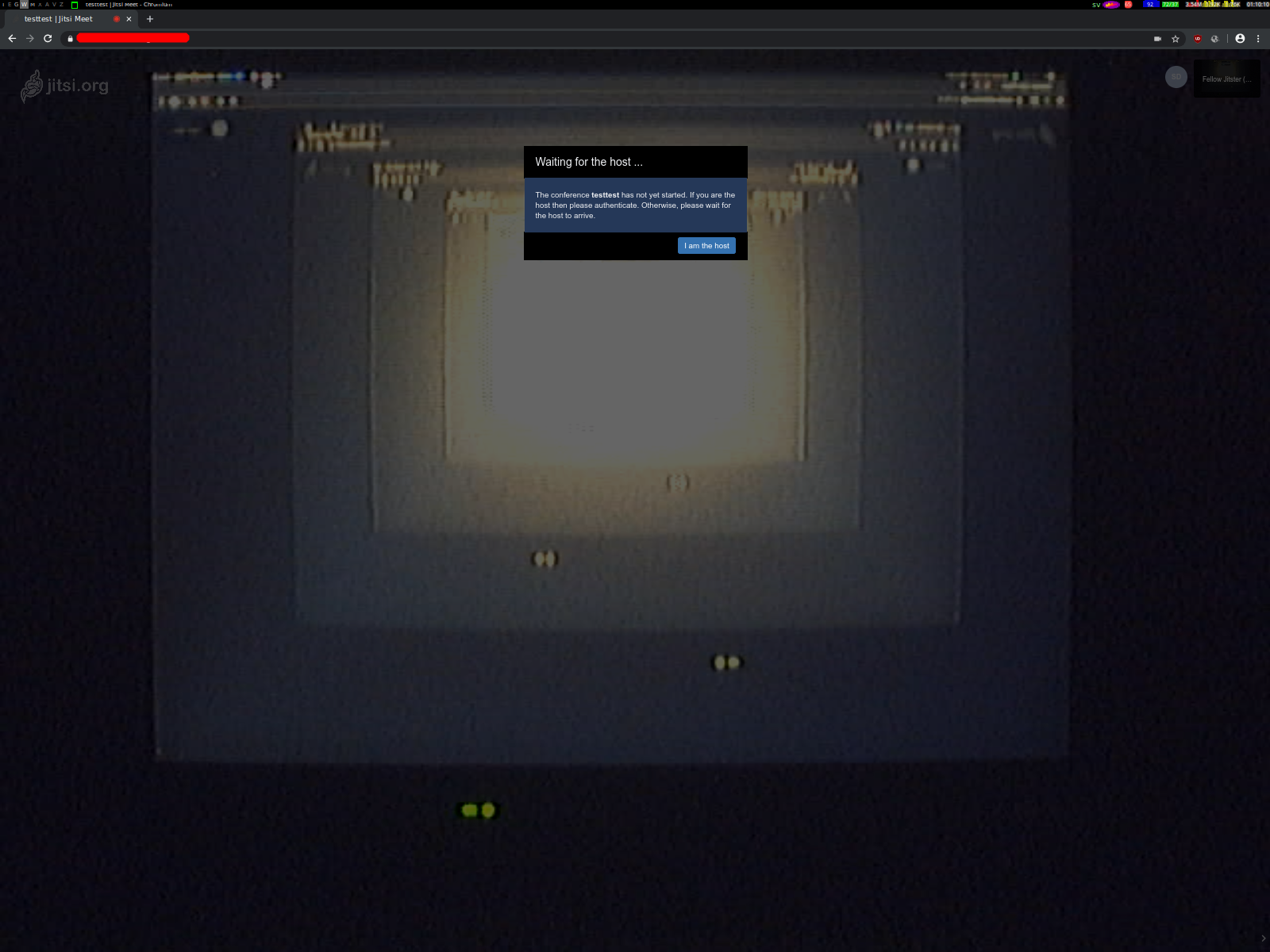
Here's the same camera used on the same _jitsi-meet_ instance through Chromium (_Version 80.0.3987.149 (Developer Build) built on Debian bullseye/sid, running on Debian bullseye/sid (32-bit)_):
Yetangitu
on 18 Apr 2020
UPDATE: We updated meet.jit.ssi yesterday and applied the fix mentioned on "update 3". Please tet again normally and report back if you are still having problems.
Still the same problem. Camera is working fine in Chrome, then after a short while it's suddenly 'Unable to access' and it loses the image. It takes longer than before though, now up to 38 seconds before it stops working.
Firefox apparently is able to keep 'accessing the camera', but that browser gives different problems. so now I don't have a good way to use Jitsi.
SolitaryShell
on 19 Apr 2020
@saghul would you please let me know if it is the only fix on your side? I added
resolutionandconstraintsto my ownconfig.jsand yet I am quite struggling since a couple of days only to make the thing work on my side. Should I wait for anotherjitsi-meetrelease for the fix?
That is the only sspecific fix we did. Maybe try this in your constraints:
    constraints: {
        video: {
            height: {
                ideal: 720,
                max: 720,
                min: 240
            }
        }
    },
So, don't set the width constraint.
saghul
on 22 Apr 2020
I have a similar issue: the Jitsi Meet Electron App cannot access my webcams (I have two connected) as well as the microphone. I checked everything in privacy settings in Win10, but access is granted to Jitsi App, nevertheless, it always shows "Permission not granted" in settings for both, cam and mic.
P.S.: Tried it with all suggested fixes, but none worked.
 cremfert
on 23 Apr 2020
cremfert
on 23 Apr 2020
- Jitsi Meet 20.2.1 (from F-Droid)
- Android 9 (LineageOS 16.0)
- LG G4 (h815)
Test on https://test.webrtc.org fails at "Video bandwidth" with :
[ FAILED ] Frame rate mean is 0, cannot test bandwidth without a working camera.
[ INFO ] Send bitrate mean: NaN kbps
[ INFO ] Send bitrate standard deviation: NaN kbps
[ INFO ] RTT average: 0 ms
[ INFO ] RTT max: 0 ms
[ INFO ] Packets lost: -1
 breversa
on 25 Apr 2020
breversa
on 25 Apr 2020
I'm having issues with giving permission to the jitsi meet website to access my microphone and webcam. I get the pop-up to allow the site to have access, but when I give the permission the site still says I haven't and won't give me access to the site. I have this issue with the latest version of Google Chrome and I'm on Windows 8. I don't have any problems at all when I try the exact same things in Firefox.
 jochemjojo
on 30 Apr 2020
jochemjojo
on 30 Apr 2020
On Windows 10, Chrom 81.0.4044.129 64-Bit, Microsoft Edge 84.0.495.2 it doesn’t work. On Firefox on the same Windows System, it works perfectly.
Both Test sites (https://test.webrtc.org and meet.jit.si) gave me the same error. Then I test it with https://webcamtests.com. There I can select the cam bevor I start the test. In the list of cams on my system, there was a cam called EpocCam as the first in the list. And this cam doesn't work. All other cams worked fine.
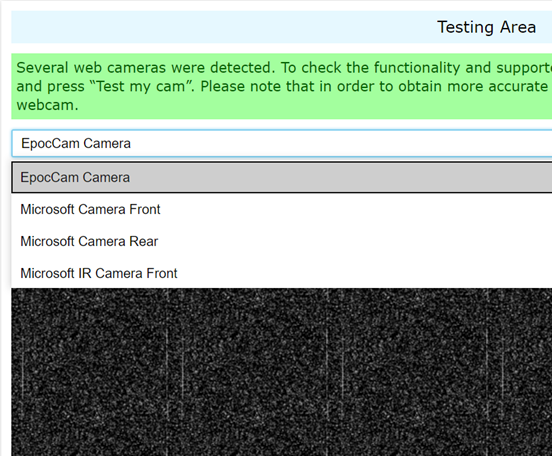
After that I deactivate this EpocCam in the device manager:
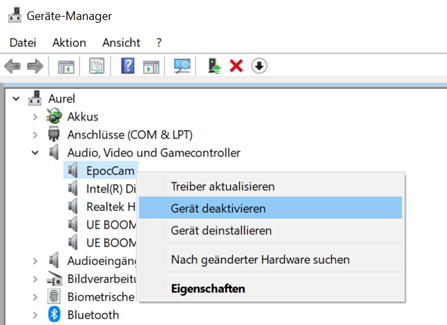
If this cam is deactivated jitsi and webrtc.org works fine on Chrome, Edge and Firefox.
Jitsi and webrtc.org takes the first cam in the list and if this cam doesn’t respond correctly they say that they have no permission and you are not able to select another cam.

Jitsi should allow to select a cam in this case.
 dmoibm
on 2 May 2020
dmoibm
on 2 May 2020
I experienced exactly the same as @dmoibm
My first webcam wasn’t responding as my Macbooks lid was closed. My external webcam was connected via USB, but I could not select it due to the permission issue. As soon as I disabled the first webcam in the device manager, everything was working fine!
cremfert
on 2 May 2020
Tengo problemas para dar permiso al sitio web jitsi meet para acceder a mi micrófono y cámara web. Obtengo la ventana emergente para permitir que el sitio tenga acceso, pero cuando doy permiso, el sitio todavía dice que no tengo y que no me daré acceso al sitio. También tengo
problema cuando intento exactamente las mismas cosas en Firefox.

 AnabelAS
on 12 May 2020
AnabelAS
on 12 May 2020
My first webcam wasn’t responding as my Macbooks lid was closed. My external webcam was connected via USB, but I could not select it due to the permission issue. As soon as I disabled the first webcam in the device manager, everything was working fine!
This is a great lead, thank you! @jallamsetty1 can you PTAL?
saghul
on 12 May 2020
I experienced exactly the same as @dmoibm
My first webcam wasn’t responding as my Macbooks lid was closed. My external webcam was connected via USB, but I could not select it due to the permission issue. As soon as I disabled the first webcam in the device manager, everything was working fine!
I couldn't reproduce this issue by closing the laptop lid, the usb webcam was detected and got selected automatically. I am trying this on a Win10 laptop running Chrome 81. Can you please share more details and also console log if possible when this happens ? Thanks you !
 jallamsetty1
on 13 May 2020
jallamsetty1
on 13 May 2020
I couldn't reproduce this issue by closing the laptop lid, the usb webcam was detected and got selected automatically. I am trying this on a Win10 laptop running Chrome 81. Can you please share more details and also console log if possible when this happens ? Thanks you !
@jallamsetty1 : I'm not sure but I think the order on the device manager is important. On my system, the not working cam was the first one in the list. I renamed the not working cam to ZZTopCam and then it worked.
dmoibm
on 13 May 2020
I couldn't reproduce this issue by closing the laptop lid, the usb webcam was detected and got selected automatically. I am trying this on a Win10 laptop running Chrome 81. Can you please share more details and also console log if possible when this happens ? Thanks you !
@jallamsetty1 : I'm not sure but I think the order on the device manager is important. On my system, the not working cam was the first one in the list. I renamed the not working cam to ZZTopCam and then it worked.
Same here, the order is relevant. My first cam was also not working. After disabling it, everything worked fine.
cremfert
on 13 May 2020
I couldn't reproduce this issue by closing the laptop lid, the usb webcam was detected and got selected automatically. I am trying this on a Win10 laptop running Chrome 81. Can you please share more details and also console log if possible when this happens ? Thanks you !
@jallamsetty1 : I'm not sure but I think the order on the device manager is important. On my system, the not working cam was the first one in the list. I renamed the not working cam to ZZTopCam and then it worked.
Same here, the order is relevant. My first cam was also not working. After disabling it, everything worked fine.
For some reason, I don't see my usb camera in the device manager at all so I can't change the order. Will you be able to share the console logs when the broken cam is first in the list ? If the browser throws an error, then we should be able to pick the next the list. If not, it would be chrome bug and we can see if there an existing issue or open a new bug report there.
jallamsetty1
on 14 May 2020
Hello, I have a question about jitsi. How to use jitsi to get the real-time number of people in the room for video conference. I installed it on the server independently. How to modify the source code? Thank you!
 VVSZGod
on 19 May 2020
VVSZGod
on 19 May 2020
@VVSZGod please refer to the Jitsi Meet community forum.
 Echolon
on 19 May 2020
Echolon
on 19 May 2020
My webcam is not working, for Jitsi only, on Windows 10 - 1909 (18363), Chrome 83.0.4103.61, Thinkpad X1 Extrem 2nd gen, but all tests for the webcam on https://test.webrtc.org/ passes. I just got warning about IPv6 ([ WARN ] Failed to gather IPv6 candidates, it might not be setup/supported on the network.)
 paullaffitte
on 6 Jun 2020
paullaffitte
on 6 Jun 2020
Just to add yet another hint: My FF 60.3.0esr (64-bit) on Progress Linux crashes when I activate my camera during the test at https://test.webrtc.org/, or when joining a meet.jit.si meeting. However, if I am the only person in a meet.jit.si, the camera works and I can see myself. If then another person joins, the tab crashes immediately. The same meeting works for me in chrome, but without screen sharing.
 schymans
on 10 Jun 2020
schymans
on 10 Jun 2020
Vivaldi (Chrome based) does have camera problem with jitsi. But Firefox works well. I can use my camera in other sites (Skype, etc) with Vivaldi.
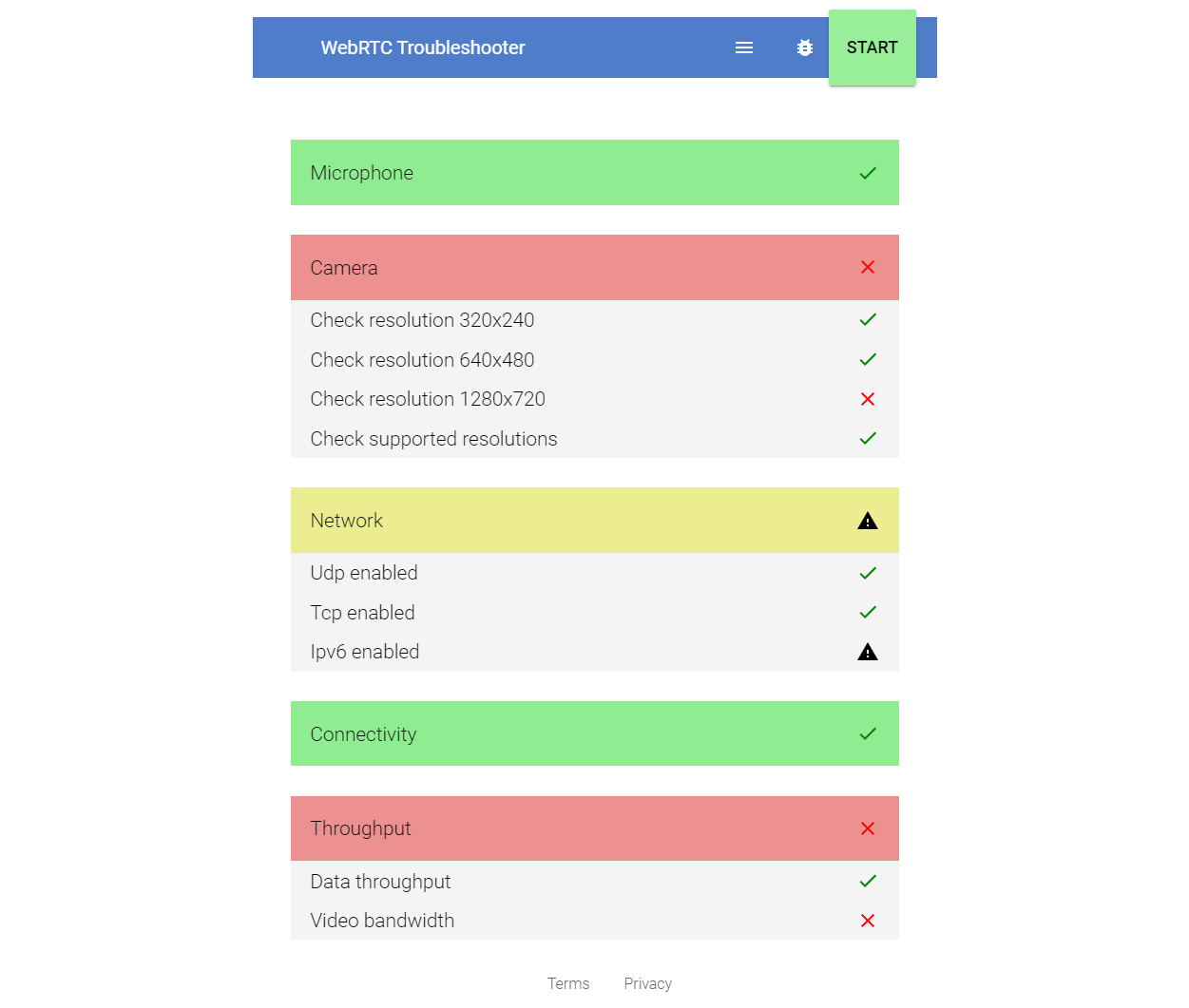
Tested on Win7, Vivaldi.
 TurkerTunali
on 10 Jun 2020
TurkerTunali
on 10 Jun 2020
Just to add yet another hint: My FF 60.3.0esr (64-bit) on Progress Linux crashes when I activate my camera during the test at https://test.webrtc.org/, or when joining a meet.jit.si meeting. However, if I am the only person in a meet.jit.si, the camera works and I can see myself. If then another person joins, the tab crashes immediately. The same meeting works for me in chrome, but without screen sharing.
Hey there, this doesn't seem to be a camera issue. This is related to signaling, will you be able to try appending config.disableSimulcast=true and test again and see if it still crashes ? The meeting url would be something like this - meet.jit.si/random_meeting_name#config.disableSimulcast=true
jallamsetty1
on 11 Jun 2020
Vivaldi (Chrome based) does have camera problem with jitsi. But Firefox works well. I can use my camera in other sites (Skype, etc) with Vivaldi.
Tested on Win7, Vivaldi.
I am not able to reproduce this on Win10 running Vivaldi 3.1. Will you be able to share any errors you see in the browser console log when this issue occurs ?
jallamsetty1
on 11 Jun 2020
Thanks, but appending #config.disableSimulcast=true to the meeting link did not make a change, it still crashes in the same way. It never crashes with other webrtc services.
schymans
on 17 Jun 2020
Vivaldi 3.1.1929.45, Windows 10
[{"title":"WebRTC Troubleshooter bug report","description":null},
{"ts":1595518410673,"name":"system-info","args":{"browserName":"Chrome","browserVersion":"83.0.4103.119","platform":"Win32"}},
{"ts":1595518489950,"name":"enumerateDevices","id":1,"args":"Some other kind of source: audiooutput"},
{"ts":1595518489950,"name":"enumerateDevices","id":1,"args":"Some other kind of source: audiooutput"},
{"ts":1595518489950,"name":"enumerateDevices","id":1,"args":"Some other kind of source: audiooutput"}]
Appending #config.disableSimulcast=true to a call did not change the problem.
 ryanwohara
on 23 Jul 2020
ryanwohara
on 23 Jul 2020
Getting the error "Unable to access camera" as well at https://meet.jit.si/ with chromium. Same on many other instances.
BUT: On instances which still have an older version of Jitsi installed, e.g. https://jitsi.uni-due.de/, the webcam still works.
Several WebRTC tests with the webcam do work as well, e.g. https://janus.conf.meetecho.com/echotest.html
So it seems to be a problem only with newer Jitsi versions.
Kernel 5.6.10-antix.1-amd64-smp
Computer: HP 620 Notebook
Intel(R) Core(TM)2 Duo CPU T6670
Camera:
Bus 001 Device 002: ID 05c8:0403 Cheng Uei Precision Industry Co., Ltd (Foxlink) Webcam
Driver Info:
Driver name : uvcvideo
Card type : HP Webcam [2 MP Fixed]: HP Webc
Bus info : usb-0000:00:1a.7-5
Driver version : 5.6.10
Capabilities : 0x84a00001
Video Capture
Metadata Capture
Streaming
Extended Pix Format
Device Capabilities
Device Caps : 0x04200001
Video Capture
Streaming
Extended Pix Format
Media Driver Info:
Driver name : uvcvideo
Model : HP Webcam [2 MP Fixed]: HP Webc
Serial : 200909240102
Bus info : usb-0000:00:1a.7-5
Media version : 5.6.10
Hardware revision: 0x00000106 (262)
Driver version : 5.6.10
Interface Info:
ID : 0x03000002
Type : V4L Video
Entity Info:
ID : 0x00000001 (1)
Name : HP Webcam [2 MP Fixed]: HP Webc
Function : V4L2 I/O
Flags : default
Pad 0x01000007 : 0: Sink
Link 0x02000010: from remote pad 0x100000a of entity 'Processing 2': Data, Enabled, Immutable
 haary
on 10 Aug 2020
haary
on 10 Aug 2020
@haary What results do you get on https://test.webrtc.org/
saghul
on 10 Aug 2020
@haary What results do you get on https://test.webrtc.org/
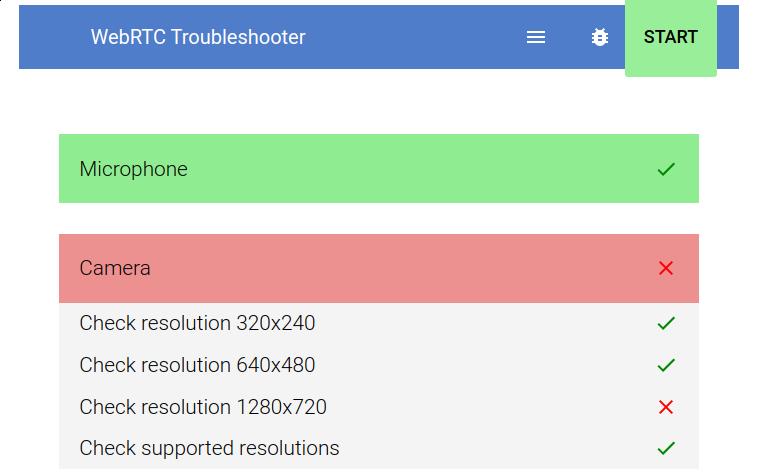
haary
on 10 Aug 2020
@jallamsetty1 can you PTAL? Looks like we might have broken "old, 4:3 only" camera support again :-(
saghul
on 10 Aug 2020
@jallamsetty1 can you PTAL? Looks like we might have broken "old, 4:3 only" camera support again :-(
@saghul, I don't think we have changed anything with the video constraints lately. https://jitsi.uni-due.de/ seems to request an ideal height of 240 and that is why its working there.
@haary, can you please expand the "Check supported resolutions" tab that lists all the capabilities that were tested and share it with us?
jallamsetty1
on 11 Aug 2020
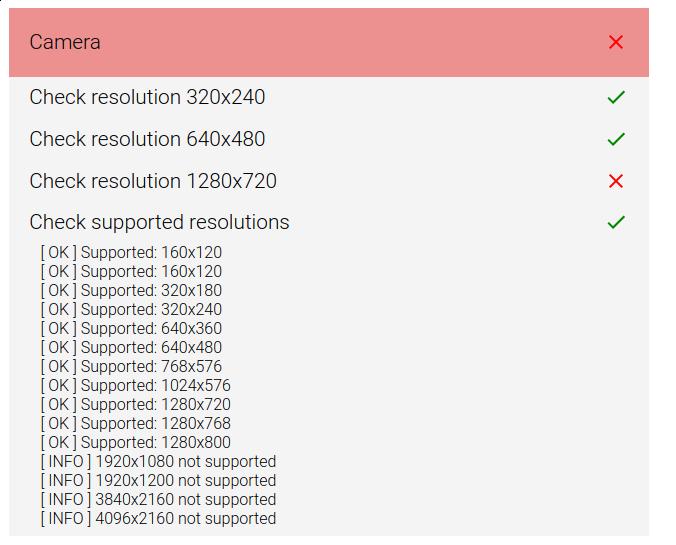
haary
on 12 Aug 2020
On the latest version of Firefox the camera doesn't work when I run my own server instance of Ubuntu Server 20.04:
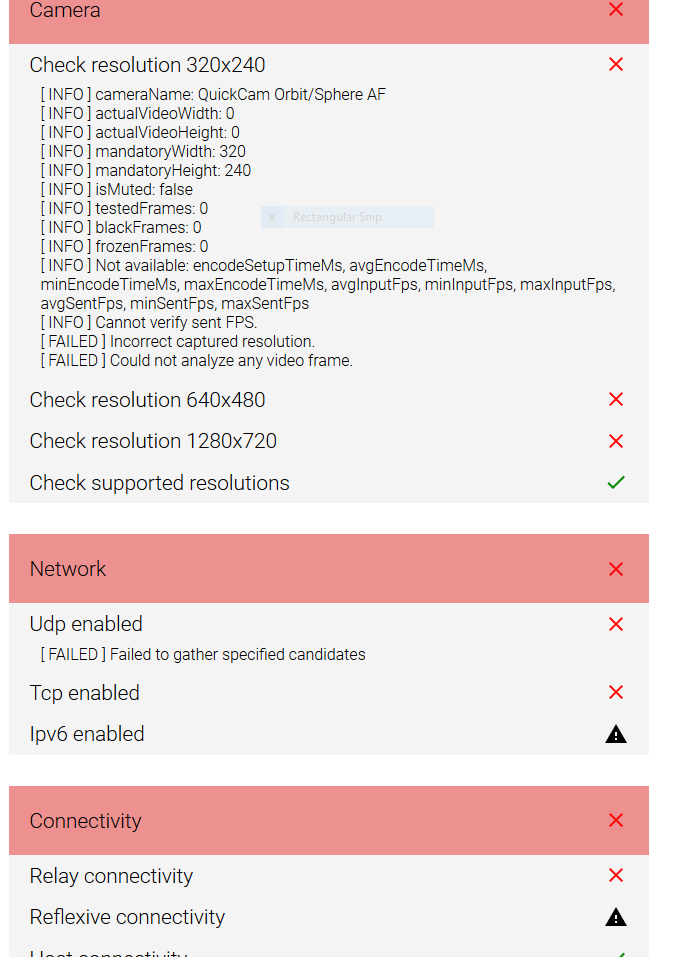
But the camera works fine when I run the latest stable Chromium for Windows (84.0.4147.125).
 pgenderson
on 16 Aug 2020
pgenderson
on 16 Aug 2020
Jitsi meet is not working in Android Phone browser (chrome)
below models camera is not working
Red mi note 6, 7 and 8 and Note 6 pro
Moto E5plus, Samsung J6
 tegarkurniawan
on 11 Sep 2020
tegarkurniawan
on 11 Sep 2020
how to update jitsi to same version https://meet.jit.si/ ?
tegarkurniawan
on 15 Sep 2020
@tegarkurniawan either get the app, use your package manager or get the latest [stable] binary (for desktop), I'd say.
pgenderson
on 17 Sep 2020
@haary What results do you get on https://test.webrtc.org/
I can confirm this, same results here.
Tried it on debiant jitsi-meet 2.0.5142-1: cam doesn't work, but
on https://jitsi.uni-due.de: it does work!!
Chris
 Chris56
on 10 Nov 2020
Chris56
on 10 Nov 2020
@haary What results do you get on https://test.webrtc.org/
I can confirm this, same results here.
Tried it on debiant jitsi-meet 2.0.5142-1: cam doesn't work, but
on https://jitsi.uni-due.de: it does work!!
Chris
Are you seeing this on Win8 ? Even if 720p isn't supported on your camera, the browser should ideally return a media stream closest in resolution. If that is not happening and the client gets stuck on the permissions page, it could be a browser bug like this - https://bugs.chromium.org/p/chromium/issues/detail?id=1043502.
https://jitsi.uni-due.de seems to be using 320x240 which is why it's working for you.
{height: {min: 120, max: 320, ideal: 240}, aspectRatio: {ideal: 1.77778}, facingMode: {ideal: ["user"]}}
jallamsetty1
on 10 Nov 2020
I am on a linux system and the problem shows up with firefox AND with chromium. Both browsers do not transmit video.
P.S.: Where in the jitsi server configuration where I can reduce the desired resolution? ... sorry found it ...
Chris56
on 10 Nov 2020
I am on a linux system and the problem shows up with firefox AND with chromium. Both browsers do not transmit video.
P.S.: Where in the jitsi server configuration where I can reduce the desired resolution?
Oh, I do notice now that you had mentioned debian. You can change the desired resolution by changing the video constraints in the config file /etc/jitsi/meet/<your_domain>-config.js on your deployment - https://github.com/jitsi/jitsi-meet/blob/master/config.js#L140
jallamsetty1
on 10 Nov 2020
Thanks for your reply!
Actually all systems are linux:
debian server hosting the current version of jitsi-meet 2.0.5142-1
and the clients are linux firefox and chromium (on Linux Mint 19 and 20, which are mainly Ubuntu 18.04 and 20.04) using this webcam: USB ID 05c8:0403.
My guess is, that the problem is the discrepancy between "supported resolutions" (which includes 1280x720) and the acual webrtc check on the 1280x720 (which does'nt seem to work).
So, the questions is: how can the clients find out, that a particular resolution (which may be advertised as supported) actually does not work and should therefore not use it but another.
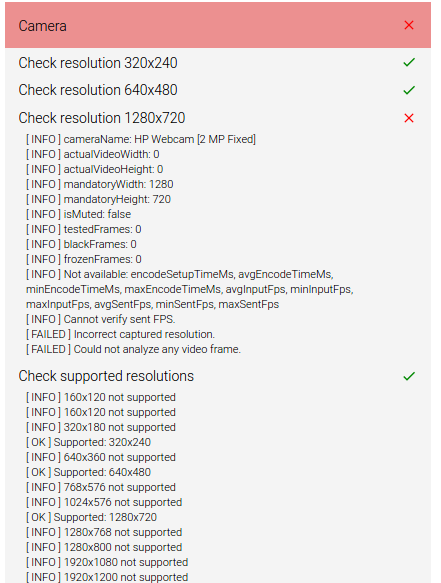
Chris56
on 11 Nov 2020
I am also experiencing camera issues. Both on my own server, and meet.jit.si
This is with Chrome on MacOS 10.14.6 on 12" MacBook. Using Safari 14.0.1 the camera works fine. EDIT: Only on my own server, not on meet.jit.si
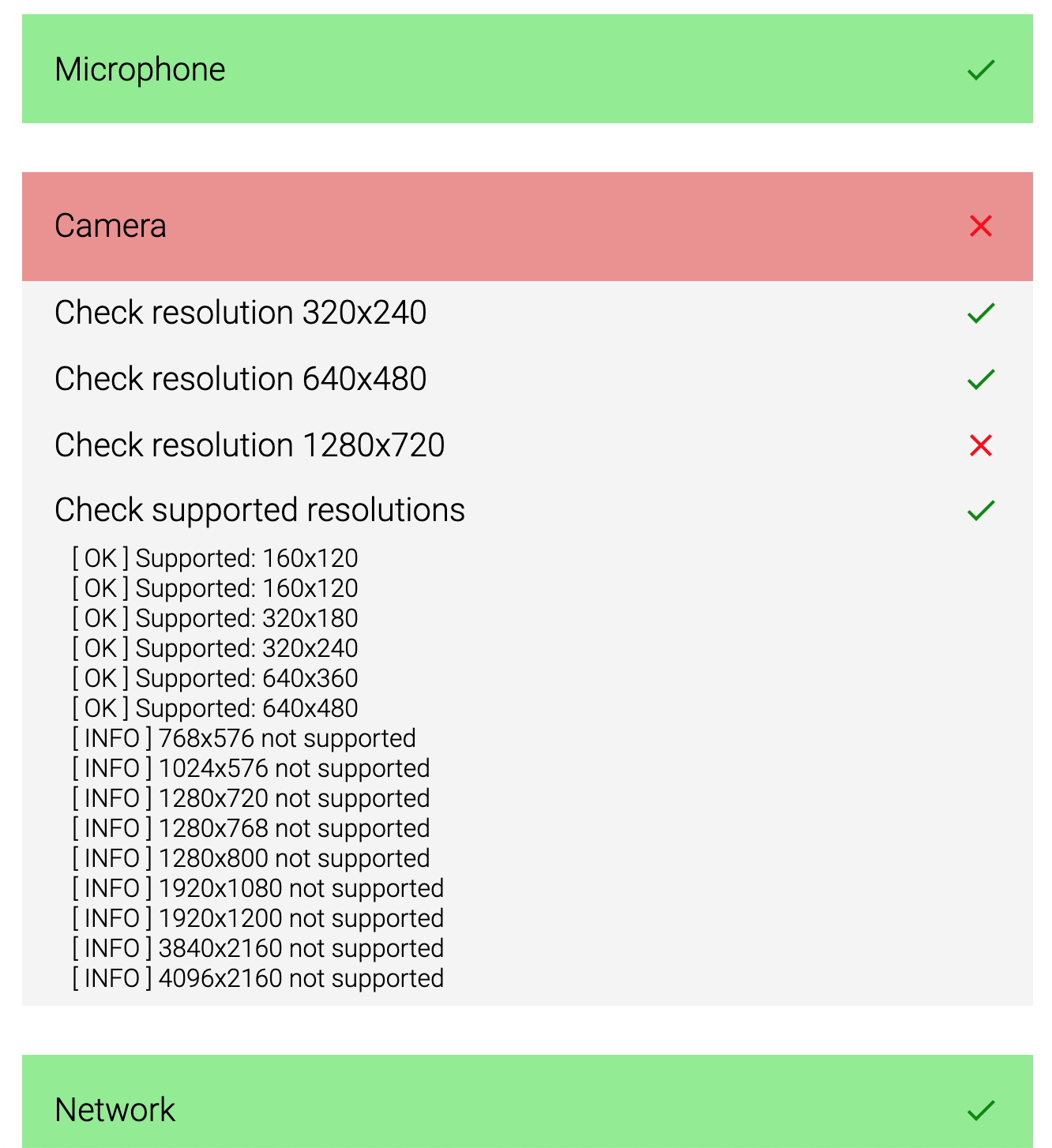
In Chrome, the camera test passes the tests from the link at the top of the thread (attached the output below).
Here is the problem I am seeing in Chrome:
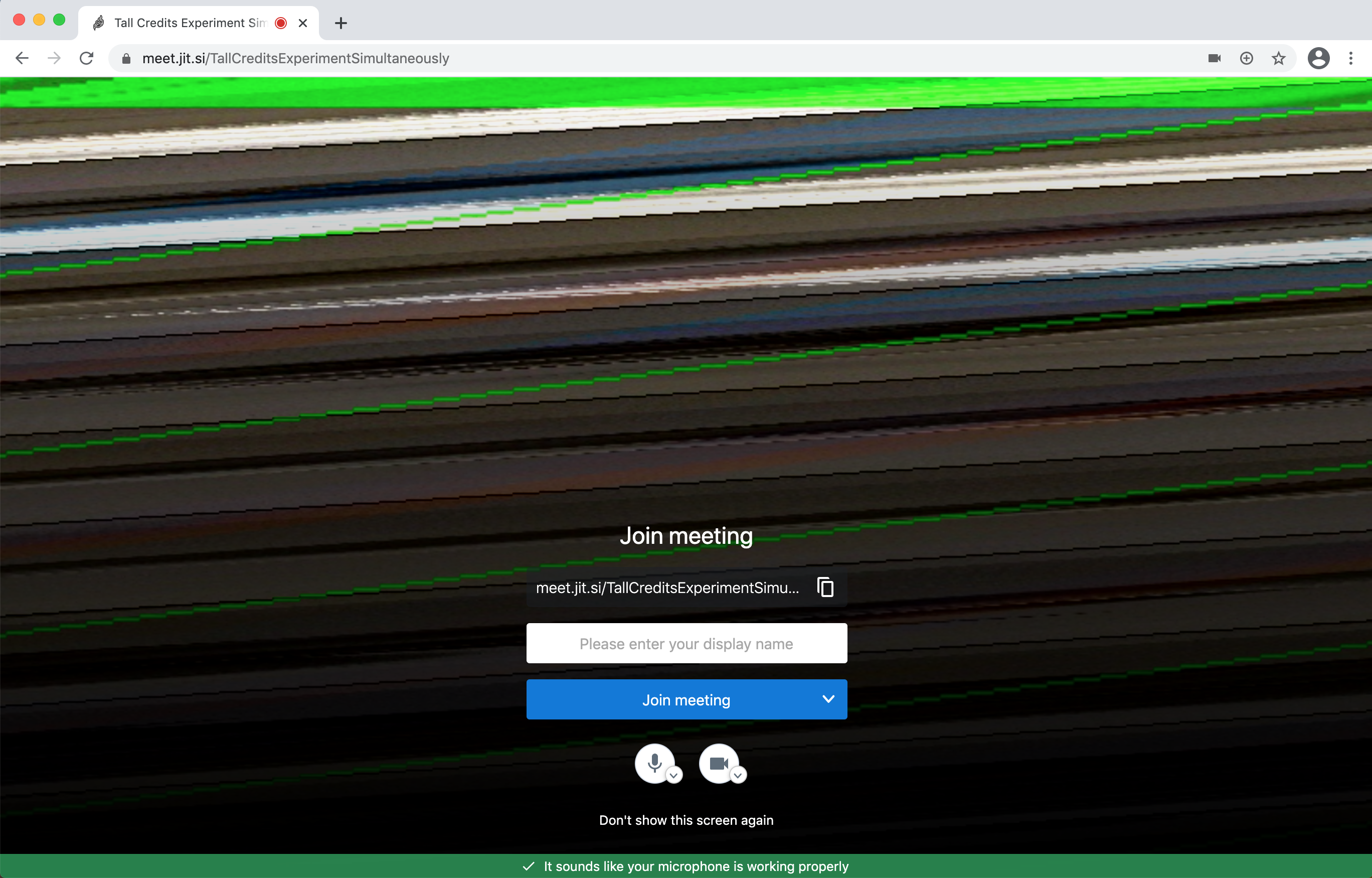
Version of Chrome:
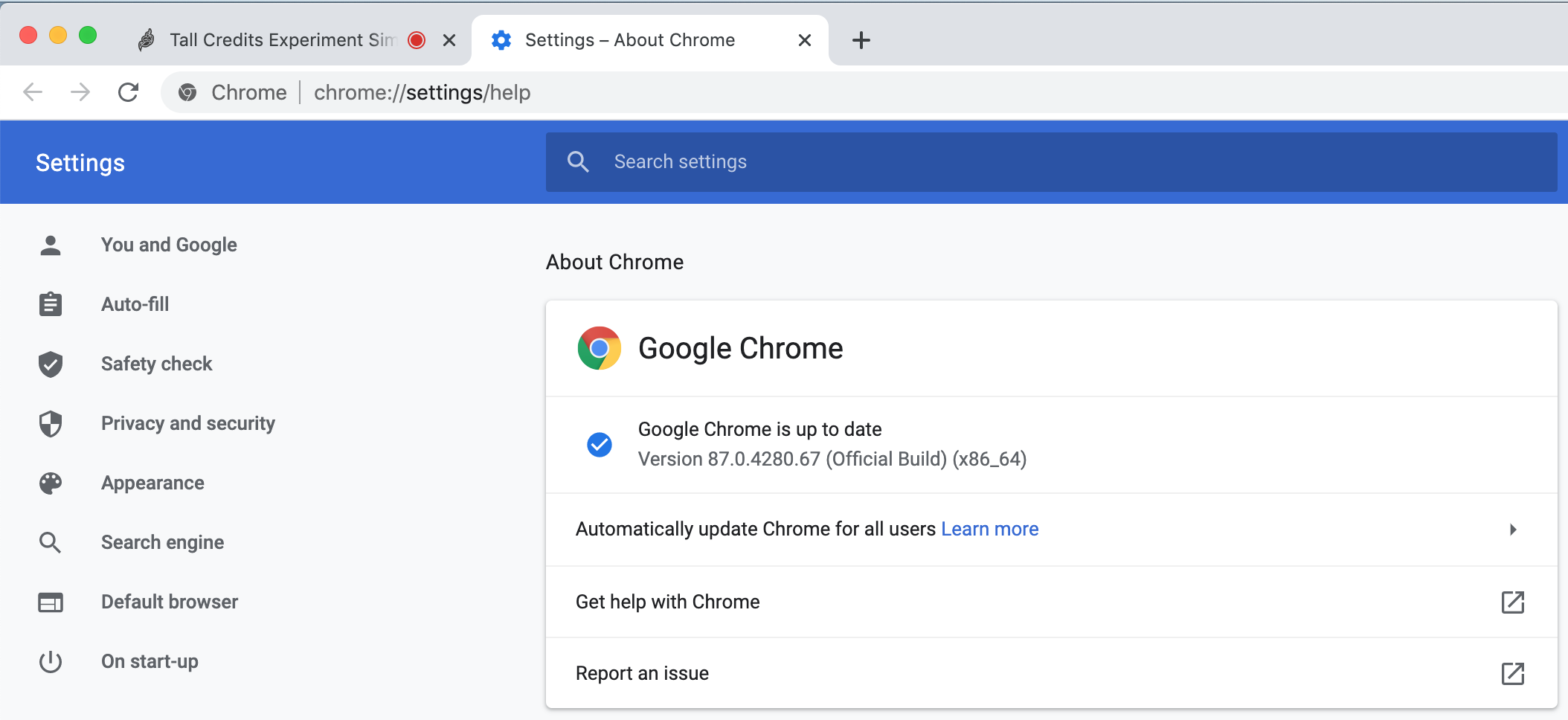
Result from test:
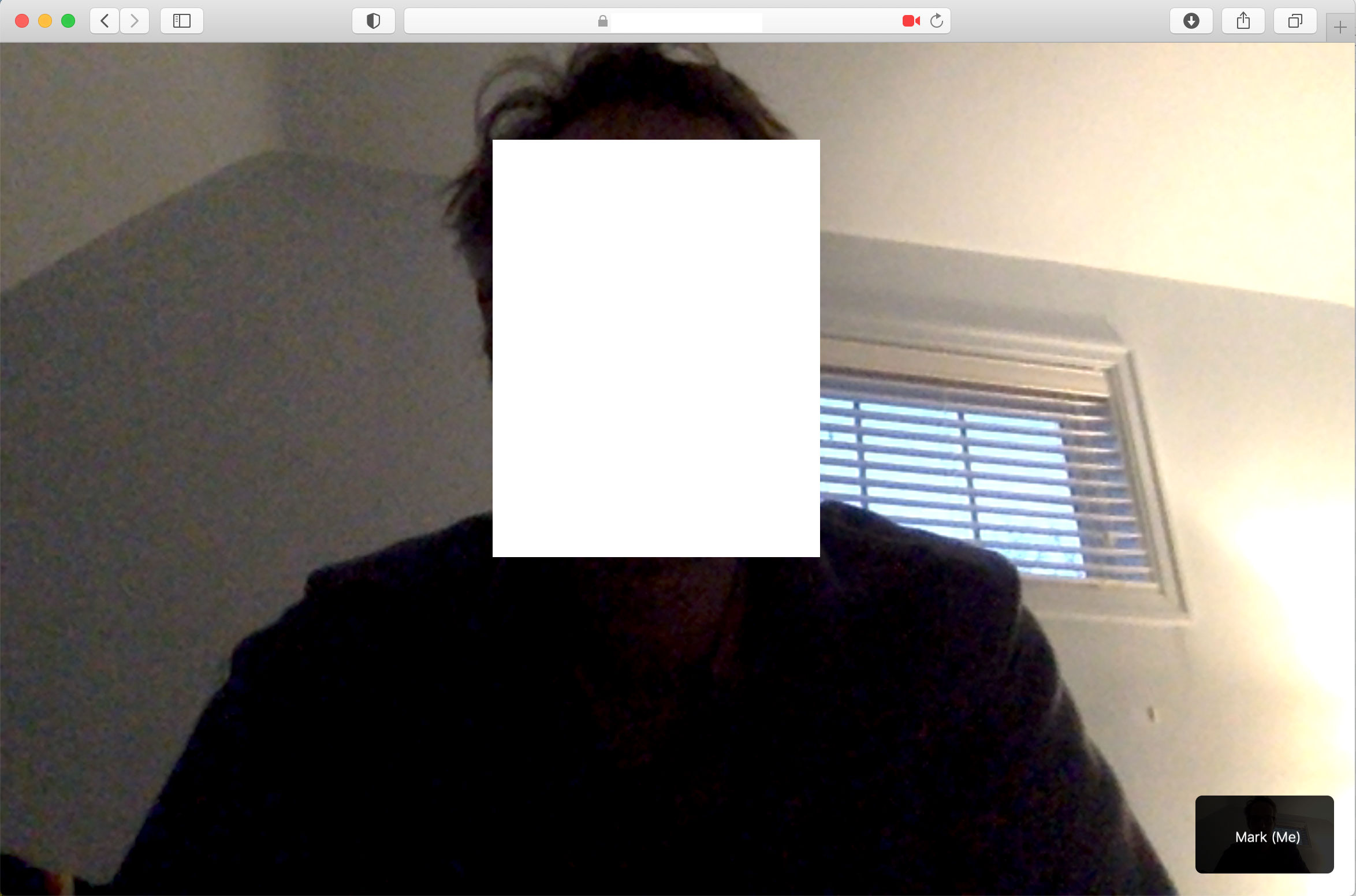
Blank camera feed in Safari (14.0.1) on meet.jit.si
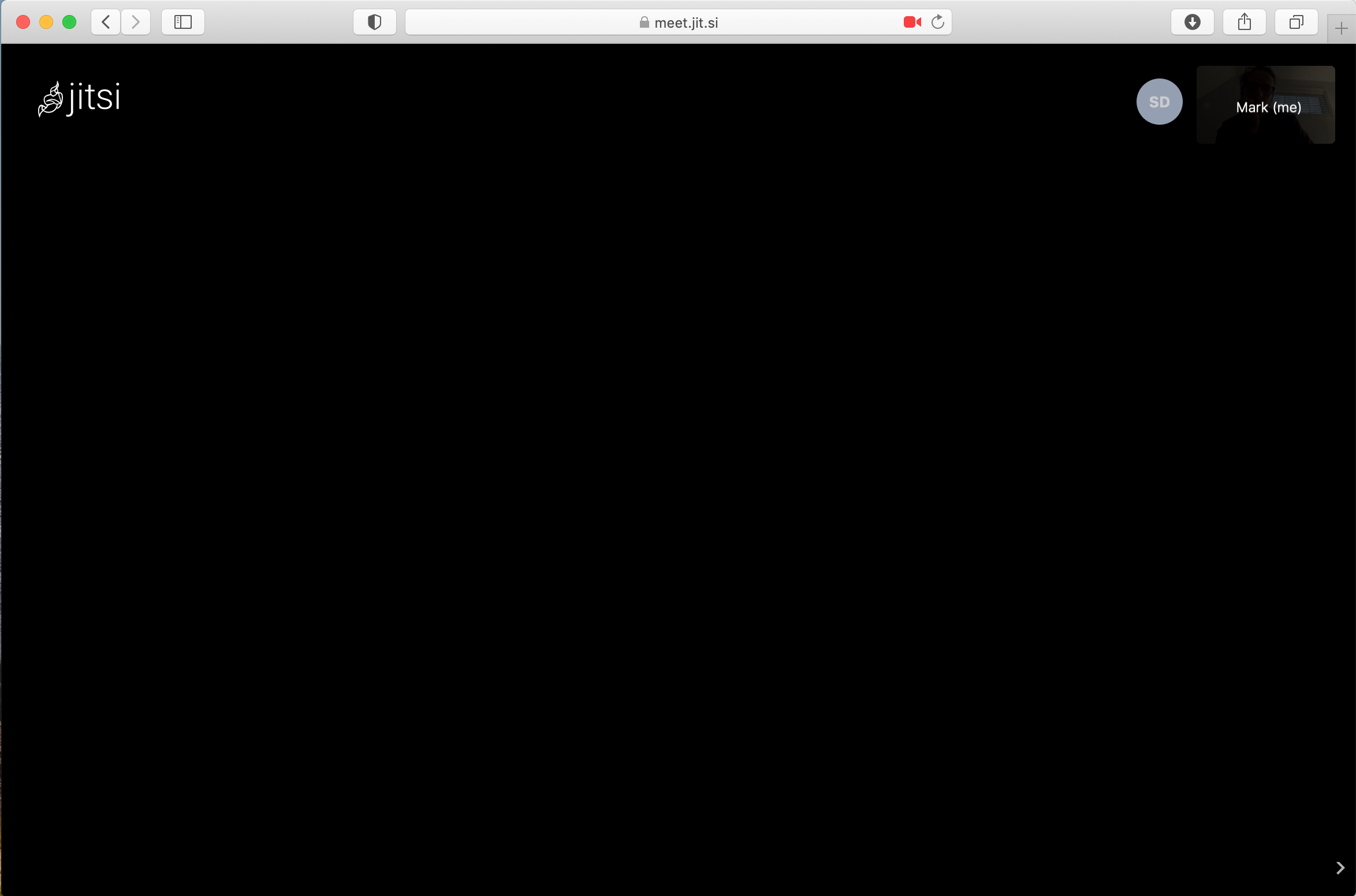
Camera works fine in Safari (14.0.1) on my own server (URL and face removed for privacy). The screenshot was taken moments after the meet.jit.si one.
 MarkErik
on 24 Nov 2020
MarkErik
on 24 Nov 2020
@MarkErik does it work on the previous Chrome version?
pgenderson
on 24 Nov 2020
@pgenderson I'm not sure how to downgrade Chrome, all the instructions I saw online required me to download from an alternative site which I am not comfortable with.
However, I tested again on meet.jit.si with the link provided at the root of the thread, and the camera works in Chrome.
But if Update 4 says that the changes are live on meet.jit.si, why is that I still need to use that link to make the camera work?
Update 3:
I found an old webcam and could reproduce the problem! Any chance you can test the following? (SomeRandomRoomNameToTestTheCamera is a room name i just made up)
https://meet.jit.si/SomeRandomRoomNameToTestTheCamera#config.constraints.video.aspectRatio=1.33
Then try to select your camera.
Update 4:
The fix mentioned on update 3 is now deployed on meet.jit.si.
MarkErik
on 24 Nov 2020
I am also experiencing camera issues. Both on my own server, and meet.jit.si
This is with Chrome on MacOS 10.14.6 on 12" MacBook. Using Safari 14.0.1 the camera works fine. EDIT: Only on my own server, not on meet.jit.siIn Chrome, the camera test passes the tests from the link at the top of the thread (attached the output below).
Here is the problem I am seeing in Chrome:
Version of Chrome:
Result from test:
Blank camera feed in Safari (14.0.1) on meet.jit.si
Camera works fine in Safari (14.0.1) on my own server (URL and face removed for privacy). The screenshot was taken moments after the meet.jit.si one.
This seems to be a chrome bug that got introduced in M87 - https://bugs.chromium.org/p/chromium/issues/detail?id=1151936. Will you be able to update the bug report with what you have seen so that they get an idea of how widespread the issue is ? Thanks!
jallamsetty1
on 24 Nov 2020
@jallamsetty1 Sure, I can add to the bug report.
However, I am also seeing camera issues with Safari on the meet.jit.si server as well (the bottom part of my post above).
MarkErik
on 24 Nov 2020
@MarkErik @jallamsetty1 do you have the same issue when using the Electron client?
pgenderson
on 25 Nov 2020
I just checked, camera works fine with Electron client 2.4.2.
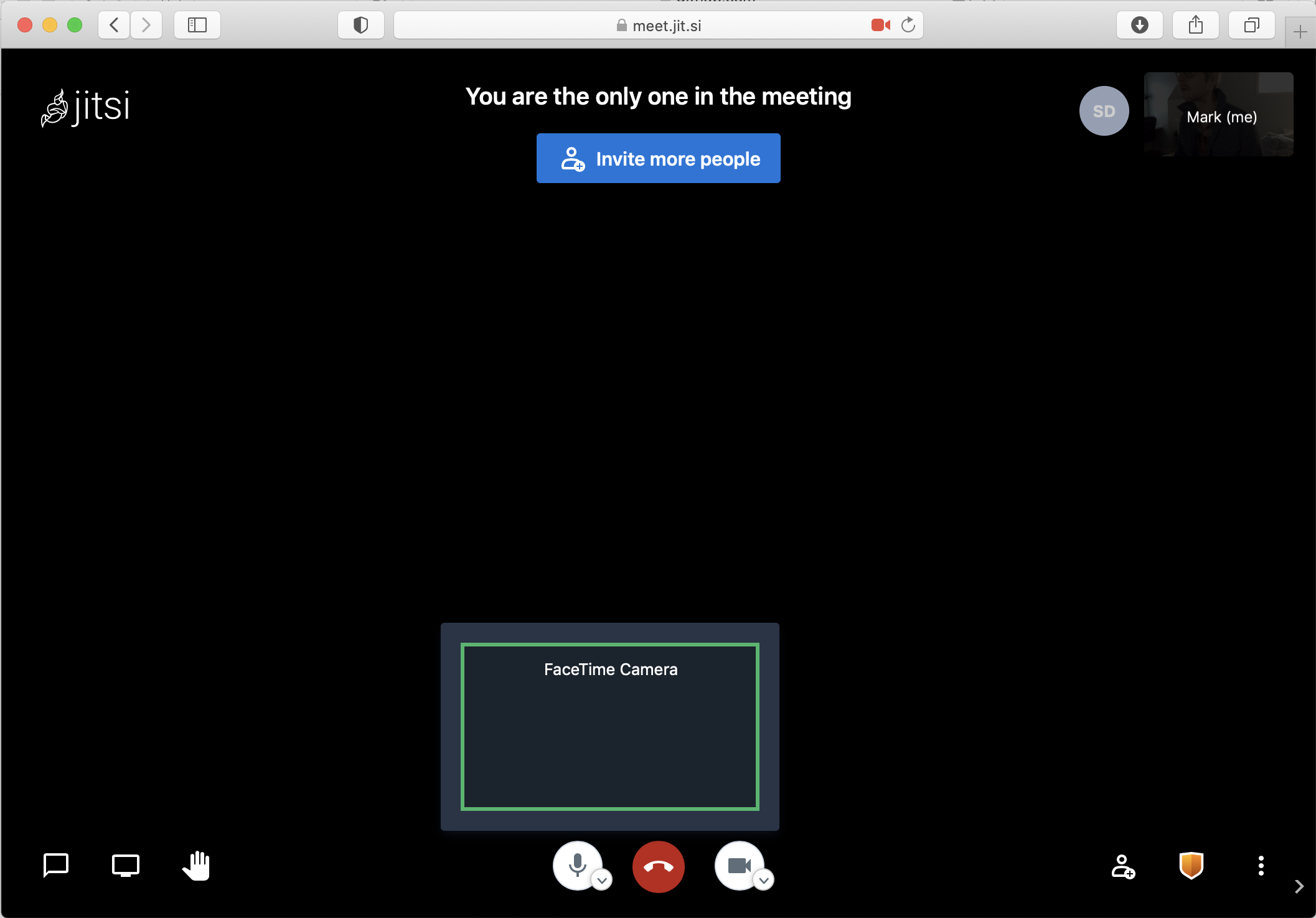
So to summarise, camera does not work in Chrome and Safari at meet.jit.si if I create/join meeting normally.
Note: If I manually add: #config.constraints.video.aspectRatio=1.33 the camera will work in Chrome.
But, #config.constraints.video.aspectRatio=1.33 does not fix the issue in Safari.
The camera issue in Safari.
MarkErik
on 25 Nov 2020
Thanks for your reply!
Actually all systems are linux:
debian server hosting the current version of jitsi-meet 2.0.5142-1
and the clients are linux firefox and chromium (on Linux Mint 19 and 20, which are mainly Ubuntu 18.04 and 20.04) using this webcam: USB ID 05c8:0403.
My guess is, that the problem is the discrepancy between "supported resolutions" (which includes 1280x720) and the acual webrtc check on the 1280x720 (which does'nt seem to work).
So, the questions is: how can the clients find out, that a particular resolution (which may be advertised as supported) actually does not work and should therefore not use it but another.
We use the ideal constraints so the browser is supposed to return a media stream with closest matching resolution if the resolution specified is not supported by the camera. Since this doesn't seem to be happening in your case, it most likely is a browser bug.
jallamsetty1
on 25 Nov 2020
I just checked, camera works fine with Electron client 2.4.2.
So to summarise, camera does not work in Chrome and Safari at meet.jit.si if I create/join meeting normally.
Note: If I manually add: #config.constraints.video.aspectRatio=1.33 the camera will work in Chrome.
But, #config.constraints.video.aspectRatio=1.33 does not fix the issue in Safari.
The camera issue in Safari.
The Safari bug seems to be a different one, I see that your camera preview is being rendered in the local thumbnail at the top, so it most likely isn't a capture bug. If you add another participant in the call, are they able to see your video and you theirs ?
I do see another issue where the second getUserMedia call for the camera preview on Safari seems to return a black video. So there are potentially 2 different issues here that we need to report to webkit.
Are you able to update Safari to 14.2 and check if you see the same issue ?
jallamsetty1
on 25 Nov 2020
@jallamsetty1
I have identified a fix regarding the blank video in Safari, in Safari I use a plugin called 'StopTheMadness', which I have been using for months, and have not had any problems with Jitsi previously.
When I turned off the plugin, the video came back - but again, I've been using this plugin for months, and just recently the video stopped working.
MarkErik
on 25 Nov 2020
@jallamsetty1
I am encountering an error:
(TIME) index.html loaded:    148.31000000049244
testroom:337 Uncaught SyntaxError: Unexpected token ';'
lib-jitsi-meet.min.js?v=4548:10 2020-11-25T15:55:54.018Z [modules/browser/BrowserCapabilities.js] <new a>:  This appears to be chrome, ver: 87.0.4280.67
lib-jitsi-meet.min.js?v=4548:1 The AudioContext was not allowed to start. It must be resumed (or created) after a user gesture on the page. https://goo.gl/7K7WLu
(anonymous) @ lib-jitsi-meet.min.js?v=4548:1
n @ lib-jitsi-meet.min.js?v=4548:1
(anonymous) @ lib-jitsi-meet.min.js?v=4548:1
(anonymous) @ lib-jitsi-meet.min.js?v=4548:1
n @ lib-jitsi-meet.min.js?v=4548:1
(anonymous) @ lib-jitsi-meet.min.js?v=4548:10
(anonymous) @ lib-jitsi-meet.min.js?v=4548:10
n @ lib-jitsi-meet.min.js?v=4548:1
(anonymous) @ lib-jitsi-meet.min.js?v=4548:10
(anonymous) @ lib-jitsi-meet.min.js?v=4548:10
n @ lib-jitsi-meet.min.js?v=4548:1
(anonymous) @ lib-jitsi-meet.min.js?v=4548:10
n @ lib-jitsi-meet.min.js?v=4548:1
(anonymous) @ lib-jitsi-meet.min.js?v=4548:17
(anonymous) @ lib-jitsi-meet.min.js?v=4548:17
n @ lib-jitsi-meet.min.js?v=4548:1
(anonymous) @ lib-jitsi-meet.min.js?v=4548:17
n @ lib-jitsi-meet.min.js?v=4548:1
(anonymous) @ lib-jitsi-meet.min.js?v=4548:1
(anonymous) @ lib-jitsi-meet.min.js?v=4548:1
(anonymous) @ lib-jitsi-meet.min.js?v=4548:1
(anonymous) @ lib-jitsi-meet.min.js?v=4548:1
DevTools failed to load SourceMap: Could not parse content for https://jallamsetty.jitsi.net/libs/lib-jitsi-meet.min.map: Unexpected token ! in JSON at position 0
AuthHandler.js:20 Uncaught ReferenceError: config is not defined
    at Object.<anonymous> (AuthHandler.js:20)
    at Object.<anonymous> (app.bundle.min.js?v=4548:44)
    at n (bootstrap:19)
    at Object.<anonymous> (connection.js:1)
    at Object.<anonymous> (app.bundle.min.js?v=4548:83)
    at n (bootstrap:19)
    at Object.<anonymous> (conference.js:1)
    at Object.<anonymous> (app.bundle.min.js?v=4548:122)
    at n (bootstrap:19)
    at Module.<anonymous> (app.bundle.min.js?v=4548:240)
    at n (bootstrap:19)
    at bootstrap:83
    at app.bundle.min.js?v=4548:1
(anonymous) @ AuthHandler.js:20
(anonymous) @ app.bundle.min.js?v=4548:44
n @ bootstrap:19
(anonymous) @ connection.js:1
(anonymous) @ app.bundle.min.js?v=4548:83
n @ bootstrap:19
(anonymous) @ conference.js:1
(anonymous) @ app.bundle.min.js?v=4548:122
n @ bootstrap:19
(anonymous) @ app.bundle.min.js?v=4548:240
n @ bootstrap:19
(anonymous) @ bootstrap:83
(anonymous) @ app.bundle.min.js?v=4548:1
@jallamsetty1
I am encountering an error:
(TIME) index.html loaded:  148.31000000049244
testroom:337 Uncaught SyntaxError: Unexpected token ';'
lib-jitsi-meet.min.js?v=4548:10 2020-11-25T15:55:54.018Z [modules/browser/BrowserCapabilities.js] <new a>:  This appears to be chrome, ver: 87.0.4280.67
lib-jitsi-meet.min.js?v=4548:1 The AudioContext was not allowed to start. It must be resumed (or created) after a user gesture on the page. https://goo.gl/7K7WLu
(anonymous) @ lib-jitsi-meet.min.js?v=4548:1
n @ lib-jitsi-meet.min.js?v=4548:1
(anonymous) @ lib-jitsi-meet.min.js?v=4548:1
(anonymous) @ lib-jitsi-meet.min.js?v=4548:1
n @ lib-jitsi-meet.min.js?v=4548:1
(anonymous) @ lib-jitsi-meet.min.js?v=4548:10
(anonymous) @ lib-jitsi-meet.min.js?v=4548:10
n @ lib-jitsi-meet.min.js?v=4548:1
(anonymous) @ lib-jitsi-meet.min.js?v=4548:10
(anonymous) @ lib-jitsi-meet.min.js?v=4548:10
n @ lib-jitsi-meet.min.js?v=4548:1
(anonymous) @ lib-jitsi-meet.min.js?v=4548:10
n @ lib-jitsi-meet.min.js?v=4548:1
(anonymous) @ lib-jitsi-meet.min.js?v=4548:17
(anonymous) @ lib-jitsi-meet.min.js?v=4548:17
n @ lib-jitsi-meet.min.js?v=4548:1
(anonymous) @ lib-jitsi-meet.min.js?v=4548:17
n @ lib-jitsi-meet.min.js?v=4548:1
(anonymous) @ lib-jitsi-meet.min.js?v=4548:1
(anonymous) @ lib-jitsi-meet.min.js?v=4548:1
(anonymous) @ lib-jitsi-meet.min.js?v=4548:1
(anonymous) @ lib-jitsi-meet.min.js?v=4548:1
DevTools failed to load SourceMap: Could not parse content for https://jallamsetty.jitsi.net/libs/lib-jitsi-meet.min.map: Unexpected token ! in JSON at position 0
AuthHandler.js:20 Uncaught ReferenceError: config is not defined
    at Object.<anonymous> (AuthHandler.js:20)
    at Object.<anonymous> (app.bundle.min.js?v=4548:44)
    at n (bootstrap:19)
    at Object.<anonymous> (connection.js:1)
    at Object.<anonymous> (app.bundle.min.js?v=4548:83)
    at n (bootstrap:19)
    at Object.<anonymous> (conference.js:1)
    at Object.<anonymous> (app.bundle.min.js?v=4548:122)
    at n (bootstrap:19)
    at Module.<anonymous> (app.bundle.min.js?v=4548:240)
    at n (bootstrap:19)
    at bootstrap:83
    at app.bundle.min.js?v=4548:1
(anonymous) @ AuthHandler.js:20
(anonymous) @ app.bundle.min.js?v=4548:44
n @ bootstrap:19
(anonymous) @ connection.js:1
(anonymous) @ app.bundle.min.js?v=4548:83
n @ bootstrap:19
(anonymous) @ conference.js:1
(anonymous) @ app.bundle.min.js?v=4548:122
n @ bootstrap:19
(anonymous) @ app.bundle.min.js?v=4548:240
n @ bootstrap:19
(anonymous) @ bootstrap:83
(anonymous) @ app.bundle.min.js?v=4548:1
Oops, my bad. Can you please try again ?
jallamsetty1
on 25 Nov 2020
@jallamsetty1
OK, just tested again - video in Chrome works!
MarkErik
on 25 Nov 2020
@jallamsetty1
OK, just tested again - video in Chrome works!
Awesome, thanks for checking. Chrome doesn't return a proper MediaStream if the specified ideal width and height are not supported by the camera. This fix will be available in the next release of meet.jit.si, until then you should be able to override the constraints using #config.constraints.video.aspectRatio=1.33 to get it to work.
jallamsetty1
on 25 Nov 2020
@jallamsetty1 do you know when the fix will be available in the Docker Jitsi release? I just tested the recent update and still encountering the issue.
Seems to be working with the 5142-2 release.
MarkErik
on 4 Dec 2020
@jallamsetty1 ~do you know when the fix will be available in the Docker Jitsi release? I just tested the recent update and still encountering the issue.~
Seems to be working with the 5142-2 release.
Unfortunately I had to revert the change for now since Chrome was returning odd resolutions like 940x720 from cameras that did support 1280x720 when only height is specified. We will have to find a better way to detect when 1280x720 isn't supported and only then switch to height only constraint. Until then you can edit your config.js and remove the width values from the video constraints.
jallamsetty1
on 8 Dec 2020
Related issues
 jidanni
·
3Comments
jidanni
·
3Comments
 532910
·
3Comments
532910
·
3Comments
 forteller
·
3Comments
forteller
·
3Comments
 xiefangzhenz
·
3Comments
xiefangzhenz
·
3Comments
 tanvir23
·
4Comments
tanvir23
·
4Comments