Jitsi-meet: So this actually works in IOS Safari with changes in IOS > Safari Settings, but camera and mic need to be manually started and the UX isn't great.
Description
I had been led to believe this doesn't work in IOS browsers, but I got a lend of my brother's iPad today and it works, but isn't a nice UX.
First, get rid of the app notification.
https://github.com/jitsi/jitsi-meet/issues/1662#issuecomment-455845959
Second, change Safari's experimental settings.
https://github.com/jitsi/lib-jitsi-meet/pull/835#issuecomment-440551892
Third, click the mic and video buttons at the bottom twice. And then audio and video works and I can see and hear other people in the call.

I know I'll get told to use the native app but my site's USP in this regard is other stuff on the page along with the video. And I don't have the inclination to create a brand new IOS app for this one thing. Instructing users to change these settings is not ideal but infinitely easier.
Current behavior
Mic and Video don't automatically start.
Buttons need to be pressed multiple times. Title of the button doesn't go away.
Some CSS issues like in the screenshot above. The N in the bottom right isn't centered.
Expected Behavior
Mic and Video automatically start.
Buttons work properly.
CSS works.
Possible Solution
I don't know. This is beyond my pay-grade.
Steps to reproduce
In introduction.
Environment details
Latest Jitsi Meet / IOS / Safari.
Thanks! :)
 niallmurphy-ie
All 45 comments
My own temporary solution for the above will likely be to use
api.executeCommand('toggleAudio')
api.executeCommand('toggleVideo')
based on the user's browser. I haven't tested it yet, but I assume it will work.
niallmurphy-ie
on 4 Mar 2020
+1
iOS Safari support is the main reason we didn't use jitsi. Our users don't understand apps so browser support is a must have.
 rschiefer
on 6 Apr 2020
rschiefer
on 6 Apr 2020
Hi, I made the experimental settings and app notification changes, and I used Niall's solution, but it doesn't work for me, am I doing something wrong? this are my settings.
Thanks in advanced for your help!

 reyisw
on 8 Apr 2020
reyisw
on 8 Apr 2020
Hi Rey,
I have pretty much no idea what these settings do but on my iPad, it works with:
WebRTC H264 Simulcast: On
WebRTC nDNS ..: On
WebRTC Unified Plan: Off
WebRTC VP8 codec: On
WebRTC Web SQL: Off
It may work with any combination of these but that's what I have set at the moment.
niallmurphy-ie
on 8 Apr 2020
Hi Niall!
Thank you for your response, I modified my settings just like the yours and it kind of works, I tested it in my server with a partner and he saw me fluently but he didn't hear me and I listened to him but I just watched our two frozen cameras.
I tried your server too but just like mine I could only see my frozen camera
Did something similar happen to you? I tested it in iPhone Safari 13.0.5
reyisw
on 8 Apr 2020
Hi all,
I can confirm iPhone XR running iOS 13.4 with mobile Safari 13.1 seems to kind of work.
I have the same UX issues that @niallmurphy-ie reported which making using it impractical, but I also saw in my tests that the video freezes often and I have to kill Safari and re-open it.
All in all a great job. I think with a few UX tweaks and after making sure the streams are stable we could officially say jitsi-meet supports mobile Safari.
@jallamsetty1 Let me know if your team needs help debugging this further.
Thanks
 pdarcos
on 21 Apr 2020
pdarcos
on 21 Apr 2020
I think Unified Plan shouldd be ON for Safari. That's what we expecct really, right @jallamsetty1 ?
 saghul
on 21 Apr 2020
saghul
on 21 Apr 2020
Yes, Saul is right, we expect Safari to be running in Unified Plan mode.
Safari in plan-b should also work since we detect the mode the browser is running in and we do signaling accordingly. However, this is not something we plan to support going forward since Safari on desktop defaulted to Unified plan in 12.1.1 and all the browsers are moving towards unified plan, chrome included.
@pdarcos, thank you for helping us test. Can you please give jitsi-meet nightly as try and see if you see the issues with the streams there ? We have a fix for video not showing up in tile view and the thumbnails.
We will get rid of the browser warning once we iron out these last few issues.
 jallamsetty1
on 21 Apr 2020
jallamsetty1
on 21 Apr 2020
Sure @jallamsetty1
By jitsi-meet nightly do you mean the unstable repo?
My server is Debian 9 and I've been installing everything using your unstable repo.
Should I wait a few hours until all the PRs are committed or can I go ahead and upgrade my server now?
pdarcos
on 21 Apr 2020
Also, regarding Mobile Safari 13.1 on iOS 13.4 the Experimental Features settings have changed from previous versions. No longer can we toggle on/off Unified Plan, VP8, etc.
The only options I see now regarding WebRTC are WebRTC DTMF and mDNS ICE candidates (both on by default).
@jallamsetty1 Are you sure that mobile safari is also using Unified Plan? I recall in an earlier test between Chrome and iOS client seeing in webrtc-internals that Plan B was being used. But I may be mistaken
pdarcos
on 21 Apr 2020
Sure @jallamsetty1
By jitsi-meet nightly do you mean the unstable repo?My server is Debian 9 and I've been installing everything using your unstable repo.
Should I wait a few hours until all the PRs are committed or can I go ahead and upgrade my server now?
Looks like we will be doing a meet.jit.si release later today, I can update you once that is done so that you can upgrade your server.
Also, when you say Plan B is being used, are you talking about Chrome ? Yes, we are running Chrome in Plan B mode still but doesn't mean Safari is running in Plan B as well.
jallamsetty1
on 21 Apr 2020
Sure @jallamsetty1
By jitsi-meet nightly do you mean the unstable repo?
My server is Debian 9 and I've been installing everything using your unstable repo.
Should I wait a few hours until all the PRs are committed or can I go ahead and upgrade my server now?Looks like we will be doing a meet.jit.si release later today, I can update you once that is done so that you can upgrade your server.
Also, when you say Plan B is being used, are you talking about Chrome ? Yes, we are running Chrome in Plan B mode still but doesn't mean Safari is running in Plan B as well.
Ok, please let me know once the deb packages are available in your unstable repo and I'll update then and test.
Re plan b, you're probably right. I remember seeing plan b in there somewhere when I was debugging but it was probably from Chrome. I thought you'd already migrated everything to Unified Plan which is why plan b caught my eye.
pdarcos
on 21 Apr 2020
I guess you can also use alpha.jitsi.net to test, since it's rebuilt after every commit.
saghul
on 21 Apr 2020
Hi @jallamsetty1
Are all the commits included already in the latest unstable deb packages or should I wait a little longer?
pdarcos
on 22 Apr 2020
Hi @pdarcos, yes we made a release late last night so the packages must be there in the unstable repo now, thank you !
jallamsetty1
on 22 Apr 2020
I've tested latest unstable and indeed mobile safari works better.
We can now see the remote thumbnails OK. :)
However, the UX is still hard to navigate as the OP stated, but it seems to be somewhat usable. One thing I noticed was on my XR when I click on my video thumbnail the video seems to "come out" of Safari and into full screen mode and the only way back is to close that video window. This leaves the thumbnail in a frozen state. Hard to explain unless you try it yourself.
pdarcos
on 23 Apr 2020
Thanks @pdarcos, we understand that our UX is not optimized for mobile yet. Hopefully we will get it to it soon !
jallamsetty1
on 23 Apr 2020
So far I've got this to work quite far with the latest master pointed to meet.jit.si on iPadOS with latest Safari. The video is now working fine with the latest commits (thanks, you are awesome!) and I believe I can work on the UX issues with the buttons. Previously I experienced quite a bit of issues joining a meeting with the iPad since it would go into this loop of joining and dropping and rejoining again after the timeout. This was fixed by disabling p2p, so there's something up with that 🤔
The only issue I'm not sure about is the fact that video works well, and the iPad can also _receive_ audio as well, but for some reason I am unable to get the iPad mic to work so that it would be audible to _other_ participants. The local track seems to work since it works in all the previews, but somehow sending that mic input fails.
I'm trying to debug this, but I'm new to Jitsi and WebRTC in general. It seems Apple sure isn't making it easy to build cross-platform system in this regard either 😄 I'm super excited about the thought of getting this to work without a native app on iOS as well!
 SamiPussinen
on 23 Apr 2020
SamiPussinen
on 23 Apr 2020
So far I've got this to work quite far with the latest master pointed to meet.jit.si on iPadOS with latest Safari. The video is now working fine with the latest commits (thanks, you are awesome!) and I believe I can work on the UX issues with the buttons. Previously I experienced quite a bit of issues joining a meeting with the iPad since it would go into this loop of joining and dropping and rejoining again after the timeout. This was fixed by disabling p2p, so there's something up with that 🤔
The only issue I'm not sure about is the fact that video works well, and the iPad can also _receive_ audio as well, but for some reason I am unable to get the iPad mic to work so that it would be audible to _other_ participants. The local track seems to work since it works in all the previews, but somehow sending that mic input fails.
I'm trying to debug this, but I'm new to Jitsi and WebRTC in general. It seems Apple sure isn't making it easy to build cross-platform system in this regard either 😄 I'm super excited about the thought of getting this to work without a native app on iOS as well!
We appreciate any help that we can get for optimizing the UX for mobile, thank you.
We are aware of the audio issues on Safari and we are working with Safari's webkit team for resolving these issues, looks like its a common issue across all webrtc services and they have received multiple reports for the same.
jallamsetty1
on 24 Apr 2020
@niallmurphy-ie, can you please close the issue since jitsi on safari works much better now. Alternately, if you want to leave this open for UX optimization, please modify the title accordingly, thanks !
jallamsetty1
on 24 Apr 2020
Hi, haven't really been following this. Does it work without changes to the settings?
Can close it if you like.
niallmurphy-ie
on 24 Apr 2020
Hi, haven't really been following this. Does it work without changes to the settings?
Can close it if you like.
Yes, Safari on mobile works now without changes to the settings. Closing this issue, thanks !
jallamsetty1
on 24 Apr 2020
The only issue I'm not sure about is the fact that video works well, and the iPad can also _receive_ audio as well, but for some reason I am unable to get the iPad mic to work so that it would be audible to _other_ participants. The local track seems to work since it works in all the previews, but somehow sending that mic input fails.
Just wanted to confirm I saw the exact same behaviour with an iPad these last few days. Everything worked ok except for mic input.
pdarcos
on 27 Apr 2020
We appreciate any help that we can get for optimizing the UX for mobile, thank you.
We are aware of the audio issues on Safari and we are working with Safari's webkit team for resolving these issues, looks like its a common issue across all webrtc services and they have received multiple reports for the same.
@jallamsetty1 is there any way I could follow the developments of the safari audio issue? Some webkit bug tracker for example?
SamiPussinen
on 28 Apr 2020
It's great that these issues have been resolved, but is there an ETA on when they will make it in to a stable release and not just the nightly builds?
 mikeluyties
on 28 Apr 2020
mikeluyties
on 28 Apr 2020
@SamiPussinen, I am working on the Safari audio issue now, will provide the webkit bug tracker once we establish its a webkit issue which seems highly likely since our AudioOutputProblemDetector which uses getStats() is reporting no audio levels for some of the remote audio tracks.
@mikeluyties, we will push these changes to stable once we fix the audio issue.
jallamsetty1
on 28 Apr 2020
I don't know if it is any way helpful, but I observed that the audio input preview on the Settings dialog does correctly preview the mic levels, but the "dominant speaker" (className "dynamic-shadow") effect does not react to audio input in the call view (the level is always 0).
I also checked that everything (audio, video) seems to work fine on the call demo found in https://webrtc.github.io/samples/
SamiPussinen
on 28 Apr 2020
dynamic-shadow
Can you pls try the workaround mentioned here for iPadOS audio input issue - https://github.com/jitsi/lib-jitsi-meet/issues/1126
jallamsetty1
on 28 Apr 2020
Can you pls try the workaround mentioned here for iPadOS audio input issue - jitsi/lib-jitsi-meet#1126
@jallamsetty1 It works! The culprit seems to be "enableNoisyMicDetection: true" indeed. Seems to work on other platforms, but not on mobile Safari.
SamiPussinen
on 29 Apr 2020
I am unable to get my iPad to use it's camera and mic with the latest stable release jitsi-meet_2.0.4548-1_all.deb
It asks for permission, but even after granting it, it doesn't work. I can click on the camera and mic icons and it detects the correct devices, but won't use them. This is occurring on multiple iOS devices.
I am using the API to create the room and connect. Is anyone else having issues and are there workarounds?
mikeluyties
on 3 May 2020
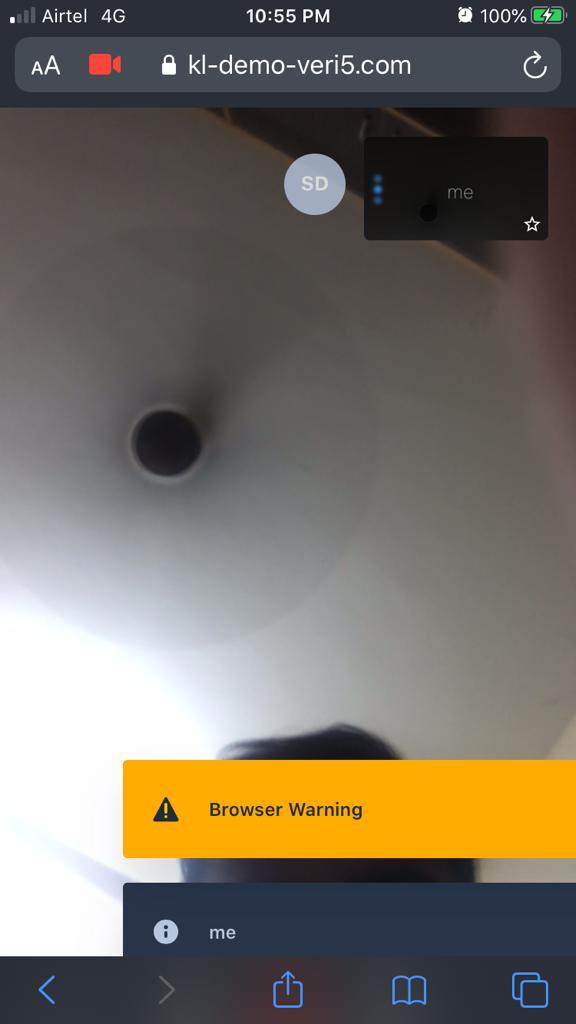
HI @jallamsetty1 , I am trying to run jitsi on my custom sever https://3.6.246.33/ , I am using jitsi on docker. I have updated the deb source list to deb https://download.jitsi.org unstable/. I am trying to run jitsi on iOS (13.4.1) safari, I tried opening in safari on my iPhone, I receive a browser warning to "try one of the fully supported browsers". The UI is messed up, can you please help me if I need to do anything or change some settings. Thank you
 BharathKadaluri
on 15 May 2020
BharathKadaluri
on 15 May 2020
@BharathKadaluri Is your question relevant to the issue discussed here?
 luixxiul
on 15 May 2020
luixxiul
on 15 May 2020
@luixxiul The heading says UX isn't that great and I tried the workaround "enableNoisyMicDetection: false" but no avail
BharathKadaluri
on 15 May 2020
I think that the workaround was proposed for the relation between audio input and "dominant speaker" (className "dynamic-shadow") effect. See above: https://github.com/jitsi/jitsi-meet/issues/5105#issuecomment-620817910 and https://github.com/jitsi/jitsi-meet/issues/5105#issuecomment-620857994.
The workaround is irrelevant to the browser warning.
Unless necessary you could use the native app. Is there any reason why you could not use that?
luixxiul
on 15 May 2020
I am using JitsiMeetExternalAPI to embbed in my custom application, which I am opening in mobile browser. My use case needs that it should be opened in mobile browser for the customer by sharing a link, the browser warning is messing up the UI
BharathKadaluri
on 15 May 2020
@BharathKadaluri, the browser warning has been removed and noise detection has been disabled for Safari mobile in the latest meet, not sure if they haven't been pushed to docker yet.
If you want the browser warning removed, make sure safari is added to the list of the optimal browsers here https://github.com/jitsi/jitsi-meet/blob/master/interface_config.js#L179
Please note that UX hasn't been optimized for Safari mobile as we have a fully supported native app.
jallamsetty1
on 15 May 2020
@jallamsetty1 Thanks a lot for the response, for our usecase we cannot ask our customer to download the native app, they need to use it on browser. So to solve this do we have to build our own custom ui or there is already a fix in wip that is comming, thank you :D
BharathKadaluri
on 15 May 2020
I just got around all this by using BigBlueButton. I was already using Jitsi for education and BBB has more stuff built-in for that.
niallmurphy-ie
on 15 May 2020
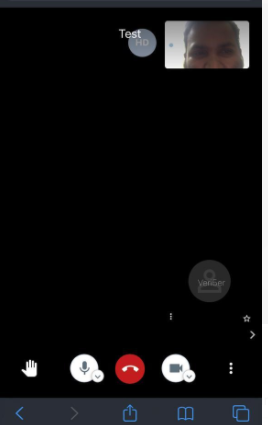
@jallamsetty1 - Tried in Safari Browser. The remote participant is not appearing at all in the Safari browser view.
 sarutumuluri
on 15 May 2020
sarutumuluri
on 15 May 2020
Please test this against https://meet.jit.si and see if you can reproduce the same issue there. It could be a device specific issue if it repros on our deployment. Otherwise I would suspect it is something to do with your deployment.
jallamsetty1
on 15 May 2020
@jallamsetty1 I have changed to from my domain to meet.jit.si and if I open in safari browser it is working, I checked both the config.js from meet.jit.si and my custom installation almost the same, I have also enabled websockets. but still the other participant becomes blank in safari iOS only thanks
BharathKadaluri
on 15 May 2020
@jallamsetty1 - I'm on an Android. I couldn't open https://meet.jit.si without downloading the app.
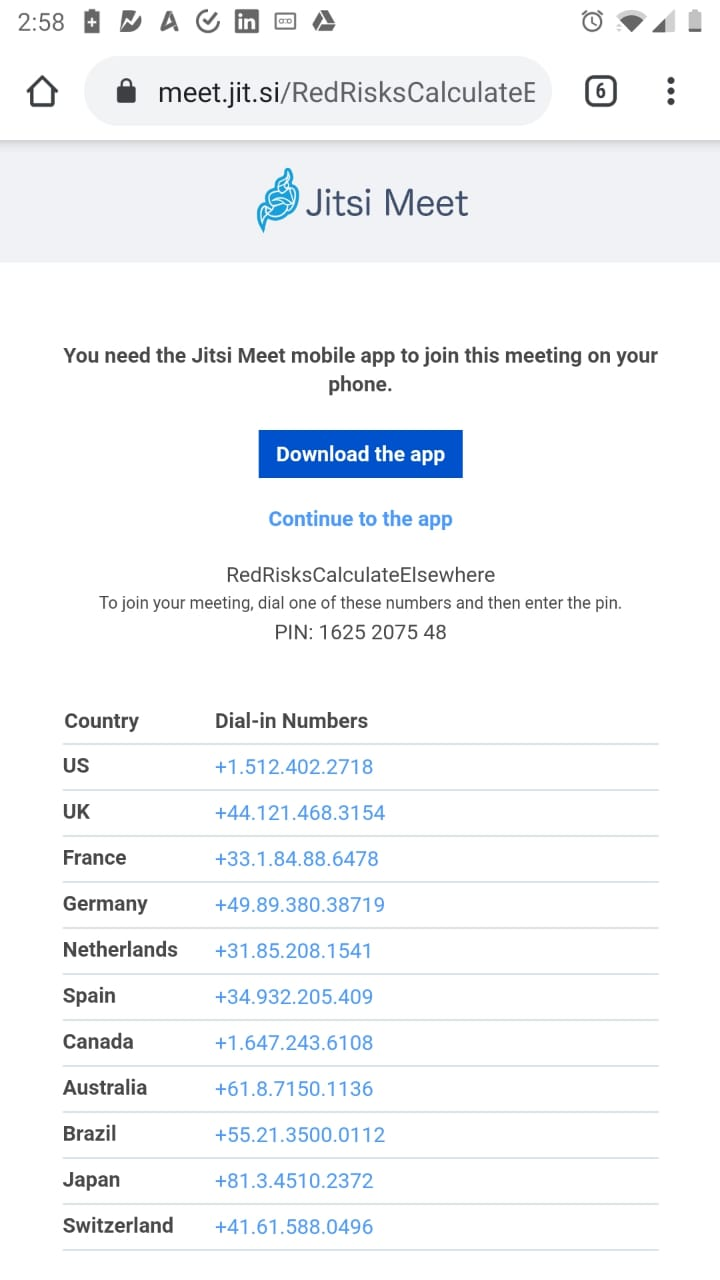
Disable deeplinking or click on the browser options (3 dots) and request desktop site.
jallamsetty1
on 15 May 2020
@jallamsetty1 I have changed to from my domain to meet.jit.si and if I open in safari browser it is working, I checked both the config.js from meet.jit.si and my custom installation almost the same, I have also enabled websockets. but still the other participant becomes blank in safari iOS only thanks
Websockets is not necessary anymore, that bug has been fixed. I can't tell why it is failing on your deployment w/o logs.
jallamsetty1
on 15 May 2020
@jallamsetty1 sure attaching my the logs, thanks
test.log
BharathKadaluri
on 15 May 2020
@jallamsetty1 sure attaching my the logs, thanks
test.log
These are server logs, I was hoping for browser logs. Is this issue specific to Safari ? If it is an issue with your deployment, check for relevant posts in https://community.jitsi.org/. I am not the right person to help with the general deployment issues.
[35mjvb_1 |[0m JVB 2020-05-15 23:46:04.872 SEVERE: [205] org.jitsi.impl.neomedia.transform.dtls.DtlsPacketTransformer.log() Failed to accept a connection from a DTLS client!
[35mjvb_1 |[0m java.io.IOException: org.jitsi.impl.neomedia.transform.dtls.DatagramTransportImpl is closed!
[35mjvb_1 |[0m at org.jitsi.impl.neomedia.transform.dtls.DatagramTransportImpl.assertNotClosed(DatagramTransportImpl.java:124)
Related issues
 shellshocker
·
47Comments
shellshocker
·
47Comments
 kerpan
·
52Comments
kerpan
·
52Comments
 Janhouse
·
99Comments
Janhouse
·
99Comments
 ghost
·
39Comments
ghost
·
39Comments
 andres934
·
54Comments
andres934
·
54Comments