Jitsi-meet: Feature Request: Breakout Rooms
Thanks for making this, this is amazing! I would love to use this for the volunteer-led classes that a nonprofit I work for teaches and has had to transition to doing over video conferencing.
The one feature that would really make this functionally stand out for us among the closed-source competition would be the ability to have breakout rooms. So if a teacher is hosting a call of ten students, the teacher could group the students into smaller calls of 2-3 students to do smaller discussions or activities together, drop in on different smaller calls to see how they're doing, then bring them back in to the larger call.
Thanks again!
 JpTiger
All 50 comments
Incase you haven’t bee paying attention Zoom are approaching a moment of reckoning.
https://hn.algolia.com/?q=zoom
And the moment is ripe for another group video service to arise.
Jitsi is attracting a lot of interest from technical folks, but to crack the mainstream there’s one key killer feature that professionally facilitators and large group meeting hosts absolutely require and that is breakout rooms.
Without it, sessions with 50+ people loose much of the possible interactivity that’s critical for engagement.
This is a key moment for Jitsi.
My suggestion would be to announce publically you’ll begin working on breakout rooms and leverage the public interest in Zoom alternatives now while everyone is talking about this. Good luck!
Ps. I started question on Hacker News;
If not Zoom. What to use for large group video with breakout rooms?
https://news.ycombinator.com/item?id=22754935
Provides a lay of the land of competing options. If it wasn’t for breakout rooms I think you otherwise are a strong contender for the best option.
 evolve2k
on 4 Apr 2020
evolve2k
on 4 Apr 2020
I agree. Every church in the world is also using Zoom for the breakout rooms functionality. But the one feature Zoom itself is missing is breakout sub-rooms. You can't split your breakout rooms into even smaller rooms for one-on-one time or praying together.
This could be done easily by simply allowing co-hosts (a host in each room) to also manage breakout rooms into smaller rooms. But Zoom don't allow that. This is a feature which would put Jitsi ahead of the pack.
 berwynhoyt
on 4 Apr 2020
berwynhoyt
on 4 Apr 2020
Related: #4787
 crabmusket
on 5 Apr 2020
crabmusket
on 5 Apr 2020
This has been done, check out https://www.videofacilitator.com/ (built on top of Jitsi)
 sbargon
on 8 Apr 2020
sbargon
on 8 Apr 2020
This has been done, check out https://www.videofacilitator.com/ (built on top of Jitsi)
Great, though to be up front, that's a product you have to pay for. Part of the appeal of Jitsi Meet is that it's free and open source.
JpTiger
on 8 Apr 2020
Due to the corona pandemic I have many more online meetings. As I'm a strong FOSS promoter, I always try to convince people to use jitsi. In my experience, the two main reasons people choose zoom instead of jitsi is that it also works with more browsers (I'm told so) and the breakout rooms. Therefore, I would highly appreciate this feature in order to bring more people to use FOSS.
 AndreasAZiegler
on 10 Apr 2020
AndreasAZiegler
on 10 Apr 2020
@JpTiger May you be so kind and give the issue a clear title summarizing what you are talking about
 Echolon
on 10 Apr 2020
Echolon
on 10 Apr 2020
@JpTiger May you be so kind and give the issue a clear title summarizing what you are talking about
Sorry about that! Thought I had but clearly didn't finish it. Fixed.
JpTiger
on 11 Apr 2020
@sbargon I'll take this opportunity to note that videofacilitator.com uses only the Jitsi mobile app, which "is not designed for navigating rooms".
 bryceschober
on 11 Apr 2020
bryceschober
on 11 Apr 2020
Here is a good explanation of the feature:
https://support.blindsidenetworks.com/hc/en-us/articles/360024516512-Create-and-manage-breakout-rooms
 marclaporte
on 17 Apr 2020
marclaporte
on 17 Apr 2020
I would like to use Jitsi instead of Zoom, but this is the feature I really need.
 Grietje143
on 19 Apr 2020
Grietje143
on 19 Apr 2020
Breakout rooms would be nice
 jacobgonzales20
on 20 Apr 2020
jacobgonzales20
on 20 Apr 2020
This is so necessary, I would be absolutely at full blown software nirvana
 dantosXD
on 21 Apr 2020
dantosXD
on 21 Apr 2020
Totally needed!
 RoyBkker
on 21 Apr 2020
RoyBkker
on 21 Apr 2020
I have made an attempt at this. For now it is only available in Openfire Meetings
https://github.com/igniterealtime/openfire-pade-plugin/wiki/Breakout-Meeting-Rooms

It uses a kanban for the UI. It can auto-allocate, re-direct participants to their breakout rooms and reassemble them back to the main conference automatically after a specified duration or manually with the reassemble button. It is only available to moderators, allowing them to dip in and out of any of the breakout rooms during the breakout session.
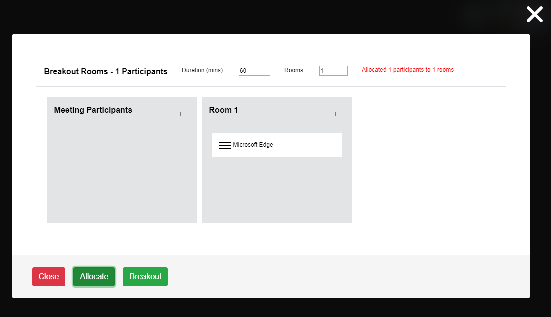
I have keep to XMPP standards and used XEP-0335: JSON Containers to send the redirect commands from the moderator to the participants.
I have no plans to upstream this back to Jitsi as I am too busy to learn React, but the vanilla JavaScript is there for anyone else to port it to React.
 deleolajide
on 22 Apr 2020
deleolajide
on 22 Apr 2020
For those interested in testing the breakout rooms feature with meet.jit.si, I have a demo running on GitPages at https://inspired-futures.github.io/ipade/
Please post any issues or questions at https://github.com/inspired-futures/ipade/issues
You are welcome to clone/fork my github repo and make your own custom version. Edit the config.js and interface_config.js files. You can even do this all directly from GitHub. No need to download/upload code to/from a PC.
Also note that this is a static web pages version of Jitsi-Meet. Meeting URLs are slightly different because there is no web server code running on GitHub. Just XMPP signalling and WebRTC media connections to meet.ji.si from the client browser.
deleolajide
on 23 Apr 2020
I'll also note that my particular use-case of the Zoom breakout rooms does also to pre-assign known users to known rooms... and it's probably a pretty common use-case for church study groups that have stable assignments to "tables" for more private discussions in smaller groups.
bryceschober
on 23 Apr 2020
I also need this, and in particular I have a use case that even Zoom doesn't support. I'm trying to do conference-style rooms where there's a general session followed by breakouts where the attendees can choose for themselves which one to enter (and can switch when they like). Obviously the breakout rooms would need to have names, not just numbers, and it would be great if the meeting owner could select whether to let people see who is already in each room (default yes).
 MethylBromide
on 26 Apr 2020
MethylBromide
on 26 Apr 2020
I'm trying to do conference-style rooms where there's a general session followed by breakouts where the attendees can choose for themselves which one to enter (and can switch when they like).
My advice would be for you to design and implement your own web page with your required user experience. Put jitsi-meet in an iframe and control it using the external API or encode the meeting URLs directly to enter your breakout rooms.
deleolajide
on 27 Apr 2020
Obviously the breakout rooms would need to have names, not just numbers, and it would be great if the meeting owner could select whether to let people see who is already in each room (default yes).
The quick&dirty™ solution without any control but readily available would be to announce rooms <basename>-<roomname> in the chat of room <basename>. Then, people can join where they want.
@bryceschober I would also suggest this solution to stable church study groups. It's like in real life: In a group which meets regularly, people know the room and enter it autonomously. Problems arise when you want to group people spontaneously or control the size or duration of a public meeting. Then, in an online meeting, the easiest way would be that the moderator distributes people into breakout rooms.
 jorsn
on 28 Apr 2020
jorsn
on 28 Apr 2020
I did try to use jitsi in an iframe as deleolajide suggested, but I ran into the issue that the browser (I use Firefox) needs to ask permission of the user to use the camera and mic, and it can't do that if the content is in an iframe.
MethylBromide
on 2 May 2020
Obviously the breakout rooms would need to have names, not just numbers, and it would be great if the meeting owner could select whether to let people see who is already in each room (default yes).
The quick&dirty™ solution without any control but readily available would be to announce rooms
<basename>-<roomname>in the chat of room<basename>. Then, people can join where they want.@bryceschober I would also suggest this solution to stable church study groups. It's like in real life: In a group which meets regularly, people know the room and enter it autonomously. Problems arise when you want to group people spontaneously or control the size or duration of a public meeting. Then, in an online meeting, the easiest way would be that the moderator distributes people into breakout rooms.
Obviously the breakout rooms would need to have names, not just numbers, and it would be great if the meeting owner could select whether to let people see who is already in each room (default yes).
The quick&dirty™ solution without any control but readily available would be to announce rooms
<basename>-<roomname>in the chat of room<basename>. Then, people can join where they want.@bryceschober I would also suggest this solution to stable church study groups. It's like in real life: In a group which meets regularly, people know the room and enter it autonomously. Problems arise when you want to group people spontaneously or control the size or duration of a public meeting. Then, in an online meeting, the easiest way would be that the moderator distributes people into breakout rooms.
What about this workaround? Attending breakout meetings can be done very easily with Jitsi even in one browser (two or more different TABs) - just attend different meeting rooms :-)
But to work as a workaround for breakout-rooms (yes, we really need real breakout-rooms! :-) one needs to easily switch the audio while changing the TABs. So muting one room (MIC + loudspeaker) and unmuting the other room. Or putting loudspeaker to 20% for the "old" room" - for all curious people who _can_ do multitasking. Hence women :-)
Does anybody know a browser-based solution for this for Chrome, Chromium, Firefox etc.? It _can_ be done with tools on OS-basis - but this is not feasible for "normal" users.
Thanks for your ideas & discussion...
PS: I tried two Chrome-extension doing a sort of mute - but this is not working very well...
 MacBlui
on 3 May 2020
MacBlui
on 3 May 2020
Obviously the breakout rooms would need to have names, not just numbers, and it would be great if the meeting owner could select whether to let people see who is already in each room (default yes).
The quick&dirty™ solution without any control but readily available would be to announce rooms
<basename>-<roomname>in the chat of room<basename>. Then, people can join where they want.
@bryceschober I would also suggest this solution to stable church study groups. It's like in real life: In a group which meets regularly, people know the room and enter it autonomously. Problems arise when you want to group people spontaneously or control the size or duration of a public meeting. Then, in an online meeting, the easiest way would be that the moderator distributes people into breakout rooms.Obviously the breakout rooms would need to have names, not just numbers, and it would be great if the meeting owner could select whether to let people see who is already in each room (default yes).
The quick&dirty™ solution without any control but readily available would be to announce rooms
<basename>-<roomname>in the chat of room<basename>. Then, people can join where they want.
@bryceschober I would also suggest this solution to stable church study groups. It's like in real life: In a group which meets regularly, people know the room and enter it autonomously. Problems arise when you want to group people spontaneously or control the size or duration of a public meeting. Then, in an online meeting, the easiest way would be that the moderator distributes people into breakout rooms.What about this workaround? Attending breakout meetings can be done very easily with Jitsi even in one browser (two or more different TABs) - just attend different meeting rooms :-)
But to work as a workaround for breakout-rooms (yes, we really need real breakout-rooms! :-) one needs to easily switch the audio while changing the TABs. So muting one room (MIC + loudspeaker) and unmuting the other room. Or putting loudspeaker to 20% for the "old" room" - for all curious people who _can_ do multitasking. Hence women :-)
Does anybody know a browser-based solution for this for Chrome, Chromium, Firefox etc.? It _can_ be done with tools on OS-basis - but this is not feasible for "normal" users.
Thanks for your ideas & discussion...
PS: I tried two Chrome-extension doing a sort of mute - but this is not working very well...
Hm, hate commenting my own comments :-)
I just tried to use the Jitsi-integrated selection of output device(s), available in the latest version of Jitsi. This can be found in the control-set at the bottom of a Jitsi Videoconference screen (small arrow right on the mute-button).
I selected two different output-devices for two different tabs / two different rooms (one headset, one loudspeaker). Seems to work - but not quite user-friendly.
Any experiences using this set-up in real conferences?
Thanks & best regards
cb
MacBlui
on 4 May 2020
Just arrived here via Google after searching for an alternative to Zoom's breakout meetings functionality. Was already aware of Jitsi and hoping the feature already existed.
 JayHoltslander
on 6 May 2020
JayHoltslander
on 6 May 2020
We are working on breakout rooms and other tools on top of Jitsi meet. Our use case is group facilitators and trainers. We were in the EuVsVirus hackathon last week and have since fleshed out the prototype we made.
Last week we had our first trial users and they were quite satisfied.
At some point we will need to make this a paid service to fund the server hosting, but for now its open for everyone here to use: www.wurk.app
Comments and suggestions are welcome!
 puthli
on 8 May 2020
puthli
on 8 May 2020
I need this, if anyone has any solutions and need testers.
dantosXD
on 20 May 2020
Hi all,
this feature would by very nice to have.
 xae7Jeze
on 22 May 2020
xae7Jeze
on 22 May 2020
Hi guys, would you please add "+1" to the first post instead of adding comments? thanks!
 luixxiul
on 22 May 2020
luixxiul
on 22 May 2020
I have attempted to summarise all known Jitsi-based solutions for breakout rooms in this new wiki page:
https://github.com/jitsi/jitsi-meet/wiki/Jitsi-based-solutions-for-breakout-rooms
 aspiers
on 23 May 2020
aspiers
on 23 May 2020
We are working on breakout rooms and other tools on top of Jitsi meet. Our use case is group facilitators and trainers. We were in the EuVsVirus hackathon last week and have since fleshed out the prototype we made.
Last week we had our first trial users and they were quite satisfied.
At some point we will need to make this a paid service to fund the server hosting, but for now its open for everyone here to use: www.wurk.appComments and suggestions are welcome!
Hi
Any plans on making this opensource?
 yodaphone
on 26 May 2020
yodaphone
on 26 May 2020
@yodaphone commented on May 26, 2020 3:28 AM:
Any plans on making [wurk.app] opensource?
Yes - see https://github.com/jitsi/jitsi-meet/issues/4787#issuecomment-626213513 and https://github.com/jitsi/jitsi-meet/wiki/Jitsi-based-solutions-for-breakout-rooms
aspiers
on 27 May 2020
Hello, we made a poll to see which use cases breakout rooms will help with. Please help us by answering two questions: https://docs.google.com/forms/d/e/1FAIpQLSd0zLFO0PJHUzQAn9JXMnAd-zlnvCJlVOls8f6QrEahnvQPuA/viewform
Thanks in advance!
puthli
on 28 May 2020
@puthli
Hello, we made a poll to see which use cases breakout rooms will help with. Please help us by answering two questions: https://docs.google.com/forms/d/e/1FAIpQLSd0zLFO0PJHUzQAn9JXMnAd- zlnvCJlVOls8f6QrEahnvQPuA/viewform
Thanks in advance!
Thanks for creating this feature for Jitsi!
I just gave it a try and what's there, is already working quite nicely!
Of course, it's easy to see it's still under development since 'basic' features are still missing (eg. naming a room, moving multiple people at once to a room, allowing attendees to see which room are there and possible let them switch between rooms themselves), but the basis is working quite nicely!
I hope you can get all this code back to Jitsi somehow or perhaps make it a one-time-purchase add-on or something.
 rvdv01
on 4 Jun 2020
rvdv01
on 4 Jun 2020
Please, please. I'm ready to leave zoom and use your product, but without break out rooms, it doesn't meet my organizations need. Please add this feature asap.
 drewellenrw
on 5 Jun 2020
drewellenrw
on 5 Jun 2020
We have been working on a solution to the more general problem of networking within an online event/meetup. We experimented _heavily_ with breakout rooms of varying sizes with zoom - as well as some of the limited available options on top of Jitsi. We had this idea of spatial/proximity-based "rooms" that felt more natural to us. Here's a gif from an earlier prototype of it,

You can try it out for yourself (it's a lot better than that gif these days). It's free, no sign-in required: https://meetfromhome.io
We'd like to add this option for others to use on the Jitsi wiki but seems there's no option to edit anymore.
 JVillella
on 14 Jul 2020
JVillella
on 14 Jul 2020
We have been working on a solution to the more general problem of networking within an online event/meetup. We experimented _heavily_ with breakout rooms of varying sizes with zoom - as well as some of the limited available options on top of Jitsi. We had this idea of spatial/proximity-based "rooms" that felt more natural to us. Here's a gif from an earlier prototype of it,
You can try it out for yourself (it's a lot better than that gif these days). It's free, no sign-in required: https://meetfromhome.io
We'd like to add this option for others to use on the Jitsi wiki but seems there's no option to edit anymore.
looks very interesting.. will definitely try it out
yodaphone
on 14 Jul 2020
Hello, we made a poll to see which use cases breakout rooms will help with. Please help us by answering two questions: https://docs.google.com/forms/d/e/1FAIpQLSd0zLFO0PJHUzQAn9JXMnAd-zlnvCJlVOls8f6QrEahnvQPuA/viewform
Thanks in advance!
Hi there... any more progress to your project?
yodaphone
on 14 Jul 2020
We have been working on a solution to the more general problem of networking within an online event/meetup. We experimented _heavily_ with breakout rooms of varying sizes with zoom - as well as some of the limited available options on top of Jitsi. We had this idea of spatial/proximity-based "rooms" that felt more natural to us. Here's a gif from an earlier prototype of it,
You can try it out for yourself (it's a lot better than that gif these days). It's free, no sign-in required: https://meetfromhome.io
We'd like to add this option for others to use on the Jitsi wiki but seems there's no option to edit anymore.
I've always liked this concept. Have you talked to the folks at gather.town? They're doing a similar thing but are still working out the kinks as well.
JpTiger
on 14 Jul 2020
Thanks @yodaphone and @JpTiger - I came across their project last month. I love where they are going with it. I think there's something that feels right w/ the concept, just needs more exploring. :)
JVillella
on 14 Jul 2020
I'd love to see meetfromhome.io/gather.town like capabilities. There also appears to be a similar open-source project: https://github.com/capnmidnight/Calla
For me, it must be self-hosted open-source. It won't pass the privacy requirements otherwise.
 kno10
on 19 Jul 2020
kno10
on 19 Jul 2020
@kno10 That's certainly an option. What use cases do you have in mind for it?
JVillella
on 19 Jul 2020
Virtual hangout for students to socialize. They'd certainly prefer to run it on their own servers.
There also is also a well-known non-commercial Jitsi server run by Freifunk München (related to the CCC): https://meet.ffmuc.net/
https://ffmuc.net/wiki/doku.php?id=knb:meet-en
they do not want accounts or registration to be required, no tracking, and self-hosted only. Freifunk is all about community-operated infrastructure; they originate from open wifi movements. In various regions of Germany, Freifunk operate a local network of long-range WiFi links (often on public buildings) to build a mesh network. As local community plays a larger role there, I can very well imagine they would be interested in having a local community hangout that routes the traffic in their own network. https://en.wikipedia.org/wiki/Freifunk
kno10
on 19 Jul 2020
We'd like to add this option for others to use on the Jitsi wiki but seems there's no option to edit anymore.
I wrote most of that wiki page, and I've lost my edit access too :-( This is a pretty unfriendly thing to do to contributors without any warning/explanation. I hope it can be reversed.
aspiers
on 20 Jul 2020
I've posted about the wiki issue here: https://community.jitsi.org/t/edit-access-for-jitsi-jitsi-meet-wiki-was-removed/71402
aspiers
on 20 Jul 2020
@nimaam First and last warning. This issue tracker is not an advertising platform.
 saghul
on 1 Aug 2020
saghul
on 1 Aug 2020
@JVillella any updates on whether your approach could become available as open-source for self-hosted non-profit use?
kno10
on 23 Sep 2020
Looking to have breakout rooms as part of a project I'm having built. Would be interested in connecting with other people who want to develop similar functionality. No point in everyone developing the same thing if we can pool our resources/knowledge.
If interested please email me at [email protected].
 gtilflm
on 23 Oct 2020
gtilflm
on 23 Oct 2020
I was looking for a similar but not identical feature to Zoom breakout rooms, which I have since found implemented in Hubbub [1] and Toucan [2].
Whereas breakout rooms let the facilitator/host split people off in to random groups/subvideoconferences within a main call, I want something similar but with more control by the participants, oriented around recovering the social dynamics of a real world group conversation instead of being a facilitation tool. My idea is 'bubbles': a user can pull others 'to the side' to create a separate conversation (splits AV into multiple groups). All users can see all bubbles and move between bubbles at will. Option to 'overhear' a bubble and preview the conversation before joining/moving bubble. So instead of randomised breakouts, any participant could invite someone to create a breakout.
The implementation of 'bubbles' and breakout rooms are very similar, except that breakout rooms have a stricter set of permissions (only the facilitator can create the rooms and either manually or randomly assign participants to the rooms), and 'bubbles' requires some additional UI for participants (to allow them to see all rooms/bubbles and move between them, and possibly support an optional 'overhear' feature). I would love if a solution could be implemented which supports both of these features.
 wcerfgba
on 23 Oct 2020
wcerfgba
on 23 Oct 2020
@JVillella any updates on whether your approach could become available as open-source for self-hosted non-profit use?
Hey @kno10, I don't mind sharing the source. Want to send me an email about how you were thinking about using it? ([email protected])
JVillella
on 23 Oct 2020
@Jvillella I will not have time to explore this myself.
kno10
on 23 Oct 2020
Related issues
 samk17cmutpm
·
4Comments
samk17cmutpm
·
4Comments
 mlelyakan
·
4Comments
mlelyakan
·
4Comments
 VogtAI
·
3Comments
VogtAI
·
3Comments
 pekubu
·
3Comments
pekubu
·
3Comments
 eceforge
·
3Comments
eceforge
·
3Comments
Most helpful comment
Incase you haven’t bee paying attention Zoom are approaching a moment of reckoning.
https://hn.algolia.com/?q=zoom
And the moment is ripe for another group video service to arise.
Jitsi is attracting a lot of interest from technical folks, but to crack the mainstream there’s one key killer feature that professionally facilitators and large group meeting hosts absolutely require and that is breakout rooms.
Without it, sessions with 50+ people loose much of the possible interactivity that’s critical for engagement.
This is a key moment for Jitsi.
My suggestion would be to announce publically you’ll begin working on breakout rooms and leverage the public interest in Zoom alternatives now while everyone is talking about this. Good luck!
Ps. I started question on Hacker News;
If not Zoom. What to use for large group video with breakout rooms?
https://news.ycombinator.com/item?id=22754935
Provides a lay of the land of competing options. If it wasn’t for breakout rooms I think you otherwise are a strong contender for the best option.