Jitsi-meet: [iOS sdk] How to set user's display name?
Hi,
is there a way to set up user's displayname, avatar and email using the iOS sdk?
Maybe some keys to pass to [JitsiMeetView loadURLObject:]?
Thanks
 manuroe
All 20 comments
That's not supported yet.
 saghul
on 11 Aug 2017
saghul
on 11 Aug 2017
Hello,
I would like to set a display name for people on mobiles, so that users using computers could see their names. When will it be supported?
Thanks
 jean-ben-guigui
on 7 Dec 2017
jean-ben-guigui
on 7 Dec 2017
You may use a jwt key in the loadURLObject: dictionary to specify the display name and avatar of the mobile participant as part of jitsi-meet (both Web and mobile)'s support of JWT. I'll have to get back to you if you don't manage to figure it out in the doc directories of jitsi/jitsi-meet, jitsi/lib-jitsi-meet - I'm finding it difficult to find useful documentation myself right now.
 lyubomir
on 7 Dec 2017
lyubomir
on 7 Dec 2017
@manuroe and @jean-ben-guigui, the awesome @aaronkvanmeerten documented for you the format of the JWT which allows you to specify the display name (and avatar) of the mobile user by specifying the jwt key to loadURLObject:: https://github.com/jitsi/lib-jitsi-meet/blob/master/doc/tokens.md#payload
lyubomir
on 8 Dec 2017
Well, I tried to use loadUrlObject to pass an object containing my user name but that doesn't do much. Do I need to implement the all jwt thing? I don't really need the authentication part for now, i'd just like to give my users a name.
Thanks
jean-ben-guigui
on 11 Dec 2017
@jean-ben-guigui Yes, you need to do it this way until we add UI controls for changing those. The jwt won't be used for auth.
saghul
on 11 Dec 2017
If it's not too much I'd need a little bit more help to get it done. I managed to configure prosody to accept jwt. I create a jwt token using the following payload.
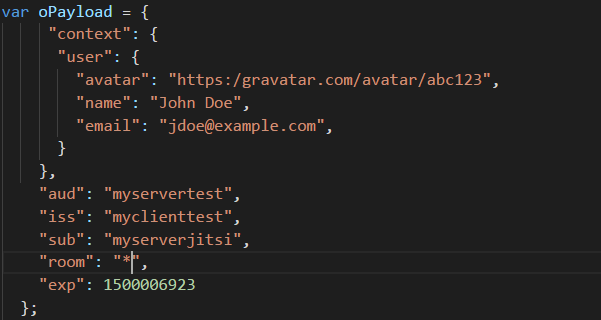
When I try to connect to a room using a url like this : 'https://myserverjitsi/roomname?jwt="eyJhbGc..."', I get these errors

So jitsi-meet is trying to get my avatar, that's a good news (even if it is not succeedding). But what should be configured so that I don't get a passwordRequired error?
jean-ben-guigui
on 12 Dec 2017
You don't need to use JWT authentication, just filling the caller part of it should be enough to configure the local display name and avatar.
saghul
on 12 Dec 2017
Indeed that works, my bad.
Thanks a lot!
jean-ben-guigui
on 12 Dec 2017
I'm glad it works for you now! Time to close this then!
saghul
on 12 Dec 2017
@saghul @jean-ben-guigui The payload write in the js code or Java???
 TangXT
on 18 Apr 2018
TangXT
on 18 Apr 2018
I tried to use loadUrlObject to pass an object containing my user name to display but it's not working.Display Name is not displayed at Other clien's. My loadUrlObject code is as below
@{@"config": @{
@"startWithAudioMuted": @NO,
@"startWithVideoMuted": @NO
},
@"url": @"https://meet.jit.si/test123",
@"context": @{
@"user": @{
@"avatar": @"https:/gravatar.com/avatar/abc123",
@"name": @"Tanim",
@"email": @"tanim.cse.[email protected]",
@"id": @"1"
},
@"group": @"test123"
},
@"aud": @"jitsi",
@"iss": @"my_client",
@"sub": @"meet.jit.si",
@"room": @"test123",
@"exp": @1500006923
Can anyone please help with sample loadUrlObject call?
 MehediHasanTanim
on 30 Sep 2018
MehediHasanTanim
on 30 Sep 2018
Hello! If I remember correctly, the loaUrlObject should be like this:
{@"jwt": @"yourjwt"}
To make your jwt, just go on this site https://jwt.io/. There is a section _Debugger_ that you can use to encode a payload (the payload should be as described here https://github.com/jitsi/lib-jitsi-meet/blob/master/doc/tokens.md#payload).
Now if you want to create a jwt dynamically, you can take a look at the _Libraries for Token Signing/Verification_ section.
jean-ben-guigui
on 30 Sep 2018
Thanks for your reply.It works now. Another problem is display name is displayed at web client which we set from iOS client but iOS client does not display any display name set from web/iOS client at call UI.It only shows display name when any connectivity issue occurs
MehediHasanTanim
on 1 Oct 2018
IOS client just don't display display names at all. It is not yet implemented as far as I know.
jean-ben-guigui
on 1 Oct 2018
Thanks for your reply
MehediHasanTanim
on 1 Oct 2018
Hi i need another help. is it possible to programmatically hangup a call from iOS client? i don't find any method in iOS jitsi-meet sdk documentation.
MehediHasanTanim
on 19 Dec 2018
You can load a null URL.
saghul
on 19 Dec 2018
Or dismiss/pop the
Hi i need another help. is it possible to programmatically hangup a call from iOS client? i don't find any method in iOS jitsi-meet sdk documentation.
As @saghul said, or dismiss/pop your view controller which contains call view.
 rptwsthi
on 17 Jan 2019
rptwsthi
on 17 Jan 2019
looks like someone has added it now....
let options = JitsiMeetConferenceOptions.fromBuilder { builder in
builder.userinfo?.displayName = ""
builder.userinfo?.displayName = URL(string: "")
}
 deya-eldeen
on 10 Nov 2019
deya-eldeen
on 10 Nov 2019
Related issues
 niallmurphy-ie
·
45Comments
niallmurphy-ie
·
45Comments
 svtagt
·
55Comments
svtagt
·
55Comments
 JpTiger
·
50Comments
JpTiger
·
50Comments
 rscastil
·
44Comments
rscastil
·
44Comments
 carotkut94
·
45Comments
carotkut94
·
45Comments