Jitsi-meet: iOS: XCode 11 Build Failed
Description
I have a project that works great with Jitsi for a long time. But, when I upgraded XCode to version 11, I needed to build Jitsi for the latest version of the Swift lang in order to avoid the error _"module compiled with swift 5.0.1 cannot be imported by the swift 5.1 compiler"_.
Jitsi integration through Cocoapods still causes error "module compiled with swift 5.0.1 cannot be imported by the swift 5.1 compiler", so I used manual installation:
https://github.com/jitsi/jitsi-meet/tree/master/ios#builduing-it-yourself
but it causes the following error:
=== BUILD TARGET JitsiMeet OF PROJECT sdk WITH CONFIGURATION Release ===

Resolving target dependencies
Target 'Pods-JitsiMeet' of project 'Pods' was rejected as an implicit dependency for 'libPods-JitsiMeet.a' because it doesn't contain platform 'macosx' in its supported platforms 'iphonesimulator, iphoneos'

Check dependencies
target 'JitsiMeet' has bitcode enabled (ENABLE_BITCODE = YES), but it is not supported for the 'macosx' platform
Building for Mac Catalyst is not supported by the legacy build system.

** ARCHIVE FAILED **
Prior to Xcode 11 update, manual installation did not cause such errors
Steps to reproduce
- npm i
- cd ./ios
- pod install
- cd ..
- open ios/jitsi-meet.xcworkspace in Xcode and hit play button
- xcodebuild -workspace ios/jitsi-meet.xcworkspace -scheme JitsiMeet -destination='generic/platform=iOS' -configuration Release archive
 svtagt
All 55 comments
Thanks for the report, we'll look into this.
 saghul
on 23 Sep 2019
saghul
on 23 Sep 2019
This was discussed in #4305 , that issue was closed, but the problem was not solved.
Adding -sdk iphoneos to the build command really avoids the build-time error, but produces a runtime error.
Unable to run on emulator, for example. And when launched on a physical device, such an assembly will lead to the following error:
dyld: Library not loaded: @ rpath / JitsiMeet.framework / JitsiMeet
   Referenced from: /var/containers/Bundle/Application/7816BF2D-59EF-4ECD-9C57-489316FBFE58/DrSmart.app/DrSmart
   Reason: image not found
(lldb)
I have the same issue. I opened the issue on the jitsi forums (https://community.jitsi.org/t/xcode-11-and-swift-5-1-sdk-error/19915) and I try to open the issue in the releases repo (https://github.com/jitsi/jitsi-meet-ios-sdk-releases/releases) but Is not possible 😞
Any solution on the horizon ?
 JavierLaguna
on 26 Sep 2019
JavierLaguna
on 26 Sep 2019
We'll fix it, but it may take a bit. Why do you need Xcode 11 specifically? If you are using Swift UI then yeah, sorry, I have no good answer right now, but if not, you should be able to build your app with Xcode 10 until this is fixed.
saghul
on 26 Sep 2019
My iphone for testing is on iOS13 and dont let me compile from Xcode10 :(
JavierLaguna
on 26 Sep 2019
You can copy the Xcode 11 DeviceSupport files into Xcode 10.2 so it works on iOS 13: https://gist.github.com/steipete/d9b44d8e9f341e81414e86d7ff8fb62d
saghul
on 26 Sep 2019
You can copy the Xcode 11 DeviceSupport files into Xcode 10.2 so it works on iOS 13: https://gist.github.com/steipete/d9b44d8e9f341e81414e86d7ff8fb62d
Thank you very much for the answer! I will try this method :)
Please tell me, will this method only work with XCode 10.2 or with 10.3 too?
svtagt
on 26 Sep 2019
It should work with any Xcode 10.
saghul
on 26 Sep 2019
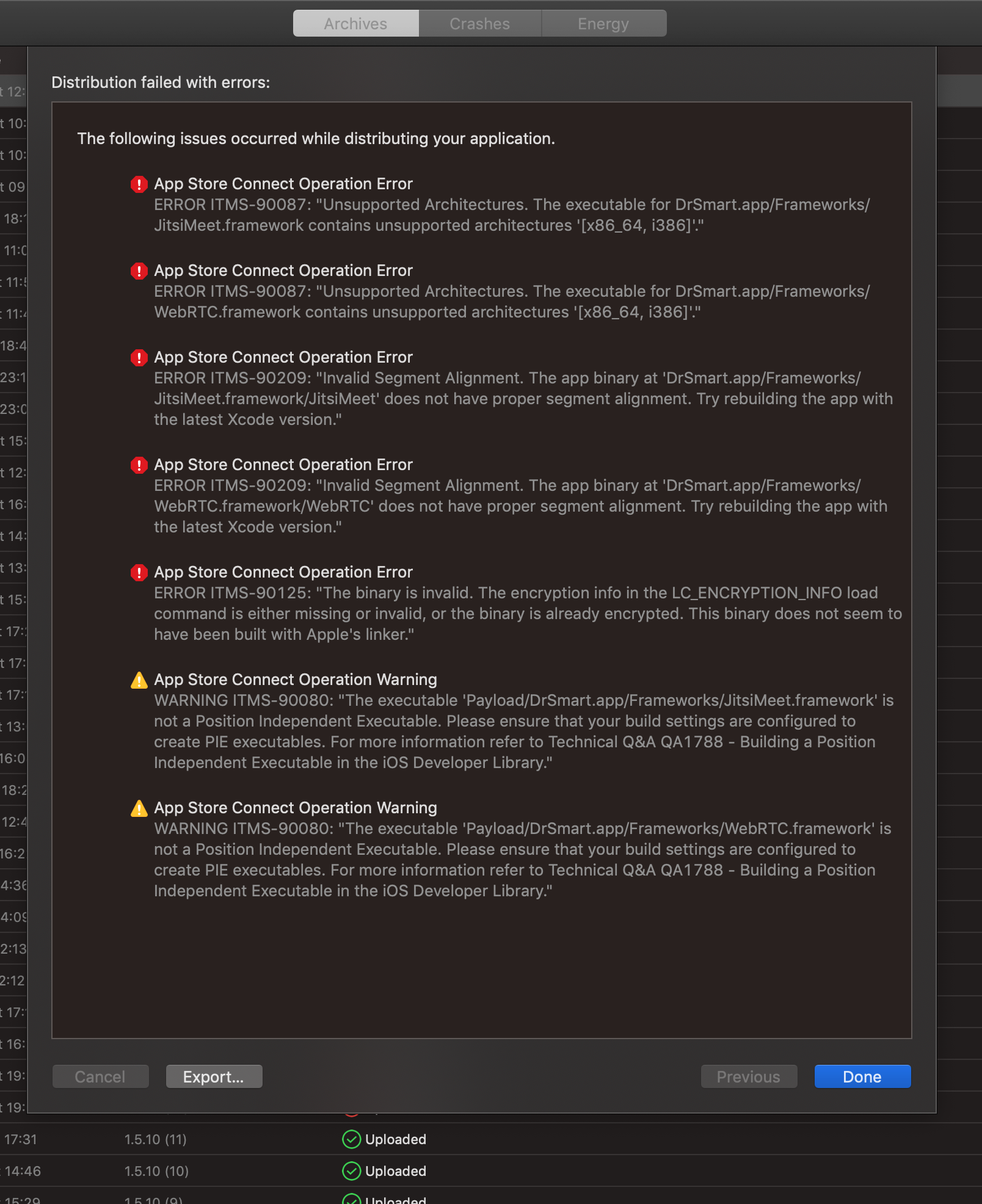
Thanks for the advice, this method helped, but I still can’t upload the version to TestFlight due to the following errors:
svtagt
on 27 Sep 2019
I have never experienced those errors, sorry. I don’t know how to help you.
Are you using JitsiMeet. framework from CocoaPods or are you building your own?
saghul
on 27 Sep 2019
I have the same issue if I try to send my app to TestFlight, Im using CocoaPods. How is the state of the fix ?
JavierLaguna
on 1 Oct 2019
What exact errors are you getting? I don’t see how compiling with one Xcode version or another has any importance in TestFlight acceptance.
Apple has recently made some important changes, unrelated to the Xcode update.
saghul
on 1 Oct 2019
I have never experienced those errors, sorry. I don’t know how to help you.
Are you using JitsiMeet. framework from CocoaPods or are you building your own?
I am building jitsi manually :)
svtagt
on 2 Oct 2019
I just pushed a build to TestFlight with no issues (using Xcode 10.2) so I don't know what that alignment issue on WebRTC is about, sorry.
saghul
on 2 Oct 2019
Getting issue Could not find module 'JitsiMeet' for target 'x86_64-apple-ios-simulator'; found: arm64 when building the Jitsi framework manually using Xcode 11. Has anyone faced the same issue?
 jeetkapadia
on 3 Oct 2019
jeetkapadia
on 3 Oct 2019
Have you read this issue? Building with Xcode 11 does not work at the moment.
saghul
on 3 Oct 2019
Okay, so I have figured it out on how to build the Jitsi framework in XCode 11. You need to remove the bitcode script present in build phases and then select the iPhone and iPad checkboxes in Development info. Also set the bitcode enabled setting to NO in build settings to false. After doing these steps you need to run the xcode command for building the Jisti SDK which is
xcodebuild -workspace ios/jitsi-meet.xcworkspace -scheme JitsiMeet -destination='generic/platform=iOS' -configuration Release archive
The Problem with the above fix is it works with actual devices but I am unable to run my Project in simulator and I get the issue
Could not find module 'JitsiMeet' for target 'x86_64-apple-ios-simulator'; found: arm64 when building the Jitsi framework manually using Xcode 11
jeetkapadia
on 3 Oct 2019
Folks, please try compiling the SDK with https://github.com/jitsi/jitsi-meet/pull/4707 applied. That should work.
@jeetkapadia Youi don't need to touch bitcode related settings if you use the script in ios/scripts/release-sdk.sh
saghul
on 3 Oct 2019
Hi, @saghul Thank you for your help. With the above help I was able to build the Jitsi Framework without any changes that I mentioned above. The only issue I am facing now is
Could not find module 'JitsiMeet' for target 'x86_64-apple-ios-simulator, i386-apple-ios-simulator'; found: arm64, x86_64, armv7-apple-ios, arm64-apple-ios, arm, armv7 when building the Jitsi framework manually using Xcode 11.
Let me know if you have an update on the same.
jeetkapadia
on 3 Oct 2019
Undo your changes, apply the linked PR and build the SDK using the provided script.
saghul
on 3 Oct 2019
@saghul thanks for your prompt response. I have taken the fresh new pull request and then executed the command for building the Jitsi Framework manually i.e the below command
xcodebuild -workspace ios/jitsi-meet.xcworkspace -scheme JitsiMeet -destination='generic/platform=iOS' -configuration Release archive
After adding that build framework into my Project, I am facing the above error which is
Could not find module 'JitsiMeet' for target 'x86_64-apple-ios-simulator, i386-apple-ios-simulator'; found: arm64, x86_64, armv7-apple-ios, arm64-apple-ios, arm, armv7 when building the Jitsi framework manually using Xcode 11.
Do let me know if I am doing anything wrong.
Thanks
jeetkapadia
on 3 Oct 2019
Does your app declare support for Catalyst? (Is macOS ticked as supported?)
Before making this PR I made a sample project (which I'll push once this lands) which uses the Xcode 11 built frameworks and got no issues :-/
saghul
on 3 Oct 2019
https://github.com/jitsi/jitsi-meet/pull/4707 landed. Please try using master and let us know if you run into issues.
saghul
on 4 Oct 2019
The Fix suggested by @djorkaeffalexandre creates the Jitsi framework with architecture files for x86_64 and i386. And now I not able to get the other architectures like armv7, armv7s, arm64 and arm64e because they are missing which were previously built. Can you please suggest me some workaround for the same.
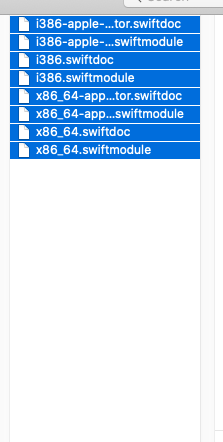
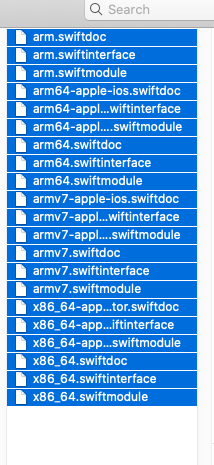
As you can see the first image is of new fix that was released today and the second image is of yesterday's fix. Some file architectures such as armv7, arm7s, arm64, and arm64e are missing in the first screenshot and i386 architecture files are missing in second screenshot.
jeetkapadia
on 4 Oct 2019
Can you capture the output of the xcodebuild command and paste it somewhere?
saghul
on 4 Oct 2019
I have updated my command. Basically all the architecture files should get generated when we run the release command. With the new fix, the previous architectures are not getting generated. Let me know if you need anything.
Also, I am very thankful for your prompt response.
jeetkapadia
on 4 Oct 2019
I don't know what to say, really.
Here is what I'm doing:
$ xcodebuild -workspace ios/jitsi-meet.xcworkspace -scheme JitsiMeet -destination='generic/platform=iOS' -configuration Release archive
Then, check:
$ lipo -info ios/sdk/JitsiMeet.framework/JitsiMeet
Architectures in the fat file: ios/sdk/JitsiMeet.framework/JitsiMeet are: i386 x86_64 armv7 arm64
So how exactly are you building the SDK? What command are you adjusting? You shouldn't need to change anything on a checkout from master.
saghul
on 4 Oct 2019
It seems that the issue continue con version 2.3.1 from cocoa
JavierLaguna
on 8 Oct 2019
@JavierLaguna That's correct. You'll need to build it yourself until we publish 2.4.0.
saghul
on 8 Oct 2019
And the 2.4.0 have an approximate release date on the horizon ?
JavierLaguna
on 8 Oct 2019
I don't have one at the moment, but I'm going to try and push so we release it soon.
saghul
on 8 Oct 2019
Okay, Thank you so much @saghul
JavierLaguna
on 9 Oct 2019
You are using a very old API, please check the documentation at io/README.md
saghul
on 10 Oct 2019
Looks like works XCode 11 with CocoaPods 2.4.0 version! Awesome! Thanks!
JavierLaguna
on 21 Oct 2019
Good to hear!
saghul
on 21 Oct 2019
Receiving this error using XCode 11.2 (11B52) with CocoaPods Version 1.5.2.
Module compiled with Swift 5.1 cannot be imported by the Swift 5.1.2 compiler: /App-Path/Pods/JitsiMeetSDK/Frameworks/JitsiMeet.framework/Modules/JitsiMeet.swiftmodule/arm64.swiftmodule
I was on XCode 10.3 ... but upgraded to XCode 11.2 because I installed the 2.4 version of the JitsiMeet iOS SDK ... due to receiving compiling error - Needed swift 5.1 and couldn't use swift 5.0 ... Now upgrading to XCode 11 causes issues because I'm apparently on the latest version of swift.
What steps can I take to resolve this @saghul ? Recompile JitsiMeetSDK using 5.1.2 version of Swift?
 nmcwilli
on 5 Nov 2019
nmcwilli
on 5 Nov 2019
The latest Jitsi Meet SDK was compiled with Xcode 11.1. If you need a newer version you are going to need to compile it yourself.
We plan to release a new version soon, which will use Xcode 11.2.
saghul
on 6 Nov 2019
Thanks for the clarification. I recompiled and it works great now.
nmcwilli
on 6 Nov 2019
Thanks for the advice, this method helped, but I still can’t upload the version to TestFlight due to the following errors:
Add this run script in Build phases it will help you.
# Type a script or drag a script file from your workspace to insert its path.
APP_PATH="${TARGET_BUILD_DIR}/${WRAPPER_NAME}"

# This script loops through the frameworks embedded in the application and
# removes unused architectures.
find "$APP_PATH" -name '*.framework' -type d | while read -r FRAMEWORK
do
FRAMEWORK_EXECUTABLE_NAME=$(defaults read "$FRAMEWORK/Info.plist" CFBundleExecutable)
FRAMEWORK_EXECUTABLE_PATH="$FRAMEWORK/$FRAMEWORK_EXECUTABLE_NAME"
echo "Executable is $FRAMEWORK_EXECUTABLE_PATH"

EXTRACTED_ARCHS=()

for ARCH in $ARCHS
do
echo "Extracting $ARCH from $FRAMEWORK_EXECUTABLE_NAME"
lipo -extract "$ARCH" "$FRAMEWORK_EXECUTABLE_PATH" -o "$FRAMEWORK_EXECUTABLE_PATH-$ARCH"
EXTRACTED_ARCHS+=("$FRAMEWORK_EXECUTABLE_PATH-$ARCH")
done

echo "Merging extracted architectures: ${ARCHS}"
lipo -o "$FRAMEWORK_EXECUTABLE_PATH-merged" -create "${EXTRACTED_ARCHS[@]}"
rm "${EXTRACTED_ARCHS[@]}"

echo "Replacing original executable with thinned version"
rm "$FRAMEWORK_EXECUTABLE_PATH"
mv "$FRAMEWORK_EXECUTABLE_PATH-merged" "$FRAMEWORK_EXECUTABLE_PATH"

done
 PinkeshGjr
on 21 Nov 2019
PinkeshGjr
on 21 Nov 2019
@saghul I tried archiving the build in Xcode 11.3.1 and installed the sdk using CocoaPods ver 2.5.2 but the it says Could not find module 'JitsiMeet' for target 'armv7-apple-ios'; found: x86_64-apple-ios-simulator, arm64, x86_64, arm64-apple-ios. How to resolve this and archive successfully.
 anugrah-sebastian
on 14 Apr 2020
anugrah-sebastian
on 14 Apr 2020
We don't support ARM v7 anymore. iOS 10 was the last version to support it, you must raise your deployment version to at least iOS 11.
saghul
on 14 Apr 2020
@saghul Thanks it worked fine. One unusual thing happening is I am not able to join the conference in iOS 12.4.3 but in iOS 13.3 it is working fine. Url used is generated from our backend servers using Jitsi. Other thing is demo Jitsi link ie meet.jit.si/test123 is working fine for both iOS versions
anugrah-sebastian
on 15 Apr 2020
I had the same issue, Are there any solution? Maybe run this version with xcode 10.3? Does anyone know any version that doesn't have this problem?
 rgmez
on 15 Apr 2020
rgmez
on 15 Apr 2020
Here's a complete reference of how it built for me.
XCode 11.5.1 , Cocapods : 1.9.3 , Jitsi-Meet (master) : HEAD @ 7dfff1b4552c6522280326a50ae3ac7324df953e
- Cloning the core repo and make it functional
git clone https://github.com/jitsi/jitsi-meet.git
cd jitsi-meet
npm install
(cd ios; pod install)
run jitsi-meet.xcworkspace in Xcode , should compile and run fine
- Making build
Make any custom changes to the repo(if required), then build using following
mkdir -p ManuallyBuiltFrameworks
xcodebuild -workspace ios/jitsi-meet.xcworkspace -scheme JitsiMeet -destination='generic/platform=iOS' -configuration Release archive

# Copy the built frameworks. the -H option is needed to follow the initial symlink.
cp -RH ios/sdk/JitsiMeet.framework node_modules/react-native-webrtc/ios/WebRTC.framework ./ManuallyBuiltFrameworks

# Strip bitcode - reducing file size by almost a gigabyte.
cd ManuallyBuiltFrameworks/
xcrun bitcode_strip -r JitsiMeet.framework/JitsiMeet -o JitsiMeet.framework/JitsiMeet
xcrun bitcode_strip -r WebRTC.framework/WebRTC -o WebRTC.framework/WebRTC
The generated frameworks would be under ROOT_DIRECTORY/ManuallyBuiltFrameworks
Note : Bitcode is disabled
- Integrate in Project
Drag drop the files in your XCode project.
Under General > Frameworks , make sure JitsiMeet and WebRTC is "Embed & Sign"

Add the following script in :: BuildPhases > RunScript (make sure Run Script is at last)
# Type a script or drag a script file from your workspace to insert its path.
APP_PATH="${TARGET_BUILD_DIR}/${WRAPPER_NAME}"

# This script loops through the frameworks embedded in the application and
# removes unused architectures.
find "$APP_PATH" -name 'JitsiMeet.framework' -type d | while read -r FRAMEWORK
do
FRAMEWORK_EXECUTABLE_NAME=$(defaults read "$FRAMEWORK/Info.plist" CFBundleExecutable)
FRAMEWORK_EXECUTABLE_PATH="$FRAMEWORK/$FRAMEWORK_EXECUTABLE_NAME"
echo "Executable is $FRAMEWORK_EXECUTABLE_PATH"

EXTRACTED_ARCHS=()

for ARCH in $ARCHS
do
echo "Extracting $ARCH from $FRAMEWORK_EXECUTABLE_NAME"
lipo -extract "$ARCH" "$FRAMEWORK_EXECUTABLE_PATH" -o "$FRAMEWORK_EXECUTABLE_PATH-$ARCH"
EXTRACTED_ARCHS+=("$FRAMEWORK_EXECUTABLE_PATH-$ARCH")
done

echo "Merging extracted architectures: ${ARCHS}"
lipo -o "$FRAMEWORK_EXECUTABLE_PATH-merged" -create "${EXTRACTED_ARCHS[@]}"
rm "${EXTRACTED_ARCHS[@]}"

echo "Replacing original executable with thinned version"
rm "$FRAMEWORK_EXECUTABLE_PATH"
mv "$FRAMEWORK_EXECUTABLE_PATH-merged" "$FRAMEWORK_EXECUTABLE_PATH"

done

# This script loops through the frameworks embedded in the application and
# removes unused architectures.
find "$APP_PATH" -name 'WebRTC.framework' -type d | while read -r FRAMEWORK
do
FRAMEWORK_EXECUTABLE_NAME=$(defaults read "$FRAMEWORK/Info.plist" CFBundleExecutable)
FRAMEWORK_EXECUTABLE_PATH="$FRAMEWORK/$FRAMEWORK_EXECUTABLE_NAME"
echo "Executable is $FRAMEWORK_EXECUTABLE_PATH"

EXTRACTED_ARCHS=()

for ARCH in $ARCHS
do
echo "Extracting $ARCH from $FRAMEWORK_EXECUTABLE_NAME"
lipo -extract "$ARCH" "$FRAMEWORK_EXECUTABLE_PATH" -o "$FRAMEWORK_EXECUTABLE_PATH-$ARCH"
EXTRACTED_ARCHS+=("$FRAMEWORK_EXECUTABLE_PATH-$ARCH")
done

echo "Merging extracted architectures: ${ARCHS}"
lipo -o "$FRAMEWORK_EXECUTABLE_PATH-merged" -create "${EXTRACTED_ARCHS[@]}"
rm "${EXTRACTED_ARCHS[@]}"

echo "Replacing original executable with thinned version"
rm "$FRAMEWORK_EXECUTABLE_PATH"
mv "$FRAMEWORK_EXECUTABLE_PATH-merged" "$FRAMEWORK_EXECUTABLE_PATH"

done
 sashi01
on 29 Jun 2020
sashi01
on 29 Jun 2020
It seems that the issue continue in xcode 11.7.
 thanhsoncun
on 11 Sep 2020
thanhsoncun
on 11 Sep 2020
@thanhsoncun What issue specifically?
saghul
on 11 Sep 2020
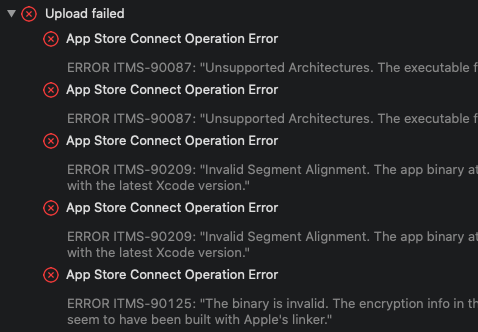
I can’t upload the version to TestFlight due to the following errors (Jitsi build by xcode 11.7):
thanhsoncun
on 11 Sep 2020
You seem to not have stripped the simulator architectures before upload.
saghul
on 11 Sep 2020
@saghul how can i do that, i tried to do everything in this post. Please help me
thanhsoncun
on 11 Sep 2020
You can use the script in your build phase: https://github.com/jitsi/jitsi-meet/blob/master/ios/scripts/fixup-frameworks.sh
saghul
on 11 Sep 2020
You can use the script in your build phase: https://github.com/jitsi/jitsi-meet/blob/master/ios/scripts/fixup-frameworks.sh
this works perfectly for me, thanks.
 DanielnetoDotCom
on 11 Sep 2020
DanielnetoDotCom
on 11 Sep 2020
@saghul thank so much.
thanhsoncun
on 14 Sep 2020
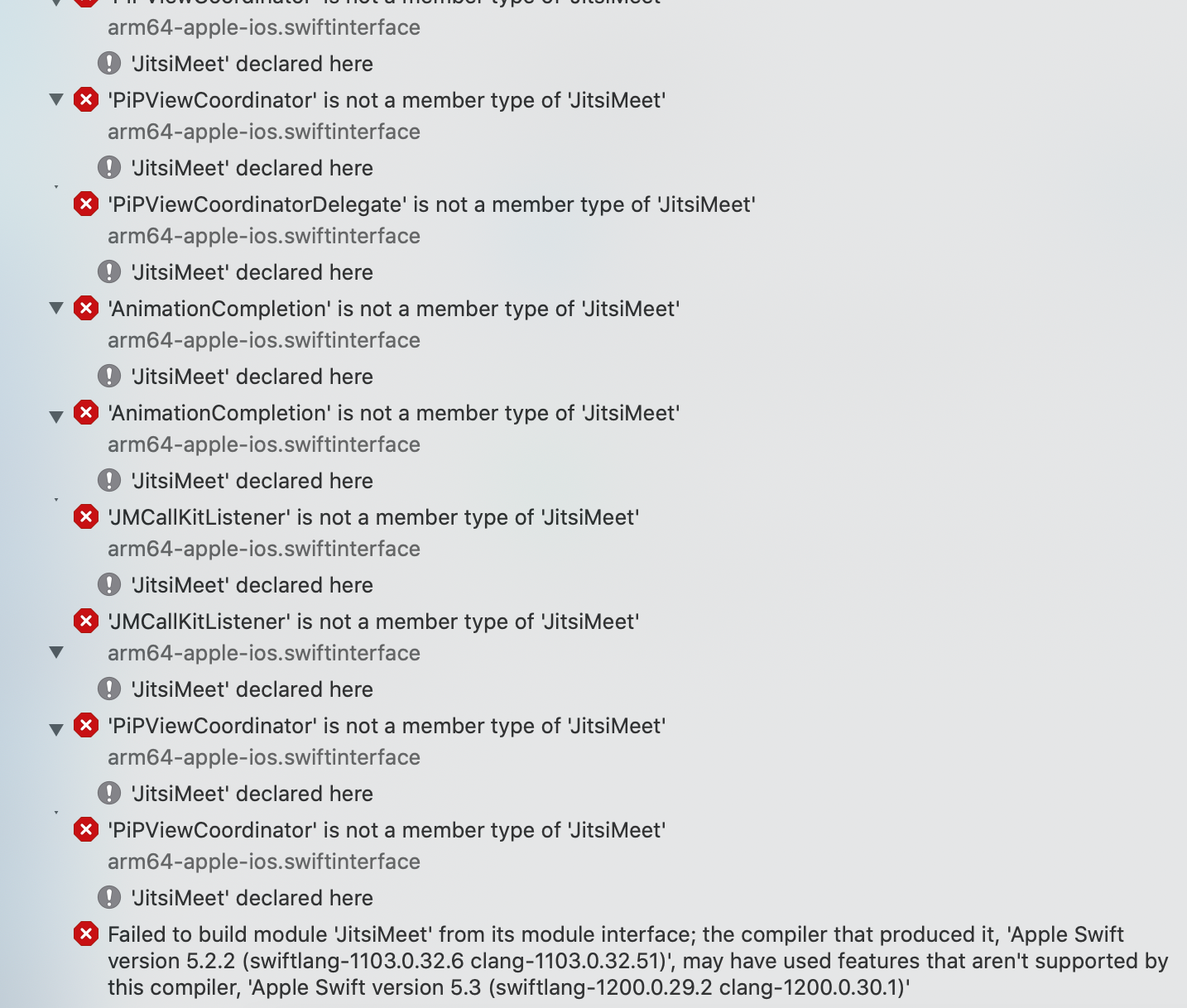
I am facing this issue after Xcode update version 12.0. Anyone help me please.
 zaidkhan290
on 18 Sep 2020
zaidkhan290
on 18 Sep 2020
Getting error : -> Could not find module 'JitsiMeet' for target 'armv7-apple-ios'; found: arm64, arm64-apple-ios
For xcode 11.7
Version 2.10.0
 Arohi-Sharma
on 19 Sep 2020
Arohi-Sharma
on 19 Sep 2020
You can use the script in your build phase: https://github.com/jitsi/jitsi-meet/blob/master/ios/scripts/fixup-frameworks.sh
this works perfectly for me, thanks.
sorry, how do you run that script? Thanks
 jonathanjairortizm
on 20 Sep 2020
jonathanjairortizm
on 20 Sep 2020
Related issues
 jidanni
·
3Comments
jidanni
·
3Comments
 mdosch
·
3Comments
mdosch
·
3Comments
 wilddylan
·
4Comments
wilddylan
·
4Comments
 TechnologyClassroom
·
3Comments
TechnologyClassroom
·
3Comments
 dantman
·
3Comments
dantman
·
3Comments
Most helpful comment
Thanks for the report, we'll look into this.