Jitsi-meet: com.facebook.react.common.JavascriptException: Can't find variable: Symbol
I changed some of the code, in react native like Toolbox buttons, as I needed only 3 button and some stuff like that and tested the app by running react-native run-android and it worked fine, then I generated the aar file for sdk and other dependencies by following the instructions given at https://github.com/jitsi/jitsi-meet/tree/master/android and did aseembleRelease and publish using gradle and hosted those at https://github.com/carotkut94/maven_repository/tree/master/jitsi-maven-repository/releases, everything compiled fine and when I ran the app on the device, getting this error.
But everything works fine when I run it using react-native run-android
08-23 20:15:55.765 23319-23364/com.death.demo E/ReactNativeJS: Can't find variable: Symbol
08-23 20:15:55.773 23319-23364/com.death.demo E/ReactNativeJS: Module AppRegistry is not a registered callable module (calling runApplication)
08-23 20:15:55.800 23319-23365/com.death.demo E/AndroidRuntime: FATAL EXCEPTION: mqt_native_modules
Process: com.death.demo, PID: 23319
com.facebook.react.common.JavascriptException: Can't find variable: Symbol, stack:
d@2:768
n@2:409
t@2:262
d@2:768
n@2:409
t@2:262
d@2:768
n@2:409
t@2:262
d@2:768
n@2:409
t@2:262
d@2:768
n@2:409
t@2:262
d@2:768
n@2:409
t@2:262
d@2:768
n@2:409
t@2:262
d@2:768
n@2:409
t@2:262
d@2:768
n@2:409
t@2:262
d@2:768
n@2:409
t@2:262
d@2:768
n@2:339
t@2:262
global code@1241:8
    at com.facebook.react.modules.core.ExceptionsManagerModule.showOrThrowError(ExceptionsManagerModule.java:54)
    at com.facebook.react.modules.core.ExceptionsManagerModule.reportFatalException(ExceptionsManagerModule.java:38)
    at java.lang.reflect.Method.invoke(Native Method)
    at com.facebook.react.bridge.JavaMethodWrapper.invoke(JavaMethodWrapper.java:372)
    at com.facebook.react.bridge.JavaModuleWrapper.invoke(JavaModuleWrapper.java:160)
    at com.facebook.react.bridge.queue.NativeRunnable.run(Native Method)
    at android.os.Handler.handleCallback(Handler.java:790)
    at android.os.Handler.dispatchMessage(Handler.java:99)
    at com.facebook.react.bridge.queue.MessageQueueThreadHandler.dispatchMessage(MessageQueueThreadHandler.java:29)
    at android.os.Looper.loop(Looper.java:164)
    at com.facebook.react.bridge.queue.MessageQueueThreadImpl$3.run(MessageQueueThreadImpl.java:192)
    at java.lang.Thread.run(Thread.java:764)
 carotkut94
All 45 comments
We recently switched to a new version of JSCore on Android. It has native JS support for Symbol so it obsoleted our Symbol polyfill. However, we haven't published any Maven artifacts so you have to do most of that yourself right now. Is it possible that your Maven artifacts don't use the new version of JSCore that we use in the source code? That would explain the missing Symbol.
 lyubomir
on 27 Aug 2018
lyubomir
on 27 Aug 2018
@lyubomir
So, what I need to do in order to resolve it? what do you mean by
you have to do most of that yourself right now
Currently I am building most of the stuff on my own, I have built all the dependent dependencies, like react-native-background-timer, react-native-fast-image etc., and sdk as well and hosted all of them to my maven repository.
So how can I resolve it?
carotkut94
on 28 Aug 2018
@lyubomir
when you are providing the latest documentation?, I am also facing the same issue.
 sandeepjangir
on 29 Aug 2018
sandeepjangir
on 29 Aug 2018
@carotkut94, the dependency of interest here is jsc-android. So when I get to building and publishing the new Jitsi Meet SDK for Android version, I'll be making sure that there is a Maven artifact for jsc-android available. If there is no such publicly available Maven artifact, I'll publish it in jitsi-maven-repository like react-native-bacgkround-timer and the rest of the react-native-XXX dependencies that we're publishing as Maven artifacts. I'll also check the jitsi-meet-sdk.pom file to ensure that it's listing that jsc-android Maven artifact as a dependency. If things still don't work, then... I'll have to investigate the specific problem further and find a solution I guess.
@sandy5487, I was talking about publishing newer Maven artifacts because we've done quite a lot of development since last time I published such. Are you talking you need updated documentation on how to build and publish artifacts? I haven't performed the publishing yet so I don't even know right now whether there'll be changes necessary to the documentation.
lyubomir
on 29 Aug 2018
@lyubomir
When can I expect that jsc-android to be released as maven-artifact?
carotkut94
on 30 Aug 2018
Hi @lyubomir
I am also talking about publishing newer Maven artifacts; I and my team are still waiting for this update.
Hope you are doing it soon :)
Thanks
sandeepjangir
on 2 Sep 2018
@sandeepjangir have you found any solution?
@lyubomir I tried to use the jsc library which was present in node_modules, but that does not work to.
Any updates on maven artifacts?
carotkut94
on 4 Sep 2018
Hi @lyubomir
any updates on this, as we are unable to proceed further, without building it.
and @damencho , @saghul can you also look into this matter for quick solution;
Thanks in advance
carotkut94
on 9 Sep 2018
Hi @carotkut94, @sandeepjangir
Add jsc-android in your project to resolve this issue.
Please refer below URL:
https://github.com/react-community/jsc-android-buildscripts
 patidars
on 10 Sep 2018
patidars
on 10 Sep 2018
@patidars When i build the jitsi android sdk and other react native libraries, i observed that they are already having a packaged aar version of jsc named(android-jsc-r224109.aar) and i created all maven artifacts, and removed the direct dependency of jsc from the jits-sdk pom, and react-native pom, and instead I loaded the aar file of jsc in the android studio project directly, the error changed, but still was related to Symbol, stating expecting something else, but got Symbol.
carotkut94
on 10 Sep 2018
@patidars @saghul @lyubomir @sandeepjangir @damencho, in order to resolve the issue of JSC I pulled the aar file of jsc from node modules, named android-jsc-r224109.aar and added that into the project and that somehow resolved the error of cannot find Symbo, but now i get an error stating
09-10 16:00:01.949 12577-12621/com.death.jitsitest E/unknown:ReactNative: Invariant Violation:
Element type is invalid: expected a string (for built-in components) or a class/function (for composite
components) but got: symbol.

This error is located at:
    in n
    in t
    in o
    in t
    in RCTView
    in RCTView
    in t, stack:
Et@51:14237
It@51:14850
<unknown>@51:21804
<unknown>@51:21866
C@51:28858
b@51:28789
P@51:29147
q@51:47194
ee@51:47795
ne@51:48869
le@51:51343
enqueueSetState@51:25514
setState@17:1347
<unknown>@697:2077
<unknown>@72:1480
p@72:1510
f@72:320
value@697:2054
<unknown>@1070:597
<unknown>@72:629
<unknown>@72:657
b@34:628
w@34:992
callImmediates@34:3173
value@29:2679
<unknown>@29:1261
value@29:2507
value@29:1231
@carotkut94 @sandeepjangir @patidars have you find any solution on this
 shijilsmb
on 3 Oct 2018
shijilsmb
on 3 Oct 2018
Hi, @shijilsmb I am also facing the same issue and tired of contact in the community;
Don't know why they are not responding to this particular issue but they are active on other issues, I am very much disappointed by this from the community member.
@lyubomir Please update its been more than a month and we are still waiting
sandeepjangir
on 3 Oct 2018
Hi @lyubomir ,
I am also facing the exact issue of what @carotkut94 mentioned 'Can't find variable: Symbol'.
It may be because of the android Maven artifacts does not used the new version of JSCore .
How can we resolve this issue?
When can we expect that the jsc-android to be released as maven-artifact ??
Please reply.
 smbteam1
on 3 Oct 2018
smbteam1
on 3 Oct 2018
Hey everyone,
Sorry about the trouble this is causing. We have a lot going on at the moment and haven't managed to get around this yet. We'll try to get it sorted ASAP, but I can't promise when that will be.
If someone already knows how to tackle this, a PR would be more than welcome, please @ me and I'll be happy to review.
 saghul
on 3 Oct 2018
saghul
on 3 Oct 2018
@saghul ,
Thanks for your reply. But we cannot move forward with out an update on this, so we are are waiting for the next maven-artifact release with the latest jsc-android.
Meanwhile could you please let us know which stable release of the SDK version has used in the current maven-artifact,
https://github.com/jitsi/jitsi-maven-repository/raw/master/releases
smbteam1
on 3 Oct 2018
@saghul @lyubomir
please, provide us the update on it ASAP, as this problem has stopped us and we cannot move further on the development of this module in our app.
carotkut94
on 3 Oct 2018
Hi @saghul
We are still waiting for the update from the community as we cannot release our product without the latest maven-artifact.
sandeepjangir
on 7 Oct 2018
It appears to me that @lyubomir was right on the money: the jscore dependency was missing. I have created a PR that adds this dependency to the SDK project.
The PR also includes updated instructions on how to build a local Maven repository that will contain the fix.
Note that you'll first need pull in the one-line change from my PR, before building (and using) such a local repository.
 guusdk
on 8 Nov 2018
guusdk
on 8 Nov 2018
@patidars @saghul @lyubomir @sandeepjangir @damencho, in order to resolve the issue of JSC I pulled the aar file of jsc from node modules, named android-jsc-r224109.aar and added that into the project and that somehow resolved the error of cannot find Symbo, but now i get an error stating
09-10 16:00:01.949 12577-12621/com.death.jitsitest E/unknown:ReactNative: Invariant Violation:
Element type is invalid: expected a string (for built-in components) or a class/function (for composite
components) but got: symbol.

This error is located at:
    in n
    in t
    in o
    in t
    in RCTView
    in RCTView
    in t, stack:
Et@51:14237
It@51:14850
<unknown>@51:21804
<unknown>@51:21866
C@51:28858
b@51:28789
P@51:29147
q@51:47194
ee@51:47795
ne@51:48869
le@51:51343
enqueueSetState@51:25514
setState@17:1347
<unknown>@697:2077
<unknown>@72:1480
p@72:1510
f@72:320
value@697:2054
<unknown>@1070:597
<unknown>@72:629
<unknown>@72:657
b@34:628
w@34:992
callImmediates@34:3173
value@29:2679
<unknown>@29:1261
value@29:2507
value@29:1231
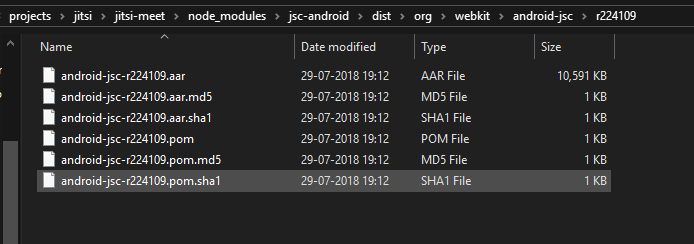
@guusdk I pulled the binary of JSC from the node_modules and imported that into the project but, still facing this issue.
this is the jsc I took from the node_modules
carotkut94
on 9 Nov 2018
@carotkut94 Looks like the JSC integration worked but you now face some other related problem. Is that a Release build? Can you do a Debug one so we get a meaningful traceback?
saghul
on 9 Nov 2018
@saghul This log was from the debug build.
carotkut94
on 9 Nov 2018
@saghul any update or something that i can look upon for this?
carotkut94
on 12 Nov 2018
I just landed https://github.com/jitsi/jitsi-meet/commit/fb6949f7baf0693bf975608e4f78c29d4bdcf4cc which should clarify how to this while I add jsc-android to the Maven repo.
saghul
on 29 Nov 2018
@saghul Are we good to go now? or will it take some time more.
carotkut94
on 30 Nov 2018
@carotkut94 We should be good now. It will just become a bit easier soon, but it should be working now.
saghul
on 30 Nov 2018
@saghul I will give it a hit, and let see where it takes us.
carotkut94
on 30 Nov 2018
@saghul I cloned the project and did npm install, and then ran "react-native run-android" I get the error "Unable to load scripts from assets index.android.bundle" previously this command was working fine and default jitsi app gets installed and worked without any error.
Previously the Metro Bundler used to bundle those js assets is something changed in that to? or do i have to manually put the index.android.bundle to android assets folder?
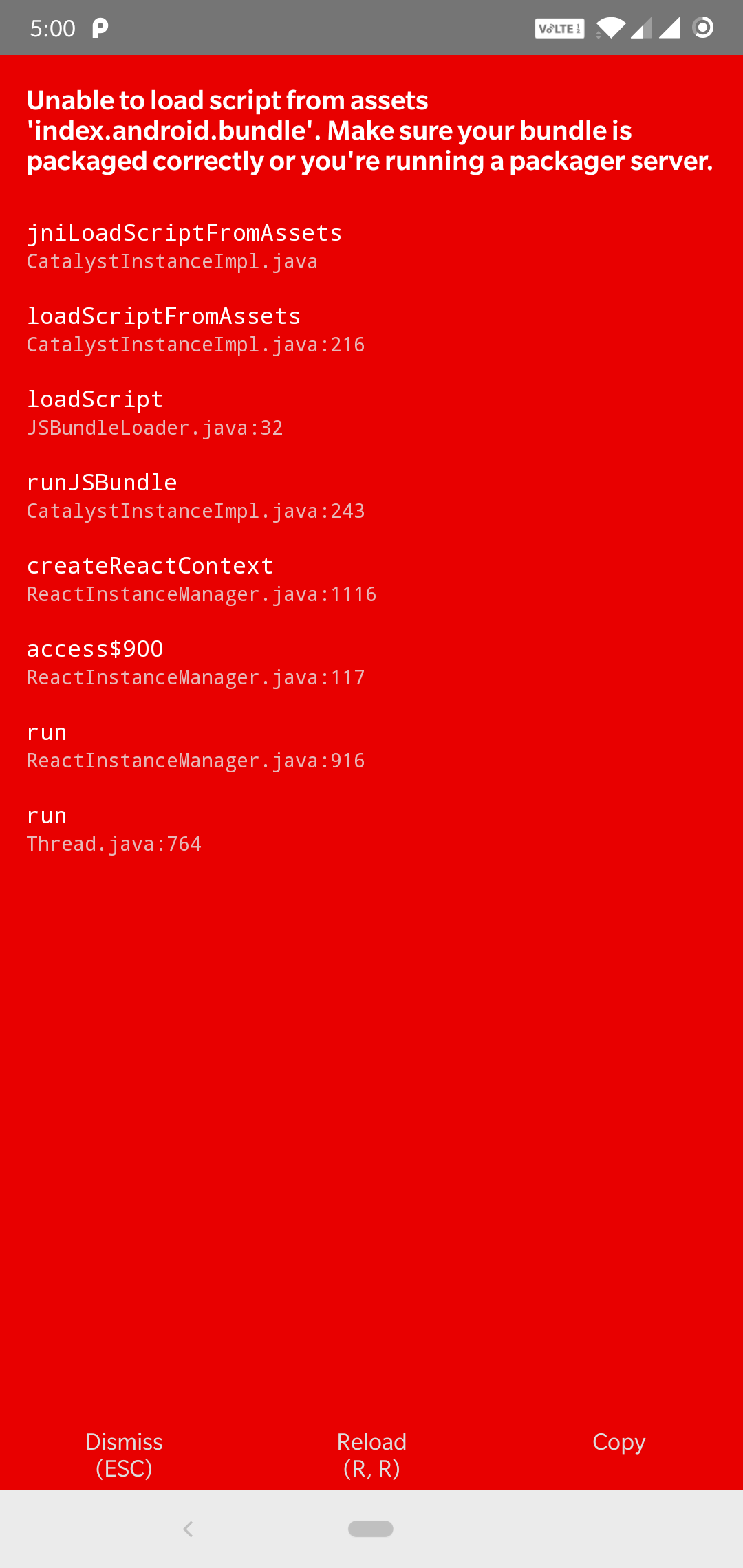
and the metro builder does nothing now
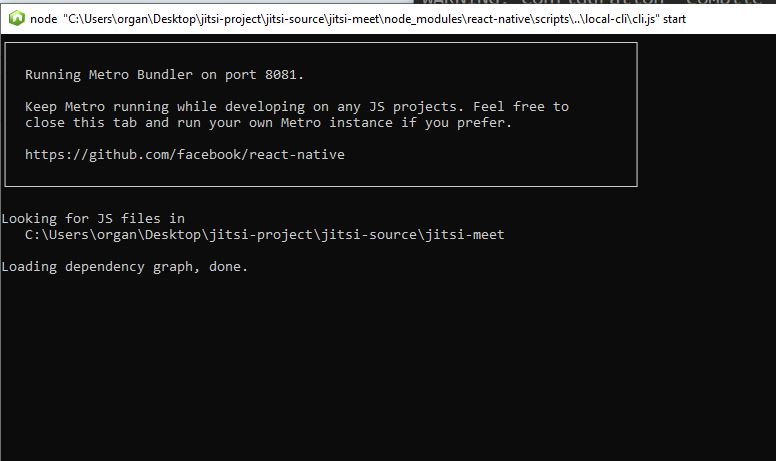
carotkut94
on 30 Nov 2018
That should just work. However, we don't support building on Windows. If it used to work then that's more of an accident than something intentional.
saghul
on 30 Nov 2018
Same result on MacOS 10.14
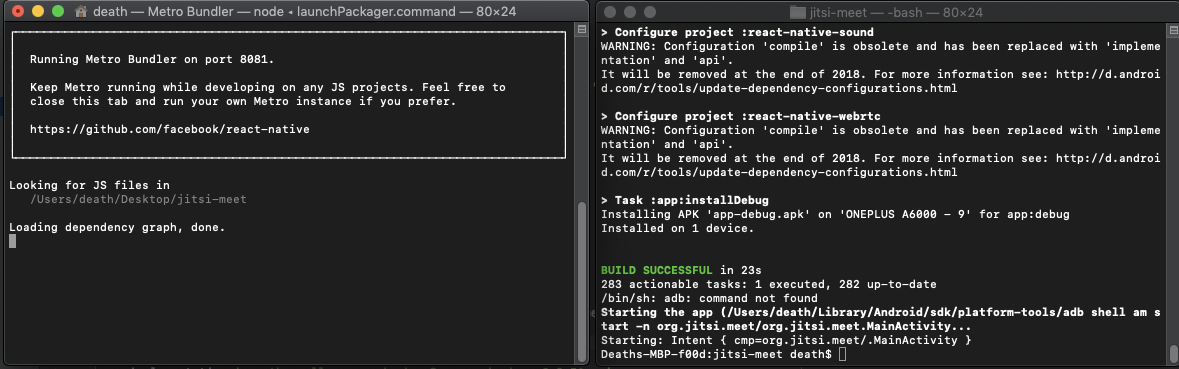
every command works fine and returns no error, apk is deployed on the device, but metro bundler does not bundles up required file "index.android.bundle"
carotkut94
on 3 Dec 2018
I don't know what to tell you 😢 I just built it myslf with no issues.
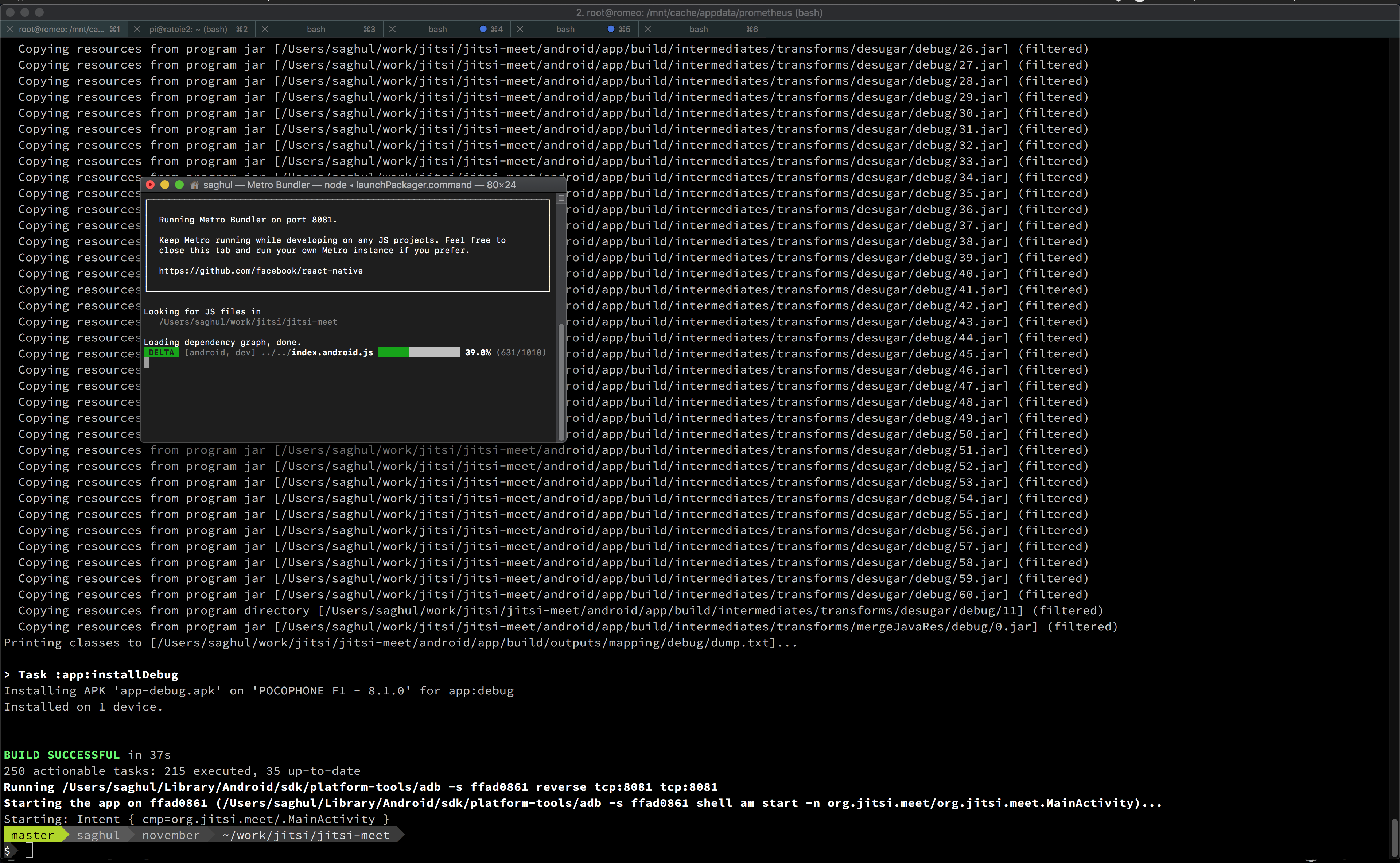
Your output is a bit different than mine. Did you make any changes? Are you running the latest code?
saghul
on 3 Dec 2018
No I changed nothing, i just took a clone of the repository(like 30 minutes ago) and did npm install and then ran "react-native run-android". My output should be like yours as its metro bundler duty to bundle up and serve the index.android.bundle but in my case it just tell, "Loading dependency graph, done" and ever goes beyond that
carotkut94
on 3 Dec 2018
Sorry, I have no idea why that can be :-( Can you try to close and start the Jitsi Meet app in the phone?
saghul
on 3 Dec 2018
Did that to, still that red screen with that error, because it does not have that bundle for android.
carotkut94
on 3 Dec 2018
What android version is that device running? IIRC old (4.x I think) devices needed some special tweaking...
saghul
on 3 Dec 2018
The device on which I am running the app is One Plus 6 with Android Pie 9.0
carotkut94
on 3 Dec 2018
Does a "hello world" react native app work? you can create one with react-native init Foo
saghul
on 3 Dec 2018
I tried it to, create a hello world app using react-native init myApp and ran it, but got the same issue, on both platforms
carotkut94
on 3 Dec 2018
Then the mistery continues :-/ I have never seen such a problem, sorry I cannot help you further.
saghul
on 3 Dec 2018
This issue has been automatically marked as stale because it has not had recent activity. It will be closed if no further activity occurs. Thank you for your contributions.
![stale[bot] picture](https://avatars3.githubusercontent.com/in/1724?v=4&s=40) stale[bot]
on 3 Mar 2019
stale[bot]
on 3 Mar 2019
Please disable stale bot, if I see a closed issue I assume I will find a solution in the comment...
 bmarty
on 29 Mar 2019
bmarty
on 29 Mar 2019
FWIW, this is solved, no change needed on your side.
saghul
on 29 Mar 2019
Ok, thanks. I'm still having this issue, but I suppose there is something bad/missing on my side then
bmarty
on 29 Mar 2019
Since you are building the SDK yourself, what commit are you using? The change was made latetively recently.
saghul
on 1 Apr 2019
I'm not building the SDK anymore, but use jitsi repo (as described here https://github.com/jitsi/jitsi-meet/tree/master/android), and I do not have the issue anymore.
bmarty
on 1 Apr 2019
Related issues
 xiefangzhenz
·
3Comments
xiefangzhenz
·
3Comments
 galvaniccoffee
·
3Comments
galvaniccoffee
·
3Comments
 532910
·
3Comments
532910
·
3Comments
 dantman
·
3Comments
dantman
·
3Comments
 eceforge
·
3Comments
eceforge
·
3Comments
Most helpful comment
Hey everyone,
Sorry about the trouble this is causing. We have a lot going on at the moment and haven't managed to get around this yet. We'll try to get it sorted ASAP, but I can't promise when that will be.
If someone already knows how to tackle this, a PR would be more than welcome, please @ me and I'll be happy to review.