Jetpack: Publicize Custom Message Doesn't Show In Twitter
I didn't see this issue in the related issues so I decided to post. I hope I'm posting in the correct spot! I was trying to replicate an issue a customer had with displaying the Custom Message in Twitter from the new Publicize feature in Gutenberg. The custom message was not showing, but the rest of the post was posted to Twitter successfully.
Steps to reproduce
- Starting at URL: https://gwentestsite733700880.wordpress.com/2018/12/09/test-post-title/
^ This is my test site. I installed the theme TheFour and used my Premium Plan. - Create a new blog post using Gutenberg editor.
- Add in featured image and content. Clicked JP Icon to publicize and connected my Twitter account (@Nvision_WebDev) and put in my custom message.
Clicked "Publish" post - looked everything over (JP was connected - message was in), confirmed Publishing.

Checked my twitter account to see post. Post was posted with my featured image and snippet of content but no custom message.

What I expected:
I expected to see the Custom Message from Publicize in my Twitter Post.
What happened instead:
The post was posted without the Custom Message.
Browser / OS version:
Mozilla Firefox Quantum - Windows 10
Temporary Workaround
Steps shared (h/t: @marutim):
- Write the post.
- Write the custom message for Twitter.
- Hit the "Save draft" and wait for a confirmation message that the draft has been saved.
- Hit the "Publish" button only after seeing confirmation that the draft is saved.
 gwensmithx
All 72 comments
Thanks a bunch for the report! We'll be looking into it.
 tyxla
on 12 Dec 2018
tyxla
on 12 Dec 2018
Hey @tyxla ! Is there an update we should share with the user on this one?
 xpurichan
on 20 Dec 2018
xpurichan
on 20 Dec 2018
Hey @xpurichan! Unfortunately, I haven't been able to reproduce this one. Perhaps we can ask whether the user can reproduce it consistently?
tyxla
on 21 Dec 2018
Hmm I was also able to reproduce this on my test site simple site.
Will ask the user if they notice it happening consistently.
 sdixon194
on 21 Dec 2018
sdixon194
on 21 Dec 2018
The user confirmed that they have tested this twice and both times produced the same result.
Adding a screenshot from the user for further context: http://cld.wthms.co/sdRnnR
 selectedselections
on 21 Dec 2018
selectedselections
on 21 Dec 2018
I've been able to reproduce when featured image is specified.
Seems like this is a race condition again, @enejb since you recently worked on a similar fix, do you have an idea why this might be happening?
tyxla
on 27 Dec 2018
Just adding a note here as the original request popped back up in 1630181-zen . Putting it back on hold for now.
 GeoJunkie
on 28 Dec 2018
GeoJunkie
on 28 Dec 2018
Hey @tyxla ! I was just checking to see if we had an update for the user?
 mishivee
on 11 Jan 2019
mishivee
on 11 Jan 2019
Howdy! I am no longer working on this, but perhaps someone from the Gutenpack team could have a look..
cc @ockham @simison @lezama
tyxla
on 14 Jan 2019
I'm adding a note because the request popped up again in 1630181-zen . Are there any updates? Putting it back on hold for now.
 ccwalburn
on 18 Jan 2019
ccwalburn
on 18 Jan 2019
@ccwalburn no updates yet.
 simison
on 19 Jan 2019
simison
on 19 Jan 2019
Let me know if when there is an update do that I can inform the user 1630181-zen. I've closed their ticket but would like to let them know when we have a fix.
 KristinaKay
on 4 Feb 2019
KristinaKay
on 4 Feb 2019
I have another user with this issue. 1858342-zen. Are there any updates?
ccwalburn
on 6 Mar 2019
New report on 1814025-zen.
They also had some interesting input to share based on some testing they have performed:
On Mac (latest version) in Safari (latest version):
Does not work: Snow Day #photoaday
Does work: Snow Day #photoaday :)
On iPhone iOS (latest version) in Safari (latest version):
Does work: Snow Day #photoaday
Does work: Snow Day #photoaday :)
xpurichan
on 8 Mar 2019
Should we remove the Premium Plan, Theme: TheFour text in the title of this report? The issue doesn't appear to be isolated to a single plan or theme.
xpurichan
on 8 Mar 2019
I can't seem to reproduce on my end right now. If I add a custom message to the Publicize custom message input field, that custom message is used on Twitter. Here is an example with a Jetpack site:
https://twitter.com/jeherve/status/1110503318672101376
And here is an example with a WordPress.com simple site:

In both cases, I was using the Block editor.
Noting that I tested with Twitter, as per the issue's title. I did not test with LinkedIn. I am mentioning this since one of the screenshots above was a LinkedIn profile page.
@gwensmithx Can you still reproduce the issue? If so, could you make a screenshot of your custom Publicize message before you publish your post?
Thank you!
 jeherve
on 29 Mar 2019
jeherve
on 29 Mar 2019
Another report of this in #1959253-zen
I asked for specifics on the posts that were affected, because the behavior was also inconsistent on the user's site.
 tijosh
on 13 Apr 2019
tijosh
on 13 Apr 2019
Another report of a user encountering this where instead of the excerpt text appearing, it was just the title of the post with the link to the post.
The instance where the user published post with excerpt text and it shows just the title of the post and link to the post - https://cld.wthms.co/OSb7Tp
Excerpt text from post here - https://cld.wthms.co/8cPIxp
Follow up ticket 1986944-zen
 susanjanec
on 25 Apr 2019
susanjanec
on 25 Apr 2019
@susanjanec Do you happen to know which editor the author used to publish their post?
jeherve
on 25 Apr 2019
@jeherve They were using the Block editor.
susanjanec
on 25 Apr 2019
Sorry, I should have been clearer with my question. Was this the editor in Calypso or the one in wp-admin?
jeherve
on 26 Apr 2019
No worries @jeherve. It was the editor in Calypso.
susanjanec
on 28 Apr 2019
I am afraid I still can't reproduce, whether I am on a Jetpack site or a WordPress.com site, and when using the Calypso editor, the Block Editor in Calypso, or the block editor in wp-admin. If I specify a custom message in the Publicize settings, it is used by Facebook and Twitter instead of the post title.
I must consequently be doing something different from the post authors above. It would be good to know if:
- They post right away or schedule.
- They saved their drafts and came back to it later, or open the editor, wrote and published right away.
- At what point in the process they entered the custom Publicize message.
Basically, having a detailed series of steps I could reproduce would be super helpful!
jeherve
on 30 Apr 2019
Hi @jeherve they mentioned that they copy and paste the text they want to show on Twitter and Facebook in the excerpt text box before they publish the post.
They didn't mention if the post was published right away or it was scheduled. The user never replied back at this point, so it may not be an issue anymore?
susanjanec
on 2 May 2019
The user never replied back at this point, so it may not be an issue anymore?
That's possible. Let me know if you ever get a reply with more info!
Thanks!
jeherve
on 2 May 2019
@jeherve User followed up to the questions above on how they post:
I’ve tried all options you listed in the first two bullets
(- They post right away or schedule.
- They saved their drafts and came back to it later, or open the editor, wrote and published right away.)
over time but in this latest instance I posted right away and I added my custom publicise message at the point I was ready to publish the post and just before hitting publish.
Hope this helps. The user is also willing to do more testing or screenshare if needed:
2127118-zen
 jenlynnemc
on 22 Jun 2019
jenlynnemc
on 22 Jun 2019
@jenlynnemc Thank you!
To try to summarize all this:
- Conversation happened in 1630181-zen and then 2127118-zen
- Blog ID 13900285 (wpcom simple)
- Publicize connected to LinkedIn and Twitter
- They added the message right before publishing
- They can reproduce (not a one-time thing)
- Gutenberg is enabled for that site, i.e. when they load wordpress.com/post/ they'll be redirected to wordpress.com/block-editor/post for that site (Gutenberg in Calypso).
- Looking at the email exchanges, we have not asked them where they write their posts, though. They have 2 main options:
- in wp-admin (
https://site.wordpress.com/wp-admin/post-new.php) - in Calypso (
https://wordpress.com/block-editor/post/site.wordpress.com)
- in wp-admin (
Could you ask them about this? Could you also ask them to try adding the custom message, then hitting "Save draft", and only once they get the confirmation that the draft is saved, hit the Publish button.
This should allow us to narrow things down and hopefully reproduce the problem.
Thank you!
jeherve
on 24 Jun 2019
I've sent those questions to the user in 2127118-zen. :)
 SiobhyB
on 24 Jun 2019
SiobhyB
on 24 Jun 2019
@jeherve These steps helped user get everything working:
- Open Calypso: https://wordpress.com/block-editor/post/
- Add the custom message.
- Hit the "Save draft" and wait for a confirmation message that the draft has been saved.
- Hit the "Publish" button only after seeing confirmation that the draft is saved.
However, now user has another concern/issue and I am not sure if this is the expected behaviour.
They have published a new post and when they now share it in social media, they get these results:
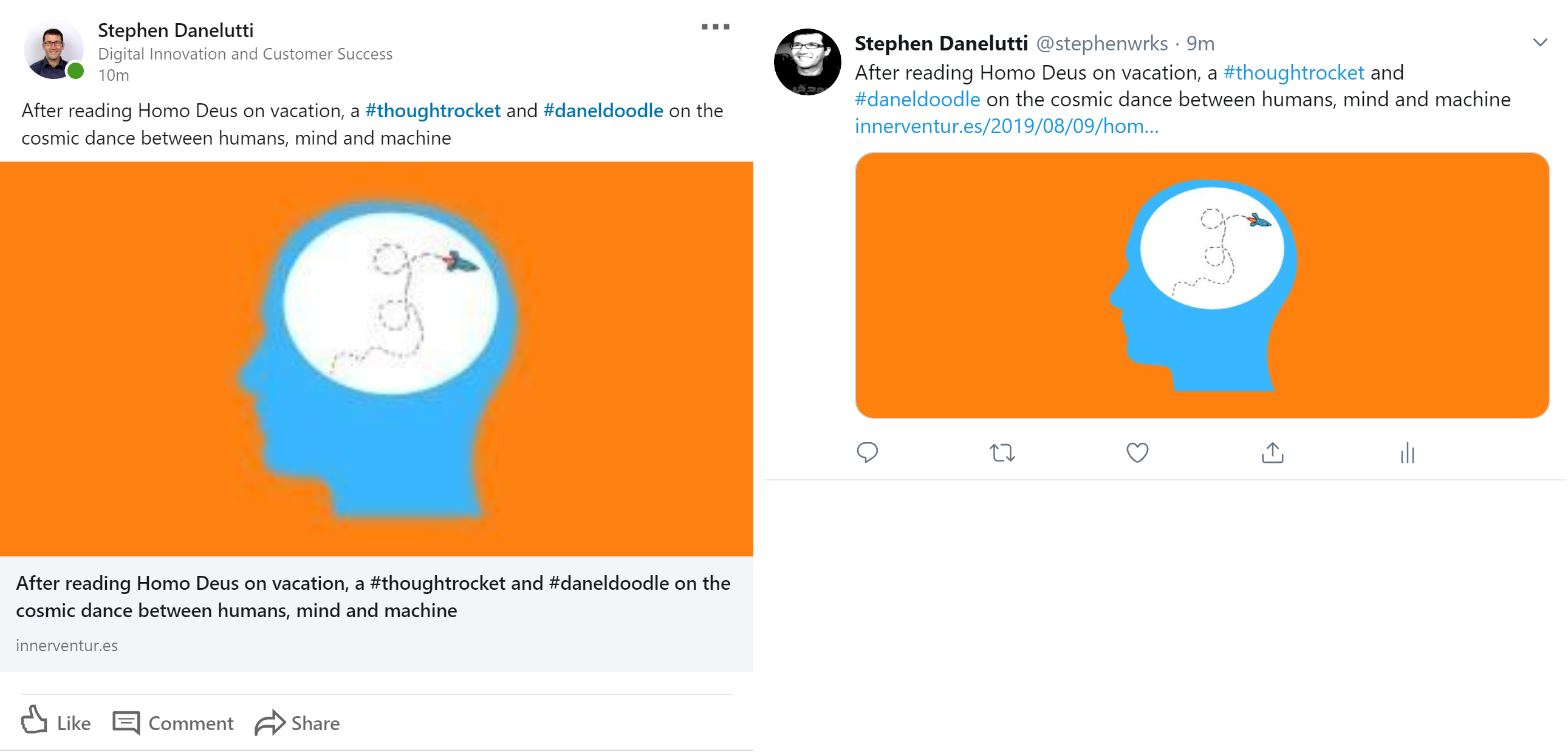
Linkedin on the left and Twitter on the right. The custom message is now replacing the post title when shared. Shouldn't this be added as an addition when sharing?
Post Title: HOMO DEUS AND THE COSMIC DANCE BETWEEN HUMANS, MIND AND MACHINE
Social media title: After reading Homo Deus on vacation, a #thoughtrocket and #daneldoodle on the cosmic dance between humans, mind and machine
Twitter shows it a bit better, but Linkedin just repeats it two times and removes the Title altogether.
Replied to the user at the moment in 2276299-zen
 kriskorn
on 15 Aug 2019
kriskorn
on 15 Aug 2019
@kriskorn This is indeed the intended behaviour, but I think it may be nice to reconsider it for LinkedIn. I agree that it may be best to have the post title displayed below the image, so as to avoid duplicates. I don't know if that's something in our control since the post preview is created by LinkedIn, but it would be something worth looking into. I would recommend that you create a new issue to keep track of this.
jeherve
on 20 Aug 2019
This bug came up in 2394642-zen (that's the followup email for our 8441736-hc chat).
__TL;DR__—I thought this was plan related, but I'm probably wrong.
They have the Personal plan. All of their posts so far have been affected by this bug. I temporarily added the Premium plan for them and had them test this through the re-Publicize feature, and it worked as expected. I then removed the plan and we tried again from the editor on a new test post, and it posted only the title.
That led me to think it was plan-related, but now I see that's probably because we re-Publicized.
_Next:_ I've asked the user to test saving the draft and then publishing and letting us know what happens.
 jessestu
on 2 Oct 2019
jessestu
on 2 Oct 2019
Another report of this issue here: 2394642-zen
The following steps helped the user:
- Write the post.
- Write the custom message for Twitter.
- Hit the "Save draft" and wait for a confirmation message that the draft has been saved.
- Hit the "Publish" button only after seeing confirmation that the draft is saved.
 marutim
on 10 Oct 2019
marutim
on 10 Oct 2019
@marutim Are you able to reproduce consistently? Is that site running the most recent version of Jetpack? Does it still happen when all other plugins are deactivated?
jeherve
on 10 Oct 2019
@jeherve Thanks for the reply! I'll let @marutim share any updates they experienced. They were replying to the user reporting success from my comment above. The user was successful with the workaround to save the draft before publishing. Here was my experience of your questions when working with the customer:
Are you able to reproduce consistently?
I was not able to repro on my own site. I tested it on a WPcom Premium plan.
Is that site running the most recent version of Jetpack?
The user has WPcom Personal plan, so I'm assuming it's not applicable.
Does it still happen when all other plugins are deactivated?
N/A given WPcom simple site.
Thank you for your work on this!
jessestu
on 10 Oct 2019
Another report of this in 13763129-hc, Premium plan WPCOM site.
 lakellie
on 30 Oct 2019
lakellie
on 30 Oct 2019
Hashtags and @mentions not showing when post is shared via publicize via Premium .com site. 16640602-hc
 wpericam
on 13 Nov 2019
wpericam
on 13 Nov 2019
Another report of this here: 17952949-hc, WP.com Premium plan
 thabotswana
on 16 Jan 2020
thabotswana
on 16 Jan 2020
It came up in 2620263-zen, WPCOM Premium plan.
I was also able to replicate on a WPCOM Free plan, but Marutim's workaround worked for me.
Noting that this appears to be a duplicate or related to #14097? (cc @jeherve for triaging or another look at the issue)
 formosattic
on 19 Jan 2020
formosattic
on 19 Jan 2020
Also reported 15640131-hc Premium plan, I am sending the above workaround now.
 mikeicode
on 24 Jan 2020
mikeicode
on 24 Jan 2020
Another case of this in #2690023-zen. What we know:
- They add a custom message for the tweet before publishing the post for the first time
- Yet, only the post title, link, and image are tweeted out.
- They use block editor on a WPcom simple site
- They delete the tweet, switch the post back to draft, disconnect and re-connect twitter, then publish the post again which works to show the custom message
- Happens repeatedly for every new post they publish
Asking them to try the workaround mentioned above and get back to us.
 donalirl
on 5 Feb 2020
donalirl
on 5 Feb 2020
Noting I've reproduced this on my own .com site. Custom social media was set but not included on Twitter. The title tweeted out instead. I'll test again on my own site with the workaround listed above to see what happens.
I was troubleshooting with this user:
https://en.forums.wordpress.com/topic/jetpack-custom-message-does-not-appear-in-twitter/#post-3420054
 supernovia
on 5 Feb 2020
supernovia
on 5 Feb 2020
@marutim Are you able to reproduce consistently? Is that site running the most recent version of Jetpack? Does it still happen when all other plugins are deactivated?
@jeherve I have a feeling that this does not work in the latest versions of jetpack
 amgmbs
on 6 Feb 2020
amgmbs
on 6 Feb 2020
I have a feeling that this does not work in the latest versions of jetpack
I have not tested it, but if it fails it may be because of the issue outlined in https://github.com/Automattic/jetpack/issues/14269#issuecomment-580004663
jeherve
on 10 Feb 2020
I have a similar report in 2720674-zen where the user reported the following:
Every time I try to share a new post on Facebook it ignores the custom message and publish the whole post on my FB page. On twitter it also ignores the custom message, tweeting the post's title instead
I've asked the user to reset their Twitter and Facebook connections, and then take screenshots of the custom message, and resulting posts on social media so we can investigate further.
 pauljacobson
on 17 Feb 2020
pauljacobson
on 17 Feb 2020
Another case reported in 18752548-hc. And I could reproduce it on my test simple sites. I shared the workaround @marutim shared here for now.
 hacchism
on 18 Feb 2020
hacchism
on 18 Feb 2020
2720674-zen (update).
Copied from - https://github.com/Automattic/jetpack/issues/11752#issuecomment-586913063
Every time I try to share a new post on Facebook it ignores the custom message and publish the whole post on my FB page. On twitter it also ignores the custom message, tweeting the post's title instead
I've asked the user to reset their Twitter and Facebook connections, and then take screenshots of the custom message, and resulting posts on social media so we can investigate further.
The user has provided some screenshots in their ticket to show what happens.
I've also shared @marutim suggestion
 rickmgithub
on 20 Feb 2020
rickmgithub
on 20 Feb 2020
Another instance reported today. Provided workaround.
internal: 18976687-hc
 JoshuaGoode
on 26 Feb 2020
tijosh
on 4 Mar 2020
JoshuaGoode
on 26 Feb 2020
tijosh
on 4 Mar 2020
Another report: 19114957-hc
Follow up: 2765834-zen
The workaround worked on my test site (simple site). Shared it to the user too.
 rinazrina
on 5 Mar 2020
rinazrina
on 5 Mar 2020
Similar report here: 2780932-zen
- Using the classic interface to publish the new post.
- Workaround for saving the post as a draft before publishing helped.
The user wants to know, how to fix this going further.
 pranali333
on 13 Mar 2020
pranali333
on 13 Mar 2020
We got another report in 2827362-zen
- Block editor, both on mobile and computer
- Suggested the save-as-draft workaround, and mentioned the share option in Calypso.
 sophiegyo
on 29 Mar 2020
sophiegyo
on 29 Mar 2020
I think - am not sure - that we got another report in 20089073-hc.
I shared the save-as-draft workaround.
sophiegyo
on 8 Apr 2020
Another report in 3001543-zen
 happychait
on 2 Jun 2020
happychait
on 2 Jun 2020
Maybe related, for WP.com simple sites
https://github.com/Automattic/wp-calypso/issues/38697
Workaround suggested helped.
 nagpai
on 20 Jun 2020
nagpai
on 20 Jun 2020
Another report in 3140379-zen
 naxoc
on 20 Jul 2020
naxoc
on 20 Jul 2020
Another case in 3156201-zen. Provided the workaround above.
 zdenys
on 21 Jul 2020
zdenys
on 21 Jul 2020
Another case 3187472-zen. Provided the workaround above.
zdenys
on 5 Aug 2020
related or possibly duplicate issues:
38697-gh-jetpack
https://github.com/Automattic/jetpack/issues/14269
https://github.com/Automattic/wp-calypso/issues/34002
45114-core <-- likely the root issue
 cathymcbride
on 6 Aug 2020
cathymcbride
on 6 Aug 2020
Another one 3310080-zen
 wynwin
on 12 Sep 2020
wynwin
on 12 Sep 2020
User reported this in 3329751-zen, provided a screen recording detailing how the custom message was not used when creating a new post.
Shared the workaround mentioned in this thread.
 smithkyle45
on 19 Sep 2020
smithkyle45
on 19 Sep 2020
I found another case here: https://github.com/Automattic/jetpack/issues/11752
supernovia
on 2 Oct 2020
@supernovia 11752 is this issue? Copy/paste error?
cathymcbride
on 5 Oct 2020
I found another one here 3390585-zen. Provided the workaround above.
 dani-elo
on 10 Oct 2020
dani-elo
on 10 Oct 2020
Also reported by a site owner in the WordPress.com forums, I gave the suggested workaround
 jerrysarcastic
on 20 Oct 2020
jerrysarcastic
on 20 Oct 2020
I also experience this issue from time to time. It just uses the title of the post instead of my custom message. I will try the workaround to first save a draft with the custom message, waiting for confirmation and then publish the post.
I'm not that experienced with Github but i see some
 Joennuh
on 20 Oct 2020
Joennuh
on 20 Oct 2020
Do I need to do something special to report it or is this message enough?
This is enough, thank you! You'll get notifications as soon as we start working on this.
jeherve
on 20 Oct 2020
Do I need to do something special to report it or is this message enough?
This is enough, thank you! You'll get notifications as soon as we start working on this.
Thanks! I hope it will be fixed soon. It would save some time for performing the additional steps.
Joennuh
on 20 Oct 2020
anther report here 13852883-hc
 carladoria
on 6 Nov 2020
carladoria
on 6 Nov 2020
Also, 23579779-hc
 ezebecke
on 11 Nov 2020
ezebecke
on 11 Nov 2020
Another issue 3480592-hc
 syedshaon
on 12 Nov 2020
syedshaon
on 12 Nov 2020
Noting that https://core.trac.wordpress.org/changeset/49172 may help us fix this, at least for our users who use WordPress 5.6. Maybe we can update Sync accordingly.
Related: #14269
jeherve
on 16 Nov 2020
This should be fixed in Jetpack 9.2 for folks using WordPress 5.6 (scheduled to be released on December 8): #17838
jeherve
on 23 Nov 2020
Related issues
 beaulebens
·
3Comments
tyxla
·
3Comments
beaulebens
·
3Comments
tyxla
·
3Comments
 crunnells
·
3Comments
crunnells
·
3Comments
 kevinlisota
·
3Comments
kevinlisota
·
3Comments
 abidhahmed
·
3Comments
abidhahmed
·
3Comments
Most helpful comment
This should be fixed in Jetpack 9.2 for folks using WordPress 5.6 (scheduled to be released on December 8): #17838