Handsontable: Rows are misaligned on the column/row resize demo
Rows are misaligned by 1px (ht_clone_left copy is higher by 1px) in this demo: http://handsontable.com/demo/column_resize.html

 jansiegel
All 30 comments
Maybe this 1px misalignment is related. After scroll multiple lines cells are lower so fixed area has a 1px spare frame under.

 AMBudnik
on 10 Apr 2015
AMBudnik
on 10 Apr 2015
Here's the 'cleared' version, when we add colHeaders: true we'll get a scroll like in this issue https://github.com/handsontable/handsontable/issues/2361
AMBudnik
on 10 Apr 2015
Related https://github.com/handsontable/handsontable/issues/1780 and maybe something to do with https://github.com/handsontable/handsontable/issues/2218
AMBudnik
on 22 Apr 2015
We could take a look at https://github.com/handsontable/handsontable/issues/2407 also.
AMBudnik
on 4 May 2015
Issue no longer exists, it will stay closed but please leave us feedback if something it still misaligned.
AMBudnik
on 24 Jul 2015
Hi @AMBudnik,
I am still somehow getting slightly misalignment after using version 0.16.1.
Looks like the 1px starts to get expanded when there are more rows exist.
Starting from row 1 to row 7, see screenshot.

Here is the code I was using,
<html>
  <head>
    <link href="http://handsontable.com/bower_components/handsontable/dist/handsontable.full.min.css" rel="stylesheet" type="text/css">
    <script src="http://handsontable.com/bower_components/handsontable/dist/handsontable.full.min.js"></script>
  </head>
  <body>
    <div id="example"></div>
    <script>
      var data = [
        {}
      ];

      var container = document.getElementById('example');
      var hot = new Handsontable(container, {
        data: data,
        rowHeaders: true,
        minSpareRows: 1,
        width: window.innerWidth,
        height: window.innerHeight,
        colHeaders: true,

        columns: [
          { data: 'foo1', width: 400 },
          { data: 'foo2' },
          { data: 'foo3' },
          { data: 'foo4' },
          { data: 'foo5' },
          { data: 'foo6' },
          { data: 'foo7' },
          { data: 'foo8' },
          { data: 'foo9' },
          { data: 'foo10' },
          { data: 'foo11' },
          { data: 'foo12' },
          { data: 'foo13' }
        ]
      });
    </script>
  </body>
</html>
Edit:
Using Mac OS X 10.10.4 Chrome 44.0.2403.125
 awsp
on 4 Aug 2015
awsp
on 4 Aug 2015
Could you please create a full demo @awsp ?
AMBudnik
on 11 Aug 2015
@AMBudnik
Here you are, its basically a clone from the above HTML code using Handsontable 0.16.1 at this moment.
http://awsp.github.io/handsontable/index.html
Tho I couldn't re-create this issue on JSFiddle (see demo). If anybody could check this out for me that, I would really appreciate that.
PS: Both demos were on the exact same browser.
PPS: Not sure what you mean for full demo, the data shown in the screenshot was from copy & paste, I tried to put those into the data object, and I still see misalignment.
PPPS: When browser is in different zoom levels, JSFiddle demo seems to give me misalignment as well.

awsp
on 12 Aug 2015
Thanks for your demo @awsp after scrolling first column shrinks a little (1-2px). I'll reopen this issue.
AMBudnik
on 12 Aug 2015
Any resolution of this?
 nischalsource
on 16 Nov 2015
nischalsource
on 16 Nov 2015
@nischalsource as long as one of our programmers will start to work on this case it'll be given a new status (label).
AMBudnik
on 16 Nov 2015
related: https://github.com/handsontable/handsontable/issues/3118 same with zoom in/out
AMBudnik
on 13 Jan 2016
+1
 markusp72
on 27 Jan 2016
markusp72
on 27 Jan 2016
Is there a workaround?
 gstanislav
on 18 Feb 2016
gstanislav
on 18 Feb 2016
Here's a workaround that worked for me:
tr:not(:last-child) {
    border-bottom: none;
}
tr:first-child td {
    border-top: none; /* causes top border of blue selection box to be under header */
}
tr:first-child th {
    border-bottom-width: 1px !important;
}
 sbichenko
on 21 Feb 2016
sbichenko
on 21 Feb 2016
hi @sbichenko . I have tried with that but no change.still same problem for me.

 basrita
on 1 Mar 2016
basrita
on 1 Mar 2016
+1 on this issue, but with a key difference: the misalignment only occurs when using the "checkbox" type of cell. When using just numbers or text, the alignment is perfect. I just upgraded to version 0.24.3.
It seems different browsers render this bug differently too. When using Chrome, the misalignment is only 1px across the board, so not too noticeable even as you go down many rows. However, on Firefox or IE11, the difference keeps growing pixel by pixel, as on the examples others have posted above.
I tried the workaround suggested by @sbichenko, but unfortunately that didn't work either.
 threemr
on 15 May 2016
threemr
on 15 May 2016
@AMBudnik could you put here a demo where it is still reproducible? I couldn't track down the bug in the 0.25.1 version.
 krzysztofspilka
on 8 Jun 2016
krzysztofspilka
on 8 Jun 2016
@krzysztofspilka guess it's working fine now.
I've tested a version with/without: height/width settings, very long text, fixedColumnsLeft and the checkbox as @thanpolas suggested, full demo: http://jsfiddle.net/x3xzd7u2/
AMBudnik
on 8 Jun 2016
Why don't u add an option for header? It's maybe easier to fix this bug.
If I set columnHeaderHeight to 40px, the table looks like:

The row header & column header are neither center & middle. But it will works if I add class htCenter & htMiddle in THs.
Is it a solution? Thanks!
 miguoliang
on 19 Aug 2016
miguoliang
on 19 Aug 2016
I think that the issue can be closed as I wasn't able to replicate any of the listed behaviors.
Thanks for sharing demos and feedback.
AMBudnik
on 2 Sep 2016
yes, I was one of the original sufferers from this error. It stopped being a problem for us. However I cant remember how we solved this error.
nischalsource
on 2 Sep 2016
thank you from your feedback @nischalsource
if anything similar would appear just give me a hint.
AMBudnik
on 5 Sep 2016
I was having the same issue and managed to fix it by setting a larger value to the rowHeights property or turning it off completely. In my case changing from 20 to 25 fixed the misalignment. Maybe this solution will work for you aswell.
 Joshua-W-Adams
on 6 Sep 2017
Joshua-W-Adams
on 6 Sep 2017
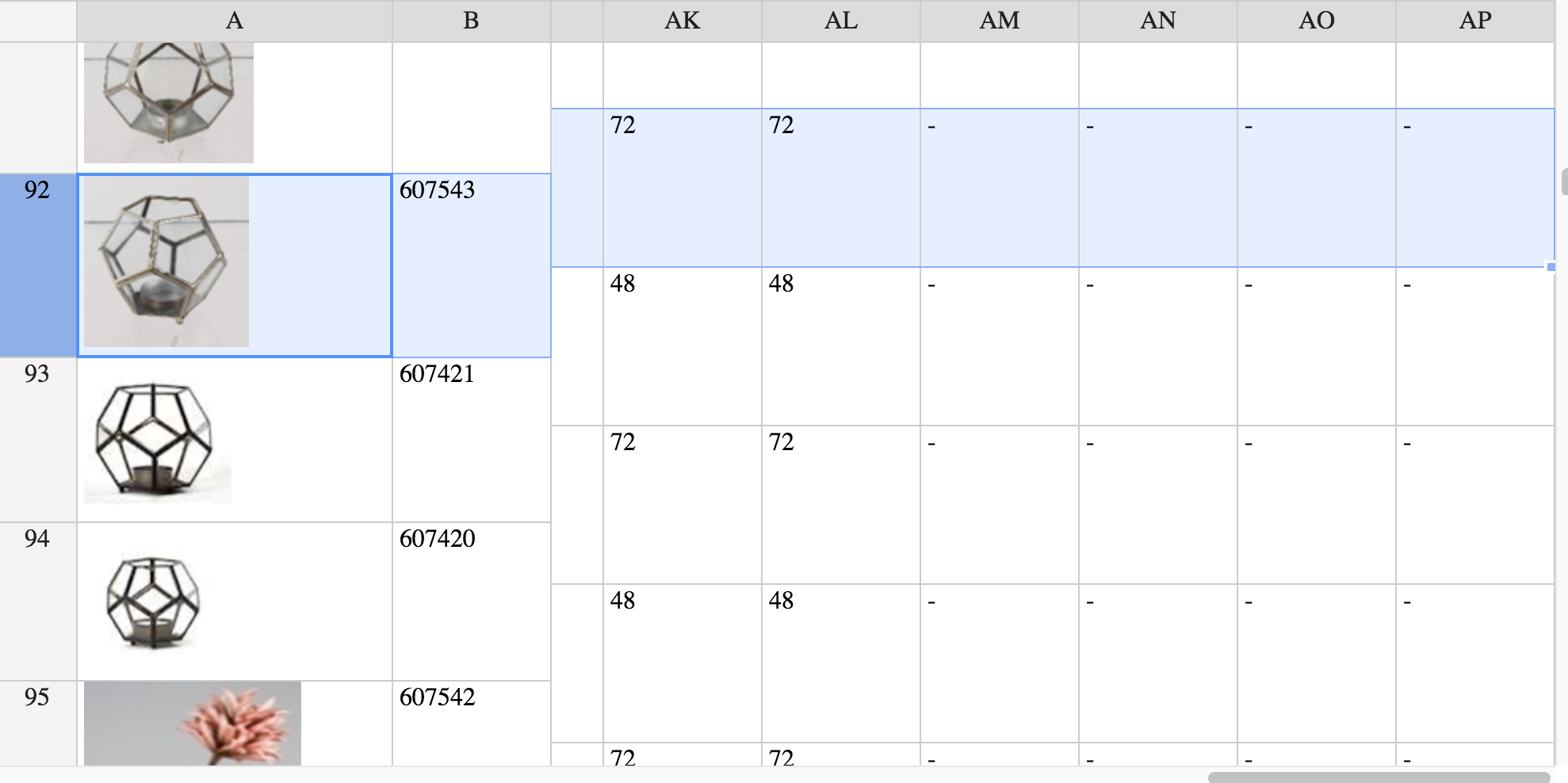
I have this problem too!
I fixed the first two columns (fixedColumnsLeft: 2) and the first contains pictures that can vary in height.
The misalignment varies when I scroll vertically.
 ottosson
on 13 Sep 2017
ottosson
on 13 Sep 2017
Hi @ottosson
have you tried adding the image inside a fixed height/width container or adding autoRowSize to the settings?
AMBudnik
on 13 Sep 2017
@AMBudnik, containing the image in a fixed size div solved the problem!
Thanks a lot!
ottosson
on 13 Sep 2017
you're welcome @ottosson
AMBudnik
on 13 Sep 2017
@AMBudnik has a fix for this been released?
 bj00rn
on 1 Feb 2019
bj00rn
on 1 Feb 2019
@bj00rn the issue has been already solved. If it does not work for you after updating to the latest version please let me know at [email protected]
AMBudnik
on 4 Feb 2019
Related issues
 dosaki
·
23Comments
AMBudnik
·
24Comments
dosaki
·
23Comments
AMBudnik
·
24Comments
 kakabomba
·
27Comments
kakabomba
·
27Comments
 Hokwang
·
69Comments
Hokwang
·
69Comments
 azyubin
·
27Comments
azyubin
·
27Comments
Most helpful comment
I have this problem too!
I fixed the first two columns (
fixedColumnsLeft: 2) and the first contains pictures that can vary in height.The misalignment varies when I scroll vertically.