Handsontable: Missaligned rows with row headers after zooming
Hello,
I am attempting to create a custom column that holds actions for each row such as delete action. I am using custom renderers to create a button element and associate an appropriate action. However, after the column is added I noticed that if you change zoom on your browser you row headers and rows themselves become miss aligned. I was wondering if any one know how I can solve this problem.

Here is JSFiddle with sample of the code: http://jsfiddle.net/26gLz0zf/
Thank you.
 azyubin
All 27 comments
Thanks for sharing @azyubin. Confirmed with zoom in and out on all major browsers.
 AMBudnik
on 13 Jan 2016
AMBudnik
on 13 Jan 2016
still reproducible, v 0.27.0: http://jsfiddle.net/v6oqbda4/
[G #597,forum]
AMBudnik
on 2 Sep 2016
Looks like rendering while scrolling is also similarly affected: there are artifacts at the edges (especially noticeable when scrolling up).
https://1drv.ms/v/s!AkVm727CuAMs5q1n8UZ2wCazxEaTHw
In my case, the zoom level of the browser is unchanged, but I have a 4K monitor set to 150% scaling (in Windows). Setting to 100% scaling (in Windows) _completely resolves_ the issue.
 twitchax
on 4 Jul 2017
twitchax
on 4 Jul 2017
This page is linked from here https://forum.handsontable.com/t/scroll-problem-in-chrome-with-zooming/643/10 ...
It's been mentioned that it's a pixels vs ems vs percent issue. I'd like to jump in and try to solve this problem, even if it's a huge rewrite — I'd appreciate any advise on what section of code to begin looking at and tweaking to alter this unusual behavior when zoomed.
 dctucker
on 19 Jul 2017
dctucker
on 19 Jul 2017
Hi @dctucker
The fixed pixel values are all around the entire handsontable.full.js file and it also does not mean that using more responsive values will fix the issue. Please remember that we are working on TD elements.
I'd be more than happy to see a table that stretches without any issues while we zoom in and out but that is a huge project you're planning.
AMBudnik
on 19 Jul 2017
I've noticed this problem occurs when scrolling on certain zoom ratios. For example, if I zoom to 67%, the error persists, but when loading the page at 50% zoom everything works as it does at 100% zoom. Might this be a problem related to integer division?
Regarding getting a table that stretches without any issues while zooming in and out, Datatables is a good example of this without spreadsheet functionality, which that leads me to believe the problem is solvable in this plugin and not a bug in the browser's rendering engine.
dctucker
on 19 Jul 2017
I would like to suggest anything but the issue has been raised a long time ago and we did not test any solutions yet. I really would like to avoid giving false tips.
AMBudnik
on 20 Jul 2017
Hit me offline then. I'm motivated.
dctucker
on 22 Jul 2017
Hi @dctucker
sorry for keeping you waiting for so long. I know that you have a lot of will power to fix the issue and as I have spoken with one of our devs your approach sounds like a good path.
I have been told that we are using parseInt to set up heights via Walkontable and that why after some time we get the misaligned cells.
ps. I'd be more than happy to get a pull request from you.
ps.2. Please delete your email from the last comment. Spammers are everywhere just waiting to harvest some juicy emails ;-)
AMBudnik
on 27 Jul 2017
No worries. I got around to debugging a little bit today and found that Overlays.onTableScroll() is not getting called when it's supposed to, when Chrome is zoomed to 67%.
dctucker
on 10 Aug 2017
I really appreciate your effort to share the results and investigate this issue @dctucker
[inform G# 9301]
AMBudnik
on 16 Aug 2017
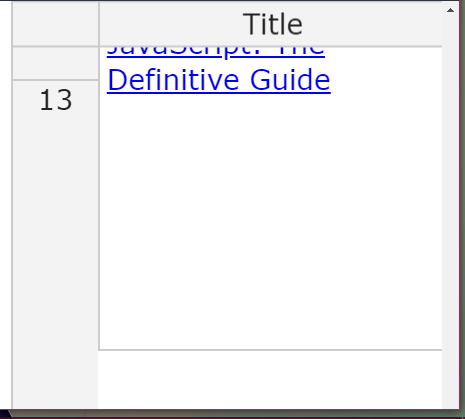
The issue is still replicable in v 2.0.0. zoom +175%
AMBudnik
on 16 Apr 2018
I consider this a show stopper because it also affects browser scaling (HiDPI etc.) and nowadays more and more people use 4k displays and HiDPI laptops.
After spending some time I was able to fix it (at least here) by doing two things:
1. Set the row height style on the rows (tr) instead of the first cell (th)
Replaced TR.firstChild.style.height with just TR.style.height in these two lines:
Replaced children[i].childNodes[0].style.height with children[i].style.height in this line:
_That last one (L313) didn't affect my use case but I added it for completeness, because from what I could see it does the same thing but in some other case._
2. Get and use the exact row height
Replaced innerHeight(ELEM) with ELEM.getBoundingClientRect().height in these two lines
Note: I have not tested this extensively because I am currently developing my first table using _hot_ and I fixed it before moving forward.
I would love to get some feedback from the developers. Thanks!
 larvanitis
on 25 Apr 2018
larvanitis
on 25 Apr 2018
Hi @larvanitis
Wouldn't you like to create a pull request? By adding tests we will be able to verify if the proposed solution works better than what we have now. You've done a lot of work with investigating this issue so it would be great to see you among our official contributors.
AMBudnik
on 26 Apr 2018
Hi @AMBudnik
When I made my handsontable with fit to screen changes (using plugin stretcH:all) ,it was acting weird for different monitors. Working properly for "acer"/"HP" but not for "ViewSonic" monitors. Is there any solution for this issue? Can you provide any suggestion that how it can be made all monitors compatible when all monitors are at default zoom level.
 yashu321
on 4 May 2018
yashu321
on 4 May 2018
Hi @azyubin
the issue with zoom is also associated with the screen resolution so it may not work for all the monitors. It is really hard to check if we do not own this kind of devices.
AMBudnik
on 8 May 2018
I tried the mod from @larvanitis and it is so far working for me, but there are still other scaling artifacts, but at least the rows are aligned.
 brianxautumn
on 6 Dec 2018
brianxautumn
on 6 Dec 2018
It also works if you set the height on a div inside the td, like in the case with the row header, but its messy if there is no row header.
brianxautumn
on 7 Dec 2018
I guess that we need to do something here sooner than later, as there are more examples where the table is misaligned or misses borders with 125% zoom.
The scale of this issue can raise with time as newer devices working on Windows set 125% zoom as the default value.
AMBudnik
on 25 Sep 2019
Bumping this thread as it's still an issue (and an annoying one too :stuck_out_tongue:)
 kyle-msm
on 25 Nov 2019
kyle-msm
on 25 Nov 2019
Hey i am having an similar issue like if i zoom the browser from 125% to 175% the fixedColumnLeft and unfixed right columns are mismatching, last row is repeating can you please help to fix this issue
 niketjsh
on 29 Jun 2020
niketjsh
on 29 Jun 2020
@niketjsh we do not have this topic on our Roadmap for July but I'll update you once we get any news on that subject.
AMBudnik
on 29 Jun 2020
Hi @larvanitis
Wouldn't you like to create a pull request? By adding tests we will be able to verify if the proposed solution works better than what we have now. You've done a lot of work with investigating this issue so it would be great to see you among our official contributors.
Hi, was a PR created related to that suggestion?
I see @larvanitis is now a contributor, perhaps due to another issue.
 oskrd
on 24 Sep 2020
oskrd
on 24 Sep 2020
Hi @oskrd zooming issue hasn't been solved yet. There are no open/pending pull requests/commits related to this subject.
AMBudnik
on 24 Sep 2020
@AMBudnik I adapted the proposed change to the current code structure in HoT 8.0.0 and it fixed two of my issues.
The thing here is I have no idea how to write a test (e2e) to zooming cases, have you ever wrote something related to guide me?
oskrd
on 24 Sep 2020
@oskrd Unfortunately, I no longer use HOT and no PR was ever created.
larvanitis
on 24 Sep 2020
@larvanitis could you please write me an email? I would like to ask you something.
oskrd
on 28 Sep 2020
Related issues
 lulezi
·
22Comments
lulezi
·
22Comments
 andrewQwer
·
23Comments
andrewQwer
·
23Comments
 mpetris
·
24Comments
mpetris
·
24Comments
 budnix
·
24Comments
budnix
·
24Comments
 shivrajsa
·
23Comments
shivrajsa
·
23Comments