Handsontable: problem using other language
Hello.
First of all, I am Korean.
I am trying to using this cool plugin.
When I input Korean in a cell, first character presents English always.
For example, I wanna write "한글", but the cell present "gㅏㄴ글".
"아이" -> "dㅏ이".
"도시" -> "eㅗ시".
Please fix it or answer to me how solve this problem.
Thank you.
 Hokwang
All 69 comments
Well - this will be really hard to fix, because we don't know how to write in Korean. But we will be grateful if you can write a pull request for this (with a proper tests).
 setthase
on 27 Jun 2013
setthase
on 27 Jun 2013
If you use english, install korean or japanese (whatever 2byte language).
and then change the language installed.
At your home page (http://handsontable.com/index.html),
click A6 cell and write "aaa" and enter key.
and write "bbb" and enter key.
and write "ccc and enter key.
you will see "aaa" -> "aㅁㅁ" ( in this case user want to write "ㅁㅁㅁ")
"bbb" -> "bㅠㅠ"
"ccc" -> "cㅊㅊ"
Thank you.
Hokwang
on 28 Jun 2013
@Hokwang, could you pleas test if my latest fix solves the problem with korean characters?
https://github.com/psmolenski/jquery-handsontable/commit/75b6534b5b133fc511778bb23bf2952642a3661c
 psmolenski
on 14 Aug 2013
psmolenski
on 14 Aug 2013
@psmolenski Sorry for late. The link has a problem, please check your link
Hokwang
on 3 Sep 2013
My fix has been merged into one of the recent version of Handsontable. Please use the latest version (0.9.16) and let me know if the problem still occurs.
psmolenski
on 3 Sep 2013
@psmolenski yes, still not fixed.
Hokwang
on 4 Sep 2013
@psmolenski seems not fixed in 0.9.17
 okjesse
on 7 Sep 2013
okjesse
on 7 Sep 2013
@psmolenski still not fixed, 0.9.18
Hokwang
on 26 Sep 2013
What about 0.10.x-beta?
psmolenski
on 1 Oct 2013
@psmolenski Did you test? I tested using 0.10.0-beta1. problem is still not fixed. Please install other language in your OS and test it.
Hokwang
on 7 Oct 2013
Which OS are you using @Hokwang ?
psmolenski
on 7 Oct 2013
@psmolenski I am using Windows 7.
Hokwang
on 14 Nov 2013
@psmolenski the problem is happened from version 0.7.5,seems still not fixed in the nearest version
okjesse
on 2 Dec 2013
Chinese has the same issue. Chinese IDEs take multiple keys as input and outputs Chinese words in return, ex: jitui -> 雞腿. But when I write jitui, the j is consumed by handsontable and the IDE only gets itui. Without the j, the IDE translates itui to some random shit that I totally did not want to write.
Below is a Chrome extension which is an IDE that can be used to reproduce this bug.
https://chrome.google.com/webstore/detail/google-input-tools/mclkkofklkfljcocdinagocijmpgbhab
Thank you.
 lauzi
on 2 Dec 2013
lauzi
on 2 Dec 2013
I also have the same problem in v0.10.3 (OS : Windows 7 sp1)
 skyand96
on 14 Feb 2014
skyand96
on 14 Feb 2014
@psmolenski I found this issue may be cause by this function.
AutocompleteEditor.prototype.updateChoicesList = function (choices) {
this.$htContainer.handsontable('loadData', Handsontable.helper.pivot([choices]));
var value = this.getValue();
var rowToHighlight;

if(this.cellProperties.strict === true){

  rowToHighlight = findItemIndexToHighlight(choices, value);

  if ( typeof rowToHighlight == 'undefined' && this.cellProperties.allowInvalid === false){
    rowToHighlight = 0;
  }

}

if(typeof rowToHighlight == 'undefined'){
  this.$htContainer.handsontable('deselectCell');
} else {
  this.$htContainer.handsontable('selectCell', rowToHighlight, 0);
}

this.focus();
};
While updating the choiceslist , it will highlight the row which the value is contained in choiceslist,and the focus is on the highlight row.And then it must focus on the textarea to input the other character.
So I Suspected the issue was caused by the change of focus, I just kept the first line of the function and removed all others, and I found it work.
1225 and #1289 were caused by the same reason ,I think.
thank you!
 jimmykwong
on 24 Feb 2014
jimmykwong
on 24 Feb 2014
Using 0.10.0-beta4,
Same problem occurs on Chrome/ Windows 8, IE10/Windows7
But works well on IE11 / Windows8 and Windows7
(Korean letter)
 hyvaa
on 24 Jul 2014
hyvaa
on 24 Jul 2014
I made a simple modification, and it works at least with Japanese characters.
I am not sure it will affect other functions or not.
Inside the jquery.handsontable.full.js
   /**
   * Listen to document body keyboard input
   */
  this.listen = function () {
    Handsontable.activeGuid = instance.guid;

    if (document.activeElement && document.activeElement !== document.body) {
      //document.activeElement.blur();
    }
    else if (!document.activeElement) { //IE
      //document.body.focus();
    }
  };
I commented those two lines.
Please let me know if it will affect other functions.
Thank you
 christchan
on 17 Oct 2014
christchan
on 17 Oct 2014
christchan's modification works well on Chrome, but not work on IE11 and Firefox34
 ustb-zz
on 12 Dec 2014
ustb-zz
on 12 Dec 2014
I find a solution to fix the bug.
line:3935
old:eventManager.addEventListener(document, 'keydown', function (ev){
new: eventManager.addEventListener(document, 'keyup', function (ev){
ustb-zz
on 26 Dec 2014
@christchan this solve the IME problem ,but copy and paste function won't work well,it's weird
 xshadows
on 9 Jan 2015
xshadows
on 9 Jan 2015
Is there any follow-up on this issue?
For Japanese IME at least, I think if it does beginEditing() opening up the textarea before keydown will solve the problem of having unintended ASCII character from appearing. Since IME input works no problem when editor textarea is opened.
The problem seems to me is that the first "key" that triggers the editor to open incorrectly. Should open with empty textarea first basically. :D
Edit: (Jun 3, 2015)
Some follow up:
Starting from 0.15.0-betaX, on a Mac, when I press the Command key before typing, the Japanese and Chinese (Cangjie) IME start to work correctly.
Not so sure about Windows yet.
Edit: (June 26, 2015)
As of version 0.15.1, the issue still exists, similar to 0.15.0-betaX.
Edit: (July 22, 2015)
version 0.16.0, the issue still exists
 awsp
on 15 Apr 2015
awsp
on 15 Apr 2015
It seems not fixed in 0.16.0.
I think the following problems can be solved.
- A problem that occurs when i use the ime in google chrome.
- A problem that occurs when i use the ime in handsontable's autocomplete.
In order to avoid the bug, i changed the code below. handsontable.full.js
line 6509
function init() {
    instance.addHook('afterDocumentKeyDown', onKeyDown);
    //eventManager.addEventListener(document.documentElement, 'keydown', function(event) {
    eventManager.addEventListener(document.documentElement, 'keyup', function(event) { //keydown -> keyup
      instance.runHooks('afterDocumentKeyDown', event);
    });
line 6902
AutocompleteEditor.prototype.open = function() {
...
  //this.focus(); //comment
line 6967
AutocompleteEditor.prototype.updateChoicesList= function() {
...

  // this.instance.listen(); //comment
  // this.TEXTAREA.focus(); //comment
 teegh
on 23 Jul 2015
teegh
on 23 Jul 2015
@teegh Thanks for the fix!
I have tried it, at least the Japanese IME opens up.
It is sort of working but not completely, the first character I typed was omitted.
There is also some problem with the "enter" key after changed from keyup to keydown.
Still waiting this to be fixed. :(
awsp
on 23 Jul 2015
@awsp I'm sorry. As you mention, there are some issues. I hope to be fixed. I think maybe it able to solve the problem in the kecode 299. Is there something good way?
http://www.w3.org/TR/2012/WD-DOM-Level-3-Events-20120906/#determine-keydown-keyup-keyCode
B.2.1 How to determine keyCode for keydown and keyup events
If an Input Method Editor (IME) is processing key input and the event is keydown, return 229.
(function(){

function KeyDownFunc(e){

  // var shift_key = e.shiftKey;
  // var ctrl_key = e.ctrlKey;
  // var alt_key = e.altKey;

  console.log("code:" + e.keyCode);
}

if(document.addEventListener){
  document.addEventListener("keydown" , KeyDownFunc);
}else if(document.attachEvent){
  document.attachEvent("onkeydown" , KeyDownFunc);
}

})();
@teegh
Yea, I used to quick fix this issue in the old jQuery version by detecting if it is IME mode using keyCode 229 at issue #1448. It worked for Japanese and Chinese IME, but didn't work for Korean IME tho.
It's gotta be somehow doing with keyCode 229, not so sure how it could get it fix in the non jQuery version tho. The method used to invoke the binding has been changed to something else..
awsp
on 24 Jul 2015
@awsp
Thank you. Issue #1448 has become a great help. Korean IME is regrettable. I hope problem is solved soon.
teegh
on 28 Jul 2015
whatever in which version, focus the editor before editing will fix this issuse. For example: focus the editor in afterSelectionEnd function.
 zhouxiaoping
on 20 Nov 2015
zhouxiaoping
on 20 Nov 2015
short term solution
don't use display = 'none' or visibility = 'hidden'
test with chrome firefox ie11 = ok

 ChouGary
on 21 Jul 2016
ChouGary
on 21 Jul 2016
I've created a patch for this problem.
It's seems working well in japanese ime.
https://github.com/ruzia/handsontable/commit/88ca0a373d61002390d91e155c66274f1ad2d3d3
Testing with:
・[Mac] Chrome 51.0.2704.103 (64-bit)
・[Mac] Firefox 46.0.1
・[Win] Internet Explorer 11.0.14393.0
・[Win] Edge 38.14393.0.0
 ruzia
on 3 Aug 2016
ruzia
on 3 Aug 2016
@ruzia The patch works well, but can't copy & paste cells anymore when I use it.
 pansinm
on 19 Sep 2016
pansinm
on 19 Sep 2016
@zhouxiaoping Do you solve this problem now? I still got the same problem under Chrome with chinese, and in some Firefox as well.
 cqcn1991
on 10 Nov 2016
cqcn1991
on 10 Nov 2016
@pansinm and how is your result? Is there any way to make it work?
cqcn1991
on 10 Nov 2016
@ChouGary Just tried the fiddle, seems performs differently under Firefox and Chrome
In firefox, I need to double click a cell to activate it. In Chrome, a single click is OK.
cqcn1991
on 21 Nov 2016
@cqcn1991
this is original jsfiddle
http://jsfiddle.net/warpech/hU6Kz/
In original sample , my firefox need to double click a cell to activate too.
sorry the behavior only in win7+嘸蝦米ime
ChouGary
on 21 Nov 2016
@swistach @budnix
Can this issue be reopened? It's not fixed yet.
- Correct behavior by Google sheet
https://drive.google.com/open?id=0BxjLMnWZ26-zZFVVNmpUWG1QcEE
- Current behavior of handsontable
https://drive.google.com/open?id=0BxjLMnWZ26-zN0ZrVHRPWTBFc00
 minipai
on 19 Jun 2017
minipai
on 19 Jun 2017
Hi @minipai
the issue is still opened. Unfortunately, we did not start to work on language handling yet.
[G #105, #52]
 AMBudnik
on 19 Jun 2017
AMBudnik
on 19 Jun 2017
hi @minipai
root cause
when .handsontableInputHolder display none, 中文 IME will lostFocus.
you can try my short term solution
http://jsfiddle.net/9jqfe0up/1/
https://drive.google.com/uc?export=download&id=0B4gB_bMISBp2SU10MGVOZFV1MVE
ChouGary
on 28 Jun 2017
Thank you very much for your effort to investigate this issue and share a solution @ChouGary
AMBudnik
on 28 Jun 2017
@ChouGary Thanks for your fix, it's awesome. Hope handsontable officially use the fix.
minipai
on 28 Jun 2017
@ChouGary
I could confirm Japanese IME and Cangjie (Traditional Chinese IME) are both working on both Mac and Windows. Finally a fix in many years!!
awsp
on 29 Jun 2017
Related topic https://github.com/handsontable/handsontable/issues/4457
AMBudnik
on 16 Aug 2017
I still got the same problem under Chrome with the latest version, and I want to know when to solve.
 minteliuwm
on 28 Sep 2017
minteliuwm
on 28 Sep 2017
Hi @minteliuwm our developer @wszymanski is currently working on the localization and we will surely check the following issue.
AMBudnik
on 28 Sep 2017
Thank you so much for your help! @ChouGary
 qwqcode
on 13 Oct 2017
qwqcode
on 13 Oct 2017
Hi Guys! I need more information about how to reproduce this bug. I don't know anything about Korean, Japanise or Chinese language and I need a step-by-step scenario on how to reproduce this problem.
Right now I've seen that original issue related to
first character presents English always
is resolved. For now, there is a problem with "unstable" Handsontable editor (textarea element) which breaks IME which causes the wrong symbol merging into another one? Please correct me if I'm in wrong.
Anyway, I need an information about what keyboard language I have to choose (I'm using macOS).
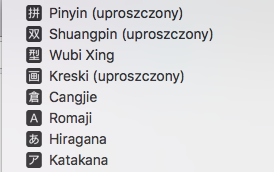
Also what letters should I type to get a valid symbol that should be merged into a Handsontable editor?
@minipai Thanks for sharing the video screens. They are very helpful. Please let me know which language do you use and what letters I need to type (using English US keyboard) to reproduce this issue?
 budnix
on 24 Nov 2017
budnix
on 24 Nov 2017
Hi, @budnix , here are the reproduce steps:
- Choose 'Pinyin' as your IME
- Select a dropdown cell and enter editor mode:
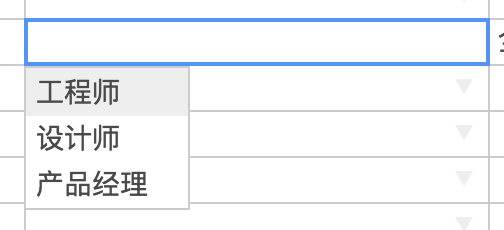
- Try to type a Chinese word '测试'(means test): type following charactors in sequence: c e s h i,then select the first candidate word:
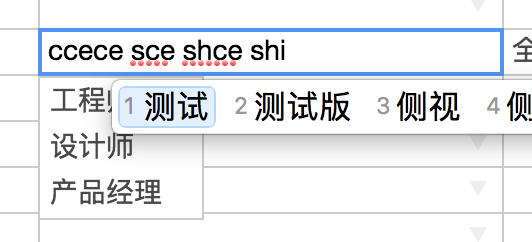
As you can see,the result is 'ccece sce shce shi测试',which is expected to be '测试'. The charactors before '测试' are all incorrectly inserted.
This issue is really a disaster for eastern Asia users. Hope it helps.
 farthinker
on 24 Nov 2017
farthinker
on 24 Nov 2017
Thanks, @farthinker!
This helps a lot! I've successfully reproduced the issue in my local environment, that's great! So this is happening only in autocomplete and dropdown editors? I've checked other types editors and it seems that they working well.
budnix
on 24 Nov 2017
@budnix , yes, this issue only exists in autocomplete and dropdown editors,and it seems to be related to these code in autocomplete editor:
    this.instance.listen();
    this.TEXTAREA.focus();
    (0, _element.setCaretPosition)(this.TEXTAREA, pos, pos === endPos ? void 0 : endPos);
Ok, I've prepared a patch and to be sure if this works for Asia users I've prepared demo at http://jsfiddle.net/budnix/4q3rtmax/1/. Can I ask you guys to test that demo?
budnix
on 24 Nov 2017
@budnix ,it definitely works for Chinese, and I think it also works for Korean and Japanese too. Hope the patch to be released soon. Thank you!
farthinker
on 25 Nov 2017
Thank you for your feedback @farthinker
I am happy that this issue is finally fixed
AMBudnik
on 27 Nov 2017
@budnix @farthinker The patch worked fine for Japanese too. Thank you
 kazuma1989
on 28 Nov 2017
kazuma1989
on 28 Nov 2017
@budnix @farthinker The patch worked fine for Korean too. Thank you.
 gwajanara
on 4 Dec 2017
gwajanara
on 4 Dec 2017
I am really happy to have this old issue solved!
Can I count on your feedback regarding testing the fix
@Hokwang @okjesse @lauzi @skyand96 @jimmykwong @hyvaa @christchan @ustb-zz @xshadows @pansinm @cqcn1991 @minteliuwm @Zneiat
@awsp @teegh @zhouxiaoping @ruzia @minipai please also try the original fix
@ChouGary @farthinker @kazuma1989 @gwajanara thank you for your feedback
AMBudnik
on 6 Dec 2017
thank your hard work ,test with 0.35.0
i want to correct the error press esc, first word is english.
here is my steps to reproduce issue
1.use chinese IME type word 中文字
2.press 「esc」 because i want to correct chinese word
3.use chinese IME type word 中文輸入法
here is video for reference
https://drive.google.com/file/d/1sSxFrZ91TZHSEBlC5y_MyoxHy0L4awbR/view
ChouGary
on 7 Dec 2017
@AMBudnik
I could verify Japanese IME works on the new release, 0.35.0, on both macOS and Windows' Chrome.
For Chinese IME (Cangjie), it only works on Chrome 62/63 but does not work on Safari 11.
First character disappeared in Safari 11, therefore the Chinese word was input incomplete.
awsp
on 7 Dec 2017
Thank you very much for feedback @ChouGary and @awsp
we'll investigate it
ps. @budnix just posted it at https://github.com/handsontable/handsontable/issues/4661
AMBudnik
on 8 Dec 2017
@ChouGary Can you tell me the English letter formula for the two of the words 中文字 and 中文輸入法?
AMBudnik
on 8 Dec 2017
@AMBudnik
i can use esc to reproduce issue in Chinese IME (Pinyin Cangije)
1 enter editing mode

2 press 「esc」key for exit editing mode

3,use Chinese IME (Pinyin Cangije)
first word is english,second word is Cangije code

ChouGary
on 8 Dec 2017
@ChouGary I've reproduced the bug, thanks. I've created a separated issue about this at https://github.com/handsontable/handsontable/issues/4662.
budnix
on 8 Dec 2017
Hi guys! I have one request for you.
Yesterday we have added Internationalization and it would be great if you could share us some feedback. I'd be more than happy to see transactions for Chinese, Korean and Japanese.
AMBudnik
on 8 Dec 2017
Hi guys, I tried ver. 0.35.0 to solve this issue and it seems working well.
I am so grateful for the many efforts.
But unfortunately, I found that this issue reproduced with copyPaste: false option.
To confirm, try this jsfiddle. https://jsfiddle.net/tacnoma/ux9at5wx
My environment is
- Handsontable: 0.35.0
- browser: Chrome 63
- OS: Mac OS X 10.12.6
- IME: Google Japanese Input 2.20
This is just a report, and I have not found the cause of this problem, sorry.
 tacnoma
on 25 Dec 2017
tacnoma
on 25 Dec 2017
Hi @tacnoma
thank you for reporting., Can I ask you to create a new issue for this bug? It will be much easier to attach new commits to it.
AMBudnik
on 2 Jan 2018
@AMBudnik
thank you, I created #4704.
tacnoma
on 6 Jan 2018
Thanks @tacnoma
I saw that @budnix has already connected it to another issue.
AMBudnik
on 8 Jan 2018
Hi Guys!
@Hokwang @skyand96 @hyvaa @gwajanara
We've just got a translation for Korean. If you could share your opinion on the translation that would be able to pull the Korean language to our official version of Handsontable! You can find it at https://github.com/handsontable/handsontable/pull/5355
AMBudnik
on 20 Aug 2018
@AMBudnik
Hello.
It seems not fixed in mobile. (or chrome inspect mobile version)
In official demo, desktop works fine, but mobile is not.
 moonjoungyoung
on 17 Nov 2020
moonjoungyoung
on 17 Nov 2020
Hi @moonjoungyoung could you please paste a screen recording where this issue is replicable?
AMBudnik
on 17 Nov 2020
Related issues
 jansiegel
·
30Comments
jansiegel
·
30Comments
 abtx
·
23Comments
abtx
·
23Comments
 mpetris
·
24Comments
mpetris
·
24Comments
 krzysztofspilka
·
35Comments
krzysztofspilka
·
35Comments
 andrewQwer
·
23Comments
andrewQwer
·
23Comments
Most helpful comment
hi @minipai
root cause
when .handsontableInputHolder display none, 中文 IME will lostFocus.
you can try my short term solution
http://jsfiddle.net/9jqfe0up/1/
https://drive.google.com/uc?export=download&id=0B4gB_bMISBp2SU10MGVOZFV1MVE