Handsontable: Duplicate bottom row with fixedRowsBottom
Description
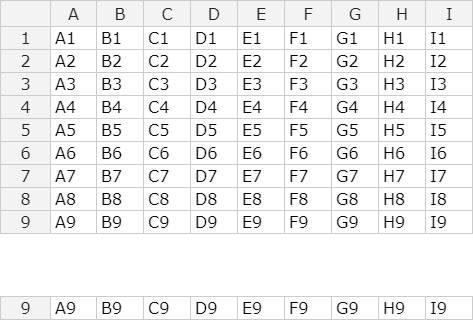
The fixed bottom row appears twice: once at the end of the rows (as expected) and again at bottom of the container.
It should only appear once (or have an option to disable the one at the bottom of the container)
Steps to reproduce
- Create a table with a number of rows that would take up less than the height of the container
- Set
fixedRowsBottomto 1 - Bottom row is duplicated
Demo
Your environment
- Handsontable version: Pro 1.13.0
- Browser Name and version: Chromium 60
- Operating System: Linux ArchOS
 dosaki
All 23 comments
Hi @dosaki
Thank you. Yes, unfortunately, it is showing like that cause of the CSS settings. The fixed bottom row is n additional 1-row table that duplicates the results of the last row in the main table.
 AMBudnik
on 7 Aug 2017
AMBudnik
on 7 Aug 2017
I see. Is there a work-around for this?
All my tables are built dynamically and I don't know how many rows they will have.
Do I have do it programatically, i.e. figure out if all the rows fit in the window and set fixedRowsBottom to 0?
If that's the case, I can't find a way to figure out the height of each row reliably from Handson.
dosaki
on 7 Aug 2017
It would be the easiest way to count rows after table gets rendered (via countRows mehod) and then use height option inside the updateSettings to change the table height.
AMBudnik
on 8 Aug 2017
But I still don't know if the last row is visible or not.
I'd need to know how high each row is and I can't see an API to get that.
I suppose I can just get the height of the element though...? What if one of the rows is higher for some reason?
dosaki
on 8 Aug 2017
@dosaki there's a method called getLastVisibleRow if it is equal to instance.countRows() you'd be able to check if the last row is visible.
AMBudnik
on 9 Aug 2017
I'll give that a go! It sounds like it should work.
Thank you!
dosaki
on 9 Aug 2017
you're welcome
AMBudnik
on 9 Aug 2017
Here's my work around, in case someone stumbles upon this:
    var autoRowSizePlugin = handsontableInstance.getPlugin('autoRowSize');
    var totalRows = handsontableInstance.countRows();
    if (autoRowSizePlugin.getLastVisibleRow() === totalRows - 1) {
      handsontableInstance.updateSettings({
        fixedRowsBottom: 0
      });
    }
If instead, you want to keep the fixedRowsBottom you can use the bit below:
    var autoRowSizePlugin = handsontableInstance.getPlugin('autoRowSize');
    var totalRows = handsontableInstance.countRows();
    if (autoRowSizePlugin.getLastVisibleRow() === totalRows - 1) {
      var totalRowHeight = 0;
      for (var i = 0; i < handsontableInstance.countRows(); i++) {
        totalRowHeight += autoRowSizePlugin.getRowHeight(i, 24);
      }
      document.querySelector(tableContainer).style.height = totalRowHeight + "px";
      handsontableInstance.updateSettings({
        height: totalRowHeight + (autoRowSizePlugin.getColumnHeaderHeight() || 24)
      });
    }
Thank you for sharing the code @dosaki
AMBudnik
on 17 Aug 2017
Replicable in version 0.35.0
The bottom row sticks to the dimensions provided by height settings, not the actual table height.
Maybe we could add an exception to move the bottom row up when there are fewer rows than fit into the required table height.
AMBudnik
on 16 Jan 2018
Update to the issue.
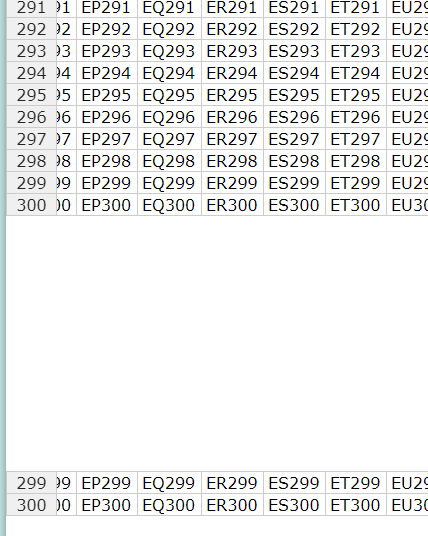
I just created a simple sample app using v6.2.0
HTML
<body>
  <div class="box"></div>
  <script src="js.js" charset="utf-8"></script>
</body>
JS (js.js file)
var box = document.querySelector('.box');

var settings = {
  data: Handsontable.helper.createSpreadsheetData(300, 200),
  colHeaders: true,
  rowHeaders: true,
  fixedRowsBottom: 2
}

var hot = new Handsontable(box, settings);
with no additional CSS settings besides the styles provided by handsontable.full.min.css and got the same result.
AMBudnik
on 29 Nov 2018
I have fixed this issue by CSS. This can help until the fix been made in next release
Hidden both the row header and row data.
[Your container] .ht_master table tbody tr:last-child, #[Your container] .ht_clone_left table tbody tr:last-child{
display: none;
}
 ashish1697
on 25 Jun 2019
ashish1697
on 25 Jun 2019
In my case,vue change the row height to 23px,i change back to 24px, it solved.
.handsontable td ,
.handsontable th { height: 24px;}
 spark889
on 8 Aug 2019
spark889
on 8 Aug 2019
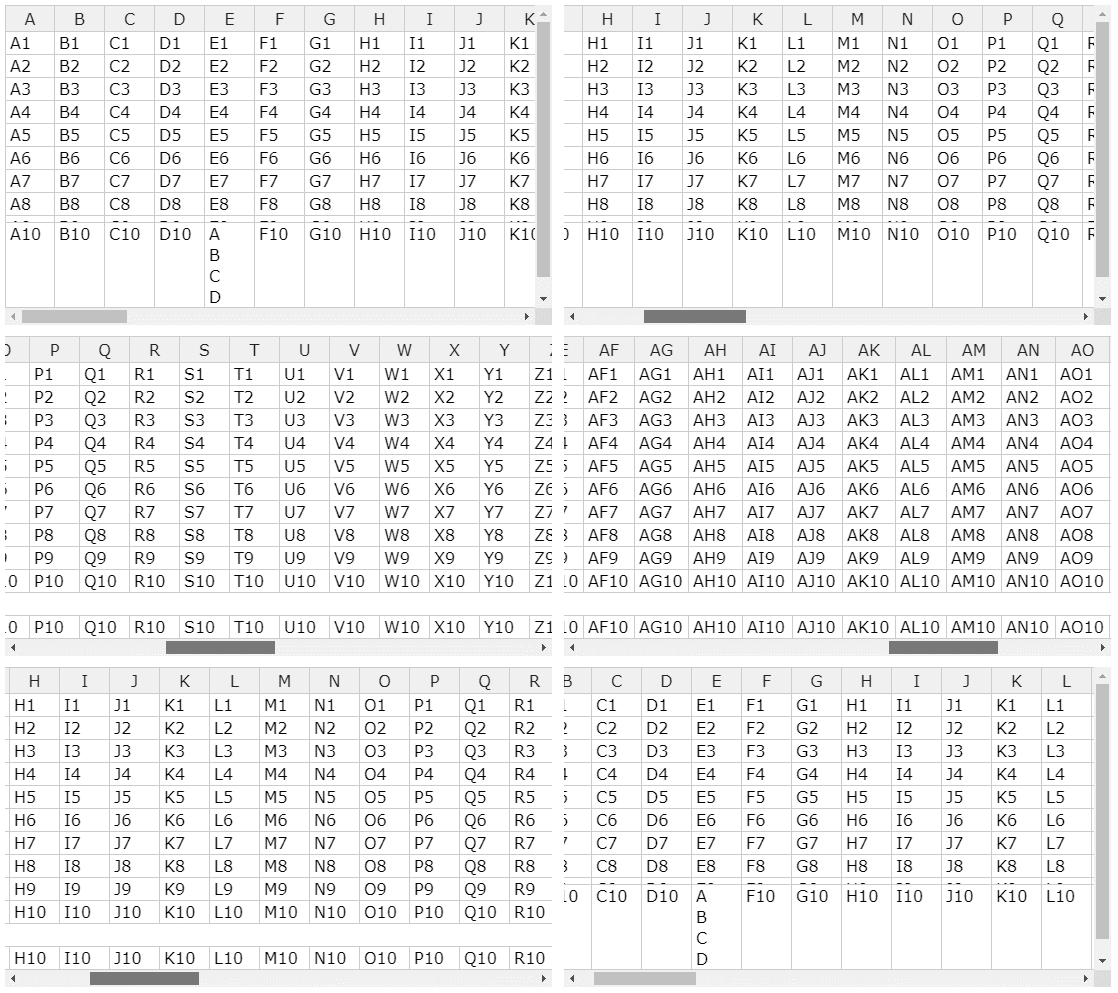
Example with multi-level data https://jsfiddle.net/126w3amh/ (7.2.2, 8.0.0.rc-1 till today works the same)
AMBudnik
on 12 Nov 2019
Related #5943
 wojciechczerniak
on 28 Dec 2019
wojciechczerniak
on 28 Dec 2019
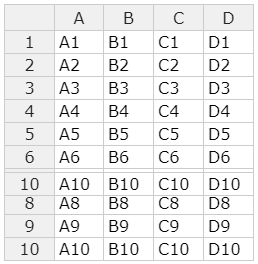
When Handsontable doesn't have height defined but a parent has bottom rows are misaligned.
https://jsfiddle.net/23h1jbes/1/ (7.3.0)
AMBudnik
on 14 Jan 2020
@AMBudnik Different issue. This task is about not displaying row on the main layer. The second is about positioning it in relation to window (feature that only left and top overlays support ATM)
wojciechczerniak
on 14 Jan 2020
@wojciechczerniak done https://github.com/handsontable/handsontable/issues/6637
AMBudnik
on 14 Jan 2020
@AMBudnik Is there any update? As our team uses lots of grids with the total at bottom fixed. Still figuring out for the upgrade version to go for.
ashish1697
on 21 Jan 2020
@ashish1697 sorry to say but the fixes for those two cases haven't been scheduled yet. Now we focus on releasing new fixes for beta2 and/or stable 8.0.0 version.
AMBudnik
on 22 Jan 2020
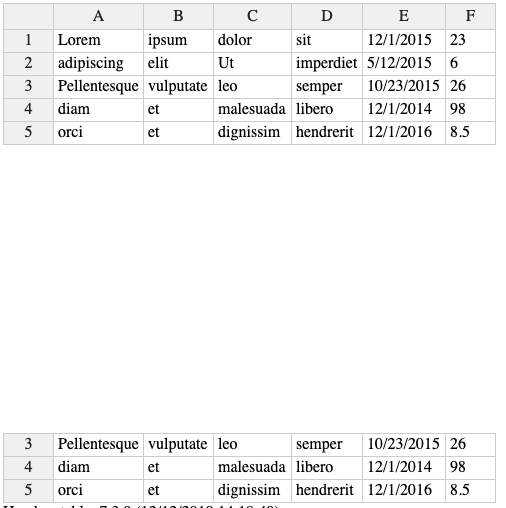
I was able to reproduce this problem when Handsontable had a defined size larger than it was able to fill.
 aninde
on 4 Feb 2020
aninde
on 4 Feb 2020
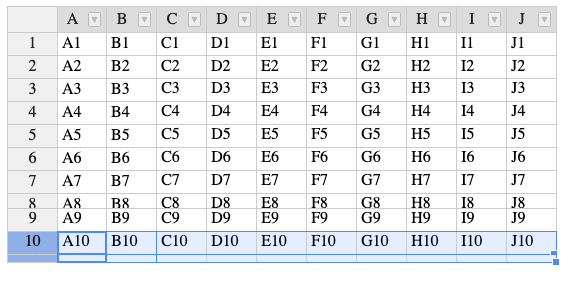
Another case or a different bug?:
when div with Handsontable is surrounded by other div
EDIT: Reported as separate bug https://github.com/handsontable/handsontable/issues/6698
 aninde
on 10 Feb 2020
aninde
on 10 Feb 2020
Works the same in v 8.0.0 http://jsfiddle.net/xkn6Lcgr/
AMBudnik
on 18 Aug 2020
Related issues
 azyubin
·
27Comments
azyubin
·
27Comments
 jansiegel
·
30Comments
jansiegel
·
30Comments
 lewisjb
·
33Comments
AMBudnik
·
24Comments
lewisjb
·
33Comments
AMBudnik
·
24Comments
 shivrajsa
·
23Comments
shivrajsa
·
23Comments
Most helpful comment
I have fixed this issue by CSS. This can help until the fix been made in next release
Hidden both the row header and row data.
[Your container] .ht_master table tbody tr:last-child, #[Your container] .ht_clone_left table tbody tr:last-child{
display: none;
}