Facebook-for-woocommerce: WARNINGS after sync and visibility products in status - staging
Hi I received below WARNINGS: variant_label: google_product_category variant_value:.
And products are in status in visibility column: staging, not published. I force role and replace visibilite value from staging to published.
By the way. It's workaround. How fix it? It's only temporary solution, after update issue happens again.
 slawekl
All 11 comments
Automated Support Message
Hello,
Thanks for your interest in our plugin! Our developer team tries to provide personal support on GitHub whenever possible.
If you have a feature request or feedback for the developers, reply with Feature Request or Feedback.
If you are a developer or have a question for the developers related to code, reply with Developer Question.
If you are running ads with us, reply with Advertiser.
If you have encountered a bug or a problem with the plugin, keep reading for information that can help you resolve the issue yourself or provide us details we need to help you.
Search Existing Issues
First, please search our issues to see if your problem has been reported before.
There may already be a workaround or a solution to your problem. You can use the search bar near the top of our issues page. Be sure to search both _open_ and _closed_ issues.
If you do find a similar issue, leave a comment on that issue instead of creating a new one. Your comment helps us prioritize which existing issues are important and urgent.
Common Resolution Methods
If you are experiencing a problem or bug and have not found any similar issue, please try the following:
- Upgrade to the latest version of the plugin
- Try to
Resyncproducts using the button on the plugin config page - Reset the plugin by selecting
Manage Settings > Advanced Options > Deletefrom the configuration page of the plugin and setting up again - Try deactivating other plugins that you think may be interfering, then reset and set up again
Necessary Information
If the above steps did not help, please provide the following information in your next comment in order for us to debug your problem:
- WooCommerce version
- WordPress version
- Plugin version (please note: we only support up-to-date versions of the plugin)
- A screenshot of where you see the problem (for example: if it is on Facebook, provide a screenshot of Facebook, if it is on WooCommerce, provide a screenshot of WooCommerce. You can provide multiple screenshots if the problem relates to different screens.)
- The URL of your website
- The URL of your Facebook Page
- The URL(s) of where you took your screenshot(s)
- If applicable, detailed steps you took in order to see the problem
Please include Debug Ready in your reply so our automated system can note your issue for manual review. Please be aware that due to a high volume of issues, we may not be able to respond immediately.
Response Time
We prioritize issues with the tags Advertiser or Multiple Reports.
For issues that have the tags Debug Ready, Feature Request or Developer Question, we aim to respond within 30 days.
If you have not responded to our automated message with one of the above phrases, such as Debug Ready, we may close your issue after 30 days. If a Feature Request is inactive (without new requests, messages or pull requests) for 6 months, we may close it.
Please note that we are not always able to provide support for issues related to interaction from other plugins with this plugin or related to the Facebook advertising interface. To get support related to Facebook ads, try visiting the Facebook Ads Help Center.
For more information on our response times, visit Facebook Support on GitHub.
Thank you,
The Facebook Dev Team
 jieminz22
on 10 Apr 2019
jieminz22
on 10 Apr 2019
I have the same issue. I have over 900 products in my store so going through every one to change to Hide, then back to Show so the product is visible on FB is a real pain. At least allow bulk selection somehow please! I also do not know how to add Advertiser label to this ... but I am.
 filch
on 11 Apr 2019
filch
on 11 Apr 2019
I have the same issue but it only applies to variable virtual products - simple products are published successfully with what appears to be the same settings. All variable virtual products are set with a visibility of staging (not sure how this is set as there's no setting within woo which seems to change/alter it). I have to create a rule within the fb product data feed to update this visibility status but updating my product within woo overwrites it back to staging.
 chucklebum
on 2 May 2019
chucklebum
on 2 May 2019
ive narrowed this down to the virtual setting on the product within woo - unticking this makes the product published. ticking this sets the product visibility to staging. can this be fixed please?
chucklebum
on 2 May 2019
i've further found that code was added in 1.9.2 which puts all virtual products into status staging. simply commenting this out fixes the problem. Can be found on line 544 in the file includes/fbproduct.php
chucklebum
on 3 May 2019
I can confirm both problem and solution from @chucklebum , in last relase this code section is on line 575. I don't see any reason to exclude virtual products form facebook sync. In my opinion the following lines of code should be removed, if there is a valid reason for this exclusion please tell us.
// Exclude variations that are "virtual" products from export to Facebook &&
// No Visibility Option for Variations
if ( true === $this->get_virtual() ) {
$product_data['visibility'] = 'staging';
}
 criniera
on 19 Jul 2019
criniera
on 19 Jul 2019
@chucklebum and @criniera thanks for pointing out this. I'm using WPML and it's the same story:
                        // IF using WPML, set the product to staging unless it is in the
                        // default language. WPML >= 3.2 Supported.
                        if ( defined( 'ICL_LANGUAGE_CODE' ) ) {
                                if ( class_exists( 'WC_Facebook_WPML_Injector' ) && WC_Facebook_WPML_Injector::should_hide( $id ) ) {
                                        $product_data['visibility'] = 'staging';
                                }
                        }
 peterkodermac
on 6 Aug 2019
peterkodermac
on 6 Aug 2019
I have this issue too and drilling down found that FB does not allow virtual (downloadable) products in FB shops. Probably to prevent pirating, but it keeps legitimate products from being on FB. So WooCommerce has this in their script.
 MaximillianM
on 21 Sep 2019
MaximillianM
on 21 Sep 2019
Hey there! 👋
Lindsey here, from the SkyVerge product team! We recently took over development and support for the Facebook for WooCommerce extension.
In our recent 1.10 releases, we've fixed many issues impacting the store connection, pixel tracking, and product sync. Could you please update to the latest version of Facebook for WooCommerce and see if that resolves this issue?
If not, could you please contact our support team or open a new issue here? We'd be happy to help troubleshoot further with you.
Thank you!
 lgfogle
on 7 Apr 2020
lgfogle
on 7 Apr 2020
still a problem.
 csertaalexandra
on 27 May 2020
csertaalexandra
on 27 May 2020
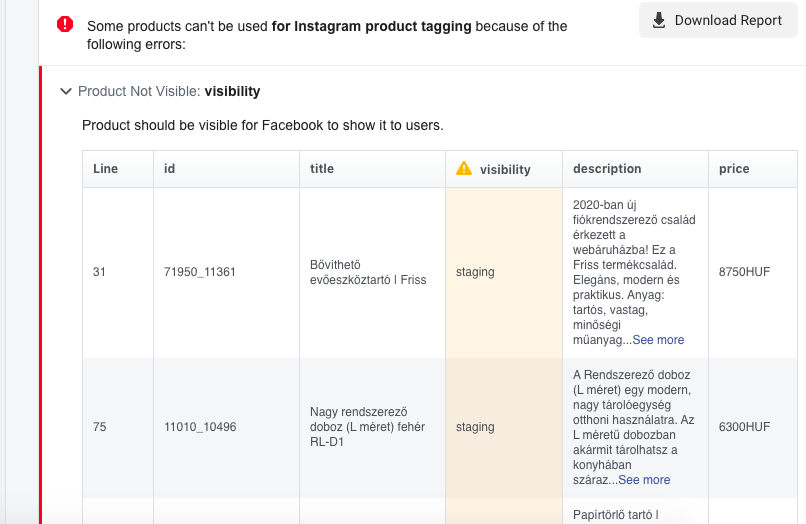
csertaalexandra
on 27 May 2020
Related issues
 t9fdservices
·
37Comments
t9fdservices
·
37Comments
 AVTMBijouterieNomade
·
24Comments
AVTMBijouterieNomade
·
24Comments
 JEJSD
·
53Comments
JEJSD
·
53Comments
 cesneris
·
33Comments
cesneris
·
33Comments
 NicoleParberry
·
46Comments
NicoleParberry
·
46Comments
Most helpful comment
@chucklebum and @criniera thanks for pointing out this. I'm using WPML and it's the same story: